Zero-Click Zip TL;DR
Apple Mail automatically uncompresses certain zip attachments and leaves a symlink in a shared temporary directory, allowing an attacker to write arbitrary files inside Mail's sandbox. This could let an attacker modify Mail rules to forward sensitive email or make the attack worm-like.
 Published on mikko-kenttala.medium.com
I found a zero click vulnerability in Apple Mail, which allowed me to add or modify any arbitrary file inside Mail’s sandbox environment. This could lead to many bad things including unauthorized disclosure of sensitive information to a third party.
The full write-up lives on its author's site
It belongs to its author, so we link to it rather than copy it. The other two tabs are our own rewrites, checked against it.
Context
Apple Mail on macOS has a legacy convenience feature: when a Mail user attaches a folder to a message, Mail compresses it into a zip archive and adds the MIME header x-mac-auto-archive=yes. When another Mail user receives that message, Mail recognises the header and automatically uncompresses the attachment, so the recipient sees the folder rather than an archive. The feature is meant to be transparent and requires no action from the recipient.
Mikko Kenttälä (@Turmio_) found that the automatic uncompression path leaves data behind in a temporary directory that is shared across Mail's processing, and that this can be turned into an arbitrary file write inside the victim's Mail data directory. The write is triggered simply by receiving an email, with no clicks. Apple patched the issue in July 2020 and credited it as CVE-2020-9922.
Setup
The research was done against Apple Mail on macOS. The report does not list specific macOS versions used during testing; the timeline shows the fix shipping in Catalina 10.15.6 Beta 4, then in macOS Mojave 10.14.6, macOS High Sierra 10.13.6 and macOS Catalina 10.15.5. The researcher's method was to send test messages and attachments and follow Mail's process syscalls to see what happens under the hood when an email is received. No special accounts or roles are described: the attacker only needs the ability to send email to the victim, and the victim only needs to receive it in Mail.
Finding it
The starting point was a search for attack vectors that trigger without user action. Safari was tried first without interesting leads, so the researcher turned to Mail and iMessage, choosing Mail because of a hunch that legacy features were hiding in the older codebase. Sending test messages and attachments while tracing syscalls revealed the automatic archive handling described above.
The anomaly is in the cleanup. Parts of the uncompressed data are not removed from the temporary directory, and that directory is not unique in the context of Mail. Because the symlink from the first zip is left in place, an attacker can plant a symlink that Mail later follows when writing the next attachment. That gives unauthorised write access to ~/Library/Mail and to $TMPDIR.
Exploitation
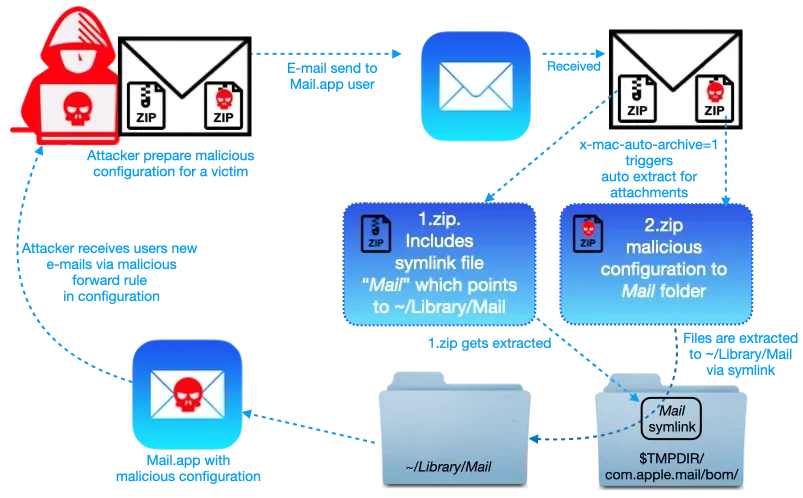
The attack is delivered as a single email with two zip attachments, both marked with the auto-archive header. As soon as the message arrives, Mail parses the attachments, finds x-mac-auto-archive=yes, and uncompresses them automatically.
Step 1: plant the symlink
The first zip contains a symlink named Mail pointing to the victim's $HOME/Library/Mail, plus a file 1.txt. Mail uncompresses the zip into $TMPDIR/com.apple.mail/bom/. Based on the filename=1.txt.zip header, 1.txt is copied into the mail directory and everything behaves as expected. The cleanup, however, is not done properly and the symlink is left in place.
Step 2: write through the symlink
The second attached zip contains the changes the attacker wants to make inside $HOME/Library/Mail. Because the symlink from step 1 is still there, this second uncompression writes through it and gives arbitrary file write permission to Library/Mail.
In the proof of concept the researcher wrote new Mail rules. The archive contains these paths:
Mail/ZCZPoC

Mail/V7/MailData/RulesActiveState.plist

Mail/V7/MailData/SyncedRules.plist
Mail/ZCZPoC is just a plaintext file that ends up written to ~/Library/Mail.
Step 3: activate the rule
RulesActiveState.plist and SyncedRules.plist are overwritten. The main purpose of RulesActiveState.plist is to switch on the attacker's rule defined in SyncedRules.plist:
…

<dict>

<key>0C8B9B35–2F89–418F-913F-A6F5E0C8F445</key>

<true/>

</dict>

…
SyncedRules.plist contains a rule matching AnyMessage. In the PoC the rule makes Mail play the morse sound whenever any message is received:
…

<key>Criteria</key>

<array>

<dict>

<key>CriterionUniqueId</key>

<string>0C8B9B35–2F89–418F-913F-A6F5E0C8F445</string>

<key>Header</key>

<string>AnyMessage</string>

</dict>

</array>

…

<key>SoundName</key>

<string>Morse</string>
Instead of a sound, the same mechanism could install a forwarding rule to leak sensitive email data.
Root cause
The automatic uncompression of x-mac-auto-archive=yes attachments extracts into $TMPDIR/com.apple.mail/bom/, a directory that is not unique per message or per operation in the context of Mail. Cleanup after extraction is incomplete, so a symlink contained in one archive survives into the next extraction. When the second archive is unpacked, its paths are resolved through the leftover symlink and the writes land in ~/Library/Mail rather than in the temporary directory. The report does not describe the code change itself.
Impact
Arbitrary write access to $HOME/Library/Mail lets an attacker manipulate every file in that directory. As demonstrated, this exposes sensitive data to a third party by changing Mail's configuration. One of the configuration options is the user's signature, which could be used to make the vulnerability wormable: the victim's outgoing mail would carry the attack onward to correspondents. The researcher also notes a chance that the write could lead to remote code execution, but did not pursue that path. The attack requires no interaction from the victim beyond receiving the email.
Fix
Apple fixed the issue in July 2020. The timeline records Catalina 10.15.6 Beta 4 with a hotfix on 2020-06-04, and updates with the hotfix for macOS Mojave 10.14.6, macOS High Sierra 10.13.6 and macOS Catalina 10.15.5 on 2020-07-15. Credits were released on 2020-11-12 as CVE-2020-9922. The report does not describe the code change itself; The report does not describe the code change itself.
Variants to test
- Other auto-processing attachment headers. Send archives with headers that trigger automatic handling in other mail clients and check whether extraction directories are shared or reused. A positive result is a file from one message appearing in the extraction path of a later message.
- Symlink and hardlink entries in archives. Craft zips containing links to paths outside the extraction directory and observe where the extracted files land. A positive result is a write outside the temporary directory.
- Cleanup timing. Send two archives in quick succession and check whether the first extraction's contents are still present when the second is unpacked. A positive result is a second write resolving through a link from the first.
- Configuration file overwrite. Target application configuration files in the writable directory (rules, signatures, redirects) and verify whether changes take effect without user action. A positive result is a new rule or signature appearing in the application.
- Worm propagation. If a signature or rule can be modified, check whether outgoing messages carry the payload to other users. A positive result is a recipient's client processing the modified content automatically.
Timeline
- 2020-05-16: issue found
- 2020-05-24: PoC done and reported to Apple
- 2020-06-04: Catalina 10.15.6 Beta 4 with hotfix released
- 2020-07-15: macOS Mojave 10.14.6, macOS High Sierra 10.13.6 and macOS Catalina 10.15.5 updates with hotfix released
- 2020-11-12: credits released (CVE-2020-9922)
- 2021-03-30: bug bounty still being evaluated
- 2021-04-16: Apple qualifies the report for the Apple Security Bounty
- 2021-04-29: Apple pays the bounty
What happened, in plain words
Apple Mail on macOS has a convenience feature: if you attach a folder to an email, Mail zips it up and adds a special marker to the message. When another Mail user receives that message, Mail sees the marker and automatically unzips the attachment, so the recipient sees the folder rather than an archive. The recipient does not have to click anything.
Mikko Kenttälä (@Turmio_) found that this automatic unzipping leaves files behind in a temporary folder that Mail reuses. Because the symlink from the first zip is left in place, an attacker can plant a shortcut that Mail later follows when it writes the next attachment. That gives the attacker the ability to write files inside the victim's Mail data folder, simply by sending an email. Apple fixed the issue in July 2020 and credited it as CVE-2020-9922.
The feature being abused
When a Mail user attaches a folder, Mail compresses it into a zip archive and adds the MIME header x-mac-auto-archive=yes. A MIME header is a line of metadata at the top of an email that tells the mail program what kind of content the message contains. When another Mail user receives that message, Mail recognises the header and automatically uncompresses the attachment. The feature is meant to be invisible and requires no action from the recipient.
How the research started
The researcher was looking for attack vectors that trigger without any user action. Safari was tried first without interesting leads, so the researcher turned to Mail and iMessage, choosing Mail because of a hunch that legacy features were hiding in the older codebase. The method was to send test messages and attachments and follow Mail's process syscalls. A syscall is a request from a program to the operating system, for example to open a file or read data; watching them shows what a program is really doing under the hood when an email is received.
The flaw
The anomaly is in the cleanup. Parts of the uncompressed data are not removed from the temporary directory, and that directory is not unique in the context of Mail. A temporary directory is a scratch area where programs put files they only need for a short time. Because the symlink from the first zip is left in place, an attacker can plant a symlink that Mail later follows when writing the next attachment. A symlink (symbolic link) is a file that acts as a shortcut to another file or folder; opening the shortcut opens the target. That gives unauthorised write access to ~/Library/Mail and to $TMPDIR. ~/Library/Mail is the folder where Mail keeps its data, including rules and signatures, and $TMPDIR is the per-user temporary directory.
The attack, step by step
The attack is delivered as a single email with two zip attachments, both marked with the auto-archive header. As soon as the message arrives, Mail parses the attachments, finds x-mac-auto-archive=yes, and uncompresses them automatically.
Step 1: plant the symlink
The first zip contains a symlink named Mail pointing to the victim's $HOME/Library/Mail, plus a file 1.txt. Mail uncompresses the zip into $TMPDIR/com.apple.mail/bom/. Based on the filename=1.txt.zip header, 1.txt is copied into the mail directory and everything behaves as expected. The cleanup, however, is not done properly and the symlink is left in place.
Why this step matters: the attacker needs a shortcut inside the temporary area that points at the real Mail folder. The first email plants that shortcut and leaves it there.
Step 2: write through the symlink
The second attached zip contains the changes the attacker wants to make inside $HOME/Library/Mail. Because the symlink from step 1 is still there, this second uncompression writes through it and gives arbitrary file write permission to Library/Mail. In other words, files that look like they are going into the temporary folder actually land in the Mail data folder.
In the proof of concept the researcher wrote new Mail rules. The archive contains these paths:
Mail/ZCZPoC

Mail/V7/MailData/RulesActiveState.plist

Mail/V7/MailData/SyncedRules.plist
Line by line:
Mail/ZCZPoCis a plaintext file that ends up written to~/Library/Mail.Mail/V7/MailData/RulesActiveState.plistis a settings file that says which Mail rules are switched on.Mail/V7/MailData/SyncedRules.plistis a settings file that holds the rules themselves.
A .plist file is Apple's format for storing settings; it is structured text, similar to XML.
Step 3: activate the rule
RulesActiveState.plist and SyncedRules.plist are overwritten. The main purpose of RulesActiveState.plist is to switch on the attacker's rule defined in SyncedRules.plist:
…

<dict>

<key>0C8B9B35–2F89–418F-913F-A6F5E0C8F445</key>

<true/>

</dict>

…
Line by line:
<dict>starts a dictionary, which is a list of key and value pairs.<key>0C8B9B35–2F89–418F-913F-A6F5E0C8F445</key>is the identifier of the rule; the same identifier appears in the rules file.<true/>means the rule is switched on.</dict>closes the dictionary.
The … marks show that this is only a fragment of the file.
SyncedRules.plist contains a rule matching AnyMessage. In the PoC the rule makes Mail play the morse sound whenever any message is received:
…

<key>Criteria</key>

<array>

<dict>

<key>CriterionUniqueId</key>

<string>0C8B9B35–2F89–418F-913F-A6F5E0C8F445</string>

<key>Header</key>

<string>AnyMessage</string>

</dict>

</array>

…

<key>SoundName</key>

<string>Morse</string>
Line by line:
<key>Criteria</key>starts the section that says when the rule applies.<array>starts a list of conditions.<dict>starts one condition.<key>CriterionUniqueId</key>names the identifier of this condition.<string>0C8B9B35–2F89–418F-913F-A6F5E0C8F445</string>is the identifier value, matching the one in the active-state file.<key>Header</key>says the condition looks at a message header.<string>AnyMessage</string>means the condition matches any message.</dict>and</array>close the condition and the list.<key>SoundName</key>names the action: which sound to play.<string>Morse</string>is the chosen sound.
Instead of a sound, the same mechanism could install a forwarding rule to leak sensitive email data. A forwarding rule is a Mail rule that automatically sends a copy of incoming messages to another address.
Why it works (root cause)
The automatic uncompression of x-mac-auto-archive=yes attachments extracts into $TMPDIR/com.apple.mail/bom/, a directory that is not unique per message or per operation in the context of Mail. Cleanup after extraction is incomplete, so a symlink contained in one archive survives into the next extraction. When the second archive is unpacked, its paths are resolved through the leftover symlink and the writes land in ~/Library/Mail rather than in the temporary directory. The report does not describe the code change itself.
Impact
Arbitrary write access to $HOME/Library/Mail lets an attacker manipulate every file in that directory. As demonstrated, this exposes sensitive data to a third party by changing Mail's configuration. One of the configuration options is the user's signature, which could be used to make the vulnerability wormable: the victim's outgoing mail would carry the attack onward to correspondents. The researcher also notes a chance that the write could lead to remote code execution, but did not pursue that path. Remote code execution means running the attacker's own commands on the victim's machine. The attack requires no interaction from the victim beyond receiving the email.
The fix
Apple fixed the issue in July 2020. The timeline records Catalina 10.15.6 Beta 4 with a hotfix on 2020-06-04, and updates with the hotfix for macOS Mojave 10.14.6, macOS High Sierra 10.13.6 and macOS Catalina 10.15.5 on 2020-07-15. Credits were released on 2020-11-12 as CVE-2020-9922. The report does not describe the code change itself; The report does not describe the code change itself.
Variants to test
- Other auto-processing attachment headers. Send archives with headers that trigger automatic handling in other mail clients and check whether extraction directories are shared or reused. A positive result is a file from one message appearing in the extraction path of a later message.
- Symlink and hardlink entries in archives. Craft zips containing links to paths outside the extraction directory and observe where the extracted files land. A positive result is a write outside the temporary directory. A hardlink is another name for the same file on disk, so writing through it changes the original file.
- Cleanup timing. Send two archives in quick succession and check whether the first extraction's contents are still present when the second is unpacked. A positive result is a second write resolving through a link from the first.
- Configuration file overwrite. Target application configuration files in the writable directory (rules, signatures, redirects) and verify whether changes take effect without user action. A positive result is a new rule or signature appearing in the application.
- Worm propagation. If a signature or rule can be modified, check whether outgoing messages carry the payload to other users. A positive result is a recipient's client processing the modified content automatically.
Timeline
- 2020-05-16: issue found
- 2020-05-24: PoC done and reported to Apple
- 2020-06-04: Catalina 10.15.6 Beta 4 with hotfix released
- 2020-07-15: macOS Mojave 10.14.6, macOS High Sierra 10.13.6 and macOS Catalina 10.15.5 updates with hotfix released
- 2020-11-12: credits released (CVE-2020-9922)
- 2021-03-30: bug bounty still being evaluated
- 2021-04-16: Apple qualifies the report for the Apple Security Bounty
- 2021-04-29: Apple pays the bounty
Glossary
- MIME header: a line of metadata at the top of an email that describes the message or its attachments.
x-mac-auto-archive=yes: the header Mail uses to mark an attachment that should be unzipped automatically.- Zip archive: a single file that contains other files, usually compressed.
- Symlink (symbolic link): a file that acts as a shortcut to another file or folder.
- Hardlink: another name for the same file on disk; writing through it changes the original file.
- Temporary directory (
$TMPDIR): a scratch area where programs put files they only need for a short time. ~/Library/Mail: the folder where Mail keeps its data, including rules and signatures..plist: Apple's format for storing settings as structured text.- Dictionary: a list of key and value pairs in a plist.
- Array: a list of values in a plist.
- Syscall: a request from a program to the operating system, for example to open a file.
- Arbitrary file write: the ability to write files wherever the attacker chooses, within the permissions of the affected program.
- Remote code execution (RCE): running the attacker's own commands on the victim's machine.
- Wormable: able to spread from one victim to others automatically, without further action by the attacker.
- CVE: a public identifier for a known security vulnerability.
- Bug bounty: a programme that pays researchers for reporting security issues.
- PoC (proof of concept): a small demonstration that shows a vulnerability is real.




