PII Disclosure of Apple Users ($10k)
The order tracking feature allowed anyone who knew a customer's email address to retrieve their shipping details by guessing the order number, because the order number was short and there was no rate limiting. The same weakness remained after a fix that added client-side encryption, so the attacker could still brute-force the order number and disclose personal information.
 Published on ahmdhalabi.medium.com
My name is Ahmad Halabi. I work as a Senior Cyber Security Specialist in UAE.
The full write-up lives on its author's site
It belongs to its author, so we link to it rather than copy it. The other two tabs are our own rewrites, checked against it.
Context
Apple Pay Supplies, at https://applepaysupplies.com/, is a site where customers order Apple-related kits such as the Apple Pay Decals Kit and the Apple Pay Signage Kit. Placing an order requires shipping information: full name, company, address details (country, city, street, zip code) and phone number. Once an order exists, the site offers a tracking feature: the customer supplies an email address and the order number assigned at creation, and the page returns the order status and shipping details.
The order number is the interesting part. It is built as a fixed APP prefix followed by seven digits, for example APP1162306. The tracking page accepts both values as GET parameters, and the researcher's interest was in what happens when the order number is guessed for an email address that is already known.
Setup
The work was done as an ordinary customer of the site, with Burp Suite intercepting traffic while an order was placed and tracked. The researcher created several orders of his own to compare the generated order numbers, and used a test email address, [redacted], throughout. No special role or account on the Apple side was needed: the whole attack runs against the public tracking feature.
Finding it
After submitting an order and using the tracking form, the resulting page exposed the tracking URL in the browser tab:
https://applepaysupplies.com/trackorder?order_id=APP1162306&email=[redacted]&language_id=1
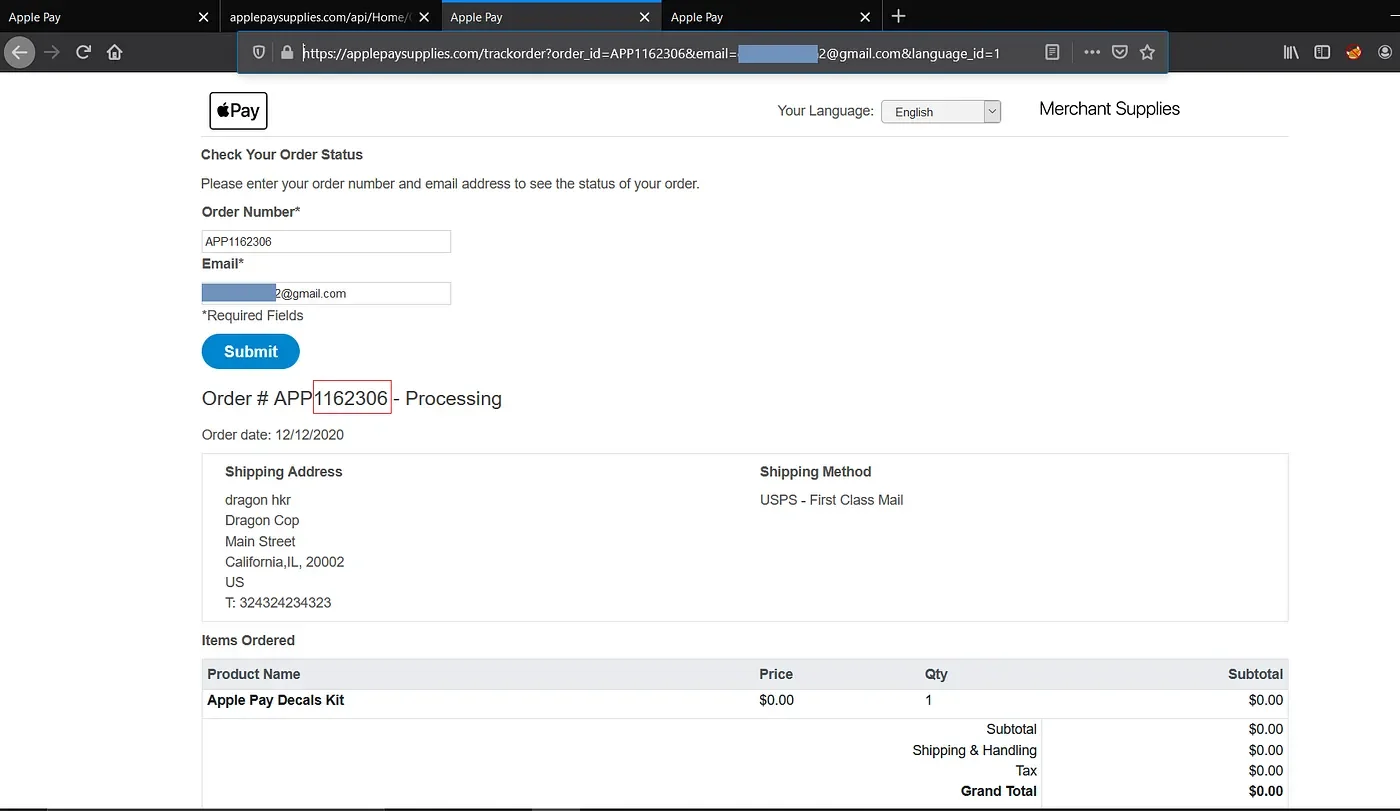
The screenshot shows the tracking page for the order.
Two parameters stood out: order_id and email. Comparing the order_id values of multiple orders showed a predictable structure:
- the
APPcharacters are fixed; - seven numeric digits follow, which can be enumerated.
That combination, a guessable identifier plus a user-supplied email, is the classic shape of an IDOR: if the server returns order data for any matching pair without checking that the requester owns the order, an attacker who knows a victim's email address can walk the number space until a valid order is found.
Exploitation
Step 1: replaying the tracking URL
Navigating directly to the same URL produced a blank page rather than the order details that appeared after pressing the Submit button.

The blank page is the first obstacle. The tracking form does not submit a normal backend request: the page fetches data on the client side with JavaScript, so there is no request in Burp history tied to the URL itself that could be replayed or sent to Intruder. The next move was to read the JavaScript files and the Burp history to find the API the front end actually calls.
Step 2: locating the backend API
Reconnaissance and analysis of the JavaScript turned up the endpoint that fetches order information:
https://applepaysupplies.com/api/Home/GetOrderStatus?orderno=APP1162306&email=[redacted]
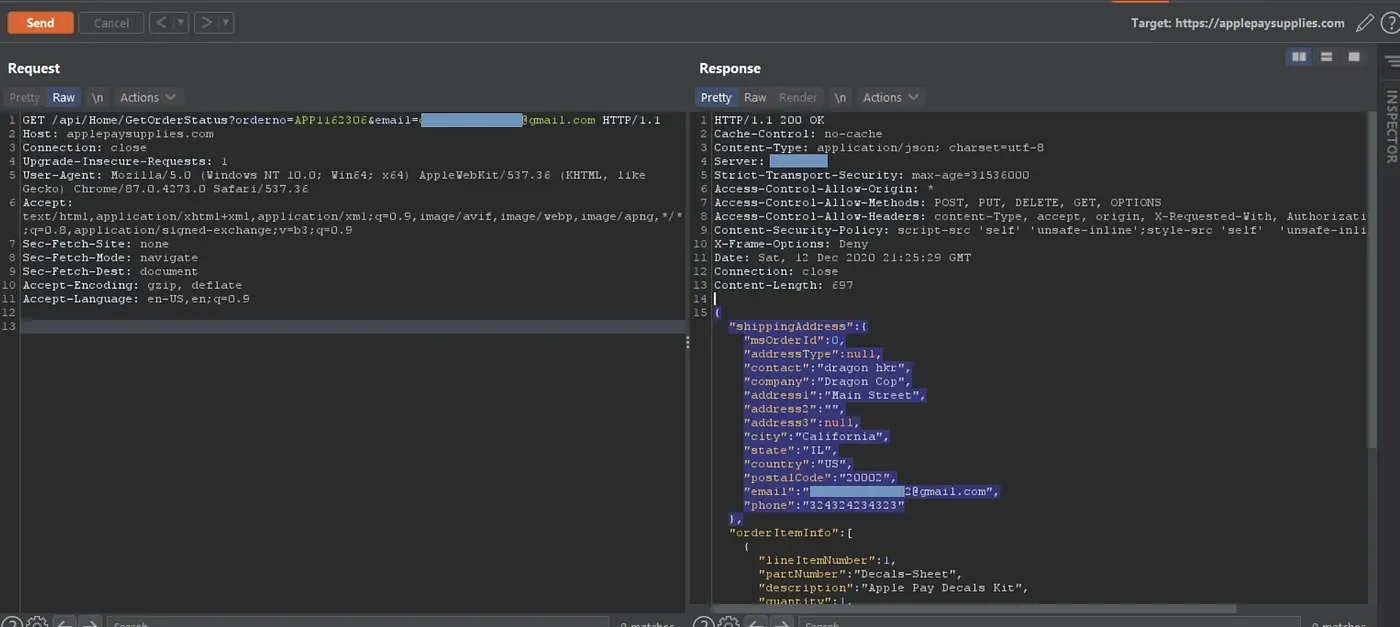
This API is what returns the order status details. Note that the parameter here is orderno, not order_id as on the tracking page, and that the email is passed in clear text. Because it is a plain GET request, it can be driven directly, which is exactly what the client-side form was doing behind the scenes.
Step 3: brute forcing the order number
With a seven-digit numeric space, a wordlist of all seven-digit numbers is enough. The request was sent to Burp Intruder with the orderno value as the payload position.
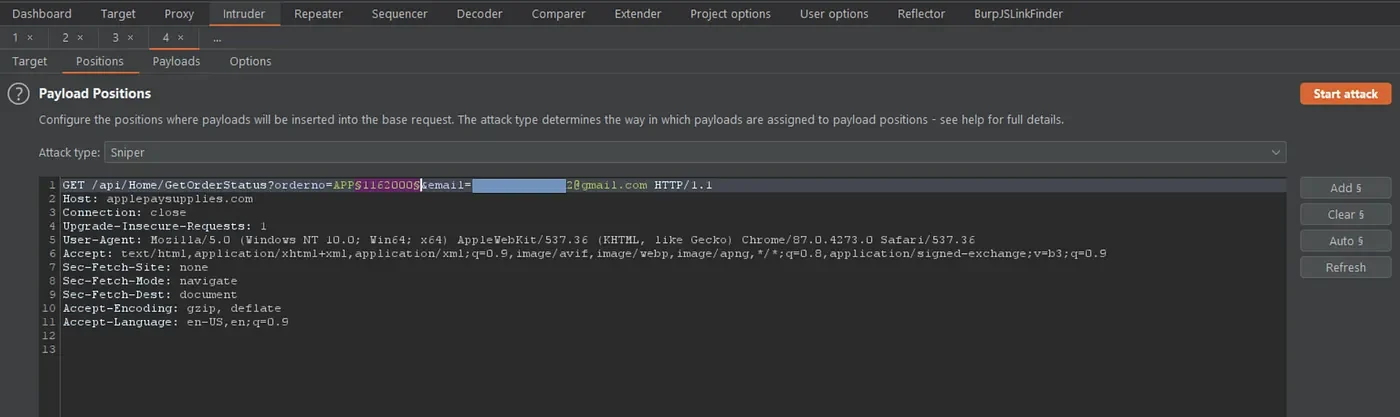
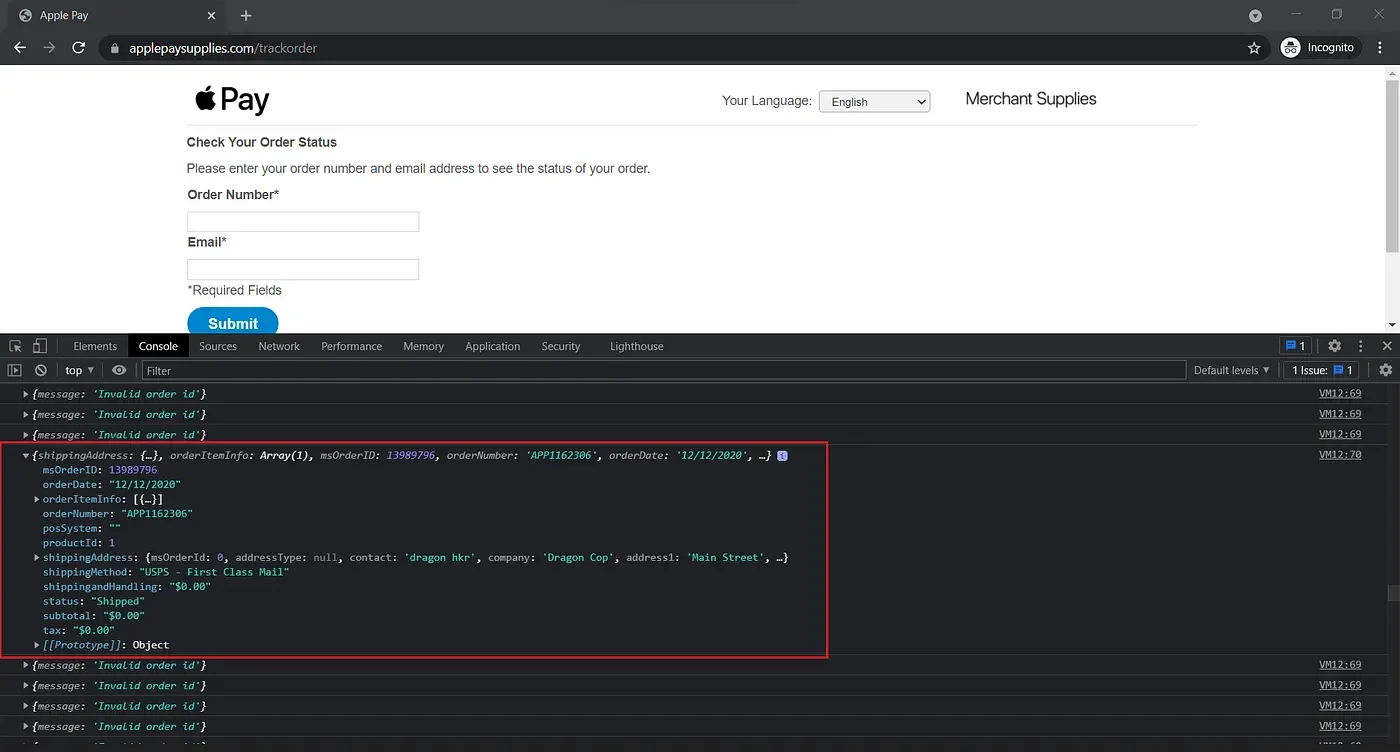
There was no rate limiting on the endpoint, so the whole space could be enumerated. A valid order number belonging to another Apple user was found, and the response disclosed that user's shipping address information.
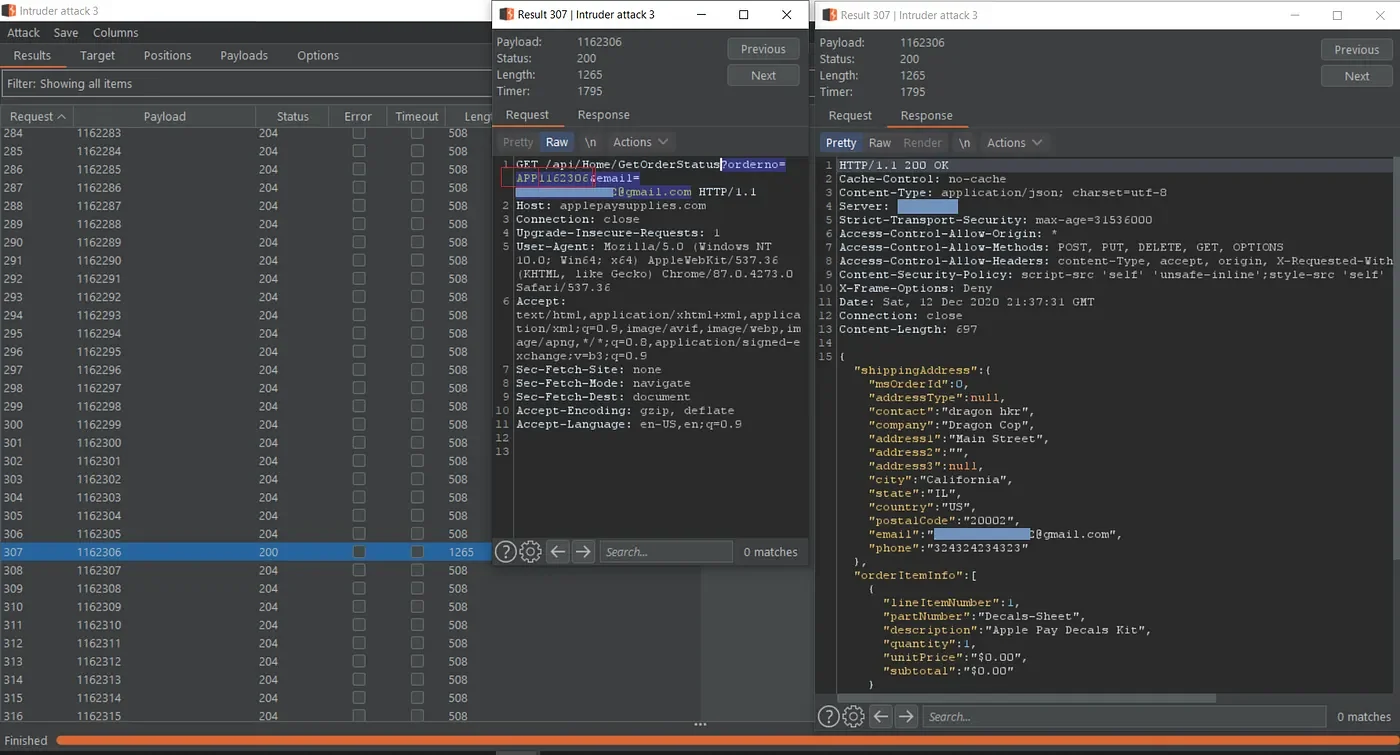
The screenshot shows a valid order number found and the shipping information disclosed. The only precondition is knowing the victim's email address, which is supplied as the second parameter and must match the order.
Reporting and the first fix
A detailed PoC was sent to Apple. Apple fixed the issue and asked the researcher to verify the fix. The fix removed the API call responsible for fetching order status details, /api/Home/GetOrderStatus, so that users could only use the main Track Order functionality.
Instead of the removed API, the site used the Track Order request itself to fetch status details:
https://applepaysupplies.com/trackorder?order_id=APP1162306&email=[redacted]
That change came with an enhancement: the values are now encrypted with the CryptoJS library, since they are sent and fetched from the client side. The researcher went back to analyse the new client-side code and the new encryption.
Step 4: testing the fixed endpoint
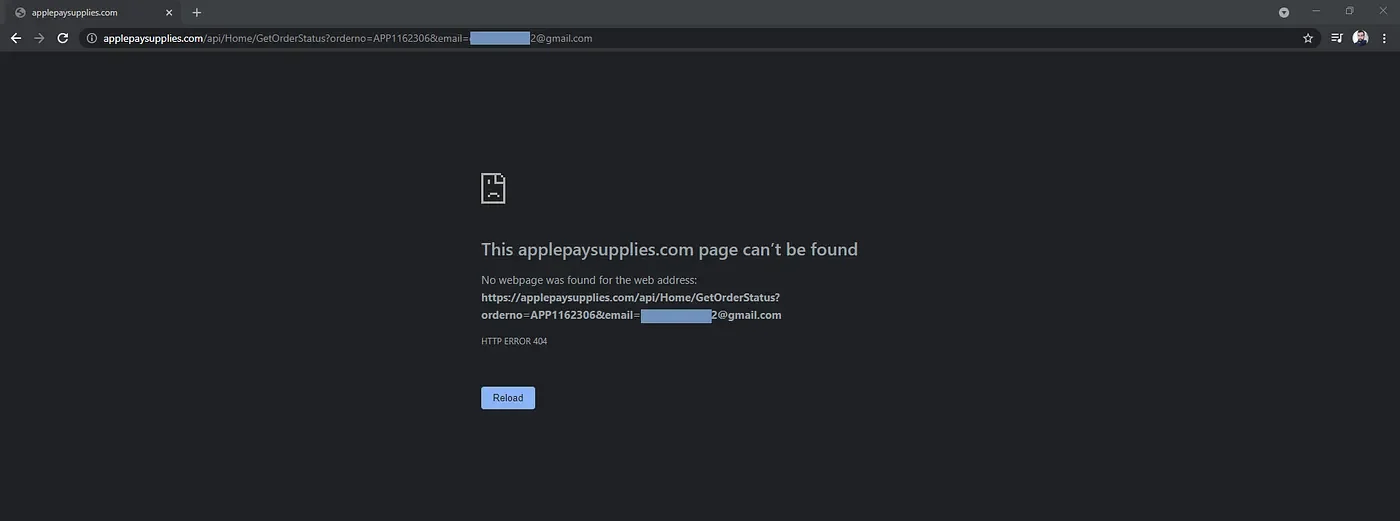
Sending a GET request to the tracking URL with Burp Suite returned neither the order status nor the shipping details of the valid order.
https://applepaysupplies.com/trackorder?order_id=APP1162306&email=[redacted]
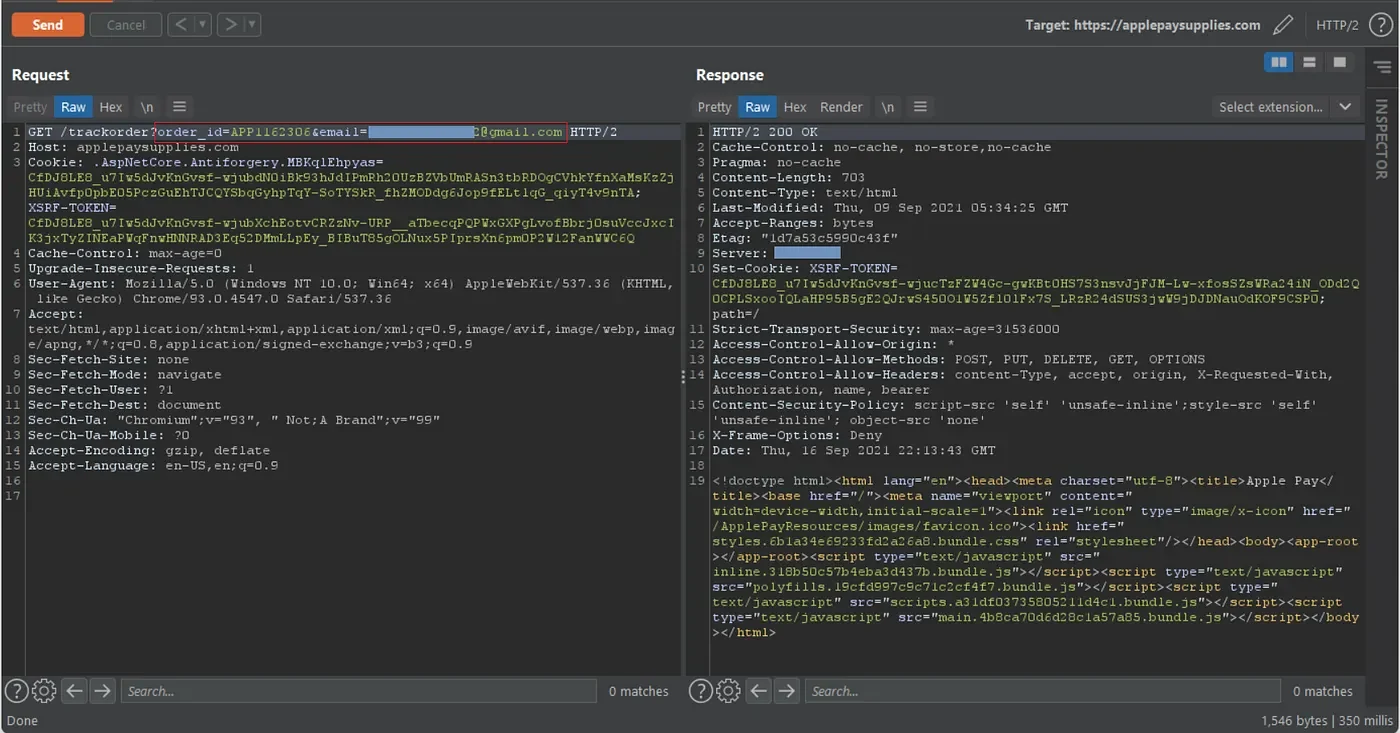
This is the protection Apple added with the fix, and it means Intruder cannot be pointed at the endpoint the way it was pointed at the old API.
Step 5: watching the client side
Opening the same URL in a browser showed a delay of one to two seconds after loading before the order details appeared.
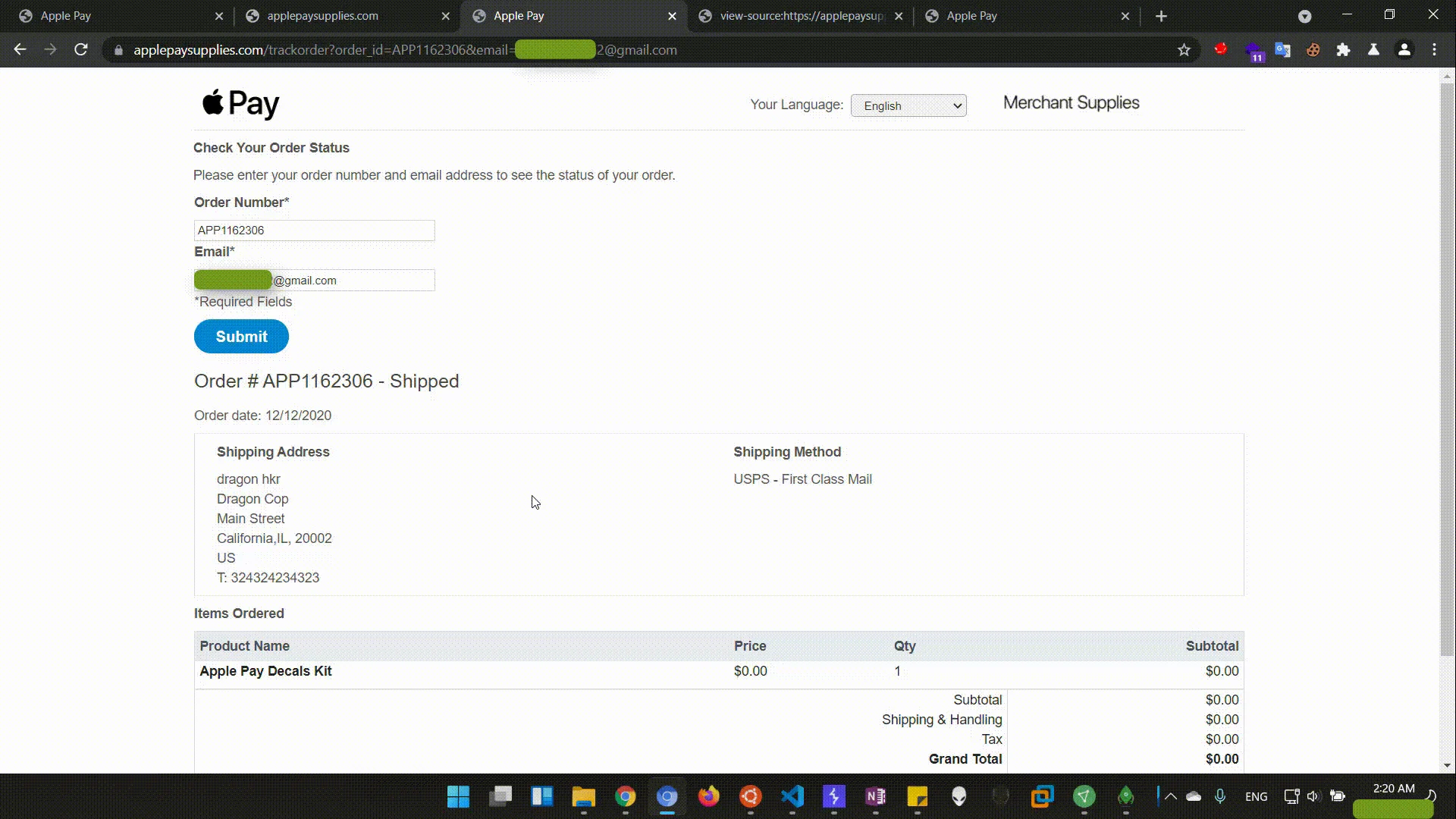
That delay explains why the request level in Burp showed nothing: the visible request is not the one that carries the data. Something in the page runs after load and fetches the details separately.
Step 6: reading the JavaScript and rebuilding the encryption
Analysis of the JavaScript files showed that the application uses a library called CryptoJS to encrypt the Email and the Order Number when requesting an order status. The intent is to make the order number hard to brute force, because a naive enumeration of order_id no longer produces a valid response.
The researcher analysed how the encryption is performed in the application and, with help from his friend Max, wrote a script that encrypts the needed values with CryptoJS exactly as the application does and then brute forces the order number.
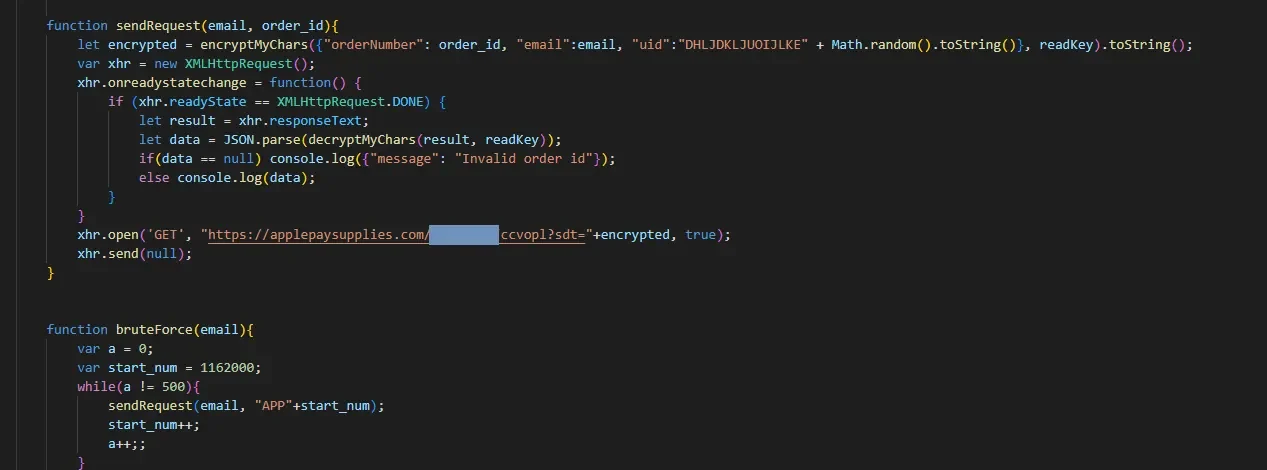
The screenshot is captioned as the script to encrypt the values with CryptoJS and brute force the order number.
Step 7: brute forcing through the encryption
The GET endpoint still had no rate limit protection. With the encryption reproduced client-side, the order number could be enumerated successfully and shipping information was disclosed again.
Reporting the bypass and the second fix
Apple asked for the bypass details in a new report, since the old fix was successful and the vulnerability now lived in a different endpoint. Apple confirmed the vulnerability and rewarded the first half of the bounty, then took some time to implement a new fix.
In the new fix, Apple kept the CryptoJS library in place and only enhanced and increased the encryption level to make it harder to break. No rate limit protection was added. Instead, the length of the order number was increased:
- before, the order number was
APPplus 7 numbers; - now, it is
APPplus 28 characters and numbers, for exampleAPPF68CAA9D1F174F91B61ECC7568D7.
Brute forcing 28 random characters is unfeasible even if the encryption can be decrypted, so the researcher considered the vulnerability well fixed and reported back.
Root cause
The tracking feature takes an order number and an email address to look up an order. The order number is short and sequential, and the email is not a secret in most contexts, so the pair is guessable. The server returned order status and shipping details for a guessed order number and matching email. The absence of rate limiting on the lookup endpoint turns a guessable identifier into an enumerable one.
The first fix removed the convenient JSON API but left the same lookup logic reachable through the tracking page. The second layer, client-side CryptoJS encryption of the email and order number, protects nothing on its own: the key material and the algorithm are shipped to the browser, so anyone who reads the JavaScript can reproduce the encryption, as happened here. Lengthening the order number to 28 characters and numbers made brute forcing unfeasible even if the encryption could be decrypted.
Impact
An attacker who knows a victim's email address can recover that victim's order status and shipping information: full name, company, address details and phone number, as captured when the order was placed. The attack needed the victim's email address and the ability to send requests to the tracking endpoint. In the researcher's demonstration the enumeration succeeded because no rate limit was in place; the second fix relies on the size of the order number space rather than on throttling.
Fix
Apple's changes, in order:
- Removal of
/api/Home/GetOrderStatus, so the JSON API could no longer be queried directly. - Encryption of the email and order number with CryptoJS on the client side, later strengthened.
- Lengthening of the order number from
APPplus 7 digits toAPPplus 28 characters and numbers.
Only the third change addresses the enumeration itself. A robust fix would also bind the lookup to the authenticated owner of the order, or at minimum apply server-side rate limiting and anomaly detection to the tracking endpoint, since client-side encryption cannot be treated as a secret.
Variants to test
- Sequential identifiers in tracking or status pages. Place two orders and compare the identifiers. A positive result is a small, predictable increment that can be enumerated with a wordlist.
- Email as the only second factor. Submit a known order number with a different email and then with the correct one. If the response differs only by match, the pair is the whole authorisation check.
- Client-side encryption as protection. Read the JavaScript for CryptoJS or similar and check whether keys or IVs are embedded. A positive result is being able to reproduce a valid encrypted request from a script outside the browser.
- Missing rate limiting on lookup APIs. Send a few hundred requests to the endpoint with varying identifiers and watch for 429s or blocks. A positive result is a long run of normal responses.
- Removed endpoints still reachable. After a vendor fix, replay the old API path. A positive result is the old JSON response still being served.
- Length-based mitigations. If the identifier is lengthened, check whether the new format is still partially predictable (fixed prefix, timestamp, counter) rather than random.
Bounty
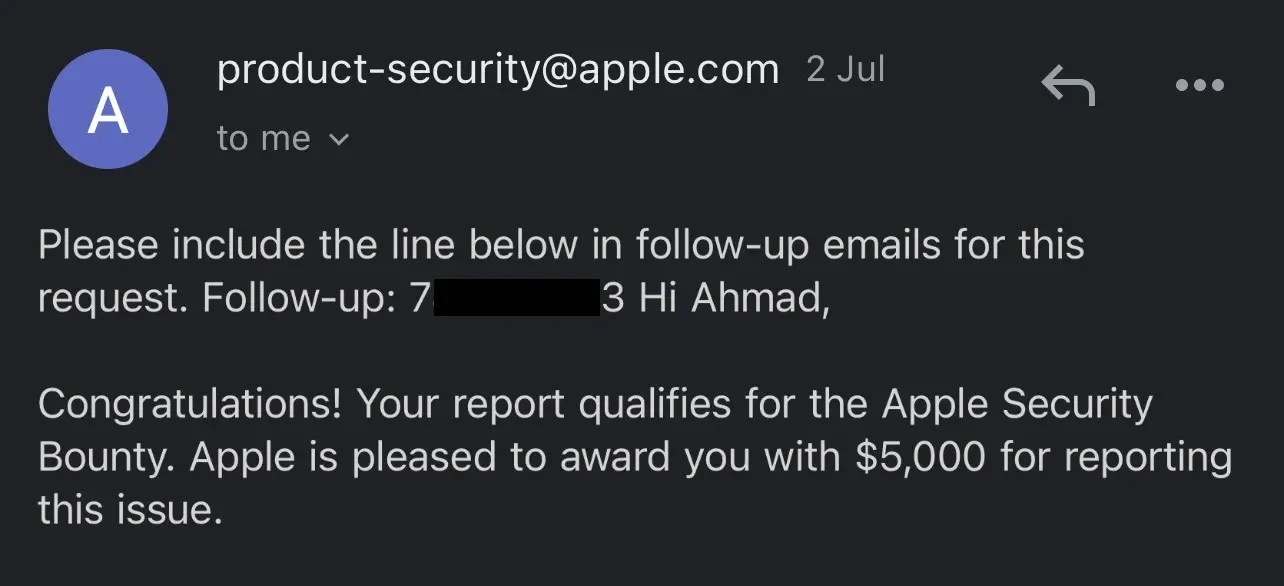
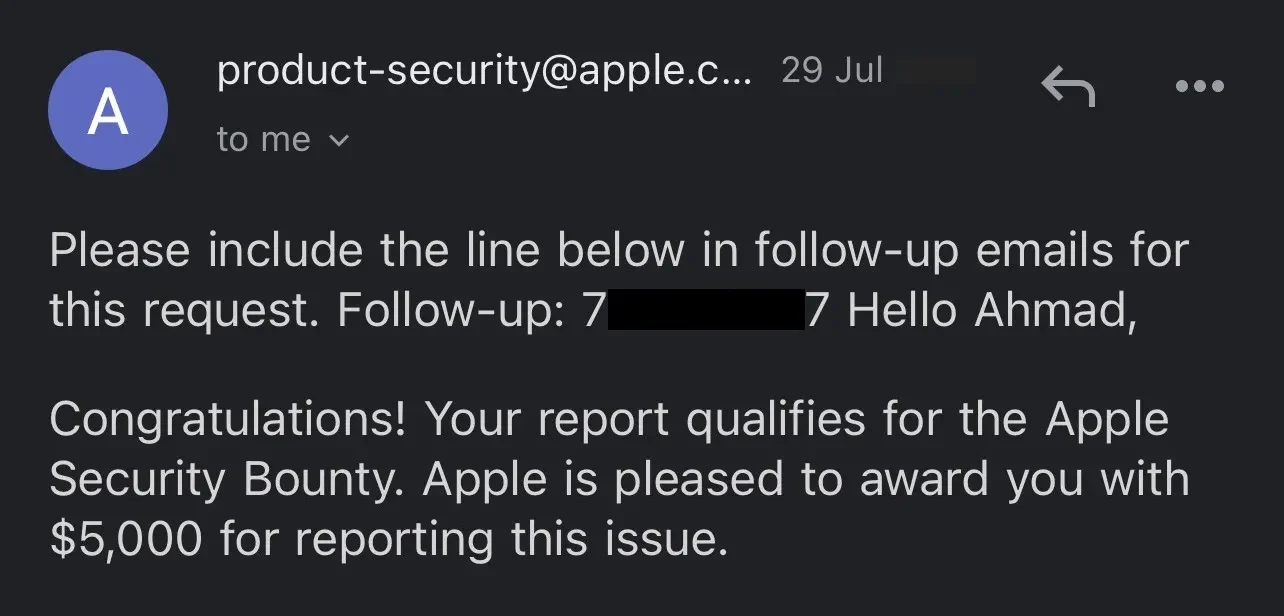
Apple rewarded a total of $10,000 for the main vulnerability and the bypass.



What happened, in plain words
Apple runs a website called Apple Pay Supplies, at https://applepaysupplies.com/. It is a shop where businesses order Apple-branded kits, for example the Apple Pay Decals Kit and the Apple Pay Signage Kit. To place an order you fill in your shipping details: full name, company, address (country, city, street, zip code) and phone number. That is personal information, and it is exactly the kind of data a stranger should not be able to read.
After ordering, the site lets you track your order. You type your email address and the order number you were given, and the page shows the order status and the shipping details. The order number looks like APP1162306: the letters APP followed by seven digits.
A security researcher, Ahmad Halabi, noticed that the order number is short and predictable, and that the tracking page only asks for two things: an order number and an email address. If you already know someone's email address, could you simply try order numbers one by one until one matches? That is what he tested. The answer was yes, and the site handed back other people's shipping information.
Apple fixed it. He found a way around the fix. Apple fixed it again, properly this time, and paid a total of $10,000 for the original bug and the bypass.
This article walks through the whole story slowly, explaining every technical idea the first time it appears. You only need to be comfortable using a browser to follow it.
The target and the feature
When a security researcher looks at a company as large as Apple, the first question is where to start. Ahmad chose a target that holds valuable private information, so that a finding would matter. He settled on https://applepaysupplies.com/, the Apple Pay Supplies shop described above.
He then used the site like a normal customer. He switched on a tool called Burp Suite, which sits between your browser and the website and records every request and response that passes through. Think of it as a recording device placed on the phone line between you and the shop: you still have a normal conversation, but you can replay it, pause it and change what you say.
He placed an order, filled in his shipping information and submitted it. Then he used the tracking feature, which asks for two values:
- the order number, assigned automatically when the order is created;
- the email address used for the order.
Those two values are what the whole story revolves around.
The vulnerability: a guessable number plus a known email
Step 1: the URL in the address bar
After he pressed Submit on the tracking form, the page showed his order details. Looking at the browser's address bar, he saw this URL:
https://applepaysupplies.com/trackorder?order_id=APP1162306&email=[redacted]&language_id=1
The screenshot shows the tracking page for the order.
Let us take the URL apart, because URLs are where a lot of web security stories begin.
https://applepaysupplies.comis the address of the website./trackorderis the path, meaning which page of the site you are asking for.- Everything after the
?is called the query string. It is a list of name and value pairs, separated by&. Each pair is a parameter. order_id=APP1162306is one parameter: its name isorder_idand its value is the order number.email=[redacted]is the second parameter: the email address used for the order.language_id=1is a third parameter, which selects the language of the page.
A GET request is simply a browser asking a server for something by visiting a URL. All the information travels inside the URL itself, which is why you can see the order number and the email in the address bar. That visibility is the first hint that something might be wrong: anything in a URL can be changed by hand.
Two parameters stood out to him: order_id and email. Those are the two things the site uses to decide which order to show.
Step 2: how predictable is the order number?
Before trying to guess anything, he wanted to understand the shape of the order number. He created several orders of his own and compared the numbers he received. The pattern was simple:
- the
APPcharacters are always the same; - seven digits follow, and those digits can be counted through one by one.
This is the classic setup for a vulnerability called IDOR, short for Insecure Direct Object Reference. The idea is easy: a website stores objects (here, orders) and refers to each one by an identifier (here, the order number). If the website hands out the object to anyone who presents the identifier, without checking that the person is allowed to see it, the reference is insecure. A everyday comparison: a hotel that gives you a room key with the room number printed on it, and where any key opens any door as long as the number is right.
Here the identifier is short and follows a pattern, so it can be guessed. And the second value needed, the email address, is often not a secret at all: people share it, it appears on business cards and websites. Put a guessable identifier together with a known email and you have a recipe for reading other people's orders.
Step 3: the blank page
He tried the obvious thing: he opened the same URL directly in his browser, changing nothing.
https://applepaysupplies.com/trackorder?order_id=APP1162306&email=[redacted]&language_id=1
Instead of the order details he had seen after pressing Submit, he got a blank page.
This is an important moment, so let us explain what it means. When you press a button on a modern website, the page often does not send you to a new address at all. Instead, a program written in JavaScript (the language that runs inside your browser) sends a request in the background and inserts the answer into the page. This is called client-side fetching: the work happens on the client, meaning your browser, rather than on the server.
The consequence is that the URL in the address bar is not the request that carries the data. The real request goes somewhere else, and Burp Suite, which records requests, had nothing tied to that URL to replay. So he could not simply take the request and repeat it thousands of times. He had to find out what the JavaScript was actually calling.
Step 4: finding the API
He read the site's JavaScript files and looked through the history Burp Suite had recorded. This kind of exploration is called reconnaissance, or recon: gathering information about how a system is built before attacking it.
He found the endpoint the page was really using:
https://applepaysupplies.com/api/Home/GetOrderStatus?orderno=APP1162306&email=[redacted]
An API is a doorway that a program uses to talk to a server, as opposed to a doorway a person uses through a browser page. Think of a restaurant: the dining room is the website you see, and the kitchen hatch is the API. The page you look at asks the kitchen for the data, and the kitchen sends it back, usually in a compact machine-readable format rather than a decorated page.
Line by line:
https://applepaysupplies.com/api/Home/GetOrderStatusis the address of the API. The/api/part is a common convention that marks a machine-facing doorway, andGetOrderStatusis the name of the operation.?orderno=APP1162306passes the order number. Notice the parameter is calledordernohere, notorder_idas on the tracking page. The same value has a different name in the two places.&email=[redacted]passes the email address in clear text, with no scrambling.
This API is what returns the order status details. Because it is a plain GET request, it can be called directly by any tool, which is exactly what the page was doing behind the scenes. The hidden doorway was now visible.
Step 5: trying every number
With seven digits, there are ten million possible numbers, but a computer does not care. He generated a wordlist: a simple text file with one candidate value per line, here every seven-digit number. Then he loaded the request into Burp Intruder, the part of Burp Suite that takes a request, replaces one chosen spot with each line of the wordlist in turn, and sends the request over and over automatically. This repetitive guessing is called brute forcing.
The screenshot shows the attack being set up in Intruder.
One thing made this practical: the endpoint had no rate limiting. Rate limiting is a server-side rule that says, for example, no more than a hundred requests per minute from one source, and answers with an error once you exceed it. It is the digital equivalent of a shop assistant who starts ignoring you after you ask the same question too many times. Without it, nothing stopped the tool from sending request after request.
A valid order number belonging to another Apple user turned up, and the response contained that user's shipping address information.
The screenshot shows a valid order number found and the shipping information disclosed. The only precondition was knowing the victim's email address, which is sent as the second parameter and has to match the order.
Reporting it and the first fix
He wrote a detailed PoC, short for proof of concept: a step-by-step demonstration, with screenshots and requests, that shows a bug is real and reproducible. He sent it to Apple. After a while Apple fixed the issue and asked him to check the fix.
The fix removed the API that fetched order status details, /api/Home/GetOrderStatus, so that users could only use the main Track Order feature.
Instead of the removed API, the site now used the Track Order request itself to fetch the status details:
https://applepaysupplies.com/trackorder?order_id=APP1162306&email=[redacted]
That change came with an addition: the values are now encrypted with a library called CryptoJS, because they are sent and fetched from the client side. Encryption means scrambling data with a mathematical recipe and a secret piece called a key, so that only someone with the key can unscramble it. CryptoJS is a collection of ready-made encryption functions written in JavaScript, which means it runs inside your browser.
So he went back to the site to study the new client-side code and the new encryption.
Bypassing the fix
Step 1: the endpoint that remained
He already knew the main address for tracking orders, https://applepaysupplies.com/trackorder, which accepts a GET request with two parameters: order_id, the order number, and email.
Step 2: the request that returned nothing useful
Using Burp Suite, he sent a GET request to the tracking URL:
https://applepaysupplies.com/trackorder?order_id=APP1162306&email=[redacted]
The response contained neither the order status nor the shipping details of this valid order.
This was the protection Apple had added with the fix. It also meant Intruder could not be pointed at this endpoint the way it had been pointed at the old API, because a correct guess produced nothing to recognise.
Step 3: watching the page in a browser
He opened the same URL in a browser:
https://applepaysupplies.com/trackorder?order_id=APP1162306&email=[redacted]
He noticed a delay: after the page loaded, it took one to two seconds before the order details appeared.
That delay explains why the request in Burp Suite showed nothing useful. The visible request is not the one that carries the data. Something in the page runs after loading and fetches the details separately, which is why the answer arrives a moment later.
Step 4: reading the JavaScript and rebuilding the encryption
He went through the JavaScript files again. He found that the application uses CryptoJS to encrypt the Email and the Order Number when requesting an order status. The intent is clear: if the values are scrambled, a naive attempt to count through order_id values no longer produces a valid response, so guessing should become hard.
He studied how the encryption is done in the application and, with help from his friend Max, wrote a script that encrypts the needed values with CryptoJS exactly as the application does, and then brute forces the order number.
The screenshot is captioned as the script to encrypt the values with CryptoJS and brute force the order number.
Why does this work? Because the encryption runs in the browser, the browser must be given everything it needs to do the job: the algorithm and the key. Anything shipped to the browser can be read by anyone who opens the JavaScript files. Encryption that keeps its key on the client is therefore not a secret at all; it is a locked box with the key taped to the lid. Reproducing it in a script outside the browser is a matter of copying the same steps.
Step 5: guessing through the encryption
The GET endpoint still had no rate limit protection. With the encryption reproduced in his script, the order number could be guessed successfully and shipping information was disclosed again.
Reporting the bypass and the second fix
Apple asked him to send the bypass details in a new report, because the old fix had worked and the vulnerability now lived in a different endpoint. Apple confirmed the vulnerability and paid the first half of the bounty, then took some time to build a new fix.
In the new fix, Apple kept the CryptoJS library and only increased the strength of the encryption to make it harder to break. No rate limit protection was added. Instead, the length of the order number was increased:
- before, the order number was
APPplus 7 numbers; - now, it is
APPplus 28 characters and numbers, for exampleAPPF68CAA9D1F174F91B61ECC7568D7.
Why does length matter so much? Because guessing means trying possibilities one after another. With seven digits there are ten million possibilities, which a computer can work through. With 28 characters drawn from digits and letters there are an astronomically large number of possibilities, and no realistic amount of computing power can try them all. Guessing 28 random characters is unfeasible even if the encryption can be decrypted, so he considered the vulnerability well fixed and reported back to Apple.
Why it worked
The tracking feature takes an order number and an email address to look up an order. The order number was short and followed a pattern, and an email address is not usually a secret, so the pair could be guessed. The server returned order status and shipping details for a guessed order number and matching email. That is the IDOR. The absence of rate limiting on the lookup endpoint turned a guessable identifier into one that could be counted through completely.
The first fix removed the convenient API but left the same lookup logic reachable through the tracking page. The second layer, encrypting the email and order number in the browser with CryptoJS, protects nothing on its own, because the key and the algorithm are shipped to the browser and anyone who reads the JavaScript can reproduce the encryption, as happened here. Lengthening the order number to 28 characters and numbers made brute forcing unfeasible even if the encryption could be decrypted.
What an attacker could get
Someone who knows a victim's email address can recover that victim's order status and shipping information: full name, company, address details and phone number, as entered when the order was placed. The attack needed the victim's email address and the ability to send requests to the tracking endpoint. In the demonstration the guessing succeeded because no rate limit was in place; the second fix relies on the size of the order number space rather than on slowing requests down.
What Apple changed, in order
- Removal of
/api/Home/GetOrderStatus, so the JSON API could no longer be queried directly. - Encryption of the email and order number with CryptoJS in the browser, later strengthened.
- Lengthening of the order number from
APPplus 7 digits toAPPplus 28 characters and numbers.
Only the third change addresses the guessing itself. A thorough fix would also tie the lookup to the logged-in owner of the order, or at the very least apply server-side rate limiting and detection of unusual patterns on the tracking endpoint, since encryption done in the browser cannot be treated as a secret.
Things worth testing on other sites
- Sequential identifiers in tracking or status pages. Place two orders and compare the identifiers. A positive result is a small, predictable step that can be counted through with a wordlist.
- Email as the only second check. Submit a known order number with a different email and then with the correct one. If the response differs only by whether they match, the pair is the whole authorisation check.
- Encryption in the browser used as protection. Read the JavaScript for CryptoJS or similar and check whether keys or initialisation values are embedded. A positive result is being able to reproduce a valid encrypted request from a script outside the browser.
- Missing rate limiting on lookup APIs. Send a few hundred requests to the endpoint with varying identifiers and watch for 429 responses or blocks. A positive result is a long run of normal responses.
- Removed endpoints still reachable. After a vendor fix, replay the old API path. A positive result is the old JSON response still being served.
- Length-based mitigations. If the identifier is lengthened, check whether the new format is still partly predictable (fixed prefix, timestamp, counter) rather than random.
Bounty
Apple rewarded a total of $10,000 for the main vulnerability and the bypass.
Glossary
- API: a doorway that programs use to talk to a server, usually returning compact machine-readable data rather than a web page.
- Brute forcing: trying every possible value, one after another, until the right one is found.
- Burp Suite: a tool that sits between your browser and a website, recording, replaying and modifying the requests and responses.
- Burp Intruder: the part of Burp Suite that automatically repeats a request, replacing one chosen spot with each line of a wordlist.
- Client side: happening inside your browser, on your own computer, rather than on the website's server.
- CryptoJS: a collection of ready-made encryption functions written in JavaScript, which run inside the browser.
- Encryption: scrambling data with a mathematical recipe and a secret key so that only someone with the key can unscramble it.
- Endpoint: a specific address on a server that accepts requests, for example
/api/Home/GetOrderStatus. - GET request: a request where the browser asks a server for something by visiting a URL, with all the information carried in the URL itself.
- IDOR (Insecure Direct Object Reference): a bug where a site refers to an object by an identifier and hands it out to anyone who presents that identifier, without checking that the person is allowed to see it.
- JavaScript: the programming language that runs inside web browsers and makes pages interactive.
- Key: the secret piece of information used by encryption to scramble and unscramble data.
- Parameter: a name and value pair in a URL, after the
?and separated by&, for exampleorder_id=APP1162306. - PoC (proof of concept): a step-by-step demonstration, with requests and screenshots, proving that a bug is real and reproducible.
- Query string: the part of a URL after the
?, holding the parameters. - Rate limiting: a server-side rule that caps how many requests a source may send in a period, returning an error once the cap is exceeded.
- Reconnaissance (recon): gathering information about how a system is built before attacking it.
- Response: what a server sends back after a request.
- Wordlist: a text file with one candidate value per line, used to drive automated guessing.




