Chaining Multiple Requests to Achieve Rate Limiting Vulnerabilities
The application allowed unlimited collaboration invites by chaining add and remove collaborator requests, bypassing the intended one-invite-per-user limit. An attacker could repeatedly send invites to a victim's email, causing a denial of service through mailbox flooding.
 Published on ahmdhalabi.medium.com
I want to share with you a new methodology about finding rate limit vulnerabilities and even bypassing rate limit protections.
The full write-up lives on its author's site
It belongs to its author, so we link to it rather than copy it. The other two tabs are our own rewrites, checked against it.
Context
Ahmad Halabi, a part time bug bounty hunter, describes a rate limiting vulnerability he found in a public program on HackerOne. The program treats rate limiting protection as one of its top security priorities. The affected feature is the Algorithm section of the page, where a user can add a collaborator to work with them on a project. When a collaborator is added, a notification is sent to that person's email address telling them to join as a collaborator. The feature allows a user to invite someone only once, unless that collaborator has been removed and then re-invited.
The researcher's point is broader than the single bug: many programs implement rate limiting on sensitive, authenticated endpoints such as login and post creation, and there are multiple ways those protections can be bypassed. This report is an example of one such bypass, achieved by chaining several requests rather than by attacking a single endpoint.
Setup
The researcher used Burp Suite's Macro feature under Session Handling Rules, and notes a script could automate the cycle instead. The basic proof needs nothing more than an account on the target and the ability to add and remove a collaborator. The advanced version requires Burp's proxy to be running while the add and remove collaborator actions are performed, so that the requests land in Burp's history and can be selected for the macro.
Finding it
The researcher noticed that the invite restriction is enforced per collaborator: you can invite a user just once, unless you remove them from the collaborators and re-invite them. The invite restriction is enforced per collaborator: you can invite a user just once, unless you remove them from the collaborators and re-invite them. By chaining three requests, add_collaborator, a normal request, and remove_collaborator, he was able to send notifications to a target user unlimited times.
The three steps are:
- Perform the add collaborator request.
- Send a normal request to www.target.com.
- Perform the remove collaborator request.
Repeating those three steps in an automated way results in bombing the victim's mailing system with collaboration invites.
Exploitation
Step 1: Confirm the behaviour manually
To prove the bug in the basic way, all you need is to add a collaborator, remove it, then add it again and remove it. The user's mail inbox receives two notifications.
Step 2: Capture the requests
Keep the Burp proxy running, perform the add collaborator and remove collaborator actions, and navigate back to your account. The three requests needed for the macro are now in Burp's history.
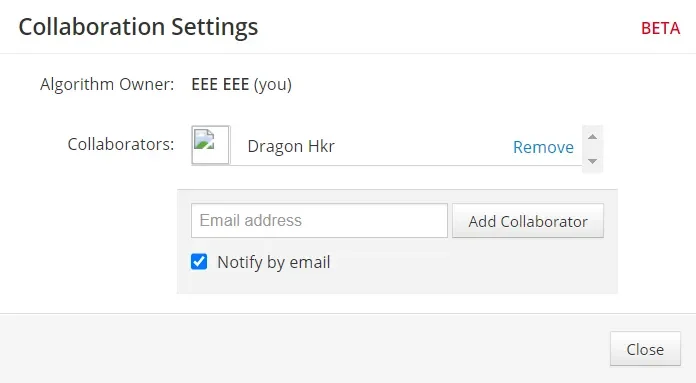
The screenshot shows the collaboration settings of the project, the page where collaborators are added and removed.
Step 3: Build the macro
In Burp, navigate to Project Options, then under Session Handling Rules click Add. In Rule Actions click Add and choose Run a Macro. Under Select Macro click Add; Burp's request history opens. Choose the three requests in order: Add collaborator, Request to profile account, Remove collaborator. Click Ok, then click Test macro and observe that a notification is sent to the target email inbox.
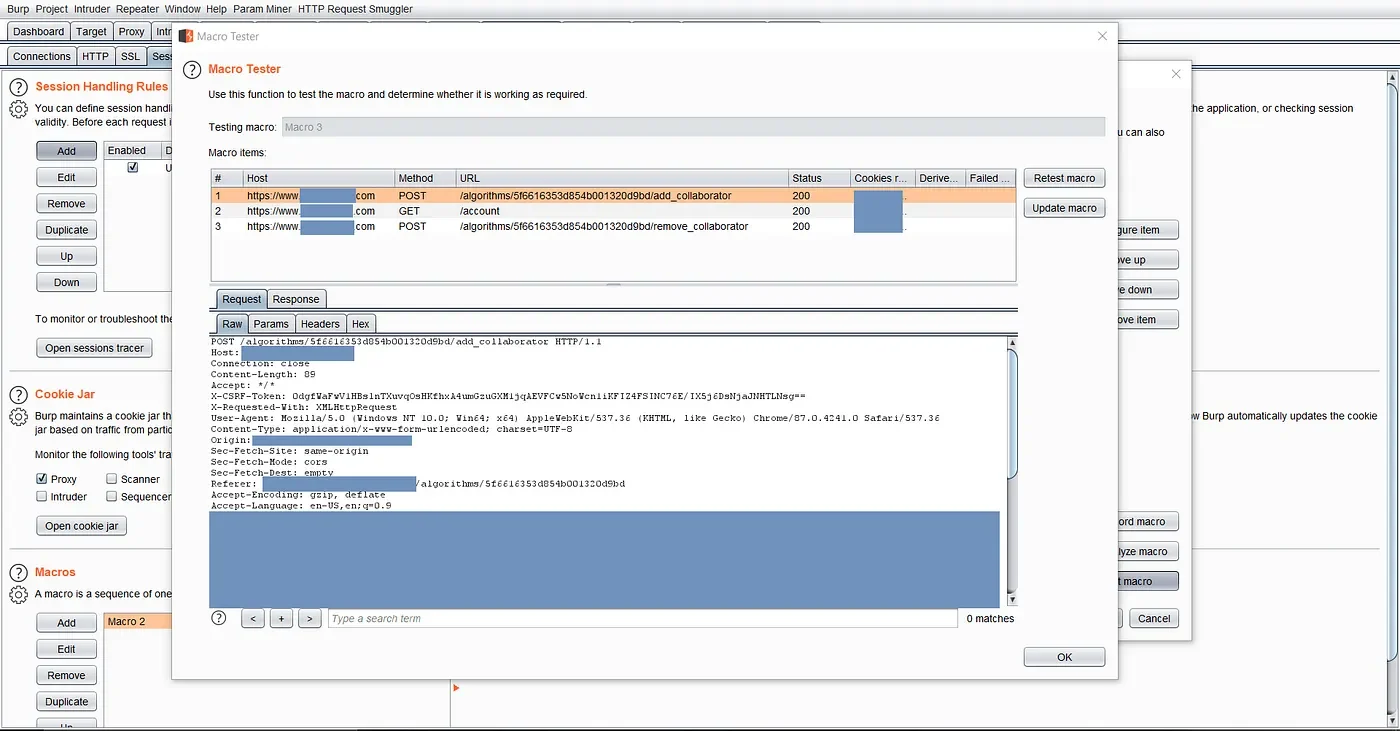
The screenshot shows the macro being launched with the three requests selected in sequence.
Step 4: Repeat
You can try Test macro many times, and every time you try it, a notification is sent to the mail inbox.

The screenshot shows the notifications arriving in the victim's inbox.
Automating this attack leads to huge mass mailing of the victim's inbox.
Root cause
The program did not expect three requests to be chained in order to reach the rate limiting on collaboration invites.
Impact
The researcher could abuse the feature to send collaboration invites to any user. A large scale attack will blow up users' mailing systems with a huge number of invites.
Fix
The recommendation is to apply rate limit protection to the Add Collaborator and Remove Collaborator requests. The lesson the researcher draws is that if an action depends on multiple requests, those requests should not be relied on as the protection by themselves; some form of rate limiting should also be implemented, because multiple requests can be chained to exploit rate limiting.
Variants to test
- On any feature where an action is gated by object state rather than by a counter (invite, share, follow, membership), try a create, read, delete cycle and watch whether the notification or side effect fires again each cycle. A positive result is a second notification after the object was removed and recreated.
- Automate the cycle with a Burp macro or a script and run it repeatedly. A positive result is a steady stream of notifications to the same recipient with no throttling.
- Try inserting an unrelated authenticated request between the create and delete steps, as the researcher did with the profile request. A positive result is that the cycle still succeeds and the notification still fires.
- Apply the same chaining idea to other multi-request flows that are assumed to be protected, such as password reset or email change confirmations. A positive result is that the flow can be repeated beyond the intended limit.
What happened, in plain words
A security researcher named Ahmad Halabi found a way to make a website send unlimited email invitations to any user. The website had a feature that let you invite someone to collaborate on a project, and it sent them an email notification. Normally you could only invite a person once, unless you removed them and invited them again. By automating a sequence of three requests, Ahmad could send the invitation email over and over, flooding the victim's inbox. He reported it through a bug bounty program on HackerOne and received a $1,000 bounty.
This article explains the bug in beginner-friendly terms. You do not need any prior security knowledge, just curiosity about how web applications work.
Background: what is rate limiting?
Many websites have features that, if abused, could cause harm. For example, a login form could be bombarded with password guesses, or a "post comment" button could be used to spam. To prevent this, developers add rate limiting: a cap on how many times an action can be performed in a given time period. For instance, you might be allowed only five login attempts per minute.
Rate limiting is a security control. When it is missing or can be bypassed, attackers can perform actions at scale, such as sending thousands of emails, trying many passwords, or creating many posts.
The vulnerable feature
The target was a public program on HackerOne (a platform where companies ask hackers to find bugs in their systems). The program had a section called "Algorithm" where you can add collaborators to work with you on a project. When you add a collaborator, the system sends an email to that person saying "join me as a collaborator".
The intended behaviour: you can invite a user only once. If you remove them from the collaborator list and then invite them again, a new invitation is sent. The intended behaviour: you can invite a user only once, unless you remove them from the collaborator list and then invite them again.
The vulnerability: chaining requests
Ahmad realised that by chaining three requests in a specific order, he could bypass the invite limit and send unlimited notifications. The three requests are:
add_collaborator(invite the user)normal request(any authenticated request to the site, like loading your profile page)remove_collaborator(remove the user from the collaborator list)
By repeating these three steps automatically, the victim's email inbox gets flooded with collaboration invites.
The program did not expect three requests to be chained to reach the rate limiting on collaboration invites.
Step-by-step: how to reproduce
Basic manual test
First, prove the bug manually: add a collaborator, remove them, then add them again and remove them again. The user will receive two notification emails.
Advanced: using Burp Suite
To automate, Ahmad used Burp Suite, a tool that lets you intercept and modify web traffic. Specifically, he used its Macro feature, which can replay a sequence of requests automatically.
- Keep Burp's proxy running (so it captures your browser's requests).
- Perform the add collaborator and remove collaborator actions in the web application.
- Go back to your account page.
The screenshot shows the collaboration settings page where you manage collaborators.
- In Burp, go to Project Options -> Session Handling Rules -> click Add -> in Rule Actions click Add -> choose "Run a Macro".
- Under Select Macro click Add. Burp's request history opens. Select the three requests in order: Add collaborator, Request to profile account, Remove collaborator. Click Ok.
- Click "Test macro" and observe that a notification is sent to the target email inbox.
The screenshot shows the macro being launched with the three requests selected.
- You can click "Test macro" many times; each time a new notification is sent.
The screenshot shows multiple notifications arriving in the victim's inbox.
Automating this attack leads to massive mailing to the victim's inbox.
Why this vulnerability arises
The program did not expect that three requests could be chained to bypass the rate limiting on collaboration invites.
Impact
An attacker can abuse the feature to send collaboration invites to any user. A large-scale attack will flood users' email inboxes with a huge number of invites.
Remediation
Apply rate limit protection to the Add Collaborator and Remove Collaborator requests. More generally, if an action depends on multiple requests, do not rely on those requests alone as protection; implement rate limiting as well, because multiple requests can be chained to exploit rate limiting.
Timeline
- 19 Sep, 2020: Initial report.
- 2 Nov, 2020: Report triaged.
- 24 Nov, 2020: Bounty awarded ($1,000).
- 24 Nov, 2020: Report resolved.
Variants to test
- On any feature where an action is gated by object state rather than by a counter (invite, share, follow, membership), try a create, read, delete cycle and watch whether the notification or side effect fires again each cycle. A positive result is a second notification after the object was removed and recreated.
- Automate the cycle with a Burp macro or a script and run it repeatedly. A positive result is a steady stream of notifications to the same recipient with no throttling.
- Try inserting an unrelated authenticated request between the create and delete steps, as the researcher did with the profile request. A positive result is that the cycle still succeeds and the notification still fires.
- Apply the same chaining idea to other multi-request flows that are assumed to be protected, such as password reset or email change confirmations. A positive result is that the flow can be repeated beyond the intended limit.
Glossary
- Rate limiting: a security control that restricts how many times an action can be performed in a given time frame.
- Endpoint: a specific URL or API route that performs a function.
- API: Application Programming Interface; a set of rules that allows different software to communicate, often used by web applications to send and receive data.
- Cookie: a small piece of data stored by the browser and sent with requests to identify a user session.
- Token: a piece of data (often a string) used to authenticate a user or request, similar to a temporary password.
- Burp Suite: a tool for intercepting and modifying HTTP traffic between a browser and a server, used for security testing.
- Proxy: an intermediary that forwards requests; Burp acts as a proxy to capture and manipulate traffic.
- Macro: in Burp, a sequence of requests that can be replayed automatically.
- Session Handling Rules: Burp feature that defines how session-related actions (like macros) are applied.
- Collaborator: a user invited to work on a project.
- Notification: an email or alert sent to a user about an event, such as an invitation.
- Bug bounty program: a program where organisations reward researchers for finding and reporting security vulnerabilities.
- HackerOne: a platform that hosts bug bounty programs.
- Triaged: a report that has been reviewed and confirmed as valid by the program.
- Bounty: a monetary reward given for a valid vulnerability report.
- Vulnerability: a weakness in a system that can be exploited to cause harm.
- Exploit: a way to take advantage of a vulnerability.
- Authenticated request: a request that includes credentials (like a session cookie) proving the user is logged in.
- State: the current condition or data of a system, such as whether a user is in a collaborator list.
- Mail flooding: sending a large number of emails to overwhelm an inbox.






