Simple HTML Injection to $250
An admin could change an employee's email address by adding an extra email parameter to the profile update request, even though the UI prevented editing. The attacker could then trigger a password reset using the employee's original email, but the reset link was sent to the attacker's email, allowing account takeover.
 Published on ahmdhalabi.medium.com
My name is Ahmad Halabi. I used to do bug bounty hunting a lot in the previous months.
The full write-up lives on its author's site
It belongs to its author, so we link to it rather than copy it. The other two tabs are our own rewrites, checked against it.
Context
In April I was invited to a new private program on HackerOne. The application has two types of users:
- Admin/Manager
- User/Employee
A Manager creates a Group, which plays the role of a Company, and can invite Employees to his Company/Group. The important thing to note is that a Manager cannot change any other Manager or Employee email address inside his Company. A Manager can only change his own email address. There is a protection on the Email Address input where they do not allow you to change the email address.
I found a business logic flaw in the Change Email endpoint that allowed me to change the email of any Employee and then reset the password, leading to complete Account Takeover without the Employee's knowledge.
Setup
Before this I had found some bugs related to Privilege Escalation, CSRF and Information Disclosure of PII information, but all were duplicates by other hackers. After that I realised that all usual bugs would end up duplicates, so I decided to avoid wasting additional time and look for a unique bug related to Application Logic.
The proof of concept assumes I am an Admin in the organisation and I want to change the email of an Employee in order to steal some info from his account or insert some data that puts him in trouble with the manager. In a real attack scenario you will not have employee credentials, but here I was testing ethically so I had to identify the mistake happening.
Finding it
The email field in the Employee profile is greyed out and cannot be edited or modified. The question was whether the server would accept an email value that the interface never lets you send.
Exploitation
Step 1: Log in as admin and open the Users section
I logged in with my admin credentials then navigated to the Users section.
Step 2: Open the Employee profile
I clicked on the Employee profile and I noticed that the email input cannot be edited or modified.
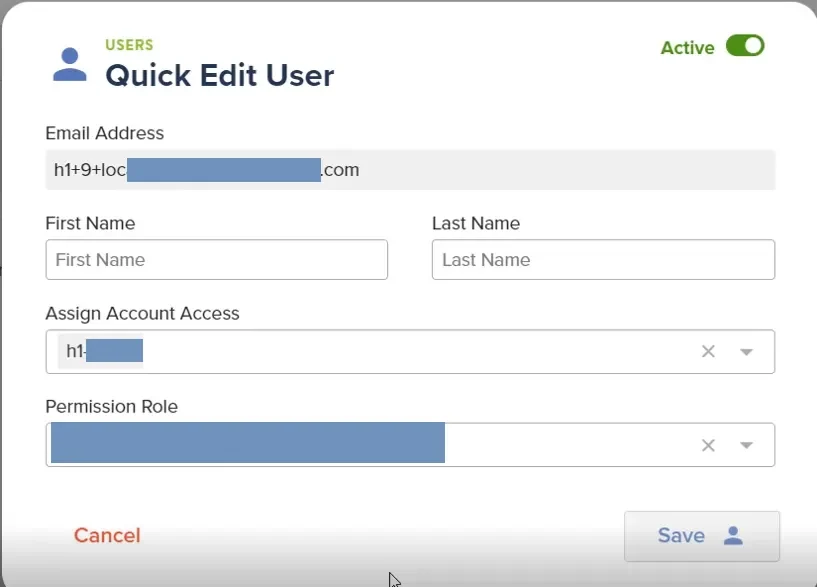
See the colour of the Email Address input is grey and cannot be modified.
Step 3: Change another field and intercept the request
I added random characters in the First name and Last name inputs and clicked Save and intercepted the request.
Step 4: Add an email parameter to the request body
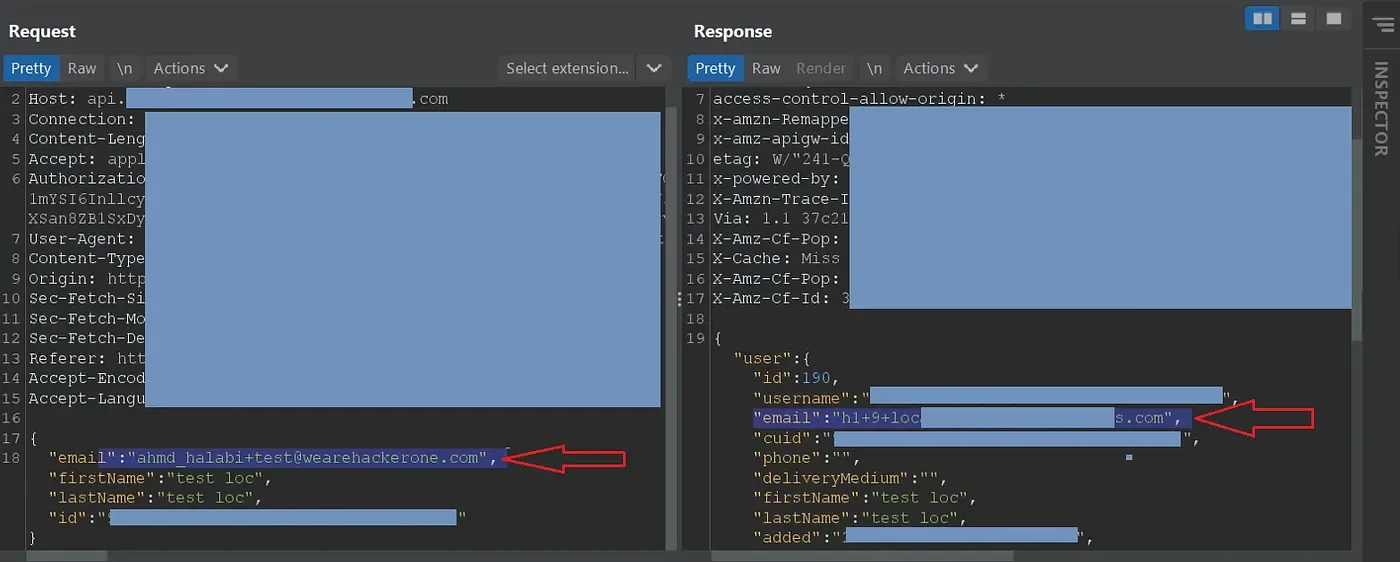
In the request, I added an additional parameter for email to study the response status and body. So I added a parameter for email to the request body like the following:
"email":"[redacted]"
I assumed that the email parameter is active on the server side and added my email as a new modification. Then I forwarded the request.
Step 5: Read the response
I got a response with 200 OK status code and body showing me the original email address that belongs to the Employee.
Step 6: Interpret the response
This did not make sense to me because the response was successful. I was sure there was something weird happening in the backend. Because if not, the application should either show an error in the response, or not proceed with the request, or proceed the request without showing a response because it is not successful. But since I got this response I was sure that my email may have passed to the backend successfully.
Step 7: Try to log in as the Employee
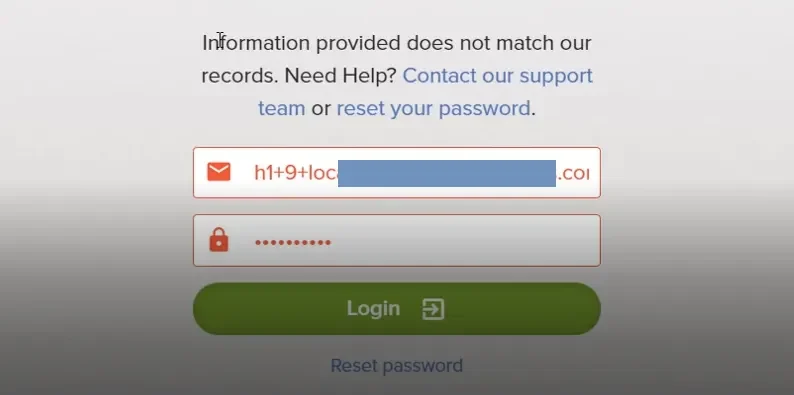
I started thinking about ways to verify my theory. So here is what I did. I logged out from my admin account and tried to log in with the target Employee credentials. I was surprised that the employee credentials did not succeed in logging in after I made the email change request.
I got an error stating:
Information provided does not match our records
Step 8: Reason about the failed login
After seeing this, I was sure that my email would work with the employee password, but I was also surprised that they did not have a successful login and the same error message appeared.
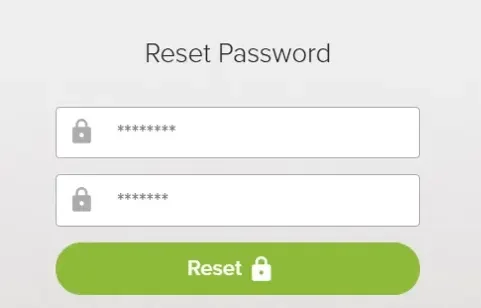
Step 9: Try the Reset Password flow with my own email
I had the last option left, which was checking the Reset Password functionality. So I clicked on Reset Password and added my email, but I got this error message stating:
We don't have that email address on file
which means the email is incorrect or does not belong to an account.
Step 10: Reason about the contradiction
I was confused about this logical bug that had just happened. I tried to change the employee email with my email, the request got a successful response but the email stayed the same, at the same time the employee was not able to log in using his email nor my email. And the forget password was not working for my email. Then I realised I should try resetting the password using the employee email and see what would happen.
Step 11: Request a reset with the Employee email
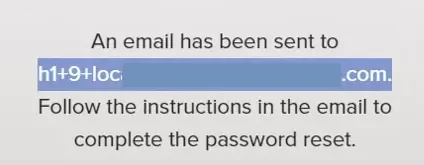
I added the employee email and hit on Send Email to Reset Password. I got a successful response stating:
A reset password email has been sent
Step 12: Wait for the email
The funny thing is that nothing was sent to the Employee email. I was kind of crazy about what was happening with this application.
Step 13: Give up for the night
I waited for 5 minutes and did not receive any email. The time was late, around 3:00 AM, so I shut down the laptop and told myself I would check it again tomorrow.
Step 14: The reset link arrives at my address
After I turned off my laptop, I got an email to my email inbox [redacted] containing the reset password link related to the Employee account. I started laughing.
Step 15: Reset the password and log in
I reopened the laptop and checked the email and yes, I changed the employee password and was inside his account.
Step 16: Observe the profile after takeover
After accessing the Employee account, I was also shocked. In the profile section, the email input was showing the Employee email and not my email, even though the valid email now is my email.
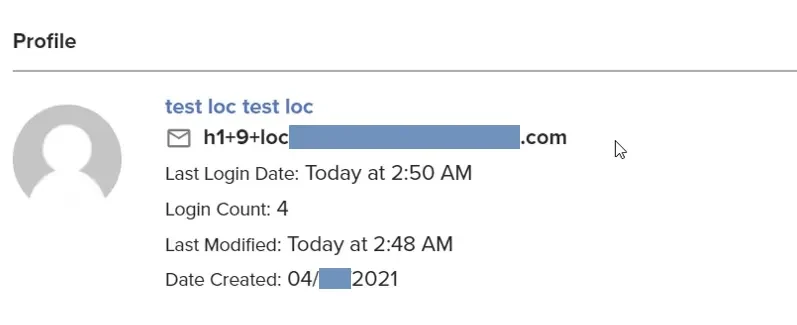
So it is like the UI showing the Employee email, but the actual email that is used in the backend is my email.
Summary of the chain
To summarise this bug: an admin can take over any employee or other admin account by modifying the change settings request and adding a new email parameter and value, then resetting the password by adding the employee email in the reset password input and receiving the reset link at his newly added email.
As a proof of concept, I did it on an account related to the private program and showed them how I was able to take over their account and deny them access to it.
Root cause
The Change Email endpoint appeared to accept an email parameter that the UI never sends, even though the interface treats the field as read-only. The response body still returned the original Employee email, so the change was not reflected in what the client was shown, while the backend stored the new address. The reset password flow accepted the Employee email in the form but delivered the reset link to the address I had injected. The UI protection on the email input did not prevent the email change from taking effect.
Impact
Impact here is unlimited. Any Manager or a user with Admin privileges can take over and access any other user found under the same Company. So you can steal information, modify data, or do some malicious activities inside user accounts. The precondition is an admin or manager account inside the target Company, and the takeover happens without the Employee's knowledge.
Fix
The report does not describe what was changed. The server should reject any email parameter on the change settings request when the caller is not changing their own address, and should enforce the rule that a Manager cannot change another Manager's or Employee's email address on the server side rather than only in the UI. The reset password flow should also be consistent about which address it looks the account up by and which address it delivers the link to.
Report timeline
- Apr 28, 2021: I recorded a video PoC and reported the issue to the private program on HackerOne.
- Apr 29, 2021: HackerOne Team triaged the report and decreased the severity from Critical to Medium.
- Apr 29, 2021: I asked them to reconsider the severity and to assess the bug according to the company business risk and the impact that can cause on company reputation and business.
- Mar 3, 2021: Further discussion and debate about the severity between me, HackerOne team and the Program internal team.
- Mar 25, 2021: Program Internal Team scored it as Medium, describing that you have to be an admin/manager in order to take over the other accounts. And they asked me to wait for further investigation about the root cause of this issue before issuing a bounty.
- July 9, 2021: I asked for an update about the issue.
- July 12, 2021: Team still investigating.
- July 21, 2021: Internal Team kept the severity as Medium and awarded me with a total of $600 ($500 bounty + $100 bonus).
To be honest, I think that this finding deserves a Critical severity taking into consideration the impact that can cause on the whole company.
Variants to test
- Add an
emailparameter to any profile or settings update request where the UI marks the field read-only, and check whether the response body still shows the old value while a password reset to the new address succeeds. A positive result is a reset link arriving at the address you injected. - Compare the address used to look up the account in the forgot password form with the address that receives the link. If they can diverge, try submitting the victim's address and receiving the mail at an address you control.
- Test the same parameter injection on other roles: invite, group settings and user creation endpoints, looking for a 200 OK whose body does not reflect the change but whose effect is visible on the next login or reset.
- After a suspected change, attempt login with the victim's original credentials and with the injected address plus the victim's password, and observe whether the error message differs between the two.
Business Logic Bugs and Bypassing Security Configurations are my favourites. I found some similar scenarios before, but this bug specifically was unique and the first time I found something like that.
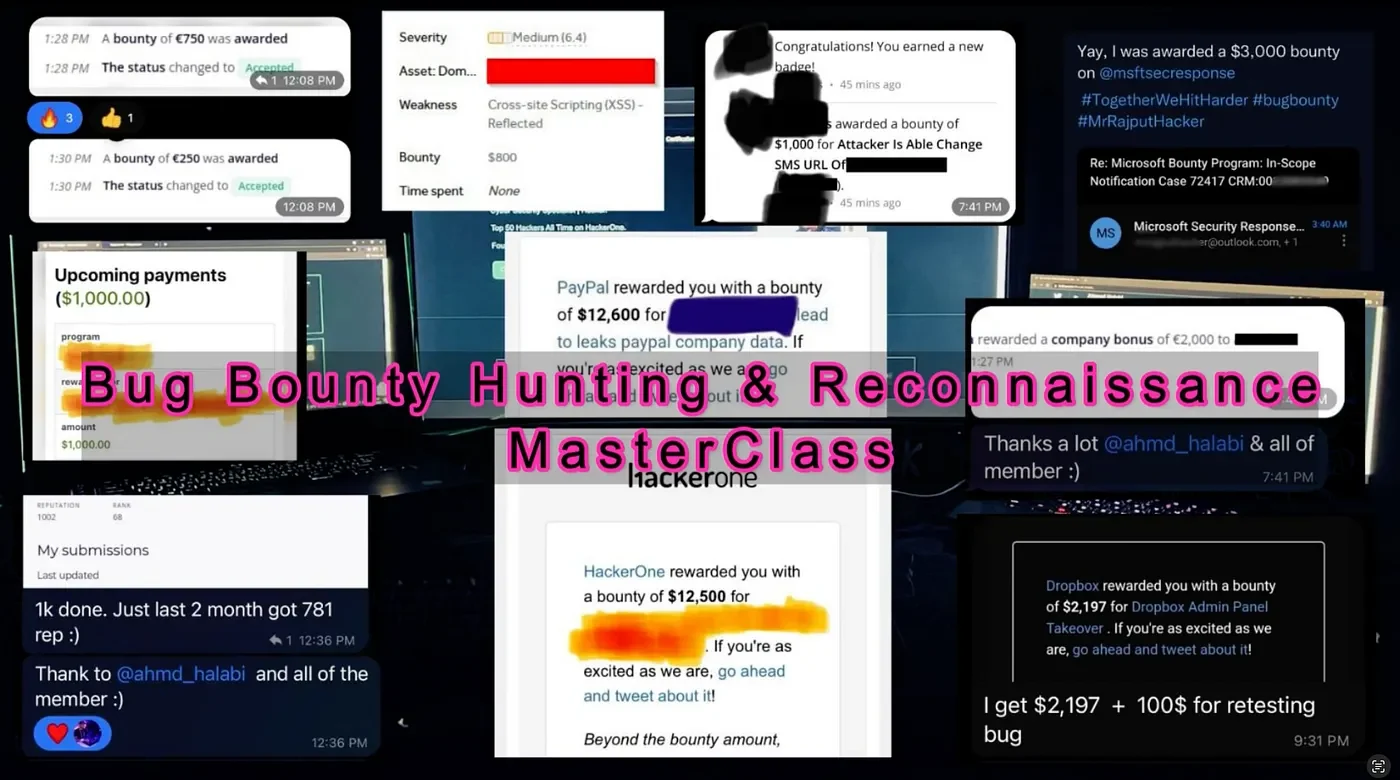
I created a private bug bounty course to help struggling hunters find valid bugs and earn bounties. If you are struggling in finding valid bugs or earning enough bounties, you just need to enrol and your mindset about approaching bug bounty hunting will improve. Check student bounties and feedback and enrol now: https://ahmadhalabi.net/course
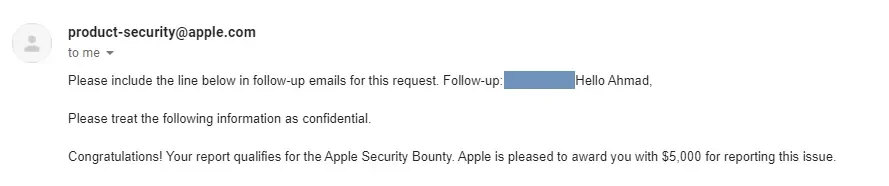
I am also willing to publish a writeup about a bug that I found in Apple which paid me $5000 for disclosing Apple users' address information and phone numbers by chaining an IDOR with Rate Limiting.
What happened, in plain words
A company ran a web application where each business (a "Company") has one or more managers and a set of employees. Managers could edit their own profile, but the screen deliberately did not let them change anyone else's email address: the email box was greyed out. The rule was enforced in the browser, but the server accepted an email value the interface never lets you send.
By editing the request that the browser sends when saving a profile, I added an extra field carrying my own email address. The server returned a successful response, and later the reset link arrived at my address, while the screen kept showing the old one. The employee could no longer log in, and I could not log in with my address either, because the login check and the stored address disagreed. The password reset form accepted the employee's old address, but the reset link arrived at my address. I received the link, set a new password, and was inside the employee's account. The employee never knew.
This is called an account takeover: gaining control of someone else's account. The underlying mistake is a security misconfiguration that leads to a business logic error, so a sequence of legitimate-looking actions produces an illegitimate result.
Background: the application and its users
In April I was invited to a new private program on HackerOne. A bug bounty program is an arrangement where a company invites independent researchers to test its systems and pays for valid findings. A private program means only invited researchers can see it and submit reports.
The application has two types of users:
- Admin/Manager
- User/Employee
A Manager creates a Group, which plays the role of a Company, and can invite Employees to his Company/Group. Think of it like a shared workspace: one person opens the workspace, and colleagues are invited into it.
The important thing to note: a Manager cannot change any other Manager or Employee email address inside his Company. A Manager can only change his own email address. There is a protection on the Email Address input where they do not allow you to change the email address.
An email address here is not just contact information. It is the identifier the application uses to decide who you are when you log in and where password reset links are sent. Whoever controls the address on an account effectively controls the account.
I found a business logic flaw in the Change Email endpoint that allowed me to change the email of any Employee and then reset the password, leading to complete Account Takeover without the Employee's knowledge.
An endpoint is a specific address on a server that performs one job, such as "save profile changes" or "send a password reset". Your browser talks to endpoints all day; you just never see them.
Before this: why I looked for logic bugs
Before this I had found some bugs related to Privilege Escalation, CSRF and Information Disclosure of PII information, but all were duplicates by other hackers.
- Privilege escalation means getting more permissions than you should have, for example a normal user acting like an administrator.
- CSRF (Cross-Site Request Forgery) means tricking a logged-in user's browser into sending a request the user did not intend.
- Information disclosure of PII means exposing personal data (PII stands for personally identifiable information) such as names, addresses or phone numbers.
- A duplicate is a report of a bug that someone else already reported first. Most programs pay only the first reporter.
After that I realised that all usual bugs would end up duplicates, so I decided to avoid wasting additional time and look for a unique bug related to Application Logic.
Application logic is the set of rules the application follows: who may do what, in which order, and under which conditions. Logic bugs are interesting because scanners and checklists rarely find them; you have to understand what the application is supposed to do and then do something slightly different.
The proof of concept assumes I am an Admin in the organisation and I want to change the email of an Employee in order to steal some info from his account or insert some data that puts him in trouble with the manager. In a real attack scenario you will not have employee credentials, but here I was testing ethically so I had to identify the mistake happening.
A proof of concept (PoC) is a demonstration that a bug is real, usually with the smallest set of steps that shows the effect. Credentials are the username and password used to log in.
Finding it
The email field in the Employee profile is protected in the UI: it is greyed out and cannot be edited or modified. UI means user interface, the part of the application you see and click in your browser.
That protection is only on the client side, so the question was whether the server would accept an email value that the interface never lets you send.
This distinction matters for everything that follows. Your browser is the client; the machine that stores data and makes decisions is the server. When a page greys out a box, that is the browser refusing to let you type. It says nothing about what the server will do if a request containing that value arrives anyway. A useful comparison: a form on a clipboard at a reception desk might have a box marked "staff only", but if the person at the back office processes every form handed in without checking, the marking on the form is decoration.
Exploitation
Step 1: Log in as admin and open the Users section
I logged in with my admin credentials then navigated to the Users section.
Logging in gives the browser a way to prove, on every later request, that it is acting for that account. Applications usually do this with a session cookie, a small piece of data the server gives the browser after login and the browser sends back with each request, or with a token, a similar value carried in a header or in the request body. Either way, the server uses it to know who is asking. Without it, the server would treat every request as coming from a stranger.
Step 2: Open the Employee profile
I clicked on the Employee profile and I noticed that the email input cannot be edited or modified.
The screenshot relates to the Employee profile form, where the Email Address input is grey and cannot be modified. See the colour of the Email Address input is grey and cannot be modified.
Step 3: Change another field and intercept the request
I added random characters in the First name and Last name inputs and clicked Save and intercepted the request.
Intercepting a request means pausing it between the browser and the server so you can read and edit it before it is sent. People do this with a proxy, a tool that sits between browser and server. The browser is configured to send its traffic through the proxy; the proxy shows each request, and you can change it and then let it continue. Think of a postal worker who is allowed to open your letter, read it, rewrite a line and then seal it again before delivery.
Why change the first and last name first? Because the email box is locked, so the only way to produce a save request at all is to change something the page does allow. The request that leaves the browser then contains the fields the page considers editable. That request is the template I wanted to modify.
Step 4: Add an email parameter to the request body
In the request, I added an additional parameter for email to study the response status and body. So I added a parameter for email to the request body like the following:
"email":"[redacted]"
This is one field of a JSON body. JSON is a text format for structured data: names in quotes, a colon, then a value, with entries separated by commas and the whole thing wrapped in curly braces. The request body is the part of the request that carries the data being submitted, as opposed to the address line and headers. A parameter is simply one named value in that data, here the name email and the value [redacted].
The +test part is a common trick: many mail providers treat [redacted] as the same inbox as [redacted], so you can create a distinct-looking address that still delivers to you. That makes it easy to see which address a message was really sent to.
I assumed that the email parameter is active on the server side and added my email as a new modification. Then I forwarded the request.
Forwarding means letting the paused request continue to the server unchanged apart from your edits.
The screenshot relates to the request with the added email parameter.
Step 5: Read the response
I got a response with 200 OK status code and body showing me the original email address that belongs to the Employee.
A status code is a three-digit number the server returns to summarise what happened. 200 OK means the request was accepted and processed without error. The response body is the data the server sends back, here a copy of the profile as the server chose to present it.
Step 6: Interpret the response
This did not make sense to me because the response was successful. I was sure there was something weird happening in the backend. Because if not, the application should either show an error in the response, or not proceed with the request, or proceed the request without showing a response because it is not successful. But since I got this response I was sure that my email may have passed to the backend successfully.
The backend is the server-side part of the application: the code and database that actually store and change data. The page you see is only a view of it. A successful status with the old value in the body is a contradiction worth chasing: either the server ignored my extra field, or it accepted it and the body is simply not showing the new value. Both explanations fit the same response, so the next steps are about telling them apart.
Step 7: Try to log in as the Employee
I started thinking about ways to verify my theory. So here is what I did. I logged out from my admin account and tried to log in with the target Employee credentials. I was surprised that the employee credentials did not succeed in logging in after I made the email change request.
I got an error stating:
Information provided does not match our records
The screenshot relates to the failed login attempt. This is a strong clue: if the server had ignored my extra field, the employee's normal login would still work. It no longer did, which means something about the account changed.
Step 8: Reason about the failed login
After seeing this, I was sure that my email would work with the employee password, but I was also surprised that they did not have a successful login and the same error message appeared.
If the stored address had simply become mine, then logging in with my address and the employee's password should have worked. It did not. So the state of the account was stranger than a simple swap: the login check and the stored address were not agreeing with each other.
Step 9: Try the Reset Password flow with my own email
I had the last option left, which was checking the Reset Password functionality. So I clicked on Reset Password and added my email, but I got this error message stating:
We don't have that email address on file
which means the email is incorrect or does not belong to an account.
A password reset flow is the feature that emails you a link so you can set a new password when you have forgotten yours. The form usually asks for your address, looks up the account, and sends the link to the address on that account. The message above says the lookup failed for my address, so as far as the reset form was concerned, my address belonged to no account.
Step 10: Reason about the contradiction
I was confused about this logical bug that had just happened. I tried to change the employee email with my email, the request got a successful response but the email stayed the same, at the same time the employee was not able to log in using his email nor my email. And the forget password was not working for my email. Then I realised I should try resetting the password using the employee email and see what would happen.
Three facts now sat side by side: the save request succeeded, the employee could not log in, and my address was unknown to the reset form. The one thing I had not tried was asking for a reset using the employee's own address. If the reset form looks accounts up by one address but sends mail to another, that test would reveal it.
Step 11: Request a reset with the Employee email
I added the employee email and hit on Send Email to Reset Password. I got a successful response stating:
A reset password email has been sent
The screenshot relates to the reset password confirmation.
Step 12: Wait for the email
The funny thing is that nothing was sent to the Employee email. I was kind of crazy about what was happening with this application.
Step 13: Give up for the night
I waited for 5 minutes and did not receive any email. The time was late, around 3:00 AM, so I shut down the laptop and told myself I would check it again tomorrow.
Step 14: The reset link arrives at my address
After I turned off my laptop, I got an email to my email inbox [redacted] containing the reset password link related to the Employee account. I started laughing.
This is the moment the two halves of the bug meet. The reset form accepted the employee's address, so the lookup succeeded. But the message went to the address stored in the backend, which was the one I had injected. The reset link is the key to the account: whoever receives it can set a new password.
Step 15: Reset the password and log in
I reopened the laptop and checked the email and yes, I changed the employee password and was inside his account.
The screenshot relates to the reset email and the resulting login.
Step 16: Observe the profile after takeover
After accessing the Employee account, I was also shocked. In the profile section, the email input was showing the Employee email and not my email, even though the valid email now is my email.
The screenshot relates to the profile page after the takeover.
So it is like the UI showing Employee email, but the actual email that is used in the backend is my email. The page is a view built from one source, while login and password reset use another. That split is exactly why the earlier steps looked contradictory.
Summary of the chain
To summarise this bug: an admin can take over any employee or other admin account by modifying the change settings request and adding a new email parameter and value, then resetting the password by adding the employee email in the reset password input and receiving the reset link at his newly added email.
As a proof of concept, I did it on an account related to the private program and showed them how I was able to take over their account and deny them access to it.
Root cause
The Change Email endpoint appeared to accept an email parameter that the UI never sends, even though the interface treats the field as read-only. The response body still returned the original Employee email, so the change was not reflected in what the client was shown, while the backend stored the new address. The reset password flow accepted the Employee email in the form but delivered the reset link to the address I had injected. The UI protection on the email input did not prevent the email change from taking effect.
In everyday terms: the front desk refused to accept a change on the form, but the back office accepted the same change when it arrived by another route, and two different clerks used two different lists to decide where to send the mail.
Impact
Impact here is unlimited. Any Manager or a user with Admin privileges can take over and access any other user found under the same Company. So you can steal information, modify data, or do some malicious activities inside user accounts. The precondition is an admin or manager account inside the target Company, and the takeover happens without the Employee's knowledge.
Precondition means what an attacker must already have before the attack works. Here it is a manager account in the same company, which is a real limit, but inside a company it is enough to reach every colleague.
Fix
The report does not describe what was changed. The server should reject any email parameter on the change settings request when the caller is not changing their own address, and should enforce the rule that a Manager cannot change another Manager's or Employee's email address on the server side rather than only in the UI. The reset password flow should also be consistent about which address it looks the account up by and which address it delivers the link to.
The general lesson: every rule shown in the interface must also be checked on the server, because the interface can always be bypassed.
Report timeline
- Apr 28, 2021: I recorded a video PoC and reported the issue to the private program on HackerOne.
- Apr 29, 2021: HackerOne Team triaged the report and decreased the severity from Critical to Medium.
- Apr 29, 2021: I asked them to reconsider the severity and to assess the bug according to the company business risk and the impact that can cause on company reputation and business.
- Mar 3, 2021: Further discussion and debate about the severity between me, HackerOne team and the Program internal team.
- Mar 25, 2021: Program Internal Team scored it as Medium, describing that you have to be an admin/manager in order to take over the other accounts. And they asked me to wait for further investigation about the root cause of this issue before issuing a bounty.
- July 9, 2021: I asked for an update about the issue.
- July 12, 2021: Team still investigating.
- July 21, 2021: Internal Team kept the severity as Medium and awarded me with a total of $600 ($500 bounty + $100 bonus).
Triaged means the program confirmed the report is valid and started handling it. Severity is the rating of how serious a bug is, often Critical, High, Medium or Low. A bounty is the payment for a valid report, and a bonus is an extra amount on top.
To be honest, I think that this finding deserves a Critical severity taking into consideration the impact that can cause on the whole company.
Variants to test
If you want to look for the same pattern in an application you are allowed to test:
- Add an
emailparameter to any profile or settings update request where the UI marks the field read-only, and check whether the response body still shows the old value while a password reset to the new address succeeds. A positive result is a reset link arriving at the address you injected. - Compare the address used to look up the account in the forgot password form with the address that receives the link. If they can diverge, try submitting the victim's address and receiving the mail at an address you control.
- Test the same parameter injection on other roles: invite, group settings and user creation endpoints, looking for a 200 OK whose body does not reflect the change but whose effect is visible on the next login or reset.
- After a suspected change, attempt login with the victim's original credentials and with the injected address plus the victim's password, and observe whether the error message differs between the two.
Business Logic Bugs and Bypassing Security Configurations are my favourites. I found some similar scenarios before, but this bug specifically was unique and the first time I found something like that.
I created a private bug bounty course to help struggling hunters find valid bugs and earn bounties. If you are struggling in finding valid bugs or earning enough bounties, you just need to enrol and your mindset about approaching bug bounty hunting will improve. Check student bounties and feedback and enrol now: https://ahmadhalabi.net/course
I am also willing to publish a writeup about a bug that I found in Apple which paid me $5000 for disclosing Apple users' address information and phone numbers by chaining an IDOR with Rate Limiting.
Glossary
- Account takeover: gaining control of another person's account, usually by changing its password or email.
- Application logic: the rules an application follows about who may do what, in which order and under which conditions.
- Backend: the server-side code and database that store and change data, as opposed to the page you see.
- Bonus: an extra payment on top of a bounty.
- Bounty: the payment a bug bounty program gives for a valid report.
- Bug bounty program: an arrangement where a company invites researchers to test its systems and pays for valid findings.
- Business logic flaw: a bug where the application follows its programmed rules but those rules are wrong or incomplete, so normal-looking actions produce a harmful result.
- Client: the program on your side, usually your browser, that sends requests to a server.
- Client-side control: a restriction enforced only in the browser, which can be bypassed by editing the request.
- Credentials: the username and password used to log in.
- CSRF (Cross-Site Request Forgery): tricking a logged-in user's browser into sending a request the user did not intend.
- Duplicate: a report of a bug that someone else already reported first.
- Endpoint: a specific address on a server that performs one job, such as saving a profile or sending a reset email.
- Forward (a request): letting a paused request continue to the server.
- Information disclosure: exposing data that should not be visible.
- Intercept (a request): pausing a request between browser and server so you can read and edit it.
- JSON: a text format for structured data, with names in quotes, a colon, a value, and entries separated by commas.
- Parameter: one named value in a request, such as
emailwith a particular address. - Password reset flow: the feature that emails a link so a user can set a new password.
- PII (personally identifiable information): data that identifies a person, such as a name, address or phone number.
- Precondition: what an attacker must already have for an attack to work.
- Private program: a bug bounty program visible only to invited researchers.
- Privilege escalation: getting more permissions than you should have.
- Proof of concept (PoC): a demonstration that a bug is real, usually with the smallest set of steps that shows the effect.
- Proxy: a tool that sits between browser and server so you can read and edit requests.
- Request body: the part of a request that carries the submitted data, as opposed to the address line and headers.
- Response body: the data a server sends back.
- Root cause: the underlying mistake that makes a bug possible.
- Server: the machine that stores data and makes decisions in response to requests.
- Session cookie: a small value given to the browser at login and sent back with each request so the server knows who is asking.
- Severity: the rating of how serious a bug is, often Critical, High, Medium or Low.
- Status code: a three-digit number summarising what the server did, such as
200 OKfor success. - Token: a value carried in a header or body that proves who is making a request, similar in purpose to a session cookie.
- Triaged: confirmed as valid by the program and taken into handling.
- UI (user interface): the part of an application you see and click in your browser.





