Escalating Privileges via Third-Party Windows Installers
The Atera Agent MSI installer's repair function ran executables as SYSTEM from a world-writable temp folder, allowing a standard user to place a malicious DLL and gain SYSTEM privileges. A second flaw let a user freeze a command window spawned by the repair and open a browser to launch a SYSTEM command prompt.
 Published on mandiant.com
Picture this: you've finally made it past the perimeter of a highly secured organization. You're feeling pretty pleased with yourself, until you realize you only have Active Directory privileges of a newly hired intern and the thrill trickles away.
The full write-up lives on its author's site
It belongs to its author, so we link to it rather than copy it. The other two tabs are our own rewrites, checked against it.
Context
Windows Installer (MSI) files are database files that hold the data and instructions for installing and uninstalling software on Windows. Organisations like them for their standardised format, which makes installation, maintenance and removal easy to manage. Developers like them because Custom Actions let an MSI run extra code during installation, removal or repair.
When software is installed from an MSI, Windows caches the file in C:\Windows\Installer under a randomised filename made of alphanumeric characters followed by .msi. That cache is what makes the "repair" feature available to standard users: it fixes missing files, broken shortcuts, incorrect registry entries and other malfunctions. The important detail is that during a repair, operations such as file creation or execution can be triggered from an NT AUTHORITY\SYSTEM context even when a standard user started the repair.
This write-up looks at two misconfigurations in Atera's Windows installer, CVE-2023-26077 and CVE-2023-26078, both reachable through the MSI repair path, and at a tool for finding more of the same.
Setup
The analysis was done against the MSI installer for Atera Agent 1.8.3.6. The tool used to observe behaviour is Microsoft's Process Monitor (ProcMon), configured to show only file operations performed by a NT AUTHORITY\SYSTEM process inside folders where standard users can write.
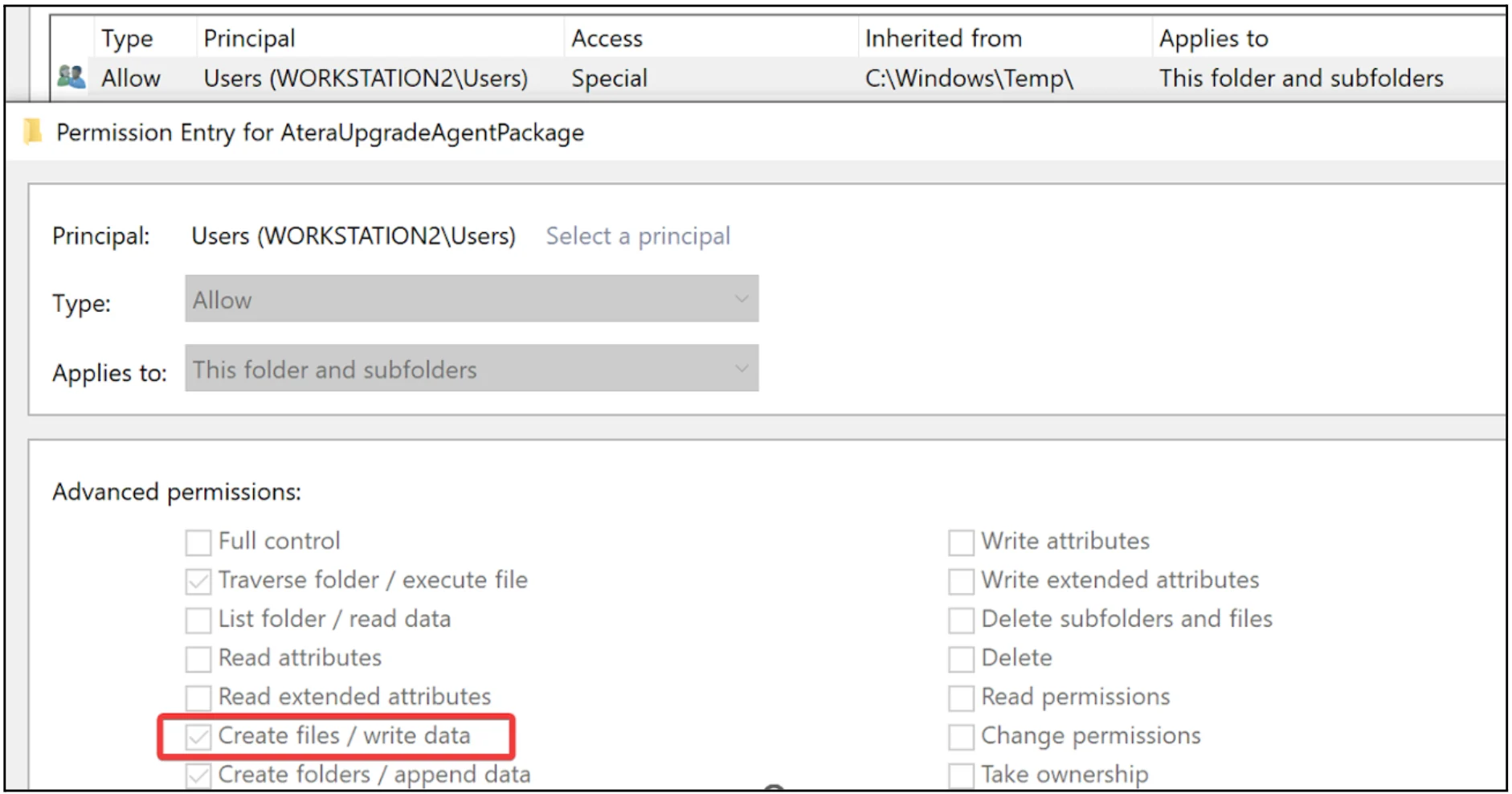
Two facts about default Windows permissions drive the whole technique. Standard users can write to C:\Windows\Temp and C:\ProgramData, and because of permission inheritance they may also have excessive privileges on subfolders of those paths. Those paths therefore belong in the ProcMon filter.
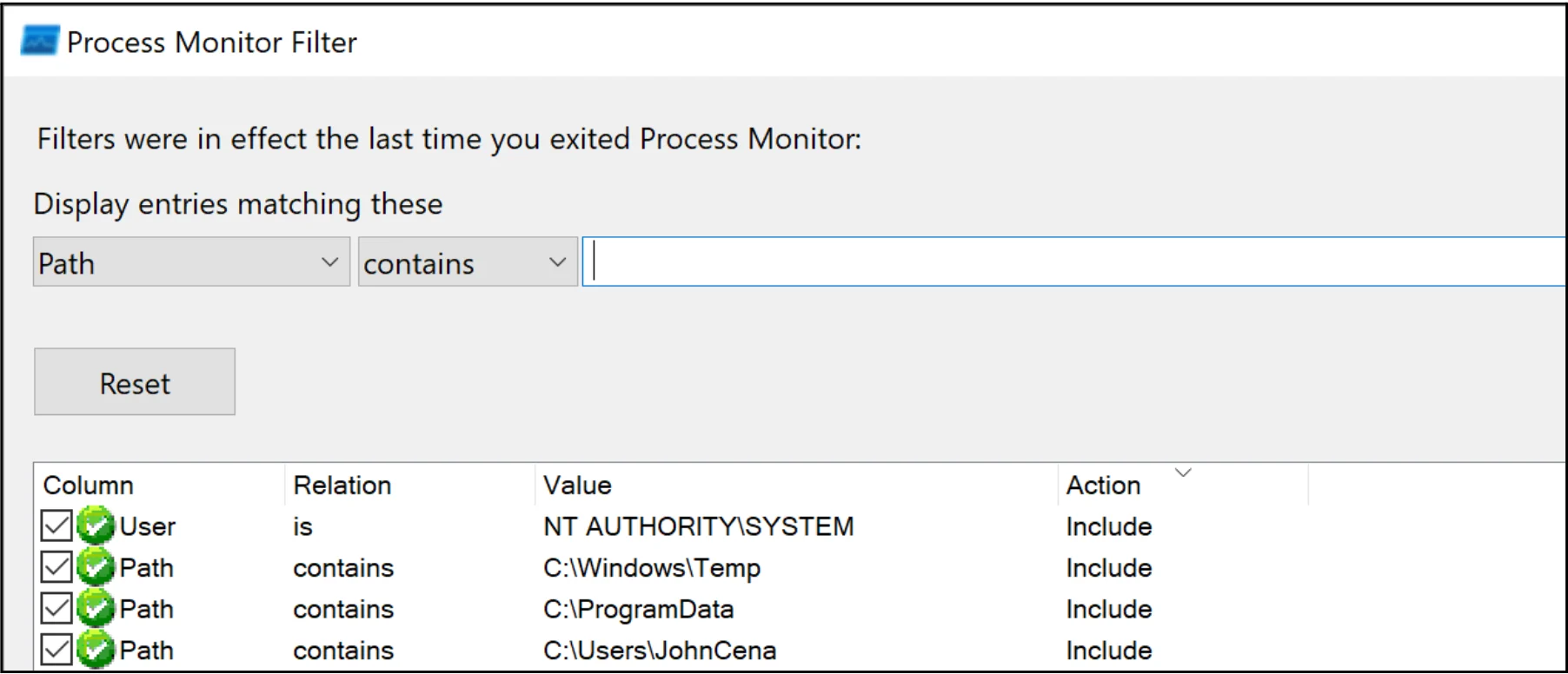
With the filters in place, a repair can be started either through the Windows Installer API or from the command line:
msiexec.exe /fa C:\Windows\Installer\[XXXXX].msi
Finding it
Running the repair on the Atera Agent [redacted] MSI under those filters shows AgentPackageUpgradeAgent.exe being executed as NT AUTHORITY\SYSTEM from C:\Windows\Temp\AteraUpgradeAgentPackage. The same process then tries to load DLL files that are not present, and it looks for them in that same folder.
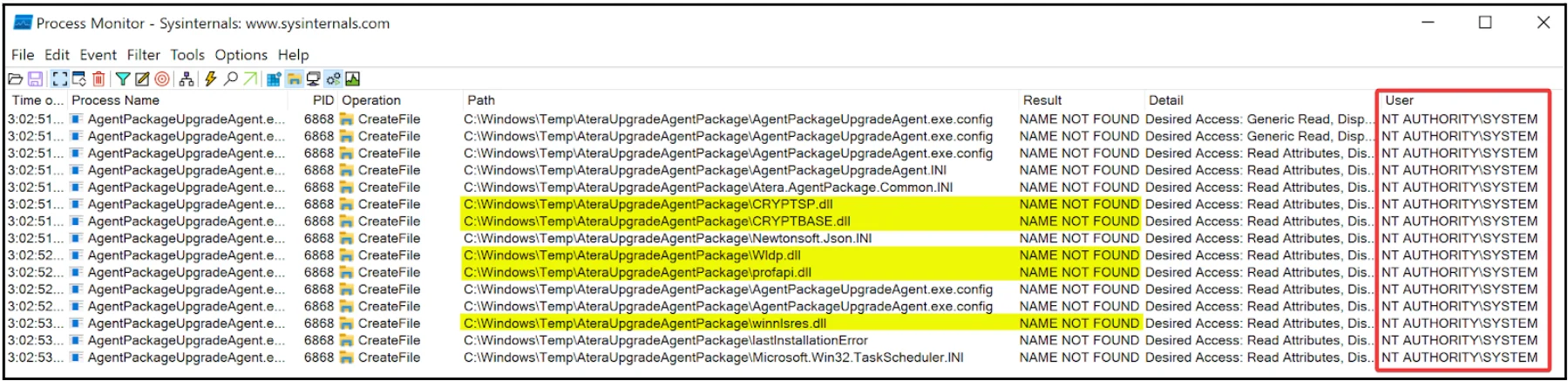
That combination is the problem. The folder sits under C:\Windows\Temp, so it inherits permissions from it, and standard users can write there. A privileged process loading a missing DLL from a directory a standard user controls is a DLL hijacking condition.
Exploitation
Step 1: plant the DLL
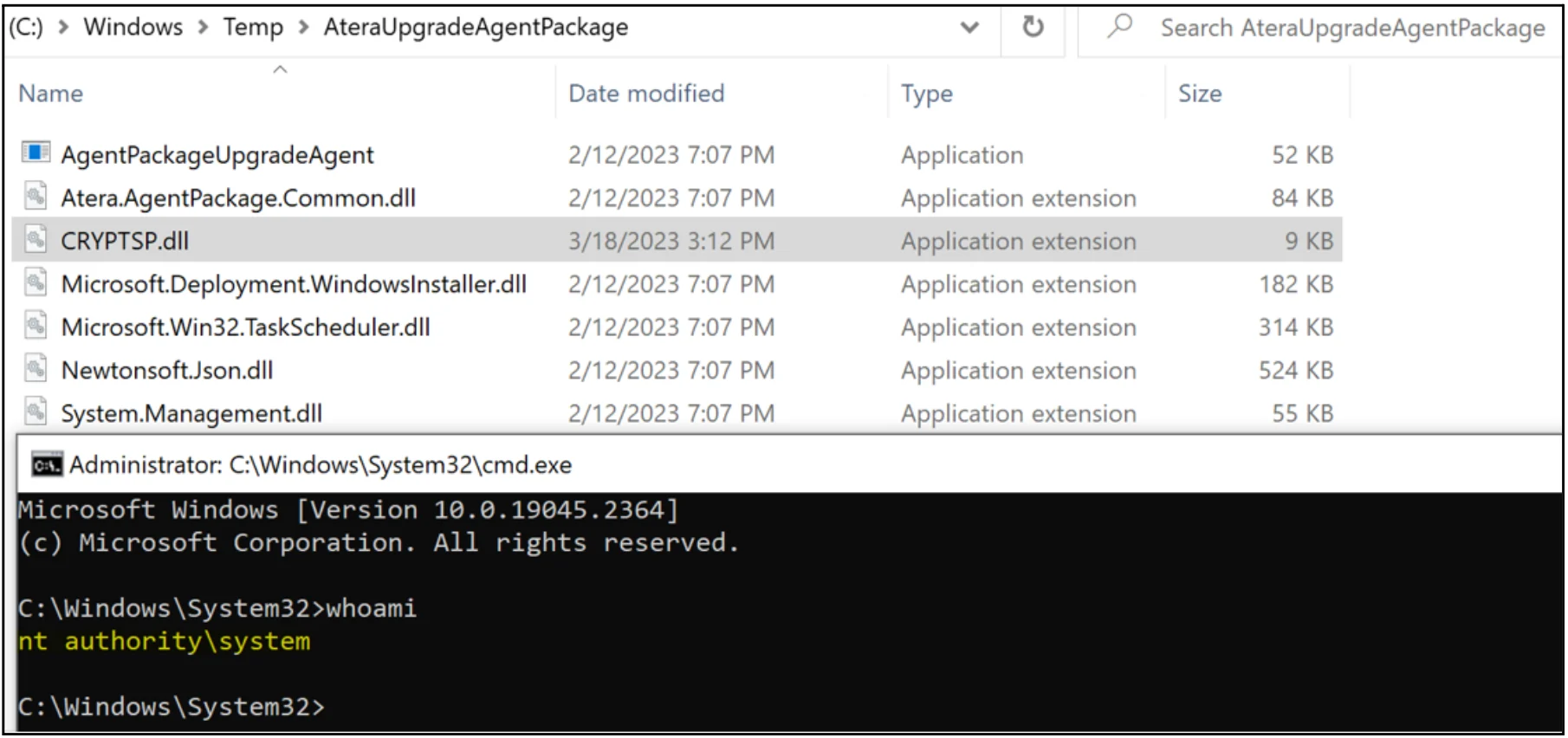
Drop a payload into C:\Windows\Temp\AteraUpgradeAgentPackage using the name of one of the DLLs the privileged process fails to find, for example CRYPTSP.dll.
Step 2: trigger the repair
Run the MSI repair. AgentPackageUpgradeAgent.exe starts as NT AUTHORITY\SYSTEM, resolves the missing DLL from the writable folder, and loads the payload instead. The result is a Command Prompt running as NT AUTHORITY\SYSTEM.
Step 3 (second bug): catch the console window
A separate misconfiguration in the same installer involves Custom Actions that run system commands spawning the Windows Console Host, conhost.exe, as a child process. conhost.exe hosts and manages console windows; when a process has it as a child, a command window opens, and if that process is elevated the window is an escalation opportunity.
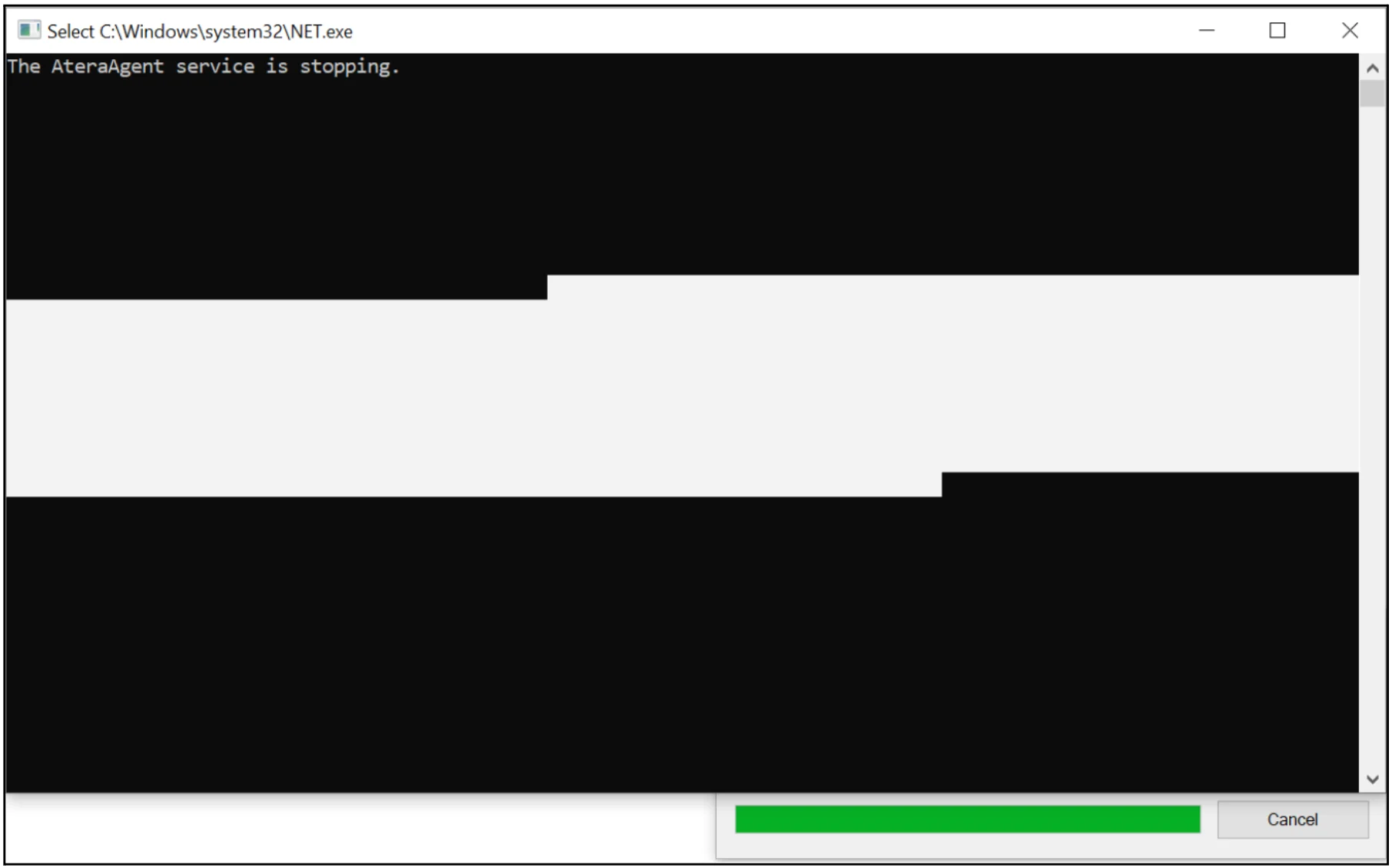
During the Atera repair, net.exe and taskkill.exe run as NT AUTHORITY\SYSTEM, and both spawn conhost.exe. The command window appears only briefly, but it can be frozen by quickly selecting part of the window with the mouse.

Step 4: from the console window to a browser
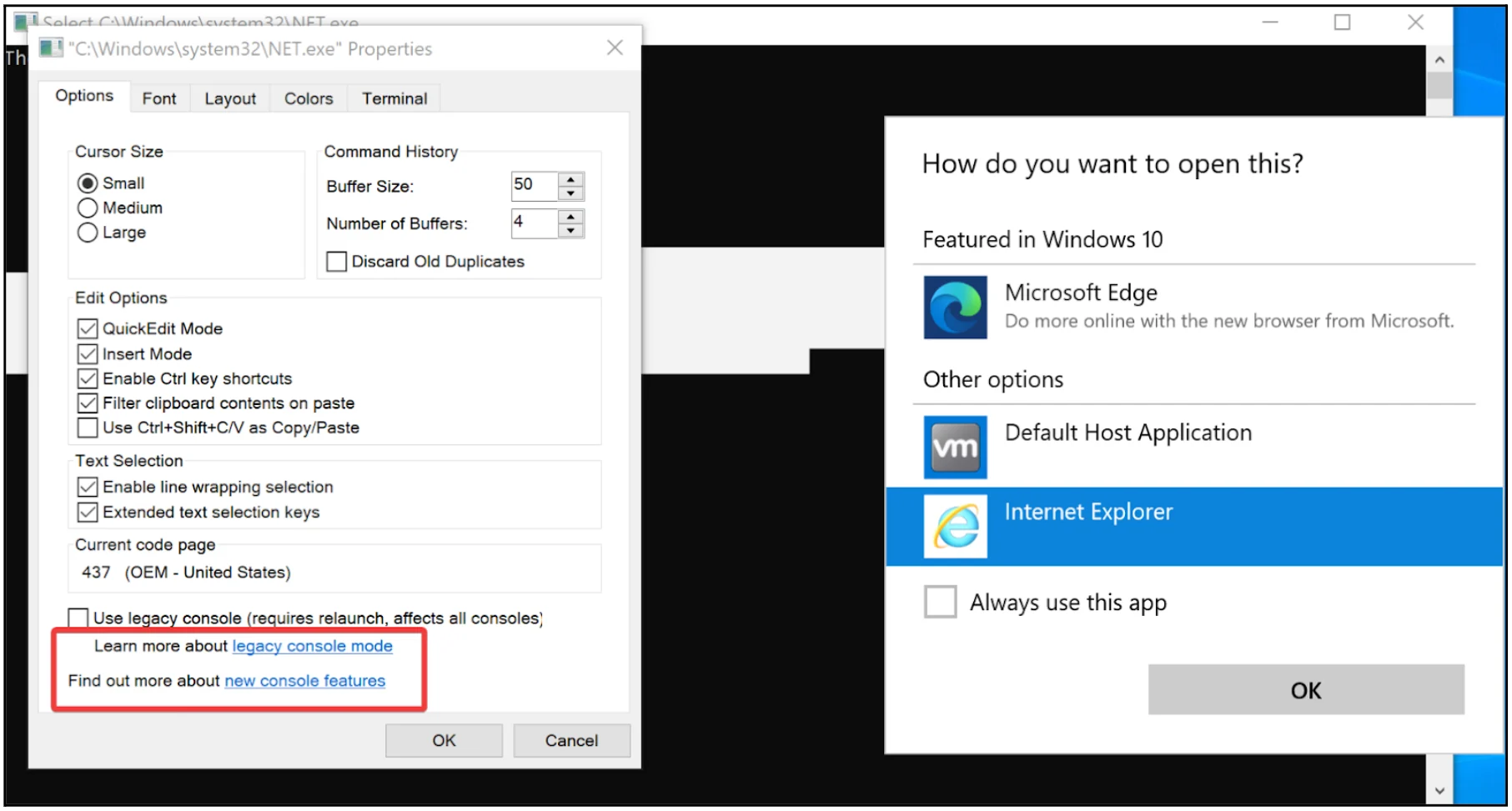
Open the frozen window's "Properties". It contains hyperlinks that can be used to launch a web browser as NT AUTHORITY\SYSTEM. NT AUTHORITY\SYSTEM has no browser configured to open hyperlinks by default, so the attacker is prompted to pick one.
Step 5: from the browser to a shell
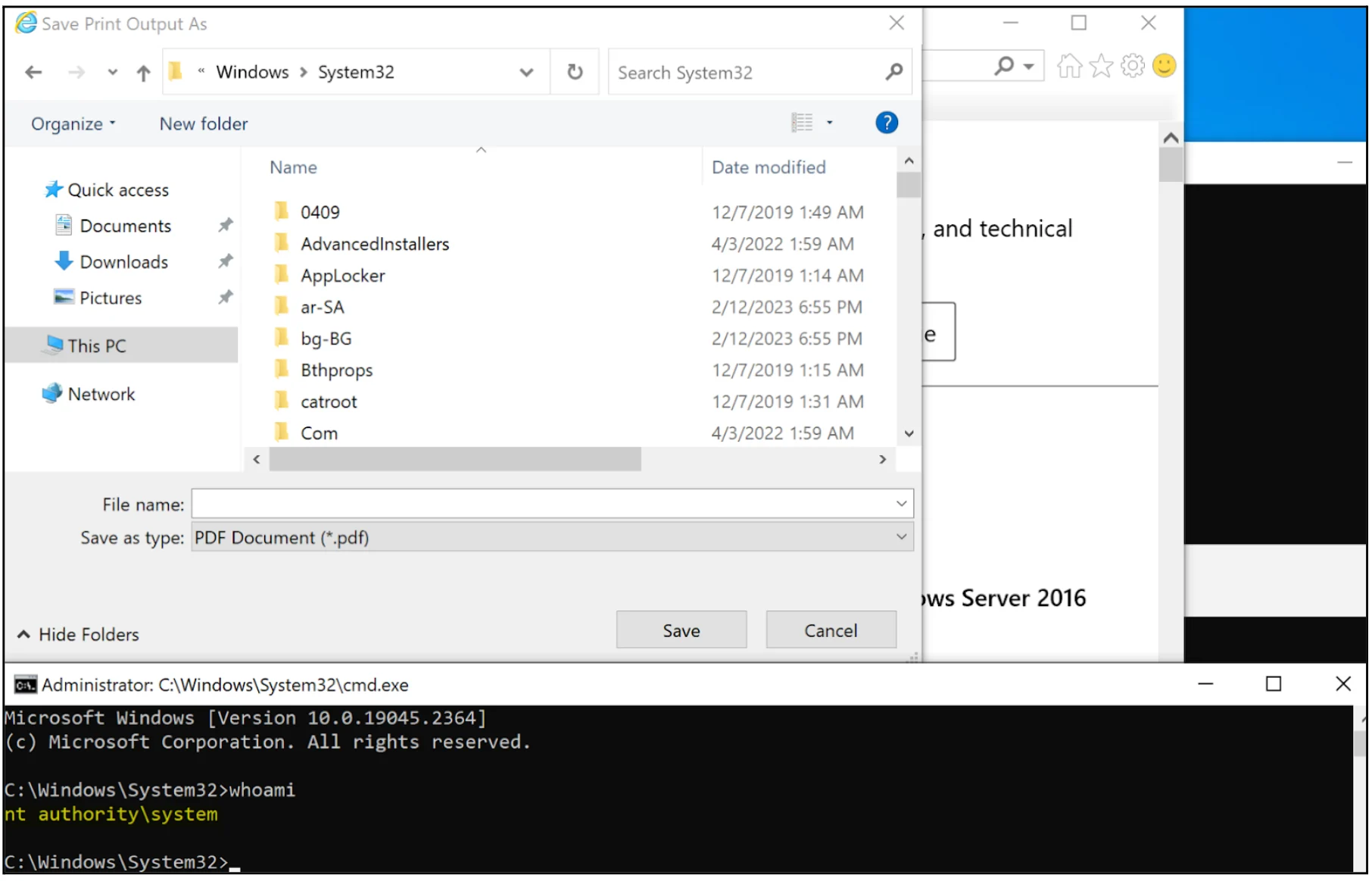
With a browser chosen, open the Print menu, print the web page to PDF to launch File Explorer, and from there execute Command Prompt as NT AUTHORITY\SYSTEM.
Root cause
Both bugs come from Custom Actions that perform privileged work in locations a standard user can write to. In CVE-2023-26077, a SYSTEM process executes from C:\Windows\Temp\AteraUpgradeAgentPackage and loads DLLs from it; the folder inherits its permissions from C:\Windows\Temp, where standard users have write access, so the DLL search resolves to attacker-controlled content. In CVE-2023-26078, a Custom Action runs net.exe and taskkill.exe as SYSTEM, which spawns conhost.exe and briefly exposes an interactive console window whose Properties dialog can be used to start other processes as SYSTEM.
The repair feature is available to standard users, and the writable locations are ordinary Windows defaults. The report frames these as misconfigurations that are trivial to identify and exploit, and notes that Mandiant's red team found numerous similar vulnerabilities in third-party Windows installers and used them during assessments.
Impact
A standard user on a machine with the affected Atera Agent installed can elevate to NT AUTHORITY\SYSTEM locally. The report frames this in red team terms: local privilege escalation is often overlooked in favour of domain escalation, but a successful local exploit can segue into more significant attacks at domain level, as shown by prior research on AD CS misconfigurations and SCCM network access account credential recovery.
Fix
Atera fixed CVE-2023-26077 in version 1.8.3.7 by hardening the C:\Windows\Temp\AteraUpgradeAgent folder so standard users cannot write files to it, which blocks the DLL hijacking. CVE-2023-26078 was addressed in version 1.8.4.9.
The general guidance in the report is for developers to review Custom Actions thoroughly so attackers cannot hijack SYSTEM operations triggered by repairs. When writing Custom Actions, remember that standard users can write to these locations, and may also write to their subfolders through inheritance:
C:\Windows\TempC:\ProgramDataC:\(ability to create folders)C:\Users\XXXX\*
Any privileged process using these folders must be appropriately secured. Using C:\Program Files or C:\Program Files (x86) instead can hinder hijacking, since those folders are protected by default with administrative privileges. For commands that spawn conhost.exe, the report recommends WixQuietExec, which runs system commands silently in the background without displaying a command window, significantly reducing the chance of hijacking.
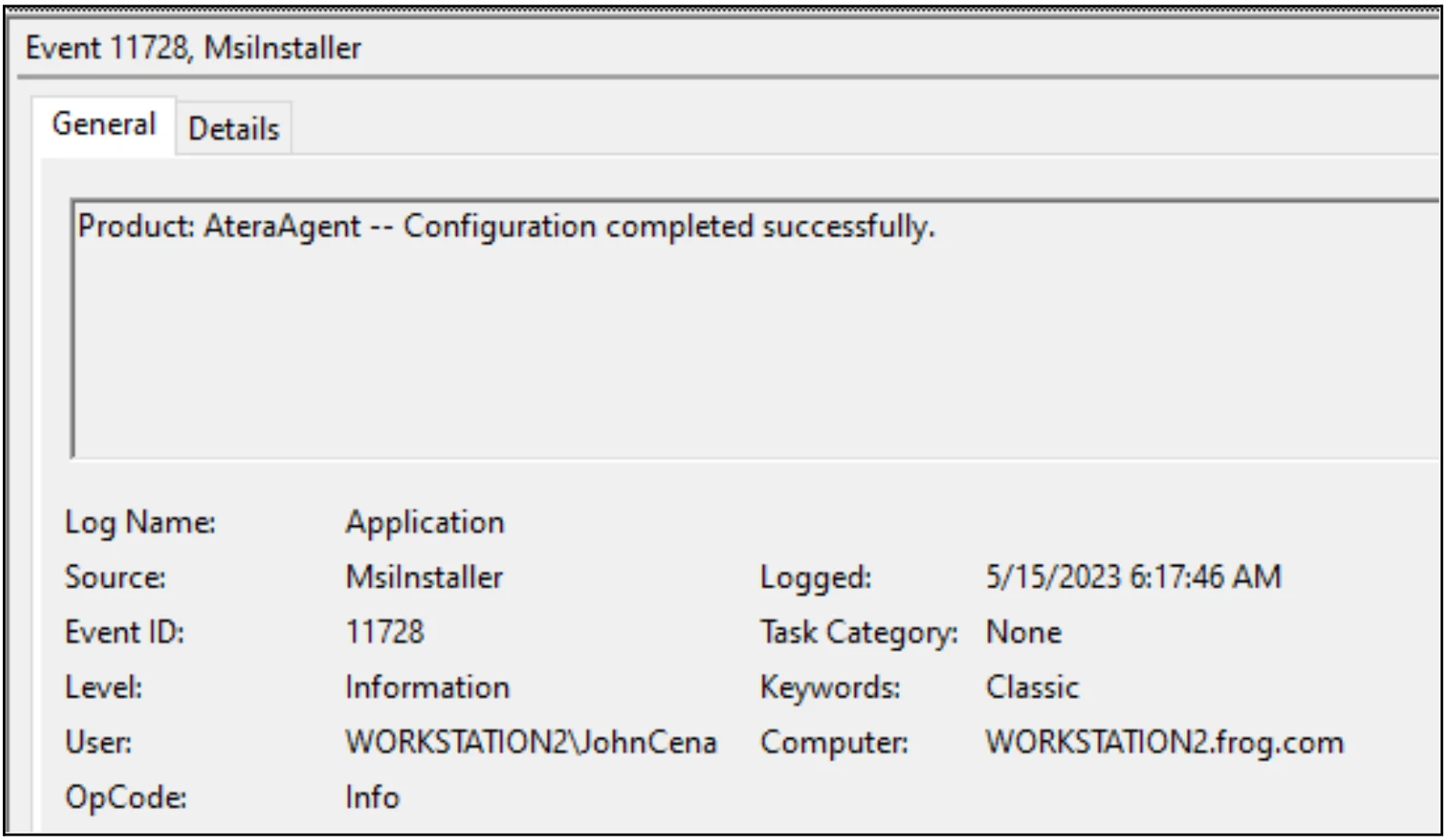
For detection, incident responders and security operations teams can monitor Application event ID 11728 originating from non-administrator users. It is specifically associated with MSI repairs and records the affected product, the user involved and the date.
Variants to test
- Other installers with privileged Custom Actions in writable paths. Run a repair under ProcMon filtered to
SYSTEMfile operations inC:\Windows\TempandC:\ProgramData. A positive result is aSYSTEMprocess executing from, or loading a missing DLL from, a folder a standard user can write to. - Missing-DLL loads from inherited-permission subfolders. Look for a privileged process probing for DLLs in a subfolder whose permissions are inherited from a writable parent.
- Console-spawning Custom Actions. Look for repair-time execution of
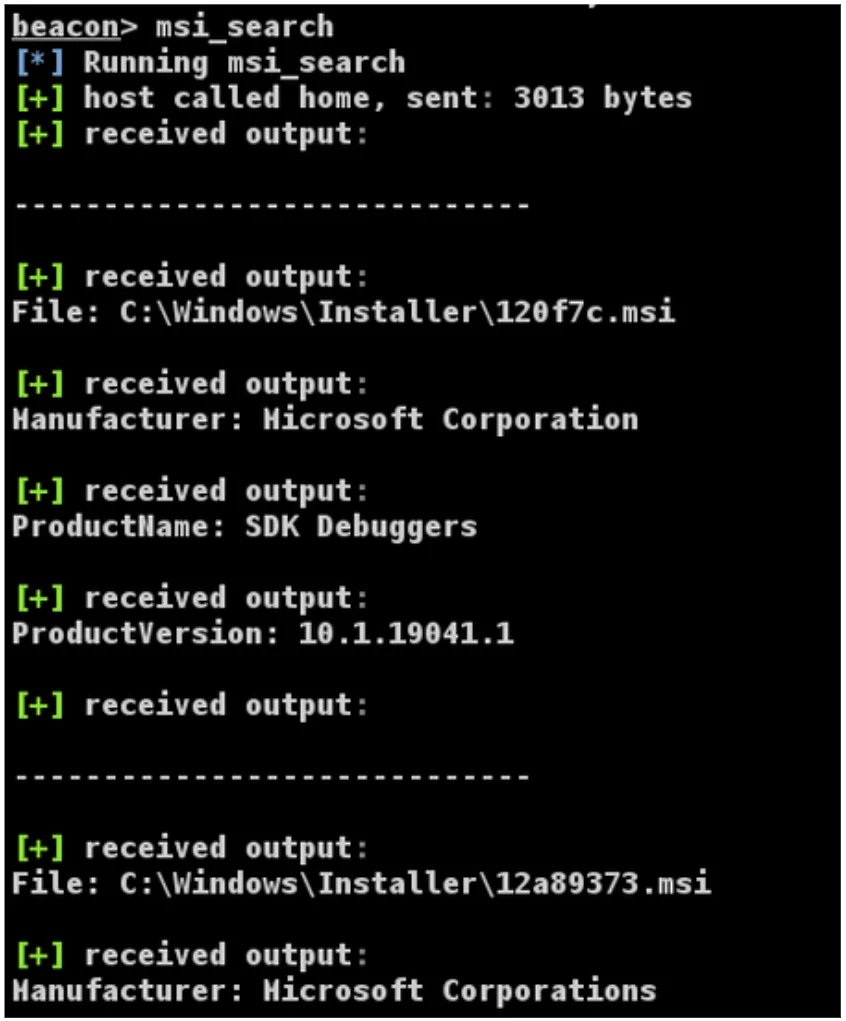
net.exe,taskkill.exeor similar commands asSYSTEMwithconhost.exeas a child. A positive result is a command window you can freeze and whose Properties hyperlinks launch a browser asSYSTEM. - Enumerating cached MSIs. Because cached filenames are random, use the msi_search BOF or PowerShell script from the msi-search repository to read metadata for every MSI in
C:\Windows\Installerand identify which product each file belongs to, then download the relevant ones for inspection.
Disclosure timelines
CVE-2023-26077:
- February 28, 2023: reported to Atera
- March 29, 2023: confirmed by Atera
- April 17, 2023: fixed in version 1.8.3.7
CVE-2023-26078:
- February 28, 2023: reported to Atera
- March 29, 2023: confirmed by Atera
- June 26, 2023: fixed in version 1.8.4.9
What happened, in plain words
A security researcher found two flaws in the Windows installer for a piece of software called Atera Agent. The flaws let an ordinary user on a Windows computer become the most powerful user on that computer, the one Windows calls NT AUTHORITY\SYSTEM. That account is the most privileged local account on the machine.
The two flaws were given official tracking numbers, CVE-2023-26077 and CVE-2023-26078. A CVE is a public label for a known security bug, so that everyone can refer to the same issue. Both flaws are reached through the same feature: the "repair" option that Windows offers for installed software. The researcher also released a small tool, msi_search, that helps find more bugs of the same kind in other installers.
To follow the story you only need to understand a few ideas: what an installer is, what a DLL is, what "running as SYSTEM" means, and why it matters which folders an ordinary user is allowed to write to. Each of those is explained below where it first comes up.
Background: what an MSI file is
An MSI file is a database file that holds the data and instructions for installing and uninstalling software on Windows. Think of it as a recipe book plus a box of ingredients: it lists which files go where, which registry entries to create, and which steps to run. Organisations like MSI files because the standardised format makes installation, maintenance and removal easy to manage across many computers. Developers like them because of a feature called Custom Actions, which lets an MSI run extra code during installation, removal or repair. A Custom Action is simply a command or a small program that the installer runs at a chosen moment, for example "register this service" or "delete this temporary file".
When software is installed from an MSI, Windows keeps a copy of the file in C:\Windows\Installer, under a randomised filename made of letters and digits followed by .msi. The reason for keeping the copy is the "repair" feature: if files go missing, shortcuts break, registry entries become wrong or the software otherwise misbehaves, a standard user can ask Windows to repair the installation from that cached copy. A standard user is an ordinary, non-administrator account.
The important detail is this: during a repair, operations such as creating a file or starting a program can be triggered from an NT AUTHORITY\SYSTEM context, even when a standard user started the repair. In other words, the user clicks "repair" with their own limited rights, but part of the work is done by the computer's most privileged account. It becomes a security problem when that privileged work touches something the standard user can change.
This write-up looks at two misconfigurations in Atera's Windows installer, CVE-2023-26077 and CVE-2023-26078, both reachable through the MSI repair path, and at a tool for finding more of the same.
Setting up the analysis
The analysis was done against the MSI installer for Atera Agent 1.8.3.6. The tool used to watch what happens is Microsoft's Process Monitor, usually shortened to ProcMon. ProcMon is a Microsoft tool that records file operations on a Windows machine. It was configured to show only file operations performed by an NT AUTHORITY\SYSTEM process inside folders where standard users can write.
Why filter that way? Because the interesting question is: does the all-powerful SYSTEM account read or run something from a place where an ordinary user could have put their own file? If yes, the ordinary user can influence what SYSTEM does.
Two facts about default Windows permissions drive the whole technique. Standard users can write to C:\Windows\Temp and C:\ProgramData, and because of permission inheritance they may also have excessive privileges on subfolders of those paths. Permission inheritance works like a folder in a shared office: if everyone in the building can add papers to the main tray, a new sub-tray placed inside it usually inherits the same rule unless someone changes it. Those paths therefore belong in the ProcMon filter.
With the filters in place, a repair can be started either through the Windows Installer API or from the command line. An API is a documented way for one program to ask another program to do something, like a service counter where you fill in a form instead of walking into the back office yourself. The Windows Installer API lets a program request a repair; the command line does the same thing by hand:
msiexec.exe /fa C:\Windows\Installer\[XXXXX].msi
Line by line: msiexec.exe is the Windows program that handles MSI files. The path after it points at that cached copy of the MSI under its randomised name, which is why the example shows [XXXXX] as a placeholder for the random characters. A repair started by a standard user can trigger privileged work.
Finding the first flaw
Running the repair on the Atera Agent [redacted] MSI under those filters shows AgentPackageUpgradeAgent.exe being executed as NT AUTHORITY\SYSTEM from C:\Windows\Temp\AteraUpgradeAgentPackage. An .exe is a program file. So a program stored in a temporary folder is being started with the highest possible rights. The same process then tries to load DLL files that are not present, and it looks for them in that same folder.
A DLL, short for dynamic-link library, is a shared code file that programs load when they need a particular function, a bit like a toolbox that several workers borrow from instead of each carrying their own copy. When a program starts, Windows looks for the DLLs it needs in a defined order of locations. If a DLL is missing from the expected place, the program may keep searching other folders, including the folder it was started from.
That combination is the problem. The folder sits under C:\Windows\Temp, so it inherits permissions from it, and standard users can write there. A privileged process loading a missing DLL from a directory a standard user controls is a DLL hijacking condition. The name describes the attack: the attacker "hijacks" the place where the program expects to find a library, and supplies their own file with the same name. The program then runs the attacker's code with its own privileges, which here means SYSTEM.
Exploiting the first flaw
Step 1: plant the DLL
Drop a payload into C:\Windows\Temp\AteraUpgradeAgentPackage using the name of one of the DLLs the privileged process fails to find, for example CRYPTSP.dll. A payload here just means the file the attacker wants to run. Because the folder is writable by standard users, copying a file into it needs no special rights. The name matters: it must match one of the DLLs the program searches for, otherwise the program will not pick it up.
Step 2: trigger the repair
Run the MSI repair. AgentPackageUpgradeAgent.exe starts as NT AUTHORITY\SYSTEM, resolves the missing DLL from the writable folder, and loads the payload instead. The result is a Command Prompt running as NT AUTHORITY\SYSTEM. A Command Prompt is the text window where you type commands instead of clicking; having one that runs as SYSTEM means every command typed there runs with the machine's highest rights.
The second flaw: catching the console window
A separate misconfiguration in the same installer involves Custom Actions that run system commands spawning the Windows Console Host, conhost.exe, as a child process. A child process is a program started by another program; the starter is the parent. conhost.exe hosts and manages console windows: whenever a text-mode program needs a window to show its output, conhost.exe provides it. When a process has it as a child, a command window opens, and if that process is elevated the window is an escalation opportunity, because the window belongs to the privileged process even though a normal user can see and click it.
During the Atera repair, net.exe and taskkill.exe run as NT AUTHORITY\SYSTEM, and both spawn conhost.exe. net.exe is a built-in Windows command for managing things like user accounts and services; taskkill.exe is a built-in command for stopping programs. The command window appears only briefly, but it can be frozen by quickly selecting part of the window with the mouse.
From the console window to a browser
Open the frozen window's "Properties". It contains hyperlinks that can be used to launch a web browser as NT AUTHORITY\SYSTEM. A hyperlink in a settings dialog is normally harmless: you click it and Windows opens a web page in your browser. The catch is that the browser is started by the privileged process, so it inherits SYSTEM rights. NT AUTHORITY\SYSTEM has no browser configured to open hyperlinks by default, so the attacker is prompted to pick one. That prompt is itself useful to the attacker, because it lets them choose which program will be launched with those rights.
From the browser to a shell
With a browser chosen, open the Print menu, print the web page to PDF to launch File Explorer, and from there execute Command Prompt as NT AUTHORITY\SYSTEM. Each step uses an ordinary feature of a program that is already running with high rights. Printing the web page to PDF launches File Explorer, the Windows file browser. From File Explorer the attacker can start a Command Prompt, and because the whole chain began inside the SYSTEM process, that Command Prompt runs as SYSTEM too.
Why both bugs exist
Both bugs come from Custom Actions that perform privileged work in locations a standard user can write to. In CVE-2023-26077, a SYSTEM process executes from C:\Windows\Temp\AteraUpgradeAgentPackage and loads DLLs from it; the folder inherits its permissions from C:\Windows\Temp, where standard users have write access, so the DLL search resolves to attacker-controlled content. In CVE-2023-26078, a Custom Action runs net.exe and taskkill.exe as SYSTEM, which spawns conhost.exe and briefly exposes an interactive console window whose Properties dialog can be used to start other processes as SYSTEM.
The repair feature is available to standard users, and the writable locations are ordinary Windows defaults. The report frames these as misconfigurations that are trivial to identify and exploit, and notes that Mandiant's red team found numerous similar vulnerabilities in third-party Windows installers and used them during assessments.
What an attacker gains
A standard user on a machine with the affected Atera Agent installed can elevate to NT AUTHORITY\SYSTEM locally. "Locally" means on that one computer, as opposed to taking over a whole network domain. The report frames this in red team terms: local privilege escalation is often overlooked in favour of domain escalation, but a successful local exploit can segue into more significant attacks at domain level, as shown by prior research on AD CS misconfigurations and SCCM network access account credential recovery. The escalation depends on the vulnerable installer being present and its repair being runnable by the user, which is the normal situation for the cached MSI.
The fix
Atera fixed CVE-2023-26077 in version 1.8.3.7 by hardening the C:\Windows\Temp\AteraUpgradeAgent folder so standard users cannot write files to it, which blocks the DLL hijacking. Hardening here means tightening the folder's permissions. CVE-2023-26078 was addressed in version 1.8.4.9.
The general guidance in the report is for developers to review Custom Actions thoroughly so attackers cannot hijack SYSTEM operations triggered by repairs. When writing Custom Actions, remember that standard users can write to these locations, and may also write to their subfolders through inheritance:
C:\Windows\TempC:\ProgramDataC:\(ability to create folders)C:\Users\XXXX\*
Any privileged process using these folders must be appropriately secured. Using C:\Program Files or C:\Program Files (x86) instead can hinder hijacking, since those folders are protected by default with administrative privileges. For commands that spawn conhost.exe, the report recommends WixQuietExec, which runs system commands silently in the background without displaying a command window, significantly reducing the chance of hijacking. WixQuietExec is a helper from the WiX toolset, a set of tools for building MSI installers; it runs a command without the visible console window that the attacker needs.
For detection, incident responders and security operations teams can monitor Application event ID 11728 originating from non-administrator users. An event ID is a numbered entry that Windows writes to its logs when something happens; event ID 11728 is specifically associated with MSI repairs and records the affected product, the user involved and the date. Seeing a repair triggered by an ordinary user is the signal worth investigating.
Other places to look for the same pattern
- Other installers with privileged Custom Actions in writable paths. Run a repair under ProcMon filtered to
SYSTEMfile operations inC:\Windows\TempandC:\ProgramData. A positive result is aSYSTEMprocess executing from, or loading a missing DLL from, a folder a standard user can write to. - Missing-DLL loads from inherited-permission subfolders. Look for a privileged process probing for DLLs in a subfolder whose permissions are inherited from a writable parent.
NAME NOT FOUNDis the message ProcMon shows when a program asks for a file that is not there. - Console-spawning Custom Actions. Look for repair-time execution of
net.exe,taskkill.exeor similar commands asSYSTEMwithconhost.exeas a child. A positive result is a command window you can freeze and whose Properties hyperlinks launch a browser asSYSTEM. - Enumerating cached MSIs. Because cached filenames are random, use the msi_search BOF or PowerShell script from the msi-search repository to read metadata for every MSI in
C:\Windows\Installerand identify which product each file belongs to, then download the relevant ones for inspection. A BOF, or Beacon Object File, is a small compiled program.; a PowerShell script is a text file of commands for Windows' built-in scripting language. Either way, the tool reads the details stored inside each MSI so you can tell which software it belongs to.
Disclosure timelines
A disclosure timeline records the dates on which a bug was reported, confirmed and fixed. CVE-2023-26077:
- February 28, 2023: reported to Atera
- March 29, 2023: confirmed by Atera
- April 17, 2023: fixed in version 1.8.3.7
CVE-2023-26078:
- February 28, 2023: reported to Atera
- March 29, 2023: confirmed by Atera
- June 26, 2023: fixed in version 1.8.4.9
Glossary
- API: a documented way for one program to ask another program to perform an action, like a service counter with a form.
- BOF (Beacon Object File): a small compiled program that runs inside an existing security agent on a machine.
- Child process: a program started by another program, the parent.
- Command Prompt: the Windows text window where you type commands instead of clicking.
- conhost.exe: the Windows Console Host, the program that provides and manages console windows for text-mode programs.
- CVE: a public identifier for a known security vulnerability, so everyone can refer to the same issue.
- Custom Action: a command or small program that an MSI installer runs at a chosen moment during install, removal or repair.
- DLL (dynamic-link library): a shared code file that programs load when they need a particular function.
- DLL hijacking: an attack where a program loads a DLL from a location an attacker controls, so the attacker's code runs with the program's privileges.
- Event ID: a numbered entry Windows writes to its logs when something happens.
- File Explorer: the Windows program for browsing files and folders.
- Hardening: tightening the configuration or permissions of something to remove ways it can be abused.
- Inheritance (permission inheritance): the rule that a subfolder or file receives the permissions of its parent unless they are changed.
- Local privilege escalation: gaining higher rights on a single computer, as opposed to across a network domain.
- MSI: the Windows installer file format, a database of data and instructions for installing and uninstalling software.
- msiexec.exe: the Windows program that handles MSI files, including repairs.
- NT AUTHORITY\SYSTEM: the most powerful local account on Windows, able to do anything on the machine.
- Payload: the file or code an attacker wants to get executed.
- Permission: a rule saying which users may read, write or execute a file or folder.
- ProcMon (Process Monitor): a Microsoft tool that records file, registry and process activity on Windows.
- Red team: a group that attacks systems with permission, to test how well they are defended.
- Registry: the Windows database of settings for the operating system and installed software.
- Repair: the Windows Installer feature that re-runs installation steps from the cached MSI to fix a broken installation.
- Standard user: an ordinary Windows account without administrator rights.
- WixQuietExec: a helper from the WiX toolset that runs a command silently, without showing a console window.

