Captcha bypass for the most important function - At en.instagram-brand.com
The approval-request endpoint accepted a PUT submission without a fresh CAPTCHA check, letting an attacker submit unlimited asset requests and trigger notification emails.

- Paid in 14 days
- Disclosed after 2.3 years
Product / URL
https://en.instagram-brand.com/wp-json/brc/v1/approval-requests
Description and Impact
The Instagram Brand Site has a functionality for business users to request for using Instagram Assets. The URL for creating a new request is: https://en.instagram-brand.com/requests/new There is a CAPTCHA implementation on the last page to make sure that only legitimate users ask for this. But, there is a way to bypass this CAPTCHA implementation.
Impact: The whole purpose of having the security feature of captcha has gone in vain. A malicious user can request for infinite times. The email is also sent to that user infinite times. This will create an overhead on those who reviews these request. Also if the malicious user spoofs the email, the actual holder of that email will be flooded with mails from Instagram site.
Note: I did not sent this request to the intruder, otherwise the admin's dashboard would be flooded. But I am sure there is absolutely no rate limitation cause the captcha is broken.
Solution: There is a logical flaw in captcha implementation. Make sure that every request is checked for correct captcha and is then processed.
Reproduction Instructions / Proof of Concept
- Create a new request by entering right captcha value.
- Intercept the request in a proxy tool.
- The request will look like this:
POST /wp-json/brc/v1/approval-requests HTTP/1.1 Host: en.instagram-brand.com User-Agent: Mozilla/5.0 (Windows NT 6.3; WOW64; rv:51.0) Gecko/20100101 Firefox/51.0 Accept: */* Accept-Language: en-US,en;q=0.5 Accept-Encoding: gzip, deflate, br X-WP-Nonce: 6e74d4f6be Content-Type: application/x-www-form-urlencoded Referer: https://en.instagram-brand.com/requests/new/3 Content-Length: 692 Cookie: <the cookies here> Connection: keep-alive
campaign-name=fdsfs&description=sdfsfsfsdfs&client=fasdfsdf&from-date=2017%2F01%2F31&to-date=2017%2F02%2F15&audience-reach=1%20-%2010%2C000&media-value=%2425%2C000%20-%20%24100%2C000&assets=11532%2C11534%2C11536&sizes=34&files=1486898411715-myjs.html&g-recaptcha-response=03AHJ_VuvtbNaOXuvMLpGNZ1r1sE8LRcGksdd_reTh3zIyz6vXE58GA_DMZfjMMLlm0gyc7qr4t5wV9YOE-CRw94WhnJn9DlIJmm2Ine1dRpiQt1x5D2-8DPgOHYxqzgYjp1bRHw2JdDDZlbfDklE0ikQlfnX6yvmX0XvQRAvUwVdoH_UZtVIrq9JolD_IfTRD9_nF2IQ7ibDU1B9dojCVuB9HQGQLmnSgQsHAP2NWg_PWJ6RsrgVEgbcke2qyNYpGTRVuU3WjyGDc53v7YwvGe2WhLU_jHFGDl-TSGD2rIZEJOJ4e6XozIKL0DGSilxXxAxG0saERnEEoKGO-05Fs9maB47ZxhhdoNnzMLNrRt8bK6rRYDO9UnxJ_2M-i9J0M34x9KI44cjm9E0aTM00VYuniBaKFkezqHg
- Now change the method from POST to PUT and right submit the request.
- The request will look like:
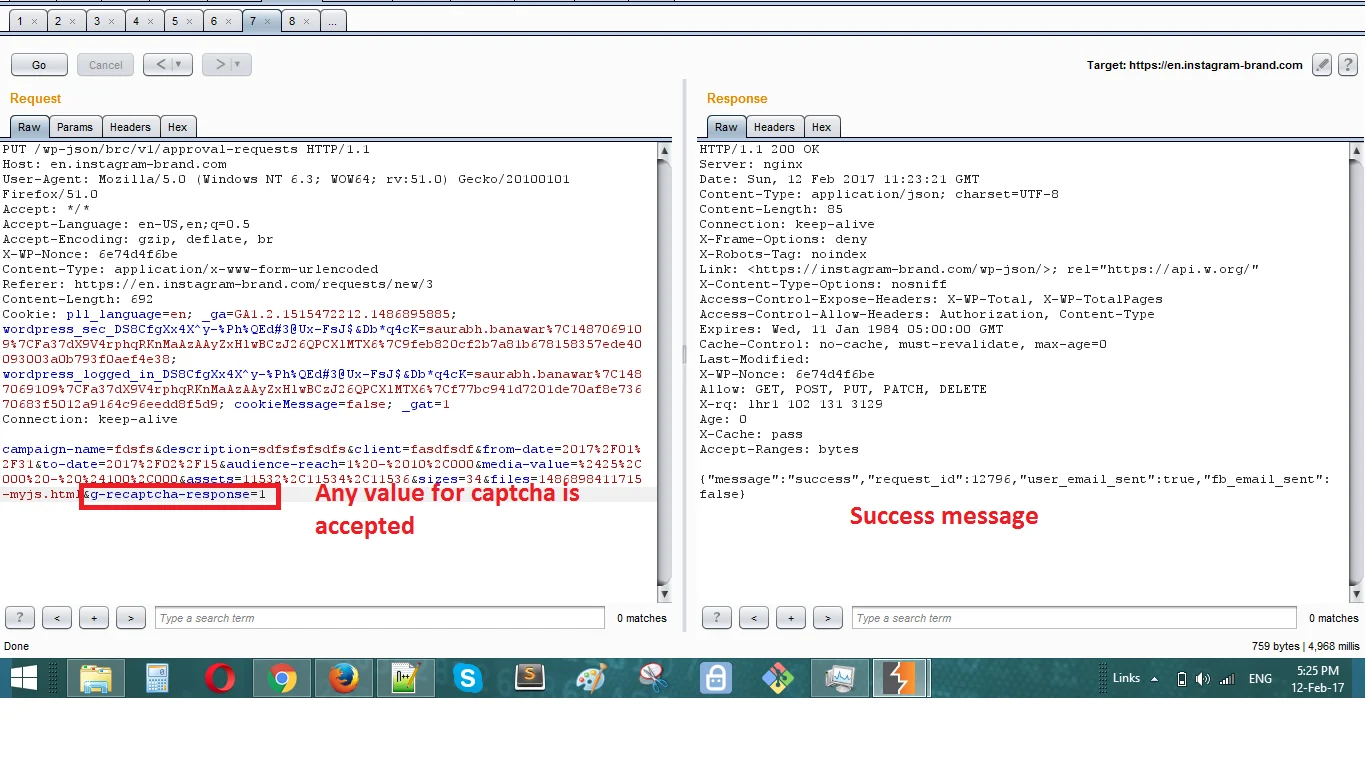
PUT /wp-json/brc/v1/approval-requests HTTP/1.1 Host: en.instagram-brand.com User-Agent: Mozilla/5.0 (Windows NT 6.3; WOW64; rv:51.0) Gecko/20100101 Firefox/51.0 Accept: */* Accept-Language: en-US,en;q=0.5 Accept-Encoding: gzip, deflate, br X-WP-Nonce: 6e74d4f6be Content-Type: application/x-www-form-urlencoded Referer: https://en.instagram-brand.com/requests/new/3 Content-Length: 692 Cookie: <the cookies here> Connection: keep-alive
campaign-name=fdsfs&description=sdfsfsfsdfs&client=fasdfsdf&from-date=2017%2F01%2F31&to-date=2017%2F02%2F15&audience-reach=1%20-%2010%2C000&media-value=%2425%2C000%20-%20%24100%2C000&assets=11532%2C11534%2C11536&sizes=34&files=1486898411715-myjs.html&g-recaptcha-response=03AHJ_VuvtbNaOXuvMLpGNZ1r1sE8LRcGksdd_reTh3zIyz6vXE58GA_DMZfjMMLlm0gyc7qr4t5wV9YOE-CRw94WhnJn9DlIJmm2Ine1dRpiQt1x5D2-8DPgOHYxqzgY&
- Repeat the request for any number of times and observe that every time instead of checking for a new captcha value, the old value or ANY VALUE from captcha is accepted.
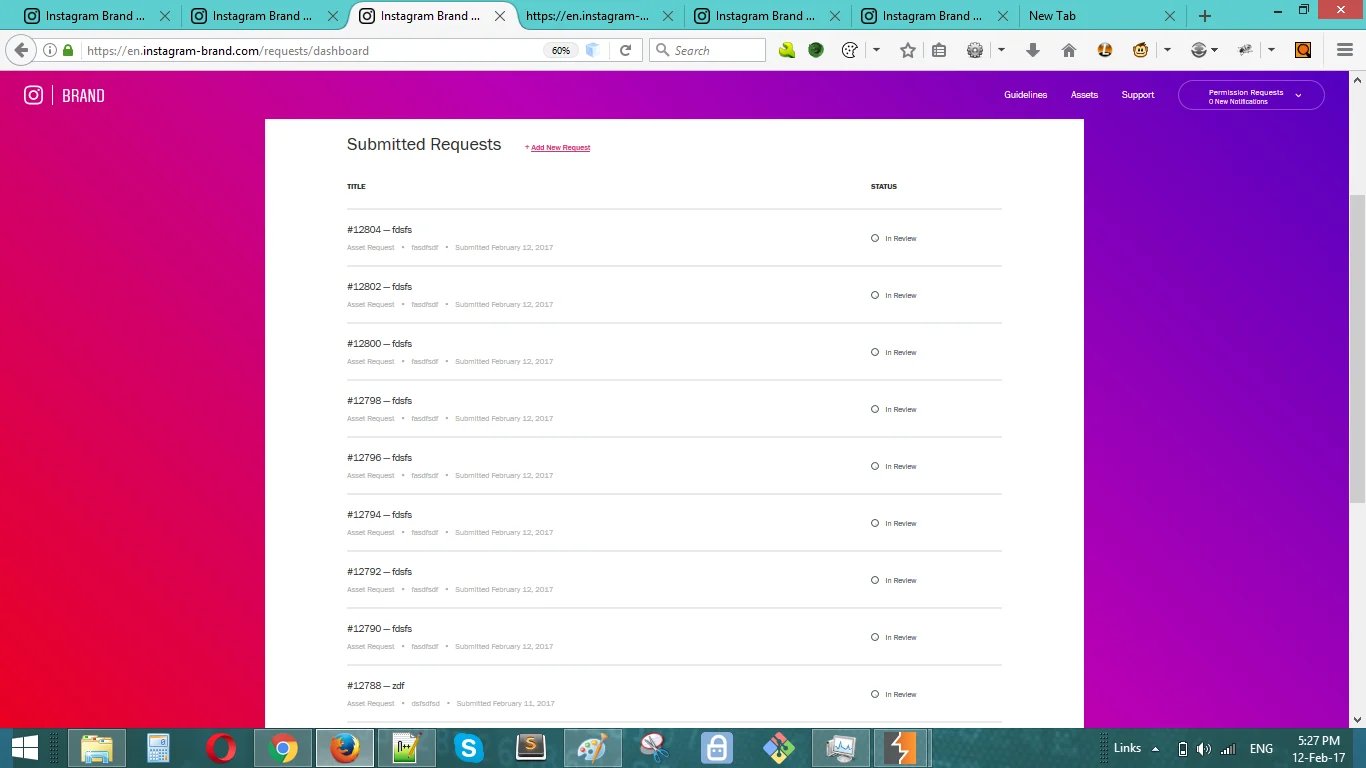
- Please see the attached screenshots for exact requests and response and my dashboard as a real proof of concept.
Attachments
Context
The target is the Instagram Brand site at en.instagram-brand.com, a WordPress-backed site that lets business users request permission to use Instagram assets. The request flow starts at https://en.instagram-brand.com/requests/new, and the final page of the flow carries a CAPTCHA that is meant to ensure only legitimate users submit a request.
The submission itself is handled by a WordPress REST API endpoint:
https://en.instagram-brand.com/wp-json/brc/v1/approval-requests
The security feature under examination is the CAPTCHA on that last page. The researcher found that the check can be bypassed, so the endpoint accepts repeated submissions without a fresh, valid CAPTCHA.
Setup
The report does not describe any account creation, role assignment or special privileges. The only precondition is the ability to reach the public request form and submit it once with a correct CAPTCHA value. The researcher used a proxy tool to intercept and modify the submission, and a browser running on Windows NT 6.3 (WOW64) with Firefox 51.0, as shown in the captured User-Agent.
Finding it
The CAPTCHA is enforced on the last page of the request flow, but the enforcement is tied to the request as it is normally sent. By changing the HTTP method of the submission from POST to PUT, the CAPTCHA check is skipped. The endpoint still processes the request, and the old CAPTCHA value, or indeed any value, is accepted.
Exploitation
Step 1: Create a request with a valid CAPTCHA
Submit the form normally, entering the correct CAPTCHA value, so that a legitimate request is generated.
Step 2: Intercept the request
Capture the submission in a proxy tool. The captured request looks like this:
POST /wp-json/brc/v1/approval-requests HTTP/1.1
Host: en.instagram-brand.com
User-Agent: Mozilla/5.0 (Windows NT 6.3; WOW64; rv:51.0) Gecko/20100101 Firefox/51.0
Accept: */*
Accept-Language: en-US,en;q=0.5
Accept-Encoding: gzip, deflate, br
X-WP-Nonce: [redacted]
Content-Type: application/x-www-form-urlencoded
Referer: https://en.instagram-brand.com/requests/new/3
Content-Length: 692
Cookie: [redacted]
Connection: keep-alive
The body carries the campaign details and the CAPTCHA response:
campaign-name=fdsfs&description=sdfsfsfsdfs&client=fasdfsdf&from-date=2017%2F01%2F31&to-date=2017%2F02%2F15&audience-reach=1%20-%2010%2C000&media-value=%2425%2C000%20-%20%24100%2C000&assets=11532%2C11534%2C11536&sizes=34&files=1486898411715-myjs.html&g-recaptcha-response=[redacted]
The important parts are the WordPress nonce in the X-WP-Nonce header, the session cookies, and the g-recaptcha-response field that carries the CAPTCHA token. The Referer points at the third page of the request flow, https://en.instagram-brand.com/requests/new/3.
Step 3: Change the method to PUT
Change the HTTP method from POST to PUT and submit the request again:
PUT /wp-json/brc/v1/approval-requests HTTP/1.1
Host: en.instagram-brand.com
User-Agent: Mozilla/5.0 (Windows NT 6.3; WOW64; rv:51.0) Gecko/20100101 Firefox/51.0
Accept: */*
Accept-Language: en-US,en;q=0.5
Accept-Encoding: gzip, deflate, br
X-WP-Nonce: [redacted]
Content-Type: application/x-www-form-urlencoded
Referer: https://en.instagram-brand.com/requests/new/3
Content-Length: 692
Cookie: [redacted]
Connection: keep-alive
The body is the same as before, including the same CAPTCHA token:
campaign-name=fdsfs&description=sdfsfsfsdfs&client=fasdfsdf&from-date=2017%2F01%2F31&to-date=2017%2F02%2F15&audience-reach=1%20-%2010%2C000&media-value=%2425%2C000%20-%20%24100%2C000&assets=11532%2C11534%2C11536&sizes=34&files=1486898411715-myjs.html&g-recaptcha-response=[redacted]
The endpoint accepts the PUT and processes the request. The CAPTCHA is not re-checked.
Step 4: Repeat
Repeat the PUT request any number of times. Each time, instead of requiring a new CAPTCHA value, the old value, or any value at all, is accepted. The researcher notes that there is no rate limitation, because the CAPTCHA is broken.
The screenshots show the exact requests and responses, and the researcher's dashboard as proof of concept.
Root cause
The report describes the issue as a logical flaw in the CAPTCHA implementation. The report describes the issue as a logical flaw in the CAPTCHA implementation, without giving the server-side mechanism. The endpoint processes the submission without requiring a fresh, valid CAPTCHA. The report does not describe the server-side code or the exact mechanism.
Impact
The purpose of the CAPTCHA is defeated. A malicious user can submit requests an unlimited number of times, and the email notification is also sent to that user an unlimited number of times. This creates an overhead for the people who review these requests. If the malicious user spoofs the email address, the actual holder of that address will be flooded with emails from the Instagram site.
The researcher deliberately did not send the request to the intruder, because the admin dashboard would have been flooded. The researcher states confidence that there is no rate limitation, because the CAPTCHA is broken.
Fix
The report recommends fixing the logical flaw so that every request is checked for a correct CAPTCHA before it is processed.
Variants to test
- Method switching on other CAPTCHA-protected endpoints: send the same body with
PUT,PATCH,DELETEorOPTIONSand observe whether the submission is processed without a fresh CAPTCHA. A positive result is a successful submission with an old or arbitraryg-recaptcha-response. - Replaying a single CAPTCHA token: submit the same
g-recaptcha-responsevalue repeatedly on the normal method. A positive result is more than one accepted submission from one token. - Omitting the CAPTCHA field entirely: remove
g-recaptcha-responsefrom the body and submit. A positive result is a processed request without any CAPTCHA value. - Submitting an arbitrary value in
g-recaptcha-response: replace the token with random text. A positive result is a processed request. - Checking for rate limiting independently of the CAPTCHA: send a burst of valid submissions and observe whether any throttling occurs. A positive result is a large number of accepted requests in a short window.
- Testing the same method switch on other WordPress REST endpoints that carry nonces: change
POSTtoPUTand observe whether the nonce and capability checks still apply. A positive result is a state-changing action performed without the expected validation.
What happened, in plain words
A website run by Instagram for businesses lets companies ask permission to use Instagram content in their own campaigns. Before the site accepts such a request, it shows a CAPTCHA: a small puzzle (usually distorted letters or a checkbox) that is easy for a person and hard for a robot. The idea is that only real people can submit the form, and only once in a while.
The researcher found that the CAPTCHA can be bypassed. By changing one small detail in how the browser talks to the server, the same request is accepted again and again, with an old CAPTCHA answer or no valid answer at all. That means a robot, or a person with a script, can flood the site with requests and flood an email inbox with notifications.
This kind of bug is often called a business logic flaw: the software does what it was programmed to do, but the rules it enforces can be stepped around. Nothing crashes and no password is stolen; the protection simply does not apply on one path through the code.
The pieces you need to know first
Before walking through the steps, here are the basic ideas, explained from zero.
- Website and server. Your browser (Firefox, Chrome) shows pages. The server is the computer that stores the site and answers your browser's questions. Every time you click something, your browser sends a small message to the server and the server sends one back.
- HTTP request and HTTP method. That message is an HTTP request. It starts with a method, a word that says what kind of action you want.
GETmeans "give me this page".POSTmeans "here is some data, please process it" (like submitting a form).PUTusually means "replace this thing with the data I am sending". The server is supposed to treat each method according to its meaning, but it is up to the programmers to enforce the rules for each one. - API and endpoint. An API is a way for programs to talk to a server without a human clicking buttons. An endpoint is one specific address in that API, like a counter in a shop where you hand in one particular form. Here the endpoint is
https://en.instagram-brand.com/wp-json/brc/v1/approval-requests. - WordPress and REST API. WordPress is a popular system for building websites. Its REST API is the built-in way for the site's own pages (and other programs) to send and receive data. Addresses under
/wp-json/belong to it. - Cookie. A small piece of text your browser stores for a site and sends back with every request. It is how the site recognises you between clicks, like a wristband at an event that proves you already checked in.
- Nonce. A one-time-ish code that the site puts into a page and expects back with a request. It proves the request came from a page the site itself generated, not from somewhere else. It is a bit like a stamped ticket that the counter checks before accepting your form. In the captured request it travels in a header called
X-WP-Nonce. - Header. Extra labelled lines at the top of an HTTP request, carrying information such as which browser you use (
User-Agent), what type of data you are sending (Content-Type), and which page you came from (Referer). - Request body. The part of the request that carries the actual form data, after the blank line. Here it holds the campaign details and the CAPTCHA answer.
- CAPTCHA and reCAPTCHA. A test to prove you are human. Google's version, reCAPTCHA, gives the page a long code (a token) when you solve it, and the page sends that code to the server. The server is supposed to check the code with Google before accepting the form. The field name here is
g-recaptcha-response. - Proxy tool. A program that sits between your browser and the server, so you can pause a request, look at it, change it, and send it on. Think of it as intercepting a letter at the post office, editing it, and putting it back in the envelope.
- Rate limiting. A rule that says "no more than X requests per minute from one person". It is a separate defence from CAPTCHA, and the report says there is none here.
The target and the feature
The site is en.instagram-brand.com. Business users go to https://en.instagram-brand.com/requests/new and fill in a multi-page form to request permission to use Instagram assets. The last page of that form carries the CAPTCHA.
When you press the final button, your browser does not simply load a new page. It sends the form data to the endpoint below, which is the part of the site that actually creates the request:
https://en.instagram-brand.com/wp-json/brc/v1/approval-requests
So there are two things to keep apart: the human-facing form at /requests/new, and the machine-facing endpoint at /wp-json/brc/v1/approval-requests that does the real work. The CAPTCHA is shown on the form, but the check that matters has to happen on the endpoint, because that is what creates the request.
What you need before starting
The report describes no account setup, no special role and no privileges. The only requirement is that you can open the public request form and submit it once with a correct CAPTCHA answer. The researcher used a proxy tool to pause and edit the submission, and a browser on Windows NT 6.3 (WOW64) running Firefox 51.0, which you can see in the User-Agent line of the captured requests.
Finding the flaw
The CAPTCHA is enforced on the last page of the flow, but changing the method from POST to PUT bypasses it. Change the method to PUT and the endpoint still processes the submission, accepting the old CAPTCHA value or any value. The old CAPTCHA value, or any value at all, is accepted.
Step by step
Step 1: Create a request with a valid CAPTCHA
Fill in the form normally and enter the correct CAPTCHA answer, so that one legitimate request is created. This gives you a real, working example of the request to work from. You are not trying to break anything yet; you are just capturing what a normal submission looks like.
Step 2: Intercept the request
Set your proxy tool to pause outgoing requests, then submit the form again. The captured request looks like this:
POST /wp-json/brc/v1/approval-requests HTTP/1.1
Host: en.instagram-brand.com
User-Agent: Mozilla/5.0 (Windows NT 6.3; WOW64; rv:51.0) Gecko/20100101 Firefox/51.0
Accept: */*
Accept-Language: en-US,en;q=0.5
Accept-Encoding: gzip, deflate, br
X-WP-Nonce: [redacted]
Content-Type: application/x-www-form-urlencoded
Referer: https://en.instagram-brand.com/requests/new/3
Content-Length: 692
Cookie: [redacted]
Connection: keep-alive
Line by line:
POST /wp-json/brc/v1/approval-requests HTTP/1.1is the request line.POSTis the method ("process this data"), the middle part is the endpoint path on the server, andHTTP/1.1is the version of the protocol being spoken.Host: en.instagram-brand.comtells the server which site the request is for. One server can host many sites, so this line picks the right one.User-Agent: ...identifies the browser and operating system. It is just a label; the server uses it for statistics and compatibility, not for security.Accept: */*says the browser will accept any type of response.Accept-Language: en-US,en;q=0.5says the browser prefers US English, with a fallback.Accept-Encoding: gzip, deflate, brlists the compression formats the browser understands, so the server can send a smaller response.X-WP-Nonce: [redacted]is the WordPress nonce, the stamped ticket described earlier. It proves the request came from a page the site generated. Without it, WordPress usually rejects the request.Content-Type: application/x-www-form-urlencodedsays the body is form data in the classickey=value&key=valueformat.Referer: https://en.instagram-brand.com/requests/new/3says the request came from the third page of the form flow. Some servers check this to make sure you followed the steps in order.Content-Length: 692is the size of the body in bytes, so the server knows where the body ends.Cookie: [redacted]carries your session cookies, the wristband that tells the site who you are.Connection: keep-aliveasks the server to keep the network connection open for the next request, which saves time.
The body carries the campaign details and the CAPTCHA answer:
campaign-name=fdsfs&description=sdfsfsfsdfs&client=fasdfsdf&from-date=2017%2F01%2F31&to-date=2017%2F02%2F15&audience-reach=1%20-%2010%2C000&media-value=%2425%2C000%20-%20%24100%2C000&assets=11532%2C11534%2C11536&sizes=34&files=1486898411715-myjs.html&g-recaptcha-response=[redacted]
This is one long line of key=value pairs joined by &. Each pair is one form field:
campaign-name=fdsfsis the name of the campaign.description=sdfsfsfsdfsis a free-text description.client=fasdfsdfis the client name.from-date=2017%2F01%2F31andto-date=2017%2F02%2F15are the campaign dates.%2Fis the URL-encoded form of a slash, so these read2017/01/31and2017/02/15.audience-reach=1%20-%2010%2C000is the expected audience size.%20is a space,%2Cis a comma, so it reads1 - 10,000.media-value=%2425%2C000%20-%20%24100%2C000is the media value.%24is a dollar sign, so it reads$25,000 - $100,000.assets=11532%2C11534%2C11536lists three asset identifiers, separated by encoded commas.sizes=34is a size field.files=1486898411715-myjs.htmlis an uploaded file name.g-recaptcha-response=[redacted]is the CAPTCHA token from Google. This is the field the whole protection depends on.
The important parts to notice are the nonce in X-WP-Nonce, the session cookies, and the g-recaptcha-response field. The Referer points at the third page of the flow, https://en.instagram-brand.com/requests/new/3.
Step 3: Change the method to PUT
Now the actual trick. In your proxy tool, change the method from POST to PUT and send the request again:
PUT /wp-json/brc/v1/approval-requests HTTP/1.1
Host: en.instagram-brand.com
User-Agent: Mozilla/5.0 (Windows NT 6.3; WOW64; rv:51.0) Gecko/20100101 Firefox/51.0
Accept: */*
Accept-Language: en-US,en;q=0.5
Accept-Encoding: gzip, deflate, br
X-WP-Nonce: [redacted]
Content-Type: application/x-www-form-urlencoded
Referer: https://en.instagram-brand.com/requests/new/3
Content-Length: 692
Cookie: [redacted]
Connection: keep-alive
The only difference from the previous request is the first word: PUT instead of POST. Everything else, including the nonce, the cookies and the referer, is unchanged. That is deliberate: you want to change exactly one thing, so that if the behaviour changes, you know what caused it.
The body is the same as before, including the same CAPTCHA token:
campaign-name=fdsfs&description=sdfsfsfsdfs&client=fasdfsdf&from-date=2017%2F01%2F31&to-date=2017%2F02%2F15&audience-reach=1%20-%2010%2C000&media-value=%2425%2C000%20-%20%24100%2C000&assets=11532%2C11534%2C11536&sizes=34&files=1486898411715-myjs.html&g-recaptcha-response=[redacted]
Every field means the same as in Step 2. The point is that the CAPTCHA token is not fresh: it is the one you already used. A correct implementation would reject it, because a reCAPTCHA token is meant to be used once.
The endpoint accepts the PUT and processes the request. The CAPTCHA is not re-checked.
Step 4: Repeat
Send the PUT request as many times as you like. Each time, instead of demanding a new CAPTCHA answer, the server accepts the old value, or any value at all. The researcher notes that there is no rate limiting either, because the CAPTCHA is broken.
The screenshots show the exact requests and responses, and the researcher's own dashboard as proof that the requests really were created.
Why it works
The report calls this a logical flaw in the CAPTCHA implementation. The report calls this a logical flaw in the CAPTCHA implementation, without giving the server-side mechanism. So the endpoint processes the submission without requiring a fresh, valid CAPTCHA. The report does not include the server-side code or the exact mechanism.
A useful comparison: a nightclub has a bouncer at the front door who checks IDs. There is a side door that leads to the same dance floor, and nobody is standing there. The club is not broken; the rule simply was not applied to every entrance.
What an attacker could do with it
The whole purpose of the CAPTCHA is defeated. A malicious user can submit requests an unlimited number of times, and the email notification is sent to that user an unlimited number of times as well. That creates extra work for the people who review the requests. If the malicious user spoofs the email address, the real owner of that address gets flooded with emails from the Instagram site.
The researcher deliberately did not send the request to the intruder, because the admin dashboard would have been flooded. The researcher is confident there is no rate limiting, because the CAPTCHA is broken.
The fix
The report recommends fixing the logical flaw so that every request is checked for a correct CAPTCHA before it is processed.
Other things worth testing
These are variations on the same idea, useful for learning how to think about a bug like this:
- Method switching on other CAPTCHA-protected endpoints. Send the same body with
PUT,PATCH,DELETEorOPTIONSand see whether the submission is processed without a fresh CAPTCHA. A positive result is a successful submission with an old or arbitraryg-recaptcha-response. - Replaying a single CAPTCHA token. Submit the same
g-recaptcha-responsevalue repeatedly using the normal method. A positive result is more than one accepted submission from one token. - Omitting the CAPTCHA field entirely. Remove
g-recaptcha-responsefrom the body and submit. A positive result is a processed request with no CAPTCHA value at all. - Submitting an arbitrary value in
g-recaptcha-response. Replace the token with random text. A positive result is a processed request. - Checking for rate limiting independently of the CAPTCHA. Send a burst of valid submissions and watch for throttling. A positive result is a large number of accepted requests in a short window.
- Testing the same method switch on other WordPress REST endpoints that carry nonces. Change
POSTtoPUTand see whether the nonce and permission checks still apply. A positive result is a state-changing action performed without the expected validation.
Glossary
- API: a way for programs to talk to a server without a human clicking buttons.
- Endpoint: one specific address in an API where a particular kind of request is handled.
- HTTP: the language browsers and servers use to exchange requests and responses.
- HTTP method: the word at the start of a request (
GET,POST,PUT, and so on) that says what kind of action is wanted. - POST: the method normally used to submit form data for processing.
- PUT: a method usually meaning "replace this thing with the data I am sending".
- Request body: the part of a request that carries the actual data, after the headers.
- Header: a labelled line at the top of a request carrying extra information, such as the browser type or the data format.
- User-Agent: the header that identifies the browser and operating system.
- Referer: the header that says which page the request came from.
- Content-Type: the header that says what format the body is in.
- Content-Length: the header that says how many bytes the body contains.
- Cookie: a small piece of text the browser stores for a site and sends back with each request, used to recognise you.
- Session: the period during which a site remembers who you are, usually via cookies.
- Nonce: a code the site puts into a page and expects back with a request, proving the request came from that page.
- WordPress: a popular system for building websites.
- REST API: a style of API built around addresses and HTTP methods.
/wp-json/: the part of a WordPress site's address where its REST API lives.- CAPTCHA: a test meant to prove a human, not a robot, is submitting a form.
- reCAPTCHA: Google's CAPTCHA service, which gives the page a token to send back to the server.
- Token: a piece of text that stands for something, such as proof that a CAPTCHA was solved.
g-recaptcha-response: the form field that carries the reCAPTCHA token.- Proxy tool: a program that sits between your browser and the server so you can pause, inspect and edit requests.
- Intercept: to pause a request in a proxy tool before it reaches the server.
- Rate limiting: a rule that caps how many requests someone can make in a given time.
- Business logic flaw: a bug where the software works as programmed but its rules can be stepped around.
- Bypass: getting past a protection without satisfying it.
- Spoofing: pretending to be someone or something you are not, such as using someone else's email address.
- Proof of concept (PoC): a demonstration that a bug is real, usually with the smallest steps needed to show it.
- URL encoding: writing special characters in a URL-safe form, such as
%20for a space or%2Ffor a slash. key=valuepairs: the format of form data, where each field name is followed by=and its value, joined by&.






