Private data related to program exposed via /reports/<id>.json endpoint to external user participant
An external participant invited to a bug report could request the report's JSON endpoint and receive program details that the UI hides from them, including the program profile picture, social handle, website, description and asset details. This exposed private program information to a user who should only see partial report data.

- Disclosed after 2 months
Summary & Impact: An organization has the ability to invite external participants not belonging to their organization to a bug report. The invited user is sees partial data and metadata of a bug in the UI after they accept the invitation. However, in this case I have discovered a way that will make a participant view more data that what is allowed. The data consists of program profile picture, twitter handle, website, about and the asset details to which the report belongs.
Steps To Reproduce
- Login to your H1 account.
- Create a sandbox program .
- Create a test bug report in your program. (Or there would be already a test report present in the sandbox program)
- Invite an external participant to the report by providing that person's email address.
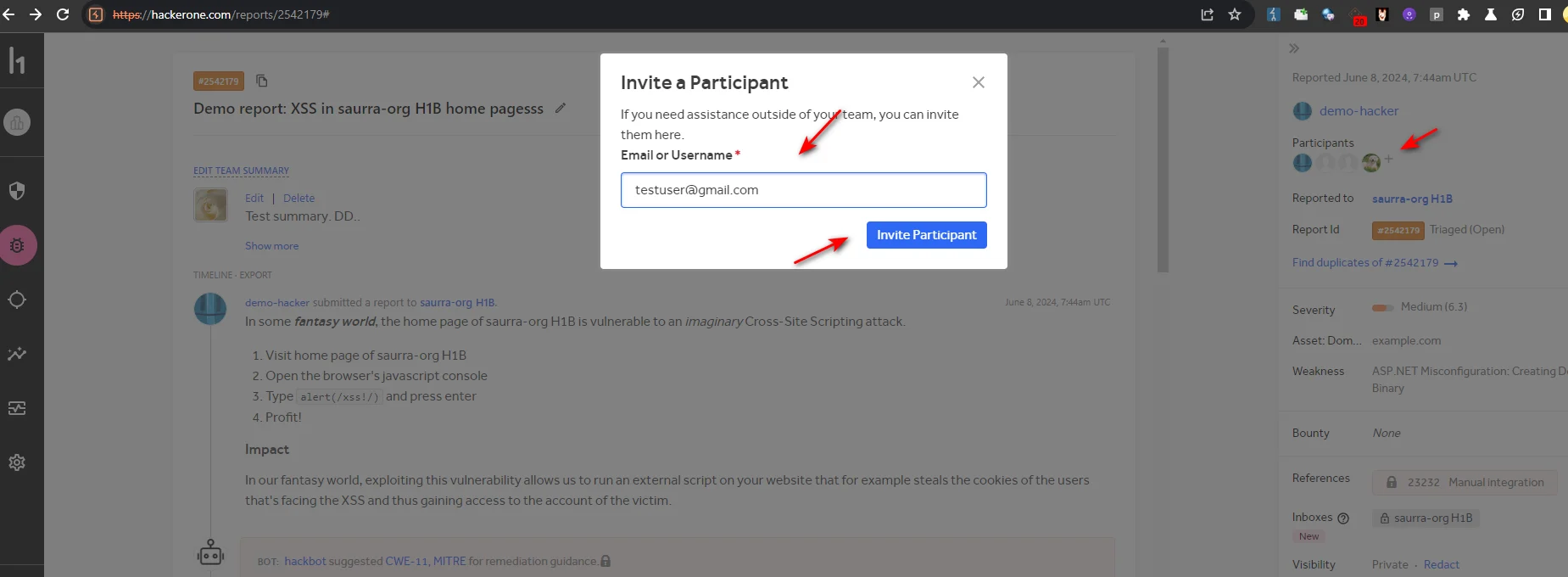
- As the participant user accept the invitation and go to the bug detail page and open the program page in new tab.
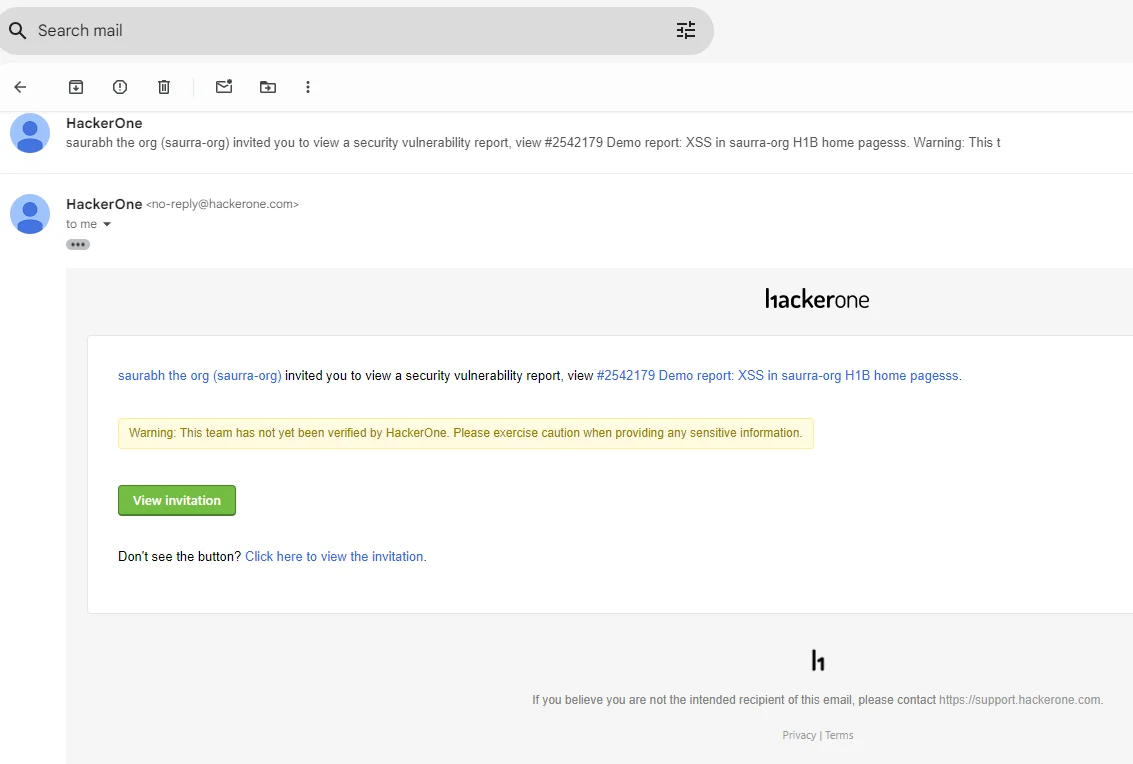
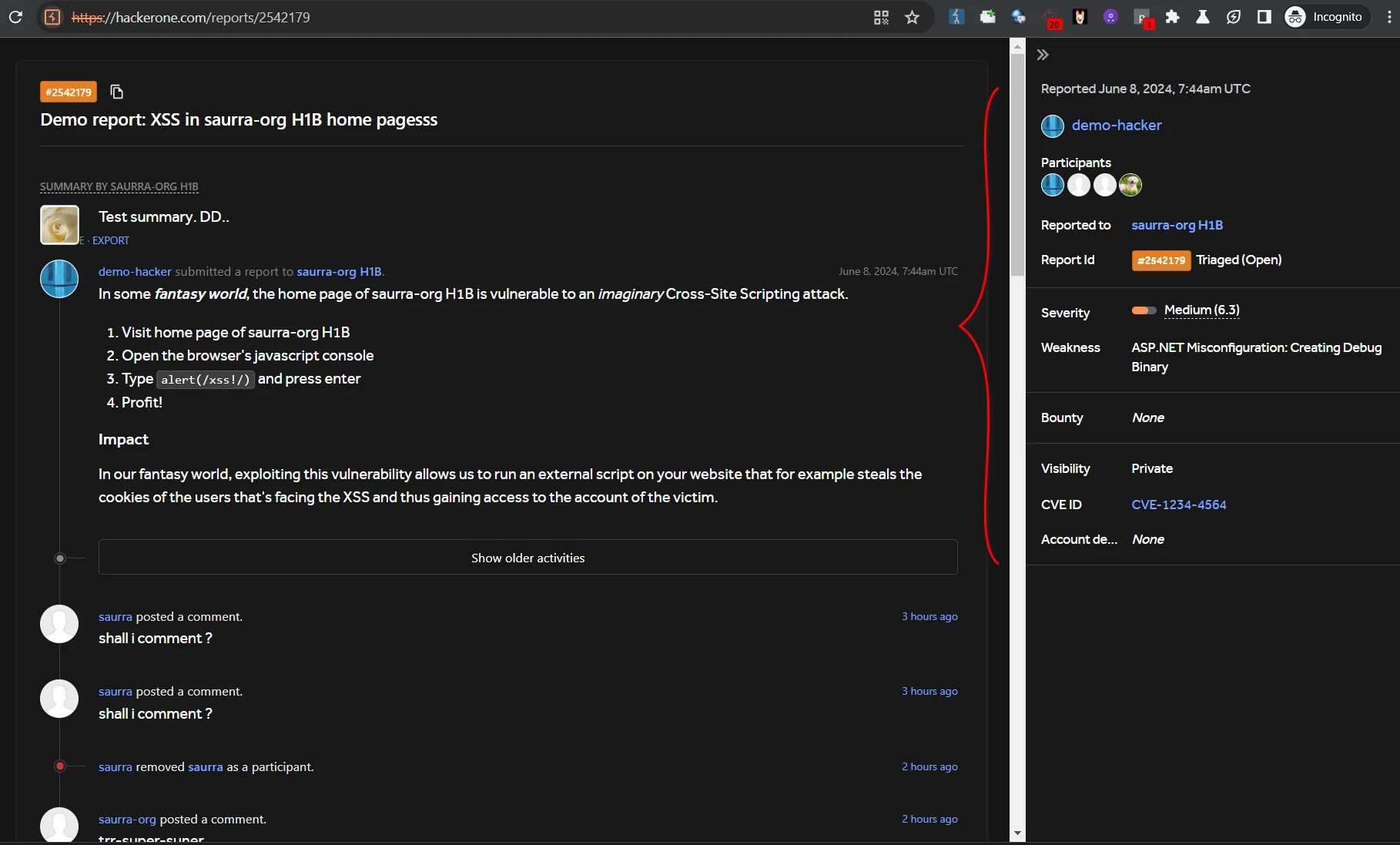
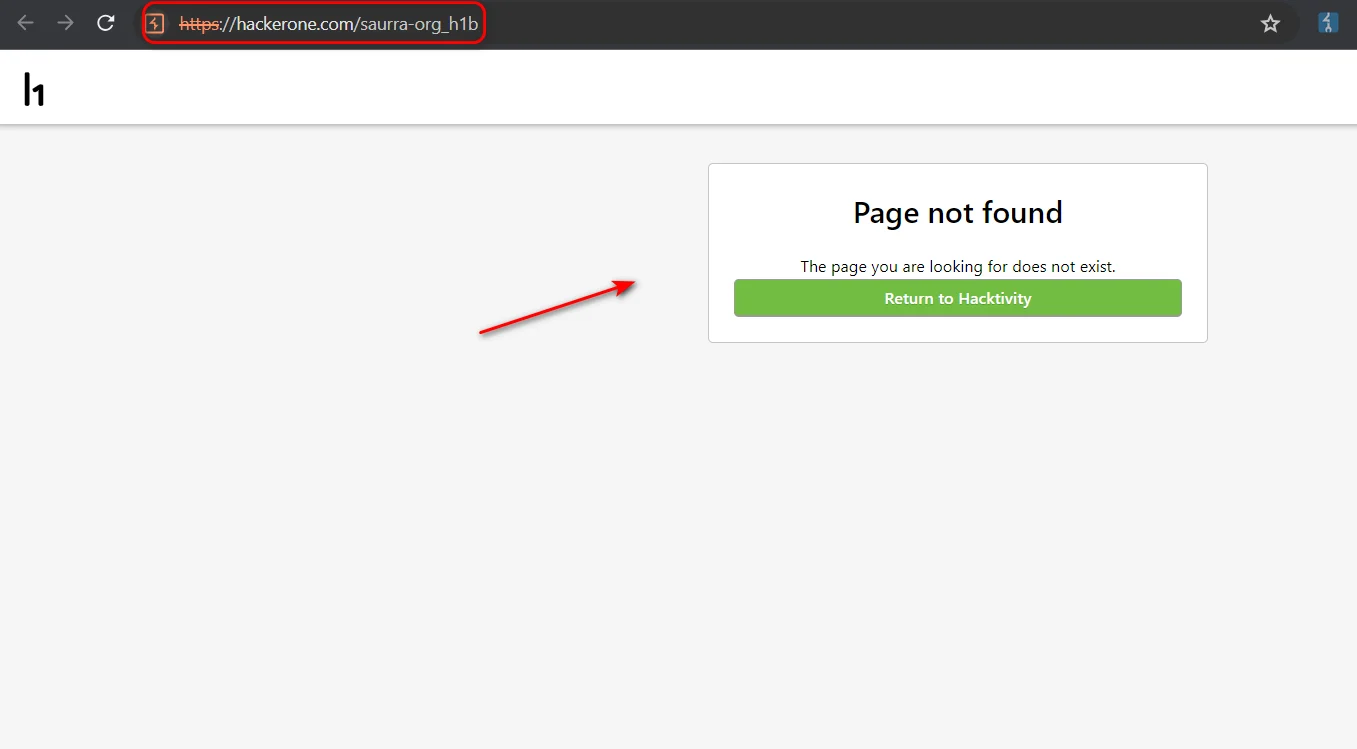
- Observe that you do not have access to this data:
- program profile picture
- twitter handle
- website
- about
- the asset details to which the report belongs
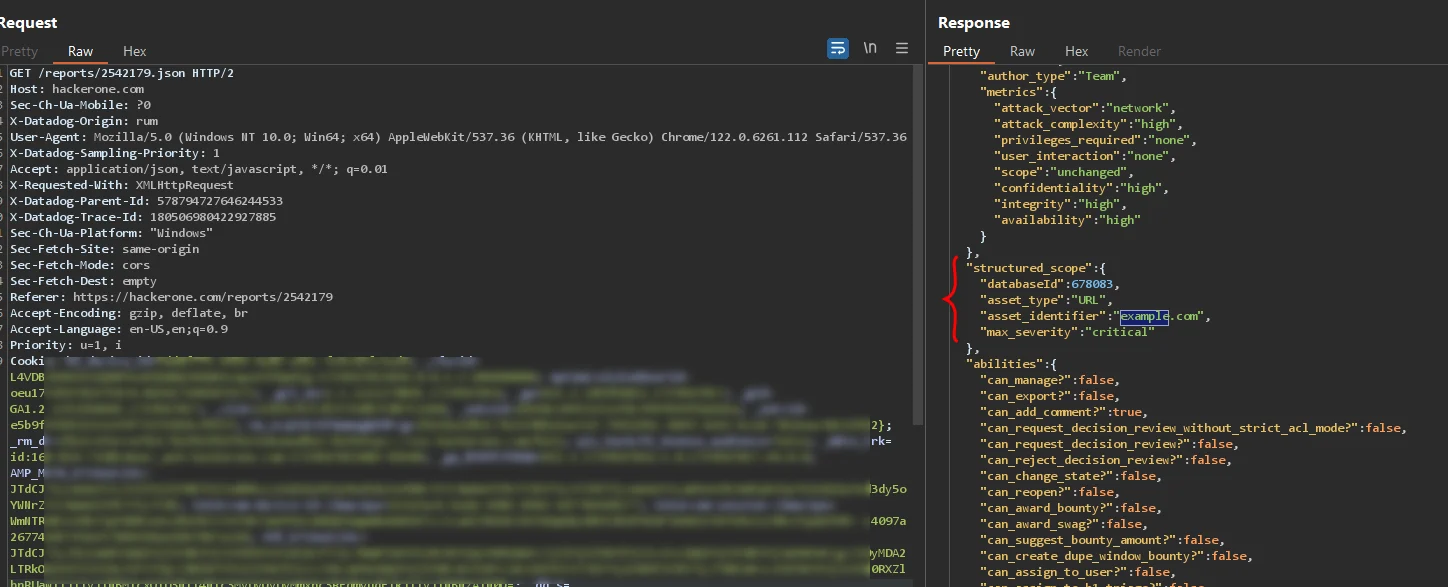
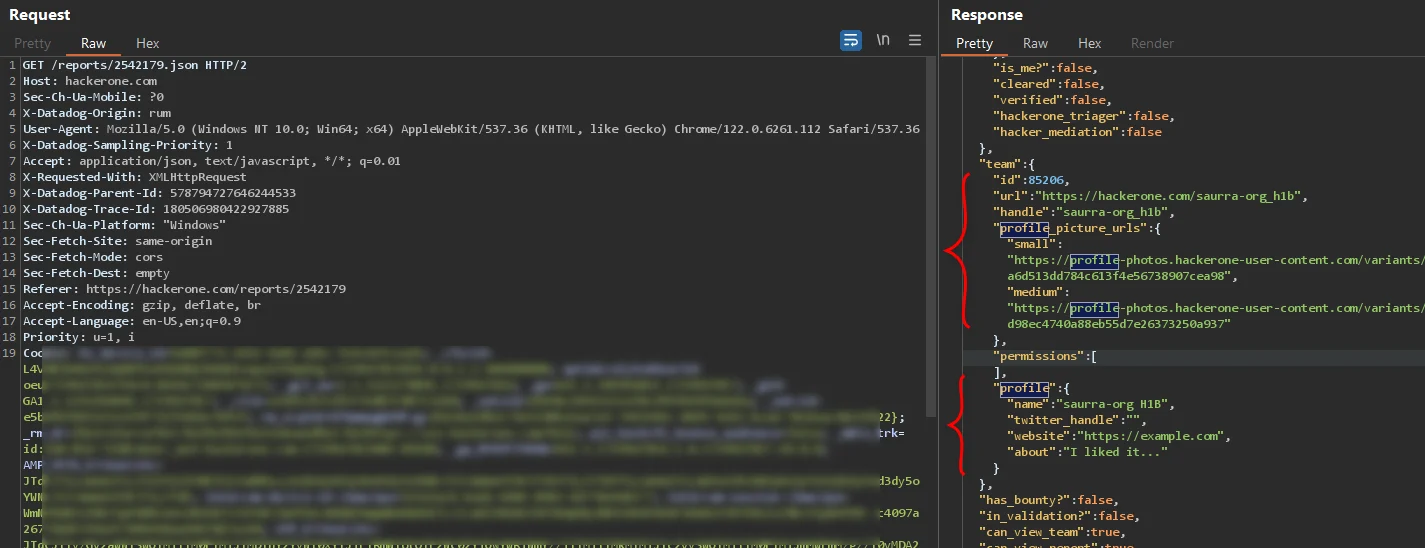
- Now as the participant user send the following request by replacing your cookies, CSRF token and report id. Observe that you see that details in the response.
GET /reports/<the-report-id-here>.json HTTP/2
Host: hackerone.com
Sec-Ch-Ua-Mobile: ?0
X-Datadog-Origin: rum
User-Agent: Mozilla/5.0 (Windows NT 10.0; Win64; x64) AppleWebKit/537.36 (KHTML, like Gecko) Chrome/122.0.6261.112 Safari/537.36
X-Datadog-Sampling-Priority: 1
Accept: application/json, text/javascript, */*; q=0.01
X-Requested-With: XMLHttpRequest
X-Datadog-Parent-Id: 578794727646244533
X-Datadog-Trace-Id: 180506980422927885
Sec-Ch-Ua-Platform: "Windows"
Sec-Fetch-Site: same-origin
Sec-Fetch-Mode: cors
Sec-Fetch-Dest: empty
Referer: https://hackerone.com/reports/2542179
Accept-Encoding: gzip, deflate, br
Accept-Language: en-US,en;q=0.9
Priority: u=1, i
Cookie: <your-cookies-here>
Content-Length: 0
Sec-Ch-Ua: "Not(A:Brand";v="24", "Chromium";v="122"
X-Csrf-Token: <your-csrf-token-here>
Impact
Private data is exposed to unauthorized users. This affects the confidentiality of the program.
Context
HackerOne lets an organisation invite people who are not members of that organisation to a specific bug report. The invited person is called an external participant. After accepting the invitation, the participant can open the report in the UI and sees partial data and metadata about the bug. The report describes a way for that participant to retrieve more data than the UI allows: the program profile picture, the Twitter handle, the website, the about text, and the asset details of the asset to which the report belongs.
The affected asset is hackerone.com, and the weakness is classified as information disclosure (medium severity, CVSS 4.3). The report was disclosed on 2024-08-30.
Setup
To reproduce, you need two accounts and a program you control:
- A HackerOne account that owns a sandbox program.
- A second account, the external participant, identified by email address and invited to a report.
- A way to send and modify HTTP requests, so that you can replace cookies, the CSRF token and the report id.
A test report already present in the sandbox program can be used instead of creating one.
Finding it
The researcher started from the normal participant experience. The participant accepts the invitation, opens the bug detail page, and opens the program page in a new tab. In that UI the participant does not have access to the program profile picture, the Twitter handle, the website, the about text, or the asset details of the asset the report belongs to.
That gap between what the UI shows and what the backend may return is the signal. The report page is rendered from data the server sends to the browser, and the report can also be requested in JSON form. If the JSON endpoint does not apply the same authorisation checks as the UI, a participant can ask for the report in JSON form and receive fields the interface deliberately hides.
Exploitation
Step 1: Prepare the program and the report
Log in to your HackerOne account, create a sandbox program, and create a test bug report in it. A test report that already exists in the sandbox program works as well.
Step 2: Invite the external participant
Invite an external participant to the report by providing that person's email address.
The screenshot shows the invitation step, where the report owner adds an external participant by email.
Step 3: Accept the invitation as the participant
As the participant user, accept the invitation, go to the bug detail page, and open the program page in a new tab.
These screenshots show the participant's view of the report and the program page. This is the baseline: the participant can see the report, but the program profile picture, Twitter handle, website, about text and asset details are not available.
Step 4: Confirm what is missing
Observe that as the participant you do not have access to:
- the program profile picture
- the Twitter handle
- the website
- the about text
- the asset details to which the report belongs
Step 5: Request the JSON representation of the report
As the participant user, send the following request, replacing your cookies, your CSRF token and the report id. The response contains the details that the UI hides.
GET /reports/<the-report-id-here>.json HTTP/2
Host: hackerone.com
Sec-Ch-Ua-Mobile: ?0
X-Datadog-Origin: rum
User-Agent: Mozilla/5.0 (Windows NT 10.0; Win64; x64) AppleWebKit/537.36 (KHTML, like Gecko) Chrome/122.0.6261.112 Safari/537.36
X-Datadog-Sampling-Priority: 1
Accept: application/json, text/javascript, */*; q=0.01
X-Requested-With: XMLHttpRequest
X-Datadog-Parent-Id: 578794727646244533
X-Datadog-Trace-Id: 180506980422927885
Sec-Ch-Ua-Platform: "Windows"
Sec-Fetch-Site: same-origin
Sec-Fetch-Mode: cors
Sec-Fetch-Dest: empty
Referer: https://hackerone.com/reports/2542179
Accept-Encoding: gzip, deflate, br
Accept-Language: en-US,en;q=0.9
Priority: u=1, i
Cookie: <your-cookies-here>
Content-Length: 0
Sec-Ch-Ua: "Not(A:Brand";v="24", "Chromium";v="122"
X-Csrf-Token: <your-csrf-token-here>
What matters in this request:
- The path is
/reports/<the-report-id-here>.json. The.jsonsuffix selects the JSON representation of the report instead of the HTML page. The report id is the one the participant was invited to. Accept: application/json, text/javascript, */*; q=0.01andX-Requested-With: XMLHttpRequestmark the request as an AJAX-style call, the same shape the web front end uses when it fetches report data.CookieandX-Csrf-Tokenare the participant's own session credentials. The request is authenticated as the invited external participant, not as a member of the program.Referer: https://hackerone.com/reports/2542179is the report page the request is made from.
The response is the report in JSON form, and it includes the program profile picture, Twitter handle, website, about text and the asset details of the asset the report belongs to.
These screenshots show the JSON response containing the extra fields, which the participant cannot see in the UI.
Root cause
The report does not describe the server-side code. What the behaviour implies is that the JSON representation of a report is authorised differently from the HTML report page: the participant is allowed to read the report, and the JSON serialiser then includes program and asset fields that the UI does not render for that role. One possible explanation is that the check that hides those fields for external participants is applied in the view layer rather than on the data returned by the endpoint. This is likely a case of field-level authorisation being enforced only in the presentation layer.
Impact
Private data is exposed to unauthorised users, which affects the confidentiality of the program. The exposed data is the program profile picture, Twitter handle, website, about text, and the asset details of the asset the report belongs to. The condition is that the attacker is an external participant who has accepted an invitation to a report in that program, and the request must be made with that participant's own session and CSRF token against the report id they were invited to.
Fix
The report does not state what was changed. The fix that follows from the behaviour is to enforce field-level authorisation on the JSON endpoint itself, so that the serialised report for an external participant contains only the fields the UI is allowed to show, rather than relying on the view to hide them.
Variants to test
- Request other representations of the same report, such as different format suffixes or content negotiation through the
Acceptheader, and compare the fields returned with what the UI shows. A positive result is any field the participant cannot see in the UI appearing in the response. - Apply the same technique to other objects the participant can reach, such as the program or the asset, and check whether their JSON representations include fields hidden from the participant. A positive result is program or asset metadata appearing for a participant who is not a member of the organisation.
- Compare the HTML page and the JSON response for the same report id as a member and as a participant, and look for fields present in JSON but absent from the participant's UI. A positive result is a consistent difference tied to the role.
Hunting notes
This kind of bug tends to hide wherever a product has both a rendered page and a machine-readable representation of the same object, and where a role sees a reduced view of that object. During recon, look for .json suffixes, AJAX endpoints marked with X-Requested-With: XMLHttpRequest, and API paths that mirror page URLs. The signal is a UI that hides fields for a restricted role while the underlying request still returns them.
The researcher showed impact as the invited external participant, demonstrating the hidden fields in the UI first, and then showing the same fields in the JSON response using that participant's own credentials. That contrast between the UI baseline and the endpoint response is what makes the disclosure concrete.
What happened, in plain words
HackerOne is a website where security researchers report bugs to companies. A company can run a "program" on HackerOne, which is its public page describing what it does and what it wants reported. Each program has a profile: a picture, a Twitter handle, a website, an "about" text, and a list of assets (the things that may be tested, such as a domain or an app).
Sometimes a company wants a person who is not part of its organisation to look at one specific bug report. HackerOne supports this: the company invites that person by email, and the person becomes an "external participant" on that one report. The participant can open the report and read part of it, but the website deliberately hides some things from them, including the program's profile picture, Twitter handle, website, about text, and the details of the asset the report belongs to.
The researcher found that the hidden information was not really hidden. The web page hides it, but the server will happily hand it over if you ask for the report in a different format, a machine-readable one called JSON, using the participant's own login. This is a classic case of a website hiding something in the picture on screen while the data behind it is still sent to anyone who asks in the right way.
A useful comparison: a restaurant may print a menu for guests that leaves out the staff-only pages at the back. If the kitchen will still photocopy the full internal menu for anyone who asks politely at the counter, the secret was never in the printing, it was in who is allowed to ask. Here, the "full internal menu" is the JSON version of the report.
The weakness is classified as information disclosure, meaning data that should stay private is shown to someone who should not see it. It was rated medium severity with a CVSS score of 4.3, and the report was disclosed on 2024-08-30. The affected asset is hackerone.com.
Background ideas you need first
Before the steps, a few everyday ideas that the rest of the article relies on.
HTTP request. When your browser loads a page or a page fetches extra data in the background, it sends a short text message to a server and gets a text message back. That message is an HTTP request. It has a method (like GET, meaning "give me this"), a path (which thing you want), and a set of headers (extra labels with details).
API and JSON. An API is a way for software to talk to software, rather than a page drawn for a human. Many websites have both: a human-friendly page and a machine-friendly version of the same information. JSON is a common text format for that machine-friendly version, made of names and values in curly braces, easy for programs to read. When a URL ends in .json, it is usually asking for the JSON version of something.
Cookie and CSRF token. After you log in, the server gives your browser a cookie, a small piece of text that your browser sends back on every request so the server knows who you are. A CSRF token is an extra secret value that the page includes so the server can tell that a request really came from the site's own pages and not from some other site trying to act as you. Together, the cookie and the CSRF token are your "session credentials": proof that the request is coming from your logged-in account.
Headers worth knowing. Host says which site you are talking to. User-Agent describes the browser. Referer says which page the request started from. Accept says which formats the client can handle. X-Requested-With: XMLHttpRequest is a common marker meaning "this request was made by JavaScript inside a page", not by typing a URL in the address bar. The X-Datadog-* headers are tracing labels used by a monitoring service; they are not part of the bug.
Authorisation and field-level authorisation. Authorisation means deciding whether a logged-in user is allowed to do or see a particular thing. Field-level authorisation means deciding it per field: this user may see the report title but not the program's website. The bug here is that the decision was not applied to the data the server sends back.
Information disclosure. The name for a bug where private data reaches someone who should not have it. It is about confidentiality: keeping data to the people allowed to see it.
Setting up
To follow along you need two accounts and a program you control:
- A HackerOne account that owns a sandbox program. A sandbox program is a practice program, one you create for testing rather than a real company's live program.
- A second account, the external participant, identified by email address and invited to a report.
- A way to send and modify HTTP requests, so you can replace the cookies, the CSRF token and the report id. Browsers have developer tools that show requests, and there are tools that let you edit and resend them.
If the sandbox program already contains a test report, you can use that instead of creating one.
Finding it
The researcher started from the normal participant experience, not from guesswork. The participant accepts the invitation, opens the bug detail page, and opens the program page in a new tab. In that interface the participant cannot see the program profile picture, the Twitter handle, the website, the about text, or the asset details of the asset the report belongs to.
That gap is the clue. The report page is drawn from data the server sends to the browser, and the JSON version of a report is a separate endpoint from the HTML page. An endpoint is simply a specific address on the server that answers a particular kind of request. If the JSON endpoint does not apply the same permission checks as the page, a participant can ask for the report in JSON form and receive fields the interface deliberately hides.
Exploitation
Step 1: Prepare the program and the report
Log in to your HackerOne account, create a sandbox program, and create a test bug report in it. A test report that already exists in the sandbox program works as well. This gives you a report you own, so you can invite someone to it and compare what they see with what you see.
Step 2: Invite the external participant
Invite an external participant to the report by providing that person's email address.
The screenshot shows the invitation step, where the report owner adds an external participant by email. This is the feature under test: a company deliberately sharing one report with an outsider.
Step 3: Accept the invitation as the participant
As the participant user, accept the invitation, go to the bug detail page, and open the program page in a new tab.
These screenshots show the participant's view of the report and the program page. This is the baseline: the participant can see the report, but the program profile picture, Twitter handle, website, about text and asset details are not available. Establishing the baseline first matters, because you need to know exactly what the site intends to hide before you can show that it fails to hide it.
Step 4: Confirm what is missing
Observe that as the participant you do not have access to:
- the program profile picture
- the Twitter handle
- the website
- the about text
- the asset details to which the report belongs
Writing this list down is the whole point of the baseline. Every item on it is a field you will look for in the server's answer later.
Step 5: Request the JSON representation of the report
As the participant user, send the following request, replacing your cookies, your CSRF token and the report id. The response contains the details that the UI hides.
GET /reports/<the-report-id-here>.json HTTP/2
Host: hackerone.com
Sec-Ch-Ua-Mobile: ?0
X-Datadog-Origin: rum
User-Agent: Mozilla/5.0 (Windows NT 10.0; Win64; x64) AppleWebKit/537.36 (KHTML, like Gecko) Chrome/122.0.6261.112 Safari/537.36
X-Datadog-Sampling-Priority: 1
Accept: application/json, text/javascript, */*; q=0.01
X-Requested-With: XMLHttpRequest
X-Datadog-Parent-Id: 578794727646244533
X-Datadog-Trace-Id: 180506980422927885
Sec-Ch-Ua-Platform: "Windows"
Sec-Fetch-Site: same-origin
Sec-Fetch-Mode: cors
Sec-Fetch-Dest: empty
Referer: https://hackerone.com/reports/2542179
Accept-Encoding: gzip, deflate, br
Accept-Language: en-US,en;q=0.9
Priority: u=1, i
Cookie: <your-cookies-here>
Content-Length: 0
Sec-Ch-Ua: "Not(A:Brand";v="24", "Chromium";v="122"
X-Csrf-Token: <your-csrf-token-here>
Line by line, in plain words:
GET /reports/<the-report-id-here>.json HTTP/2is the request line.GETmeans "give me this". The path points at a report, with the report id filled in, and the.jsonsuffix asks for the machine-readable version instead of the web page.HTTP/2is the version of the protocol being used.Host: hackerone.comsays which site the request is for.Sec-Ch-Ua-Mobile: ?0andSec-Ch-Ua: "Not(A:Brand";v="24", "Chromium";v="122"are browser hints about the device and browser;?0means "not a mobile device".X-Datadog-Origin: rum,X-Datadog-Sampling-Priority: 1,X-Datadog-Parent-Id: 578794727646244533andX-Datadog-Trace-Id: 180506980422927885are tracing labels added by a monitoring service. They do not affect the result.User-Agent: Mozilla/5.0 (Windows NT 10.0; Win64; x64) AppleWebKit/537.36 (KHTML, like Gecko) Chrome/122.0.6261.112 Safari/537.36identifies the browser and operating system.Accept: application/json, text/javascript, */*; q=0.01tells the server the client prefers JSON, then JavaScript, and will accept anything else as a last resort. This is the header that says "I want data, not a page".X-Requested-With: XMLHttpRequestmarks the request as an AJAX-style call, the same shape the web front end uses when it fetches report data in the background. Sending it makes the request look like the site's own normal data fetch.Sec-Ch-Ua-Platform: "Windows",Sec-Fetch-Site: same-origin,Sec-Fetch-Mode: corsandSec-Fetch-Dest: emptyare browser security hints.same-originsays the request comes from the same site, andcorsdescribes how cross-site data sharing is handled.Referer: https://hackerone.com/reports/2542179says the request started from that report page.Accept-Encoding: gzip, deflate, brlists the compression formats the client can handle, andAccept-Language: en-US,en;q=0.9says the client prefers US English.Priority: u=1, iis a request priority hint.Cookie: <your-cookies-here>is where the participant's own session cookie goes. This is the crucial line: the request is authenticated as the invited external participant, not as a member of the program. The bug is not that someone logged in as the wrong person; it is that the right person, with the lowest level of access in the feature, gets too much.Content-Length: 0says there is no body in the request, which is normal for aGET.X-Csrf-Token: <your-csrf-token-here>is the participant's own CSRF token, proving the request came from the site's own pages.
The response is the report in JSON form, and it includes the program profile picture, Twitter handle, website, about text and the asset details of the asset the report belongs to.
These screenshots show the JSON response containing the extra fields, which the participant cannot see in the UI. Compare them with the baseline from step 4: the same items that were missing on screen are present in the data.
Why it worked
The report does not describe the server-side code. What the behaviour implies is that the JSON representation of a report is authorised differently from the HTML report page: the participant is allowed to read the report, and the JSON serialiser then includes program and asset fields that the UI does not render for that role. A serialiser is the part of the server that turns an internal object into text to send back. One possible explanation is that the check that hides those fields for external participants is applied in the view layer, the part that draws the page, rather than on the data returned by the endpoint. So requesting the same report with a .json suffix bypasses it. This is likely a case of field-level authorisation being enforced only in the presentation layer.
In everyday terms: the guard was standing at the door of the printed menu, not at the door of the kitchen.
Impact
Private data is exposed to unauthorised users, which affects the confidentiality of the program. The exposed data is the program profile picture, Twitter handle, website, about text, and the asset details of the asset the report belongs to. The condition is that the attacker is an external participant who has accepted an invitation to a report in that program, and the request must be made with that participant's own session and CSRF token against the report id they were invited to. In other words, this is not open to the whole internet; it is open to the one outsider the company chose to trust with a single report, and it gives them more of the program's profile than intended.
Fix
The report does not state what was changed. The fix that follows from the behaviour is to enforce field-level authorisation on the JSON endpoint itself, so that the serialised report for an external participant contains only the fields the UI is allowed to show, rather than relying on the view to hide them. The kitchen should check who is asking, not just the printed menu.
Variants to test
- Request other representations of the same report, such as different format suffixes or content negotiation through the
Acceptheader, and compare the fields returned with what the UI shows. A positive result is any field the participant cannot see in the UI appearing in the response. - Apply the same technique to other objects the participant can reach, such as the program or the asset, and check whether their JSON representations include fields hidden from the participant. A positive result is program or asset metadata appearing for a participant who is not a member of the organisation.
- Compare the HTML page and the JSON response for the same report id as a member and as a participant, and look for fields present in JSON but absent from the participant's UI. A positive result is a consistent difference tied to the role.
Hunting notes
This kind of bug tends to hide wherever a product has both a rendered page and a machine-readable representation of the same object, and where a role sees a reduced view of that object. During recon, look for .json suffixes, AJAX endpoints marked with X-Requested-With: XMLHttpRequest, and API paths that mirror page URLs. The signal is a UI that hides fields for a restricted role while the underlying request still returns them.
The researcher showed impact as the invited external participant, demonstrating the hidden fields in the UI first, and then showing the same fields in the JSON response using that participant's own credentials. That contrast between the UI baseline and the endpoint response is what makes the disclosure concrete.
Glossary
- API: a way for software to request data or actions from another piece of software, usually over HTTP, rather than a page drawn for a human.
- Asset: in a bug bounty program, a specific thing that may be tested, such as a domain or an application.
- Authorisation: the decision about whether a logged-in user is allowed to do or see a particular thing.
- Baseline: the normal, expected behaviour recorded first, so that any later difference can be shown clearly.
- Bug bounty program: a company's published offer to pay or thank people for reporting security bugs in its systems.
- Confidentiality: keeping data visible only to the people who are allowed to see it.
- Cookie: a small piece of text a site stores in your browser and receives back on each request, used to recognise your logged-in session.
- CSRF token: an extra secret value included with a request so the server can tell it came from the site's own pages and not from another site acting as you.
- CVSS: a standard scoring system for the severity of a security bug; 4.3 is a medium score.
- Endpoint: a specific address on a server that answers a particular kind of request.
- External participant: a person outside an organisation who has been invited to view one specific bug report.
- Field-level authorisation: deciding permissions per individual field of data, rather than for the whole page or object.
- GET: an HTTP method meaning "give me this", used to fetch something without changing it.
- Header: an extra labelled line in an HTTP request or response carrying details such as the browser type or accepted formats.
- HTML: the language web pages are written in, describing what a human sees.
- HTTP: the protocol browsers and servers use to exchange requests and responses.
- Information disclosure: a bug where private data reaches someone who should not have it.
- JSON: a plain-text format of names and values, easy for programs to read, often used by APIs.
- JSON serialiser: the part of a server that turns an internal object into JSON text to send back.
- Presentation layer / view layer: the part of an application that draws what the user sees, as opposed to the part that decides what data may be released.
- Referer: a request header saying which page the request started from.
- Sandbox program: a practice program created for testing rather than a real company's live program.
- Session: the state of being logged in, kept alive by a cookie sent with each request.
- Severity: how serious a bug is judged to be, often expressed with a score such as CVSS.
- UI: user interface, the part of a product a person sees and interacts with.
- User-Agent: a request header describing the browser and operating system making the request.
- X-Requested-With: a request header commonly set to
XMLHttpRequestto mark a request as made by JavaScript inside a page rather than by typing a URL.





