DOM based XSS in the WooCommerce plugin
The WooCommerce order page outputs the state field without escaping, allowing an attacker to inject a script that executes when the page is viewed. This could let an attacker run arbitrary JavaScript in the context of an authenticated admin.

- Fixed in 18 days
- Paid in 18 days
- Disclosed after 57 days
I have found a stored DOM based XSS in the order page at WooCommerce 3.5.6.
The Data input from HTML element name _shipping_state and _billing_state in order page outputs data without escaping.When the victim read the page containing the payload, it executes the script.
Steps to reproduce
- From a Wordpress admin menu, naavigate to WooCommerce page.
- Click to
Add order(Or select to the exist order data, navigate to edit page.) - Click to pencil icon of
BillingorShippingitems, and expand input form. - Select to
Select a country...by Country item. - Input following value in State / Country item.
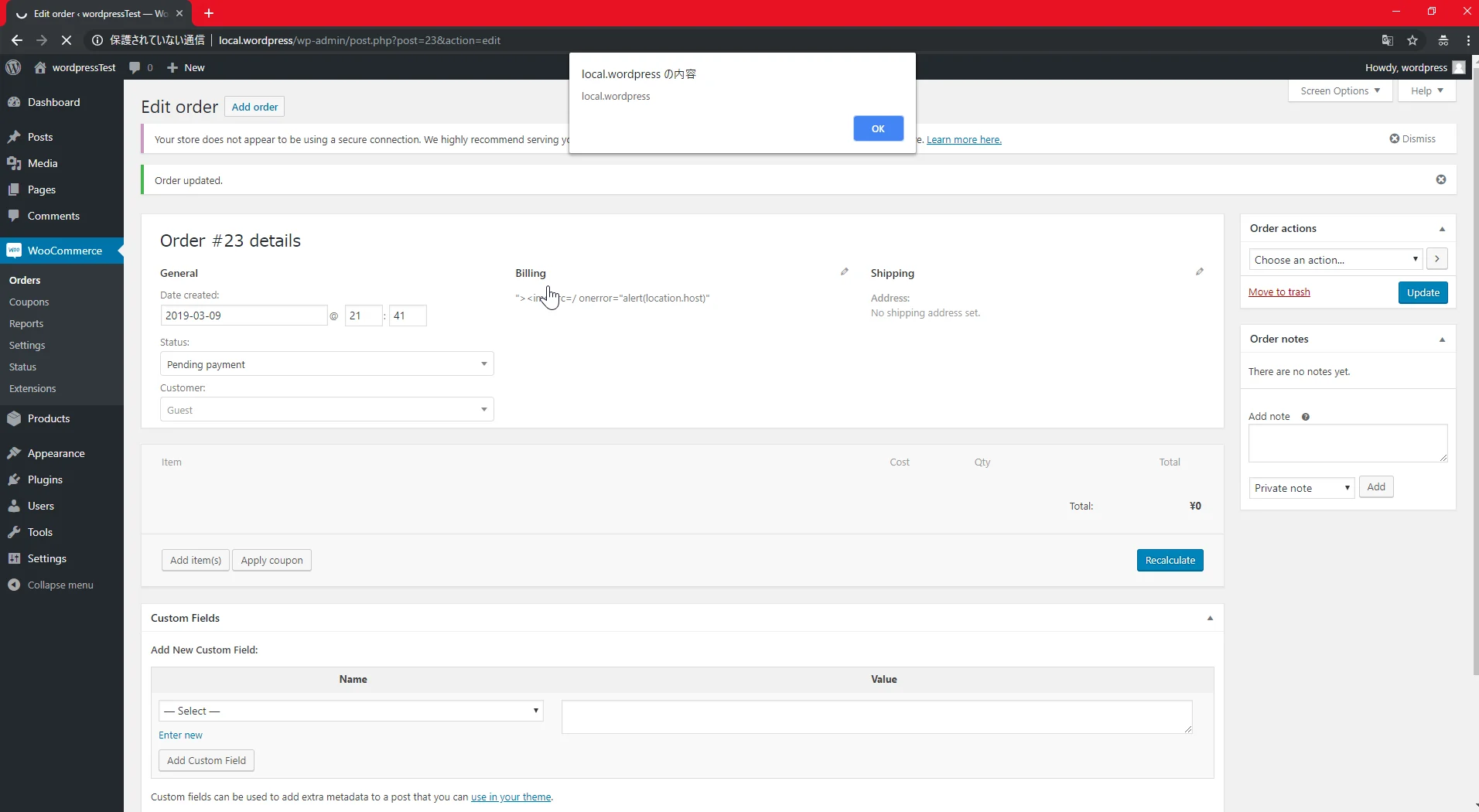
"><img src=/ onerror="alert(location.host)"
- Click Create button.(If navigated from the exist order, click update.)
- Navigate to edit page, after then an alert displayed.
See also attached screenshot.
The security impact is the same as any typical XSS.
Impact
The security impact is the same as any typical XSS.
Attachments
Not written yet. The AI write-up for this report has not been written yet. The Original tab links to the source.
How it worked
Root cause
Likely the application fails to escape user-supplied input when rendering the state field in the order page.
Impact
The security impact is the same as any typical XSS.
What the attacker needed
Admin access to WooCommerce; ability to create or edit an order
How it was found
- From a Wordpress admin menu, navigate to WooCommerce page.
- Click to `Add order` (Or select to the exist order data, navigate to edit page.)
- Click to pencil icon of `Billing` or `Shipping` items, and expand input form.
- Select to `Select a country...` by Country item.
- Input following value in State / Country item.
- Click Create button.(If navigated from the exist order, click update.)
Explained by bugbounty.wiki with AI from the original and checked against quotes from it; it can still be wrong. Read the original before relying on a detail.
Not written yet. The AI write-up for this report has not been written yet. The Original tab links to the source.
The order page shows the state you entered without cleaning it up, so special code runs as a script in the browser when the page is viewed.
What is XSS?
Script an attacker supplies runs in another user's browser, on the target's origin, with that user's session.



