Stored XSS on the "www.intensedebate.com/extras-widgets" url at "Recent comments by" module with malicious blog url
A blog or site URL containing special characters was not escaped when IntenseDebate rendered a user's recent comments, so the injected markup executed as script. An attacker who owned a malicious blog could run arbitrary code in the browser of any user who commented there and later opened the extras-widgets page.

- Disclosed after 15 months
Summary:
Hello team. I have found a place where filtration/encoding for special symbols used in blog/site url is not set which leads to Stored XSS on the user page who posted a comment on malicious blog/site.
Platform(s) Affected:
Affected page www.intensedebate.com/extras-widgets block "Recent comments by". After loading, this page makes a request to https://www.intensedebate.com/widgets/userComment/27205148 - (where 27205148 is userID) to receive additional javascript logic and list of user's comments with html pre set.
Here are Payloads for malicious blog / site.
For context of "a" tag a malicious url must be like this http://████.herokuapp.com/"onmousemove=console.log(`Happy-hack!`);>.html
For context of "html" document a malicious url must be like this http://██████████.herokuapp.com/"><img+src=z+onerror=console.log(`Happy-hack!`);>.html
You can encode this url as URI to hide these special symbols from users eyes or load this page in some iframe.
I used Heroku service to demonstrate this case. I used this console.log (...) payload so as not to bother real users because I don't know where else it might appear.
Here are some pieces of code from this https://www.intensedebate.com/widgets/userComment/27205148 request. Line #2 contains generated html with comments where two links are not filtered / escaped "Jump to" and "Document", but 3th link is escaped!
var theHTML = '... <a href=\"http://████.herokuapp.com/\"><img src=z onerror=console.log(`Happy-hack!`);>.html#IDComment1096880652\" class=\"idw-jump\"><span>Jump to</span></a> </p> <p><a href=\"http://█████.herokuapp.com/"><img+src=z+onerror=console.log(`happy-hack!`);>.html\">http://████████.herokuapp.com/&quot;&gt;&lt;img+src=z+onerror=console.log(`happy-hack!`);&gt;.html/</a> / <a href=\"http://████.herokuapp.com/\"><img src=z onerror=console.log(`Happy-hack!`);>.html\">Document</a></p> ...
and line #20 (in my case) where theHTML code is written into html document
document.write('<style>....</style><div class="idw-container" id="IDWidget1">' + theHTML + '</div> ...');
Steps To Reproduce:
First of all we need to have two accounts to test this case. e.g the first is an Attacker who is the owner of malicious blog/site and the second is victim user. Let's say we have two accounts "Attacker" (set "I want to install IntenseDebate on my blog or website" while registration) and "Victim"
Attacker steps:
- Create a page on the Attacker's blog/site and set the name of route or static file (in my case) as
"onmousemove=console.log(`Happy-hack!`);>.html or "><img+src=z+onerror=console.log(`Happy-hack!`);>.html
2. Login into https://www.intensedebate.com
3. Navigate to https://intensedebate.com/install and add blog/site with payload e.g http://██████.herokuapp.com/"><img+src=z+onerror=console.log(`Happy-hack!`);>.html
4. Then go next to "Step: 2" and choose platform (in my case it's "Generic Install"). I think this works for every platform.
5. Then do JavaScript installation on the Attacker's blog/site "Copy and paste the following code into the area where you would like Intense Debate comments to appear:"
6. You can use this functionality to trigger users to visit your blog / site "Let people know that you have installed IntenseDebate"
Victim steps:
- Login into https://www.intensedebate.com
- Visit the Attacker's blog/site and login there
- Post a comment
- Then navigate to this page https://intensedebate.com/extras-widgets
- Pay attention to "Recent comments by" block
Supporting Material/References:
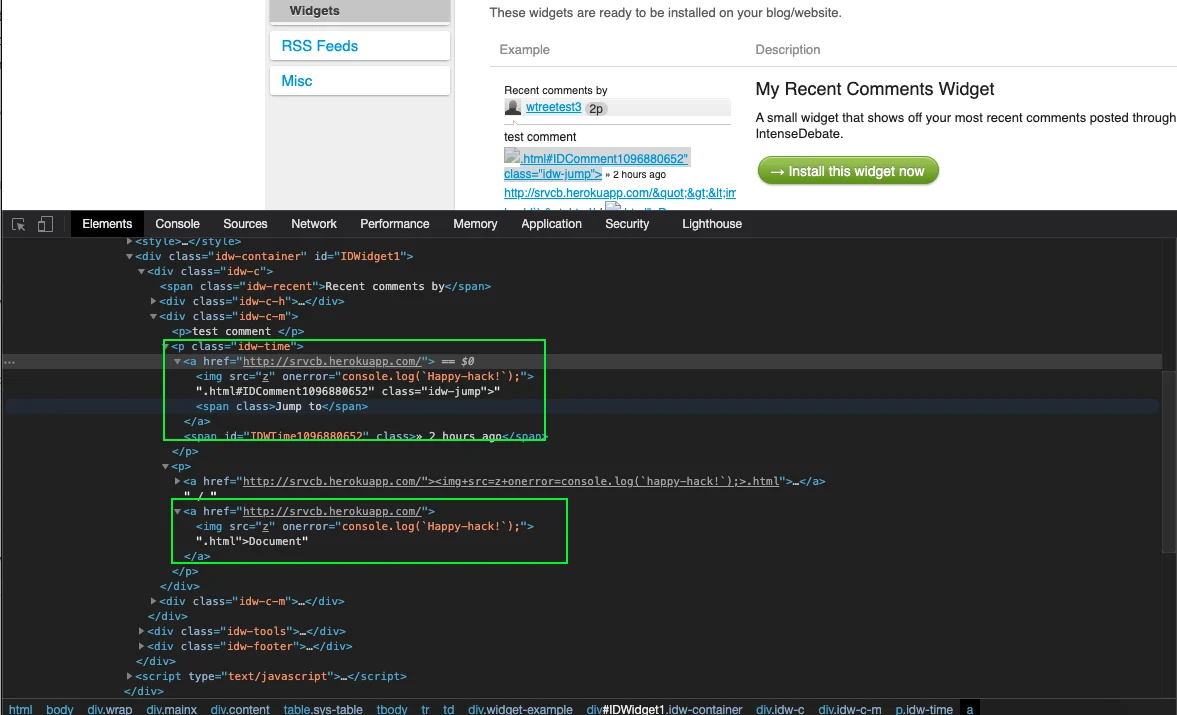
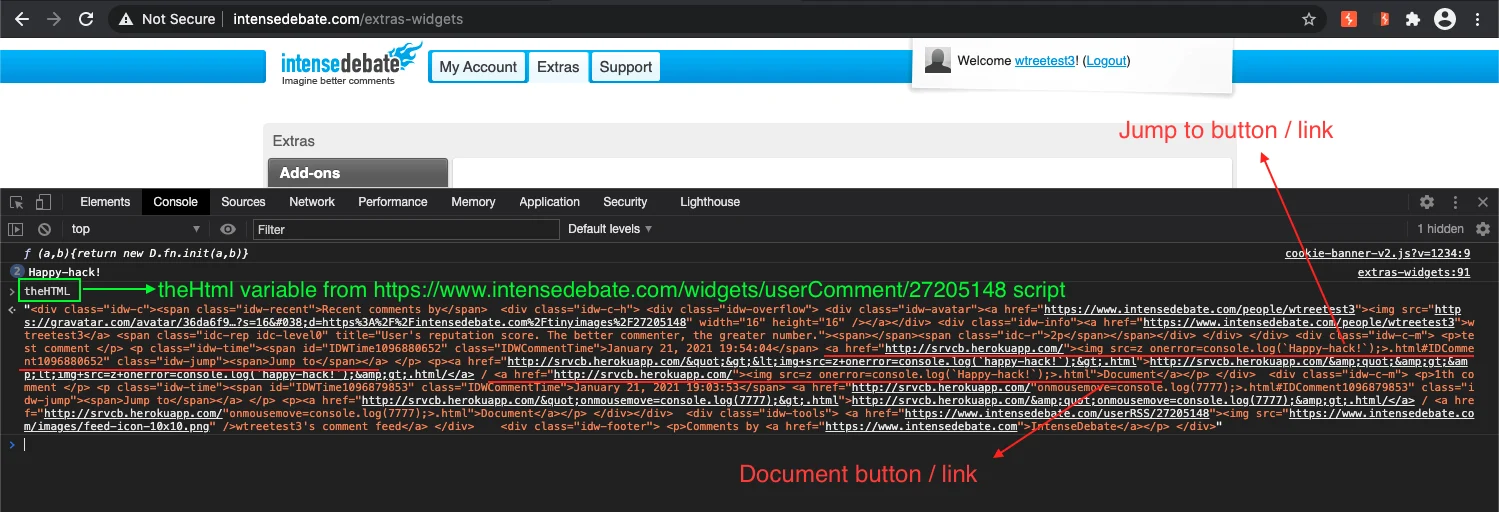
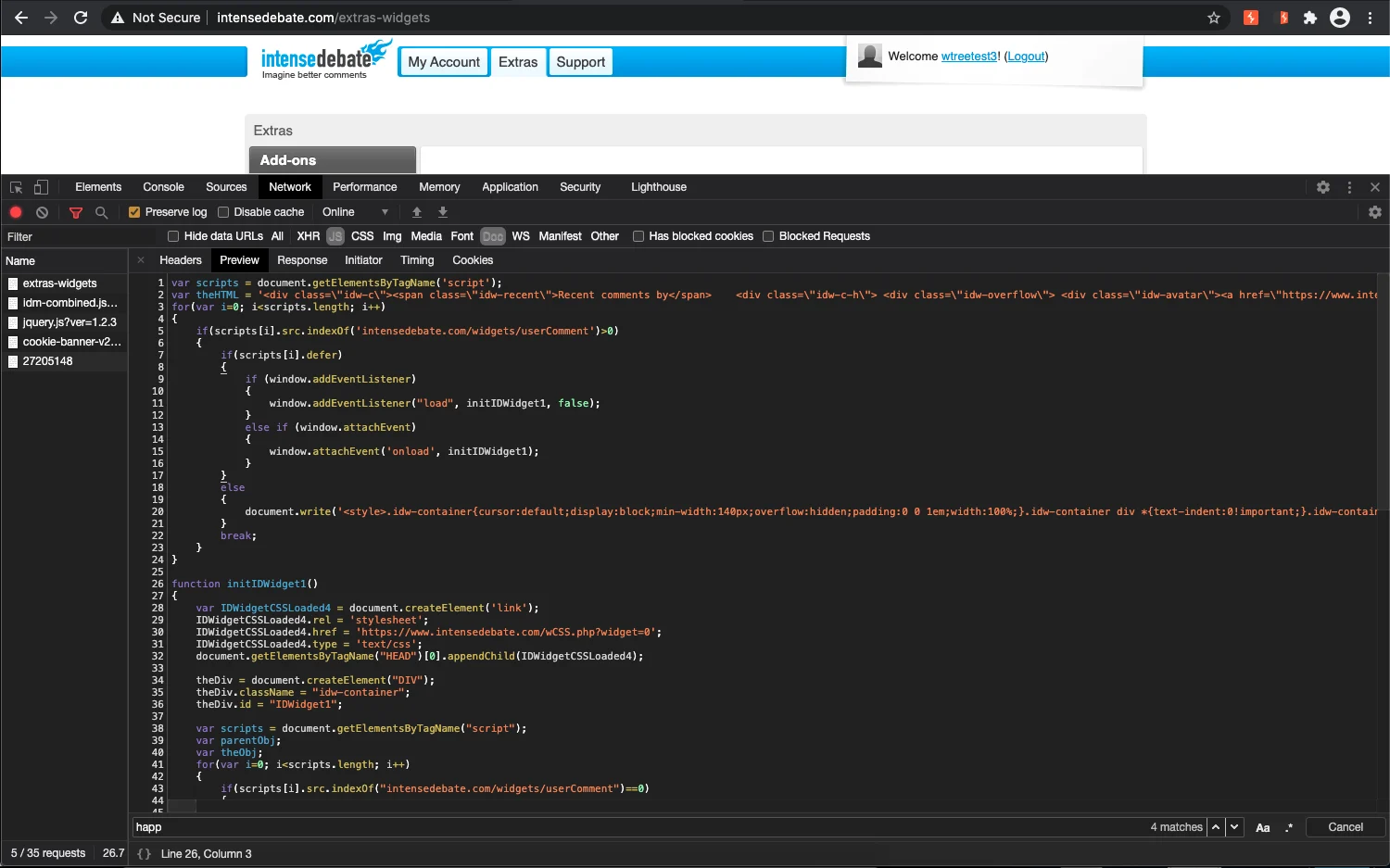
Impact
In this case an attacker can use his own blog / site to inject and run arbitrary code on the "intensedebate.com" users page. It's possible to make malicious request from users account to somewhere or to someone or interact with user's personal data by injection more complex payload and so on.
You need to filter/escape these "Jump to" and "Document" affected places before rendering on the front-end.
Not written yet. The AI write-up for this report has not been written yet. The Original tab links to the source.
How it worked
Root cause
Likely the comment-rendering code built HTML by string concatenation and escaped some links but not the blog URL used in the 'Jump to' and 'Document' links.
Impact
An attacker could run arbitrary code in the browser of an IntenseDebate user who had commented on the malicious blog, potentially making requests as that user or interacting with their personal data.
What the attacker needed
Attacker owns a blog or site; victim comments on the malicious blog; victim opens the extras-widgets page
The fix
The 'Jump to' and 'Document' links should be filtered or escaped before being rendered on the front end.
How it was found
- Create a page on the attacker's blog whose route or file name contains the injected characters.
- Log in to IntenseDebate and add that blog URL through the install flow, choosing a platform such as Generic Install.
- Install the IntenseDebate comment code on the attacker's blog.
- As the victim, log in, visit the attacker's blog, log in there and post a comment.
- Open the extras-widgets page and look at the 'Recent comments by' block, where the script runs.
Explained by bugbounty.wiki with AI from the original and checked against quotes from it; it can still be wrong. Read the original before relying on a detail.
Not written yet. The AI write-up for this report has not been written yet. The Original tab links to the source.
When a website shows text that came from a user, it must convert characters like < and " into harmless display text. Here that conversion was missing for the blog address, so a crafted address was treated as part of the page's code and ran in the visitor's browser. This is called stored cross-site scripting, because the harmful value is saved and shown to other people later.
What is XSS?
Script an attacker supplies runs in another user's browser, on the target's origin, with that user's session.



