WooCommerce: Persistent XSS via customer address (state/county)
WooCommerce echoed a customer's state/county field without encoding in the admin backend, leading to persistent XSS. An attacker with a customer account could execute JavaScript in an administrator's browser, potentially leading to code execution on the server.

- Triaged in 3 days
- Fixed in 18 days
- Paid in 18 days
- Disclosed after 49 days
Persistent XSS via customer address (state/county)
CVSS
High 7.2 CVSS:3.0/AV:N/AC:L/PR:N/UI:N/S:C/C:L/I:L/A:N
Description
The current version (3.5.7) of the WooCommerce WordPress plugin echoes the state/county of a customer in the admin backend without encoding, leading to persistent XSS.
For a successful attack, an attacker needs a customer account, though it is to be expected that account creation is available for users in a considerable amount of setups.
If the victim is an administrator on a default WordPress setup, an attacker can exploit the issue to gain code execution on the server by eg sending a request to edit a WordPress plugin file.
POC
Setup: Install the WooCommerce plugin & open registration / add a user (permissions do not matter, I used "customer").
To place the payload:
- Login as a customer at http://192.168.0.101/wordpress/my-account/
- To place a payload, either:
- add an item to cart & proceed to checkout. Under "Billing Details", select UK as country and enter
'"><img src=x onerror=alert(1) x=yasCounty(note the missing>which is required as tags are filtered). - Alternatively, simply change the address under account settings at
http://192.168.0.101/wordpress/my-account/edit-address/.
- add an item to cart & proceed to checkout. Under "Billing Details", select UK as country and enter
To trigger the payload:
- Go to
http://192.168.0.101/wordpress/wp-admin/users.phpand click on the customer, or directly visithttp://192.168.0.101/wordpress/wp-admin/user-edit.php?user_id=4, where4is the customers ID.
Impact
With a successful attack, an attacker can read data available to the attacked user or perform arbitrary request in the name of the attacked user.
With a default setup, an attacker can gain code execution on the server by eg editing a WordPress plugin file.
Attachments
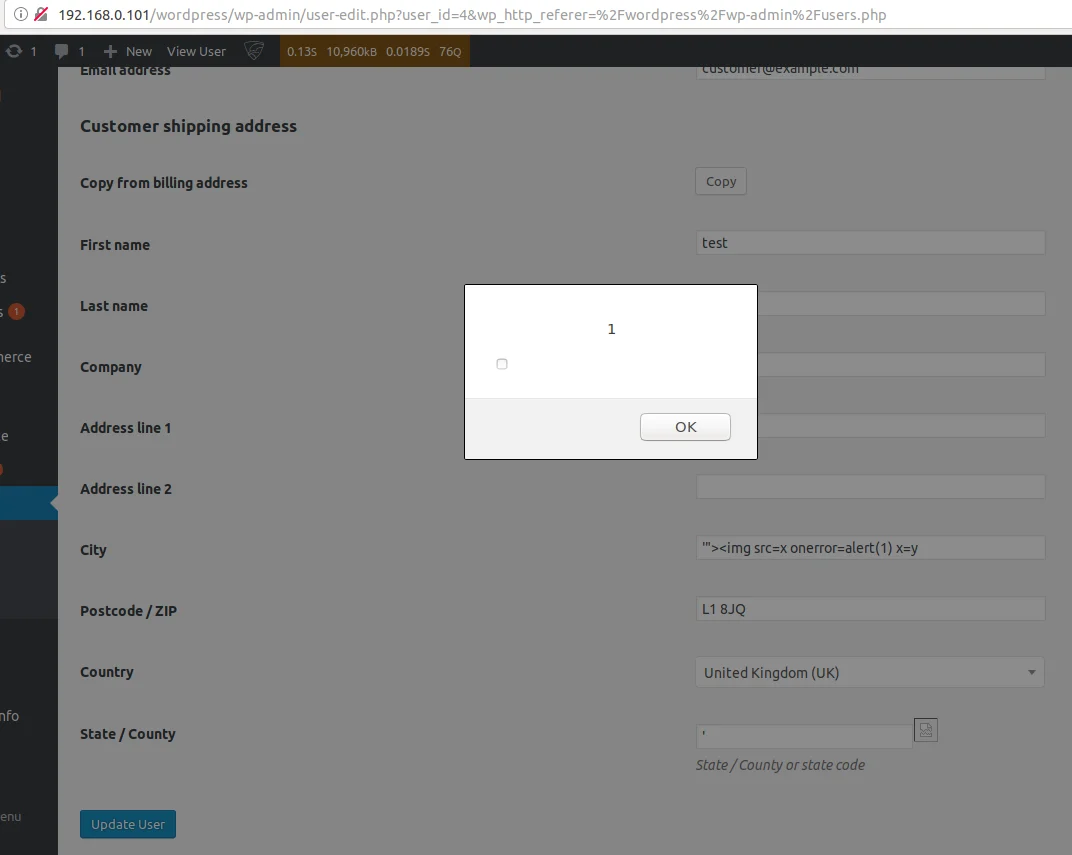
Not written yet. The AI write-up for this report has not been written yet. The Original tab links to the source.
How it worked
Root cause
The plugin failed to HTML-encode the customer's state/county value before outputting it in the admin backend.
Impact
An attacker could read data available to the attacked user or perform arbitrary requests as that user; with a default setup, they could gain code execution on the server by editing a plugin file.
What the attacker needed
A customer account; victim is an administrator; victim views the customer's user edit page
How it was found
- Log in as a customer and go to the checkout or account address page.
- Enter a malicious value in the County field (with UK as country) or change the address under account settings.
- As an administrator, visit the users list and click on the customer, or directly open the user edit page for that customer.
- The stored script executes in the administrator's browser.
Explained by bugbounty.wiki with AI from the original and checked against quotes from it; it can still be wrong. Read the original before relying on a detail.
Not written yet. The AI write-up for this report has not been written yet. The Original tab links to the source.
When you type something into a form, a safe website will display it as plain text. Here, the plugin put the text directly into the admin page's HTML, so a malicious customer could enter special characters that make the browser run code. That code runs in the administrator's browser and can do anything the admin can do.
What is XSS?
Script an attacker supplies runs in another user's browser, on the target's origin, with that user's session.







