Spotted: How we discovered Privilege Escalation, missing CloudTrail data and a race condition in AWS Directory Service
AWS Directory Service did not verify the iam:PassRole permission when assigning users or groups to an existing IAM role, allowing a user with ds:EnableRoleAccess to assign themselves or others to any role trusted by the service. This could lead to privilege escalation in certain configurations.
 Published on cloudar.be
It takes a village to spot a bug. Recently, Cloudar discovered a set of bugs in AWS Directory Service.
The full write-up lives on its author's site
It belongs to its author, so we link to it rather than copy it. The other two tabs are our own rewrites, checked against it.
Context
AWS Directory Service lets you connect an AWS Managed Microsoft AD directory to the AWS Management Console, so that directory users can sign in to the console with their directory credentials. When you configure a service to use an IAM role on your behalf, you normally need iam:PassRole in addition to the permissions required to configure or use that service. Assigning users or groups to an existing IAM role in Directory Service is one of those operations: the role has to be in the same account, its trust policy has to allow use by AWS Directory Service, and the caller is expected to hold iam:PassRole on it.
Cloudar, an AWS Managed Service Provider Partner, found a set of bugs in this area: a missing iam:PassRole check that could be used for privilege escalation by an authenticated user with sufficient permissions, some actions that were not logged to CloudTrail, and a validation that is only done client-side. AWS remediated the issues and published a security bulletin; no customer action is required.
Setup
The work started from a client environment that Cloudar manages as an MSP. The relevant preconditions for the privilege escalation are:
- An authenticated principal with the
ds:EnableRoleAccesspermission for the Directory Service domain. - A target IAM role in the same AWS account whose trust policy allows use in AWS Directory Service.
- The attacker does not need
iam:PassRoleon that role, which is the point of the bug.
The tooling was ordinary: the AWS Console, the browser developer console, CloudTrail, and command-line requests to the undocumented API the console itself uses. There is no public API for enabling console access or for assigning users to roles within Directory Service.
Finding it
A client alerted Cloudar to a strange behaviour: AWS Directory Service for AWS Management Console access had been configured and was working, but the console showed the feature as disabled.
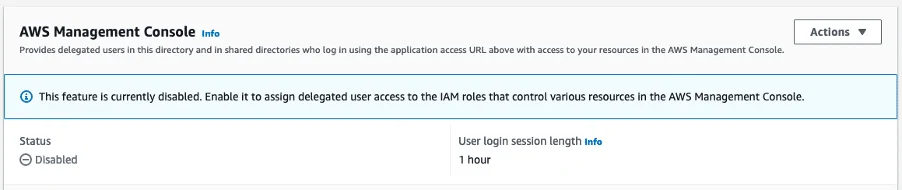
The natural next step was CloudTrail, but there was no entry showing the enabling or disabling of access. Testing the status change directly produced the same result: the actions were not recorded. After Cloudar reported this, enabling or disabling console access now creates events in CloudTrail. The event below shows the shape of the new record (***OMITTED*** marks fields the report redacts):
{
[…]
   "eventSource": "ds.amazonaws.com",
   "requestParameters": {
      "directoryId": "d-123456789a",
      "applicationId": "***OMITTED***",
      "serviceAccountUserName": "***OMITTED***",
      "serviceAccountPassword": "HIDDEN_DUE_TO_SECURITY_REASONS"
   },
   "responseElements": null,
   "readOnly": false,
   "eventType": "AwsApiCall",
   "managementEvent": true,
   "sessionCredentialFromConsole": "true"
}
{
[…]
   "eventSource": "ds.amazonaws.com",
   "eventName": "UnauthorizeApplication",
   "requestParameters": {
      "directoryId": "d-123456789a",
      "applicationId": "***OMITTED***"
   },
   "responseElements": null,
   "readOnly": false,
   "eventType": "AwsApiCall",
   "managementEvent": true,
   "sessionCredentialFromConsole": "true"
}
With CloudTrail unhelpful, the team opened the browser developer console and watched the requests the console sends when enabling console access. They went to an undocumented API, which is not surprising given there is no public API for this. What was surprising is that enabling or disabling console access produced two calls to the internal API: one to (un)authorise an application called AWSManagementConsole, and one to (un)authorise an application called Directory Service console.
Assuming a consistency problem, they reproduced the client's symptom by sending requests to the undocumented API from the command line and unauthorising only one of the two applications. With AWSManagementConsole unauthorised and Directory Service console authorised, the console showed the feature as disabled while sign-in still worked. By the time the report was sent to AWS, the double API call no longer happened (only AWSManagementConsole is used today), so this looked like a temporary issue. It was still reported, with a note that it could no longer be reproduced.
Exploitation
Step 1: The client-side disable check
Reading the documentation closely turned up an ambiguous sentence: "If any IAM roles have been assigned to users or groups in the directory, the Disable button may be unavailable." The word "may" stood out, especially after the network-disconnection issue that had already produced an unexpected state. The expected behaviour is that you cannot disable the integration while users or groups are still assigned to roles.
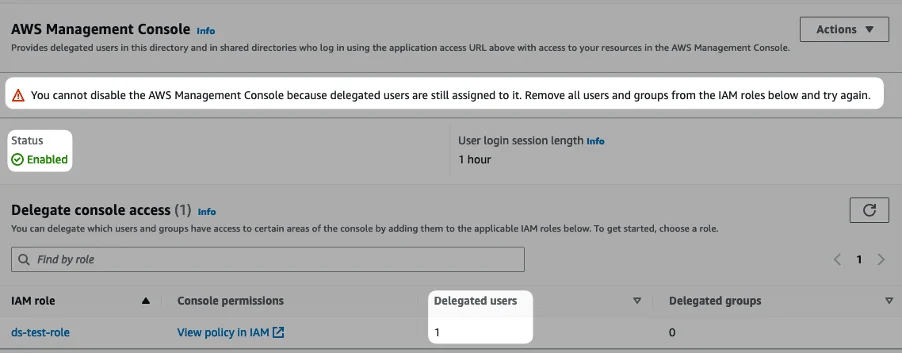
That check is done entirely in the browser and appears to be based on the state at the time the tab was loaded. So console access can be disabled while assignments still exist. Two ways to do it: call the same undocumented API the console uses, or, in the browser:
- Open the console while there are no assignments.
- Use a second tab to assign users or groups to a role.
- Use the first tab to disable console access.
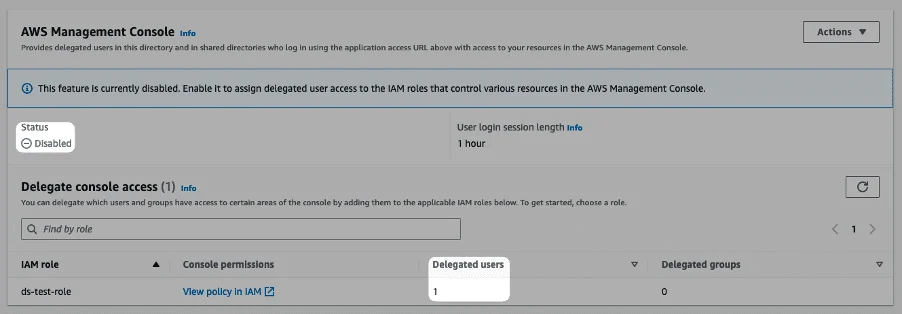
This was reported to AWS but is not considered a vulnerability, because the assignments are not usable once console access is disabled.
Step 2: The missing iam:PassRole check
Having found two APIs that did part of their logic client-side, and having experimented with role assignment, the team looked at the other validations that should happen when assigning a role to a user in a directory. To assign a specific role to a user or group:
- you should have
ds:EnableRoleAccesspermission for the Directory Service domain; - the role you want to pass should have a trust policy that allows use in AWS Directory Service;
- the role should be in the same AWS account;
- you should have
iam:PassRolepermissions on the role.
When they tested these checks, they could assign a role within the same account even without the right iam:PassRole permission. In certain setups this means privilege escalation. Two scenarios from the report:
- Alice and Bob both manage a domain, and each is responsible for assigning users to specific IAM roles: Alice to Role A, Bob to Role B. The missing check lets Alice assign people to a role she is not responsible for, for example assigning herself or someone else to Role B.
- A user has the permissions to create and manage a domain in AWS Directory Service but no IAM permissions, for example with the
PowerUserAccessmanaged policy. If a role that already trusts AWS Directory Service exists, that user can create their own domain and assume that existing role.
This issue has been completely fixed.
Root cause
Two distinct mistakes, both about where validation lives.
The role-assignment path did not verify iam:PassRole when assigning users or groups to an existing IAM role. The role-assignment path did not verify iam:PassRole when assigning users or groups to an existing IAM role, so a principal holding ds:EnableRoleAccess but not iam:PassRole on the target role could still assign users to it. The existing defences therefore did not stop a principal who held ds:EnableRoleAccess but not iam:PassRole on the target role.
The disable check for console access was implemented in the browser, based on the state when the tab was loaded, rather than enforced by the API. A client that calls the undocumented API directly, or that runs the check against stale state, bypasses it. The same pattern, logic done client-side, is what the team was looking for when they moved on to the role-assignment checks.
Impact
Exploiting the privilege escalation required a specific configuration and a high level of permissions within Directory Service. Within those limits, an authenticated user with ds:EnableRoleAccess could assign users or groups to any role in the account that trusts AWS Directory Service, without holding iam:PassRole on it. That breaks the separation of duties between administrators who are each meant to manage only their own roles, and it lets a Directory Service administrator without IAM permissions reach an existing role through a domain they create. The client-side disable check on its own is not treated as a vulnerability, because assignments are not usable while console access is disabled.
Fix
AWS fixed the missing iam:PassRole check completely, and enabling or disabling console access now creates events in CloudTrail. By the time the report was sent, the double API call no longer happened, so it seemed to have been a temporary issue. The client-side disable check was reported but not treated as a vulnerability.
For customers, the recommendation is aimed at the window before the fix: anyone who relied on iam:PassRole permissions for access control before 2023-05-12 should review their directory for misconfiguration and their CloudTrail logs for unexpected AssumeRole calls.
Timeline:
| Date | Event |
|---|---|
| 2023-04-07 | Issue found and reported to AWS; investigation started by AWS |
| 2023-04-13 | Issue confirmed by AWS; fix in development |
| 2023-04-24 | Development finished; deployment in progress |
| 2023-05-12 | Fix deployed globally |
Variants to test
- Other service integrations that pass roles. Look for features where a service assigns or attaches an IAM role to a user, group or resource. A positive result is that the assignment succeeds with a principal that holds the service-level permission but not
iam:PassRoleon the target role. - Client-side guard rails. Find UI restrictions that are described with hedged language ("may be unavailable") and check whether the underlying API enforces them. A positive result is that the API accepts the operation the UI refuses, for example by calling it directly or by racing two tabs against stale state.
- Undocumented internal APIs. Watch the browser developer console while performing privileged console actions. A positive result is an internal endpoint that performs part of the operation without the server-side checks the public API would apply.
- Missing audit events. Perform sensitive configuration changes and check CloudTrail. A positive result is a change that takes effect but produces no event, which also makes the other variants harder to detect after the fact.
- Split operations. Where one user action triggers several backend calls, interrupt or replay them individually. A positive result is an inconsistent state, such as a feature shown as disabled while it still works.
Acknowledgements
Cloudar thanked the AWS teams involved, especially the Security team for their open communication and helpful responses, and the coworkers who dive deep when they see unexpected things in the AWS console. The journey was presented on June 12 at fwd:cloudsec, on how it showed the universal benefits of security features.
What happened, in plain words
A security company called Cloudar was helping one of its clients with their cloud setup. One day the client said something odd was happening: a feature that lets people sign in to the AWS Management Console using their company directory account was working, but the AWS web page showed it as switched off.
Cloudar dug into it. Along the way they found several separate problems in AWS Directory Service, a service that AWS runs for its customers. One of those problems was serious: a person with certain permissions could give themselves, or someone else, access to a role they were not supposed to be able to use. That is called privilege escalation: getting more power than you were granted. AWS fixed the problems and published a security bulletin. Customers did not need to do anything.
This article walks through the whole story slowly, explaining each idea as it comes up. You only need to know how to use a browser and a computer.
Some words you will meet first
Before the story, a few ideas. You do not need to memorise them; each one is explained again where it appears.
- AWS is a company that rents out computers and software over the internet. Instead of buying servers, you log in to a website and use theirs.
- The AWS Management Console is that website. It is a control panel full of buttons and pages for setting things up.
- AWS Directory Service is one of the services inside AWS. It stores a list of people (users) and teams (groups) for a company, a bit like a company phone book. One of its features lets those people sign in to the AWS Management Console with the same username and password they use at work.
- An IAM role is a set of permissions that a person or a piece of software can temporarily take on, like a visitor badge that opens certain doors for a while. AWS uses roles so that software can act on your behalf without you handing over your own password.
- An API is the set of instructions one piece of software uses to talk to another. When you click a button on a web page, the page usually sends a message to a server somewhere saying "please do this", and the server replies. That message exchange is an API call. Think of a restaurant: the menu is the API, the waiter carries your order to the kitchen, and the kitchen sends back a plate.
- CloudTrail is AWS's logbook. It records who did what and when inside an AWS account, so you can look back later and see what happened. Like a security camera for actions rather than places.
- The browser developer console is a panel built into every browser (usually opened with a key such as F12) that shows the messages a web page sends and receives behind the scenes. It is like being able to watch the waiter walk to the kitchen.
The findings
When you set up an AWS service so that it uses an IAM role on your behalf, AWS normally requires you to hold a permission called iam:PassRole, in addition to whatever permissions you need to configure the service itself. iam:PassRole is the permission to hand a role to a service. Without it, you should not be able to say "here, service, please use this role".
Because of the bug Cloudar reported, AWS Directory Service did not check for that permission when someone assigned users or groups to an existing IAM role. So a person who had the permission ds:EnableRoleAccess (the permission to switch on role access in Directory Service) could assign users to any role in their account that has a trust relationship with AWS Directory Service. A trust relationship is an arrangement where the role says "I am willing to be used by this particular service".
Cloudar also found some actions that were not written to CloudTrail, and a check that was only done in the browser (client-side) rather than on the server.
The discovery
Cloudar is an AWS Managed Service Provider Partner, which means AWS has recognised them as a company that sets up and looks after AWS accounts for other businesses. One of their clients reported strange behaviour in the AWS Management Console for AWS Directory Service. That report made Cloudar look more closely at how the service works underneath.
Step 1: Missing CloudTrail data
Cloudar had set up AWS Directory Service so that the client's people could use their directory accounts to sign in to the AWS Management Console. It worked. But when they looked at the console page, the feature appeared to be switched off.
The screenshot shows the AWS Console with the "AWS Management Console" feature of AWS Directory Service shown as disabled, even though sign-in was working.
Normally, the next step would be to open CloudTrail, the logbook, and look for the entry that recorded someone switching the feature off. But there was no such entry. When Cloudar tested it themselves, switching the feature on and off, those actions were not recorded in CloudTrail either. The logbook was simply missing the pages.
They reported this to AWS. Now, switching console access on or off does create events in CloudTrail. Here is what one of those new records looks like. The report marks some fields as ***OMITTED*** because they are redacted:
{
[…]
   "eventSource": "ds.amazonaws.com",
   "requestParameters": {
      "directoryId": "d-123456789a",
      "applicationId": "***OMITTED***",
      "serviceAccountUserName": "***OMITTED***",
      "serviceAccountPassword": "HIDDEN_DUE_TO_SECURITY_REASONS"
   },
   "responseElements": null,
   "readOnly": false,
   "eventType": "AwsApiCall",
   "managementEvent": true,
   "sessionCredentialFromConsole": "true"
}
Line by line, in plain words:
- The outer braces
{and}hold one record, written in a format called JSON, which is just a way of writing labelled values. […]stands for parts of the record the report left out."eventSource": "ds.amazonaws.com"says which AWS service the action belongs to.dsis short for Directory Service."requestParameters"is the list of details that were sent with the request."directoryId": "d-123456789a"identifies which directory was changed. The value here is an example."applicationId": "***OMITTED***"identifies the application involved; the report hides the real value."serviceAccountUserName"and"serviceAccountPassword"are the account details used behind the scenes. The password is shown asHIDDEN_DUE_TO_SECURITY_REASONS, meaning AWS deliberately never writes it into the log."responseElements": nullmeans the reply carried no extra details."readOnly": falsemeans this was a change, not just a look."eventType": "AwsApiCall"says the record came from an API call."managementEvent": truesays it was a change to how the account is set up, rather than to data inside it."sessionCredentialFromConsole": "true"says the action was done from the web console rather than from a script.
The second record shows the other direction, switching access off:
{
[…]
   "eventSource": "ds.amazonaws.com",
   "eventName": "UnauthorizeApplication",
   "requestParameters": {
      "directoryId": "d-123456789a",
      "applicationId": "***OMITTED***"
   },
   "responseElements": null,
   "readOnly": false,
   "eventType": "AwsApiCall",
   "managementEvent": true,
   "sessionCredentialFromConsole": "true"
}
- Most fields mean the same as before.
"eventName": "UnauthorizeApplication"is the name of the action: it means "take away this application's authorisation", in other words switch it off.- The
requestParametershere are shorter: just the directory and the application.
Step 2: Looking at what the console does
Since the logbook did not help, Cloudar opened the browser developer console and watched what the web page actually sends when you switch console access on. They saw it sending requests to an undocumented API. "Undocumented" means AWS does not publish it for customers to use directly; it is the internal wiring the web page uses. That was not surprising, because there is no public API for switching console access on or for assigning users to roles inside Directory Service.
What was surprising: switching console access on or off sent two calls to that internal API. One switched on (or off) an application called "AWSManagementConsole", and the other switched on (or off) an application called "Directory Service console". Two switches for one button.
Cloudar guessed there was a consistency problem: the two switches could end up in different positions. To test that, they sent requests to the undocumented API from the command line, switching only one of the two applications. When they switched off "AWSManagementConsole" but left "Directory Service console" switched on, they reproduced exactly what the client saw: the console page said "disabled", but signing in still worked.
By the time Cloudar sent their report to AWS, the double call no longer happened; only "AWSManagementConsole" is used today. So it looked like a temporary issue. They still reported it, noting that they could no longer reproduce it.
Step 3: Finding a race condition
This was not an easy bug to find, so Cloudar read a lot of documentation to understand deeply what Directory Service was doing. While reading, they noticed an interesting sentence: "If any IAM roles have been assigned to users or groups in the directory, the Disable button may be unavailable."
The word "may" seemed very ambiguous. It suggests the button might be unavailable, not that it definitely is. Especially after finding the earlier issue, where a network disconnection could lead to an unexpected state, they looked further. The expected behaviour, they realised, is that you cannot switch the integration off while users or groups are still assigned to roles.
The screenshot shows the expected behaviour: you cannot disable the integration while users or groups are still assigned to roles.
But that check is done entirely in the browser, and it appears to be based on the state of things at the moment the tab was loaded. In other words, the web page decides whether to allow the button based on what it knew when you opened it, not on what is true right now. That means you can switch console access off while users or groups are still assigned. There are two ways to do it: call the same undocumented API the console uses, or do it in the browser by:
- opening the console while there are no assignments;
- using a second tab to assign users or groups to a role;
- using the first tab to disable console access.
The check is based on the state when the tab was loaded, so the first tab still believes there are no assignments and lets you switch access off. The first tab still believes there are no assignments, so it lets you switch access off, even though the second tab has just created some. It is like a shop assistant checking the shelf, walking to the back room, and by the time they return someone has put a new item on the shelf; the assistant still says "sold out".
Cloudar reported this to AWS but do not consider it a vulnerability, because the assignments are not usable once console access is switched off.
Step 4: Privilege escalation
Having found two APIs that did part of their logic in the browser, and having experimented with role assignment, Cloudar looked at the other checks that should happen when you assign a role to a user in a directory. To assign a specific role to a user or group, four things should be true:
- you should have the
ds:EnableRoleAccesspermission for the Directory Service domain; - the role you want to pass should have a trust policy that allows use in AWS Directory Service;
- the role should be in the same AWS account;
- you should have
iam:PassRolepermissions on the role.
A trust policy is the rule attached to a role saying who is allowed to use it. The same-account rule means you cannot reach across into someone else's AWS account.
When Cloudar tested these checks, they noticed they could assign a role within the same account even without the right iam:PassRole permission. In certain setups, that means privilege escalation. Two scenarios from the report:
- Imagine two people, Alice and Bob, managing a domain. Each is responsible for assigning users to specific IAM roles: Alice to Role A, Bob to Role B. Because the
iam:PassRolecheck is missing, Alice could assign people to a role she is not responsible for. For example, Alice assigns herself, or someone else, to Role B. That breaks the separation of duties, the idea that each person should only be able to do their own part. - Another scenario: a user has the permissions needed to create and manage a domain in AWS Directory Service, but no IAM permissions, for example with the
PowerUserAccessmanaged policy. A managed policy is a ready-made bundle of permissions that AWS provides. If there is already a role that has a trust relationship with AWS Directory Service, that user could create their own domain and assume that existing role. "Assume" here means take on the role's permissions.
This issue has been completely fixed.
Recommended actions
Taking advantage of this vulnerability required a specific configuration and a high level of permissions within Directory Service. AWS customers who were relying on iam:PassRole permissions for access control before 2023-05-12 should review their directory for misconfiguration and their CloudTrail logs for unexpected AssumeRole calls. An AssumeRole call is the action of taking on a role; an unexpected one in the logbook is worth a look.
Timeline
| Date | Event |
|---|---|
| 2023-04-07 | Issue found and reported to AWS; investigation started by AWS |
| 2023-04-13 | Issue confirmed by AWS; fix in development |
| 2023-04-24 | Development finished; deployment in progress |
| 2023-05-12 | Fix deployed globally |
Acknowledgements
Cloudar thanked the AWS teams involved, especially the Security team for their open communication and helpful responses. They also thanked their coworkers for diving deep when they see unexpected things in the AWS console. The journey was presented on June 12 at fwd:cloudsec, a security conference, on how it showed the universal benefits of security features.
Glossary
- AWS: a company that rents out computers and software over the internet.
- AWS Management Console: the website where you control your AWS account with buttons and pages.
- AWS Directory Service: an AWS service that stores users and groups for a company and can let them sign in to the AWS Management Console.
- IAM role: a set of permissions that a person or piece of software can temporarily take on.
- API: the set of instructions one piece of software uses to talk to another.
- API call: one message sent to a server asking it to do something, and the reply.
- CloudTrail: AWS's logbook of who did what and when.
- Browser developer console: a panel in the browser that shows the messages a web page sends and receives.
iam:PassRole: the permission to hand an IAM role to a service so the service can use it.ds:EnableRoleAccess: the permission to switch on role access in AWS Directory Service.- Trust relationship / trust policy: a rule attached to a role saying which service or account is allowed to use it.
- Client-side: done in the browser, on the user's computer, rather than on the server.
- Server-side: done on the server, where the user cannot change it.
- Undocumented API: an internal set of instructions a web page uses that AWS does not publish for customers.
- Race condition: a problem where two things happening at nearly the same time, in an unlucky order, produce a wrong result.
- Privilege escalation: getting more power or access than you were granted.
- Separation of duties: the idea that each person should only be able to do their own part, so no one has too much power.
- Managed policy: a ready-made bundle of permissions that AWS provides.
- Assume a role: to take on a role's permissions.
AssumeRole: the action of taking on a role, recorded in CloudTrail.- JSON: a way of writing labelled values that software can read.
- Redacted: hidden or removed from a document, often for privacy or security.
- MSP (Managed Service Provider): a company that sets up and looks after AWS accounts for other businesses.
- Security bulletin: an official notice from AWS about a security issue and its fix.
- fwd:cloudsec: a security conference where Cloudar presented this journey.

