Clickjacking at ylands.com
The server did not return an X-Frame-Options header, allowing the site to be embedded in an iframe. An attacker could trick a user into clicking on something different from what they perceive, potentially revealing confidential information or taking control of their computer.

- Triaged in 7 days
- Fixed in 5 months
- Paid in 20 days
- Disclosed after 7 months
Hi team,
While performing security testing of your website i have found the vulnerability called Clickjacking. Many URLS are in scope and vulnerable to Clickjacking.
What is Clickjacking ? Clickjacking (User Interface redress attack, UI redress attack, UI redressing) is a malicious technique of tricking a Web user into clicking on something different from what the user perceives they are clicking on, thus potentially revealing confidential information or taking control of their computer while clicking on seemingly innocuous web pages. The server didn't return an X-Frame-Options header which means that this website could be at risk of a clickjacking attack. The X-Frame-Options HTTP response header can be used to indicate whether or not a browser should be allowed to render a page in a <frame> or <iframe>. Sites can use this to avoid clickjacking attacks, by ensuring that their content is not embedded into other sites. This vulnerability affects Web Server.
Steps to Reproduce / POC
Vulnerable Urls: https://ylands.com/ https://workshop.ylands.com/ https://dayz.com/ http://armamobileops.com/ https://minidayz.com/
Put every above url one by one in the code of iframe, which is given below
<!DOCTYPE HTML> <html lang="en-US"> <head> <meta charset="UTF-8"> <title>I Frame</title> </head> <body> <h3>clickjacking vulnerability</h3> <iframe src="https://vigorgame.com/" height="550px" width="700px"></iframe> </body> </html>By Tahir Javed [email protected]
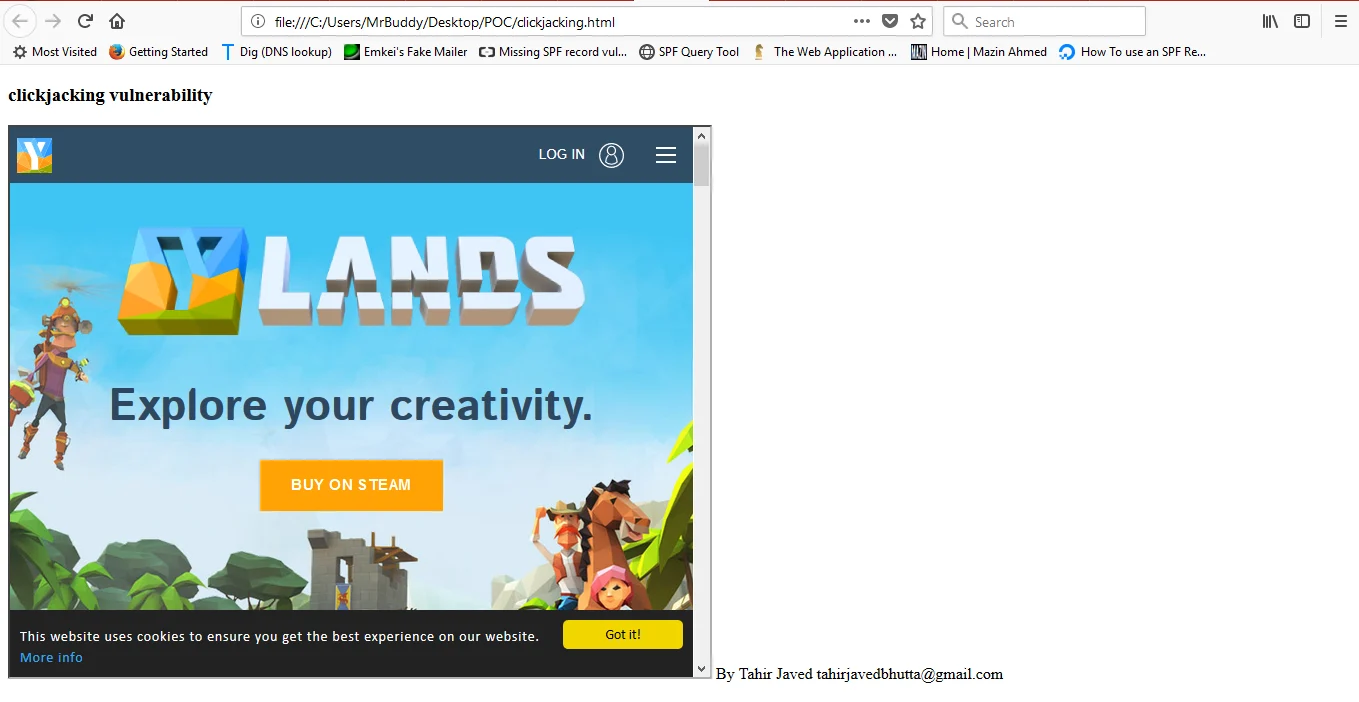
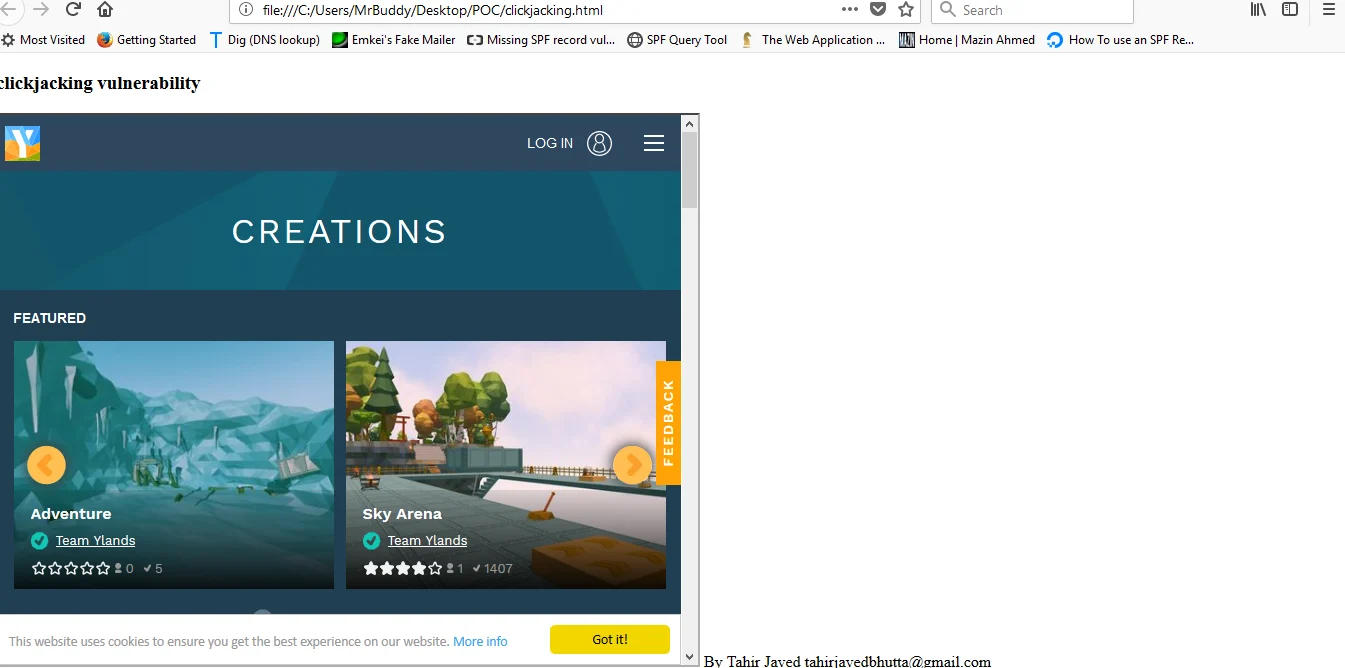
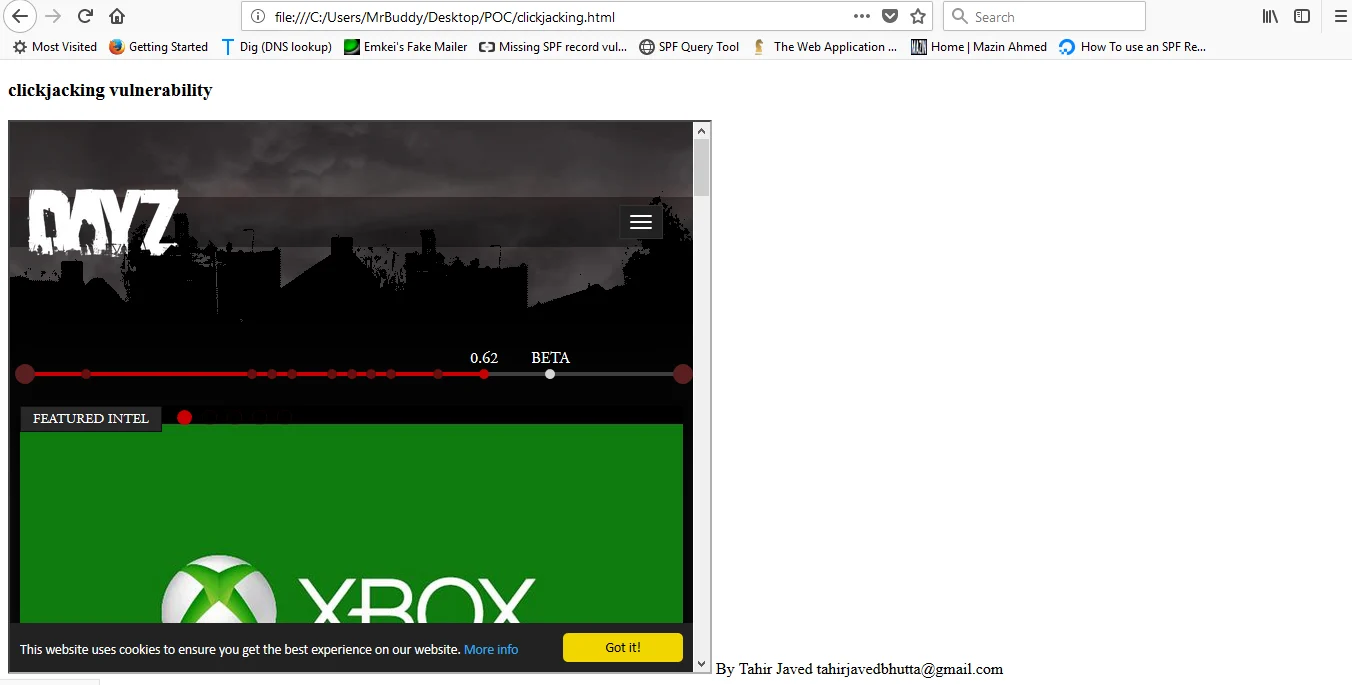
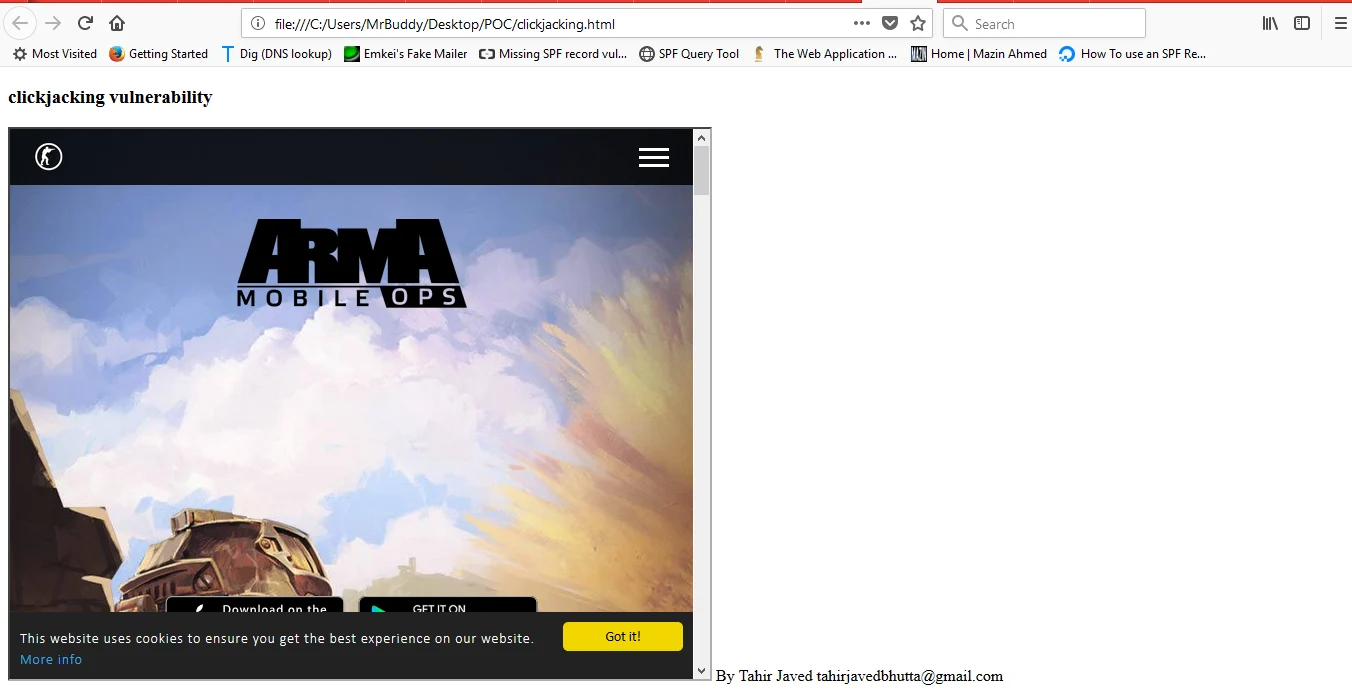
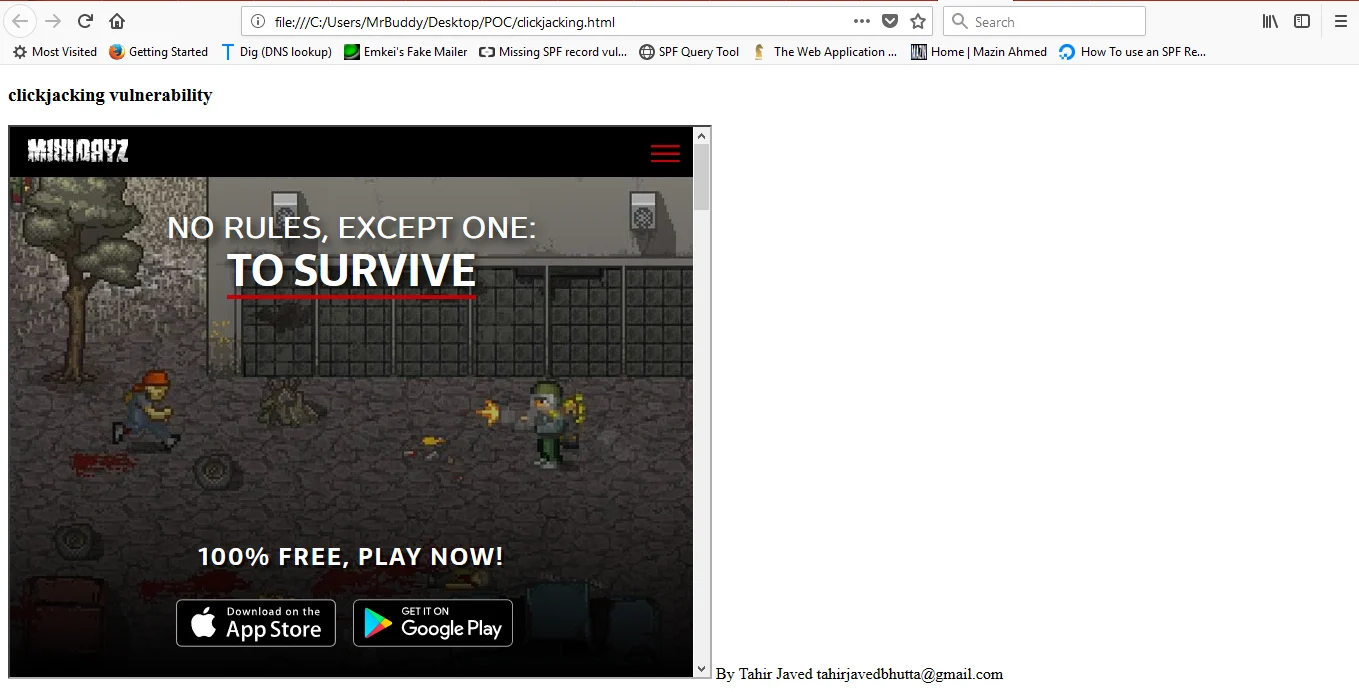
Notice that site is visible in the Iframe
POC is in the attachments. Thanks, waiting for your response.
Impact
Using a similar technique, keystrokes can also be hijacked. With a carefully crafted combination of stylesheets, iframes, and text boxes, a user can be led to believe they are typing in the password to their email or bank account, but are instead typing into an invisible frame controlled by the attacker.
Attachments
Context
The target is the Bohemia Interactive web estate, a set of public websites belonging to the game publisher. The researcher reports that several of these sites can be embedded in a third-party page because the server does not send an X-Frame-Options response header. The affected assets named in the report are:
https://ylands.com/https://workshop.ylands.com/https://dayz.com/http://armamobileops.com/https://minidayz.com/
These are ordinary public-facing web properties. The feature that matters here is not a specific application function but the default framing behaviour of the pages: whether a browser is permitted to render them inside a <frame> or <iframe> on another origin.
Setup
No accounts, roles, special tooling or versions are described. The test only requires a browser and a local HTML file that frames the target. The precondition is that the target page is reachable and that the response lacks the X-Frame-Options header.
Finding it
While testing the websites, the researcher observed that the server did not return an X-Frame-Options header. That header tells the browser whether a page may be rendered in a <frame> or <iframe>, and sites use it to stop their content being embedded elsewhere. Without it, the browser has no instruction to refuse framing, so the page can be loaded inside an attacker-controlled document.
The researcher frames this as clickjacking, also called a UI redress attack: tricking a user into clicking something different from what they perceive, which can reveal confidential information or hand control of their machine to the attacker while they click on seemingly innocuous pages. The report also notes that the issue affects the web server.
Exploitation
Step 1: Build a framing page
The researcher provides a minimal HTML document that loads a target inside an iframe:
<!DOCTYPE HTML>
<html lang="en-US">
<head>
<meta charset="UTF-8">
<title>I Frame</title>
</head>
<body>
<h3>clickjacking vulnerability</h3>
<iframe src="https://vigorgame.com/" height="550px" width="700px"></iframe>
</body>
</html>
The <iframe> element points at the site under test; the src attribute is the only part that changes between tests. The height and width attributes size the embedded page so it is usable inside the attacker page.
Step 2: Swap in each vulnerable URL
The researcher instructs that each of the listed URLs be placed, one by one, into the src of the iframe above:
https://ylands.com/
https://workshop.ylands.com/
https://dayz.com/
http://armamobileops.com/
https://minidayz.com/
Step 3: Confirm the page renders
With the target loaded in the iframe, the researcher notes that the site is visible inside the frame. That visibility is the proof: the browser rendered the target page inside a document from another origin, which is exactly what X-Frame-Options is meant to prevent. The proof of concept is captured in the attachments.
Root cause
The pages are served without the X-Frame-Options response header, so the browser has no directive telling it to refuse framing. The report does not describe any other framing defence, such as a Content-Security-Policy frame-ancestors directive, so the absence of X-Frame-Options is the whole of the gap as presented. The mistake is a missing response header on the server side rather than a flaw in application logic.
Impact
The researcher describes the impact in terms of UI redressing. A victim who visits an attacker page can be made to interact with the embedded target while believing they are interacting with something else. The report extends this to keystrokes: with a crafted combination of stylesheets, iframes and text boxes, a user can be led to believe they are typing a password for their email or bank account while actually typing into an invisible frame controlled by the attacker.
These outcomes depend on the victim visiting the attacker's page and on the framed site offering actions worth hijacking. The report does not demonstrate a specific state-changing action or data disclosure on the listed sites; the impact is stated as the general clickjacking risk.
Fix
The report does not state what was changed. The remedy it points to is the X-Frame-Options response header, which the server should return so that browsers refuse to render the pages in a frame or iframe on other origins.
Variants to test
- Frame each in-scope host and check whether the page renders. A positive result is the target page appearing inside the iframe.
- Inspect the response headers for
X-Frame-Options. A positive result is its absence on a page that renders in the frame. - Check for a Content-Security-Policy
frame-ancestorsdirective as an alternative control. A positive result for the bug is neither header being present. - Test subdomains and sibling properties beyond the five listed, since the report notes that many URLs in scope were vulnerable. A positive result is the same missing header and successful framing.
Hunting notes
This kind of issue hides on public marketing and game sites, workshop portals and other content properties where response headers are configured per host or per virtual host and can drift between them. During recon, the signal is a response that lacks X-Frame-Options (and any frame-ancestors policy) on a page that performs authenticated or sensitive actions. The researcher showed impact by demonstrating that the live pages render inside an iframe, with screenshots as evidence.
What happened, in plain words
A security researcher was testing the websites run by Bohemia Interactive, a company that publishes video games. While looking at those sites, he noticed that several of them could be loaded inside another website. That sounds harmless, but it is the basis of an attack called clickjacking: a trick where a page you visit secretly places a real website under your mouse, so that when you think you are clicking one thing, you are actually clicking another.
The researcher showed that five public sites belonging to the company could be embedded this way, and he took screenshots as proof.
This article walks through the report from the beginning, explaining every idea as it comes up, so you can follow it even if you have never done security testing before.
Context
The target is a set of public websites owned by the game publisher. The researcher lists five of them as affected:
https://ylands.com/https://workshop.ylands.com/https://dayz.com/http://armamobileops.com/https://minidayz.com/
These are ordinary public websites that anyone can visit.
The thing that matters here is not a particular button or form on those pages. It is a default behaviour of web pages: whether a browser is allowed to show a page inside a small window on a different website. That small window is called a frame, and the next sections explain what that means.
A quick word on frames
A web page can contain another web page inside it, like a picture inside a picture frame. The HTML element that does this is called <iframe> (short for inline frame). Web developers use it for things like embedding a video player or a map into their own page.
Normally the embedded page comes from a different website than the page around it. The site around the frame is called the parent, and the site inside the frame is called the embedded page. Browsers allow this by default, which is convenient, but it also means that anyone can put your website inside their own page unless you tell the browser not to.
Setup
There is no special software, account or version involved in this report. To repeat the test you only need:
- A computer with a web browser.
- A plain text file saved with an
.htmlending, which the browser can open. - A working internet connection so the target sites can load.
The only precondition is that the target page is reachable and that its response does not include a particular instruction called X-Frame-Options. We will get to what that instruction is in a moment.
Finding it
While testing the websites, the researcher noticed that the server did not send back an X-Frame-Options header.
A header is a small piece of information that a web server sends along with a page, before the page content itself. You never see headers in the browser window, but the browser reads them and follows their instructions. Think of them as the label on a parcel: the parcel is the web page, and the label tells the delivery service how to handle it.
X-Frame-Options is a header whose whole job is to tell the browser whether this page is allowed to appear inside a <frame> or <iframe> on another site. If a site sends it, the browser refuses to show that page inside someone else's frame. If the site does not send it, the browser has no instruction to refuse, so it happily displays the page inside the frame.
The researcher calls this clickjacking, also known as a UI redress attack. "UI" means user interface, the parts of a page you see and interact with, and "redress" means dressing something up as something else. The idea is to trick a user into clicking something different from what they believe they are clicking, which can reveal confidential information or let an attacker take control of the user's computer while the user clicks on pages that look harmless.
The report also notes that the issue affects the web server, meaning the fix belongs on the server side, in how it sends pages, not in the code of any particular feature.
Exploitation
Step 1: Build a framing page
The researcher provides a very small HTML document that loads a target site inside an iframe:
<!DOCTYPE HTML>
<html lang="en-US">
<head>
<meta charset="UTF-8">
<title>I Frame</title>
</head>
<body>
<h3>clickjacking vulnerability</h3>
<iframe src="https://vigorgame.com/" height="550px" width="700px"></iframe>
</body>
</html>
Line by line, in plain words:
<!DOCTYPE HTML>tells the browser that this file is an HTML page, so it knows how to read the rest.<html lang="en-US">opens the page and says its language is English (United States).<head>starts the part of the page that holds information about the page rather than visible content.<meta charset="UTF-8">says which character encoding the file uses, so letters and symbols display correctly.<title>I Frame</title>sets the text shown in the browser tab.</head>closes the head section.<body>starts the visible part of the page.<h3>clickjacking vulnerability</h3>is a heading that will appear on the page. It is just a label for the test.<iframe src="https://vigorgame.com/" height="550px" width="700px"></iframe>is the important line. It creates the frame,srcsays which web address to load inside it, andheightandwidthset how big the frame is on screen, in pixels. The address here is the site being tested; the researcher says this is the only part that changes between tests.</body>and</html>close the visible page and the document.
Why this step: the whole test is simply "can I put this site inside my own page?". Writing a tiny page with an iframe is the smallest possible way to ask the browser that question. If the site appears inside the frame, the answer is yes.
Step 2: Swap in each vulnerable URL
The researcher says to put each of the listed addresses, one at a time, into the src of the iframe above:
https://ylands.com/
https://workshop.ylands.com/
https://dayz.com/
http://armamobileops.com/
https://minidayz.com/
Why this step: one site being frameable could be a one-off mistake. Testing each address in turn shows whether the same missing protection affects several sites, which makes the finding stronger and tells the company where to look.
Step 3: Confirm the page renders
With the target loaded in the iframe, the researcher notes that the site is visible inside the frame. That visibility is the proof. The browser showed a page from one website inside a page from another, which is exactly what X-Frame-Options exists to prevent.
The proof of concept is captured in the attachments:
Root cause
The pages are sent to the browser without the X-Frame-Options header, so the browser has no instruction telling it to refuse framing. The report does not mention any other protection against framing, such as a Content-Security-Policy frame-ancestors rule, so as presented, the missing header is the entire gap.
In other words, the mistake is a missing instruction on the server side, not a bug in the logic of any feature. Nothing in the site's code is doing the wrong thing; the server is simply not saying "do not frame me".
Impact
The researcher describes the impact in terms of UI redressing. A person who visits an attacker's page can be made to interact with the embedded real site while believing they are interacting with something else. Because the real site is invisible or disguised under the attacker's layout, the victim's clicks land on the real site's buttons.
The report goes further and mentions keystrokes. With a carefully crafted combination of stylesheets, iframes and text boxes, a user can be led to believe they are typing the password to their email or bank account, while in reality they are typing into an invisible frame controlled by the attacker.
A stylesheet is a file that controls how a page looks: colours, positions, sizes. By layering stylesheets, frames and text boxes, an attacker can make one thing appear where another thing actually is.
These outcomes depend on two things: the victim visiting the attacker's page, and the framed site offering actions worth hijacking. The report does not demonstrate a specific action or data leak on the listed sites; the impact is stated as the general risk of clickjacking.
Fix
The report does not say what was changed. The remedy it points to is the X-Frame-Options response header, which the server should send so that browsers refuse to display the pages in a frame or iframe on other sites.
Variants to test
If you want to look for the same issue yourself, these are the checks the write-up suggests:
- Frame each in-scope host and see whether the page renders. A positive result is the target page appearing inside the iframe.
- Look at the response headers for
X-Frame-Options. A positive result is that it is missing on a page that renders in the frame. - Check for a Content-Security-Policy
frame-ancestorsrule as an alternative protection. A positive result for the bug is neither being present. - Test subdomains and sibling sites beyond the five listed, since the report notes that many URLs in scope were vulnerable. A positive result is the same missing header and successful framing.
Hunting notes
This kind of issue tends to hide on public marketing and game sites, workshop portals and other content sites, where response headers are set per host and can drift apart between them. During recon, the signal is a response that lacks X-Frame-Options (and any frame-ancestors policy) on a page that performs logged-in or sensitive actions. The researcher showed impact by demonstrating that the live pages render inside an iframe, with screenshots as evidence.
Glossary
- Header: a small piece of information a web server sends with a page, telling the browser how to handle it.
X-Frame-Options: a response header that tells the browser whether a page may be shown inside a frame or iframe on another site.- Frame / iframe: a way to show one web page inside another, using the HTML
<iframe>element. - Parent page: the page that contains the frame.
- Embedded page: the page shown inside the frame.
- Origin: the combination of scheme, host and port that identifies a website; pages from different origins are treated as separate sites by the browser.
- Clickjacking: tricking a user into clicking something different from what they think they are clicking, often by hiding a real site under a fake one.
- UI redress attack: another name for clickjacking; "UI" means user interface, and "redress" means dressing something up as something else.
- Response: what a web server sends back to the browser when a page is requested.
- Server: the computer that stores and delivers websites to visitors.
- HTML: the language used to write web pages.
srcattribute: the part of an HTML element that says which address to load.- Pixel: a single dot on screen;
heightandwidthin pixels set how large an element appears. - Content-Security-Policy: a set of rules a site can send to the browser to restrict what the page is allowed to do, including whether it can be framed.
frame-ancestors: a rule inside Content-Security-Policy that says which sites may embed this page in a frame.- Stylesheet: a file that controls how a page looks, such as colours, positions and sizes.
- Keystroke: a single press of a key on the keyboard.
- Proof of concept (POC): a small demonstration that shows a vulnerability is real.
- Recon: the early stage of testing where you gather information about a target.
- Bounty: a reward paid by a company to a researcher who reports a valid security issue.
- Severity: a rating of how serious a security issue is.


