CRLF injection allow => cookie injection in root domain & xss
A redirect endpoint on a subdomain reflected user input into HTTP response headers without sanitising carriage returns and line feeds, letting an attacker inject arbitrary headers and a response body. This allowed setting cookies for the parent domain and executing JavaScript in the subdomain's origin, which could steal session cookies or force a victim into an attacker-controlled account.
 Published on medium.com
i found CRLF injection in https://glimpse.bukalapak.com ( i know is out of scope but have critical impact in all domain bukalapak.com)
The full write-up lives on its author's site
It belongs to its author, so we link to it rather than copy it. The other two tabs are our own rewrites, checked against it.
Context
Bukalapak is an Indonesian e-commerce site, and the researcher found a CRLF injection on glimpse.bukalapak.com, a host he explicitly notes is out of scope but which he says has critical impact on the whole bukalapak.com domain. The vulnerable feature is a redirect endpoint that takes a link parameter. Because the value of link is written into the response headers without sanitising carriage return and line feed characters, an attacker can terminate the current header block and start writing new headers, or even a new response body.
The report describes two distinct outcomes from the same flaw: injecting HTML and JavaScript into the response (leading to XSS), and injecting Set-Cookie headers scoped to the root domain .bukalapak.com, which lets the attacker plant cookies that every subdomain will send.
Setup
The researcher tested in Chrome. The only stated precondition is the browser: the payloads are opened as ordinary links in Chrome. No account, tool or special configuration is required to reproduce the header injection itself. The XSS variant relies on the X-XSS-Protection: 0 header being injected first, which the researcher calls out as important for bypassing Chrome's XSS protection.
Finding it
The researcher was looking at the redirect endpoint on glimpse.bukalapak.com and its link parameter. The parameter value is reflected into the response headers, and the researcher found that CRLF sequences (%0d%0a) in the value are not stripped. That is the whole finding: once you can put a newline into a header value, you control what comes after it.
He frames the impact in two directions. First, the injection lets him add cookies to the root domain, so the cookies apply to every subdomain of bukalapak.com. Second, it lets him inject HTML and JavaScript while bypassing the XSS protection header, which he says is enough to read session_id.
Exploitation
Step 1: CRLF to HTML injection and XSS
The first payload turns the redirect response into an HTML document containing a script. The researcher says to test it in Chrome and stresses that X-XSS-Protection:0 is important to bypass Chrome's XSS protection.
https://glimpse.bukalapak.com/redirect?link=%0d%0aX-XSS-Protection:0%0d%0aContent-Type:%20text/html%0d%0aHTTP/1.1%20200%20OK%0d%0aContent-Type:%20text/html%0d%0a%0d%0a<html><script>alert(document.domain)</script><!--
Reading the payload from left to right:
%0d%0aends the header line the application was writing and starts a new one.X-XSS-Protection:0disables the browser's reflective XSS filter for this response.Content-Type: text/htmlsets the type of the injected response.HTTP/1.1 200 OKand a secondContent-Type: text/htmlbegin a second, nested response, so the body that follows is parsed as HTML.%0d%0a%0d%0aterminates the headers and starts the body.<html><script>alert(document.domain)</script><!--is the body. The trailing<!--comments out whatever the application appends after the injected value.
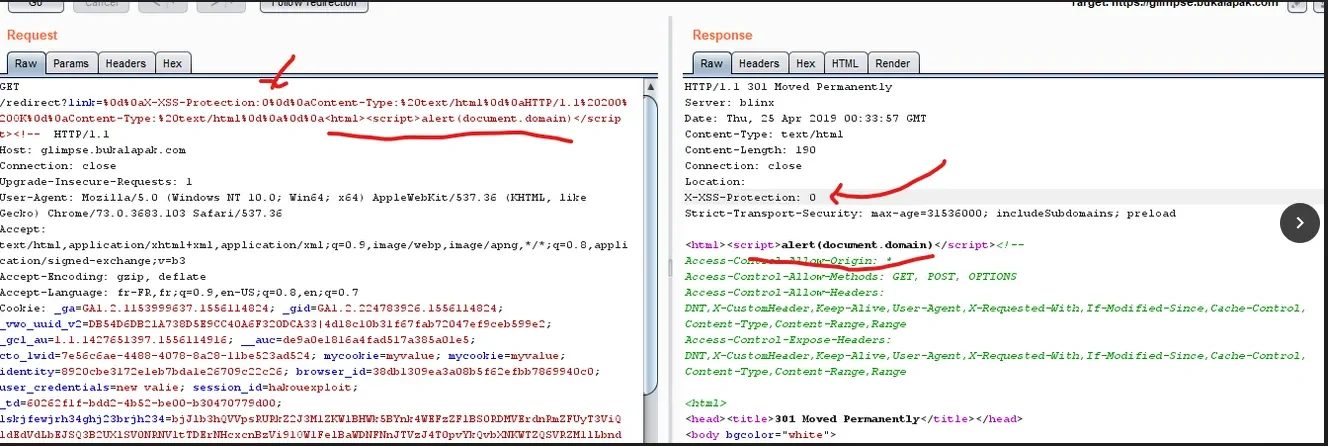
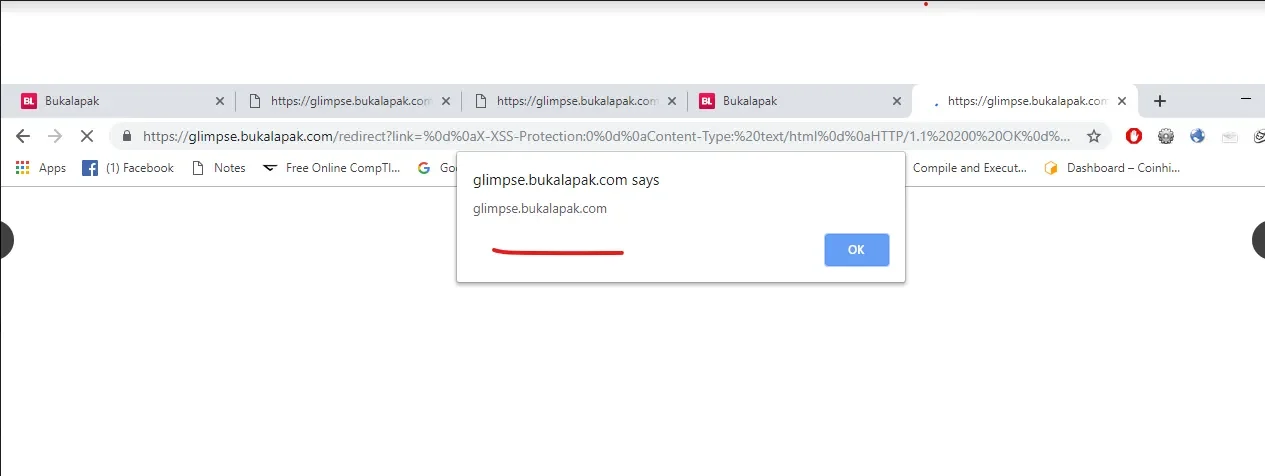
The report places two screenshots after this payload.
Step 2: reading cookies
The same construction, with the script changed to read document.cookie, is presented as a way to obtain cookies. The researcher states that all cookies configured this way can be used on any subdomain of bukalapak.com, and that this includes session_id.
https://glimpse.bukalapak.com/redirect?link=%0d%0aX-XSS-Protection:0%0d%0aContent-Type:%20text/html%0d%0aHTTP/1.1%20200%20OK%0d%0aContent-Type:%20text/html%0d%0a%0d%0a<html><script>alert(document.cookie)</script><!--
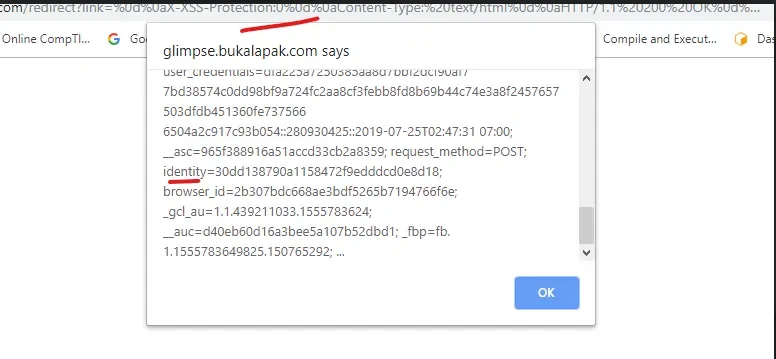
The report places a screenshot after this payload.
Step 3: CRLF to cookie injection on the root domain
The second payload does not inject a body at all. It injects Set-Cookie headers whose domain attribute is .bukalapak.com, so the cookies are valid for the root domain and every subdomain beneath it.
https://glimpse.bukalapak.com/redirect?link=%0d%0aSet-Cookie%3a+newcookie%3dvalue1%3b+domain%3d.bukalapak.com%3b+path%3d/%3b%250d%250aSet-Cookie%3a+newcookie2%3dvalue2%3b+domain%3d.bukalapak.com%3b+path%3d/%3b
Decoding the important parts:
%0d%0aends the current header and starts a new one.Set-Cookie%3a+newcookie%3dvalue1%3b+domain%3d.bukalapak.com%3b+path%3d/%3bisSet-Cookie: newcookie=value1; domain=.bukalapak.com; path=/;with the separators URL-encoded.%250d%250ais a double-encoded CRLF (%0d%0aafter one round of decoding), which separates the first injected cookie from the second.- The second
Set-Cookiesetsnewcookie2=value2with the same domain and path.
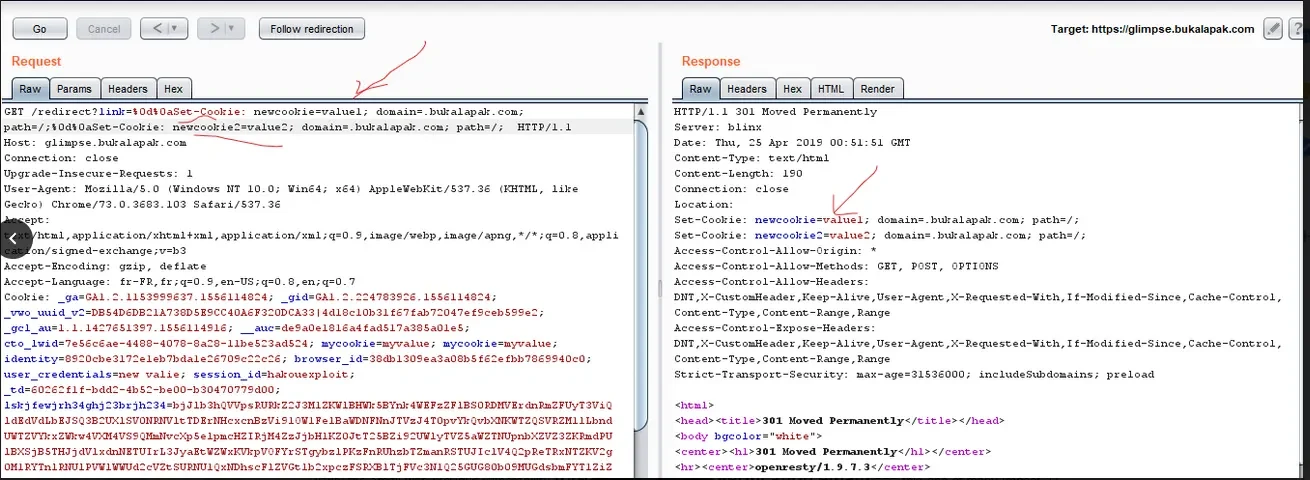
Root cause
The redirect endpoint writes the user-supplied link value into a response header without removing or rejecting CR and LF characters. In HTTP, a header line ends at CRLF, so any CRLF inside a value lets the attacker start new header lines. The report does not describe the server-side code, so the exact implementation mistake is not shown. The XSS variant additionally relies on the attacker being able to inject X-XSS-Protection: 0 ahead of the body, which the researcher says is what defeats Chrome's XSS protection.
Impact
The researcher lists four impacts:
- Getting cookies, including
session_id, through the XSS variant. - Forcing a user to log out by clearing cookies. He says this was tested, with the payload
{Set-Cookie: lskjfewjrh34ghj23brjh234=;Set-Cookie: session_id=;Set-Cookie: user_credentials=;}. - Turning a self XSS into a stored XSS by combining it with cookie injection.
- Forcing a user to log in to another account, which he describes as having the same impact as adding a credit card.
For the fourth impact he gives a scenario:
- Create an account with the victim's name, which the site allows, and an email address that looks like the victim's. His example is the victim's address
[redacted]versus a lookalike at a different domain,[redacted]. - Verify that email using the same vulnerability, which he labels as breaking and bypassing email verification.
- Take the cookies of this account and inject them through the vulnerable link, add phishing text in the HTML such as a request to add a credit card to confirm the account, and redirect to the payment settings page at
https://www.bukalapak.com/users/payment_settings. - When the victim opens the link, the cookies are changed, the phishing message is shown, and the browser is redirected to the payment settings page.
- Because the account has the same name and the same email with a verified mark, the victim believes they are still in their own account and adds their credit card.
- The attacker can then force the user to log out of the attacker's account (impact 2), leaving the attacker with the email and password of the account now linked to the victim's credit card.
A video walkthrough of this scenario is linked at https://www.youtube.com/watch?v=ODFfwW2kxCE. The report also cites three similar HackerOne reports as references: https://hackerone.com/reports/52042, https://hackerone.com/reports/237357 and https://hackerone.com/reports/174474.
The report does not state a severity, a CVSS score or a bounty amount.
Fix
Variants to test
- Other redirect or link parameters on the same and other hosts: send
%0d%0afollowed by a harmless header such asX-Test: 1and check whether the response contains a separateX-Testheader. A positive result is a header you did not send being reflected as its own line. - Double-encoded CRLF: try
%250d%250awhere a single encoding is filtered. A positive result is the same header split appearing after one round of decoding. - Cookie scope: inject
Set-Cookiewithdomain=.example.comand confirm in the browser's storage that the cookie is set for the parent domain and sent to sibling subdomains. - Response splitting: inject a full status line and
Content-Type: text/htmlfollowed by a body, as in the first payload, and check whether the browser renders the injected HTML. A positive result is script execution in the target origin. - XSS filter bypass: prepend
X-XSS-Protection: 0to the injected headers and test in Chrome. A positive result is the script running where the browser's reflective filter would otherwise block it. - Logout and session fixation: inject
Set-Cookielines that blank existing session cookies, or set a session cookie to a value the attacker knows, and observe whether the victim is logged out or logged in as the attacker. - Header injection in other sinks: anywhere user input reaches a
Location,Set-Cookieor custom header (URL shorteners, language redirects, tracking parameters), repeat the single-CRLF probe and look for a new header line in the response.
What happened, in plain words
Bukalapak is an Indonesian online shopping site, a bit like Amazon or eBay but for Indonesia. The researcher found a bug on one of its servers, glimpse.bukalapak.com. He openly says this particular host is out of scope, meaning it is not officially part of the programme he was allowed to test, but he argues the bug is serious because it affects the whole bukalapak.com domain, not just that one host.
The bug is called CRLF injection. To understand it, you need to know a little about how a web server talks to your browser. When you visit a page, the server sends back a response. That response has two parts: a set of headers (small lines of metadata, like "this is HTML" or "here is a cookie") and then a body (the actual page content). Each header sits on its own line, and lines are separated by two invisible characters: a carriage return (CR) and a line feed (LF). In URLs these are written as %0d and %0a.
If a website takes something you typed in the URL and copies it straight into a header without cleaning it, you can sneak those two characters in. The server then thinks your input has ended and a new header has begun. You have effectively broken out of the box you were put in and started writing your own headers, or even your own page body. That is CRLF injection.
The vulnerable feature here is a redirect endpoint that takes a destination in a parameter called link. The researcher found that whatever you put in link gets copied into the response headers without the CR and LF characters being removed. That is the whole bug.
From that one flaw he got two different results. First, he could inject HTML and JavaScript into the response, which makes the browser run his code. That is XSS (cross-site scripting): running your own script inside someone else's website, so it can read things that belong to that site, like cookies. Second, he could inject Set-Cookie headers scoped to the root domain .bukalapak.com, which means planting cookies that every subdomain of Bukalapak will send back to the server.
A cookie is a small piece of text a website asks your browser to store and send back on every request to that site. It is how a site remembers who you are between page loads. The most important one is usually the session cookie (here called session_id): it is the ticket that proves you are logged in. If someone else gets your session cookie, they can often act as you without knowing your password.
Setup
The researcher tested in Chrome. The only thing you need to reproduce the header injection itself is a browser: the payloads are opened as ordinary links. No account, no special tool, no configuration. The XSS variant depends on one extra trick: injecting the header X-XSS-Protection: 0 first, which the researcher says is important for bypassing Chrome's built-in XSS protection. That header is an old browser instruction that tells Chrome to switch off its reflective XSS filter for this response.
Finding it
The researcher was looking at the redirect endpoint on glimpse.bukalapak.com and its link parameter. The value of link is reflected into the response headers, and he found that CRLF sequences (%0d%0a) inside the value are not stripped out. That is the entire finding: once you can put a newline into a header value, you control everything that comes after it.
He describes the impact in two directions. First, the injection lets him add cookies to the root domain, so those cookies apply to every subdomain of bukalapak.com. Second, it lets him inject HTML and JavaScript while bypassing the XSS protection header, which he says is enough to read session_id.
Exploitation
Step 1: CRLF to HTML injection and XSS
The first payload turns the redirect response into an HTML page containing a script. The researcher says to test it in Chrome and stresses that X-XSS-Protection:0 is important to bypass Chrome's XSS protection.
https://glimpse.bukalapak.com/redirect?link=%0d%0aX-XSS-Protection:0%0d%0aContent-Type:%20text/html%0d%0aHTTP/1.1%20200%20OK%0d%0aContent-Type:%20text/html%0d%0a%0d%0a<html><script>alert(document.domain)</script><!--
Reading the payload from left to right:
%0d%0ais the CRLF pair. It ends the header line the application was writing and starts a new one. This is the moment you escape the box.X-XSS-Protection:0is a new header you wrote yourself. It tells the browser to disable its reflective XSS filter for this response, so the script that follows will not be blocked.Content-Type:%20text/htmlsets the content type of the injected response.%20is just a space. Telling the browser the content is HTML is what makes it render a page instead of treating it as plain text.HTTP/1.1%20200%20OKfollowed by a secondContent-Type:%20text/htmlstarts a second, nested response inside the first. This is called response splitting: you are not just adding headers, you are starting a whole new response, so the body that follows is parsed as HTML.%0d%0a%0d%0ais two CRLF pairs in a row. A blank line is what separates headers from the body, so this is where your page content begins.<html><script>alert(document.domain)</script><!--is the body. The script pops up an alert showingdocument.domain, which is the site's own domain name, proving the script is running in the context of the target site. The trailing<!--is an HTML comment opener, which comments out whatever the application appends after your injected value, so leftover text does not break your page.
The report places two screenshots after this payload.
Step 2: reading cookies
The same construction, with the script changed to read document.cookie, is presented as a way to obtain cookies. The researcher states that all cookies configured this way can be used on any subdomain of bukalapak.com, and that this includes session_id.
https://glimpse.bukalapak.com/redirect?link=%0d%0aX-XSS-Protection:0%0d%0aContent-Type:%20text/html%0d%0aHTTP/1.1%20200%20OK%0d%0aContent-Type:%20text/html%0d%0a%0d%0a<html><script>alert(document.cookie)</script><!--
This is the same payload as before, with one change: alert(document.domain) becomes alert(document.cookie). document.cookie is a browser property that returns all the cookies the current page is allowed to read as a single string. If the session cookie is not marked as hidden from scripts, it appears in that string, and the alert shows it on screen. That is why the researcher says this link can get session_id.
The report places a screenshot after this payload.
Step 3: CRLF to cookie injection on the root domain
The second payload does not inject a body at all. It injects Set-Cookie headers whose domain attribute is .bukalapak.com, so the cookies are valid for the root domain and every subdomain beneath it.
https://glimpse.bukalapak.com/redirect?link=%0d%0aSet-Cookie%3a+newcookie%3dvalue1%3b+domain%3d.bukalapak.com%3b+path%3d/%3b%250d%250aSet-Cookie%3a+newcookie2%3dvalue2%3b+domain%3d.bukalapak.com%3b+path%3d/%3b
Decoding the important parts:
%0d%0aends the current header and starts a new one, exactly as in step 1.Set-Cookie%3a+newcookie%3dvalue1%3b+domain%3d.bukalapak.com%3b+path%3d/%3bis the headerSet-Cookie: newcookie=value1; domain=.bukalapak.com; path=/;with the separators URL-encoded.%3ais a colon,+is a space,%3dis an equals sign and%3bis a semicolon.Set-Cookieis the header a server uses to tell the browser to store a cookie. Thedomain=.bukalapak.compart is the key: a leading dot means the cookie belongs to the whole domain and all its subdomains, not just the host that set it.path=/means it applies to every path on the site.%250d%250ais a double-encoded CRLF.%25is the percent sign, so after one round of decoding this becomes%0d%0a, a real CRLF. It separates the first injected cookie from the second. The researcher uses double encoding here as a way of getting the newline through.- The second
Set-Cookiesetsnewcookie2=value2with the same domain and path, so two cookies are planted in one visit.
Root cause
The redirect endpoint writes the user-supplied link value into a response header without removing or rejecting CR and LF characters. In HTTP, a header line ends at CRLF, so any CRLF inside a value lets the attacker start new header lines. The report does not describe the server-side code, so the exact implementation mistake is not shown. The XSS variant additionally relies on the attacker being able to inject X-XSS-Protection: 0 ahead of the body, which the researcher says is what defeats Chrome's XSS protection.
Impact
The researcher lists four impacts:
- Getting cookies, including
session_id, through the XSS variant. In plain terms: stealing the login ticket. - Forcing a user to log out by clearing cookies. He says this was tested, with the payload
{Set-Cookie: lskjfewjrh34ghj23brjh234=;Set-Cookie: session_id=;Set-Cookie: user_credentials=;}. Each of these sets a cookie to an empty value, which wipes it, so the browser no longer has a valid session and the user is logged out. - Turning a self XSS into a stored XSS by combining it with cookie injection. Self XSS is a script that only runs for the person who triggers it, so on its own it is low value. Stored XSS is a script that is saved somewhere and runs for other people later. The researcher's point is that by planting cookies and a payload, the self XSS can be made to affect other users.
- Forcing a user to log in to another account, which he describes as having the same impact as adding a credit card.
For the fourth impact he gives a scenario:
- Create an account with the victim's name, which the site allows, and an email address that looks like the victim's. His example is the victim's address
[redacted]versus a lookalike at a different domain,[redacted]. The trick is that the two addresses look almost identical at a glance, so the victim does not notice the difference. - Verify that email using the same vulnerability, which he labels as breaking and bypassing email verification. Email verification is the step where a site sends a link to your address to prove the address is really yours. If that step can be bypassed, the fake account gets the verified mark that makes it look trustworthy.
- Take the cookies of this account and inject them through the vulnerable link, add phishing text in the HTML such as a request to add a credit card to confirm the account, and redirect to the payment settings page at
https://www.bukalapak.com/users/payment_settings. Phishing means writing a message that pretends to come from the real site to trick the victim into doing something, here entering card details. - When the victim opens the link, the cookies are changed, the phishing message is shown, and the browser is redirected to the payment settings page. From the victim's point of view, they clicked a link and ended up on a Bukalapak page that looks like their own account.
- Because the account has the same name and the same email with a verified mark, the victim believes they are still in their own account and adds their credit card.
- The attacker can then force the user to log out of the attacker's account (impact 2), leaving the attacker with the email and password of the account now linked to the victim's credit card. The card is attached to an account the attacker controls.
A video walkthrough of this scenario is linked at https://www.youtube.com/watch?v=ODFfwW2kxCE. The report also cites three similar HackerOne reports as references: https://hackerone.com/reports/52042, https://hackerone.com/reports/237357 and https://hackerone.com/reports/174474.
The report does not state a severity, a CVSS score or a bounty amount.
Fix
An allowlist is a list of values that are explicitly permitted, so anything not on the list is refused.
Variants to test
- Other redirect or link parameters on the same and other hosts: send
%0d%0afollowed by a harmless header such asX-Test: 1and check whether the response contains a separateX-Testheader. A positive result is a header you did not send appearing as its own line. - Double-encoded CRLF: try
%250d%250awhere a single encoding is filtered. A positive result is the same header split appearing after one round of decoding. - Cookie scope: inject
Set-Cookiewithdomain=.example.comand confirm in the browser's storage that the cookie is set for the parent domain and sent to sibling subdomains. - Response splitting: inject a full status line and
Content-Type: text/htmlfollowed by a body, as in the first payload, and check whether the browser renders the injected HTML. A positive result is script execution in the target origin. - XSS filter bypass: prepend
X-XSS-Protection: 0to the injected headers and test in Chrome. A positive result is the script running where the browser's reflective filter would otherwise block it. - Logout and session fixation: inject
Set-Cookielines that blank existing session cookies, or set a session cookie to a value the attacker knows, and observe whether the victim is logged out or logged in as the attacker. Session fixation is when an attacker makes a victim use a session identifier the attacker already knows, so the attacker can take over that session. - Header injection in other sinks: anywhere user input reaches a
Location,Set-Cookieor custom header (URL shorteners, language redirects, tracking parameters), repeat the single-CRLF probe and look for a new header line in the response. A sink is the place in the code where untrusted input finally gets used, in this case where it is written into a header.
Glossary
- CRLF injection: a bug where an attacker puts carriage return and line feed characters into input that ends up in a response header, so the server treats the rest of the input as new headers or a new body.
- CR (carriage return): the invisible character
%0dthat, together with LF, marks the end of a line in HTTP. - LF (line feed): the invisible character
%0athat, together with CR, marks the end of a line in HTTP. - Header: a line of metadata in an HTTP response, such as
Content-TypeorSet-Cookie, sent before the body. - Body: the actual content of an HTTP response, such as the HTML of a page.
- HTTP: the protocol browsers and web servers use to exchange requests and responses.
- Redirect endpoint: a URL whose job is to forward the visitor to another address, usually given in a parameter.
- Parameter: a named value in a URL, here
link, written after a?. - XSS (cross-site scripting): running an attacker's JavaScript inside another website's page, so it can act with that site's permissions.
- Reflective XSS filter: a browser feature that tries to detect and block scripts that appear to be reflected from the request;
X-XSS-Protection: 0turns it off for a response. - Response splitting: injecting a full second HTTP response, including its own status line and headers, into the first one.
- Cookie: a small piece of text a site asks the browser to store and send back on later requests, used to remember who you are.
- Session cookie /
session_id: the cookie that proves you are logged in; stealing it can let someone act as you. Set-Cookie: the response header a server uses to ask the browser to store a cookie.- Domain attribute: the part of a cookie that says which hosts the cookie belongs to; a leading dot like
.bukalapak.comcovers the root domain and all subdomains. - Path attribute: the part of a cookie that says which URL paths it applies to;
/means the whole site. - Root domain: the main domain, here
bukalapak.com, as opposed to a subdomain likeglimpse.bukalapak.com. - Subdomain: a host that sits under a main domain, such as
glimpse.bukalapak.comunderbukalapak.com. - URL encoding: writing special characters as
%codes so they can travel safely in a URL, for example%3afor a colon or%20for a space. - Double encoding: encoding an already encoded value, so
%0dbecomes%250d, which decodes back to%0dafter one round. document.domain: a browser property holding the domain of the current page, used here to prove which site the script is running on.document.cookie: a browser property that returns the cookies the current page is allowed to read.- Self XSS: a script that only runs for the person who triggers it, so it has limited impact on its own.
- Stored XSS: a script that is saved on the server and later runs for other visitors.
- Phishing: a fake message that pretends to come from a trusted site to trick someone into handing over information or money.
- Email verification: the step where a site sends a link to an address to prove the address belongs to the person using it.
- Session fixation: making a victim use a session identifier the attacker already knows, so the attacker can take over the session.
- Allowlist: a list of values that are explicitly permitted, with everything else refused.
- Sink: the place in code where untrusted input is finally used, such as a header being written.
- Out of scope: not officially included in the programme a researcher is allowed to test.
- CVSS: a standard scoring system for rating the severity of a vulnerability.
- Bounty: a reward paid by a company to a researcher for reporting a valid bug.