[Hacking Banks] Broken Access Control Vulnerability in Banking application [PART I]
The banking app used client-side encryption and SSL pinning, but the author bypassed these to access the API. The text claims a broken access control vulnerability allows an attacker to obtain full user information and transmit money using only the victim's phone number, but the exploitation details are in Part II.
 Published on medium.com
This is the part I of the story about finding a critical Vulnerability in a banking mobile app that allows attackers to obtain full user information (Balance, transaction list), as well as the ability to transmit money with just the victim’s phone number.
The full write-up lives on its author's site
It belongs to its author, so we link to it rather than copy it. The other two tabs are our own rewrites, checked against it.
Context
This is the first part of a two-part account of a broken access control vulnerability found in a banking Android application. The researcher was doing freelance reverse engineering on several banks' mobile apps in order to obtain their APIs. The app in question is a Cordova-based Android application: its UI and logic run as HTML, CSS and JavaScript inside a WebView, wrapped in a native shell. The API traffic between the app and the backend is encrypted, and the app ships client-side protections such as SSL pinning and root detection.
The vulnerability itself, which lets an attacker obtain a user's balance and transaction list and transmit money using only the victim's phone number, is described in Part II. This part covers the groundwork: getting around the app's protections, decompiling it, recovering the encrypted web assets, and getting a JavaScript debugger attached to the WebView.
Setup
- A rooted Android device running the banking application.
- Frida server running in the background on the device.
- frida_multiple_unpinning.js to disable SSL pinning.
- tracer-cipher.js to hook
javax.crypto.Cipher. - jadx-gui to read the decompiled Java source and the
AndroidManifest.xml. - A Python script written by the researcher to decrypt the app's web assets.
- Stetho, dex2jar, adb and Chrome's developer tools for the second debugging approach.
Finding it
The starting observation is a familiar one for mobile banking work: the app uses client-side protections (SSL pinning, root detection, request and response encryption), and the researcher's view is that reliance on these can lead the backend team to overlook server-side controls. The result here was a broken access control vulnerability. Access controls exist to stop users acting outside their intended permissions; when they are missing or flawed, an attacker can read other users' information, modify data, and act as other users.
Exploitation
Step 1: Bypass SSL pinning and observe the traffic
With Frida server running in the background and the app started on the rooted device, the researcher loaded the unpinning script to disable SSL pinning and intercept all requests between the app and the API.
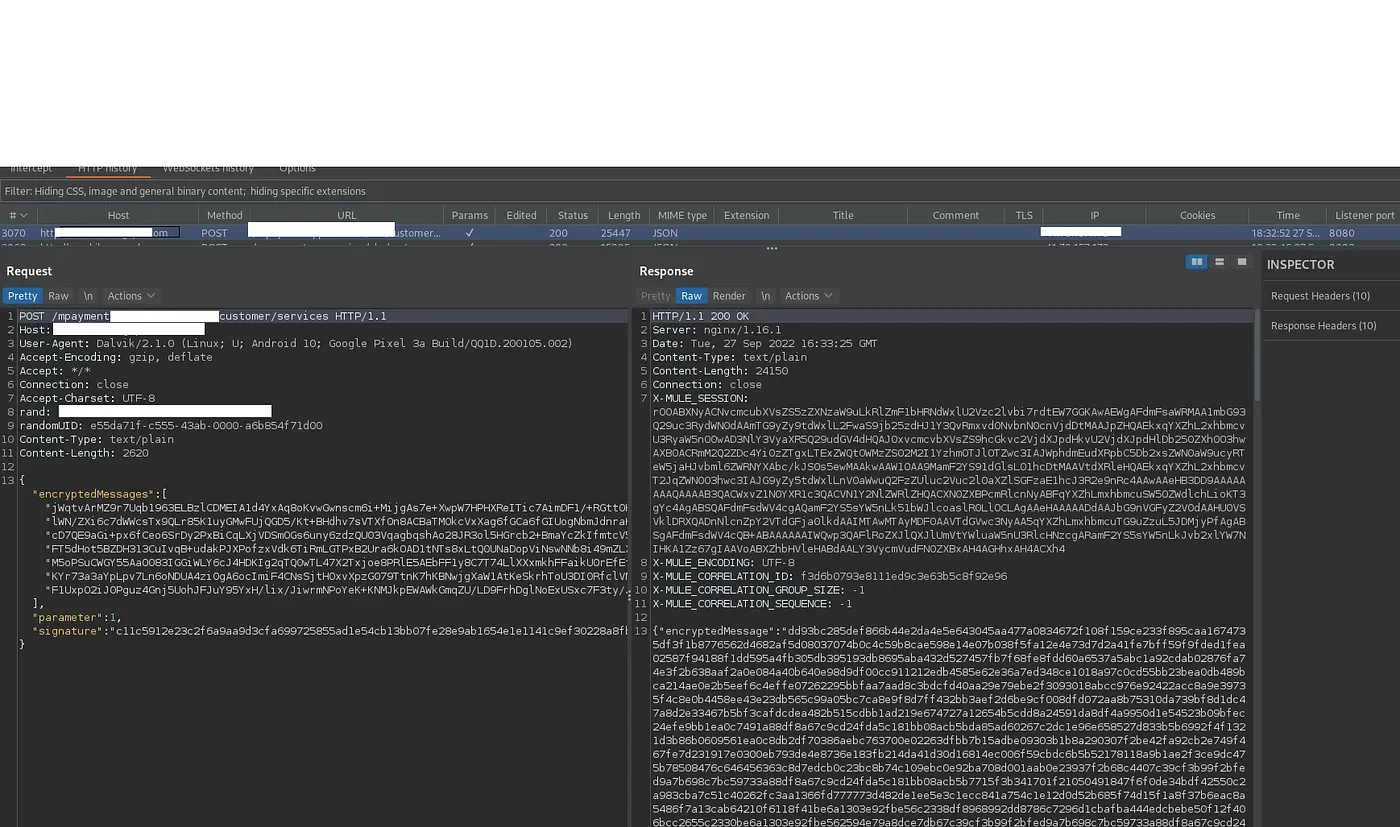
The interception showed that all requests are encrypted. Restarting the app with tracer-cipher.js, which hooks the Java javax.crypto.Cipher class responsible for encryption and decryption, produced no output at all. That absence is the clue: the crypto is not happening in Java.
Step 2: Decompile the APK
The next step was jadx-gui to read the Java source, then the AndroidManifest.xml to identify the main activity.

The presence of Apache Cordova packages confirms the app runs in a WebView.
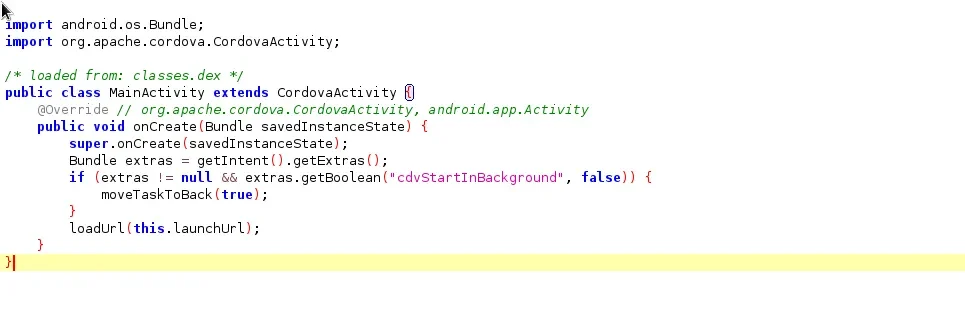
Cordova is an open-source framework that converts HTML, JavaScript and CSS into a native application for iOS, Android and other mobile platforms. This explains the empty Frida output: the encryption is performed by JavaScript code, not by Java classes, so hooking javax.crypto.Cipher had nothing to catch.
Step 3: Recover the web source code
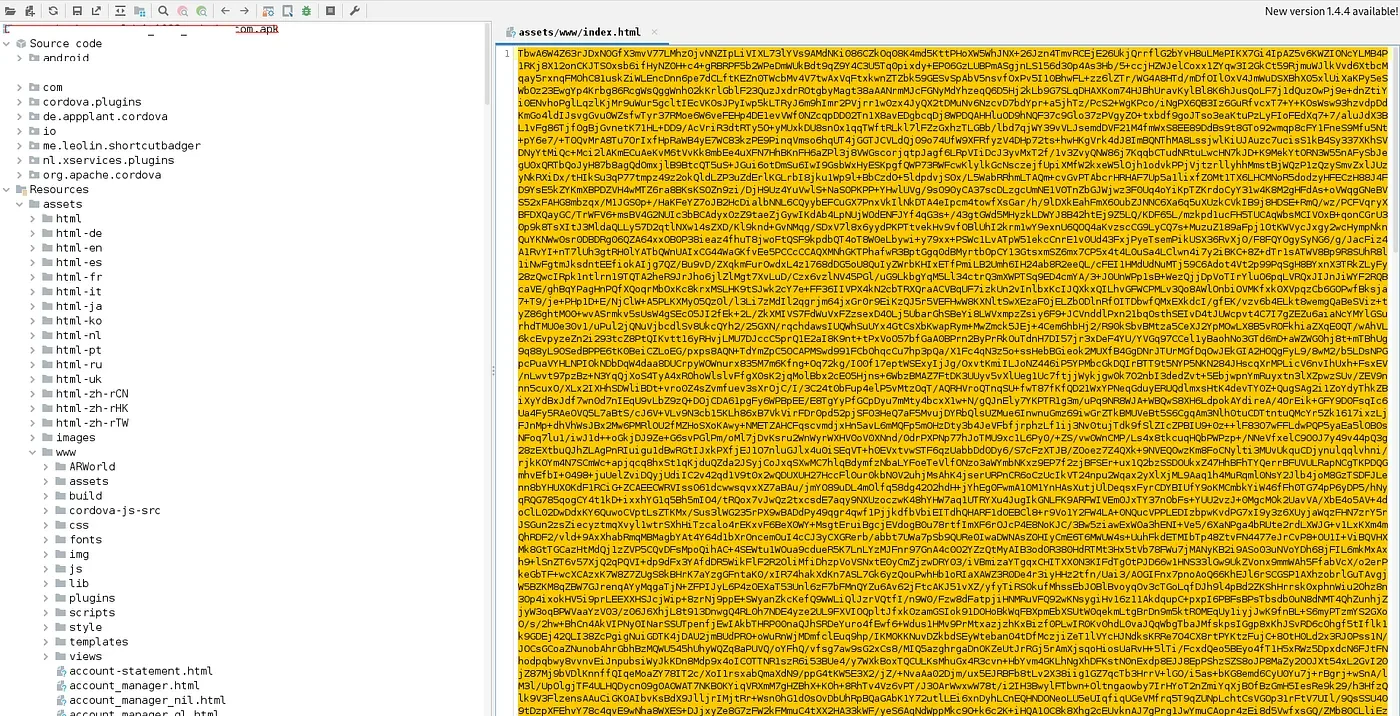
The web assets inside the APK are encrypted. Returning to the Java source, the researcher found the class responsible for decrypting them.
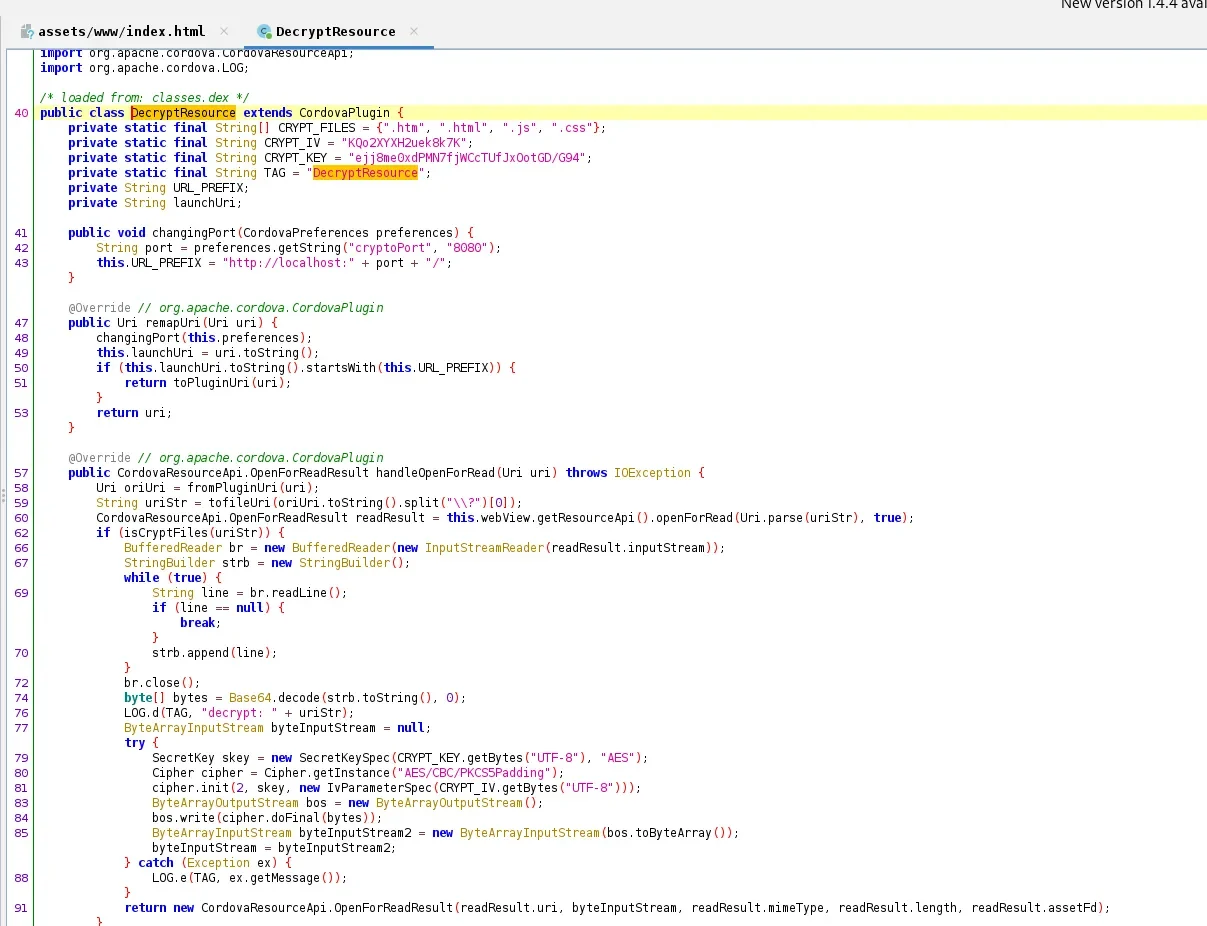
That class yielded everything needed to decrypt the files:
| Item | Value |
|---|---|
| IV | KQo2XYXH2uek8k7K |
| Key | ejj8me0xdPMN7fjWCcTUfJxOotGD/G94 |
| Algorithm | AES |
| Mode | CBC |
| Padding | PKCS5Padding |
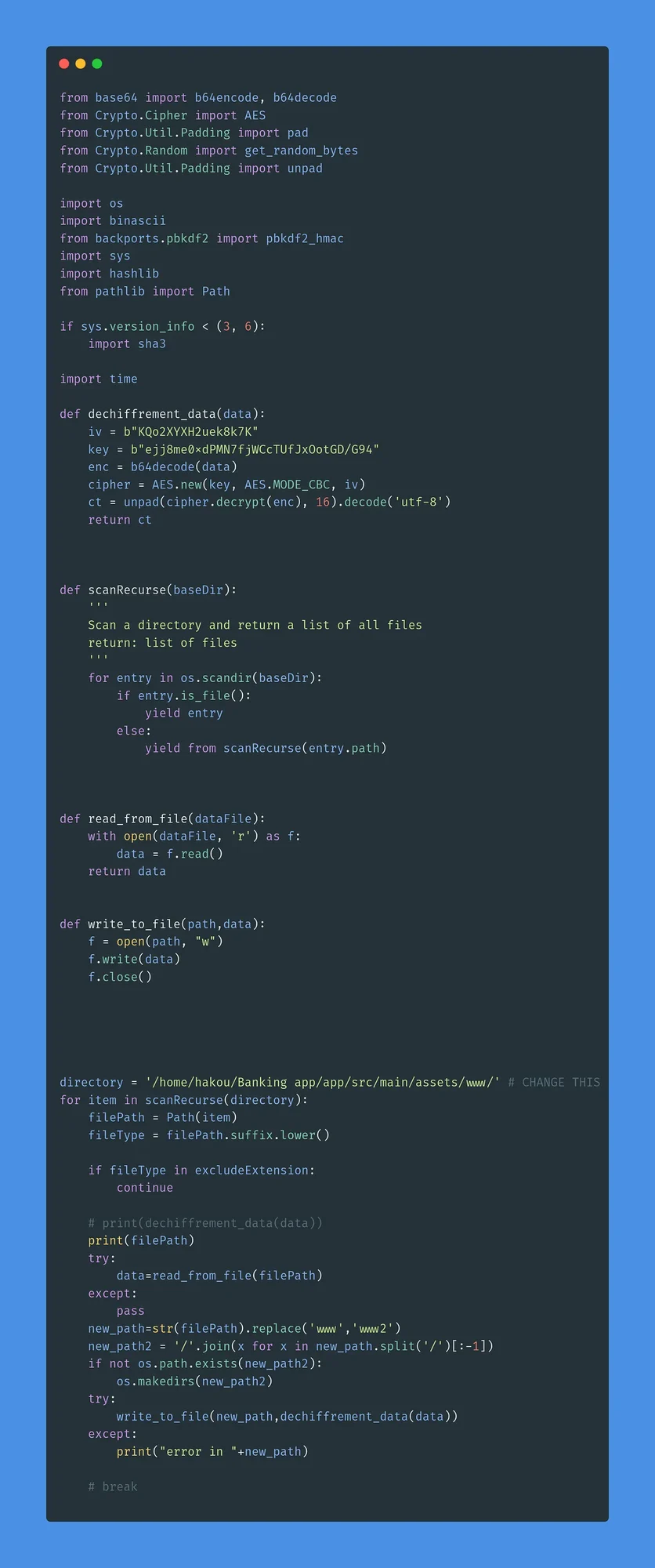
A Python script was written to recursively scan the /WWW/ directory for encrypted files, decrypt them, and write the clear-text results to a new path, /WWW2/.
Step 4: Serve the decrypted assets (failed attempt)
The decrypted WWW2 directory was served over an HTTP server and opened in a browser. Various JavaScript functions did not work and numerous problems appeared, so the researcher moved to the second approach.
Step 5: Load Stetho and use Chrome developer tools
Stetho is a debug bridge for Android applications that exposes Chrome Developer Tools to the app, plus an optional dumpapp command-line interface into application internals. The steps were:
- Download Stetho from http://facebook.github.io/stetho/.
- Rename it to
stetho.jar. - Download dex2jar from https://sourceforge.net/projects/dex2jar/.
- Convert the jar to dex:
d2j-jar2dex.sh stetho.jar
- Push the dex file to
/data/local/tmp/:
adb push stetho-jar2dex.dex /data/local/tmp/stetho.jar
-
Run the app under Frida with load_stetho.js:
-
Open Chrome at:
chrome://inspect/#devices
- Inspect the app.
With the WebView attached to Chrome's developer tools, the obfuscated JavaScript can be debugged directly. Part II covers using breakpoints to reveal the parameters before encryption, discovering the vulnerability, and writing a Python script to exploit it.
Root cause
The report attributes the vulnerability to broken access control: access controls are meant to stop users acting outside their intended permissions, and when they are missing or flawed an attacker can read other users' information, modify data and act as other users. The report does not describe the precise missing check. The client-side protections (SSL pinning, root detection, request and response encryption) do not prevent this, because they only raise the cost of observing and replaying the app's own traffic; once the JavaScript is debugged and the request format is understood, the attacker can issue requests directly. The report does not show the server-side code, so the precise missing check is not stated.
Impact
Per the report, the vulnerability allows an attacker to obtain full user information, specifically balance and transaction list, and to transmit money using only the victim's phone number.
Fix
Variants to test
- Replace the user identifier in an authenticated API request with another user's identifier (phone number, account number, customer ID) and check whether the response contains that user's data. A positive result is the response containing another user's balance or transactions.
- Replay a money-transfer request with the recipient or sender field changed to a value belonging to another user, and check whether the transfer is accepted.
- Inspect Cordova apps for encrypted assets under
/WWW/and look for the Java class that decrypts them; if the key and IV are embedded, decrypt the assets and read the JavaScript to find the request format and parameter names.
What happened, in plain words
A security researcher spent some time taking apart the Android mobile apps of a few banks, as freelance work, in order to find out what their APIs look like. An API (Application Programming Interface) is the set of web addresses and rules that an app uses to talk to the bank's servers: when you tap "show my balance", the app sends a request to one of those addresses and the server sends the answer back. If you know those addresses and the format of the requests, you can talk to the server yourself, without the app.
In one of those apps, the researcher found a serious flaw called broken access control. Access control is the part of a system that decides who is allowed to do what. Think of a hotel: your key card opens your room and nothing else. If the hotel gave every guest a card that opened every door, that would be broken access control. In a banking app, the equivalent is a server that does not check that a user is acting only within their intended permissions.
With this flaw, according to the report, an attacker could get a user's full information (balance and transaction list) and could even send money using only the victim's phone number. The report is split into two parts. This first part is the groundwork: getting past the app's defences, opening up the app's files, decrypting the parts of the app that were hidden, and finally attaching a debugger so the JavaScript code inside the app could be read and stepped through. The actual discovery and exploitation are in Part II.
A quick note on the words you will meet. SSL pinning is a technique where an app refuses to talk to a server unless that server presents one specific, pre-approved certificate. It stops someone sitting between the app and the bank from reading the traffic. Root detection is the app checking whether the phone has been "rooted", that is, whether the owner has taken full administrator control of the Android system, which makes it easier to inspect and modify apps. Encryption is scrambling data with a key so that only someone with the right key can read it. Banks often encrypt both the requests and the responses, so even if you capture the traffic, it looks like gibberish.
The researcher's view, stated in the report, is that banking apps lean on these client-side protections (protections built into the app on the phone), and that this can lead the backend team (the people running the servers) to overlook security checks on their side. The researcher's view is that this pattern can leave server-side checks overlooked.
Setting up
To follow along you need a handful of tools. None of them are things a normal user would install, but each has a clear job:
- A rooted Android device running the banking application. Rooted means you have full control of the phone's operating system, which lets you run tools that a normal phone would block.
- Frida server running in the background on the device. Frida is a tool that lets you inject your own code into a running app and watch or change what it does, a bit like putting a transparent glove inside the app.
- frida_multiple_unpinning.js, a Frida script whose job is to switch off SSL pinning so the traffic can be intercepted.
- tracer-cipher.js, a Frida script that watches the Java class
javax.crypto.Cipher. In Java, a class is a named bundle of code;javax.crypto.Cipheris the standard Java class that performs encryption and decryption, so watching it is a way to see every encryption operation the app performs. - jadx-gui, a program that opens an Android app file (an APK) and shows the Java source code inside it, in a readable form.
- A Python script written by the researcher to decrypt the app's web files.
- Stetho, dex2jar, adb and Chrome's developer tools for the second debugging approach. adb is the Android Debug Bridge, the standard command-line tool for talking to an Android device from a computer. Chrome's developer tools are the panel you can open in the Chrome browser with F12, normally used by web developers to inspect pages.
Step 1: Getting around the app's SSL pinning
The first move is to see what the app sends to the bank. Normally SSL pinning would block that, so the researcher started Frida server in the background, launched the banking app on the rooted device, and loaded the unpinning script to disable SSL pinning and intercept all requests between the app and the API.
The screenshot shows the Frida server running in the background while the banking application is started on the rooted device, with the unpinning script loaded to disable SSL pinning and intercept the requests between the app and the API.
The interception revealed a problem: all requests are encrypted. Capturing them is like intercepting a letter written in a code you do not have. So the next idea was to watch the encryption itself. The researcher restarted the application and used tracer-cipher.js to hook the Java class javax.crypto.Cipher, the class responsible for encryption and decryption. Hooking means attaching a small piece of code to a function so that every time the app calls it, your code runs too and can record what went in and what came out.
However, the researcher received no output at all. That silence is itself a clue. If the app were encrypting in Java, the hook would have fired. It did not, so the encryption must be happening somewhere else.
Step 2: Opening up the app file
The next step was to look inside the app. The researcher started with jadx-gui to read the Java source code, then read the AndroidManifest.xml file to find the main activity. The manifest is a file inside every Android app that declares what the app contains and which screen starts first; the main activity is that first screen.
This image shows jadx-gui displaying the decompiled Java source code, alongside the AndroidManifest.xml file used to identify the main activity.
Reading the code revealed the use of Apache Cordova packages, which confirms that the app runs in a WebView. A WebView is a component inside an Android app that behaves like a small built-in browser: it displays a web page. So this "Android app" is really a web page (or a set of them) wrapped in a thin native shell.
Here the Apache Cordova packages are visible in the decompiled code, confirming that the app runs inside a WebView.
Cordova, the report explains, is an open-source framework that lets you convert HTML, JavaScript and Cascading Style Sheets (CSS) into a native application that can run on iOS, Android and other mobile platforms. HTML is the language that describes the structure of a web page, CSS describes how it looks, and JavaScript is the code that makes it do things.
This explains the empty Frida output. The encryption is done by JavaScript code running inside the WebView, not by Java classes, so hooking javax.crypto.Cipher had nothing to catch. It is like watching the front door of a building while everyone is using a side entrance.
Step 3: Recovering the web source code
The web files inside the APK are encrypted, so they cannot simply be read. The researcher went back to the Java source code and found the class responsible for decrypting these files.
This screenshot shows the step in Jadx where the web files are found to be encrypted.
This image shows the Java class in the decompiled source that is responsible for decrypting those files.
That class gave away everything needed to decrypt the files:
| Item | Value |
|---|---|
| IV | KQo2XYXH2uek8k7K |
| Key | ejj8me0xdPMN7fjWCcTUfJxOotGD/G94 |
| Algorithm | AES |
| Mode | CBC |
| Padding | PKCS5Padding |
A short explanation of each row, because these words look intimidating and are not. AES is one of the standard, widely used encryption algorithms; it takes your data and a key and produces scrambled output. The key is the secret value that locks and unlocks the data: anyone with the key can decrypt. The IV (initialisation vector) is a starting value used alongside the key so that encrypting the same data twice does not produce identical output; it is not secret in the same way the key is, but it is needed to decrypt. Mode CBC (Cipher Block Chaining) is a way of applying AES to data longer than one block, chaining each block to the previous one. Padding PKCS5Padding is a rule for filling up the last block when the data does not divide evenly, so the decryption knows where the real data ends.
The important point for a beginner: the key and the IV were sitting inside the app itself. Anything shipped inside an app can be extracted by whoever holds the app, so a key stored there is not really secret from an attacker.
The researcher then wrote a Python script that recursively scans the /WWW/ directory looking for encrypted files, decrypts them, and generates a new path called /WWW2/ where the clear-text results are saved. Recursively means it goes into every subfolder, not just the top one.
This image shows the Python script that scans the /WWW/ directory, decrypts the encrypted files and writes the clear-text results into /WWW2/.
Step 4: Serving the decrypted files (which did not work)
With the files decrypted, the researcher served the WWW2 directory with an HTTP server and opened it in a browser. An HTTP server is a small program that hands files to a browser when the browser asks for them; it is how any website reaches you.
It did not go well. Various JavaScript functions did not operate, and numerous problems appeared. A web app is not just static text: its scripts expect to be loaded in a particular way, often by a particular host, and simply opening the files in a browser broke those expectations. So the researcher moved to the second approach.
Step 5: Loading Stetho and using Chrome's developer tools
Stetho, as the report describes it, is a sophisticated debug bridge for Android applications. When enabled, developers have access to the Chrome Developer Tools feature natively part of the Chrome desktop browser. Developers can also choose to enable the optional dumpapp tool, which offers a powerful command-line interface to application internals. In plain terms: Stetho makes the WebView inside the app appear in Chrome on your computer as if it were an ordinary web page you had opened, so you can use the same inspection tools web developers use every day.
The steps were:
- Download Stetho from http://facebook.github.io/stetho/.
- Rename it to
stetho.jar. A jar file is a package of Java code. - Download dex2jar from https://sourceforge.net/projects/dex2jar/. Android apps do not run jar files directly; they run a format called dex, so a conversion is needed.
- Convert the jar file to dex:
d2j-jar2dex.sh stetho.jar
This runs the dex2jar conversion script on stetho.jar, producing a dex version of the same code that Android can load.
- Push the dex file to
/data/local/tmp/:
adb push stetho-jar2dex.dex /data/local/tmp/stetho.jar
adb push copies a file from your computer onto the device. Here the converted dex file is copied into /data/local/tmp/, a scratch directory on the phone, under the name stetho.jar.
- Run the app under Frida with load_stetho.js:
frida starts the Frida tool, -U targets the USB-connected device, -l load_stetho.js loads the script that pulls Stetho into the app, and -f com.the.banking.app starts the banking app fresh under Frida's control.
- Open Chrome at:
chrome://inspect/#devices
This is a special page inside Chrome that lists debuggable targets, including WebViews on a connected Android device.
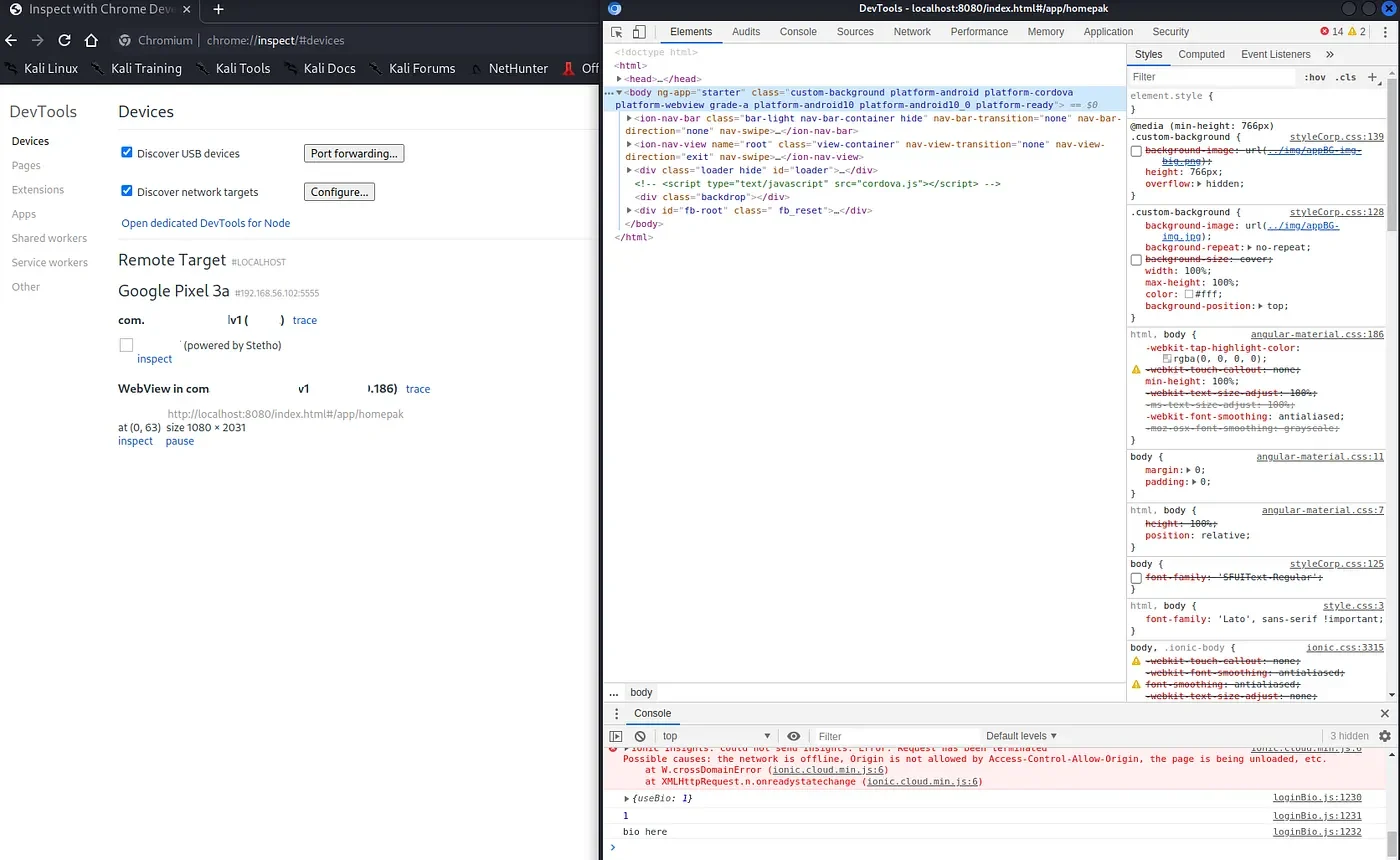
- Inspect the app.
This image shows the app being inspected through Chrome's developer tools after Stetho has been loaded.
With the WebView attached to Chrome's developer tools, the obfuscated JavaScript can be debugged directly. Obfuscated means the code has been deliberately made hard for a human to read, for example by renaming variables to meaningless strings, while still running correctly.
Part II covers how the researcher debugged that obfuscated JavaScript to reveal the parameters before encryption using breakpoints, as well as how the vulnerability was discovered and how a Python script was written to exploit it. A breakpoint is a marker you place on a line of code that makes execution pause there, so you can look at the values the program is holding at that moment.
Why this worked, and what it means
The report attributes the vulnerability to broken access control: access controls are meant to stop users acting outside their intended permissions, and when they are missing or flawed an attacker can read other users' information, modify data and act as other users. The report does not describe the precise missing check. The client-side protections (SSL pinning, root detection, request and response encryption) do not prevent this, because they only raise the cost of observing and replaying the app's own traffic. Once the JavaScript is debugged and the request format is understood, the attacker can issue requests directly.
The impact, per the report, is that an attacker can obtain full user information, specifically balance and transaction list, and can transmit money using only the victim's phone number. The report does not state how the phone number is obtained.
In other words, the server must check, for every request, that the person asking is allowed to see or do that thing, and must not rely on the app to have done that checking.
Things worth testing in a similar app
- Replace the user identifier in an authenticated API request with another user's identifier (phone number, account number, customer ID) and check whether the response contains that user's data. A positive result is the response containing another user's balance or transactions.
- Inspect Cordova apps for encrypted assets under
/WWW/and look for the Java class that decrypts them; if the key and IV are embedded, decrypt the assets and read the JavaScript to find the request format and parameter names.
Glossary
- API: the set of web addresses and rules an app uses to exchange data with a server.
- Access control: the part of a system that decides who is allowed to do what.
- Broken access control: a flaw where those decisions are missing or wrong, so a user can act outside their intended permissions.
- SSL pinning: an app refusing to talk to a server unless it presents one specific, pre-approved certificate.
- Root detection: an app checking whether the phone has been rooted (given full administrator control).
- Rooted device: an Android phone whose owner has full control of the operating system.
- Encryption: scrambling data with a key so only someone with the key can read it.
- Decryption: turning encrypted data back into readable data using the key.
- Frida: a tool that injects your own code into a running app to observe or change its behaviour.
- Hook: code attached to a function so it runs whenever that function is called, recording or altering what happens.
- Java class: a named bundle of code in the Java language;
javax.crypto.Cipheris the standard class that performs encryption and decryption. - APK: the file format of an Android app.
- jadx-gui: a program that opens an APK and shows the Java source code inside it.
- AndroidManifest.xml: a file inside every Android app declaring its contents and which screen starts first.
- Main activity: the first screen an Android app opens.
- WebView: a component inside an app that behaves like a small built-in browser and displays web pages.
- Cordova: an open-source framework that turns HTML, JavaScript and CSS into a native app for iOS, Android and other platforms.
- HTML: the language that describes the structure of a web page.
- CSS: the language that describes how a web page looks.
- JavaScript: the programming language that makes web pages do things.
- AES: a standard, widely used encryption algorithm.
- Key: the secret value used to lock and unlock encrypted data.
- IV (initialisation vector): a starting value used with the key so that encrypting the same data twice does not give identical output.
- CBC (Cipher Block Chaining): a mode of applying AES to data longer than one block by chaining each block to the previous one.
- PKCS5Padding: a rule for filling the last block of data so decryption knows where the real data ends.
- HTTP server: a program that hands files to a browser when the browser asks for them.
- Stetho: a debug bridge for Android apps that exposes Chrome Developer Tools to the app, plus an optional dumpapp command-line interface.
- Chrome Developer Tools: the inspection panel built into the Chrome browser, normally used by web developers.
- jar file: a package of Java code.
- dex: the code format Android apps actually run.
- dex2jar: a tool for converting between jar and dex formats.
- adb (Android Debug Bridge): the standard command-line tool for talking to an Android device from a computer.
- Obfuscated code: code deliberately made hard for a human to read while still running correctly.
- Breakpoint: a marker on a line of code that pauses execution there so you can inspect the values.
- 200 response: the standard HTTP status code meaning the request succeeded and here is the answer.
- Client-side: happening in the app on the user's device.
- Server-side / backend: happening on the bank's servers.
- Reverse engineering: taking apart a finished program to understand how it works.
- Exploit: a technique or script that takes advantage of a vulnerability.