Centreon map vulnerability
The Centreon MAP plugin's beta API authenticated users with only a valid username, ignoring the password, and exposed sensitive Spring Boot Actuator endpoints including heapdump. An unauthenticated attacker could log in as admin with any password and download process memory to recover secrets used by Centreon checks.

Vladimir had the opportunity to test the security of the Centreon MAP plugin (centreon-map-server) during an internal pentest on a monitoring infrastructure.
The full write-up lives on its author's site
It belongs to its author, so we link to it rather than copy it. The other two tabs are our own rewrites, checked against it.
Context
Centreon is a monitoring platform, and Centreon MAP (the centreon-map-server component) is a commercial extension for it. According to the documentation quoted in the report, the plugin "is capable of displaying efficient graphical overviews and mapping correlated data into user-relevant custom views." It requires a valid Centreon licence.

The plugin exposes a "beta" API whose documentation is public. To call that API in an authenticated way, a client must send a Studio-Session HTTP header. The value of that header is the studioSession JSON variable returned by the API after a successful authentication.
Vladimir tested the plugin during an internal pentest on a monitoring infrastructure. The result was an authentication bypass at the plugin API level, followed by remote access to process memory. An unauthenticated attacker with access to the web interface could recover all the secrets present in the process's memory, which notably includes all the secrets used by the Centreon checks.
Setup
- A Centreon installation with the Centreon MAP plugin (
centreon-map-server) and a valid licence. - Network access to the plugin's web interface and its beta API.
- No credentials for the API: the researcher had no accounts to authenticate with, which is what pushed him towards guessing.
The vulnerability was fixed in these versions:
centreon-map-21.10.8centreon-map-22.04.2centreon-map-22.10.1
It carries a CVSSv3 score of 8.3 (vector AV:N/AC:L/PR:N/UI:N/S:C/C:H/I:N/A:N).
Finding it
The researcher started with weak credential pairs against the authentication endpoint:
POST /centreon-studio/api/beta/authentication
He tried combinations such as "admin:admin", "admin:centreon" and "admin:password". Each time, the application returned the same message, which suggested that the accounts were not valid.
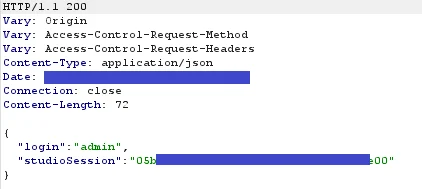
He then tried an account name that was unlikely to exist.
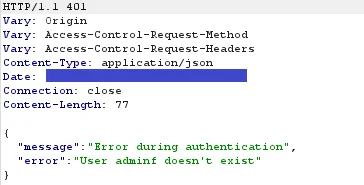
That raised the question: could it be that all the first tests were actually valid?
Exploitation
Step 1: authenticate with any password
Using one of the studioSession cookies returned for the admin account on an authenticated endpoint confirmed the first vulnerability: the beta Centreon Map API only needs a valid username to authenticate the user. In this case, the admin account allows authentication with any password.
The login endpoint accepts the username and issues a session without verifying the password; the admin account allows authentication with any password.
Step 2: enumerate the Actuator
The troubleshooting documentation mentions a call worth noticing:
GET /centreon-studio/api/beta/actuator/health
Spring Boot Actuator exposes operational endpoints, and it is always interesting to enumerate which functionalities a service exposes through it. With the admin session obtained in step 1, the researcher listed the available Actuator calls by simply requesting:
GET /centreon-studio/api/beta/actuator/
The listing included health, beans, env, configprops, loggers, jolokia and heapdump, among others. Many exploitation possibilities were therefore present. For some obscure reason, however, only GET requests seemed to be accepted, and although Jolokia was listed, it did not seem accessible, so there was no Jolokia RCE.
Step 3: dump the heap
heapdump did work. It allowed the researcher to recover memory from the process. To his surprise, the dump contained the Centreon check command lines, including in particular the accounts used to access the services.
The second Centreon Map vulnerability is therefore that sensitive Actuator calls were left enabled by default. Depending on the configuration of the targeted Centreon application, those calls can give access to other components of the information system.
The report's POC section announces Linux commands to reproduce the vulnerability, but the commands themselves are not included in the text.
Root cause
The first flaw is in the authentication code of the beta API: the login endpoint validates the username and issues a studioSession, but does not verify the password. The report describes the correction as a change to the source code related to authentication, in order to verify the password.
The second flaw is that sensitive Actuator calls were left enabled by default on the plugin's API path. The report does not say which Actuator endpoints were enabled by default beyond what the listing showed, nor why only GET requests were accepted.
Impact
An unauthenticated attacker with access to the web interface could obtain an admin session on the beta API with any password, then read the process heap. The heap contains the Centreon check command lines and the accounts used to access the services, so the leak exposes the secrets used by the checks.
Centreon is more often than not a central component in an information system, so this information leak can lead to the compromise of other applications and servers, or even of the information system as a whole. The severity depends on the configuration of the targeted Centreon application and on what the checks can reach.
Fix
The publisher's fix has two parts: changing the authentication source code so that the password is verified, and disabling sensitive Actuator endpoints by default. The corrected versions are centreon-map-21.10.8, centreon-map-22.04.2 and centreon-map-22.10.1.
On the installation side, the report recommends reducing the attack surface and respecting the principle of least privilege:
- Use accounts with the minimum privileges necessary for the checks carried out.
- Use complex and unique secrets and passwords, which cannot be reused in a password spraying attack for example.
- Only expose Centreon web interfaces and administration services to relevant personnel, for example on an administration VLAN only.
- Apply the Centreon security recommendations at
https://docs.centreon.com/docs/administration/secure-platform/andhttps://docs.centreon.com/docs/graph-views/secure-your-map-platform/. - Keep components up to date, both core and extensions.
These recommendations are to be adapted to the context of each installation.
Variants to test
- Password check on other beta or plugin APIs. Send a login request with a valid username and a deliberately wrong password, then use the returned session against an authenticated endpoint. A positive result is a working session for a user whose password you never knew.
- Username enumeration through response differences. Compare the response for a valid username with the response for a username that is unlikely to exist. A different message or status for the two cases tells you the endpoint distinguishes them, which is the first hint that the password is not being checked.
- Actuator discovery under application paths. Request the Actuator root under the product's API prefix, as in
GET /centreon-studio/api/beta/actuator/, and read the listing. A positive result is a list containing endpoints such asenv,configprops,loggers,jolokiaorheapdump. - Heapdump retrieval. If
heapdumpis listed, download it with the session you hold and search it for credentials and command lines. A positive result is secrets used by the monitored checks appearing in the dump. - Jolokia reachability. If
jolokiais listed, try to reach it with the methods the server accepts. A positive result is a reachable Jolokia endpoint, which would open a path to code execution; in this report it was listed but not accessible and only GET requests seemed accepted.
Timeline
- 16/11/2022: first email sent by Vladimir following the Centreon process.
- 16/11/2022: Centreon replied that they were starting the analysis.
- 17/11/2022: the vulnerability was reproduced and Centreon validated the proposed severity (CVSSv3 8.3).
- 22/11/2022: synchronisation meeting with Centreon.
- 29/11/2022: publication of the corrected versions.
- 17/01/2023: mention on the Centreon GitHub security page.
- 19/01/2023: publication of the article.
Centreon's coordinated disclosure process is documented at https://github.com/centreon/centreon/security/policy#security-policy. The response was quick, and the vulnerability management and communication process was very well handled by Centreon.
What happened, in plain words
Centreon MAP is an add-on for Centreon that draws maps and dashboards of the monitored infrastructure. The report calls the add-on's server component centreon-map-server, and notes that it needs a paid Centreon licence to run.
During an internal security test (a pentest: a friendly, authorised attempt to break into a system, done by a specialist hired for that purpose) on a monitoring infrastructure, the researcher Vladimir found two problems in the Centreon MAP plugin:
- The plugin's login system could be fooled. It accepted a username and handed out a working session without ever checking the password. An attacker with access to the web interface could log in as the administrator with any password.
- Once logged in, a built-in diagnostic feature of the plugin let him download a snapshot of the program's memory. That snapshot contained the command lines Centreon uses to run its checks, including the accounts and secrets those checks use to reach other services.
Put together, an attacker who never had a password could end up with secrets used by the Centreon checks. Because Centreon is usually a central piece of an organisation's systems, that leak can lead to other applications and servers being compromised, or the whole information system.
The flaw was rated 8.3 on the CVSSv3 scale (a standard 0 to 10 scale for how serious a security flaw is) and was fixed in these versions of the plugin:
centreon-map-21.10.8centreon-map-22.04.2centreon-map-22.10.1
The fix is mentioned in the plugin's release notes and in the security acknowledgements on Centreon's GitHub page.
The pieces you need to know
Before following the steps, a few everyday ideas make the rest much easier.
API. An API is a way for one program to talk to another, like a service counter at a train station: you hand over a request in a fixed format and get an answer back. Here the API is reached over the web, so requests look like ordinary web addresses and the answers come back as text or data.
HTTP request and method. When your browser loads a page it sends an HTTP request. The method is the verb of that request: GET means "give me this", POST means "here is some data, do something with it". A login is normally a POST because you are sending a username and password.
Endpoint. An endpoint is one specific address on the API, the equivalent of one particular counter window. POST /centreon-studio/api/beta/authentication is the endpoint that handles logins.
Header. Headers are small labelled lines attached to a request or a response, like the label on a parcel. They carry information such as what kind of data you accept or who you claim to be.
Session and cookie. After you log in to a website, the site gives your browser a small piece of data, a session cookie, so it can recognise you on the next page without asking for your password again. It works like a cloakroom ticket: whoever holds the ticket gets the coat. Here the equivalent is called a studioSession, and it is sent back in a header called Studio-Session.
Authentication bypass. Authentication is the process of proving who you are. A bypass means getting past that check without meeting its conditions, for example getting in without knowing the password. It is like a door guard who checks that your name is on the guest list but forgets to ask for your invitation.
Spring Boot Actuator. Many Java web applications are built with a framework called Spring Boot. Actuator is an optional part of it that exposes diagnostic endpoints: pages that report the health of the application, its configuration, its internal objects, and so on. It is meant for operators, but if it is reachable by outsiders it can reveal a lot. Think of it as the maintenance panel of a lift, normally for the technician, sometimes left unlocked in the corridor.
Heap and heapdump. A running program keeps its working data in an area of memory called the heap. A heapdump is a file containing a copy of that memory at a given moment. It is like photocopying everything on an office desk, including the sticky notes with passwords on them.
CVSS. A standard scoring system for security flaws, from 0 to 10, where higher means more serious. The report gives the vector AV:N/AC:L/PR:N/UI:N/S:C/C:H/I:N/A:N, which is the detailed breakdown behind the 8.3 score.
How the researcher got in
Step 1: trying passwords on the login endpoint
The plugin's "beta" API (a version the vendor labels as still in development) has public documentation. To use it while logged in, a client must send a Studio-Session header, and the value for that header is the studioSession variable the API returns after a successful login.
Vladimir had no account for this API. Rather than give up, he tried the oldest trick in the book: guessing common username and password pairs. The login endpoint is:
POST /centreon-studio/api/beta/authentication
Line by line:
POSTis the method: he is sending data (a username and a password) rather than just asking for a page./centreon-studio/api/beta/authenticationis the address of the login endpoint on the plugin's API.centreon-studiois the part of the path that belongs to the plugin,api/betamarks the beta API, andauthenticationis the login handler.
He tried combinations such as "admin:admin", "admin:centreon" and "admin:password". Each time, the application returned the same message, which suggested that the accounts were not valid.
Why this step? Because a login form is the front door. If the door is weak, everything behind it is exposed, and trying a handful of obvious pairs costs almost nothing.
Step 2: the response that did not fit
He then tried an account name that was unlikely to exist.
Why this step? To compare. If the application answers differently for a real username and for an invented one, it is telling you something about how it checks logins. This raised the question: could it be that all the first tests were actually valid? In other words, maybe the earlier failures were not failures at all, and the message was simply what the application says when it does not like the username.
Step 3: confirming the bypass
To check, he took one of the studioSession values returned for the admin account and used it on an endpoint that requires you to be logged in. It worked. That confirmed the first vulnerability: the beta Centreon Map API only needs a valid username to authenticate the user. In this case, the admin account allows authentication with any password.
The login endpoint takes the username and issues a session without verifying the password; the admin account allows authentication with any password. It is like a club where the bouncer checks that your name is on the list and then waves you in without looking at your ID.
What he found once inside
Step 4: looking for the maintenance panel
The troubleshooting documentation for the plugin mentions a call worth noticing:
GET /centreon-studio/api/beta/actuator/health
Line by line:
GETis the method: he is only asking to read something, not sending data./centreon-studio/api/beta/actuator/healthis the address.actuatoris the Spring Boot diagnostic component, andhealthis one of its standard pages, which reports whether the application is up.
Why this step? Because the documentation itself pointed at Actuator. If a health page is reachable, the rest of the Actuator may be reachable too, and Actuator pages are known to be informative. The report notes that Actuator had already been covered in an earlier article about an Apereo CAS configuration flaw, so it was a familiar hunting ground.
Step 5: listing what Actuator offers
Using the admin session obtained in step 3, he listed the available Actuator calls by simply requesting:
GET /centreon-studio/api/beta/actuator/
Line by line:
GETagain: a read-only request./centreon-studio/api/beta/actuator/is the root of the Actuator under the plugin's API path. The trailing slash asks for the index, the list of what is available.
The listing included health, beans, env, configprops, loggers, jolokia and heapdump, among others. In plain terms:
health: is the application alive?beans: the internal objects the application is built from.env: environment settings, often including configuration values.configprops: configuration properties.loggers: the logging configuration, which can sometimes be changed.jolokia: a bridge that lets you invoke internal management operations over HTTP, which in some setups can lead to running code.heapdump: a download of the application's memory.
Many exploitation possibilities were therefore present. For some obscure reason, however, only GET requests seemed to be accepted, and although Jolokia was listed, it did not seem accessible, so there was no remote code execution through Jolokia. Remote code execution means making the server run commands of your choosing, the worst outcome in this kind of test; here it did not happen.
Step 6: downloading the memory
heapdump did work. It allowed him to recover memory from the process. To his surprise, the dump contained the Centreon check command lines, including in particular the accounts used to access the services.
Why this is serious: those command lines are the instructions Centreon runs to check other systems, and they carry the credentials needed to reach those systems. Anyone holding the dump holds those credentials. It is like finding the master key ring in a photocopy of the caretaker's notebook.
The second Centreon Map vulnerability is therefore that sensitive Actuator calls were left enabled by default. Depending on the configuration of the targeted Centreon application, those calls can give access to other components of the information system.
Proof of concept
The report's proof of concept section announces Linux commands to reproduce the vulnerability, but the commands themselves are not included in the text.
Why it worked
The first flaw is in the authentication code of the beta API: the login endpoint validates the username and issues a studioSession, but does not verify the password. The report describes the correction as a change to the source code related to authentication, in order to verify the password, which confirms that the check was missing rather than misconfigured.
The second flaw is that sensitive Actuator calls were left enabled by default on the plugin's API path. The report does not say which Actuator endpoints were enabled by default beyond what the listing showed, nor why only GET requests were accepted.
What an attacker could do with it
An unauthenticated attacker with access to the web interface could obtain an admin session on the beta API with any password, then read the process heap. The heap contains the Centreon check command lines and the accounts used to access the services, so the leak exposes the secrets used by the checks.
Centreon is more often than not a central component in an information system, so this information leak can lead to the compromise of other applications and servers, or even of the information system as a whole. The severity depends on the configuration of the targeted Centreon application and on what the checks can reach.
How it was fixed
The publisher's fix has two parts: changing the authentication source code so that the password is verified, and disabling sensitive Actuator endpoints by default. The corrected versions are centreon-map-21.10.8, centreon-map-22.04.2 and centreon-map-22.10.1.
On the installation side, the report recommends reducing the attack surface and respecting the principle of least privilege, which means giving every account and every service only the access it actually needs, nothing more:
- Use accounts with the minimum privileges necessary for the checks carried out.
- Use complex and unique secrets and passwords, which cannot be reused in a password spraying attack for example. Password spraying is trying one common password against many accounts, hoping one of them uses it.
- Only expose Centreon web interfaces and administration services to relevant personnel, for example on an administration VLAN only. A VLAN is a separated section of a network, like a staff-only corridor.
- Apply the Centreon security recommendations at
https://docs.centreon.com/docs/administration/secure-platform/andhttps://docs.centreon.com/docs/graph-views/secure-your-map-platform/. - Keep components up to date, both core and extensions.
These recommendations are to be adapted to the context of each installation.
Other places to look for the same pattern
- Password check on other beta or plugin APIs. Send a login request with a valid username and a deliberately wrong password, then use the returned session against an endpoint that requires login. A positive result is a working session for a user whose password you never knew.
- Username enumeration through response differences. Compare the answer for a valid username with the answer for a username that is unlikely to exist. A different message or status for the two cases tells you the endpoint distinguishes them, which is the first hint that the password is not being checked.
- Actuator discovery under application paths. Request the Actuator root under the product's API prefix, as in
GET /centreon-studio/api/beta/actuator/, and read the listing. A positive result is a list containing endpoints such asenv,configprops,loggers,jolokiaorheapdump. - Heapdump retrieval. If
heapdumpis listed, download it with the session you hold and search it for credentials and command lines. A positive result is secrets used by the monitored checks appearing in the dump. - Jolokia reachability. If
jolokiais listed, try to reach it with the methods the server accepts. A positive result is a reachable Jolokia endpoint, which would open a path to code execution; in this report it was listed but not accessible and only GET requests seemed accepted.
How the disclosure went
Centreon's coordinated disclosure process is documented at https://github.com/centreon/centreon/security/policy#security-policy. Coordinated disclosure means telling the vendor first and giving them time to fix the problem before publishing details. The response was quick, and the vulnerability management and communication process was very well handled by Centreon.
- 16/11/2022: first email sent by Vladimir following the Centreon process.
- 16/11/2022: Centreon replied that they were starting the analysis.
- 17/11/2022: the vulnerability was reproduced and Centreon validated the proposed severity (CVSSv3 8.3).
- 22/11/2022: synchronisation meeting with Centreon.
- 29/11/2022: publication of the corrected versions.
- 17/01/2023: mention on the Centreon GitHub security page.
- 19/01/2023: publication of the article.
Glossary
- API: a fixed way for one program to talk to another, like a service counter with defined requests and answers.
- Actuator: a Spring Boot component that exposes diagnostic pages about a running application, such as health, configuration and memory.
- Authentication: the process of proving who you are, usually with a username and password.
- Authentication bypass: getting past a login check without meeting its conditions, for example without knowing the password.
- Beans: the internal objects a Java application is built from; Actuator can list them.
- Centreon: a monitoring platform that checks servers and services and raises alerts.
- Centreon MAP: a paid add-on for Centreon that draws maps and dashboards of the monitored infrastructure; its server component is
centreon-map-server. - Configprops: an Actuator page listing configuration properties.
- Cookie: a small piece of data a site stores in your browser so it can recognise you later, like a cloakroom ticket.
- Coordinated disclosure: telling the vendor about a flaw first and giving them time to fix it before publishing details.
- CVSS / CVSSv3: a standard 0 to 10 score for the seriousness of a security flaw, with a vector describing the details.
- Endpoint: one specific address on an API that handles one kind of request.
- Env: an Actuator page showing environment settings, often including configuration values.
- GET: an HTTP method meaning "give me this", used for reading.
- Header: a labelled line attached to an HTTP request or response carrying extra information, such as a session value.
- Heap: the area of memory where a running program keeps its working data.
- Heapdump: a file containing a copy of a program's heap at a given moment.
- Health: an Actuator page reporting whether the application is up.
- HTTP: the protocol browsers and web services use to exchange requests and responses.
- Information system: all the computers, applications and data an organisation uses together.
- Jolokia: a bridge that lets internal management operations be invoked over HTTP; in some setups it can lead to code execution.
- Least privilege: the principle of giving every account and service only the access it actually needs.
- Loggers: an Actuator page showing the logging configuration.
- Method: the verb of an HTTP request, such as
GETorPOST. - Password spraying: trying one common password against many accounts, hoping one of them uses it.
- Pentest: an authorised attempt to break into a system, done to find and fix weaknesses.
- POST: an HTTP method meaning "here is some data, do something with it", used for logins and form submissions.
- Remote code execution: making a server run commands of your choosing.
- Session: the state of being logged in, usually represented by a value the server gives your browser after a successful login.
- Spring Boot: a framework for building Java web applications.
Studio-Session: the HTTP header the Centreon MAP beta API expects for authenticated calls.studioSession: the JSON variable returned by the API after a successful login, whose value goes into theStudio-Sessionheader.- Username enumeration: learning which usernames exist by comparing how the application answers for real and invented names.
- VLAN: a separated section of a network, used to keep services reachable only by the right people.
- Web interface: the pages you open in a browser to use a product.