Look at what i found in Comodo
Several Comodo websites reflected or stored user-supplied input without proper encoding, allowing script injection. An attacker could run script in a victim's browser, including help desk workers viewing support tickets, to steal data or redirect users to phishing pages.
 Published on maordayanofficial.medium.com
The firm operates a certificate authority that issues SSL certificates, and offers information security products for both enterprises and consumers.
The full write-up lives on its author's site
It belongs to its author, so we link to it rather than copy it. The other two tabs are our own rewrites, checked against it.
Context
Comodo Security Solutions, Inc. is a cybersecurity company headquartered in Clifton, New Jersey, in the United States. The firm operates a certificate authority that issues SSL certificates and offers information security products for both enterprises and consumers. It also contributed to the IETF DNS Certification Authority Authorization (CAA) Resource Record.

Across Comodo's web estate the researcher found six cross-site scripting issues: two stored and four reflected. The affected hosts were:
| Host | Type |
|---|---|
| https://support.comodo.com | Stored XSS, usable against help desk employees |
| https://servicedesk.comodo.com/ | Stored XSS, usable against help desk employees |
| https://blog.comodo.com | Reflected XSS |
| https://verdict.valkyrie.comodo.com | Reflected XSS |
| https://verdict-devops.valkyrie.comodo.com | Reflected XSS |
| https://www.comodosecuritycouncil.com | Reflected XSS |
The two stored issues sit in the support and service desk features, where tickets submitted by customers are later opened and read by help desk staff. The reflected issues sit in tracking parameters and in the Valkyrie verdict pages.
Setup
No special tooling is described. For the stored XSS proof of concept the researcher created an account on the service desk and started a help desk service, which is enough to submit tickets that staff will later view. The reflected issues need only a crafted URL delivered to a victim.
Finding it
The researcher went through Comodo's public sites looking at how user-controlled input was handled. The tracking parameters track and af are used to track users around the website, and in most pages those parameters are encoded. In the blog section, however, the defence was weaker: every time someone entered " or "><, the system automatically added a backslash to the start and blocked the code from executing. That escaping was the thing to get around.
Exploitation
1. Reflected XSS at https://blog.comodo.com
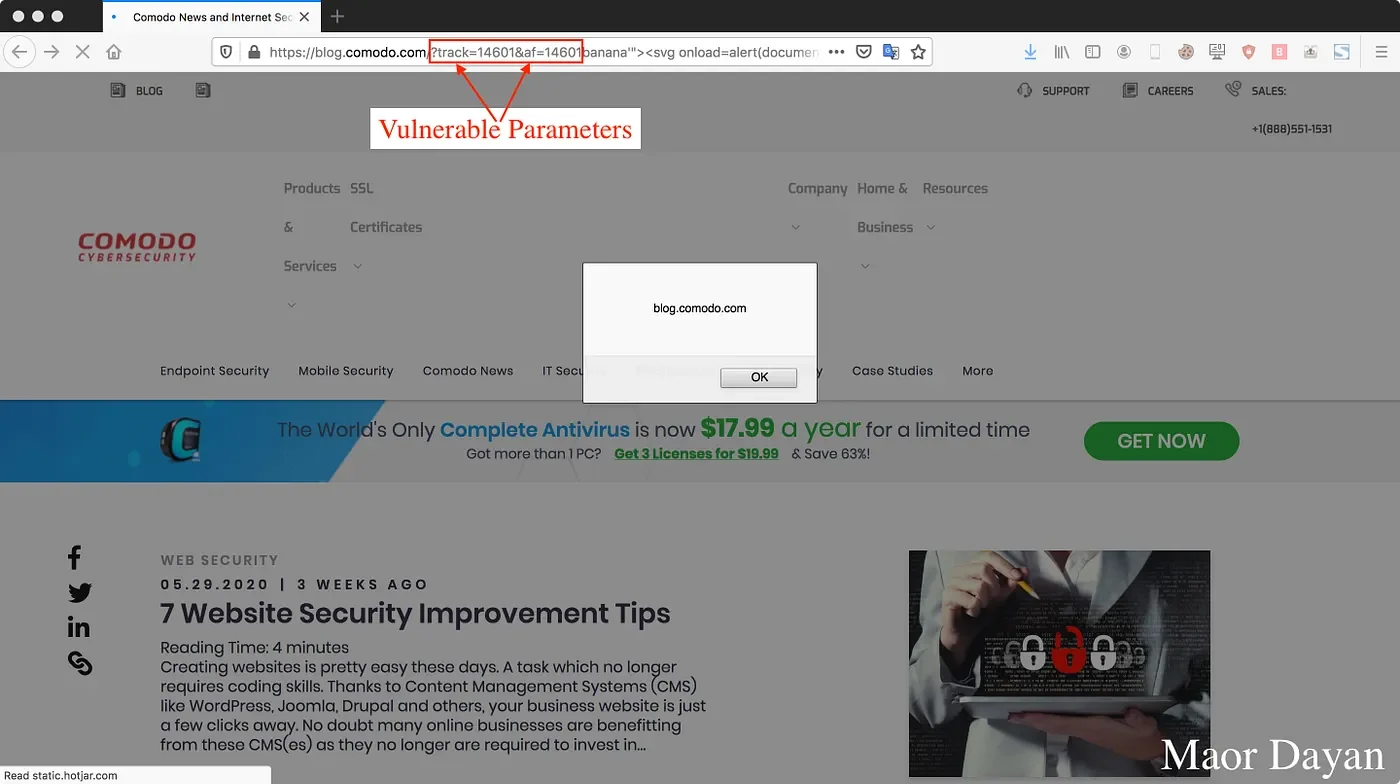
Vulnerable parameters:
trackaf
The bypass of the backslash-adding filter was a single apostrophe placed before the payload:
'""><svg onload=alert(1)>
The researcher's bypass was a single apostrophe placed before the payload, which was enough to get past the backslash-adding filter.
2. Reflected XSS at https://verdict.valkyrie.comodo.com
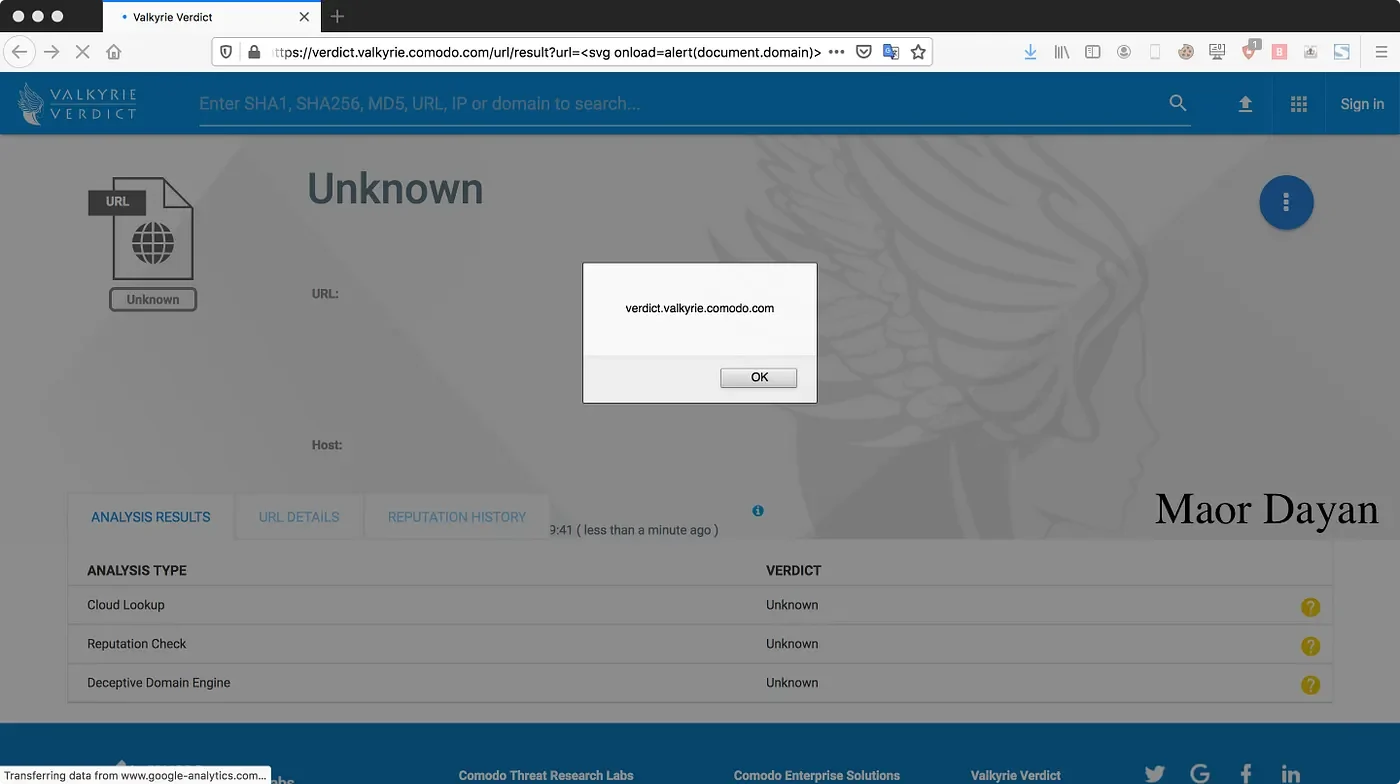
Vulnerable parameter:
url
3. Reflected XSS at https://verdict-devops.valkyrie.comodo.com
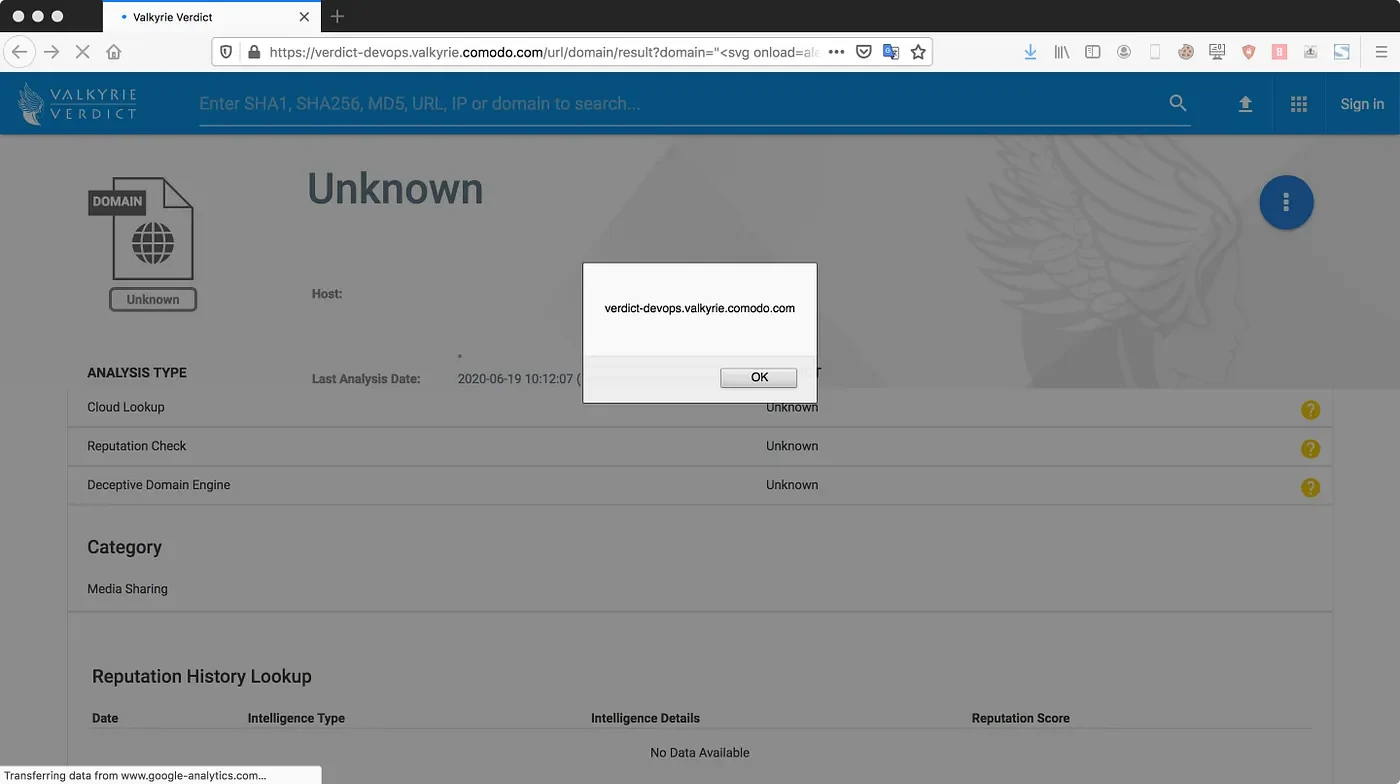
Vulnerable parameter:
domain
4. Reflected XSS at https://www.comodosecuritycouncil.com
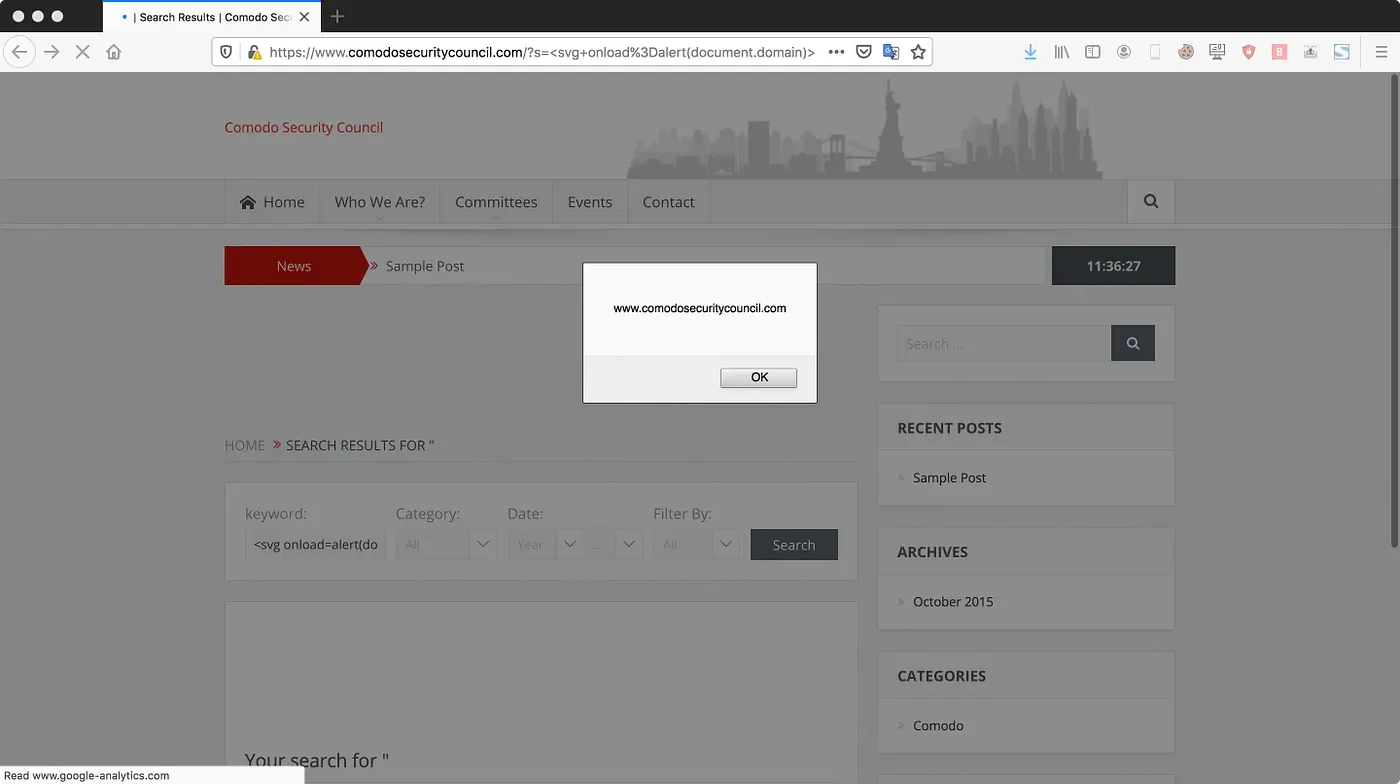
Vulnerable parameter:
s
5. Stored XSS at https://support.comodo.com
This stored issue can be used against the help desk workers of the company, and of other companies that use the service. If a script executes on the workers' side it can be very dangerous to the company. After the ticket submission the attacker can take the link and send it to anyone: the link is public and can be accessed without an account. The next stored issue demonstrates that this can be used against the workers.
6. Stored XSS at https://servicedesk.comodo.com/

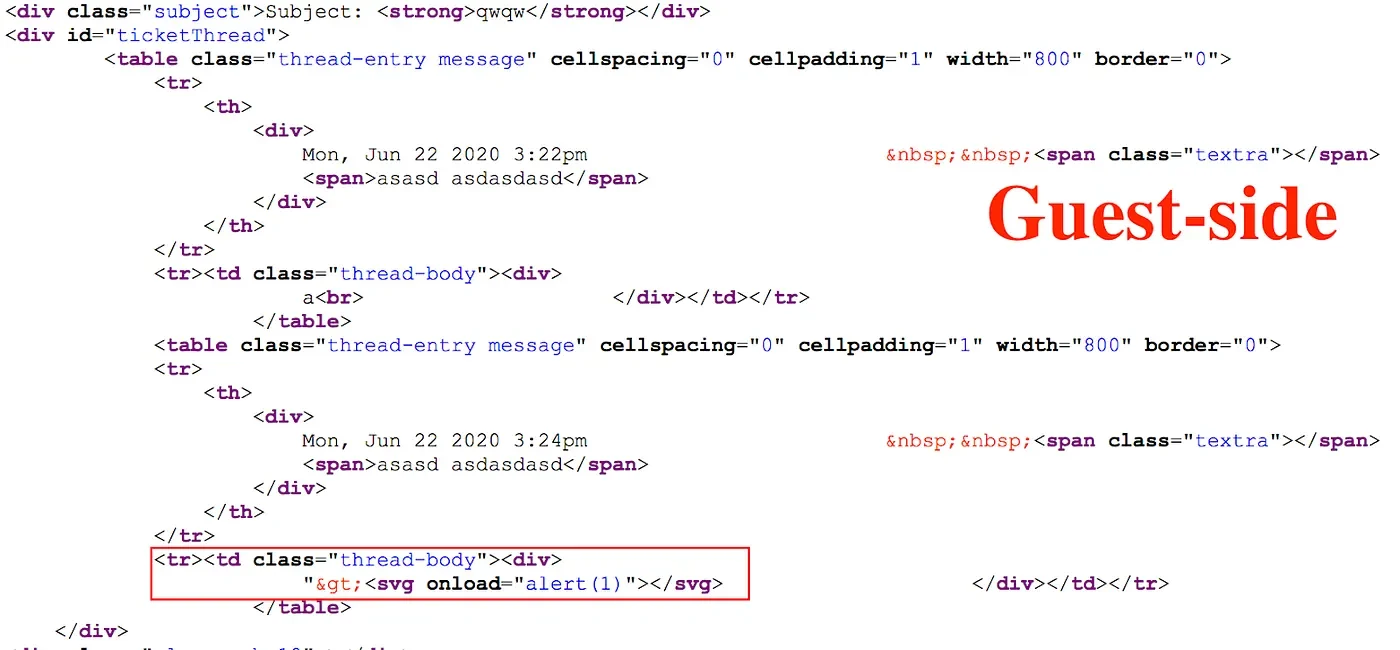
Comodo runs a service desk service, which it probably uses itself for its support centre. The question is what happens if that support centre carries a stored XSS vulnerability that can be used against your company, and that is what happens here. The proof of concept video shows that it can be used against the company's employees.
For the proof of concept the researcher created an account and started a help desk service, which demonstrates the stored XSS on the help desk workers' side.
Root cause
On the blog, the filter added a backslash in front of " and ">< rather than encoding the value properly. A single leading apostrophe was enough to consume that escaping and let the following markup through. On the other reflected endpoints the vulnerable parameters were url, domain and s. On the support and service desk, the stored XSS could be used against help desk workers when they opened a submitted ticket. The report does not describe the server-side code behind any of these.
Impact
For each of the reflected issues the researcher lists the same three consequences:
- The attacker can redirect the victim from Comodo's website to a phishing page.
- Automatic malware download.
- The attacker can execute JavaScript in the victim's browser to steal cookies, steal information and so on.
For the stored issues the impact falls on help desk workers at Comodo and at other companies using the service: a script running on the workers' side can be very dangerous to the company. Because the ticket link is public and needs no account, the attacker can send it to anyone after submission. The service desk write-up states that more than 200 companies use the service, which widens the set of potential victims.
Fix
The researcher reported the vulnerabilities, and they were fixed by the Comodo IT Department. The report does not describe the specific changes made.
Variants to test
- On any endpoint that reflects a tracking parameter, try a leading apostrophe before a quote-breaking payload, as here with
'""><svg onload=alert(1)>. A positive result is the handler firing in the browser while the plain payload without the apostrophe stays escaped. - Test the same bypass against other filters that prepend a backslash to quotes: submit
'followed by"><svg onload=alert(1)>and watch whether the backslash lands before the apostrophe instead of the quote. - For verdict-style pages, probe parameters such as
urlanddomainwith a quote-breaking payload and check whether the value is reflected unencoded into an attribute or script context. - For support and service desk features, submit a ticket containing a script payload from a normal customer account, then open the ticket as staff or via the public ticket link. A positive result is the script executing in the viewer's browser without any account being required.
- Check whether ticket links are reachable unauthenticated, since that is what makes the stored issue deliverable to arbitrary victims.
Maor Dayan.
What happened, in plain words
A security researcher, Maor Dayan, spent some time looking at the websites run by Comodo, a large cybersecurity company. He found six places where the sites could be made to run code that the site's owners never intended to run. Two of those places were especially serious: they were inside the help desk systems, the software that companies use to handle customer support tickets. A malicious script planted in a support ticket could be used against the support worker who opened the ticket. The researcher reported all six, and they were fixed by Comodo's IT department.
This article walks through what he found, in the order he found it, and explains every term from scratch. If you can use a browser, you can follow it.
A little background on Comodo
Comodo Security Solutions, Inc. is a cybersecurity company based in Clifton, New Jersey, in the United States. It runs a certificate authority, which is an organisation allowed to issue SSL certificates. An SSL certificate is the small piece of data that lets your browser show the padlock and prove that the site you are visiting really belongs to who it claims. Comodo also sells security products to businesses and to ordinary consumers, and it helped shape internet standards by contributing to the IETF (Internet Engineering Task Force) DNS Certification Authority Authorization (CAA) Resource Record. The IETF is the volunteer body that writes the technical rules the internet runs on; a DNS record is a piece of information published about a domain name, and CAA lets a domain owner say which certificate authorities are allowed to issue certificates for it.
In short: this is a company whose whole business is security. That is what makes the findings interesting.
The six findings at a glance
On Comodo's websites the researcher found six vulnerabilities: two stored XSS and four reflected XSS. Both terms are explained below. The affected addresses were:
| Address | Type |
|---|---|
| https://support.comodo.com | Stored XSS, usable against help desk employees |
| https://servicedesk.comodo.com/ | Stored XSS, usable against help desk employees |
| https://blog.comodo.com | Reflected XSS |
| https://verdict.valkyrie.comodo.com | Reflected XSS |
| https://verdict-devops.valkyrie.comodo.com | Reflected XSS |
| https://www.comodosecuritycouncil.com | Reflected XSS |
The two stored issues live in the support and service desk features. Those are the systems where a customer fills in a form to open a ticket (a request for help), and later a member of staff opens that ticket and reads it. The four reflected issues live in tracking parameters and in the Valkyrie verdict pages.
What XSS is, from zero
Cross-site scripting, usually shortened to XSS, is a type of computer security vulnerability typically found in web applications. XSS attacks enable attackers to inject client-side scripts into web pages viewed by other users. A cross-site scripting vulnerability may be used by attackers to bypass access controls such as the same-origin policy. Cross-site scripting carried out on websites accounted for roughly 84% of all security vulnerabilities documented by Symantec up until 2007. In 2017, XSS attacks were still considered a major threat vector. XSS effects vary in range from petty nuisance to significant security risk, depending on the sensitivity of the data handled by the vulnerable site and the nature of any security mitigation implemented by the site's owner network.
That definition is dense, so let us unpack it.
A web page is, underneath the pictures and text, a document written in a language called HTML. HTML is made of tags, which are instructions in angle brackets such as <b> for bold or <img> for an image. A browser reads the tags and draws the page. A script is a small program, usually written in a language called JavaScript, that the browser runs. Scripts are what make pages interactive: they can react to a click, fetch new data, or read what is stored in the browser.
Normally the browser only runs scripts that came from the website itself. XSS breaks that rule: it tricks the site into sending a script that the attacker wrote, and the browser runs it as if the site had written it. The everyday comparison is a noticeboard in an office lobby. If anyone can pin a note to the board, someone can pin a note that says "hand your keys to the person at the door". Everyone who reads the board believes it, because it is on the official board. XSS is the same trick with a web page.
Client-side means "on the visitor's own computer, inside the browser", as opposed to server-side, which means "on the machine that hosts the website".
Access controls are the rules that decide who may see or do what. The same-origin policy is a rule built into every browser: a script that came from one website is not allowed to read data belonging to a different website. It is the wall between sites. XSS matters because a script that the browser believes came from the site itself is inside the wall, so it can read everything the site is allowed to read.
A threat vector is simply a route an attacker can take. A security mitigation is a defence the site owner puts in place.
The two types found here
Reflected XSS: reflected XSS attacks, also known as non-persistent attacks, occur when a malicious script is reflected off of a web application to the victim's browser. The script is activated through a link, which sends a request to a website with a vulnerability that enables execution of malicious scripts.
In plain words: the attacker builds a special link and sends it to the victim. When the victim clicks it, the site takes part of the link and pastes it straight into the page it sends back. If that pasted part is a script, the browser runs it. Nothing is stored on the site; the attack lives only in the link. The comparison is a photocopier that copies whatever you put on the glass: hand it a rude drawing and every copy carries the drawing. "Non-persistent" means the effect disappears once the link is no longer used.
Stored XSS: stored XSS, also known as persistent XSS, is the more damaging of the two. It occurs when a malicious script is injected directly into a vulnerable web application.
In plain words: the attacker types the script into something the site saves, such as a comment, a profile or, here, a support ticket. The site stores it in its database. Every time anyone later opens that page, the site hands the stored script to that person's browser, and it runs. The comparison is the noticeboard again, but this time the malicious note stays pinned and every person who walks past reads it. "Persistent" means it keeps working, for every viewer, until someone removes it.
How the researcher went about it
No special tooling is described. The method was to browse Comodo's public sites and watch how the sites handled text that a visitor controls, such as the values in a link. For the stored XSS proof of concept, the researcher created an account on the service desk and started a help desk service. That is enough to submit tickets that staff will later view. The reflected issues need only a crafted URL delivered to a victim.
A URL is the address in your browser's address bar. The part after a question mark is the query string, a list of name and value pairs, for example ?track=abc. Each pair is a parameter. Sites use parameters to pass information around, and if a site prints a parameter's value back into the page without cleaning it, that is where XSS can appear. Encoding is the cleaning: turning characters that have a special meaning in HTML, such as < and >, into harmless stand-ins so the browser shows them as text instead of treating them as tags.
Finding it
The researcher went through Comodo's public sites looking at how user-controlled input was handled. The tracking parameters track and af are used to track users around the website, and in most pages those parameters are encoded. In the blog section, however, the defence was weaker: every time someone entered " or "><, the system automatically added a backslash to the start and blocked the code from executing. That escaping was the thing to get around.
A tracking parameter is a value added to a link so the site can tell where a visitor came from, for example which advertisement or which page sent them. Marketing teams rely on them, which is why they appear all over a site.
A backslash is the character \. In many programming languages it is used as an escape character: it tells the system "the character after me is ordinary text, not an instruction". A filter is a piece of code that inspects input and tries to remove or neutralise anything dangerous. The blog's filter was trying to escape the dangerous characters. The researcher's job was to find an input where the filter's own escaping worked against it.
Exploitation
1. Reflected XSS at https://blog.comodo.com
Vulnerable parameters:
trackaf
The bypass of the backslash-adding filter was a single apostrophe placed before the payload:
'""><svg onload=alert(1)>
Line by line, in plain words:
'is a single apostrophe, also called a single quote. It is the whole trick. The filter was built to add a backslash in front of double quotes and in front of the sequence"><. The researcher's bypass was a single apostrophe placed before the payload, which was enough to get past the filter."is a double quote. In HTML, attribute values are wrapped in quotes, for example<input value="something">. A double quote in the wrong place can end the attribute early and let whatever follows be read as new HTML.>closes the tag that was open.<svgopens an SVG element. SVG is a format for drawing pictures in a web page, and browsers treat it as a real HTML element.onload=alert(1)is an event handler: an instruction that says "when this element finishes loading, run this code". The code isalert(1), which makes the browser pop up a small box containing the number 1. Security researchers usealert(1)as a harmless, unmistakable signal: if the box appears, the script ran.>closes the SVG tag.
So the payload is: break out of wherever the value was placed, open a picture element, and attach a script to it that fires the moment it loads. The leading apostrophe is what let the rest survive the filter. The researcher's own summary of the bypass was: "Yeah that simple..."
The impact of this vulnerability
- Attacker can use it to redirect the 'victim' from Comodo's website to a phishing page.
- Automatic malware download.
- Attacker can use it to execute js code at the 'victim' browser to steal cookies, steal information etc...
A phishing page is a fake copy of a real login page, built to capture the password you type into it. Malware is any software written to cause harm. js is short for JavaScript, the browser's scripting language. A cookie is a small piece of data a website asks your browser to keep and to send back with every request to that site. Cookies are how a site remembers that you are logged in. If an attacker's script can read your cookies, it can often take over your session, which means acting as you without knowing your password. That is why "steal cookies" appears in every impact list here.
2. Reflected XSS at https://verdict.valkyrie.comodo.com
Vulnerable parameter:
url
The vulnerable parameter on this endpoint was url. The report does not give the exact payload used on this endpoint.
The impact of this vulnerability
- Automatic malware download.
3. Reflected XSS at https://verdict-devops.valkyrie.comodo.com
Vulnerable parameter:
domain
Here the parameter is called domain, meaning a domain name such as example.com. The vulnerable parameter on this endpoint was domain.
The impact of this vulnerability
- Automatic malware download.
4. Reflected XSS at https://www.comodosecuritycouncil.com
Vulnerable parameter:
s
The vulnerable parameter on this endpoint was s.
The impact of this vulnerability
- Automatic malware download.
5. Stored XSS at https://support.comodo.com
This stored issue can be used against the help desk workers of the company, and of other companies that use the service. If a script executes on the workers' side it can be very dangerous to the company. After the ticket submission the attacker can take the link and send it to anyone: the link is public and can be accessed without an account. The next stored issue demonstrates that this can be used against the workers.
Why this matters more than the reflected ones: a reflected attack needs the victim to click a link the attacker sent. A stored attack needs nothing from the victim except that they do their job and open the ticket. The attacker writes the script once, into a ticket, and waits. And because the ticket link is public and needs no login, the attacker does not even have to target a specific person: the link can be shared anywhere.
6. Stored XSS at https://servicedesk.comodo.com/
Comodo runs a service desk service, which it probably uses itself for its support centre. The question is what happens if that support centre carries a stored XSS vulnerability that can be used against your company, and that is what happens here. The proof of concept video shows that it can be used against the company's employees.
A service desk is the software a company uses to receive, track and answer support requests. It is often sold as a service to other companies, who then run their own support through it. That is why a flaw here is bigger than one company: every customer of the service inherits the risk.
For the proof of concept the researcher created an account and started a help desk service, which demonstrates the stored XSS on the help desk workers' side. He created his own account and started a help desk service to demonstrate the stored XSS on the workers' side.
The impact of this vulnerability
This Stored XSS can be used against the company (and other 200+ companies that use their service) help desk workers from https://servicedesk.comodo.com. If a js script will be executed at the side of the workers it can be very dangerous to the company. Another thing is after the ticket submission the attacker can take the link and just send it to anyone: this link is public and can be access without an account.
Why it worked
On the blog, the filter added a backslash in front of " and ">< rather than encoding the value properly. A single leading apostrophe was enough to consume that escaping and let the following markup through. On the other reflected endpoints the vulnerable parameters were url, domain and s. On the support and service desk, the stored XSS could be used against help desk workers when they opened a submitted ticket. The report does not describe the server-side code behind any of these.
The general lesson: blocking a list of bad characters is fragile, because the attacker only needs one input the list did not think of. Encoding the value properly, so that it can only ever be displayed as text, is the robust approach.
What was fixed
The researcher reported the vulnerabilities, and they were fixed by the Comodo IT Department.
Similar things worth testing
These are the patterns from this report, phrased so you can recognise them elsewhere:
- On any endpoint that reflects a tracking parameter, try a leading apostrophe before a quote-breaking payload, as here with
'""><svg onload=alert(1)>. A positive result is the handler firing in the browser while the plain payload without the apostrophe stays escaped. - Test the same bypass against other filters that prepend a backslash to quotes: submit
'followed by"><svg onload=alert(1)>and watch whether the backslash lands before the apostrophe instead of the quote. - For verdict-style pages, probe parameters such as
urlanddomainwith a quote-breaking payload and check whether the value is reflected unencoded into an attribute or script context. - For support and service desk features, submit a ticket containing a script payload from a normal customer account, then open the ticket as staff or via the public ticket link. A positive result is the script executing in the viewer's browser without any account being required.
- Check whether ticket links are reachable unauthenticated, since that is what makes the stored issue deliverable to arbitrary victims.
Maor Dayan.
Glossary
- Access control: a rule that decides who is allowed to see or do something on a system.
- Attribute: a setting written inside an HTML tag, such as the
valueof an input box, usually wrapped in quotes. - Backslash: the character
\, often used to mark the next character as ordinary text rather than an instruction. - Certificate authority: an organisation trusted to issue SSL certificates that prove a website's identity.
- Client-side: happening on the visitor's own computer, inside the browser.
- Cookie: a small piece of data a site asks the browser to store and send back with later requests, commonly used to keep you logged in.
- Cross-site scripting (XSS): a flaw that lets an attacker get their own script run by another visitor's browser as if the site had written it.
- DNS: the system that translates domain names into the addresses computers use.
- Domain: a name such as
example.comthat identifies a site on the internet. - Encoding: converting characters that have a special meaning in HTML into harmless stand-ins so they display as text.
- Escape character: a character, often a backslash, that tells a system the next character is literal text.
- Event handler: an instruction attached to an HTML element that runs code when something happens, such as the element loading.
- Filter: code that inspects input and tries to remove or neutralise anything dangerous.
- HTML: the language web pages are written in, made of tags in angle brackets.
- IETF (Internet Engineering Task Force): the volunteer body that writes the technical standards the internet runs on.
- JavaScript (js): the programming language browsers run to make pages interactive.
- Malware: software written to cause harm.
- Non-persistent: another name for reflected XSS; the attack exists only in the link and is not saved on the site.
- Parameter: a name and value pair in a URL's query string, such as
track=abc. - Payload: the piece of input an attacker sends to trigger a flaw.
- Persistent: another name for stored XSS; the attack is saved on the site and affects every later viewer.
- Phishing page: a fake copy of a real page, built to capture what you type into it.
- Proof of concept (POC): a demonstration that a flaw is real and can be exploited.
- Query string: the part of a URL after the question mark, holding the parameters.
- Reflected XSS: a flaw where input from a link is pasted into the page and run, affecting only whoever clicks the link.
- Same-origin policy: the browser rule that stops a script from one site reading data belonging to another.
- Script: a small program, usually JavaScript, that a browser runs.
- Server-side: happening on the machine that hosts the website.
- Service desk: software a company uses to receive, track and answer support requests, often sold to other companies.
- Session: the state of being logged in to a site; taking it over lets an attacker act as you.
- SSL certificate: the data that lets a browser show the padlock and confirm a site's identity.
- Stored XSS: a flaw where a script is saved by the site and runs for every person who later views the page.
- SVG: a format for drawing pictures in a web page; browsers treat it as a real HTML element.
- Tag: an instruction in HTML written in angle brackets, such as
<img>. - Threat vector: a route an attacker can take to cause harm.
- Ticket: a support request submitted by a customer and later read by staff.
- Tracking parameter: a value added to a link so the site can tell where a visitor came from.
- URL: the address of a page, as shown in the browser's address bar.
- Valkyrie: Comodo's file analysis service, which returns a verdict on whether a submitted file is safe.
- Web application: a website that behaves like software, taking input and responding to it.