IDOR, Content Spoofing and Url Redirection via unsubscribe email in Confluent
The unsubscribe link for Confluent mailings accepted an id parameter that could be changed to unsubscribe any user, and also accepted a message parameter and an unsubscribe_redirect_url parameter that allowed arbitrary text to be shown and redirection to any website. An attacker could unsubscribe arbitrary users by brute-forcing the id and use the spoofed message and redirect for phishing.
 Published on medium.com
Security
The full write-up lives on its author's site
It belongs to its author, so we link to it rather than copy it. The other two tabs are our own rewrites, checked against it.
Context
Confluent sends marketing and notification email to subscribers, and every such email carries an unsubscribe link. The link in the mail I received pointed at a subdomain, https://sdr.confluent.io, and the unsubscribe flow lived under the path /api/mailings/<id>/unsubscribe_html. The endpoint takes the mailing identifier, the message body to display on the unsubscribe page, an organisation identifier, a signature, and a URL to send the user to after they confirm.
That is the whole feature: render a confirmation page with a message, unsubscribe the recipient when they click, then redirect them somewhere sensible. The interesting part is that several of those values arrive from the query string rather than from server-side state.
Setup
No accounts, tooling or special roles were needed. The starting point was an ordinary email from Confluent sitting in my inbox. Copying the unsubscribe link out of that mail and inspecting it in the browser was enough to see the parameters. The only precondition is having received one such mailing, so that you hold a valid link to start from.
Finding it
While going through my inbox to unsubscribe from things, I opened the Confluent mail and copied the link instead of clicking it. The URL exposed the mailing id, a message parameter, an org value, a sig signature and an unsubscribe_redirect_url. Seeing a free-text message and a redirect target both supplied by the client is what made me look closer: neither belongs in a link that a recipient is supposed to be able to trust.
Exploitation
Step 1: Inspect the unsubscribe link
The link as it appeared in the mail, with the identifiers masked:
https://sdr.confluent.io/api/mailings/1xxxx7/unsubscribe_html?id=1xxxx7&message=ALERT:%20THERE%20HAD%20BEEN%20A%20MASSIVE%20BREACH%20AT%20OUR%20DATA%20CENTER.%20KINDLY%20UNSUBSCRIBE%20AND%20RE-REGISTER%20AT%20https://xxx.org&org=03cc2586-0cbc-479a-a28c-25882d14226f&[redacted]&unsubscribe_redirect_url=https%3A%2F%2Fwww.openbugbounty.org
The parameters that matter are:
| Parameter | Role |
|---|---|
id |
Identifies the mailing or subscriber being unsubscribed |
message |
Text rendered on the unsubscribe page |
unsubscribe_redirect_url |
Where the user is sent after confirming |
org |
Organisation identifier |
sig |
Signature over the request |
Step 2: Change the id
Altering the id value unsubscribed a different user from Confluent mailings. The endpoint accepted the identifier straight from the query string and acted on it without checking that the caller had any relationship to that subscriber. Because the value is a simple identifier, it can be walked: brute-forcing id lets an attacker unsubscribe anyone who has subscribed.
Step 3: Inject text through message
Supplying my own message value replaced the text shown on the unsubscribe page. The page is served from the legitimate sdr.confluent.io origin, so arbitrary text rendered there appears to come from Confluent. The parameters to play with are:
id= xxxxxx
message= xxxxxx
unsubscribe_redirect_url= https://examplexxx.com
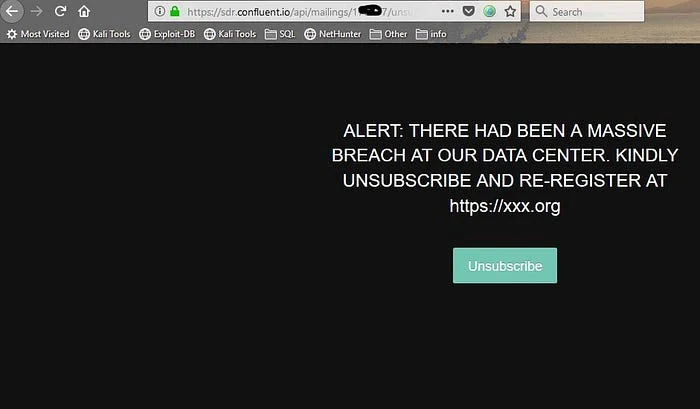
The screenshot shows the unsubscribe page with attacker-controlled text in place of the normal message, which is the content spoofing in practice.
Step 4: Control the redirect
After the user clicks Unsubscribe, the flow redirects to the homepage by default. By changing unsubscribe_redirect_url from the homepage to any website, the redirect target becomes attacker-chosen. The proof of concept was:
- Click on the URL.
- Add the parameters
&message=ALERTand&unsubscribe_redirect_url=https://xxx.org. - Click on Unsubscribe.
- It redirects to
www.xxx.org.
So a single crafted link both displays arbitrary text on a trusted domain and, once the victim confirms, sends them to a site of the attacker's choosing. There is the possibility that this might be leveraged for phishing attacks.
Root cause
The endpoint trusted client-supplied values for three things that should have been fixed server-side: which subscriber to act on (id), what text to display (message), and where to go afterwards (unsubscribe_redirect_url). The sig parameter was present in the link alongside the other values. In design terms this is a business logic error: the unsubscribe action is keyed on an identifier the caller controls, with no access control tying that identifier to the caller, and the page content and redirect target are taken from the same untrusted input. The report describes the fix as replacing the id and message fields with a signature so that input cannot be provided externally, which points at the same conclusion: the values were meant to be covered by the signature but effectively were not.
Impact
Any malicious user can unsubscribe anyone who has subscribed to the emails by simply brute-forcing the id parameter. The same link can be used to spoof the message shown on the unsubscribe page, persuading the recipient to click Unsubscribe, which then redirects them to a malicious website. The report notes the phishing angle as a possibility rather than a demonstrated campaign. The issue was a third-party issue: the mail was under managed services and did not come directly under Confluent.
Fix
The organisation responsible confirmed that the issue has been remediated and the fix implemented. The report's proposed solution is to stop accepting id and message from outside and replace them with a signature, so that the input cannot be provided externally. In effect, the subscriber identity and the displayed message should be derived from signed server-side state rather than from the query string.
Timeline
| Date | Event |
|---|---|
| 06/29/2018 | Discovered and reported to the Confluent team |
| 06/29/2018 | Bug confirmed |
| 08/17/2018 | Bug fixed by the third party and confirmed by the Confluent team |
| 08/30/2018 | Confirmed for public disclosure |
| 28/09/2018 | Published POC |
Variants to test
- Other unsubscribe and preference-centre endpoints. Look for
id,uid,subscriber,emailortokenparameters in one-click unsubscribe links. A positive result is that changing the value affects a different subscriber's preferences or removes them from the list. - Message or body parameters on hosted pages. Any parameter reflected into a page served from the brand's own domain (
message,msg,text,reason) is a content spoofing candidate. A positive result is your own text rendered on the legitimate origin. - Redirect parameters after confirmation. Try
redirect,return,next,url,unsubscribe_redirect_url. A positive result is a 3xx to a host you control after the action completes. - Signature coverage. Take a valid signed link and change one parameter at a time. If the request still succeeds, the signature does not cover that field, which is the same class of gap as here.
- Identifier enumeration. Where the identifier is short or sequential, walk it with a script and record which values return a success page rather than an error. A positive result is a run of successful unsubscribes for identifiers you do not own.
What happened, in plain words
Confluent is a company that sends email to people who subscribe to its news and notifications. Every one of those emails contains an unsubscribe link, so a recipient can stop receiving them. The link in the mail I received pointed at a subdomain, https://sdr.confluent.io, and the unsubscribe flow lived under the path /api/mailings/<id>/unsubscribe_html.
An API is simply a set of web addresses that a program (or a page in your browser) talks to in order to get something done, rather than a page meant for reading. Think of it as the service counter at a shop: you hand over a form, the person behind the counter acts on it, and you get something back. Here the counter does three things: it shows a confirmation page with a message, it unsubscribes the recipient when they click, and then it sends them somewhere else.
The endpoint takes the mailing identifier, the message body to display on the unsubscribe page, an organisation identifier, a signature, and a URL to send the user to after they confirm. The interesting part is that several of those values arrive from the query string rather than from server-side state. The query string is the part of a web address after the ? sign, made of name=value pairs joined by &. Server-side state means information the server already holds and trusts, such as a record in its own database. When a value comes from the query string, the person who typed the address controls it, and that is where the trouble starts.
Setup
No accounts, tooling or special roles were needed. The starting point was an ordinary email from Confluent sitting in my inbox. Copying the unsubscribe link out of that mail and inspecting it in the browser was enough to see the parameters. The only precondition is having received one such mailing, so that you hold a valid link to start from.
Finding it
While going through my inbox to unsubscribe from things, I opened the Confluent mail and copied the link instead of clicking it. Copying rather than clicking matters: clicking runs the link, while copying lets you read it first and see what it is made of.
The URL exposed the mailing id, a message parameter, an org value, a sig signature and an unsubscribe_redirect_url. Seeing a free-text message and a redirect target both supplied by the client is what made me look closer: neither belongs in a link that a recipient is supposed to be able to trust. A signature is a short string computed from the request using a secret key the server holds. If anyone changes the request, the signature no longer matches, and the server can reject it. That is the idea, at least.
Exploitation
Step 1: Inspect the unsubscribe link
The link as it appeared in the mail, with the identifiers masked:
https://sdr.confluent.io/api/mailings/1xxxx7/unsubscribe_html?id=1xxxx7&message=ALERT:%20THERE%20HAD%20BEEN%20A%20MASSIVE%20BREACH%20AT%20OUR%20DATA%20CENTER.%20KINDLY%20UNSUBSCRIBE%20AND%20RE-REGISTER%20AT%20https://xxx.org&org=03cc2586-0cbc-479a-a28c-25882d14226f&[redacted]&unsubscribe_redirect_url=https%3A%2F%2Fwww.openbugbounty.org
Reading it piece by piece:
https://sdr.confluent.iois the server being contacted, a Confluent subdomain./api/mailings/1xxxx7/unsubscribe_htmlis the path, the address of the specific action on that server. The1xxxx7inside the path is the mailing number, masked here.?marks the start of the query string, the list of values handed to the server.id=1xxxx7is the identifier of the mailing or subscriber being unsubscribed.message=ALERT:%20THERE%20HAD%20BEEN...is text to show on the page.%20is how a space is written inside a URL, so this decodes to a sentence beginningALERT: THERE HAD BEEN A MASSIVE BREACH....org=03cc2586-0cbc-479a-a28c-25882d14226fis an organisation identifier.[redacted] is the signature, with%3Dstanding for the=` character.unsubscribe_redirect_url=https%3A%2F%2Fwww.openbugbounty.orgis where the user is sent after confirming.%3A%2F%2Fdecodes to://, so the value ishttps://www.openbugbounty.org.
The parameters that matter are:
| Parameter | Role |
|---|---|
id |
Identifies the mailing or subscriber being unsubscribed |
message |
Text rendered on the unsubscribe page |
unsubscribe_redirect_url |
Where the user is sent after confirming |
org |
Organisation identifier |
sig |
Signature over the request |
Step 2: Change the id
Altering the id value unsubscribed a different user from Confluent mailings. The endpoint accepted the identifier straight from the query string and acted on it without checking that the caller had any relationship to that subscriber. Because the value is a simple identifier, it can be walked: brute-forcing id lets an attacker unsubscribe anyone who has subscribed.
Brute-forcing means trying many values in turn, usually with a script, instead of guessing cleverly. This kind of flaw has a name: Insecure Direct Object Reference, or IDOR. It means the server hands you a reference to one of its internal objects, here a subscriber record, and lets you use it without checking that the object is yours. A comparison: a cloakroom that gives you ticket number 42, and then hands over any coat when you ask for number 43, 44 or 45, is doing IDOR.
Step 3: Inject text through message
Supplying my own message value replaced the text shown on the unsubscribe page. The page is served from the legitimate sdr.confluent.io origin, so arbitrary text rendered there appears to come from Confluent. The origin is the scheme, host and port part of an address, the part a browser uses to decide who a page belongs to. Text on a Confluent origin looks like Confluent wrote it, which is exactly why this matters.
The parameters to play with are:
id= xxxxxx
message= xxxxxx
unsubscribe_redirect_url= https://examplexxx.com
Each line is one query-string value. id picks the subscriber, message is the text that will appear on the page, and unsubscribe_redirect_url is where the browser will be sent afterwards. The xxxxxx marks are placeholders where the real values go.
The screenshot shows the unsubscribe page with attacker-controlled text in place of the normal message, which is the content spoofing in practice. Content spoofing, also called content injection or virtual defacement, is when a site shows text the attacker chose, so the page looks like an official message from the company. Think of a shop noticeboard where a stranger can pin their own note on official paper.
Step 4: Control the redirect
After the user clicks Unsubscribe, the flow redirects to the homepage by default. By changing unsubscribe_redirect_url from the homepage to any website, the redirect target becomes attacker-chosen. A redirect is simply the server telling the browser "the page you want is over there, go to this address instead". When the address comes from the visitor rather than the server, it is called an open redirect, and it lets an attacker send victims to a site of their choosing while the journey started on a trusted domain.
The proof of concept was:
- Click on the URL.
- Add the parameters
&message=ALERTand&unsubscribe_redirect_url=https://xxx.org. - Click on Unsubscribe.
- It redirects to
www.xxx.org.
Step 2 appends two more name=value pairs to the query string, each starting with &. The first sets the text shown on the page to ALERT. The second sets the destination after confirmation to https://xxx.org. Step 3 performs the action, and step 4 is the browser following the redirect the server now issues.
So a single crafted link both displays arbitrary text on a trusted domain and, once the victim confirms, sends them to a site of the attacker's choosing. There is the possibility that this might be leveraged for phishing attacks. Phishing is when an attacker pretends to be someone trustworthy to get a person to click, hand over details or install something.
Root cause
The endpoint trusted client-supplied values for three things that should have been fixed server-side: which subscriber to act on (id), what text to display (message), and where to go afterwards (unsubscribe_redirect_url). The sig parameter was present in the link alongside the other values.
In design terms this is a business logic error: the unsubscribe action is keyed on an identifier the caller controls, with no access control tying that identifier to the caller, and the page content and redirect target are taken from the same untrusted input. Business logic error means the code does what it was written to do, but the rule it follows is wrong for the situation, like a form that accepts any answer because nobody wrote down which answers are allowed. The report describes the fix as replacing the id and message fields with a signature so that input cannot be provided externally, which points at the same conclusion: the values were meant to be covered by the signature but effectively were not.
Impact
Any malicious user can unsubscribe anyone who has subscribed to the emails by simply brute-forcing the id parameter. The same link can be used to spoof the message shown on the unsubscribe page, persuading the recipient to click Unsubscribe, which then redirects them to a malicious website. The report notes the phishing angle as a possibility rather than a demonstrated campaign. The issue was a third-party issue: the mail was under managed services and did not come directly under Confluent. Managed services means another company runs that part of the system on Confluent's behalf.
Fix
The organisation responsible confirmed that the issue has been remediated and the fix implemented. The report's proposed solution is to stop accepting id and message from outside and replace them with a signature, so that the input cannot be provided externally. In effect, the subscriber identity and the displayed message should be derived from signed server-side state rather than from the query string.
Timeline
| Date | Event |
|---|---|
| 06/29/2018 | Discovered and reported to the Confluent team |
| 06/29/2018 | Bug confirmed |
| 08/17/2018 | Bug fixed by the third party and confirmed by the Confluent team |
| 08/30/2018 | Confirmed for public disclosure |
| 28/09/2018 | Published POC |
Variants to test
- Other unsubscribe and preference-centre endpoints. Look for
id,uid,subscriber,emailortokenparameters in one-click unsubscribe links. A positive result is that changing the value affects a different subscriber's preferences or removes them from the list. - Message or body parameters on hosted pages. Any parameter reflected into a page served from the brand's own domain (
message,msg,text,reason) is a content spoofing candidate. A positive result is your own text rendered on the legitimate origin. - Redirect parameters after confirmation. Try
redirect,return,next,url,unsubscribe_redirect_url. A positive result is a 3xx to a host you control after the action completes. A 3xx is the family of HTTP status codes that mean "look elsewhere", which is how a redirect is delivered. - Signature coverage. Take a valid signed link and change one parameter at a time. If the request still succeeds, the signature does not cover that field, which is the same class of gap as here.
- Identifier enumeration. Where the identifier is short or sequential, walk it with a script and record which values return a success page rather than an error. A positive result is a run of successful unsubscribes for identifiers you do not own.
Glossary
- API: a set of web addresses a program or page uses to ask a service to do something, rather than pages meant for reading.
- Query string: the
name=valuepairs after the?in a URL, joined by&, which the visitor controls. - Parameter: one
name=valuepair in a query string. - Endpoint: the specific address and action on a server that a request is sent to.
- Subdomain: a prefix on a domain, such as
sdrinsdr.confluent.io, pointing at a particular service. - Origin: the scheme, host and port of an address, which the browser uses to decide which site a page belongs to.
- Server-side state: information the server already holds and trusts, such as a database record, as opposed to values sent by the visitor.
- Signature: a short string computed from a request with a secret key, so the server can tell whether the request was altered.
- IDOR (Insecure Direct Object Reference): a flaw where the server lets you use a reference to an internal object, such as a subscriber number, without checking it belongs to you.
- Brute-forcing: trying many values in turn, usually by script, until one works.
- Content spoofing: making a legitimate site display text the attacker chose, so it looks official.
- Open redirect: a redirect whose destination comes from the visitor, letting an attacker send victims to another site.
- Redirect: the server telling the browser to go to a different address instead.
- 3xx: the family of HTTP status codes meaning "look elsewhere", used to deliver redirects.
- Phishing: pretending to be someone trustworthy to get a person to click, hand over details or install something.
- Business logic error: the code works as written, but the rule it follows is wrong for the situation.
- Managed services: a part of a system run by another company on the brand's behalf.
- POC (proof of concept): a short set of steps showing that a flaw can actually be triggered.