S3 Bucket Misconfiguration in Amazon
An Amazon S3 bucket used for customer attachments was misconfigured to allow public write and delete access. An attacker could upload arbitrary files, delete existing files, and potentially use the bucket for phishing or to access confidential files.
 Published on medium.com
AWS
The full write-up lives on its author's site
It belongs to its author, so we link to it rather than copy it. The other two tabs are our own rewrites, checked against it.
Context
Amazon.in has a contact customer care flow where a customer can attach files, such as an image or a PDF, when asking a retailer about an invoice or receipt. Those attachments are stored in an Amazon S3 bucket, from which customer executives download them. The bucket in question is:
https://bbcomm-mgr-ui-attachments-eu.s3.amazonaws.com
The write-up describes a misconfiguration in that bucket that let any user upload and delete files in it.
Setup
The researcher was working against the public Amazon.in site and used Burp to intercept the upload request. No accounts, roles or specific tool versions are described. The only precondition shown is that the contact page offered an upload feature that accepted png, jpeg and gif files.
Finding it
While looking for a way to contact customer care, the researcher found a page with upload functionality and decided to try uploading a PHP shell. With Burp interception on, the attempt to bypass the file upload was made. The page allowed png, jpeg and gif, and every upload attempt returned an error response.
The researcher then started spidering to find other pages linked to the upload page. The spider revealed an S3 bucket holding the same file that had just been uploaded. Copying the link let the researcher download the file again, which confirmed that the bucket was misconfigured. The bucket is the one from which customer executives download attachments sent to them.
Exploitation
Step 1: confirm the bucket is reachable
Visit the bucket URL:
https://bbcomm-mgr-ui-attachments-eu.s3.amazonaws.com/login2.html
Step 2a: write a file with curl
Using curl to write index.html:
curl -XPUT -d ‘<html><h1> Upload by justmorpheus</html>’ ‘https://bbcomm-mgr-ui- attachments-eu.s3.amazonaws.com/index.html’
The -XPUT sends an HTTP PUT with the HTML body to the object key index.html in the bucket. The command as published contains a space inside the host name (bbcomm-mgr-ui- attachments-eu), which is how it appears in the write-up.
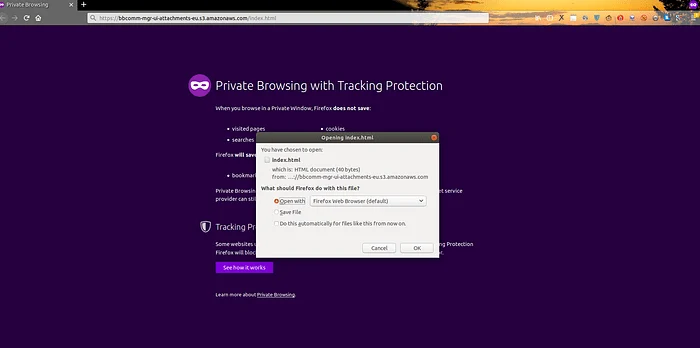
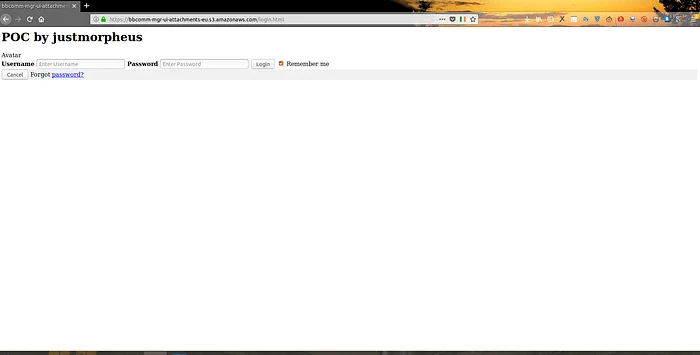
Step 2b: move and copy files with the AWS CLI
Move command:
aws s3 mv login.html s3://bbcomm-mgr-ui-attachments-eu — grants read=uri=http://acs.amazonaws.com/groups/global/AllUsers
Copy command:
aws s3 cp login2.html s3://bbcomm-mgr-ui-attachments-eu — grants read=uri=http://acs.amazonaws.com/groups/global/AllUsers
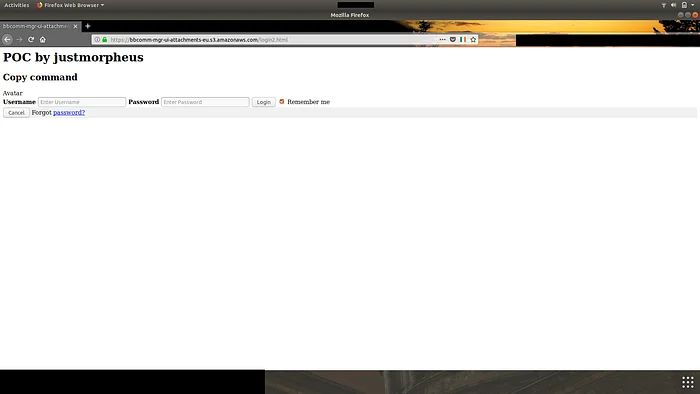
Both commands operate on the bucket bbcomm-mgr-ui-attachments-eu. The trailing text in each line, grants read=uri=http://acs.amazonaws.com/groups/global/AllUsers, is the canned ACL grant that makes the object readable by the AllUsers group.
Step 3: delete files with the AWS CLI
aws s3 rm s3://bbcomm-mgr-ui-attachments-eu/login.html
aws s3 rm s3://bbcomm-mgr-ui-attachments-eu/index.html
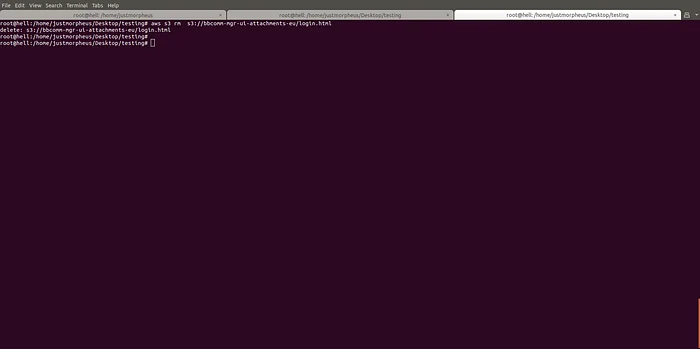
Result
The researcher reports full write and execute access to the Amazon.in S3 bucket. Directory bruteforcing with dirbuster also discovered a folder, which the researcher says could be used to download confidential files and for phishing.
Root cause
The bucket permitted unauthenticated users to write and delete objects. The write-up's fix is not to allow anyone full read, write and execute access, and the CLI examples show objects being granted read access to the AllUsers group. and the CLI examples show objects being granted read access to the AllUsers group. The upload page allowed png, jpeg and gif, and each attempt returned an error response.
Impact
An attacker could upload arbitrary files to the bucket, including HTML, and delete existing objects. Because the bucket is the one customer executives use to download attachments, the researcher notes the discovered folder could be used to download confidential files and for phishing. The write-up does not give a count of affected files or users.
Fix
The recommendation is not to allow anyone full read, write and execute access, with a pointer to the S3 access control documentation:
https://docs.aws.amazon.com/AmazonS3/latest/dev/access-control-overview.html
According to the timeline, Amazon confirmed the bug on 10/07/2018, fixed it on 03/08/2018, and the POC was published on 12/08/2018. The researcher notes there was no hall of fame entry or reward, as the report was handled under Amazon's coordinated disclosure policy.
Variants to test
- Upload a small HTML or text object to a bucket with a direct PUT and then fetch it back from a browser. A positive result is the object being served with your content.
- Run
aws s3 cpandaws s3 rmagainst a bucket without credentials. A positive result is the CLI reporting a successful copy or delete. - Spider the upload page and look for bucket hostnames in the linked resources. A positive result is an S3 hostname that serves the file you just uploaded.
- Run directory bruteforcing against a discovered bucket. A positive result is a folder listing or objects that were not meant to be public.
What happened, in plain words
A security researcher found that a storage area (called an S3 bucket) used by Amazon.in was misconfigured. It allowed anyone on the internet to upload new files and delete existing files without needing a password or account. The bucket was used by Amazon customer service staff to download attachments that customers sent when asking about invoices or receipts. The researcher uploaded and deleted files in the bucket, and also found a folder that could be used to download confidential files or for phishing. Amazon fixed the issue after it was reported.
Background: what is an S3 bucket?
Amazon S3 (Simple Storage Service) is like an online filing cabinet. You create a "bucket" (a top-level folder) and put files (called "objects") inside it. Each object has a key (its name) and can be accessed via a URL. Buckets are used to store images, documents, backups, and more. By default, buckets are private: only the owner can access them. But the owner can change permissions to allow others to read, write, or delete objects. If those permissions are set too loosely, anyone can access the bucket.
In this case, the bucket was named bbcomm-mgr-ui-attachments-eu. It was used by Amazon.in's contact customer care flow: when a customer attaches a file (like an image or PDF) to a message about an invoice or receipt, that file is stored in this bucket. Customer service representatives then download the file from the bucket to view it.
How the researcher found it
The researcher was on the Amazon.in website, looking for a way to contact customer care. They found a page with an upload feature. The page allowed uploading files with extensions .png, .jpeg, and .gif. The researcher decided to try uploading a PHP shell (a malicious script that could give control over the server) to see if the upload validation could be bypassed. They turned on Burp (a tool that intercepts and modifies web traffic) to intercept the upload request. However, every upload attempt returned an error response, so the direct upload didn't work.
Instead of giving up, the researcher used a spider (an automated tool that crawls a website and lists all linked pages and resources) to find other pages linked to the upload page. The spider revealed an S3 bucket that contained the same file the researcher had just tried to upload. By copying the link to that file, the researcher was able to download it again. This confirmed that the bucket was misconfigured. The bucket was the one from which customer service representatives download attachments.
Step-by-step exploitation
Step 1: Confirm the bucket is reachable
The researcher visited the following URL in a browser:
https://bbcomm-mgr-ui-attachments-eu.s3.amazonaws.com/login2.html
This URL points to an object named login2.html inside the bucket. If the bucket is public, the browser will display the file. The researcher used this to check that the bucket could be accessed without authentication.
Step 2a: Write a file using curl
curl is a command-line tool for sending HTTP requests. The researcher used it to upload a new file to the bucket:
curl -XPUT -d ‘<html><h1> Upload by justmorpheus</html>’ ‘https://bbcomm-mgr-ui- attachments-eu.s3.amazonaws.com/index.html’
Explanation:
curlis the command.-XPUTtells curl to use the HTTP PUT method. PUT is used to upload or replace a file on a server.-d ‘<html><h1> Upload by justmorpheus</html>’provides the data to send: a small HTML snippet that will become the content of the file.- The URL
‘https://bbcomm-mgr-ui- attachments-eu.s3.amazonaws.com/index.html’is the target. Note that there is a space in the hostname (bbcomm-mgr-ui- attachments-eu), which is how it appears in the write-up. The object key isindex.html.
When this command succeeds, it creates or overwrites the object index.html in the bucket with the given HTML content. The researcher then took a screenshot to prove it:
Step 2b: Move and copy files using the AWS CLI
The AWS CLI (Command Line Interface) is a tool for managing AWS services from the command line. The researcher used it to move and copy files into the bucket.
Move command:
aws s3 mv login.html s3://bbcomm-mgr-ui-attachments-eu — grants read=uri=http://acs.amazonaws.com/groups/global/AllUsers
Explanation:
aws s3 mvmoves a file from the local system to the bucket (or within the bucket).login.htmlis the local file being moved.s3://bbcomm-mgr-ui-attachments-euis the destination bucket.- The trailing text
— grants read=uri=http://acs.amazonaws.com/groups/global/AllUsersis not part of the command; it is a note indicating that the move operation grants read access to the AllUsers group. In S3, a canned ACL (Access Control List) can be specified to grant permissions. The AllUsers group means everyone on the internet.
Copy command:
aws s3 cp login2.html s3://bbcomm-mgr-ui-attachments-eu — grants read=uri=http://acs.amazonaws.com/groups/global/AllUsers
Explanation:
aws s3 cpcopies a file from the local system to the bucket.login2.htmlis the local file being copied.- The destination is the same bucket.
- Again, the trailing text indicates that the copy grants read access to AllUsers.
Step 3: Delete files using the AWS CLI
The researcher also demonstrated that files could be deleted:
aws s3 rm s3://bbcomm-mgr-ui-attachments-eu/login.html
aws s3 rm s3://bbcomm-mgr-ui-attachments-eu/index.html
Explanation:
aws s3 rmremoves an object from the bucket.- The first command deletes
login.htmlfrom the bucket. - The second command deletes
index.htmlfrom the bucket.
Result
The researcher reports having full write and execute access to the Amazon.in S3 bucket. They also used dirbuster (a tool that brute-forces directory and file names on a web server) to discover a folder in the bucket. According to the researcher, this folder could be used to download confidential files and for phishing (creating fake pages to steal credentials).
Why it worked
The bucket allowed unauthenticated users to write and delete objects. The write-up's fix is not to allow anyone full read, write and execute access. The AWS CLI examples show objects being granted read access to the AllUsers group. The upload page allowed only png, jpeg and gif, and each attempt returned an error response.
Impact
An attacker could upload arbitrary files to the bucket, including HTML, and delete existing objects. Because the bucket is used by customer service representatives to download attachments, the researcher notes that the discovered folder could be used to download confidential files and for phishing. The write-up does not give a count of affected files or users.
How to fix it
The recommendation is not to allow anyone full read, write, and execute access. The researcher points to the S3 access control documentation:
https://docs.aws.amazon.com/AmazonS3/latest/dev/access-control-overview.html
According to the timeline, Amazon confirmed the bug on 10/07/2018, fixed it on 03/08/2018, and the proof of concept was published on 12/08/2018. The researcher notes there was no hall of fame entry or reward, as the report was handled under Amazon's coordinated disclosure policy.
Variants to test
If you want to check for similar issues, here are some steps you can try:
- Upload a small HTML or text file to a bucket using a direct PUT request (like with curl), then fetch it back in a browser. If you see your content, the bucket is writable.
- Run
aws s3 cpandaws s3 rmagainst a bucket without credentials. If the CLI reports success, the bucket is misconfigured. - Spider the upload page and look for bucket hostnames in the linked resources. If you find an S3 hostname that serves the file you just uploaded, it's likely misconfigured.
- Run directory bruteforcing against a discovered bucket. If you find a folder listing or objects that were not meant to be public, the bucket is misconfigured.
Glossary
- S3 bucket: A storage container in Amazon S3, like a folder in the cloud.
- Object: A file stored in an S3 bucket.
- Key: The name of an object in a bucket.
- Misconfiguration: A setting that is not secure, often leaving access open when it should be restricted.
- Burp: A tool that intercepts and modifies HTTP traffic between a browser and a server, used for security testing.
- Spider: An automated tool that crawls a website to discover linked pages and resources.
- PHP shell: A malicious script that can execute commands on a server, often used to gain control.
- curl: A command-line tool for sending HTTP requests.
- HTTP PUT: An HTTP method used to upload or replace a resource on a server.
- AWS CLI: The command-line interface for managing Amazon Web Services.
- ACL (Access Control List): A list of permissions attached to an object or bucket, specifying who can access it.
- AllUsers group: A special group in S3 that represents everyone on the internet.
- dirbuster: A tool that brute-forces directory and file names on a web server to discover hidden content.
- Phishing: A technique to trick users into revealing sensitive information by mimicking a trusted entity.
- Coordinated disclosure: A process where a security researcher reports a vulnerability to the vendor and gives them time to fix it before public disclosure.