Injecting Punycode URL Within the Arbitrary Text via Comment Box In Google Photo Sharing Option
A comment field on Google Photos shared albums accepted arbitrary HTML, so a commenter could insert a link with attacker-chosen text pointing to a lookalike Punycode domain. An attacker could share an image publicly and use the comment to send viewers to a phishing site, with no warning shown in Firefox.
 Published on justm0rph3u5.medium.com
HTML injection is a type of injection vulnerability that occurs when a user is controlling an input point and can inject arbitrary HTML code into a vulnerable web page. It was possible to inject <a> tag along with Punycode domain and creating the phishing comment thus used by an attacker to attack any person by making…
The full write-up lives on its author's site
It belongs to its author, so we link to it rather than copy it. The other two tabs are our own rewrites, checked against it.
Context
Google Photos lets you share a photo or a video with other people, either by naming the recipients directly or by generating a public shareable link. On a shared item there is a comment box ("say something") that accepts text and a URL, and the URL is rendered as a clickable hyperlink in the comment. The researcher, Divyanshu Shukla (@justm0rph3u5), looked at that comment box and found that the URL value could be tampered with so that arbitrary HTML, specifically an <a> tag, ended up in the comment. Combined with a Punycode (IDN homograph) domain, the injected anchor becomes a phishing link that shows a familiar-looking domain while pointing somewhere else.
The report frames the class of issue up front: HTML injection occurs when a user controls an input point and can inject arbitrary HTML into a vulnerable page. Here the injected <a> element, with its href attribute, creates a hyperlink to whatever a URL can address, and the attacker can make the image public so that anyone can be reached.

Setup
- A Google account with access to Google Photos.
- A photo or video to share, either to named users or through a generated shareable link.
- Burp Suite as an intercepting proxy to tamper with the comment request.
- Firefox as the browser of interest, because
IDN_show_punycodeis disabled by default there, so an internationalised domain is displayed in its Unicode form rather than asxn--Punycode. The report notes this makes the redirection and phishing scenario more impactful.
Finding it
The comment box accepts a URL and turns it into a hyperlink. When the researcher intercepted the comment request, the URL value was a plain parameter that could be edited. Direct injection of a Punycode domain was not possible: the report says that doing so led to the URL being removed completely. The restriction was bypassed by URL-encoding the value, which allowed the Punycode URL to be inserted. From there, arbitrary text wrapped in an <a> tag could be placed in the comment, and in Firefox the visible text is shown as the original (Unicode) domain rather than the Punycode form, with no warning that the user is about to be redirected to the attacker's domain.
Exploitation
Step 1: Open Google Photos and pick an item
- Visit
https://photos.google.com/. - Select a video or image in
photos.google.com.
Step 2: Share it
- Click the share option, then click Send in Google Photos.
- Enter the name of the user you want to share with. A shareable link can also be generated for viewing.
- A public link looks similar to:
https://photos.app.goo.gl/ophzhxxxxxxxxxx9
Step 3: Add a comment with a URL
- Click "say something" and enter the comment. Add a URL such as
https://google.comor the Punycode domainhttps://www.аррӏе.com.
Step 4: Tamper with the request
- Intercept the request in Burp Suite and change the value of the URL that was added. Insert arbitrary text (an
<a>tag) together with any malicious URL the attacker wants to redirect to.
The payload used is:
<a href=”https://www.аррӏе.com”>iPhone Black Friday sale</a>
The anchor's href points at the Punycode domain, while the visible link text is the innocuous "iPhone Black Friday sale".
- In Firefox it is also possible to inject the Punycode URL and the arbitrary text. The request body shown in the report is:
Request Body:f.req=[[[“HF8OLc”,”[[\”AF1Qip6767676767676767r_24-[redacted]\”],[[[2,\”mypage\”,null,[\”https%3A%2F%2Fwww.%D0%B0%D1%80%D1%80%D3%8F%D0%B5.com\",\"https%3A%2F%2Fwww.%D0%B0%D1%80%D1%80%D3%8F%D0%B5.com\"]]]],\"ZS1CdDZ6dG8yTFBdddddddddddddYS\",null,null,[],null,\"`comment_0\",null,[[\"[redacted]\",\"99999277788885631999999999995\"],\"https://lh3.googleusercontent.com/JcxcvcvcvbvvbbbbbbbbbbbbbbbbbbbbbwMT-[redacted]-XZU2A\",null,[\"Demo+App\",1,\"male\",\"justmorpheus\"],[null,null,[]],1,\"\",\"\",[],[],null,[\"https://lh3.googleusercontent.com/a/AATXAJxUjjEGFNSdcXVQ_Y5hhhcZ32-b9L7TZw-SeY4\"],2]]",null,"generic"]]]&at=[redacted]:16979004365222&
The URL appears twice, URL-encoded, as https%3A%2F%2Fwww.%D0%B0%D1%80%D1%80%D3%8F%D0%B5.com, which is the encoded form of the Punycode domain.
- Send the request and check for
200 OK.
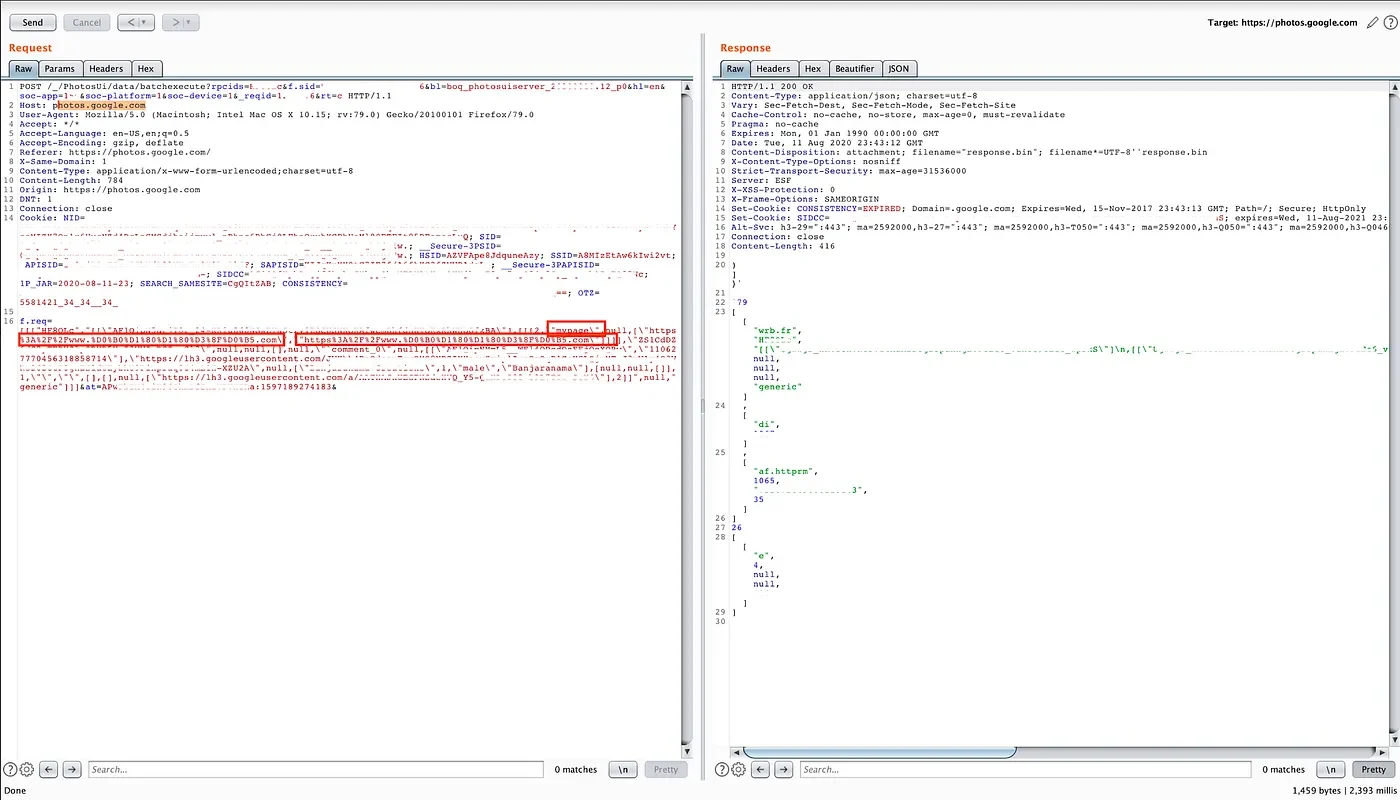
Burp Request On Tampering The Input With Malicious Data
Step 5: Verify the rendered link
- Reload the page and hover over the hyperlink created from the arbitrary text.
- In Firefox the arbitrary text is shown as the original domain instead of Punycode, and once the user clicks the link they can be redirected or phished.
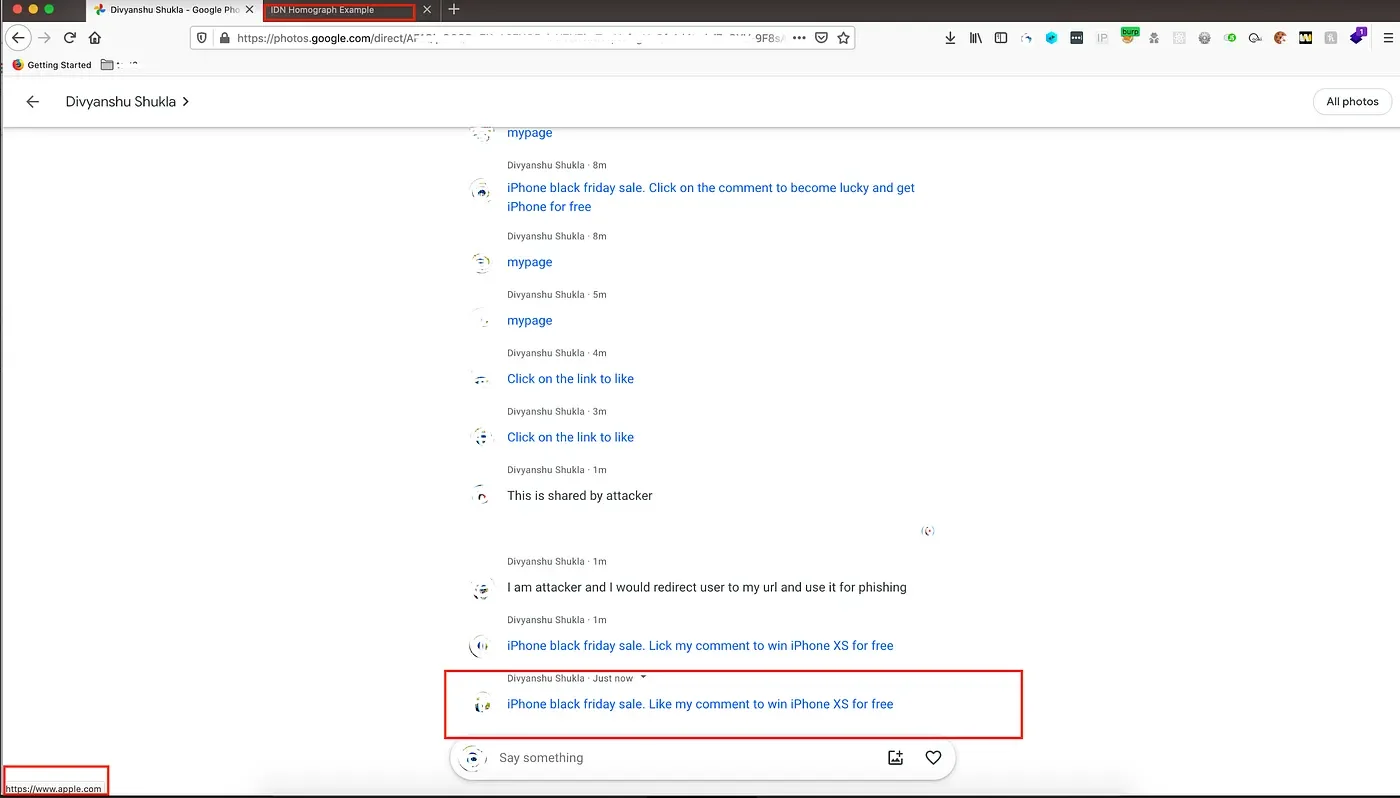
Final Attacker Controlled Image With Punycode
Root cause
The URL value in the comment could be tampered with so that an <a> tag with arbitrary text ended up in the comment. Because the value was placed into the markup, an <a> tag with an attacker-chosen href and link text survived into the rendered comment. Direct injection of the Punycode domain led to the URL being removed completely; URL-encoding the value bypassed that restriction. On the client side, Firefox's default of not showing Punycode means the homograph domain is displayed in its Unicode form, so the user sees a familiar-looking domain and gets no warning before being redirected.
Impact
An attacker can share images or videos with multiple people, or create a shareable link, making the item available to the public. The injected comment then contains a hyperlink with arbitrary text that points at an attacker-controlled (Punycode) domain. Anyone who views the shared item and clicks the link can be redirected to a malicious site, and because there is no warning, the report says phishing attacks are feasible. The report highlights the scenario in Firefox, where IDN_show_punycode is disabled by default.
Fix
Google marked the issue as Not-Applicable, on the grounds that it is a social engineering attack and not part of the scope. The report notes that it was later fixed by Google, and that on retesting the issue was fixed.
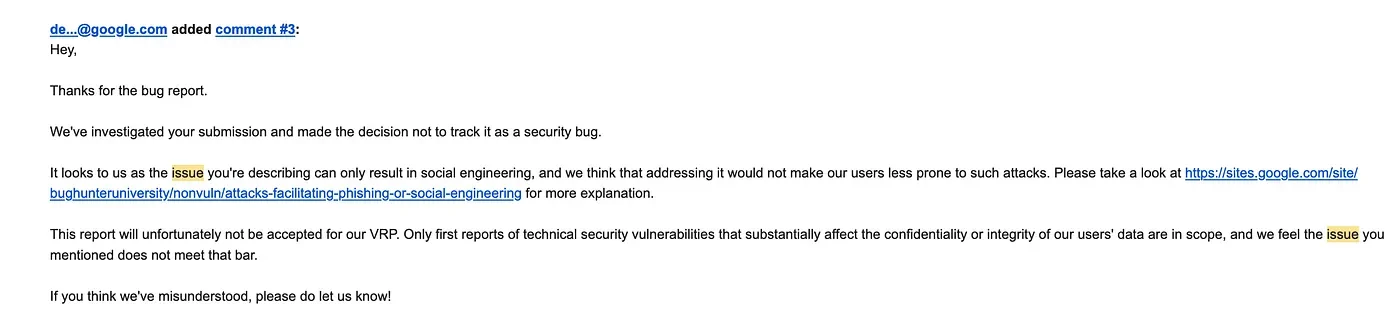
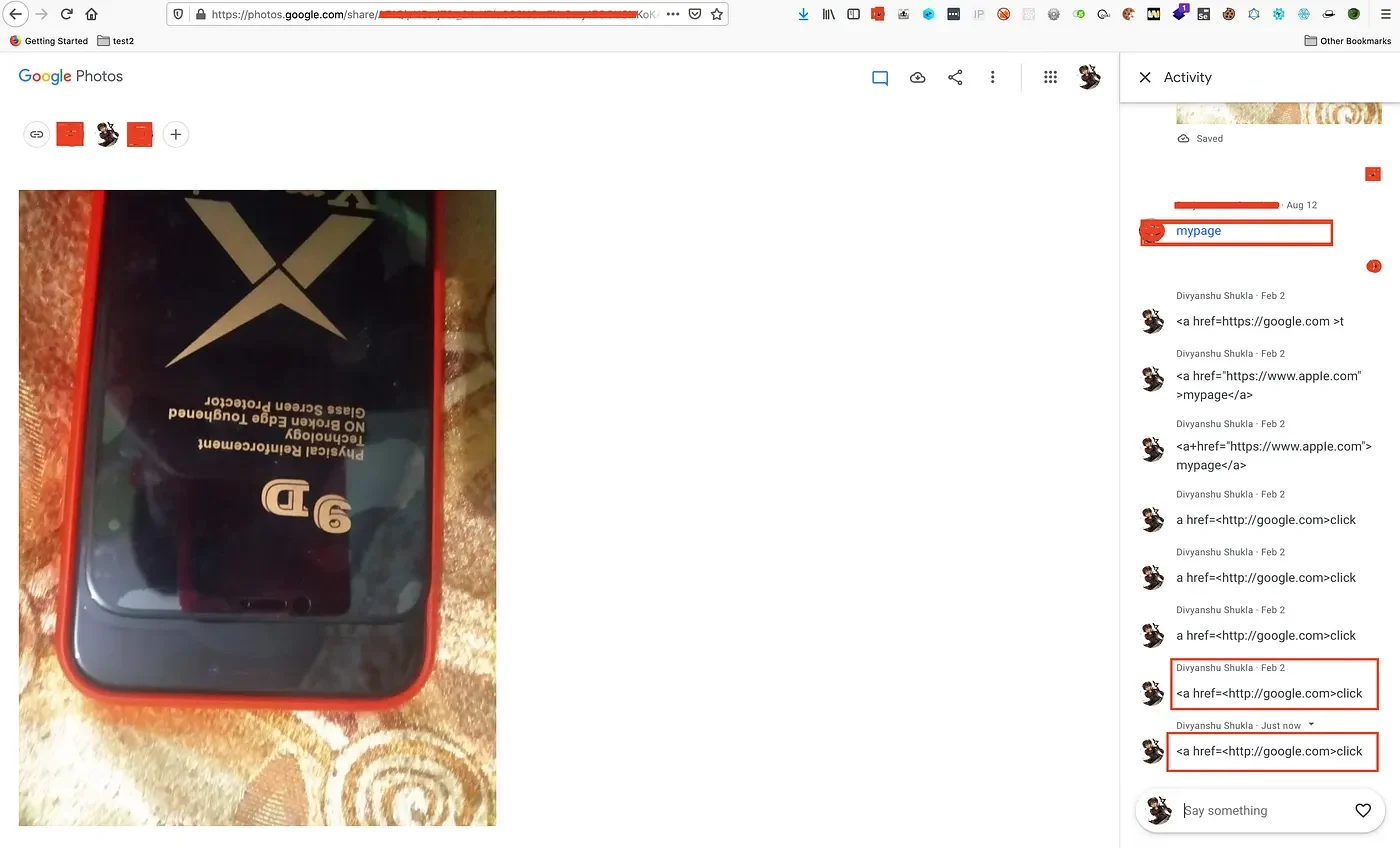
On retesting the issue was fixed.
Variants to test
- Other comment or caption fields on sharing surfaces. Submit a URL value containing an
<a>tag and see whether it is rendered as markup. A positive result is a clickable link whose text differs from itshref. - Encoding bypasses on URL filters. Where a Punycode or otherwise suspicious URL is stripped, try URL-encoding parts of it (as here,
%D0%B0style sequences) and check whether the decoded value still reaches the page. A positive result is the encoded value being accepted and rendered as the intended link. - Browsers with Punycode display. Test in Firefox and other browsers with
IDN_show_punycodedisabled by default, and compare what the link text shows against the actual destination. A positive result is the Unicode domain being displayed with no warning on click. - Public share links. Generate a shareable link and open it in a clean session to confirm the injected comment is visible to unauthenticated viewers. A positive result is the tampered link rendering for anyone with the link.
What happened, in plain words
Google Photos is a service for storing and sharing photos and videos. When you share a photo with someone, the two of you can leave comments on it, a bit like a chat thread attached to the picture. One of the things the comment box lets you do is type a web address (a URL), and Google Photos turns that address into a clickable link, so the other person can click it and go to that page.
A security researcher, Divyanshu Shukla (@justm0rph3u5), looked closely at that comment box. He found that the web address you type is not handled safely. If you catch the request that your browser sends when you post a comment, you can change the address into something else: a piece of HTML, the language web pages are written in, that creates a link. That link can show one thing to the reader and lead somewhere completely different.
He combined this with a trick called Punycode, or an IDN homograph. Some letters in other alphabets look exactly like ordinary Latin letters. For example, the Cyrillic letter "а" looks the same as the Latin "a". A domain name built from those lookalike letters can be registered by anyone, and in some browsers it is displayed in its original alphabet, so it looks like a familiar site while actually pointing to a different one. The researcher used this to make a comment that looks like an innocent link but sends the reader to a lookalike domain.
Google looked at the report and marked it as Not-Applicable, saying it was a social engineering attack and outside the scope of the programme. Later, the researcher says, Google fixed it anyway, and on retesting the problem was gone.
The idea behind the bug
The report starts with a definition. HTML injection is a type of injection vulnerability that happens when a user controls an input point and can inject arbitrary HTML code into a vulnerable web page.
Let us unpack that. A web page is built from HTML, a set of instructions in angle brackets, called tags, that tell the browser what to show. For example, <a> is the tag for a link (the "anchor" element). It has an attribute called href, which holds the address the link points to, and the text between the opening <a ...> and the closing </a> is what the reader sees and clicks.
An "input point" is anywhere a website accepts something you type: a search box, a comment field, a form. Normally the site takes what you typed and shows it back to you as plain text. If it instead pastes your text into the page as if it were part of the page's own HTML, then you can type tags, and the browser will obey them. That is HTML injection. A simple comparison: it is the difference between a noticeboard where you pin a note (the site shows your words as words) and one where you hand the printer a new sheet of the poster design (the site treats your words as instructions).
In this case the input point was the comment box on a shared photo. The researcher found that the URL part of a comment could be tampered with so that an <a> tag ended up in the comment. The injected anchor, with its href attribute, creates a hyperlink to whatever a URL can address: web pages, files, email addresses, locations on the same page, or anything else a URL can point at. And because the attacker can make the image public, anyone can be reached.
Setting up
To follow along, the researcher needed a few things:
- A Google account with access to Google Photos.
- A photo or video to share, either with named people or through a generated shareable link.
- Burp Suite, a tool that sits between your browser and the website and lets you look at, and change, the requests your browser sends. Think of it as a post office clerk who opens every letter you send, lets you rewrite it, and then sends it on.
- Firefox as the browser of interest. Firefox has a setting called
IDN_show_punycodewhich is disabled by default, meaning it shows an internationalised domain name in its normal alphabet (Unicode) rather than in thexn--form that Punycode uses internally. The report says this makes the redirection and phishing scenario more impactful.
Finding it
The comment box accepts a URL and turns it into a hyperlink. When the researcher intercepted the comment request, the URL value was a plain parameter that could be edited, like a field on a form you can overwrite before posting it.
Direct injection of a Punycode domain was not possible: the report says that doing so led to the URL being removed completely. In other words, the site had a check that spotted the suspicious domain and deleted it. The researcher bypassed that check by URL-encoding the value. URL encoding is a way of writing characters using a percent sign and two hexadecimal digits, so that a character which might otherwise be special can travel safely inside a URL. For example, a Cyrillic "а" becomes %D0%B0. URL-encoding the value bypassed the restriction, so the encoded Punycode URL got through.
From there, arbitrary text wrapped in an <a> tag could be placed in the comment. In Firefox the visible text is shown as the original (Unicode) domain rather than the Punycode form, and there is no warning that the user is about to be redirected to the attacker's domain.
Exploitation
Step 1: Open Google Photos and pick an item
- Visit
https://photos.google.com/. - Select a video or image in
photos.google.com.
These two steps are just getting to the starting point: you need a photo or video that you own and can share.
Step 2: Share it
- Click the share option, then click Send in Google Photos.
- Enter the name of the user you want to share with. A shareable link can also be generated for viewing.
- A public link looks similar to:
https://photos.app.goo.gl/ophzhxxxxxxxxxx9
This is the address that anyone with the link can open to see the shared item. The x characters stand for parts of the real link that were blanked out. The point of this step is that the attacker can make the item reachable by many people, not just one named recipient.
Step 3: Add a comment with a URL
- Click "say something" and enter the comment. Add a URL such as
https://google.comor the Punycode domainhttps://www.аррӏе.com.
Here the researcher is doing what any normal user would do: writing a comment and including a web address. The second address is the interesting one. It looks like apple.com, but the letters are not the Latin ones you expect; they are lookalike characters from other alphabets. To a human eye it reads as Apple, but to a computer it is a completely different domain, one the attacker can register.
Step 4: Tamper with the request
- Intercept the request in Burp Suite and change the value of the URL that was added. Insert arbitrary text (an
<a>tag) together with any malicious URL the attacker wants to redirect to.
Why intercept? Because the browser normally sends the comment to Google in a structured request, and the site may clean up what you type in the box. By catching the request on its way out, the researcher can put in exactly what he wants, bypassing any tidying the page itself does.
The payload used is:
<a href=”https://www.аррӏе.com”>iPhone Black Friday sale</a>
Line by line:
<a ...>opens a link tag.href=”https://www.аррӏе.com”sets the destination of the link to the Punycode domain. The quote marks here are curly ones, as they appear in the report.iPhone Black Friday saleis the visible text, an innocuous phrase that has nothing to do with the destination.</a>closes the link tag.
The anchor's href points at the Punycode domain, while the visible link text is the harmless "iPhone Black Friday sale". A reader who clicks it thinks they are following a shopping link and is taken to the lookalike domain instead.
- In Firefox it is also possible to inject the Punycode URL and the arbitrary text. The request body shown in the report is:
Request Body:f.req=[[[“HF8OLc”,”[[\”AF1Qip6767676767676767r_24-[redacted]\”],[[[2,\”mypage\”,null,[\”https%3A%2F%2Fwww.%D0%B0%D1%80%D1%80%D3%8F%D0%B5.com","https%3A%2F%2Fwww.%D0%B0%D1%80%D1%80%D3%8F%D0%B5.com"]]]],\"ZS1CdDZ6dG8yTFBdddddddddddddYS\",null,null,[],null,\"`comment_0",null,[[\"[redacted]\",\"99999277788885631999999999995\"],\"https://lh3.googleusercontent.com/JcxcvcvcvbvvbbbbbbbbbbbbbbbbbbbbbwMT-[redacted]-XZU2A\",null,[\"Demo+App\",1,\"male\",\"justmorpheus\"],[null,null,[]],1,\"\",\"\",[],[],null,[\"https://lh3.googleusercontent.com/a/AATXAJxUjjEGFNSdcXVQ_Y5hhhcZ32-b9L7TZw-SeY4\"],2]]",null,"generic"]]]&at=[redacted]:16979004365222&
This is the raw body of the request, the package of data the browser sends to Google when you post a comment. It looks intimidating, but a few parts matter:
f.req=is the name of the field that carries the whole payload. The value after it is a long nested structure, a bit like a set of boxes inside boxes, written in a compact format.- The URL appears twice, URL-encoded, as
https%3A%2F%2Fwww.%D0%B0%D1%80%D1%80%D3%8F%D0%B5.com. Decoded,%3Ais:,%2Fis/, and the%D0%B0style sequences are the lookalike letters. So this is the encoded form of the Punycode domain. comment_0marks the comment being added.
- Send the request and check for
200 OK.
200 OK is the standard HTTP status code meaning the server accepted the request and everything went fine. Seeing it tells the researcher the tampered comment was stored.
Burp Request On Tampering The Input With Malicious Data
Step 5: Verify the rendered link
- Reload the page and hover over the hyperlink created from the arbitrary text.
Hovering, without clicking, lets you see where a link really goes, usually in a small bar at the bottom of the browser. It is a safe way to check the result before anyone is exposed to it.
- In Firefox the arbitrary text is shown as the original domain instead of Punycode, and once the user clicks the link they can be redirected or phished.
This is the payoff. Because Firefox displays the domain in its Unicode form, the reader sees a familiar-looking name and no warning appears before the redirect. Phishing means tricking someone into going to a fake site that looks real, usually to steal a password or other information.
Final Attacker Controlled Image With Punycode
Why it worked
The URL value in the comment could be tampered with so that an <a> tag with arbitrary text ended up in the comment. "Reflected" means the site took the value the user supplied and placed it straight into the page it sent back. "Escaped" or "sanitised" means turning dangerous characters into harmless text, so that a < becomes something the browser displays rather than something it obeys. Because the value was placed into the markup, an <a> tag with an attacker-chosen href and link text survived into the rendered comment.
Direct injection of a Punycode domain led to the URL being removed completely. URL-encoding the value got around it, so the filter did not actually constrain what ended up in the page. It is like a bouncer who only checks for a name on a list and lets in anyone who spells it differently.
On the client side, Firefox's default of not showing Punycode means the homograph domain is displayed in its Unicode form, so the user sees a familiar-looking domain and gets no warning before being redirected.
What an attacker could do with it
An attacker can share images or videos with multiple people, or create a shareable link, making the item available to the public. The injected comment then contains a hyperlink with arbitrary text that points at an attacker-controlled (Punycode) domain. Anyone who views the shared item and clicks the link can be redirected to a malicious site, and because there is no warning, the report says phishing attacks are feasible. The report highlights the scenario in Firefox, where IDN_show_punycode is disabled by default.
What Google said
Google marked the issue as Not-Applicable, on the grounds that it is a social engineering attack and not part of the scope. Social engineering means manipulating people rather than machines, for example persuading someone to click a link. The report notes that it was later fixed by Google, and that on retesting the issue was fixed.
On retesting the issue was fixed.
Other places to look for the same pattern
- Other comment or caption fields on sharing surfaces. Submit a URL value containing an
<a>tag and see whether it is rendered as markup. A positive result is a clickable link whose text differs from itshref. - Encoding bypasses on URL filters. Where a Punycode or otherwise suspicious URL is stripped, try URL-encoding parts of it (as here,
%D0%B0style sequences) and check whether the decoded value still reaches the page. A positive result is the encoded value being accepted and rendered as the intended link. - Browsers with Punycode display. Test in Firefox and other browsers with
IDN_show_punycodedisabled by default, and compare what the link text shows against the actual destination. A positive result is the Unicode domain being displayed with no warning on click. - Public share links. Generate a shareable link and open it in a clean session to confirm the injected comment is visible to unauthenticated viewers. A positive result is the tampered link rendering for anyone with the link.
Glossary
- HTML: the language web pages are written in, made of tags in angle brackets that tell the browser what to display.
- HTML injection: a vulnerability where a user can put their own HTML into a page, so the browser obeys it as instructions instead of showing it as text.
- Tag: a piece of HTML in angle brackets, such as
<a>, that marks up part of a page. - Anchor (
<a>) element: the HTML tag that creates a hyperlink. hrefattribute: the part of an anchor tag that holds the address the link points to.- Attribute: an extra setting inside an HTML tag, written as a name and a value.
- URL: a web address, such as
https://google.com. - Hyperlink: clickable text or an image that takes you to another address when clicked.
- Input point: anywhere a website accepts something a user types.
- Punycode: a way of writing domain names that contain characters outside the basic Latin alphabet, using an
xn--form that computers understand. - IDN homograph: a domain name built from lookalike characters from other alphabets, so it appears to read as a familiar name.
- Unicode: the standard that assigns a number to every character in every writing system.
IDN_show_punycode: a browser setting that controls whether internationalised domains are shown in their Punycode form instead of their normal alphabet.- URL encoding: writing characters as a percent sign plus two hexadecimal digits, so they can travel safely inside a URL.
- Burp Suite: a tool that sits between your browser and a website so you can inspect and change the requests being sent.
- Intercepting proxy: a tool that catches requests on their way out and lets you edit them before they are forwarded.
- Request: the message your browser sends to a website asking for something or submitting data.
- Request body: the part of a request that carries the data being submitted, such as a comment.
- Parameter: a named value inside a request, such as
f.reqorat. - Token: a short-lived code the site issues so it can verify a request came from your logged-in session.
- Session: the period during which a site remembers that you are logged in.
- HTTP status code: a number a server returns to say how a request went;
200 OKmeans it succeeded. - Reflected: when a site takes a value you supplied and places it straight into the page it sends back.
- Escaping / sanitising: turning dangerous characters into harmless text so the browser displays them instead of obeying them.
- String filter: a simple check that searches for certain characters or words and blocks them.
- Bypass: getting around a security check without removing it.
- Client side: happening in the user's browser rather than on the server.
- Server side: happening on the website's own computers.
- Phishing: tricking someone into visiting a fake site or handing over information by making the request look legitimate.
- Social engineering: manipulating people rather than machines, for example persuading someone to click a link.
- Scope: the set of systems and issue types a bug bounty programme agrees to consider.
- Not-Applicable: a programme's decision that a report does not qualify under its rules.
- Bug bounty programme: a scheme where organisations reward people for reporting security problems to them.
- Shareable link: a web address that lets anyone who has it view a shared item.
- Unauthenticated: not logged in.