Vulnerability Causing Deletion of All Users in CrushFTP Admin Area
A weak input validation flaw in CrushFTP allowed an admin to create a user with a special name containing a period, and when that user was deleted, the period was interpreted as a path component, causing all user directories to be removed. This resulted in all users being deleted and unable to log in.
 Published on trustwave.com
Change theme to light
The full write-up lives on its author's site
It belongs to its author, so we link to it rather than copy it. The other two tabs are our own rewrites, checked against it.
Context
CrushFTP is a secure, high-speed file transfer server that runs on almost any operating system and handles a wide array of protocols and security options. It gives the server administrator the ability to customise, monitor and control every aspect of the server's operations.
CrushFTP stores the details of registered users within the filesystem, in the users/MainUsers directory. Each user gets their own directory under that path. Admin users have privileges to create additional accounts through the web interface, and the user manager page is where those accounts are created and deleted.
During a recent penetration test, Trustwave SpiderLabs researchers found a weak input validation vulnerability in CrushFTP that caused the deletion of all users. The write-up was published on 2 February 2023 by Jean Calvin Mugabo, and the vendor fixed the issue in version 10.3.0_44.
Setup
The precondition is an authenticated administrator: the account creation and deletion features used here are admin-only. The researchers worked through the web interface's user manager, creating accounts and then deleting them, while watching what happened on the underlying filesystem and in the server log.
The default installation contains the users crushadmin, default and TempAccount, each with their own directory under users/MainUsers.

Figure 1 shows the contents of the MainUsers directory with those three default user directories.
Finding it
While testing for weak input validation, the researchers tried various special characters in the username field and realised that quotes and periods were not being blocked. That meant it was possible to create a user named “.”.
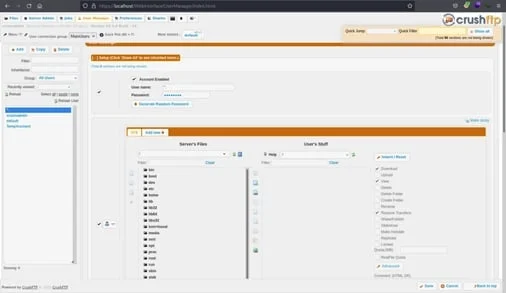
Figure 2 shows the user manager page on the web interface where such an account is created.
Creating the account produced a new directory on the filesystem containing the details for the user “.”.

Figure 3 shows that new directory.
The interesting part came at deletion time. When this particular user was selected to be deleted, the “.” was parsed directly to the filesystem without sanitisation and was taken to mean part of the path, which resulted in all users being removed.
Exploitation
Step 1: create a user whose name contains a quote and a period
With an admin session on the user manager page, create a new account with the username “.”. The application does not block quotes or periods in the username, so the account is accepted and a directory for it appears under users/MainUsers on the filesystem.
Step 2: delete that user
Select the user “.” in the user manager and delete it.
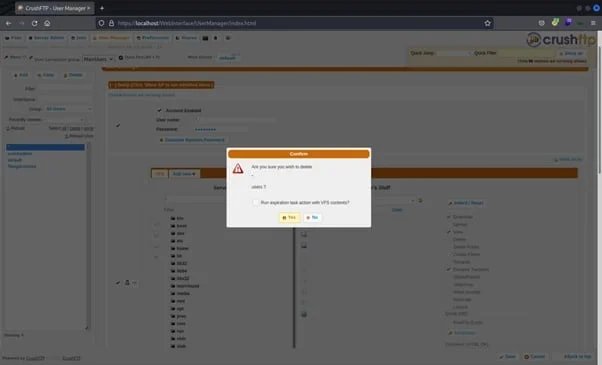
Figure 4 shows the deletion of the user “.”.
Step 3: observe the commands sent to the server
The log lines below show the commands sent to the server when the user “.” was deleted:
SERVER|10/26/2022 01:50:39.523|SETTINGS:users/MainUsers/" delete
SERVER|10/26/2022 01:50:39.532|SETTINGS:users/MainUsers/. Delete
The log lines show the commands sent to the server when the user was deleted. The second line carries the period as the final path component: users/MainUsers/.. Because the . was parsed directly to the filesystem without sanitisation, it was interpreted as part of the path rather than as a literal name, and all folders under MainUsers were deleted.

Figure 5 shows all folders under MainUsers deleted.
Step 4: confirm the effect on the web interface
On the web interface, the researchers saw that the user list was empty.
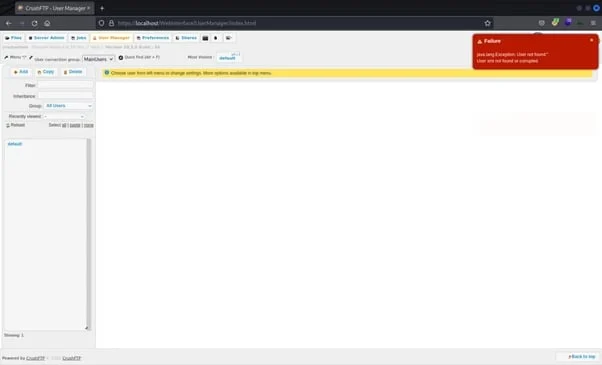
Figure 6 shows the empty user list.
As a result, users were not able to log in.
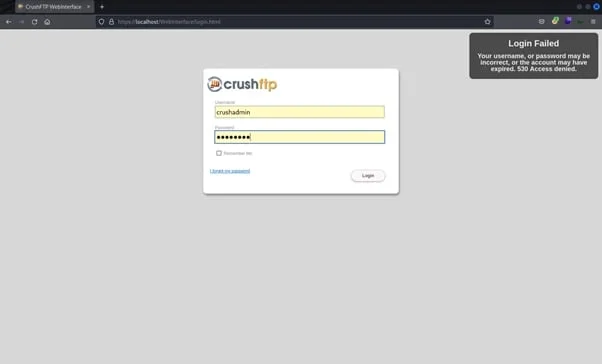
Figure 7 shows a failed login.
Root cause
The username is accepted without validation of quotes and periods, and at deletion time the name is concatenated into a filesystem path without sanitisation. A name of “.” therefore does not resolve to a directory called “.”; the . is treated as a path component, and the delete operation applies to the contents of users/MainUsers rather than to a single user directory. The input was not rejected at creation, and the name was parsed directly to the filesystem without sanitisation at deletion.
Impact
All user accounts stored under users/MainUsers are removed, and the user list on the web interface becomes empty. Users are then unable to log in. The action requires an authenticated administrator, so this is a post-authentication issue; the report notes that post-authentication vulnerabilities are often overlooked, but when one exposes an administrator to attack it deserves a closer look because of the risk associated with a successful attack. Given the right circumstances, a successful exploit can produce disastrous results.
Fix
The vendor fixed the issue in version 10.3.0_44. The report does not describe the code change itself. The responsible disclosure process was followed: Trustwave reached out to the vendor to ensure a patch was released prior to public disclosure, and CrushFTP was responsive and easy to work with throughout.
Variants to test
- Other special characters in usernames. Try quotes and periods in the username field of any admin-managed account system. A positive result is an account that is created successfully and whose name appears verbatim in a filesystem path or in a delete command.
- Deletion of the crafted account. After creating an account with a path-like name, delete it and watch the server log or filesystem. A positive result is a delete command whose path resolves to a parent directory rather than to the single user's directory.
- HTML entity handling. A positive result is a decoded character appearing in a filesystem operation.
- Other admin-managed resources. A positive result is deletion or modification of sibling objects rather than only the named one.
- Path traversal in the name. A positive result is an operation that reaches outside the intended directory.
What happened, in plain words
CrushFTP is a program that lets people send and receive files over the internet. Think of it as a very capable digital post office: it runs on almost any operating system, speaks many different file transfer languages (called protocols), and gives the person in charge a control panel to customise, watch and manage everything it does.
Like any post office, CrushFTP keeps a list of the people allowed to use it. Those accounts are stored as ordinary folders on the server's hard disk, inside a folder called users/MainUsers. Each user gets their own little folder inside it.
During a penetration test (a hired, authorised attempt to break into a system, the way a locksmith might be paid to test your locks), researchers at Trustwave SpiderLabs found a flaw in how CrushFTP checks the names people type in. The flaw let them create a user whose name was just a quote and a full stop. When that user was deleted, the full stop was treated not as part of a name but as a direction in the folder path, and the server ended up deleting every user folder under MainUsers. The user list on the web page became empty and nobody could log in.
The write-up was published on 2 February 2023 by Jean Calvin Mugabo. The vendor fixed the issue in version 10.3.0_44.

The pieces you need to know first
Before following the steps, here are the ideas the rest of the article relies on, explained from scratch.
- Server: a computer that runs a program and answers requests from other computers. When you open a website, your browser asks a server for a page and the server sends it back.
- Filesystem: the way a computer organises files and folders on disk. Folders sit inside folders, and you describe a location with a path, like
users/MainUsers/crushadmin. Each/means "inside the folder before it". - Web interface: the pages you see in a browser that let you operate a program. CrushFTP's web interface includes a user manager page where an administrator creates and deletes accounts.
- Administrator (admin): an account with extra powers. On CrushFTP, only admins can create and delete other accounts.
- Input validation: checking what a person types into a form before the program uses it. If a field is meant to hold a simple name, a well-built program rejects characters that could be misunderstood later. Weak input validation means those checks are missing or too loose.
- Sanitisation: cleaning up input so that special characters cannot be mistaken for instructions. A common everyday comparison is a form where you write your name: if the system later pastes that name into a file path, a stray slash or dot can change where the file goes.
- Path traversal: a class of bug where a crafted name containing path characters (like
.or..) makes the program operate on a different folder than intended, often a parent folder. - Log: a running diary the server keeps of what it was asked to do, with timestamps. Logs are how you see the exact commands that reached the server.
- HTML entity: a code used in web pages to represent a character that would otherwise be awkward.
"is the entity for a double quote. Browsers and some server code translate entities back into the real character. - Post-authentication vulnerability: a flaw that only works after you have logged in. It is often overlooked because people assume an attacker cannot get that far, but an admin account that can be tricked into destroying data is still serious.
Context: what CrushFTP does and where accounts live
CrushFTP is a secure, high-speed file transfer server that runs on almost any operating system and handles a wide array of protocols and security options. It gives the server administrator the ability to customise, monitor and control every aspect of the server's operations.
CrushFTP stores the details of registered users within the filesystem, in the users/MainUsers directory. Each user gets their own directory under that path. Admin users have privileges to create additional accounts through the web interface, and the user manager page is where those accounts are created and deleted.
During a recent penetration test, Trustwave SpiderLabs researchers found a weak input validation vulnerability in CrushFTP that caused the deletion of all users. The write-up was published on 2 February 2023 by Jean Calvin Mugabo, and the vendor fixed the issue in version 10.3.0_44.
Setup: what the researchers started with
The precondition is an authenticated administrator: the account creation and deletion features used here are admin-only. The researchers worked through the web interface's user manager, creating accounts and then deleting them, while watching what happened on the underlying filesystem and in the server log.
The default installation contains the users crushadmin, default and TempAccount, each with their own directory under users/MainUsers.
Figure 1 shows the contents of the MainUsers directory with those three default user directories. In plain terms, this is the post office's list of who has a mailbox: three folders, one per default account.
Finding it: trying odd characters in the username field
While testing for weak input validation, the researchers tried various special characters in the username field and realised that quotes and periods were not being blocked. That meant it was possible to create a user named “.”.
Why does that matter? A username is supposed to be a label, not a set of directions. A full stop has a special meaning in a filesystem path: a single . means "this current folder", and .. means "the folder above". If a program later pastes a username straight into a path without checking it, a dot can stop being a name and start being an instruction.
Figure 2 shows the user manager page on the web interface where such an account is created.
Creating the account produced a new directory on the filesystem containing the details for the user “.”.
Figure 3 shows that new directory. At this point the account exists like any other, and nothing has gone wrong yet. The problem is dormant, waiting for the delete step.
The interesting part came at deletion time. When this particular user was selected to be deleted, the “.” was parsed directly to the filesystem without sanitisation and was taken to mean part of the path, which resulted in all users being removed.
Exploitation, step by step
Step 1: create a user whose name contains a quote and a period
With an admin session on the user manager page, create a new account with the username “.”. The application does not block quotes or periods in the username, so the account is accepted and a directory for it appears under users/MainUsers on the filesystem.
Why this step: the researchers wanted to see whether the form would accept characters that have meaning elsewhere in the system. A form that accepts them is the first half of the bug; the second half is what the program does with them later.
Step 2: delete that user
Select the user “.” in the user manager and delete it.
Figure 4 shows the deletion of the user “.”.
Why this step: deletion is where the stored name is turned back into a filesystem operation. If the name is pasted into a path without cleaning, this is the moment the dot can change the meaning of that path.
Step 3: observe the commands sent to the server
The log lines below show the commands sent to the server when the user “.” was deleted:
SERVER|10/26/2022 01:50:39.523|SETTINGS:users/MainUsers/" delete
SERVER|10/26/2022 01:50:39.532|SETTINGS:users/MainUsers/. Delete
SERVERmarks the source of the entry: the server itself wrote it.deleteat the end of each line is the action requested.
The first line carries the username as ", the HTML entity for a double quote, appended to the users/MainUsers/ path. The second line carries the period as the final path component: users/MainUsers/.. Because the . was parsed directly to the filesystem without sanitisation, it was interpreted as part of the path rather than as a literal name, and all folders under MainUsers were deleted.
Figure 5 shows all folders under MainUsers deleted. The comparison to keep in mind: it is as if a clerk asked to empty the mailbox labelled "." instead emptied the whole row of mailboxes, because "." was read as "the row itself".
Step 4: confirm the effect on the web interface
On the web interface, the researchers saw that the user list was empty.
Figure 6 shows the empty user list.
As a result, users were not able to log in.
Figure 7 shows a failed login. With no account records left, the server has nothing to check a login against, so every attempt fails.
Root cause: why it worked
The username is accepted without validation of quotes and periods, and at deletion time the name is concatenated into a filesystem path without sanitisation. A name of “.” therefore does not resolve to a directory called “.”; the . is treated as a path component, and the delete operation applies to the contents of users/MainUsers rather than to a single user directory. The input was not rejected at creation, and the name was parsed directly to the filesystem without sanitisation at deletion.
In everyday terms: two small checks were missing. Nobody asked "is this a sensible name?" when the account was made, and nobody asked "does this path still point inside the user's own folder?" before the delete ran.
Impact: what it means in practice
All user accounts stored under users/MainUsers are removed, and the user list on the web interface becomes empty. Users are then unable to log in. The action requires an authenticated administrator, so this is a post-authentication issue; the report notes that post-authentication vulnerabilities are often overlooked, but when one exposes an administrator to attack it deserves a closer look because of the risk associated with a successful attack. Given the right circumstances, a successful exploit can produce disastrous results.
Fix: what the vendor did
The report does not describe the code change itself. The responsible disclosure process was followed: Trustwave reached out to the vendor to ensure a patch was released prior to public disclosure, and CrushFTP was responsive and easy to work with throughout.
Responsible disclosure, in plain words, is the habit of telling the maker of a product about a flaw privately and giving them time to fix it before the details become public, so that attackers do not get a head start.
Variants to test: where else to look
These are the same ideas applied to other places, useful if you are learning to test software yourself. Only test systems you own or have written permission to test.
- Other special characters in usernames. Try quotes and periods in the username field of any admin-managed account system. A positive result is an account that is created successfully and whose name appears verbatim in a filesystem path or in a delete command.
- Deletion of the crafted account. After creating an account with a path-like name, delete it and watch the server log or filesystem. A positive result is a delete command whose path resolves to a parent directory rather than to the single user's directory.
- HTML entity handling. A positive result is a decoded character appearing in a filesystem operation.
- Other admin-managed resources. A positive result is deletion or modification of sibling objects rather than only the named one.
- Path traversal in the name. A positive result is an operation that reaches outside the intended directory.
Glossary
- Administrator (admin): an account with extra powers, here the ability to create and delete other users.
- API: a defined way for one program to ask another to do something, like a service counter with set requests.
- Authentication: proving who you are, usually by logging in.
- Concatenation: joining pieces of text end to end, for example pasting a username onto a folder path.
- CrushFTP: a file transfer server program that runs on many operating systems and is managed through a web interface.
- Directory: another word for folder on a filesystem.
- Filesystem: the way a computer stores and organises files and folders on disk.
- Fix / patch: a change to software that closes a flaw.
- HTML entity: a code such as
"that stands for a character (here a double quote) in web content. - Impact: the harm a flaw can cause if someone exploits it.
- Input validation: checking what a user types before the program uses it.
- Log: a timestamped diary of what a server was asked to do.
- Normalisation: rewriting a path or name into a standard form so that equivalent spellings are treated the same way.
- Path: the address of a file or folder, written with
/between folder names. - Path traversal: a bug where crafted path characters make a program act on a different folder than intended.
- Penetration test: an authorised, hired attempt to break into a system to find weaknesses.
- Post-authentication vulnerability: a flaw that only works after logging in.
- Protocol: an agreed set of rules two computers use to exchange data.
- Responsible disclosure: telling a vendor about a flaw privately and allowing time for a fix before publishing.
- Root cause: the underlying reason a flaw exists, as opposed to its visible symptoms.
- Sanitisation: cleaning input so special characters cannot be mistaken for instructions.
- User manager: the page in CrushFTP's web interface where accounts are created and deleted.
- Vendor: the company that makes the software.
- Vulnerability: a weakness in software that can be used to cause harm.
- Web interface: the pages in a browser used to operate a program.



