Partially disable Cybereason EDR as low privileges user on Windows
A low-privileged Windows user could run the Cybereason repair routine and kill the sensor processes while the loader was stopped, so several detection probes failed to restart. This could reduce the endpoint detection coverage by roughly half until the agent was repaired again.
 Published on medium.com
EDR — Endpoint Detection & Response — has been a trending topic in cybersecurity since the last decade. Among the biggest players of this industry sits Cybereason, top performer of the MITRE ATT&CK evaluation of 2022, making it a good candidate for your security posture.
The full write-up lives on its author's site
It belongs to its author, so we link to it rather than copy it. The other two tabs are our own rewrites, checked against it.
Context
Cybereason is an Endpoint Detection & Response (EDR) product, and the author notes it was a top performer in the MITRE ATT&CK evaluation of 2022. EDR agents are designed to be unalterable: unlike a classical antimalware product, which an attacker who reaches NT AUTHORITY\SYSTEM can often disable remotely with a PsExec invocation, Cybereason cannot be uninstalled or permanently disabled by anything except Cybereason itself.
The feature examined here is the agent's own maintenance interface. Cybereason ships a GUI that can repair the agent or uninstall it. Uninstallation is protected by a token so that only an EDR administrator can remove the agent, but the repair path is open to anyone. The question the article asks is simple: can we politely ask Cybereason to disable itself?
The author states that this is not meant to criticise Cybereason, and that because the vendor does not offer a public bug bounty programme, they felt free to write about what appears to be a flaw in the repair mechanism. They also note that they do not have full details of the role of each loader and probe, as those details belong to Cybereason, so parts of the presentation may be inaccurate.
Setup
The write-up does not describe a lab topology, product version, Windows build or tooling. The technique starts from the Windows application manager on a host running the Cybereason agent. The uninstall token is held by the EDR administrator and is not needed for the technique, because only the repair path is used.
The number of probes running depends on which modules are activated. When all of them were running, the manipulation described below disabled around 50% of them.
Finding it
Looking at the process tree of an instrumented host, the author groups the Cybereason processes into two categories. In red is what they believe to be the initial loader. The CrAmTray.exe process runs in each user context and is probably the GUI part of Cybereason. In blue are some of the probes responsible for detection and/or prevention, which are the target of the technique.

Depending on the active modules, a number of different processes can be spawned by Cybereason, acting as probes to detect and prevent some threats.
The observation that drives the rest of the article is the asymmetry in the maintenance GUI: uninstallation requires a token, but repair does not. Since the repair routine has to stop and restart the agent's own components, it necessarily interacts with the loader and the probes, and that interaction is available to any local user.
Exploitation
Step 1: open the maintenance interface
In the Windows application manager, select "Modify" on Cybereason.

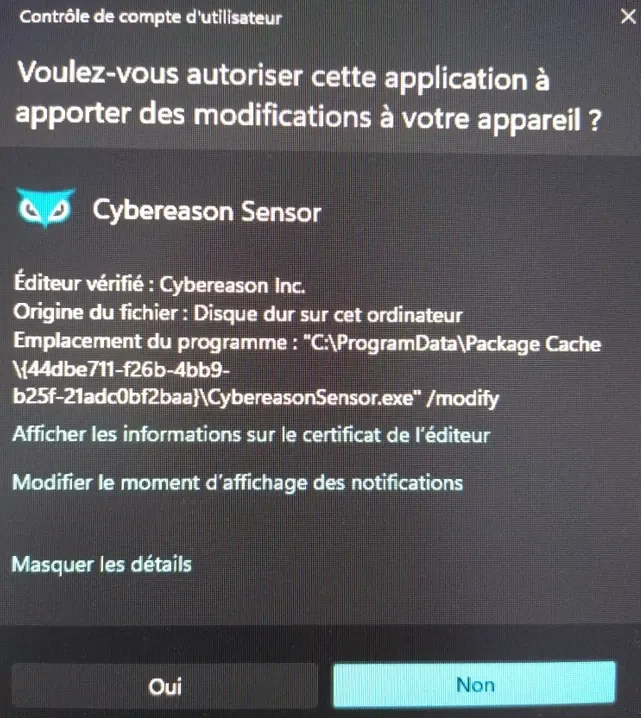
Windows then asks: "Do you want to authorize this application to modify settings on your device ?" Agreeing runs Cybereason.exe /modify.
Cybereason.exe /modify
The /modify switch is the entry point to the maintenance GUI. No administrator token is requested at this stage, which is the whole point: the repair branch is open to anyone.
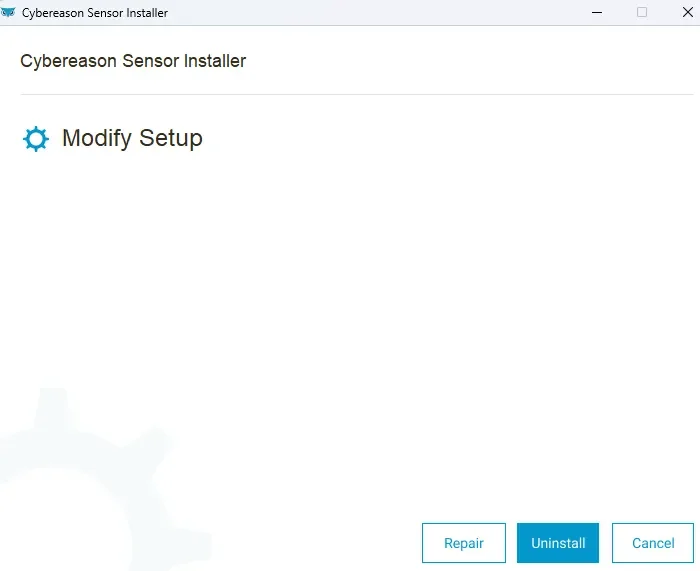
Step 2: start a repair
Run a Repair.
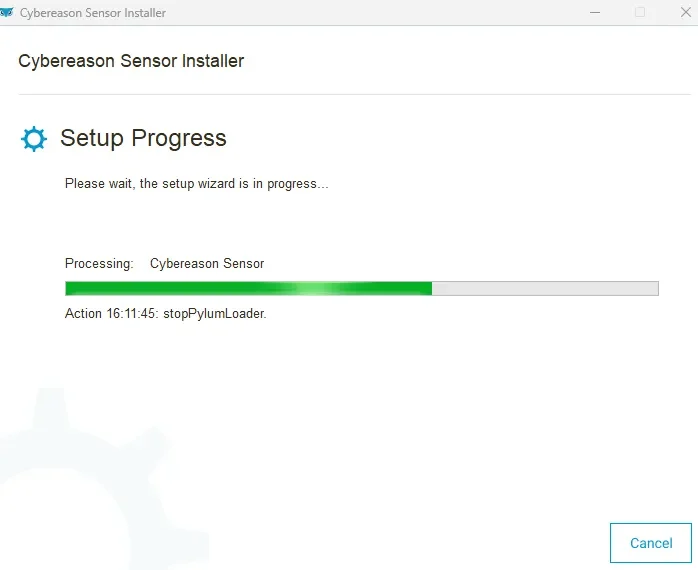
The repair proceeds until it waits for a while at stopPylumLoader. PylumLoader appears to be the loader for every other service, so this pause is the window in which the agent's components are being taken down before being brought back up.

Step 3: kill the sensor processes during the window
As soon as the stopPylumLoader phase ends, kill all Cybereason Sensor processes manually.
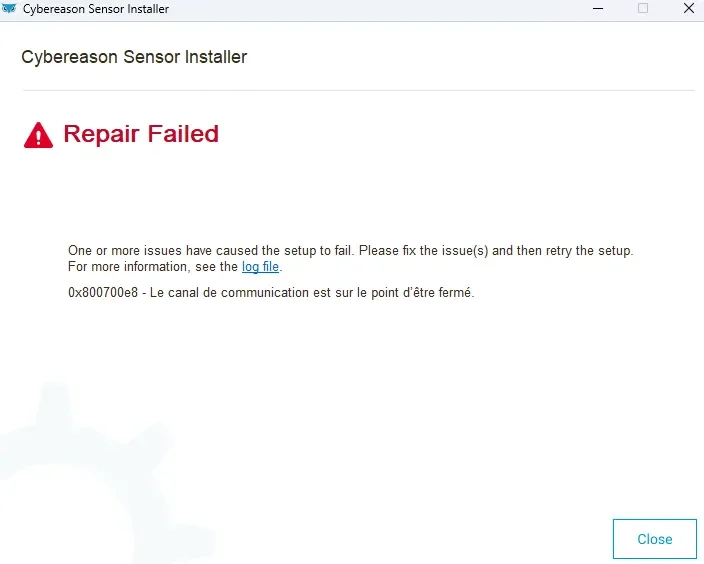
The repair then fails, displaying an error: "Agent repaired failed".

Result
Some probes failed to restart after PylumLoader was killed improperly. In the process view, the lime green bar displays a process still running, while the dark green indicates the process was stopped. No other instance of those processes could be found, which means the probes actually got stopped and could not restart. Only the CrsSvc.exe service was able to stay alive during the manipulation.
Root cause
The design flaw is in the repair mechanism: the repair path is open to anyone, without the token that guards uninstallation, and it stops the loader as part of its operation. Killing the sensor processes while the loader is down prevents the repair from completing and leaves the probes stopped, with no other instance able to bring them back. The agent's own self-protection is what is being used against it: as the author puts it, nothing can uninstall or permanently disable Cybereason except Cybereason itself, and the repair path is Cybereason disabling parts of itself on request.
The author does not present code or a patch analysis, so the precise implementation mistake is not shown. The write-up also does not state which privileges the repair routine runs under or how the process kills were performed.
Impact
Anyone able to run the repair on a Windows host can reduce the endpoint's detection and prevention coverage without any EDR administrator token. The effect is partial: with all modules running, around 50% of the probes were disabled, and CrsSvc.exe survived. The author is not certain what every disabled probe does, naming NNX.exe as an example of one they cannot identify, while others are easier to guess, such as Execution Prevention Service. The technique does not uninstall the agent, and the article does not claim persistence of the effect beyond what was observed.
Fix
On 6 December 2022, Cybereason investigated and exercised its right to answer. The vendor noticed that anti-tampering was not enabled on the author's test tenant and activated it. Since then, it is not possible to kill any probes except NNX.exe, which does not seem related to detection capabilities and is only needed for less important features. The remediation was therefore a configuration change on the tenant rather than a code change described in the report.
Variants to test
- Run the repair on a tenant where anti-tampering is enabled and attempt the same kill of sensor processes during the
stopPylumLoaderwindow. A positive result would be any probe other thanNNX.exefailing to restart. - Try the same interruption against other maintenance operations exposed by the agent GUI, such as modify or update flows, and watch whether the loader is stopped without a token. A positive result is a window in which detection processes are down and do not come back.
- Repeat on hosts with different module sets, since the number of probes depends on the active modules. A positive result is a larger proportion of probes disabled than the roughly 50% seen here.
- Check whether
NNX.execan be killed on a hardened tenant and whether its absence affects any detection feature. A positive result would tie the remaining killable process to a security-relevant capability.
What happened, in plain words
Cybereason is a security product that runs on a computer and watches what happens on it, looking for signs of an attacker. The author of this write-up found a way to switch off part of that protection by using one of Cybereason's own menus.
The trick is not a clever piece of code. It is a misuse of a normal feature: the "repair" option that Cybereason offers so that a broken installation can fix itself. Repair has to stop the product's internal pieces and start them again. If you kill those pieces at exactly the moment they are stopped, the repair fails and some of them never come back. The result is that a chunk of the detection and prevention machinery stays off.
The author is careful about what this is and is not. It is not a way to uninstall Cybereason, and it is not a permanent disable. It is a partial loss of coverage, around 50% of the probes when all modules were running in the author's test, achieved without any administrator token. Cybereason later replied that a setting called anti-tampering was not switched on in the author's test environment, and that with it on the trick no longer works, apart from one process that does not appear to matter for detection.
Before going further, a few words on the vocabulary, because the rest of the article leans on it.
- EDR stands for Endpoint Detection & Response. An endpoint is any computer at the edge of a network, such as a laptop or a server. An EDR is software installed on that computer that records activity, looks for suspicious behaviour and can block it. Think of it as a security guard inside the building rather than a camera at the gate.
- Antimalware is the older, simpler category: software that mainly scans files for known bad programs. An EDR does more, watching processes and behaviour rather than just files.
- A process is a running program. When you open a browser, the browser becomes one or more processes. Each process has an identity on the system, and one process can start another.
- A service is a program that runs in the background, usually without a window, often started automatically when the computer boots. Cybereason's components are services.
- A token, in this context, is a secret string of characters that proves you are allowed to do something, a bit like a claim ticket at a cloakroom. The uninstall feature of Cybereason asks for one; the repair feature does not.
- Privileges are the permissions an account has. A low-privileged user is a normal account, not an administrator.
NT AUTHORITY\SYSTEMis the name Windows gives to its most powerful built-in account, the one the operating system itself uses for core tasks. - PsExec is a well-known Microsoft tool that lets an administrator run a program on another computer. Attackers who have stolen administrator credentials often use it to run commands remotely.
- A GUI is a graphical user interface: windows, buttons and menus, as opposed to typing commands in a text console.
- Anti-tampering is a protection that stops other programs, even powerful ones, from stopping or altering the security software itself.
Context
Cybereason is an Endpoint Detection & Response product, and the author notes it was a top performer in the MITRE ATT&CK evaluation of 2022. MITRE ATT&CK is a public catalogue of the techniques attackers use, and the evaluation is a test in which security products are run against simulated attacks and scored. Doing well there is a strong signal that a product detects a lot.
EDR agents are designed to be unalterable. The comparison the author draws is with classical antimalware: an attacker who has reached NT AUTHORITY\SYSTEM, the highest privilege level on Windows, can often disable such a product remotely with a PsExec invocation. In plain terms, once you are the most powerful account on the machine, you can usually tell the antivirus to stop. Cybereason is built so that this does not work: nothing can uninstall it or permanently disable it except Cybereason itself.
The feature examined here is the agent's own maintenance interface. Cybereason ships a GUI that can repair the agent or uninstall it. Uninstallation is protected by a token so that only an EDR administrator can remove the agent, but the repair path is open to anyone. The question the article asks is simple: can we politely ask Cybereason to disable itself?
The author states that this is not meant to criticise Cybereason, and that because the vendor does not offer a public bug bounty programme, they felt free to write about what appears to be a flaw in the repair mechanism. A bug bounty programme is a scheme in which a vendor pays researchers for reporting security problems under agreed rules; without one, a researcher has no formal channel and no confidentiality obligation.
The author also notes that they do not have full details of the role of each loader and probe, as those details belong to Cybereason, so parts of the presentation may be inaccurate. A loader here means a small program whose job is to start the other programs. A probe means one of the small processes that do the actual watching and blocking.
Setup
The write-up does not describe a lab topology, product version, Windows build or tooling. What it does establish is the precondition that matters: a low-privileged user on a Windows host running the Cybereason agent, with access to the Windows application manager. The Windows application manager is the ordinary "Apps & features" or "Programs and Features" screen where you uninstall or change software; every user can open it.
The uninstall token is held by the EDR administrator and is not needed for the technique, because only the repair path is used. In other words, the attacker never has to guess or steal the claim ticket, because they walk through a different door that has no ticket check.
The number of probes running depends on which modules are activated. A module is an optional component of the product that can be switched on or off depending on what the customer bought or configured. When all of them were running, the manipulation described below disabled around 50% of them.
Finding it
Looking at the process tree of an instrumented host, the author groups the Cybereason processes into two categories. A process tree is the list of running processes and which one started which, like a family tree of programs. In red is what they believe to be the initial loader. The CrAmTray.exe process runs in each user context and is probably the GUI part of Cybereason. "In each user context" means one copy runs for every logged-in user, which fits a tray icon and settings window. In blue are some of the probes responsible for detection and/or prevention, which are the target of the technique.
The screenshot shows the process tree with the two groups colour-coded. Depending on the active modules, a number of different processes can be spawned by Cybereason, acting as probes to detect and prevent some threats. "Spawned" simply means started by another process.
The observation that drives the rest of the article is the asymmetry in the maintenance GUI: uninstallation requires a token, but repair does not. Since the repair routine has to stop and restart the agent's own components, it necessarily interacts with the loader and the probes, and that interaction is available to any local user. That is the heart of the issue. A feature that is supposed to fix the product has to be able to stop the product, and it does not check who is asking.
Exploitation
Step 1: open the maintenance interface
In the Windows application manager, select "Modify" on Cybereason.
Windows then asks: "Do you want to authorize this application to modify settings on your device ?" This is the standard Windows confirmation prompt that appears whenever a program wants to change installed software. Agreeing runs Cybereason.exe /modify.
Cybereason.exe /modify
Line by line, there is only one line. Cybereason.exe is the main executable of the product, the program file that Windows launches. /modify is a switch, a word starting with a slash that is passed to the program to tell it which mode to run in. Here it means "open the maintenance interface" rather than "start the protection service". The /modify switch is the entry point to the maintenance GUI. No administrator token is requested at this stage, which is the whole point: the repair branch is open to anyone.
Step 2: start a repair
Run a Repair.
The repair proceeds until it waits for a while at stopPylumLoader. PylumLoader appears to be the loader for every other service, so this pause is the window in which the agent's components are being taken down before being brought back up. Think of a building manager who switches off the main power breaker before servicing the wiring: for a short time, every light in the building is off. That pause is the opportunity.
Step 3: kill the sensor processes during the window
As soon as the stopPylumLoader phase ends, kill all Cybereason Sensor processes manually. "Kill" here means ending a process from the operating system's own tools, the same action as "End task" in the Windows task manager. The timing matters: the loader has just been taken down by the repair, and the sensor processes are killed before the repair brings them back.
The repair then fails, displaying an error: "Agent repaired failed".
Result
Some probes failed to restart after PylumLoader was killed improperly. In the process view, the lime green bar displays a process still running, while the dark green indicates the process was stopped. No other instance of those processes could be found, which means the probes actually got stopped and could not restart. Only the CrsSvc.exe service was able to stay alive during the manipulation.
Root cause
The design flaw is in the repair mechanism: the repair path is open to anyone, without the token that guards uninstallation, and it stops the loader as part of its operation. Killing the sensor processes while the loader is down prevents the repair from completing and leaves the probes stopped, with no other instance able to bring them back. The agent's own self-protection is what is being used against it: as the author puts it, nothing can uninstall or permanently disable Cybereason except Cybereason itself, and the repair path is Cybereason disabling parts of itself on request.
The author does not present code or a patch analysis, so the precise implementation mistake is not shown. The write-up also does not state which privileges the repair routine runs under or how the process kills were performed.
Impact
Anyone able to run the repair on a Windows host can reduce the endpoint's detection and prevention coverage without any EDR administrator token. A foothold means the attacker has already got some access, for example by tricking a user into running a malicious file; this technique does not get them in, it weakens what watches them once they are in.
The effect is partial: with all modules running, around 50% of the probes were disabled, and CrsSvc.exe survived. The author is not certain what every disabled probe does, naming NNX.exe as an example of one they cannot identify, while others are easier to guess, such as Execution Prevention Service. The technique does not uninstall the agent, and the article does not claim persistence of the effect beyond what was observed. "Persistence" means the effect surviving a reboot or other normal events; the author makes no such claim.
Fix
On 6 December 2022, Cybereason investigated and exercised its right to answer. The vendor noticed that anti-tampering was not enabled on the author's test tenant and activated it. A tenant is the vendor's cloud-side account that represents one customer's installation, where settings for all that customer's agents are managed. Anti-tampering is the protection that refuses to let other programs stop the security software.
Since then, it is not possible to kill any probes except NNX.exe, which does not seem related to detection capabilities and is only needed for less important features. The remediation was therefore a configuration change on the tenant rather than a code change described in the report.
Variants to test
- Run the repair on a tenant where anti-tampering is enabled and attempt the same kill of sensor processes during the
stopPylumLoaderwindow. A positive result would be any probe other thanNNX.exefailing to restart. - Try the same interruption against other maintenance operations exposed by the agent GUI, such as modify or update flows, and watch whether the loader is stopped without a token. A positive result is a window in which detection processes are down and do not come back.
- Repeat on hosts with different module sets, since the number of probes depends on the active modules. A positive result is a larger proportion of probes disabled than the roughly 50% seen here.
- Check whether
NNX.execan be killed on a hardened tenant and whether its absence affects any detection feature. A positive result would tie the remaining killable process to a security-relevant capability.
Glossary
- EDR (Endpoint Detection & Response): security software installed on a computer that watches activity, detects suspicious behaviour and can block it.
- Endpoint: a computer at the edge of a network, such as a laptop, desktop or server.
- Antimalware: older-style security software that mainly scans files for known bad programs.
- Process: a running program, with its own identity on the system.
- Process tree: the list of running processes and which process started which.
- Spawn: to start a new process from another process.
- Service: a background program, usually without a window, often started at boot.
- GUI (Graphical User Interface): windows, buttons and menus, as opposed to typed commands.
- Token: a secret string that proves you are allowed to perform an action, like a claim ticket.
- Privileges: the permissions an account has on a system.
- Low-privileged user: a normal account without administrator rights.
NT AUTHORITY\SYSTEM: the most powerful built-in Windows account, used by the operating system itself.- PsExec: a Microsoft tool for running programs on other computers, often abused by attackers who hold administrator credentials.
- Loader: a small program whose job is to start the other programs.
- Probe: one of the small processes that do the actual watching and blocking.
- Module: an optional component of a product that can be switched on or off.
- Anti-tampering: a protection that stops other programs from stopping or altering the security software.
- Tenant: the vendor-side account representing one customer's installation and its settings.
- Bug bounty programme: a scheme in which a vendor pays researchers for reporting security problems under agreed rules.
- MITRE ATT&CK evaluation: a public test in which security products are run against simulated attacker techniques and scored.
- Foothold: the initial access an attacker has obtained on a system.
- Persistence: an effect or access that survives reboots or other normal events.
- Kill (a process): to end a running program from the operating system, as with "End task" in the task manager.
- Switch (command-line): a word starting with a slash passed to a program to select a mode of operation, such as
/modify. /modify: the Cybereason command-line switch that opens the maintenance interface.stopPylumLoader: the repair phase in which the PylumLoader component is stopped, creating the window used in the technique.CrAmTray.exe: the Cybereason process that runs in each user context, probably the GUI part.CrsSvc.exe: the Cybereason service that stayed alive throughout the manipulation.NNX.exe: a Cybereason process the author could not identify, still killable after anti-tampering was enabled.