SSRF (Server Side Request Forgery) worth $4,913 | My Highest Bounty Ever !
The HelloSign document import feature accepted a user-supplied file reference and fetched it server-side without proper validation, allowing an attacker to make the server request arbitrary URLs. By using a redirect, the attacker reached the AWS metadata endpoint and retrieved cloud credentials, though the role lacked permissions to perform actions.
 Published on medium.com
Hope you’re doing well , today I am doing another write-up about one of my best findings and my highest bounty ever. It’s an SSRF — Server Side Request Forgery vulnerability I discovered in Dropbox Bug Bounty Program.
The full write-up lives on its author's site
It belongs to its author, so we link to it rather than copy it. The other two tabs are our own rewrites, checked against it.
Context
Dropbox runs a bug bounty programme on HackerOne, and its policy also lists HelloSign as in scope. The researcher chose to hunt on HelloSign, starting with the main application at app.hellosign.com. The feature of interest is document import: HelloSign lets a user pull a document in from an external storage provider, and the interface offers Dropbox, Google Drive, Box, OneDrive and Evernote as sources. Behind the scenes the application fetches the file from the chosen provider on the user's behalf, which is exactly the kind of server-side fetch that can turn into SSRF if the destination is not constrained.
Setup
The work was done against app.hellosign.com, with a Burp Collaborator instance to observe out-of-band requests. The researcher also used a server they controlled to host a redirect. The captured request shows a Chrome 86 user agent on macOS, and the request carries a CSRF token and a session cookie. No special role or privilege is described beyond being a logged-in user of the import feature.
Finding it
The import feature was the obvious candidate: the server has to reach out to a third-party URL supplied by the user. The researcher started with the Dropbox import and captured the request it generates. The key parameter is file_reference, which carries the reference to the file being imported.
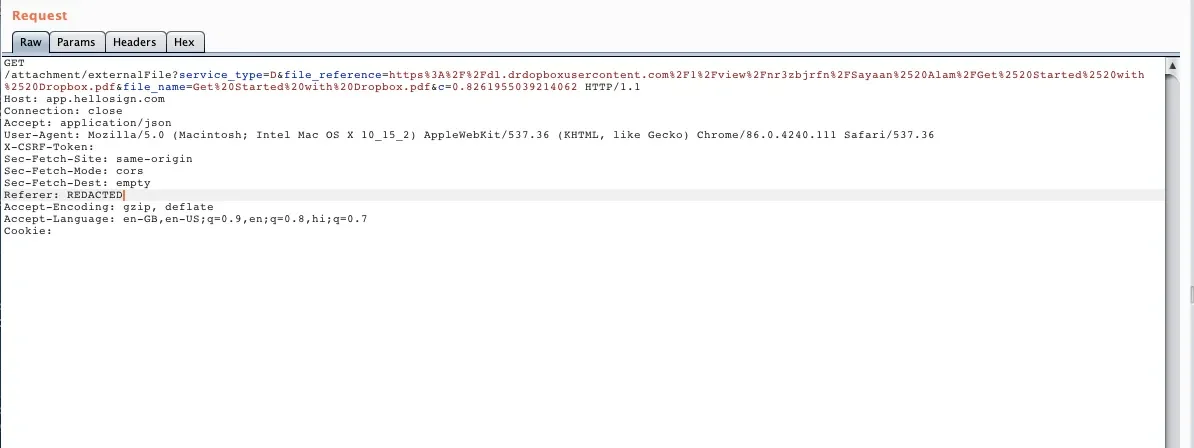
Replacing the value of file_reference with a Burp Collaborator URL returned 404. At that point it looked as though SSRF protection was in place, and the researcher stopped for the day.
The next day the same idea was tried against the OneDrive import instead, and the request looked different:
GET /attachment/externalFile?service_type=O&file_reference=MYONEDRIVEFILELINKHERE&file_name=FILENAME.ANYTHING&c=0.8261955039214062 HTTP/1.1Host: app.hellosign.comConnection: closeAccept: application/jsonUser-Agent: Mozilla/5.0 (Macintosh; Intel Mac OS X 10_15_2) AppleWebKit/537.36 (KHTML, like Gecko) Chrome/86.0.4240.111 Safari/537.36X-CSRF-Token: Sec-Fetch-Site: same-originSec-Fetch-Mode: corsSec-Fetch-Dest: emptyReferer: REDACTEDAccept-Encoding: gzip, deflateAccept-Language: en-GB,en-US;q=0.9,en;q=0.8,hi;q=0.7Cookie:REDACTED
The endpoint is /attachment/externalFile, and it takes service_type, file_reference, file_name and a cache-busting c value. The important difference from the Dropbox request is service_type=O, meaning OneDrive, where the Dropbox flow used D. The Dropbox attempt with the collaborator URL returned 404, while the OneDrive request with the same kind of value produced a ping.
Exploitation
Step 1: confirm the server-side fetch
With service_type=O, the file_reference value was changed to the Collaborator link. This time a ping arrived. HelloSign then generated a PDF containing the content of the collaborator page, which confirms that the server fetched the URL and returned the response body to the user through the generated document.
Step 2: try the cloud metadata endpoint
The researcher first checked which cloud provider HelloSign runs on using whatismyipaddress.com and found AWS/EC2. The next attempt was the instance metadata service at http://[redacted]/latest/, which returned:
404 Not Found
A request to http://[redacted] returned the same response. Both direct requests to internal addresses returned 404 Not Found.
Step 3: bypass with a redirect
Searching HackerOne Hacktivity turned up report 247680, where the reporter used a 303 redirect to bypass SSRF protection. The researcher hosted this on their own server:
<?php header('Location: http://[redacted]/latest/meta-data/', TRUE, 303); ?>
The file_reference was then pointed at the redirect URL on the researcher's server. Pointing file_reference at the redirect link returned the content of the AWS instance metadata.
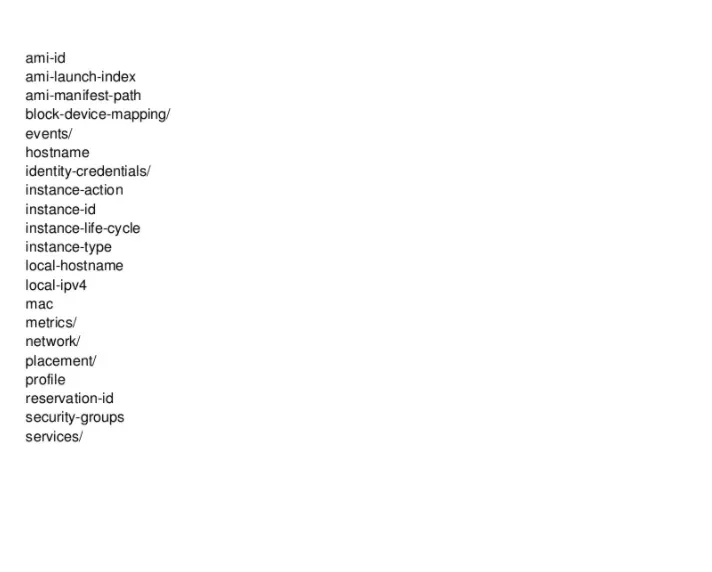
This gave full-read SSRF: everything exposed by the metadata service, including access keys and tokens, could be retrieved.
Step 4: check for RCE
The report was triaged within 3 hours. The team then asked the researcher to check whether RCE was possible. Using the access key and token obtained from the metadata, the researcher tried:
AWS ec2 stop-instances — instance-ids intsanceidhere
This did not work, because the role attached to the instance did not have enough permissions to execute the command. The credential exposure was real, but its blast radius was limited by IAM permissions.
Root cause
The file_reference parameter is user-controlled and is fetched server-side. The Dropbox attempt with a collaborator URL returned 404, but the OneDrive request with a collaborator link produced a ping. Direct requests to [redacted] and [redacted] returned 404, but a 303 redirect hosted on the researcher's server to the metadata address returned its content. The report does not show the validation code, so the exact mechanism is not described.
Impact
A user of the import feature could make the HelloSign backend fetch a supplied URL and read the response back through the generated PDF. Against the AWS metadata service this yielded credentials and tokens for the instance role. The practical impact depends on what that role can do: in this case it could not stop instances, so the credentials did not translate into control of the EC2 estate. The report does not describe any other use of the credentials.
Fix
The changes that would address the issue are to apply the same URL validation on every provider path, including OneDrive, and to validate the final destination after redirects rather than only the submitted URL, or to disable redirect following in the fetcher. Restricting the instance role to the minimum needed would also limit the value of any metadata leak.
Variants to test
- Compare every provider value of
service_type(Dropbox, Google Drive, Box, OneDrive, Evernote) with the samefile_referencepayload. A positive result is a Collaborator ping or fetched content on a provider where another provider returned404. - Submit a URL on your own server that returns a
303redirect tohttp://[redacted]/latest/meta-data/. A positive result is metadata content appearing in the generated document. - Try other redirect codes (
301,302,307,308) and redirect chains. A positive result is the fetcher following to an internal address that was blocked when requested directly. - Try redirects to
http://[redacted]and to internal hostnames. A positive result is any response body from an internal service. - Try DNS rebinding or a hostname that resolves to an internal address. A positive result is a fetch to the internal target despite a hostname-based check.
- Where the fetched content is rendered into a PDF, check whether internal HTML or other content is reflected in the output. A positive result is internal page content visible in the generated file.
What happened, in plain words
A security researcher found a bug in HelloSign, a service owned by Dropbox that lets you sign documents online. HelloSign has a feature that lets you import a document from another service, such as Dropbox, Google Drive, Box, OneDrive or Evernote. When you use that feature, HelloSign's own computers go and fetch the file from the address you give them. The researcher worked out how to make HelloSign's computers fetch a file from a place they were never meant to reach: a special internal address that only the server itself can talk to. The researcher checked which cloud provider HelloSign uses and found AWS/EC2, whose metadata service hands out credentials. The researcher got those credentials and reported the bug. Dropbox paid a bounty of $4,913, the researcher's highest ever.
Before we go further, a few words you will see throughout:
- A bug bounty programme is a deal a company offers: if you find a security problem in our systems and report it responsibly, we pay you. Dropbox runs its programme on a platform called HackerOne.
- HelloSign is a product for signing documents electronically. Its main web application lives at
app.hellosign.com. - An SSRF, or Server Side Request Forgery, is when an attacker can make a server send a request of the attacker's choosing. Think of a hotel concierge who will fetch anything you ask for, including things from the staff-only back room. If you can talk the concierge into going into the back room and reading out what is on the shelf, you have an SSRF.
Setting the scene
Dropbox's bug bounty policy lists HelloSign as fair game, so the researcher decided to look there. The starting point was the main application at app.hellosign.com. The feature that stood out was document import: HelloSign lets you pull a document in from an external storage provider, and the interface offers Dropbox, Google Drive, Box, OneDrive and Evernote as sources.
Why does that matter? Because to import a file, HelloSign's server has to reach out to a web address that the user supplies. Any time a server fetches a user-supplied address, there is a chance the user can point it somewhere they should not be able to reach. That is the classic setup for SSRF.
Finding it
The researcher started with the Dropbox import and captured the request the browser sends when you use it. The key parameter is file_reference, which carries the reference to the file being imported.
The screenshot shows the captured request from the Dropbox import flow, with the file_reference parameter visible.
A parameter is a named value in a web request, like a form field. In a URL, parameters come after a ? and are separated by &, for example ?name=alice&colour=blue. The server reads them to decide what to do.
The first idea was simple: replace the value of file_reference with a URL pointing at a Burp Collaborator address. Burp Collaborator is a service that gives you a unique web address and tells you whenever anything on the internet contacts it. It is like a tripwire: if the server fetches your address, you get a notification, which proves the server made the request. The result was a 404, which means "not found". It looked as though SSRF protection was in place, so the researcher stopped for the day.
The next day, with fresh eyes, the same idea was tried against the OneDrive import instead. The request looked different:
GET /attachment/externalFile?service_type=O&file_reference=MYONEDRIVEFILELINKHERE&file_name=FILENAME.ANYTHING&c=0.8261955039214062 HTTP/1.1Host: app.hellosign.comConnection: closeAccept: application/jsonUser-Agent: Mozilla/5.0 (Macintosh; Intel Mac OS X 10_15_2) AppleWebKit/537.36 (KHTML, like Gecko) Chrome/86.0.4240.111 Safari/537.36X-CSRF-Token: Sec-Fetch-Site: same-originSec-Fetch-Mode: corsSec-Fetch-Dest: emptyReferer: REDACTEDAccept-Encoding: gzip, deflateAccept-Language: en-GB,en-US;q=0.9,en;q=0.8,hi;q=0.7Cookie:REDACTED
Line by line, in plain words:
GET /attachment/externalFile?...is the request line.GETis the method, meaning "please give me this"./attachment/externalFileis the path on the server, the address of the feature that handles external file imports.service_type=Otells the server which storage provider is being used.Ostands for OneDrive. In the Dropbox flow the value wasD.file_reference=MYONEDRIVEFILELINKHEREis the address of the file to import. This is the parameter the researcher will abuse.file_name=FILENAME.ANYTHINGis the name to give the imported file.c=0.8261955039214062is a random-looking number. It is a cache buster: a value that changes every time so the browser and any intermediate caches do not reuse an old response.Host: app.hellosign.comsays which website the request is for. One server can host many websites, and this header tells it which one you want.Connection: closeasks the server to close the connection after the response.Accept: application/jsonsays the client would like a JSON response. JSON is a common text format for structured data, like{"name": "alice"}.User-Agent: ...identifies the browser and operating system that made the request. Here it is Chrome 86 on macOS.X-CSRF-Token:is a CSRF token, a secret value the site puts in its pages so that only requests coming from its own pages are accepted. CSRF stands for Cross-Site Request Forgery: a trick where another website tries to make your browser send a request to a site you are logged into. The token is like a stamped form that only the site's own office can issue.Sec-Fetch-Site,Sec-Fetch-Mode,Sec-Fetch-Destare headers the browser adds to describe where the request came from and what it is for. They help the server decide whether to allow it.Referer: REDACTEDsays which page the request came from. The value has been hidden here.Accept-Encoding: gzip, deflatesays the client can accept compressed responses.Accept-Language: en-GB,en-US;q=0.9,en;q=0.8,hi;q=0.7lists the languages the user prefers, with weights.Cookie:REDACTEDcarries the session cookie. A cookie is a small piece of data the browser stores for a site and sends back with every request. A session cookie is like a wristband at an event: it proves you are logged in, so the server knows who you are without asking for your password every time. The value is hidden here because it is a secret.
The important difference from the Dropbox request is service_type=O, meaning OneDrive, where the Dropbox flow used D. The Dropbox attempt with the collaborator URL returned 404, while the OneDrive request with the same kind of value produced a ping.
Exploitation
Step 1: confirm the server-side fetch
With service_type=O, the file_reference value was changed to the Collaborator link. This time a ping arrived. HelloSign then generated a PDF containing the content of the collaborator page. That confirms two things: the server fetched the URL, and it returned the response body to the user through the generated document. In other words, the researcher could now read whatever the server could read.
Step 2: try the cloud metadata endpoint
The researcher first checked which cloud provider HelloSign runs on, using whatismyipaddress.com, and found AWS/EC2. AWS is Amazon Web Services, a cloud platform where companies rent computers. EC2 is AWS's service for renting virtual servers.
Every EC2 server has a special internal address, [redacted], called the instance metadata service. It is a bit like a staff noticeboard inside the building: only people inside can see it, and it lists useful facts about the machine, including temporary credentials. Those credentials are what the server uses to talk to other AWS services. If an outsider can read the noticeboard, they can borrow the server's identity.
The next attempt was the metadata service at http://[redacted]/latest/, which returned:
404 Not Found
A request to http://[redacted] returned the same response. [redacted] is the loopback address: it always means "this same machine". Both direct requests to internal addresses returned 404 Not Found.
Step 3: bypass with a redirect
Searching HackerOne Hacktivity, the public feed of disclosed reports, turned up report 247680, where the reporter used a 303 redirect to bypass SSRF protection. A redirect is a response that tells the client "the thing you want is over there, go and ask that address instead". The 303 is a status code meaning "see other". The report does not explain why the redirect worked. It is like a bouncer who checks your invitation at the front door, then lets you follow a sign that says "the real party is in the back room".
The researcher hosted this on their own server:
<?php header('Location: http://[redacted]/latest/meta-data/', TRUE, 303); ?>
Line by line:
<?phpand?>mark the start and end of a block of PHP code. PHP is a programming language commonly used for websites.header('Location: http://[redacted]/latest/meta-data/', TRUE, 303);sends an HTTP response header.Location:tells the client where to go next. The address is the AWS metadata service.TRUEmeans this header replaces any previousLocationheader.303is the status code, meaning "see other".
So whenever anyone visits this page on the researcher's server, the server replies "go to the metadata address instead".
The file_reference was then pointed at the redirect URL on the researcher's server. Pointing file_reference at the redirect link returned the content of the AWS instance metadata.
The screenshot shows the content returned from the AWS metadata service, confirming the server had reached it.
This gave full-read SSRF: everything exposed by the metadata service, including access keys and tokens, could be retrieved. An access key is a long secret string that identifies a program to AWS, a bit like a username and password rolled into one. A token here is a temporary credential that goes with it.
Step 4: check for RCE
The report was triaged within 3 hours. Triaged means the security team looked at it, confirmed it was real, and started handling it.
The team then asked the researcher to check whether RCE was possible. RCE stands for Remote Code Execution: the ability to make the server run commands of your choosing. That is the worst-case outcome, because it usually means full control of the machine.
Using the access key and token obtained from the metadata, the researcher tried:
AWS ec2 stop-instances — instance-ids intsanceidhere
This is a command for the AWS command-line tool. ec2 stop-instances asks AWS to shut down one or more virtual servers, and --instance-ids (written here with a long dash) would list which ones. The placeholder intsanceidhere stands in for a real instance ID.
This did not work, because the role attached to the instance did not have enough permissions to execute the command. An IAM role is a set of permissions attached to a server or user in AWS, like a keycard that opens only certain doors. The credential exposure was real, but its blast radius was limited by those permissions.
Root cause
The file_reference parameter is user-controlled and is fetched server-side. The Dropbox attempt with a collaborator URL returned 404, but the OneDrive request with a collaborator link produced a ping. Direct requests to [redacted] and [redacted] returned 404, but a 303 redirect hosted on the researcher's server to the metadata address returned its content. The report does not show the validation code, so the exact mechanism is not described.
Impact
A user of the import feature could make the HelloSign backend fetch a supplied URL and read the response back through the generated PDF. Against the AWS metadata service this yielded credentials and tokens for the instance role. The practical impact depends on what that role can do: in this case it could not stop instances, so the credentials did not translate into control of the EC2 estate.
Fix
The changes that would address the issue are to apply the same URL validation on every provider path, including OneDrive, and to validate the final destination after redirects rather than only the submitted URL, or to disable redirect following in the fetcher. Restricting the instance role to the minimum needed would also limit the value of any metadata leak.
Variants to test
- Compare every provider value of
service_type(Dropbox, Google Drive, Box, OneDrive, Evernote) with the samefile_referencepayload. A positive result is a Collaborator ping or fetched content on a provider where another provider returned404. - Submit a URL on your own server that returns a
303redirect tohttp://[redacted]/latest/meta-data/. A positive result is metadata content appearing in the generated document. - Try other redirect codes (
301,302,307,308) and redirect chains. A positive result is the fetcher following to an internal address that was blocked when requested directly. - Try redirects to
http://[redacted]and to internal hostnames. A positive result is any response body from an internal service. - Try DNS rebinding or a hostname that resolves to an internal address. A positive result is a fetch to the internal target despite a hostname-based check.
- Where the fetched content is rendered into a PDF, check whether internal HTML or other content is reflected in the output. A positive result is internal page content visible in the generated file.
Glossary
- Access key: a long secret string that identifies a program to AWS, like a username and password combined.
- AWS (Amazon Web Services): a cloud platform where companies rent computers and services.
- Bug bounty programme: a deal where a company pays people who find and report security problems in its systems.
- Burp Collaborator: a service that gives you a unique web address and notifies you when anything contacts it, used to detect server-side requests.
- Cache buster: a random value added to a request so caches do not reuse an old response.
- Cookie: a small piece of data a browser stores for a site and sends back with each request.
- CSRF (Cross-Site Request Forgery): a trick where another website makes your browser send a request to a site you are logged into.
- CSRF token: a secret value in a page that proves a request came from that site's own pages.
- EC2: AWS's service for renting virtual servers.
- GET: an HTTP method meaning "please give me this".
- HackerOne: a platform where companies run bug bounty programmes and researchers report bugs.
- Hacktivity: HackerOne's public feed of disclosed reports.
- Header: a line in an HTTP request or response carrying extra information, such as the host or content type.
- HelloSign: a Dropbox product for signing documents electronically.
- IAM role: a set of permissions attached to a server or user in AWS, like a keycard that opens only certain doors.
- Instance metadata service: a special internal address on an EC2 server that lists facts about the machine, including temporary credentials.
- JSON: a common text format for structured data.
- Loopback address:
[redacted], which always means "this same machine". - Parameter: a named value in a web request, like a form field.
- PHP: a programming language commonly used for websites.
- RCE (Remote Code Execution): the ability to make a server run commands of your choosing.
- Redirect: a response telling the client to go and ask a different address instead.
- Session cookie: a cookie that proves you are logged in, so the server knows who you are.
- SSRF (Server Side Request Forgery): when an attacker can make a server send a request of the attacker's choosing.
- Token: a temporary credential, often used alongside an access key.
- Triaged: reviewed and confirmed by the security team, and moved into handling.
- User-Agent: a header identifying the browser and operating system that made the request.