Mail Server Misconfiguration leads to sending a fax from anyone’s account on HelloFax (Dropbox BBP) for a bounty of $4,913
The HelloFax mail server accepted emails without verifying the sender's authenticity, so an attacker could send a fax from any user's account by spoofing the From address. The same misconfiguration could allow creating support tickets or other actions on behalf of victims.
 Published on infosecwriteups.com
This article is about my recent finding of a mail server misconfiguration among multiple targets that allowed me to perform unauthorized actions on vulnerable web applications, This vulnerability is common among multiple targets and different types of web applications. Dropbox fixed the issue and awarded me a bug…
The full write-up lives on its author's site
It belongs to its author, so we link to it rather than copy it. The other two tabs are our own rewrites, checked against it.
Context
HelloFax is a Dropbox product that lets users send faxes. Besides the normal logged-in interface, it offers a feature that lets a user send a fax simply by emailing a fax number at the HelloFax domain, without logging into their HelloFax account. The researcher links to HelloFax's own FAQ article describing how to send a fax through email.
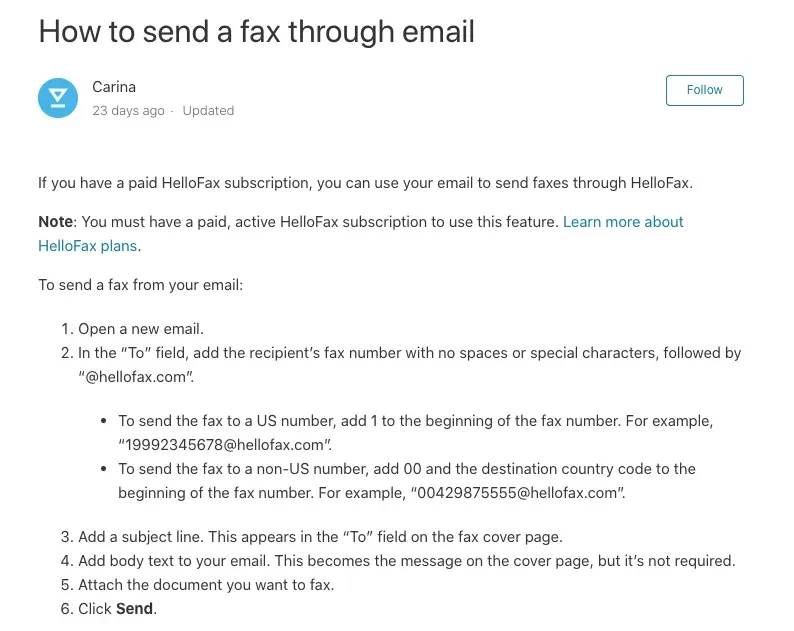
The behaviour is straightforward: when a paid user sends an email to [redacted], the application takes the content of that email and sends it as a fax to FAXNUMBER, billed to and sent from the user's HelloFax account. For example, an email to [redacted] results in a fax to [redacted] sent from the sender's HelloFax account.
The researcher was working on HelloFax through the Dropbox bug bounty programme on HackerOne. The application was well sanitised against the usual authorisation problems such as IDOR and access control issues, so the search moved to less obvious functionality, and the email-to-fax feature was the one that stood out.
Setup
No special accounts, roles or tooling are described beyond a HelloFax account and access to the email-to-fax feature. The only external tool used is a disposable mail service, anonymailer.net, which lets a sender choose the address that appears in the FROM field of the outgoing message. The precondition for the attack is that the target accepts inbound email and performs an action on behalf of the sender.
Finding it
The interesting property of the feature is that the identity of the actor is taken from the email itself. The application has no session, no token and no other credential to tie the request to a HelloFax user: the only thing that says who is sending the fax is the FROM header of the message. That raised the obvious question of whether the mail server checked that the sender really was who the header claimed.
Exploitation
Step 1: send a forged email to the fax address
The researcher went to anonymailer.net and sent a fake email to [redacted], putting the victim's email address in the FROM field. The message was accepted and HelloFax replied confirming that the fax had been sent successfully.
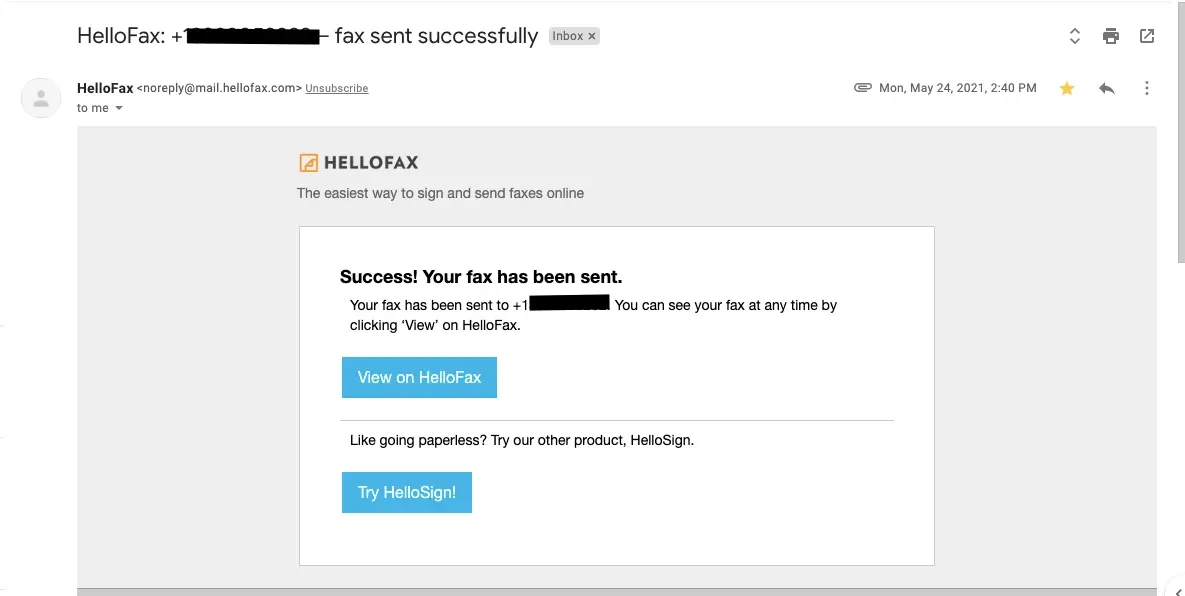
The reply is the proof: the mail server at HelloFax did not verify the authenticity of the fake email, and the application processed it as though it came from the victim's account.
Step 2: understand the general pattern
The researcher generalises the finding into four conditions that make an application vulnerable:
- The target allows an action to be performed by sending an email to
[redacted]. - An attacker sends a fake email to that address with the victim's email in the FROM field.
- The target server receives the email, does not verify its authenticity, and treats it as a legitimate message from a user.
- The application processes the email and performs the action from the victim's account, which is an authorisation bypass.
Step 3: report and triage
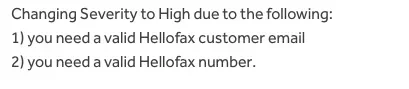
The bug was reported to the Dropbox BBP on HackerOne on 16 December 2021 and triaged by the HackerOne triage team the next day. The team then downgraded the severity to High, giving the reason shown in their comment.
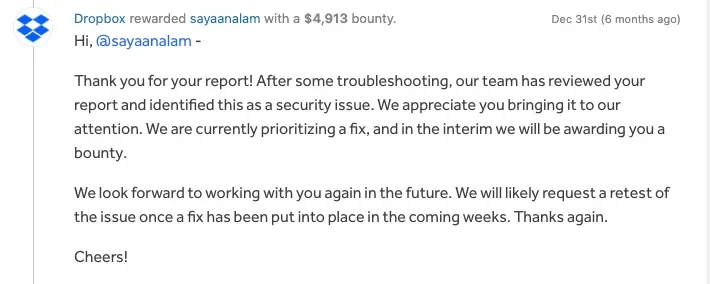
Despite the downgrade, Dropbox paid $4,913 under the High category, in line with their policy.
Root cause
The application trusts the FROM field of an inbound email as proof of the sender's identity. Nothing in the mail handling verifies that the message was actually authorised to use that address. In the researcher's words, the root cause is that the target server does not verify SPF records. Email clients configured to use SPF and DMARC will automatically reject messages that fail validation, and the researcher argues the same validation should be applied by applications that act on inbound email.
Impact
An attacker can make HelloFax send a fax from any user's account, without logging in as that user, by forging the FROM address of an email to the fax address. The action is attributed to the victim's HelloFax account. The researcher also describes the same flaw on a bug reporting portal, where sending an email to [redacted] allowed bug tickets to be created from the victim's account. More generally, the pattern applies to applications that run their own support panels, where tickets can be created on behalf of the internal team or any other user, and to any application that performs actions or creates tickets and bugs in response to inbound email.
Fix
Dropbox fixed the issue on 17 March 2022, and the report was closed as resolved on 2 May 2022. The report does not describe the change that was made. The mitigation the researcher points to is validation of the sender: checking SPF records, and applying the same rejection that SPF- and DMARC-aware mail clients perform, so that messages failing validation are not treated as coming from the claimed user.
Variants to test
- Email-to-action features on other products. Look for any address of the form
[redacted]that triggers an action (sending a fax, posting a message, opening a ticket). Send a message from a disposable mail service with a victim's address in FROM. A positive result is a confirmation from the target, or a visible action in the victim's account, that you did not authorise. - Support and bug portals. Send a forged email to the portal's inbound address, such as
[redacted]or a support address. A positive result is a ticket created under the victim's or an internal team member's identity. - Internal team impersonation. Use an address belonging to staff rather than an ordinary user. A positive result is a ticket or action attributed to the internal team.
- SPF and DMARC checks. For each candidate address, test whether the target rejects messages that fail SPF or DMARC. A positive result for the attacker is a message that fails validation but is still processed.
Timeline
| Date | Event |
|---|---|
| 16 Dec 2021 | Bug reported to Dropbox BBP on HackerOne |
| 17 Dec 2021 | Bug triaged by the HackerOne triage team |
| 31 Dec 2021 | $4,913 bounty awarded by the Dropbox team |
| 17 Mar 2022 | Dropbox team fixed the issue |
| 02 May 2022 | Report closed as resolved |
What happened, in plain words
HelloFax is a service, owned by Dropbox, that lets you send a fax over the internet instead of using a fax machine. Normally you log in to your HelloFax account, type or upload a document, and HelloFax sends it as a fax to a phone number. But HelloFax also offers a shortcut: you can send an email to a special address and the email itself becomes the fax. The researcher found that this shortcut trusted the email too much. By pretending to be someone else in the email, an attacker could make HelloFax send a fax from that person's account, without ever logging in as them. Dropbox paid a bounty of $4,913 for the finding.
This article walks through the whole story for someone who has never studied security. Every technical word is explained where it first appears, and there is a glossary at the end.
Context
What HelloFax does
A fax is an old way of sending a scanned document over a phone line. HelloFax replaces the phone line with the internet: you give it a document and a fax number, and it delivers the document to a fax machine (or to another online fax service) on the other end. The researcher was looking at HelloFax as part of the Dropbox bug bounty programme on HackerOne.
A bug bounty programme is a deal offered by a company: if you find a security problem in their product and report it privately, they pay you a reward (the bounty) instead of punishing you. HackerOne is a website where these programmes are run; companies list their products there, researchers submit reports, and the company and the researcher talk through the report's page.
The email-to-fax feature
Besides the normal logged-in interface, HelloFax offers a feature that lets a user send a fax simply by emailing a fax number at the HelloFax domain, without logging into their HelloFax account. The researcher links to HelloFax's own FAQ article describing how to send a fax through email.
The image shows the feature in action: an email is sent to an address made of the destination fax number followed by @hellofax.com, and HelloFax turns that email into a fax.
The behaviour is straightforward: when a paid user sends an email to [redacted], the application takes the content of that email and sends it as a fax to FAXNUMBER, billed to and sent from the user's HelloFax account. For example, an email to [redacted] results in a fax to [redacted] sent from the sender's HelloFax account.
In other words, the email address itself carries two pieces of information: the part before the @ is the fax number to dial, and the sender of the email is treated as the HelloFax user who is paying for and sending the fax. There is no password, no login screen, no session. The only thing that says who you are is the email.
Why the researcher was looking here
The researcher was working on HelloFax through the Dropbox bug bounty programme on HackerOne. The application was well sanitised against the usual authorisation problems such as IDOR and access control issues, so the search moved to less obvious functionality, and the email-to-fax feature was the one that stood out.
Two of those terms need explaining. Authorisation is the part of a system that decides whether a logged-in user is allowed to do a particular thing: for example, whether Alice may read Bob's fax history. IDOR (Insecure Direct Object Reference) is a classic authorisation bug where a website uses a simple identifier, such as a number in a URL, to point at a record, and does not check that the person asking owns that record. If your account page is at example.com/account?id=42 and you can change 42 to 43 and see someone else's account, that is an IDOR. Access control is the general name for the rules that say who may do what. The researcher is saying that HelloFax had already closed these obvious doors, so the interesting question was whether a less obvious door, the email-to-fax feature, was left open.
Setup
No special accounts, roles or tooling are described beyond a HelloFax account and access to the email-to-fax feature. The only external tool used is a disposable mail service, anonymailer.net, which lets a sender choose the address that appears in the FROM field of the outgoing message. The precondition for the attack is that the target accepts inbound email and performs an action on behalf of the sender.
A few words here. A disposable mail service is a website that sends email for you without requiring you to own a real mailbox; you type the message, you type the address you want to appear as the sender, and it sends the message on your behalf. The FROM field is the part of an email that says who sent it, the equivalent of the return address on a paper envelope. Normally your email app fills it in with your own address, but a disposable service lets you type anything there. That is the whole trick: the envelope can say anything, and the question is whether the receiver checks.
Finding it
The interesting property of the feature is that the identity of the actor is taken from the email itself. The application has no session, no token and no other credential to tie the request to a HelloFax user: the only thing that says who is sending the fax is the FROM header of the message. That raised the obvious question of whether the mail server checked that the sender really was who the header claimed.
A session is what a website remembers about you after you log in, so that it does not ask for your password on every page. A token is a small piece of data, often a long random string, that a website gives your browser after login and asks for again on each request; if you have the token, the site treats you as logged in. A credential is anything used to prove identity: a password, a token, a certificate. The point here is that the email-to-fax feature had none of these. The only identity signal was the FROM header, which, as we saw, anyone can write.
Exploitation
Step 1: send a forged email to the fax address
The researcher went to anonymailer.net and sent a fake email to [redacted], putting the victim's email address in the FROM field. The message was accepted and HelloFax replied confirming that the fax had been sent successfully.
The image shows the confirmation email that HelloFax sent back: the fax was accepted and sent, even though the sender was not the person named in the FROM field.
The reply is the proof: the mail server at HelloFax did not verify the authenticity of the fake email, and the application processed it as though it came from the victim's account.
Why did the researcher do this? Because the feature's only identity check was the FROM header, and a disposable mail service lets you write any value there. If HelloFax had checked that the sender really owned the address, the message would have been rejected. It was not, so the fax went out under the victim's name.
Step 2: understand the general pattern
The researcher generalises the finding into four conditions that make an application vulnerable:
- The target allows an action to be performed by sending an email to
[redacted]. - An attacker sends a fake email to that address with the victim's email in the FROM field.
- The target server receives the email, does not verify its authenticity, and treats it as a legitimate message from a user.
- The application processes the email and performs the action from the victim's account, which is an authorisation bypass.
An authorisation bypass means doing something the system should only allow the rightful user to do, without having that user's permission. Here the action is sending a fax from someone else's account. The four steps are a recipe you can check against any product: does it act on inbound email, does it trust the FROM field, and does it skip the check that the sender really owns that address?
Step 3: report and triage
The bug was reported to the Dropbox BBP on HackerOne on 16 December 2021 and triaged by the HackerOne triage team the next day. The team then downgraded the severity to High, giving the reason shown in their comment.
Triage is the first pass a report goes through: someone reads it, checks that it is real and reproducible, and passes it to the company. Severity is a label for how serious a bug is, usually something like Low, Medium, High or Critical. The team's comment in the image explains why they moved the severity down.
Despite the downgrade, Dropbox paid $4,913 under the High category, in line with their policy.
The image shows the bounty payment on the HackerOne report.
Root cause
The application trusts the FROM field of an inbound email as proof of the sender's identity. Nothing in the mail handling verifies that the message was actually authorised to use that address. In the researcher's words, the root cause is that the target server does not verify SPF records. Email clients configured to use SPF and DMARC will automatically reject messages that fail validation, and the researcher argues the same validation should be applied by applications that act on inbound email.
SPF (Sender Policy Framework) is a DNS record: a public list, published by the owner of a domain, of which mail servers are allowed to send email for that domain. When a receiving mail server gets a message claiming to be from example.com, it can look up example.com's SPF record and check whether the server that delivered the message is on the list. If it is not, the message is likely forged. DMARC is a policy that tells receiving mail servers what to do with messages that fail SPF (or a related check called DKIM): reject them, quarantine them, or let them through. A mail client or mail server that honours SPF and DMARC will therefore throw away a forged message. The problem here was that the HelloFax application, when it processed the inbound email, did not apply that check, so a forged message was treated as genuine.
Impact
An attacker can make HelloFax send a fax from any user's account, without logging in as that user, by forging the FROM address of an email to the fax address. The action is attributed to the victim's HelloFax account. The researcher also describes the same flaw on a bug reporting portal, where sending an email to [redacted] allowed bug tickets to be created from the victim's account. More generally, the pattern applies to applications that run their own support panels, where tickets can be created on behalf of the internal team or any other user, and to any application that performs actions or creates tickets and bugs in response to inbound email.
Impact is the answer to the question "what can an attacker actually do with this?" Here the answer is: send faxes from the victim's account, and, on other products, create tickets or messages that appear to come from the victim or from staff.
Fix
Dropbox fixed the issue on 17 March 2022, and the report was closed as resolved on 2 May 2022. The report does not describe the change that was made. The mitigation the researcher points to is validation of the sender: checking SPF records, and applying the same rejection that SPF- and DMARC-aware mail clients perform, so that messages failing validation are not treated as coming from the claimed user.
A mitigation is a change that removes or reduces the risk. The general lesson is: if your application takes an action because an email arrived, check that the email really came from the address it claims, using SPF and DMARC, before doing anything.
Variants to test
- Email-to-action features on other products. Look for any address of the form
[redacted]that triggers an action (sending a fax, posting a message, opening a ticket). Send a message from a disposable mail service with a victim's address in FROM. A positive result is a confirmation from the target, or a visible action in the victim's account, that you did not authorise. - Support and bug portals. Send a forged email to the portal's inbound address, such as
[redacted]or a support address. A positive result is a ticket created under the victim's or an internal team member's identity. - Internal team impersonation. Use an address belonging to staff rather than an ordinary user. A positive result is a ticket or action attributed to the internal team.
- SPF and DMARC checks. For each candidate address, test whether the target rejects messages that fail SPF or DMARC. A positive result for the attacker is a message that fails validation but is still processed.
Timeline
| Date | Event |
|---|---|
| 16 Dec 2021 | Bug reported to Dropbox BBP on HackerOne |
| 17 Dec 2021 | Bug triaged by the HackerOne triage team |
| 31 Dec 2021 | $4,913 bounty awarded by the Dropbox team |
| 17 Mar 2022 | Dropbox team fixed the issue |
| 02 May 2022 | Report closed as resolved |
Glossary
- Access control: the rules in a system that decide who is allowed to do what.
- Authorisation: the process of checking whether a user is allowed to perform a particular action.
- Authorisation bypass: doing something the system should only allow the rightful user to do, without that user's permission.
- Bug bounty programme: a scheme where a company pays researchers who privately report security problems in its products.
- Credential: anything used to prove identity, such as a password or a token.
- Disposable mail service: a website that sends email on your behalf and lets you type any address in the FROM field.
- DMARC: a policy, published by a domain owner, that tells receiving mail servers what to do with messages that fail SPF or DKIM checks.
- DNS record: a piece of public information about a domain, stored in the internet's domain name system, such as which servers handle its email.
- FROM field: the part of an email that says who sent it, like the return address on an envelope.
- HackerOne: a website where bug bounty programmes are run and reports are submitted and discussed.
- IDOR (Insecure Direct Object Reference): a bug where a website uses a simple identifier, such as a number in a URL, to point at a record and does not check that the requester owns it.
- Impact: what an attacker can actually do with a vulnerability.
- Mitigation: a change that removes or reduces a risk.
- Session: what a website remembers about you after you log in, so it does not ask for your password on every page.
- Severity: a label for how serious a bug is, such as Low, Medium, High or Critical.
- SPF (Sender Policy Framework): a DNS record listing which mail servers are allowed to send email for a domain.
- Token: a small piece of data, often a random string, that a website gives your browser after login and asks for again on each request to recognise you.
- Triage: the first pass a bug report goes through, where someone checks that it is real and passes it to the company.