How I could have been the administrator for all Dutch companies and create invoices. And still can be…
The registration process for a new government website allowed anyone to claim any Dutch company by simply entering its name, without verifying ownership. An attacker could become administrator for all unregistered companies and create invoices in their name.
 Published on medium.com
Ethical Hacking
The full write-up lives on its author's site
It belongs to its author, so we link to it rather than copy it. The other two tabs are our own rewrites, checked against it.
Context
A new Dutch government website went live, and Bob van der Staak spotted the launch announcement on LinkedIn. From a bug bounty perspective a freshly launched site is worth a look, so he opened it and found a registration button.
The registration flow was unusual. Instead of asking for personal details, it asked for the name of a company. The remaining company data was then pulled from the Dutch KVK Business Register. The account being created was meant to be the first contact person for that company, with the ability to add further persons later. In other words, the feature is a company onboarding flow: a representative of a business registers, becomes the first contact, and from there manages the company's presence in the portal, including invoicing.
Setup
No special tooling was needed to reach the vulnerable state. The researcher used a normal browser and, for the idea of scaling the attack, Burp Suite to script the flow. The only precondition was that the targeted company had not yet registered an account on the portal. Because the site had only been live for a few hours, the chance that a given company was still unregistered was high.
Finding it
The registration form asked for a company name rather than proof of identity. After entering a company, which the researcher did not own personally, the site prompted him to create an account for that company. The prompt stated that he would be the first contact person within "my" company and that with this account he would later be able to add extra persons.

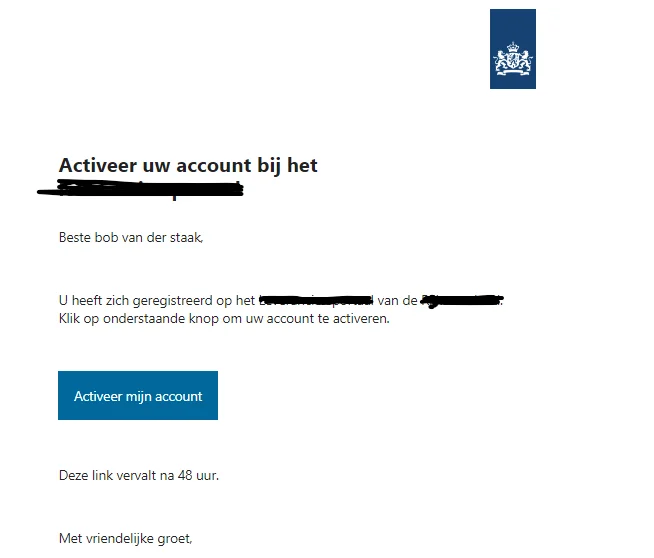
That alone looked wrong: nothing in the flow established that the person registering had any relationship to the company. He completed the account creation and received an automatic email from the Dutch government with a link to activate the account for the given company. He was surprised, having expected verification that he really was the owner of that company.
Exploitation
Step 1: register against a company you do not own
Enter the name of a target company in the registration form. The extra data is retrieved from the KVK Business Register, so the form accepts a real, existing company that the registrant has no connection to. Complete the account creation for that company.
Step 2: activate the account
The government sends an automatic email containing an activation link for the account tied to the chosen company. Following the link activates the account. No ownership check intervenes between registration and activation.
Step 3: log in and observe the granted roles
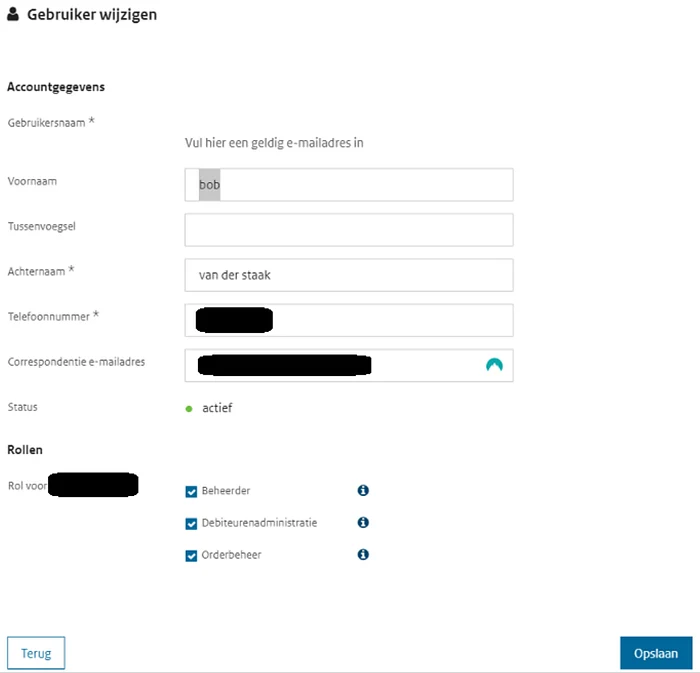
After activation the researcher could log in and found himself to be administrator, debtor administrator and order manager for that company.
Step 4: reach the invoicing features
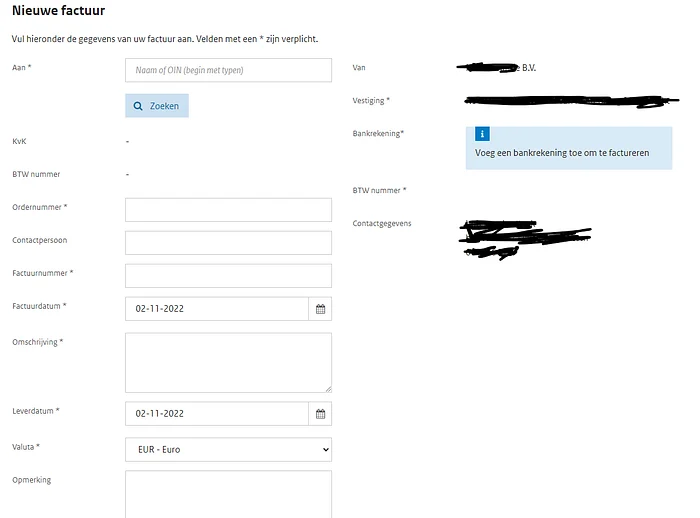
Inside the account he came across pages indicating he would be able to write new invoices in the name of that company. He could even add his own bank account to the system, which he describes as a bit like impersonating a company identity.
Step 5: scale it
The flow could easily be scripted with Burp Suite to make the attacker administrator for all Dutch companies that did not yet have an account. Since the website had only been live for a few hours, the chance of being first was huge.
Root cause
The flow accepts any company present in the KVK Business Register without verifying the registrant against the company. Registration accepts any company present in the KVK Business Register, activation only requires clicking a link sent to the registrant's own email address, and the first account created for a company is granted the highest roles (administrator, debtor administrator, order manager). There is no step that verifies the registrant against the company, for example through a channel controlled by the company itself. The activation email only proves that the registrant controls the mailbox they signed up with, not that they represent the company.
Impact
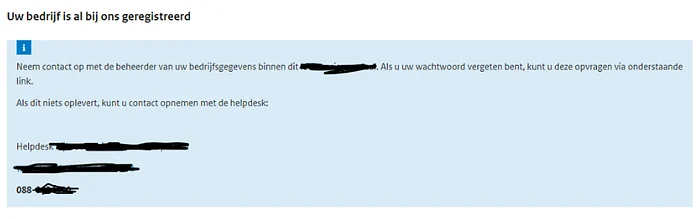
An attacker can become administrator, debtor administrator and order manager for any Dutch company that has not yet registered, and from there create invoices in that company's name and add their own bank account to the system. The legitimate owner is also locked out: when they try to register their own company they receive a message that the company is already registered and that they should contact the administrator of the portal. That message does not disclose the attacker's information, so the owner has to go through the government helpdesk, which can generate a lot of work for the agency.
The researcher reported the issue immediately to the NCSC through its coordinated responsible disclosure programme. About two months later he was told that the party responsible for the software did not see it as a security issue and that it would therefore not be resolved. A follow-up message confirmed both sides were discussing the same issue, impersonating company identity. The company reasoned that in future it will use "eHerkenning" and that control mechanisms are in place to make sure no ghost invoices could be sent. The researcher still considers it a vulnerability: not a fancy RCE, but something easy and obvious enough that anyone could exploit it. As part of the write-up agreement with the NCSC he was not allowed to name the responsible party or disclose the domain.
Fix
The report does not describe a fix being applied; the responsible party declined to treat the issue as a security problem. The direction indicated by that party is the use of "eHerkenning" for authentication, together with control mechanisms intended to prevent ghost invoices.
Variants to test
- First-registrant-wins onboarding. On any portal that onboards organisations by name, register an organisation you do not control and check whether you receive the top role. A positive result is an activated account with administrative rights over an organisation you have no relationship with.
- Registration without ownership verification. Look for flows where the only verification is an email to the address you supplied. A positive result is activation succeeding with no check against a company-controlled channel.
- Role bundling on first account. Check whether the first account for an entity is granted several powerful roles at once (administrator, debtor administrator, order manager). A positive result is a single registration yielding all of them.
- Financial actions from a claimed identity. Once inside, test whether you can create invoices in the organisation's name or add your own bank account. A positive result is an invoice or payout destination accepted under the victim's identity.
- Owner lockout. Attempt to register the same organisation from a second account. A positive result is a message that the organisation is already registered, with no way for the real owner to recover access without the helpdesk.
- Scripted mass registration. Automate the flow with a proxy such as Burp Suite across many organisations, especially on a freshly launched service. A positive result is a large set of administrative accounts obtained in a short time.
What happened, in plain words
A new Dutch government website went live. Bob van der Staak saw the launch announcement on LinkedIn. From a bug bounty point of view, a brand new website is always worth a look, because new sites often have simple mistakes in them. He opened the site and found a registration button.
The registration was unusual. It did not ask for his personal details. It asked for the name of a company. The rest of the company details were then fetched from the Dutch KVK Business Register, which is the official register of Dutch businesses. The account being created was meant to belong to the first contact person for that company, and that person would later be able to add other people to the account.
In plain terms, this is a company onboarding feature: a representative of a business signs up, becomes the first contact, and from there manages the company's presence in the portal, including invoicing. The problem was that nothing in the flow checked that the person signing up actually had anything to do with the company. Bob entered a company he did not own, got an account, activated it from his own email, and found himself holding the most powerful roles for that company. He could create invoices in its name and even add his own bank account. The real owner would then be locked out.
He reported it to the NCSC, the Dutch organisation that coordinates responsible disclosure for the government. About two months later he was told that the party responsible for the software did not see it as a security issue, so it would not be fixed. This article walks through the same steps for someone who has never done security testing before. You only need a browser and a computer to follow the idea; the only extra tool mentioned is Burp Suite, used for the idea of automating the flow.
Context
A new Dutch government website went live, and Bob van der Staak spotted the launch announcement on LinkedIn. From a bug bounty perspective a freshly launched site is worth a look, so he opened it and found a registration button.
A quick word on terms before we go on. A bug bounty is a programme where an organisation invites people to look for security problems in its systems and report them, sometimes for a reward. A vulnerability is a weakness in a system that someone could abuse to do something the owners did not intend. A site that has just gone live is interesting because it has not yet been tested by many people, so obvious mistakes may still be there.
The registration flow was unusual. Instead of asking for personal details, it asked for the name of a company. The remaining company data was then pulled from the Dutch KVK Business Register. The account being created was meant to be the first contact person for that company, with the ability to add further persons later.
The KVK Business Register is the official Dutch register of companies. Think of it like a public phone book for businesses: it lists which companies exist, and a website can look a company up there to fill in details such as its address. In other words, the feature is a company onboarding flow: a representative of a business registers, becomes the first contact, and from there manages the company's presence in the portal, including invoicing. Onboarding simply means the process of getting a new user or organisation set up in a system for the first time.
Setup
No special tooling was needed to reach the vulnerable state. The researcher used a normal browser and, for the idea of scaling the attack, Burp Suite to script the flow. The only precondition was that the targeted company had not yet registered an account on the portal. Because the site had only been live for a few hours, the chance that a given company was still unregistered was high.
Burp Suite is a tool that sits between your browser and a website and lets you watch, change and repeat the requests your browser sends. Think of it as a recording device for web traffic that also lets you replay a recording many times with small changes. Scripting here means automating a sequence of requests so it can be repeated quickly for many targets instead of being done by hand each time. A precondition is something that must be true before an attack works; here, the target company must not already have an account, because the first account created for a company gets the top roles.
Finding it
The registration form asked for a company name rather than proof of identity. After entering a company, which the researcher did not own personally, the site prompted him to create an account for that company. The prompt stated that he would be the first contact person within "my" company and that with this account he would later be able to add extra persons.
Notice the wording: the site treats the company as already belonging to whoever is registering.
That alone looked wrong: nothing in the flow established that the person registering had any relationship to the company. He completed the account creation and received an automatic email from the Dutch government with a link to activate the account for the given company. He was surprised, having expected verification that he really was the owner of that company.
He received an automatic email from the Dutch government with a link to activate the account for the given company. An activation link is a web address containing a unique code; opening it tells the site that the person who received the email is the one who signed up. It proves control of the mailbox, and nothing more. That is the key point: the email proves he can read messages sent to his own address, not that he represents the company.
Exploitation
Exploitation means actually using a weakness to show what an attacker could do with it, rather than just suspecting it is there.
Step 1: register against a company you do not own
Enter the name of a target company in the registration form. The extra data is retrieved from the KVK Business Register, so the form accepts a real, existing company that the registrant has no connection to. Complete the account creation for that company.
Why this step: the form only checks that the company exists in the public register. It never checks that the person typing the name works for that company. So any real company name is accepted.
Step 2: activate the account
The government sends an automatic email containing an activation link for the account tied to the chosen company. Following the link activates the account. No ownership check intervenes between registration and activation.
Why this step: activation is the moment where a site could still stop and ask for proof that you represent the company. Here, clicking a link sent to your own email is enough. The only thing verified is that you control the mailbox you signed up with.
Step 3: log in and observe the granted roles
After activation the researcher could log in and found himself to be administrator, debtor administrator and order manager for that company.
A role is a set of permissions in a system: what a user is allowed to see and do. Administrator means full control over the company's account. Debtor administrator relates to managing debtors, the parties who owe the company money. Order manager relates to handling orders. Getting all three from a single registration is the core of the problem: the first account created for a company is handed the highest powers at once.
Step 4: reach the invoicing features
Inside the account he came across pages indicating he would be able to write new invoices in the name of that company. He could even add his own bank account to the system, which he describes as a bit like impersonating a company identity.
Inside the account he came across pages indicating he would be able to write new invoices in the name of that company and add his own bank account. Impersonating a company identity means acting online as if you were that company: sending documents in its name, or directing its money to an account you control. An invoice is a bill a company sends to a customer asking to be paid. If an attacker can create invoices in a company's name and put their own bank account in the system, invoices could be sent in that company's name.
Step 5: scale it
The flow could easily be scripted with Burp Suite to make the attacker administrator for all Dutch companies that did not yet have an account. Since the website had only been live for a few hours, the chance of being first was huge.
Why this step matters: a single wrong account is a problem, but an automated flow turns it into a problem for every company that has not signed up yet. The attacker does not need to be clever per company; the same few requests work for each one.
Root cause
The root cause is the underlying design mistake that makes the whole thing possible, as opposed to a single bug in one line of code.
The design treats possession of a company name as sufficient proof of authority over that company. Registration accepts any company present in the KVK Business Register, activation only requires clicking a link sent to the registrant's own email address, and the first account created for a company is granted the highest roles (administrator, debtor administrator, order manager). There is no step that verifies the registrant against the company, for example through a channel controlled by the company itself. The activation email only proves that the registrant controls the mailbox they signed up with, not that they represent the company.
A useful comparison: it is like a building where the receptionist hands out the master key to anyone who can correctly say the building's name. Knowing the name is public information; it says nothing about whether you work there.
Impact
Impact means the harm that follows if the weakness is abused.
An attacker can become administrator, debtor administrator and order manager for any Dutch company that has not yet registered, and from there create invoices in that company's name and add their own bank account to the system. The legitimate owner is also locked out: when they try to register their own company they receive a message that the company is already registered and that they should contact the administrator of the portal. That message does not disclose the attacker's information, so the owner has to go through the government helpdesk, which can generate a lot of work for the agency.
The owner receives a message that the company is already registered and that they should contact the administrator of the portal. Because the message does not reveal who registered, the owner cannot resolve it themselves and must ask the government helpdesk for help. Lockout means the rightful user is kept out of their own account or registration.
The researcher reported the issue immediately to the NCSC through its coordinated responsible disclosure programme. Responsible disclosure is the practice of telling the organisation that owns a system about a weakness privately, so it can be fixed before details become public. The NCSC is the Dutch national cyber security centre, which coordinates these reports for the government. About two months later he was told that the party responsible for the software did not see it as a security issue and that it would therefore not be resolved. A follow-up message confirmed both sides were discussing the same issue, impersonating company identity. The company reasoned that in future it will use "eHerkenning" and that control mechanisms are in place to make sure no ghost invoices could be sent.
eHerkenning is a Dutch login system for businesses: it lets a company prove its identity and which person is authorised to act for it, a bit like a digital passport for organisations. Ghost invoices are invoices that should not exist, for example ones created by someone who does not represent the company. The researcher still considers it a vulnerability: not a fancy RCE, but something easy and obvious enough that anyone could exploit it. RCE, short for remote code execution, is a serious class of bug where an attacker can run their own commands on a server; the researcher is saying this issue is not that kind of dramatic bug, but it is still a real weakness. As part of the write-up agreement with the NCSC he was not allowed to name the responsible party or disclose the domain.
Fix
The report does not describe a fix being applied; the responsible party declined to treat the issue as a security problem. The direction indicated by that party is the use of "eHerkenning" for authentication, together with control mechanisms intended to prevent ghost invoices.
In everyday terms: before handing out the master key, check the person's staff pass, not just whether they can say the building's name.
Variants to test
These are the same kinds of checks, written so a beginner can try them on other sites. Each one lists what a positive result looks like.
- First-registrant-wins onboarding. On any portal that onboards organisations by name, register an organisation you do not control and check whether you receive the top role. A positive result is an activated account with administrative rights over an organisation you have no relationship with.
- Registration without ownership verification. Look for flows where the only verification is an email to the address you supplied. A positive result is activation succeeding with no check against a company-controlled channel.
- Role bundling on first account. Check whether the first account for an entity is granted several powerful roles at once (administrator, debtor administrator, order manager). A positive result is a single registration yielding all of them.
- Financial actions from a claimed identity. Once inside, test whether you can create invoices in the organisation's name or add your own bank account. A positive result is an invoice or payout destination accepted under the victim's identity.
- Owner lockout. Attempt to register the same organisation from a second account. A positive result is a message that the organisation is already registered, with no way for the real owner to recover access without the helpdesk.
- Scripted mass registration. Automate the flow with a proxy such as Burp Suite across many organisations, especially on a freshly launched service. A positive result is a large set of administrative accounts obtained in a short time.
Glossary
- Activation link: a web address containing a unique code, sent by email, that confirms the person who received the email signed up.
- Administrator: a user role with full control over an account or system.
- Bug bounty: a programme where an organisation invites people to find and report security problems, sometimes for a reward.
- Burp Suite: a tool that sits between your browser and a website so you can watch, change and repeat web requests.
- Debtor administrator: a role for managing debtors, the parties who owe the company money.
- eHerkenning: a Dutch login system that lets a business prove its identity and which person is authorised to act for it.
- Exploitation: actually using a weakness to show what an attacker could do with it.
- Ghost invoices: invoices that should not exist, for example ones created by someone who does not represent the company.
- Impact: the harm that follows if a weakness is abused.
- Impersonating a company identity: acting online as if you were a company, for example sending documents in its name or directing its money to your account.
- Invoice: a bill a company sends to a customer asking to be paid.
- KVK Business Register: the official Dutch register of companies, used by websites to look up company details.
- Lockout: the rightful user being kept out of their own account or registration.
- NCSC: the Dutch national cyber security centre, which coordinates responsible disclosure for the government.
- Onboarding: the process of getting a new user or organisation set up in a system for the first time.
- Order manager: a role for handling orders.
- Precondition: something that must be true before an attack works.
- RCE (remote code execution): a serious class of bug where an attacker can run their own commands on a server.
- Responsible disclosure: telling the organisation that owns a system about a weakness privately, so it can be fixed before details become public.
- Role: a set of permissions in a system, defining what a user is allowed to see and do.
- Root cause: the underlying design mistake that makes a weakness possible.
- Scripting: automating a sequence of requests so it can be repeated quickly for many targets.
- Vulnerability: a weakness in a system that someone could abuse to do something the owners did not intend.





