How I Hacked the Dutch Government: Exploiting an Innocent Image for Remote Code Execution
A GeoServer instance exposed the Jiffle map algebra process without authentication, and improper validation of Jiffle scripts allowed injection of Java code that was compiled by the Janino compiler, leading to remote code execution. An attacker could execute arbitrary commands on the server.
 Published on medium.com
I began my search for opportunities and stumbled upon a list of eligible websites for bug hunting at https://gist.github.com/R0X4R/81e6c50c091a20b060afe5c259b58cfa. This list became my starting point.
The full write-up lives on its author's site
It belongs to its author, so we link to it rather than copy it. The other two tabs are our own rewrites, checked against it.
Context
The target was a website belonging to the Dutch Government bug bounty programme that was running GeoServer. GeoServer is an open-source server for sharing geospatial data, and it supports standard protocols such as WFS, WMS and WCS. It also ships with the JAI-EXT API, which is enabled by default and provides high-level objects for image processing.
JAI-EXT contains a map algebra language called Jiffle, a simple scripting language for working with raster images whose aim is to let you get more done with less code. Jiffle scripts are meant to be compiled and executed securely within a controlled environment.
The bug in question is CVE-2022-24816, an exploit for the JT-JIFFLE extension that was discovered on 13 April 2022.
Setup
The researcher started from a public list of eligible websites for bug hunting:
https://gist.github.com/R0X4R/[redacted]
Live hosts, technology stacks, status codes and titles were enumerated with httpx:
cat scope.txt | sort -u | ~/go/bin/httpx -sc -title -tech-detect
While examining sites that returned 200 OK, one of them was seen using GeoServer services. Nuclei was run against it, but no vulnerabilities were detected. The service allowed access to its functionality without requiring authentication, so Burp Suite was used to interact with the application and probe for exploitable points. The service allowed access to its functionality without requiring authentication.
Finding it
The interesting observation was that GeoServer functionality was reachable without authentication. Research into GeoServer led to the JAI-EXT API and its Jiffle scripting language, and from there to CVE-2022-24816.
The vulnerability lies in the JAI-EXT library's handling of Jiffle scripts. Jiffle scripts are meant to be compiled and executed securely within a controlled environment, but due to improper validation, malicious Jiffle code embedded in an image or other data could be injected and executed on the vulnerable system. That code can then take advantage of the Janino Java compiler used by JAI-EXT, ultimately leading to remote code execution with full system privileges. In short: improper code injection leading to RCE via Jiffle scripts and the Janino compiler.
Exploitation
Step 1: Read the patch
The fix commit is public:
https://github.com/geosolutions-it/jai-ext/commit/[redacted]
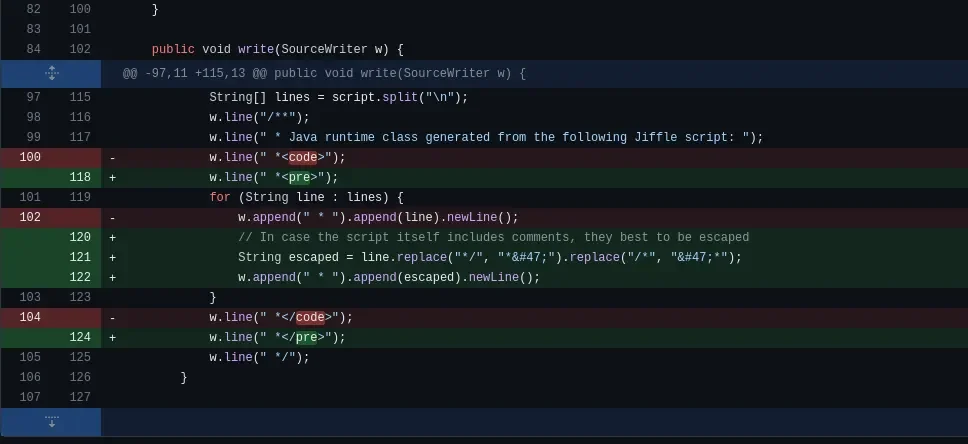
Looking at the patch, Javadoc comment escaping has been added to the it.geosolutions.jaiext.jiffle.parser.node.Script write method. That method is what Jiffle uses to convert the scriptModel to Java source code.
Step 2: Craft a WPS request
A suitable WPS XML request was crafted using the WPS builder demo webpage.
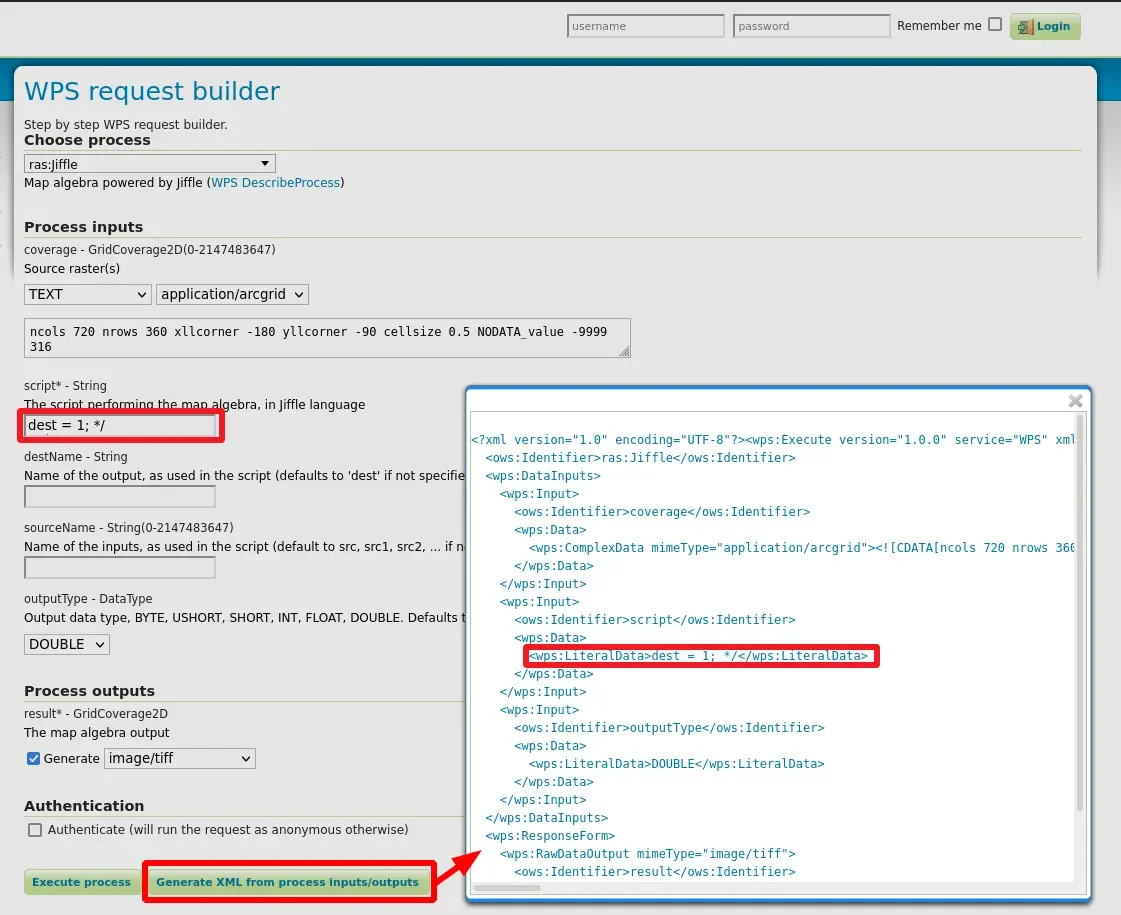
The payload produces a verbose javax.media.jai.util.ImagingException:
HTTP/1.1 200[...]<?xml version="1.0" encoding="UTF-8"?><wps:ExecuteResponse xmlns:xs="http://www.w3.org/2001/XMLSchema" xmlns:ows="http://www.opengis.net/ows/1.1" xmlns:wps="http://www.opengis.net/wps/1.0.0" xmlns:xlink="http://www.w3.org/1999/xlink" xml:lang="en" service="WPS" serviceInstance="http://localhost:8085/geoserver/ows?" version="1.0.0"><wps:Process wps:processVersion="1.0.0"><ows:Identifier>ras:Jiffle</ows:Identifier><ows:Title>Jiffle map algebra</ows:Title><ows:Abstract>Map algebra powered by Jiffle</ows:Abstract></wps:Process><wps:Status creationTime="2022-08-11T12:36:24.457Z"><wps:ProcessFailed><ows:ExceptionReport version="1.1.0"><ows:Exception exceptionCode="NoApplicableCode"><ows:ExceptionText>Process failed during executionjavax.media.jai.util.ImagingException: All factories fail for the operation &quot;Jiffle&quot;All factories fail for the operation &quot;Jiffle&quot;it.geosolutions.jaiext.jiffle.JiffleException: Runtime source error for source: package it.geosolutions.jaiext.jiffle.runtime;import java.util.List;import java.util.ArrayList;import java.util.Arrays;/** * Java runtime class generated from the following Jiffle script: *&lt;code&gt; * dest = 1; */ *&lt;/code&gt; */public class JiffleIndirectRuntimeImpl extends it.geosolutions.jaiext.jiffle.runtime.AbstractIndirectRuntime {[...]}Runtime source error for source: package it.geosolutions.jaiext.jiffle.runtime;[...]Line 11, Column 3: One of &apos;class enum interface @&apos; expected instead of &apos;*&apos;
The Janino compiler fails when converting the source code to byte-code because it encounters an uncommented line starting with a * instead of expected keywords like class, enum or interface.
Step 3: Escape the comment and inject Java
To inject Java code into the file, the remaining comments must also be rectified by including the string /*. The payloads take the following form:
<wps:LiteralData>dest = 1; */ INJECTED JAVA CODE /*</wps:LiteralData>
Step 4: Hijack the Double class
In the Java code generated by Jiffle it was possible to override the Double class that is used when initializing the result variable at the end of the program:
double result = Double.NaN;
When accessing the static attribute NaN of the manipulated Double class, the static block of code runs. The manipulated Double class used as a proof of concept is:
public class Double { public static double NaN; static { throw new RuntimeException(": We control the execution flow :)"); }}
Step 5: Run a command
Executing a command becomes straightforward. The following Double class was used to initiate execution of the cat /etc/passwd command:
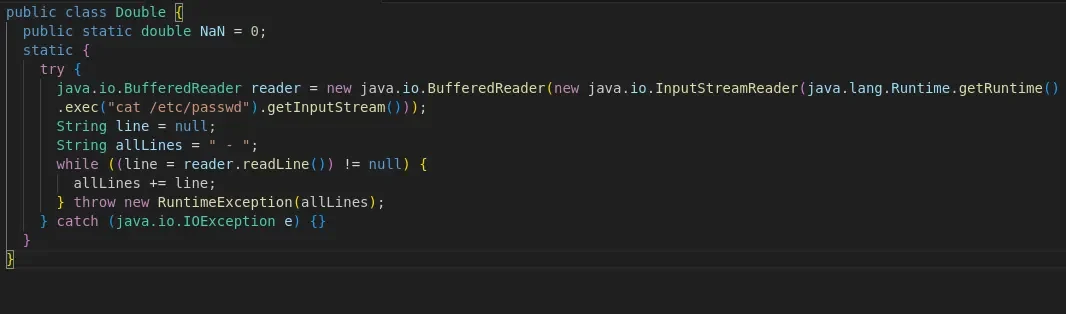
cat /etc/passwd
Combining this with the initial payload to escape Java comments results in the following request:
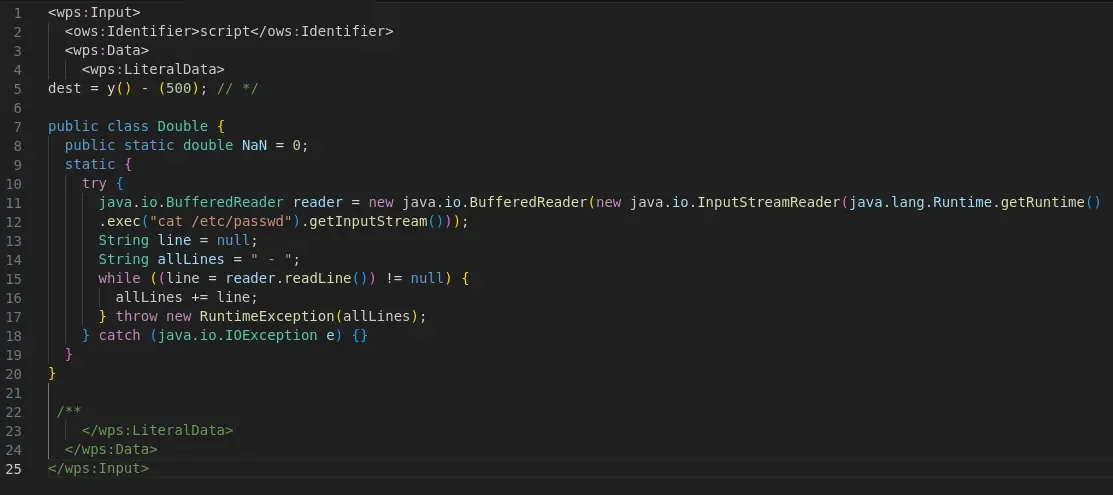
The execution of that request results in a java.lang.ExceptionInInitializerError exception which contains the output of the executed command:
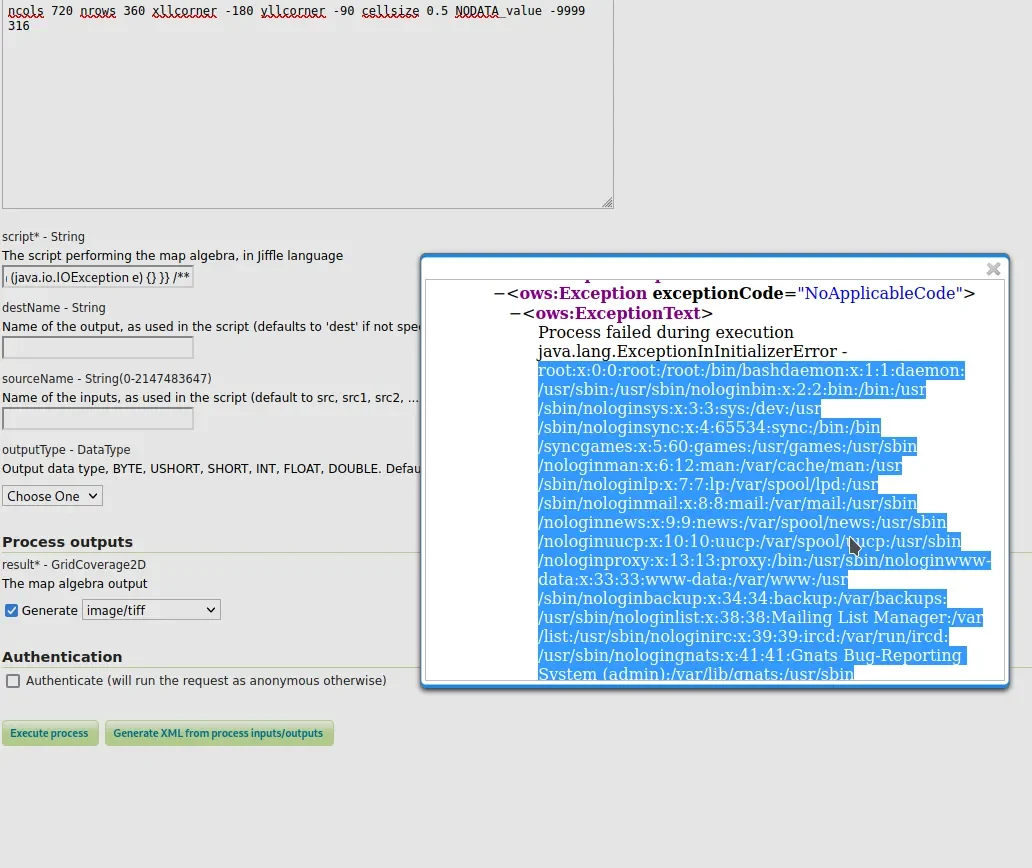
/etc/passwd
Step 6: Detection template
A Nuclei template was created to detect the vulnerability, available at:
https://github.com/projectdiscovery/nuclei-templates/blob/main/http/cves/2022/CVE-2022-24816.yaml
Root cause
The write method of it.geosolutions.jaiext.jiffle.parser.node.Script converts the scriptModel into Java source code, and it places the original Jiffle script inside a Javadoc comment in the generated class. Because the script text was not escaped, a */ sequence in the script terminates the comment, and the rest of the script is compiled as Java. The patch adds Javadoc comment escaping to that write method, which is the direct fix for the injection point.
Existing defences did not stop it: the WPS process was reachable without authentication, and the JAI-EXT API is enabled by default.
Impact
The result is remote code execution with full system privileges, on a GeoServer instance that exposes the Jiffle WPS process to an unauthenticated user. The proof of concept only ran cat /etc/passwd, but the injected Java executes in the server process, so the attacker controls the execution flow. The report does not describe any further actions taken against the target.
Fix
The fix is the commit referenced above: Javadoc comment escaping added to the Script write method in JAI-EXT, so script content can no longer break out of the generated comment.
Variants to test
- Other WPS processes that accept a script or expression as
LiteralDataand compile it. A positive result is a verbose compiler or runtime exception in thewps:ExceptionReportthat echoes the generated source. - A positive result is the same
JiffleExceptionwith generated source in the response. - Unpatched GeoServer instances found with the published Nuclei template
CVE-2022-24816.yaml. A positive result is a template match on the Jiffle injection behaviour. - Comment-terminator injection in any product that embeds user text in generated source comments. A positive result is a compiler error pointing at a line that starts with attacker-controlled text.
Timeline
| Event | Date |
|---|---|
| Reported | 22 December 2022 |
| Confirmed | 23 December 2022 |
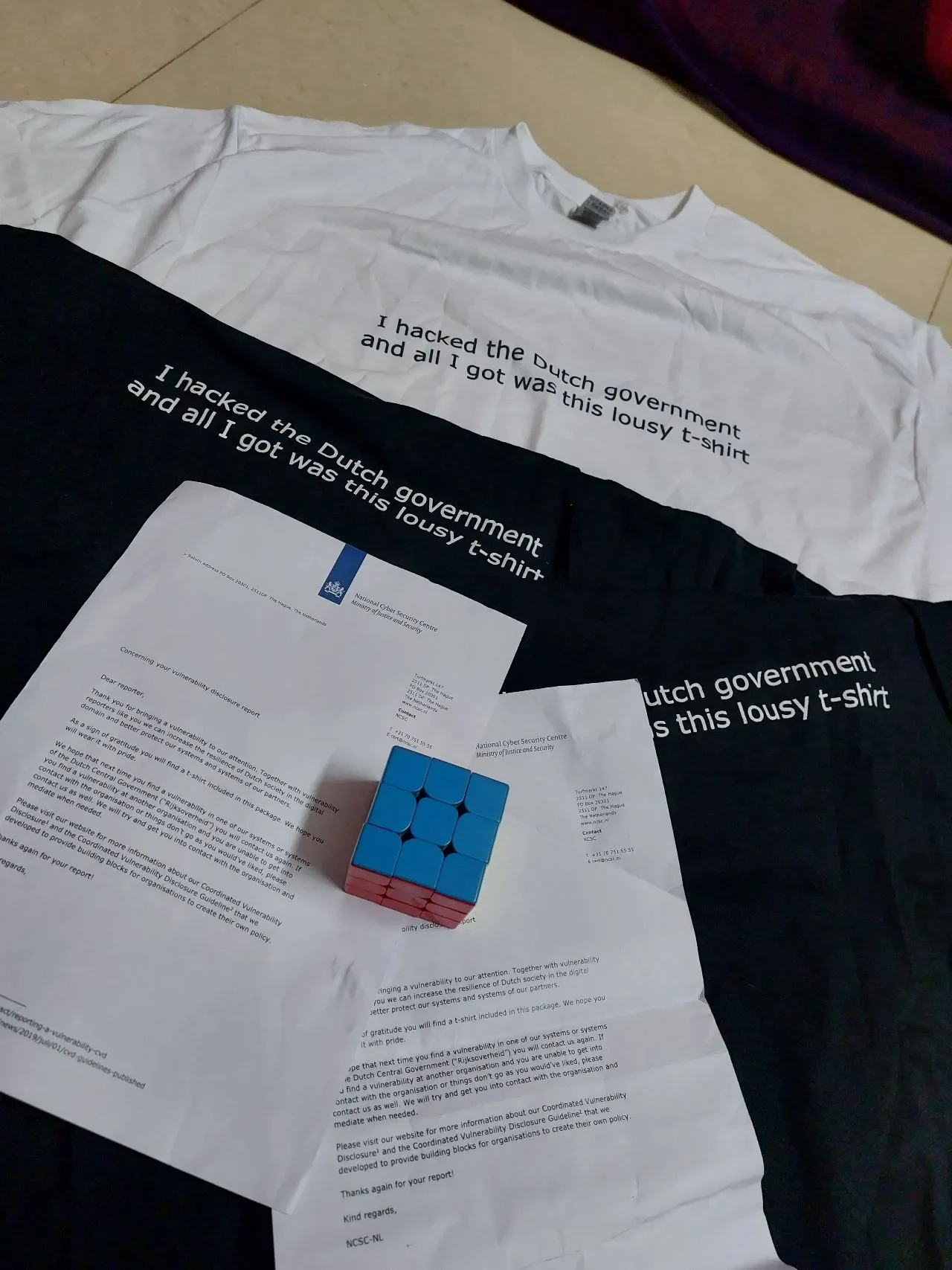
| Swag received | 24 March 2023 |
What happened, in plain words
A security researcher found a way to make a Dutch Government website run commands of his choosing on its own server. The website was running a piece of free software called GeoServer, which is used to publish and share map data. The problem was that the script text was pasted into generated Java code without being cleaned up first, so a carefully written script could break out of the place it was supposed to stay in and add its own Java code. That added code ran with the server's own privileges, which is what people call remote code execution, or RCE.
The service allowed access to its functionality without requiring authentication. He found the site from a public list of bug bounty targets, scanned it, noticed GeoServer, read the public fix for a known bug called CVE-2022-24816, and built a request that made the server run cat /etc/passwd, a harmless command that prints the list of user accounts on a Linux machine. The report was sent on 22 December 2022, confirmed the next day, and the researcher received swag in March 2023.
A few words before we start, because they come up constantly:
- A bug bounty programme is an arrangement where an organisation says: if you find a security problem in our systems and tell us privately, we will reward you. The reward can be money or, as here, merchandise ("swag").
- A server is a computer that answers requests from other computers. When you open a website, your browser asks a server for a page and the server sends it back.
- Remote code execution (RCE) means an attacker can make someone else's computer run commands the attacker chose, from a distance. It is one of the most serious kinds of security bug, because the attacker is no longer limited to what the website's buttons do.
Motivation
The researcher's interest started at a security conference. He saw someone wearing a t-shirt that said:
I hacked the Dutch government and all I got was this lousy t-shirt.

He asked the person how they got it, and decided he wanted the same swag. That is the whole motivation: a bit of fun and a t-shirt. It is worth saying plainly because it shows how these hunts often begin, with curiosity rather than a plan.
Scope
Before touching anything, a researcher needs to know which systems are allowed. Hitting a website that is not part of the programme is not research, it is unauthorised access. The researcher found a public list of websites that were eligible for bug hunting:
https://gist.github.com/R0X4R/[redacted]
A gist is a small public page on GitHub, a site where people share code and text. This one held a list of addresses. The list became his starting point.
Target
A list of addresses is not much use until you know which ones are alive and what software they run. The researcher used a tool called httpx for that. httpx is a command-line program: you type a command in a terminal (a text window on your computer) and it prints results. It takes a list of addresses and, for each one, reports whether the site answers, what HTTP status code it returns, what its page title is, and what technologies it appears to use.
cat scope.txt | sort -u | ~/go/bin/httpx -sc -title -tech-detect
Line by line:
cat scope.txtprints the contents of a file calledscope.txt, which holds the list of addresses, one per line.catis short for concatenate: it reads files and writes them out.|is a pipe. It takes the output of the command on its left and feeds it as input to the command on its right. Think of it as a conveyor belt between two machines.sort -usorts the lines alphabetically and removes duplicates (-umeans unique). Duplicates would waste time later.~/go/bin/httpxis the location of the httpx program on the researcher's machine.~means the user's home folder, andgo/binis where programs installed with the Go programming language usually end up.-scasks httpx to show the status code. A status code is the three-digit number a web server sends with every reply.200means OK,404means not found,403means forbidden, and so on.-titleasks it to show the page title, the text that appears in the browser tab.-tech-detectasks it to guess which technologies the site uses, for example which web server or which framework.
Why do this? Because you cannot test everything, and a shortlist of live sites with known software narrows the search enormously. It is the difference between looking for a book in a library and looking for it on one shelf.
While going through the sites that answered 200 OK, the researcher noticed one that was using GeoServer. He then ran Nuclei against it. Nuclei is a scanner: it sends a large set of known test requests, each tied to a known vulnerability, and reports any that match. It found nothing. That is normal and not a reason to stop; it only means no known, easy-to-detect bug was present.
Finding
The important observation was that the GeoServer functionality could be reached without authentication. Authentication is the step where a site asks who you are, usually with a username and password. Without it, anyone who can reach the address can use the feature. The researcher opened Burp Suite, a tool that sits between your browser and a website so you can see and edit every request and response, and started poking at the application to find places worth attacking.
He then read up on GeoServer. It is an open-source server for sharing geospatial data, meaning map and satellite data with coordinates attached. It speaks standard protocols with short names: WFS, WMS and WCS. A protocol here is just an agreed format for requests and replies, so that different programs can talk to each other. GeoServer also ships with the JAI-EXT API, which is switched on by default and provides high-level building blocks for image processing.
An API (application programming interface) is a defined set of operations one program offers to another. A useful comparison is a restaurant menu: you do not walk into the kitchen, you order from the menu, and the kitchen does the work. The API is the menu of things GeoServer can be asked to do.
Inside JAI-EXT there is a small language called Jiffle. Jiffle is a scripting language for working with raster images. A raster image is a picture stored as a grid of pixels, which is how most photos and map tiles work. Jiffle's aim is to let you get more done with less code: instead of writing a long program to process an image, you write a short script.
Jiffle scripts are supposed to be compiled and run safely inside a controlled environment. Compiling means translating human-readable code into the form the computer actually executes. WPS stands for Web Processing Service: a standard way to ask a server to run a calculation. A process is one named operation the server offers, and ras:Jiffle is the one that takes a Jiffle script as input and runs it.
The bug is CVE-2022-24816. A CVE is a public catalogue number for a known vulnerability, so that everyone can refer to the same issue unambiguously. This one affects the JT-JIFFLE extension and was discovered on 13 April 2022.
Exploitation
Step 1: Read the patch
When a bug is fixed, the change is often published. Reading the fix is one of the most efficient ways to understand a vulnerability, because the fix shows exactly what was wrong. The commit, meaning the recorded change to the source code, is public:
https://github.com/geosolutions-it/jai-ext/commit/[redacted]
Looking at the patch, the researcher saw that Javadoc comment escaping had been added to the write method of it.geosolutions.jaiext.jiffle.parser.node.Script. That method is what Jiffle uses to turn the scriptModel (its internal representation of your script) into Java source code.
Two ideas need unpacking here. A comment is text in a program that the computer ignores; it exists for humans. In Java there are two common styles: a line comment starting with //, and a block comment that starts with /* and ends with */. Javadoc is a special block comment that starts with /** and is used to write documentation. Escaping means marking characters so they are treated as plain text rather than as instructions. If you want to print the character */ inside a comment without ending it, you have to escape it.
Step 2: Craft a WPS request
To talk to the ras:Jiffle process, you send an XML request. XML is a text format for structured data, built from tags in angle brackets, like <name>value</name>. A WPS XML request is simply an XML document that follows the WPS standard and asks the server to run a process.
The researcher built a suitable request using the WPS builder demo webpage, a page that helps you assemble such requests without writing all the XML by hand.
The payload produced a long, detailed error, a javax.media.jai.util.ImagingException:
HTTP/1.1 200[...]<?xml version="1.0" encoding="UTF-8"?><wps:ExecuteResponse xmlns:xs="http://www.w3.org/2001/XMLSchema" xmlns:ows="http://www.opengis.net/ows/1.1" xmlns:wps="http://www.opengis.net/wps/1.0.0" xmlns:xlink="http://www.w3.org/1999/xlink" xml:lang="en" service="WPS" serviceInstance="http://localhost:8085/geoserver/ows?" version="1.0.0"><wps:Process wps:processVersion="1.0.0"><ows:Identifier>ras:Jiffle</ows:Identifier><ows:Title>Jiffle map algebra</ows:Title><ows:Abstract>Map algebra powered by Jiffle</ows:Abstract></wps:Process><wps:Status creationTime="2022-08-11T12:36:24.457Z"><wps:ProcessFailed><ows:ExceptionReport version="1.1.0"><ows:Exception exceptionCode="NoApplicableCode"><ows:ExceptionText>Process failed during executionjavax.media.jai.util.ImagingException: All factories fail for the operation &quot;Jiffle&quot;All factories fail for the operation &quot;Jiffle&quot;it.geosolutions.jaiext.jiffle.JiffleException: Runtime source error for source: package it.geosolutions.jaiext.jiffle.runtime;import java.util.List;import java.util.ArrayList;import java.util.Arrays;/** * Java runtime class generated from the following Jiffle script: *&lt;code&gt; * dest = 1; */ *&lt;/code&gt; */public class JiffleIndirectRuntimeImpl extends it.geosolutions.jaiext.jiffle.runtime.AbstractIndirectRuntime {[...]}Runtime source error for source: package it.geosolutions.jaiext.jiffle.runtime;[...]Line 11, Column 3: One of &apos;class enum interface @&apos; expected instead of &apos;*&apos;
What is this telling us? The first part, HTTP/1.1 200, is the status line: the server answered with 200, meaning the request itself was accepted. Then comes the XML reply. Inside it, <wps:ProcessFailed> says the process failed, and <ows:ExceptionText> carries the error message. An exception is a program's way of reporting that something went wrong; a stack trace or verbose exception is the detailed report, and verbose means it includes internal details.
The key line is the last one: Line 11, Column 3: One of 'class enum interface @' expected instead of '*'. The Janino compiler, the component that turns Java source into byte-code (the form the machine runs), was reading the generated file and found a line starting with * where it expected a keyword such as class, enum or interface.
Without that feedback he would have been guessing.
Step 3: Escape the comment and inject Java
To add Java code to the file, the remaining comments also had to be closed properly, by including the string /*. The payloads take this form:
<wps:LiteralData>dest = 1; */ INJECTED JAVA CODE /*</wps:LiteralData>
Line by line:
<wps:LiteralData>is the XML tag that carries a literal value, meaning a piece of text passed as-is to the process. Here it carries the Jiffle script.*/closes the Javadoc comment that the server wrapped around the script. Everything after this point is no longer a comment.INJECTED JAVA CODEis the placeholder where the attacker's own Java goes. It will be compiled as part of the generated class.</wps:LiteralData>closes the XML tag.
Step 4: Hijack the Double class
In the Java code that Jiffle generates, the researcher found he could override the Double class used when the result variable is initialised at the end of the program:
double result = Double.NaN;
Double is Java's built-in type for decimal numbers. NaN means "not a number", a special value used when a calculation has no valid result. The generated code refers to Double.NaN, and because the attacker's code is now part of the same file, the attacker can define his own Double class that takes precedence.
When the program accesses the static attribute NaN of the manipulated Double class, the static block runs. A static block is a piece of code that a class runs once, the first time the class is used. That gives the attacker a hook: the moment the server touches Double.NaN, the attacker's code executes. The manipulated Double class used as a proof of concept is:
public class Double { public static double NaN; static { throw new RuntimeException(": We control the execution flow :)"); }}
Line by line:
public class Double {starts the definition of a class namedDouble.publicmeans other code can use it.public static double NaN;declares a field calledNaNof typedouble.staticmeans it belongs to the class itself rather than to an individual object made from it.static {opens the static block, which runs once when the class is first used.throw new RuntimeException(": We control the execution flow :)");deliberately raises an error with a message. Throwing an exception is a way to stop and report; here the message is the proof that the attacker's code ran.}closes the static block, and the final}closes the class.
A proof of concept (PoC) is a minimal demonstration that a vulnerability is real, without doing any harm. This one only proves control by raising an error with a cheeky message.
Step 5: Run a command
Running a command then becomes straightforward. The following Double class was used to start the cat /etc/passwd command:
cat /etc/passwd
The image shows the command and its output.
Combining this with the initial payload to escape the Java comments gives the following request:
The execution of that request results in a java.lang.ExceptionInInitializerError exception, which contains the output of the executed command:
/etc/passwd
ExceptionInInitializerError is Java's way of saying that something failed while a class was being initialised, which is exactly the static block from the previous step. The image shows that output.
Step 6: Detection template
The researcher wrote a Nuclei template to detect the vulnerability, so that others can check their own systems quickly:
https://github.com/projectdiscovery/nuclei-templates/blob/main/http/cves/2022/CVE-2022-24816.yaml
A template here is a small recipe: a request to send and a pattern to look for in the reply. If the pattern matches, the scanner reports the site as vulnerable. Sharing it means the check is available to everyone who uses Nuclei.
Root cause
The write method of it.geosolutions.jaiext.jiffle.parser.node.Script converts the scriptModel into Java source code, and it places the original Jiffle script inside a Javadoc comment in the generated class. Because the script text was not escaped, a */ sequence in the script ends the comment, and the rest of the script is compiled as Java. The patch adds Javadoc comment escaping to that write method, which is the direct fix for the injection point.
The failure surfaced only as a verbose ImagingException in the WPS response, which is what made the generated source visible and the injection practical to develop.
Impact
The result is remote code execution with full system privileges, on a GeoServer instance that exposes the Jiffle WPS process to an unauthenticated user. The proof of concept only ran cat /etc/passwd, but the injected Java executes in the server process, so the attacker controls the execution flow. The report does not describe any further actions taken against the target.
Fix
The fix is the commit referenced above: Javadoc comment escaping added to the Script write method in JAI-EXT, so script content can no longer break out of the generated comment.
Variants to test
- Other WPS processes that accept a script or expression as
LiteralDataand compile it. A positive result is a verbose compiler or runtime exception in thewps:ExceptionReportthat echoes the generated source. - A positive result is the same
JiffleExceptionwith generated source in the response. - Unpatched GeoServer instances found with the published Nuclei template
CVE-2022-24816.yaml. A positive result is a template match on the Jiffle injection behaviour. - Comment-terminator injection in any product that embeds user text in generated source comments. A positive result is a compiler error pointing at a line that starts with attacker-controlled text.
Timeline
| Event | Date |
|---|---|
| Reported | 22 December 2022 |
| Confirmed | 23 December 2022 |
| Swag received | 24 March 2023 |
Glossary
- API: a defined set of operations one program offers to another, like a menu you order from.
- Authentication: the step where a system checks who you are, usually with a username and password.
- Block comment: text between
/*and*/that the computer ignores. - Bug bounty programme: an arrangement where an organisation rewards people for privately reporting security problems.
- Burp Suite: a tool that sits between your browser and a website so you can see and edit requests and responses.
- Byte-code: the intermediate form Java source is compiled into before the machine runs it.
- CVE: a public catalogue number for a known vulnerability.
- Comment: text in a program that the computer ignores and humans read.
- Compile: translate human-readable code into the form the computer executes.
- Escaping: marking characters so they are treated as plain text rather than as instructions.
- Exception: a program's way of reporting that something went wrong.
- GeoServer: open-source server software for sharing geospatial (map) data.
- Gist: a small public page on GitHub for sharing code or text.
- httpx: a command-line tool that checks a list of addresses and reports status, title and technologies.
- JAI-EXT: an image-processing library that ships with GeoServer and is enabled by default.
- Janino: the Java compiler used by JAI-EXT to turn generated source into byte-code.
- Java: a widely used programming language; GeoServer is written in it.
- Javadoc: a special Java block comment, starting with
/**, used to write documentation. - Jiffle: a small scripting language for raster images, used inside JAI-EXT.
- LiteralData: the XML tag that carries a literal value, such as a script, to a WPS process.
- Nuclei: a scanner that sends known test requests and reports matches.
- Pipe (
|): a shell symbol that feeds the output of one command into the next. - Proof of concept (PoC): a minimal demonstration that a vulnerability is real.
- Protocol: an agreed format for requests and replies so different programs can talk.
- Raster image: a picture stored as a grid of pixels.
- Remote code execution (RCE): making someone else's computer run commands you chose, from a distance.
- Scope: the set of systems a researcher is allowed to test.
- Server: a computer that answers requests from other computers.
- Static block: code a Java class runs once, the first time the class is used.
- Status code: the three-digit number a web server sends with every reply, such as 200 for OK.
- Swag: merchandise given as a reward.
- Template (Nuclei): a small recipe of a request to send and a pattern to look for.
- WCS, WFS, WMS: standard protocols for sharing map data.
- WPS: Web Processing Service, a standard way to ask a server to run a calculation.
- XML: a text format for structured data built from tags in angle brackets.


