How I got a lousyT-Shirt from the Dutch Government.
The author found multiple WordPress installations on Dutch government domains and used WPScan to identify known vulnerabilities, which he then manually verified. He reported these vulnerabilities and received a T-shirt as a reward.

Hello everyone, my name is Max. I’m a Computer Science student and ethical hacker from Germany.
The full write-up lives on its author's site
It belongs to its author, so we link to it rather than copy it. The other two tabs are our own rewrites, checked against it.
Context
The target here is the Dutch Government's responsible disclosure programme, a vulnerability disclosure policy (VDP) rather than a bug bounty platform programme. Because it is not listed on HackerOne or Bugcrowd, the author describes it as a good target for beginners: there is less competition. The scope is described as really huge, and a curated list of in-scope domains is available in a public gist, which the author suggests using as a starting point for recon.
The class of issue is old components with known vulnerabilities, specifically WordPress installations and their plugins. The author's goal was low-hanging fruit: find in-scope domains running WordPress, then check each one for a known vulnerability.
Setup
The author describes himself as a Computer Science student and ethical hacker from Germany, a beginner just starting out in bug bounty. No accounts, roles or target-specific credentials are involved beyond a free WPScan account.
Tools used:
- Google search (Google-Dorking), with the Google Hacking Database as a source of dorks.
- Nuclei from Project Discovery, a template-based vulnerability scanner, used here for technology detection.
- WPScan, a WordPress vulnerability scanner, free for non-commercial use. A free account provides an API token, which the author says unlocks the full potential of the tool because it will then check and display possible vulnerabilities.
The precondition for the whole approach is a list of in-scope domains, which the gist provides.
Finding it
The reasoning is straightforward. WordPress is described as an awesome CMS, but in the author's experience a lot of WordPress sites are vulnerable, especially when many plugins are used. So the plan had two parts:
- Find as many in-scope domains hosting WordPress as possible.
- Check every found domain for some sort of known vulnerability.
Exploitation
Step 1: Google-Dorking for WordPress
Google-Dorking uses Google's search engine to gather information. A dork that identifies WordPress installations is:
"Proudly powered by WordPress”
This matches pages carrying the default WordPress footer credit. With a wildcard scope, the dork can be combined with a site: operator. The author gives the DoD-VDP wildcard *.mil as the example:
site:*.mil "Proudly powered by WordPress”
Applied to each domain from the gist, this surfaces further subdomains hosting WordPress.
Step 2: Nuclei for bulk detection
Nuclei is a template-based vulnerability scanner, but it can also identify WordPress installations from a list of given domains. The command used was:
nuclei -l wordpress.subs.txt -t /root/nuclei-templates/technologies/wordpress-detect.yaml
Here -l supplies the list of domains and -t points at the WordPress detection template. The author notes this method is a lot quicker when you already have a list of domains.
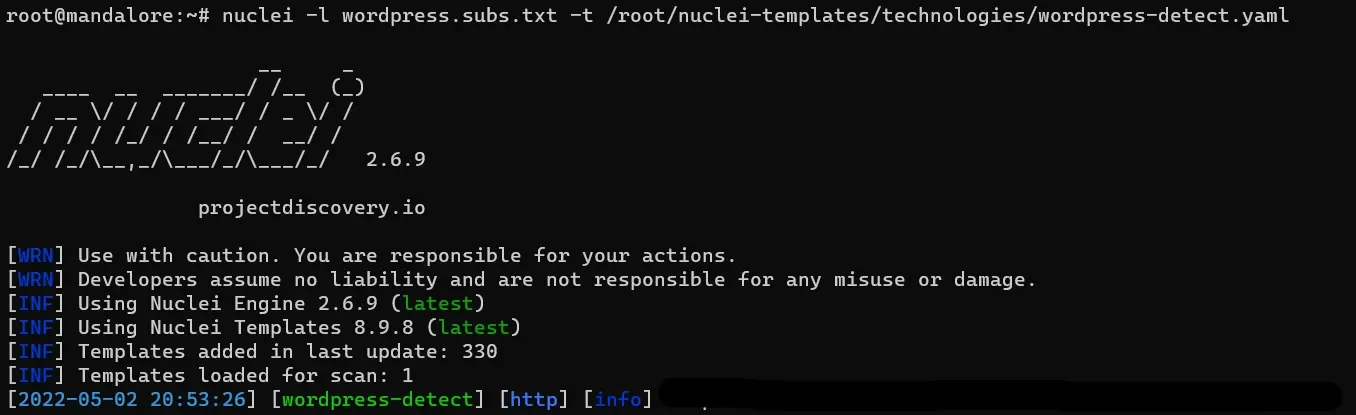
The screenshot shows the console output of Nuclei running the WordPress detection template.
Combining the two methods produces a list of domains hosting WordPress.
Step 3: Checking each domain with WPScan
WPScan is the tool used to check whether a given WordPress installation has vulnerabilities. It is run as:
wpscan --url <domain> --api-token <your API-Token>
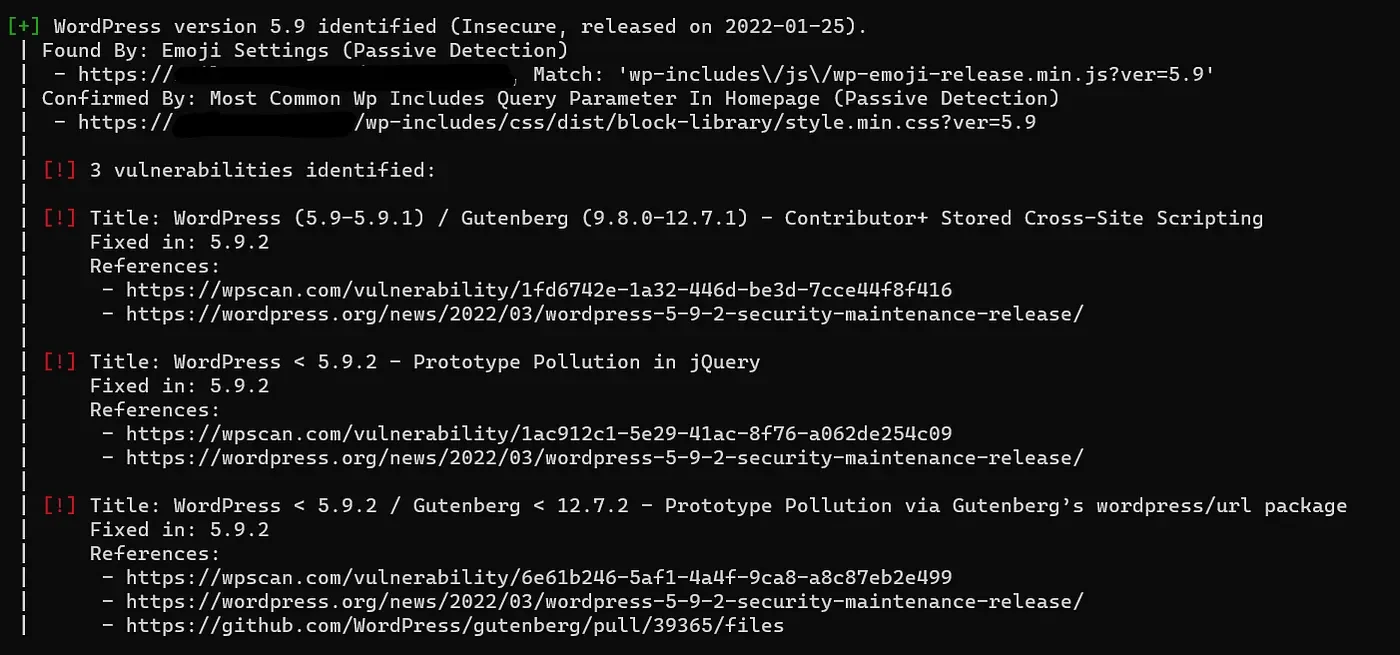
The screenshot shows the console output of WPScan. The author stresses one point: if WPScan displays vulnerabilities, check manually whether they can actually be exploited, because a lot of vulnerabilities require, for example, an admin account.
Step 4: Reporting
Using this approach the author identified and reported multiple vulnerabilities to the Dutch Government. The reward was a letter and a T-shirt.
Root cause
The report frames the issue as old components with known vulnerabilities: WordPress installations, and by implication their plugins, running versions or components with publicly known flaws. The author does not analyse any specific vulnerable component, so the precise root cause of each finding is not described.
Impact
The impact depends entirely on which vulnerability WPScan reports for a given installation. The author's own caveat is the key limit: many of these vulnerabilities require an admin account to exploit, so a scanner hit is not proof of exploitability. The author does not state what the reported vulnerabilities allowed an attacker to do, to whom, or under which conditions beyond that.
Fix
The report does not describe what was changed on the affected systems. The timeline records that the issues were fixed on 04.01.2022.
Variants to test
The same workflow generalises to any large wildcard scope with a public domain list:
- Run the WordPress dork against each in-scope domain, for example
site:<domain> "Proudly powered by WordPress”. A positive result is a search hit on a page carrying the WordPress footer credit, which gives you a candidate host. - Run the Nuclei detection template over a list of subdomains with
-land-t. A positive result is the template matching a host, which adds it to the WordPress list. - Run WPScan with an API token against each candidate. A positive result is a reported vulnerability, but treat it as a lead only: verify manually whether it is reachable without privileged access, since many require an admin account.
Timeline
- Multiple vulnerabilities reported: 19.11.2021
- Initial response and triaged: 19.11.2021
- Fixed and T-shirt awarded: 04.01.2022
What happened, in plain words
A computer science student from Germany, who signs himself Max, went looking for security holes in websites run by the Dutch Government. He was new to this kind of work, so he deliberately aimed at the easiest kind of problem to find: websites built with an old, out-of-date piece of software called WordPress, where the version or one of its add-ons has a publicly known weakness. He found several such problems, reported them through the government's responsible disclosure programme, and received a letter and a T-shirt as thanks.
The rest of this article walks through exactly how he did it, step by step, explaining every term along the way. If you can use a browser, you can follow the reasoning.
The programme he reported to
The Dutch Government runs what is called a responsible disclosure programme, often shortened to VDP (Vulnerability Disclosure Policy). Think of it as a formal mailbox for security problems: if you find a flaw in one of their websites, you tell them privately, they fix it, and nobody gets in trouble for looking. It is not a commercial bug bounty platform, so there is no cash prize, but there is recognition.
The author points to the public page describing the programme:
Two things make this programme attractive for someone starting out. First, it is not listed on the big bug bounty platforms HackerOne or Bugcrowd, so fewer people are hunting there: less competition. Second, the scope is very large. Scope means the list of systems you are allowed to test. Testing something outside the scope is not allowed, so the scope list is the boundary of the game.
A curated list of domains that are in scope is published in a public gist (a small snippet-hosting page on GitHub):
https://gist.github.com/random-robbie/[redacted]
The author suggests using that list as the starting point for recon, short for reconnaissance: the information-gathering phase before you try anything, like studying a map before a hike.
The kind of weakness he was looking for
The category is old components with known vulnerabilities. A website is rarely built from scratch; it is assembled from ready-made pieces, and each piece has a version number. When a security researcher finds a flaw in one of those pieces, the flaw becomes public knowledge, and the maker releases a newer version that fixes it. Anyone who keeps running the old version is now exposed to a weakness that is written down in public databases. It is like a lock model whose master key has been published: the lock still works, but everyone knows how to open it.
WordPress is one such piece. It is a CMS, a Content Management System: software that lets people publish and edit a website without writing code, the way a word processor lets you write a document without knowing how files are stored. WordPress is extremely popular, and it can be extended with plugins, small add-on programs that add features such as contact forms or image galleries. Each plugin is another component with its own version and its own history of flaws.
The author's reasoning: WordPress is a great CMS, but in his experience many WordPress sites are vulnerable, especially when many plugins are installed. So his plan had two parts:
- Find as many in-scope domains as possible that are running WordPress.
- Check every one of those domains for some sort of known vulnerability.
The tools he used
- Google search, used in a technique called Google-Dorking: crafting special search queries that make Google reveal pages matching a pattern, rather than pages matching a topic. A catalogue of such queries is the Google Hacking Database at https://www.exploit-db.com/google-hacking-database.
- Nuclei, from Project Discovery (https://github.com/projectdiscovery/nuclei). It is a template-based vulnerability scanner: instead of hard-coding every check, it runs small recipe files (templates) that describe what to look for. Here it is used not to find flaws but simply to recognise which sites are WordPress.
- WPScan (https://wpscan.com/wordpress-security-scanner), a scanner specialised in WordPress. It is free for non-commercial use. You register a free account to get an API token.
An API (Application Programming Interface) is a way for one program to ask another program for information or action, without a human clicking anything. An API token is a long secret string that identifies you to that API, like a membership card you show at the door: it proves the request comes from a registered account. WPScan uses the token to look up its vulnerability database, and the author says the token unlocks the tool's full potential, because with it WPScan will check and display possible vulnerabilities.
Step 1: finding WordPress sites with Google
A search phrase that identifies WordPress installations is:
"Proudly powered by WordPress”
Line by line: the quotation marks tell Google to look for that exact phrase, in that order, rather than for the individual words anywhere on a page. The phrase itself is the default credit line that WordPress themes often print in the footer of a page. So any page that matches is very likely a WordPress site, and the search result gives you its address.
When the scope is a wildcard, meaning a whole family of addresses is allowed (for example every subdomain of one domain), the phrase can be combined with Google's site: operator, which restricts results to one domain or domain family. The author uses the US Department of Defence programme's wildcard *.mil as his example:
site:*.mil "Proudly powered by WordPress”
Line by line: site:*.mil means "only show me pages whose address ends in .mil, including any subdomain". The * is the wildcard standing for "anything". The quoted phrase then filters those pages down to the ones carrying the WordPress footer credit. The result is a list of .mil hosts that run WordPress.
You can repeat this for every domain in the gist, which surfaces further subdomains hosting WordPress.
Step 2: finding WordPress sites in bulk with Nuclei
Google is fine for a handful of domains, but if you already have a long list of domains, a scanner is much faster. Nuclei can take that list and check each entry against a WordPress detection template. The command was:
nuclei -l wordpress.subs.txt -t /root/nuclei-templates/technologies/wordpress-detect.yaml
Line by line:
nucleiis the name of the program being run.-l wordpress.subs.txtgives it a list of targets: the filewordpress.subs.txtcontains one domain per line. The-lflag is short for list.-t /root/nuclei-templates/technologies/wordpress-detect.yamlgives it the template to run: a file calledwordpress-detect.yamlsitting in a folder of templates. The-tflag is short for template. The.yamlending is just the file format the recipe is written in.
The screenshot shows the console output of Nuclei running the WordPress detection template.
Combining the Google approach and the Nuclei approach gives a list of domains that host WordPress.
Step 3: checking each WordPress site with WPScan
Now that there is a list of WordPress sites, each one has to be checked for known weaknesses. That is what WPScan does. It was run like this:
wpscan --url <domain> --api-token <your API-Token>
Line by line:
wpscanis the program being run.--url <domain>tells it which site to scan. The angle brackets are a placeholder: you replace<domain>with the actual address, for example the host you found in step 1 or 2.--api-token <your API-Token>supplies the secret string from your free WPScan account, so the tool can query its vulnerability database. Again the angle brackets are a placeholder for your own value.
The screenshot shows the console output of WPScan.
The author stresses one point here. If WPScan displays vulnerabilities, check manually whether they can actually be exploited. A scanner reports that a component has a known flaw; it does not prove that the flaw can be reached on this particular site. Many of these vulnerabilities require, for example, an admin account to trigger, and an outside attacker does not have one. Treat a scanner hit as a lead to investigate, not as a confirmed break-in.
Step 4: reporting
Using this approach, the author identified and reported multiple vulnerabilities to the Dutch Government. The reward was a letter and a T-shirt.
Why the sites were vulnerable
The pattern behind every finding is the same: old components with known vulnerabilities. The WordPress installation, or one of its plugins, was running a version with a publicly documented flaw. The author does not analyse any individual vulnerable component, so the precise cause of each finding is not described.
What the impact could be
The impact depends entirely on which vulnerability WPScan reported for a given installation. The author's own caveat is the key limit: many of these vulnerabilities need an admin account to exploit, so a scanner hit is not proof that an outsider could do damage. Beyond that, the report does not say what the reported vulnerabilities would have allowed an attacker to do, to whom, or under which conditions.
How it was fixed
The report does not describe what was changed on the affected systems. The timeline records that the issues were fixed on 04.01.2022.
Doing the same on another programme
The same workflow works on any large scope with a public list of domains:
- Run the WordPress search phrase against each in-scope domain, for example
site:<domain> "Proudly powered by WordPress”. A hit is a page carrying the WordPress footer credit, which gives you a candidate host. - Run the Nuclei detection template over a list of subdomains with
-land-t. A match adds that host to your WordPress list. - Run WPScan with an API token against each candidate. A reported vulnerability is a lead only: verify manually whether it can be reached without privileged access, since many require an admin account.
Timeline
- Multiple vulnerabilities reported: 19.11.2021
- Initial response and triaged: 19.11.2021
- Fixed and T-shirt awarded: 04.01.2022
Glossary
- API: a way for one program to request information or actions from another program, without a human clicking through a website.
- API token: a long secret string that identifies your account to an API, like a membership card shown at the door.
- Bug bounty platform: a website such as HackerOne or Bugcrowd where organisations list programmes and pay rewards for security reports.
- CMS (Content Management System): software that lets people publish and edit a website without writing code, such as WordPress.
- Component: a ready-made piece of software a website is assembled from, each with its own version number.
- Google-Dorking: crafting special Google search queries that make the search engine reveal pages matching a pattern.
- Google Hacking Database: a public catalogue of such search queries.
- Gist: a small public snippet-hosting page on GitHub, often used to share lists.
- Nuclei: a template-based vulnerability scanner that runs small recipe files describing what to look for.
- Old components with known vulnerabilities: software pieces running versions whose flaws are publicly documented and already fixed in newer releases.
- Plugin: an add-on program that extends a CMS with extra features, such as contact forms or galleries.
- Recon (reconnaissance): the information-gathering phase before testing, like studying a map before a hike.
- Responsible disclosure programme / VDP (Vulnerability Disclosure Policy): a formal, private channel for reporting security flaws to an organisation so they can fix them.
- Scope: the list of systems you are allowed to test; anything outside it is off limits.
- Template: a small recipe file used by a scanner to describe a single check.
- Triaged: reviewed by the receiving team and accepted as a valid report to work on.
- Wildcard: a symbol (often
*) standing for "anything", used to cover a whole family of addresses such as every subdomain of a domain. - WordPress: a very popular CMS used to build and run websites.
- WPScan: a scanner specialised in WordPress that reports known vulnerabilities in the CMS and its plugins.



