Account Takeover Due to Cognito Misconfiguration Earns Me €xxxx
The application used AWS Cognito for authentication and fetched user data from an API based on the email address in the access token. An attacker could change their own email to a case-variant of a victim's email, then refresh their token so the email claim matched the victim's, allowing them to access the victim's account details.
 Published on medium.com
I was looking for a target late at night. I find a target with a medium scope.
The full write-up lives on its author's site
It belongs to its author, so we link to it rather than copy it. The other two tabs are our own rewrites, checked against it.
Context
Late one night I picked a target with a medium scope and started reconnaissance. The application used AWS services, and specifically Amazon Cognito, for customer identity and access management. The application workflow fetched data from execute-api by email: the API decoded the token, grabbed the email claim, and used it to look up the user's details.
Cognito User Pools let developers add sign-up and authentication workflows quickly, and the security of the whole application then depends on how those pools are configured. I had previously worked through an exercise on misconfigured Cognito attributes, which is what put the idea in my head:
[## Misconfigured AWS Cognito Attributes | Kontra
With Amazon Cognito "User Pools", developers can quickly add authentication features and workflows including sign up…
application.security](https://application.security/free-application-security-training/kontra-owasp-aws-top-10-misconfigured-aws-cognito-attributes)
Setup
I created two accounts in the target's Cognito user pool:
Attacker : [redacted] : [redacted]
The tooling was the AWS CLI, used against the pool's region with access tokens and refresh tokens taken from the application. The commands below use $REGION, $TOKEN, $CLIENT_ID and $REFRESH_TOKEN as placeholders for those values.
Finding it
While looking into the application workflow, I noticed that the data was fetched from execute-api by email. That made the email attribute the interesting part of the identity: if the email attached to a token could be made to point at another user, the API would presumably serve that other user's data.
To confirm how the pool behaved, I grabbed an access token and asked Cognito for the user details from the AWS CLI:
aws cognito-idp get-user --region $REGION --access-token $TOKEN
I got the details as expected.
Exploitation
Step 1: try to take over the victim's email
With a new token for the attacker account ([redacted]), I tried to change its email to the victim's address:
aws cognito-idp update-user-attributes --region $REGION --access-token $TOKEN --user-attributes Name=email,Value=[redacted]
Cognito refused:
An error occurred (AliasExistsException) when calling the UpdateUserAttributes operation: An account with the given email already exists.
So a straight email change was not possible while the address was already registered.
Step 2: exploit case-insensitivity
The Cognito email structure is case-insensitive. I changed the attacker's email to a differently cased version of the victim's address:
aws cognito-idp update-user-attributes --region $REGION --access-token $TOKEN --user-attributes Name=email,Value=[redacted]
This time the update succeeded, and the attacker's email was now the victim's address.
Step 3: the stale claim in the token
There was still a problem: the API was not fetching the victim's details. I rechecked the user record:
aws cognito-idp get-user --region $REGION --access-token $TOKEN
The email had changed, but the application still could not retrieve the victim's information. I decoded the token in jwt.io and found that the email inside it was still the attacker's email. Since execute-api decodes the token, grabs the email and then fetches the details, the old claim was what mattered, not the updated user record.
Step 4: mint a fresh token from the refresh token
I wanted a token that carried the victim's email, but JWT signature validation was a problem: I could not simply edit the claim. After reading the documentation, I used the refresh token to have Cognito issue a new token through the AWS CLI:
aws cognito-idp initiate-auth --region $REGION --auth-flow REFRESH_TOKEN_AUTH --client-id $CLIENT_ID --auth-parameters REFRESH_TOKEN=$REFRESH_TOKEN
I got the new access token, checked it in jwt.io, and the email was now [redacted].
Step 5: access the victim's data
With the new token I tried to access account details through execute-api, and it worked. I could now access all the details about the victim.
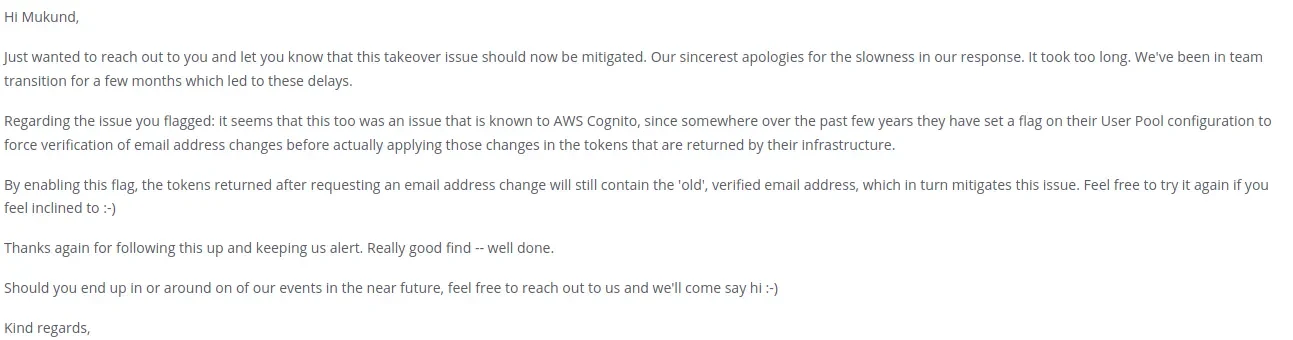
When it was reported to the appropriate bug bounty program, it was quickly triaged and received a €XXXX bounty.
Root cause
Cognito treats email addresses case-insensitively for uniqueness, but the application's API trusted the email claim in the token as an exact identifier. Changing the case of the address let the attacker's account hold an address that collided with the victim's, and because the API looked users up by the email string in the token, a token carrying the victim's address resolved to the victim's data. The API looked users up by the email string in the token rather than by a stable identifier. Editing the claim by hand was not possible because of JWT signature validation, so a new token had to be issued by Cognito.
Impact
An attacker who can register an account and change its email attribute could take over another user's account in the application, reading all of that user's details through execute-api.
Fix
The report does not describe what was changed to fix the issue. The appropriate fix is to stop using the email claim as the lookup key: resolve users by the immutable Cognito identifier (sub) from the verified token, and treat email as a display attribute only. Restricting self-service email changes, or requiring verification of the new address before it is used, would also remove the collision path.
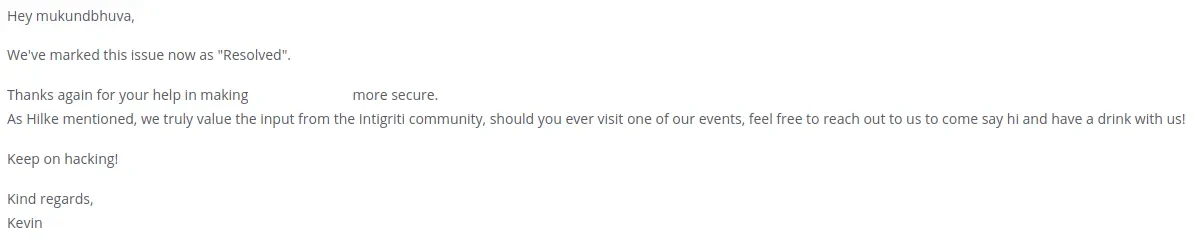
Timeline

Variants to test
- Change your own email to a differently cased version of another user's address and check whether the update succeeds. A positive result is a successful
update-user-attributescall where the plain address returnedAliasExistsException. - Refresh your token after the change and decode it. A positive result is a new, validly signed token whose email claim is the victim's address.
- Call the application's API with that token. A positive result is a response containing another user's data.
- Look for other attributes the API trusts from the token (username, phone number, custom attributes) and test whether they can be changed to collide with another account.
- Test whether the API accepts tokens from a different client or pool, or tokens whose claims were changed, to see whether signature and issuer validation are enforced.
What happened, in plain words
A security researcher found a way to log in as another user on a website that used Amazon Cognito, an Amazon service that many apps use to handle sign-up and login. It came down to one small detail: Cognito treated email addresses as case-insensitive when checking whether an address was already taken, while the API looked users up by the email string in the token.
Here is the story in everyday terms. Imagine a members' club where the person at the door checks your name badge, not your face. If you can get a badge printed with someone else's name on it, the door staff will let you in as that person. In this report, the "badge" is a token, a small piece of text the app hands you after you log in, and the "name" on it is your email address. The researcher managed to get a badge printed with the victim's email address on it, and the app then showed him the victim's data.
The impact is called account takeover: getting into someone else's account without their permission. The researcher rated it critical. The report was triaged by the bug bounty program and paid a bounty of €XXXX.
Photo by Arget on Unsplash
The pieces you need to know
Before walking through the steps, here are the ideas that come up, explained from scratch.
An API is the part of a website that serves data to the page rather than serving a page itself. When you scroll through a shopping site and the product list loads without the whole page reloading, your browser is asking an API for that list. Think of a restaurant: the menu and the dining room are the website, and the kitchen door where the waiter passes your order is the API. You do not go into the kitchen yourself; you ask, and something comes back.
execute-api is the name of the AWS service that runs APIs. In this report, the application's data was fetched from execute-api by email, meaning the API looked at the email address it was given and used it to decide whose details to return.
Amazon Cognito is an AWS product that handles accounts for an application: sign-up, login, password resets, and the tokens that prove who you are. Developers use it so they do not have to build all of that themselves. A User Pool is one collection of user accounts inside Cognito, roughly like one membership list for one application.
A token is a short string of characters that the login system gives you after you sign in, and that you show to the API on every later request to prove who you are. It works like a cloakroom ticket: you hand in your coat, you get a ticket, and the ticket is what gets your coat back. You do not have to prove your identity again each time; the ticket does it for you.
A JWT (JSON Web Token) is a particular kind of token. It contains a small block of data, called claims, such as your email address or a user identifier, plus a signature. The signature is a cryptographic stamp that lets the API check the token really came from Cognito and was not edited by anyone in between. If you change even one character inside a JWT, the signature no longer matches and the API should reject it. That is why the researcher could not simply edit the email inside his token by hand.
An access token is the token you send with requests to the API. A refresh token is a longer-lived token whose only job is to ask Cognito for a fresh access token when the old one expires. Think of the access token as a day pass and the refresh token as the membership card you use at the desk to get a new day pass.
The AWS CLI is a program you run in a terminal (a text window where you type commands) to talk to Amazon's services directly, without using a website. The researcher used it to send requests to Cognito by hand, which is useful because it lets you see exactly what the service says back.
Reconnaissance means looking around a target before attacking it: what services it uses, how its pages talk to its API, what the data looks like. It is the equivalent of walking around a building and noting which doors exist before trying any of them.
A bug bounty program is a scheme where a company invites outside researchers to test its systems and pays them for reporting real problems responsibly instead of exploiting them.
Account takeover means getting access to someone else's account. Severity is the rough seriousness rating; here the researcher called it critical.
How the researcher got there
Late one night the researcher picked a target with a medium scope. Scope is the list of systems a program allows you to test; medium scope means a moderate set of them. During reconnaissance he noticed the target used AWS services, and specifically Cognito, for customer identity and access management, that is, for handling who its users are and how they log in.
He remembered an exercise he had done before on misconfigured Cognito attributes. Attributes are the fields stored about a user, such as email, phone number or name. The exercise is linked in the report:
[## Misconfigured AWS Cognito Attributes | Kontra
With Amazon Cognito "User Pools", developers can quickly add authentication features and workflows including sign up…
application.security](https://application.security/free-application-security-training/kontra-owasp-aws-top-10-misconfigured-aws-cognito-attributes)
That memory is what gave him the idea to look at how this particular pool was configured.
Setting up two accounts
To test safely, he created two accounts in the target's Cognito user pool: one to act as the attacker, one to act as the victim. Both used his own mailbox with a plus suffix, a common trick where [redacted] still delivers to [redacted] but counts as a separate address to the application.
Attacker : [redacted] : [redacted]
Line by line: the first line names the attacker account, the one the researcher controls and will try to abuse. The second names the victim account, the one he will try to reach without permission. tld.me is a placeholder domain, and the +attacker and +victim parts are what make the two addresses different to the application while both landing in the same real inbox.
All the commands below were run with the AWS CLI against the pool's region, using tokens taken from the application. In the commands, $REGION, $TOKEN, $CLIENT_ID and $REFRESH_TOKEN are placeholders for those values, the way a form might say "insert your name here".
Finding the weak point
While studying how the application worked, the researcher noticed that data was fetched from execute-api by email. That single observation is the heart of the whole report. If the API decides whose data to return by reading the email address out of your token, then whoever controls the email address in a token controls whose data comes back.
To confirm how the pool behaved, he took an access token and asked Cognito directly for the user details:
aws cognito-idp get-user --region $REGION --access-token $TOKEN
Line by line: aws is the AWS CLI program. cognito-idp selects the Cognito identity service. get-user is the command that asks "tell me about the user this token belongs to". --region $REGION says which AWS region the pool lives in, because AWS runs in many separate locations. --access-token $TOKEN supplies the token that identifies the user. The answer came back as expected, which confirmed the token worked and the tooling was pointed at the right place.
Trying to take over the victim's email
Step 1: the direct attempt
With a fresh token for the attacker account, he tried the obvious thing: change the attacker's email to the victim's address.
aws cognito-idp update-user-attributes --region $REGION --access-token $TOKEN --user-attributes Name=email,Value=[redacted]
Line by line: update-user-attributes is the command that changes fields on the user the token belongs to. --user-attributes Name=email,Value=[redacted] says which field to change (email) and what to set it to (the victim's address). Everything else is the same as before: the region and the attacker's token.
Cognito refused:
An error occurred (AliasExistsException) when calling the UpdateUserAttributes operation: An account with the given email already exists.
In plain words: Cognito said no, because that email address is already in use by another account. An alias here means an alternative name that identifies an account, and Cognito will not let two accounts share one. So a straight swap was blocked.
Step 2: the case trick
The researcher knew that Cognito treats email addresses as case-insensitive when checking for duplicates. In other words, [redacted] and [redacted] are considered the same address for the purpose of "is this taken?". But the application's API compared the email as an exact string, where capital and small letters are different characters.
So he changed the attacker's email to a version of the victim's address with different capitalisation:
aws cognito-idp update-user-attributes --region $REGION --access-token $TOKEN --user-attributes Name=email,Value=[redacted]
Line by line: this is the same command as before, with one change: the value now starts with MUKUND in capitals instead of mukund. The update was accepted, and the attacker's account now held the victim's address, just written with different capital letters.
This is the misconfiguration. The pool allowed a user to set an email that collided with another account's address as long as the letters were cased differently.
Step 3: the token still says the old thing
There was still a problem: the API was not fetching the victim's details. He rechecked the user record:
aws cognito-idp get-user --region $REGION --access-token $TOKEN
Line by line: the same "tell me about this user" command as before. The email on the account had changed, but the application still could not retrieve the victim's information. Why?
He decoded the token in jwt.io, a website that shows you the contents of a JWT without needing any special tools. The email inside the token was still the attacker's original address. That is because a token is a snapshot: it was issued before the change, and it carries the claims as they were at that moment. The API reads the email from the token, not from the live user record, so the old address was what mattered. The account had a new email, but the badge still had the old name printed on it.
Step 4: getting a new badge from Cognito
He now wanted a token that carried the victim's address. Editing the token by hand was not an option, because of JWT signature validation: the signature would no longer match and the API would reject it. The signature is what stops anyone from simply rewriting the claims inside a token.
After reading the documentation, he used the refresh token to ask Cognito to issue a new access token:
aws cognito-idp initiate-auth --region $REGION --auth-flow REFRESH_TOKEN_AUTH --client-id $CLIENT_ID --auth-parameters REFRESH_TOKEN=$REFRESH_TOKEN
Line by line: initiate-auth starts a login-style exchange with Cognito. --auth-flow REFRESH_TOKEN_AUTH says the exchange is of the refresh kind, meaning "I already have a refresh token, give me a new access token". --client-id $CLIENT_ID identifies which application is asking, because a pool can serve several apps. --auth-parameters REFRESH_TOKEN=$REFRESH_TOKEN supplies the refresh token itself. The response contained a new access token.
He checked the new token in jwt.io and the email claim was now [redacted]. The badge was genuine; it just had the wrong name on it.
Step 5: reading the victim's data
With the new token he called the application's API through execute-api, and it worked. The API decoded the token, read the email, looked up the user with that email, and returned the details. Since the email was now the victim's, the details were the victim's too. He could access all of the victim's information.
When the issue was reported to the appropriate bug bounty program, it was quickly triaged and paid a €XXXX bounty. Triaged means the program's team confirmed the report was valid and passed it on for fixing.
Why it worked
The root cause is a mismatch between two systems that both look at the same email address but compare it differently. Cognito treats email addresses as case-insensitive for uniqueness, so [redacted] and [redacted] are the same address to it. The application's API, however, used the email string in the token as an exact identifier. Changing the case let the attacker's account hold an address that collided with the victim's, and because the API looked users up by that string, a token carrying the victim's address resolved to the victim's data.
The API looked users up by the email string in the token rather than by a stable identifier. Editing the token by hand was not possible because of JWT signature validation, so a new token had to be issued by Cognito.
Who was affected
An attacker who can register an account and change its email attribute could take over another user's account in the application, reading all of that user's details through execute-api.
The fix
The report does not describe what was changed to fix the issue. The appropriate fix is to stop using the email claim as the lookup key: resolve users by the immutable Cognito identifier (sub) from the verified token, and treat email as a display attribute only. Restricting self-service email changes, or requiring verification of the new address before it is used, would also remove the collision path.
Timeline
Timeline
Things worth testing on other targets
- Change your own email to a differently cased version of another user's address and see whether the update succeeds. A positive result is a successful
update-user-attributescall where the plain address returnedAliasExistsException. - Refresh your token after the change and decode it. A positive result is a new, validly signed token whose email claim is the victim's address.
- Call the application's API with that token. A positive result is a response containing another user's data.
- Look for other attributes the API trusts from the token, such as username, phone number or custom attributes, and test whether they can be changed to collide with another account.
- Test whether the API accepts tokens from a different client or pool, or tokens whose claims were changed, to see whether signature and issuer validation are enforced.
Glossary
- Access token: the token you send with requests to an API to prove who you are.
- Account takeover: gaining access to someone else's account without their permission.
- Alias: an alternative name that identifies an account, such as an email address.
- API: the part of a service that returns data to a page or program on request, rather than a full web page.
- Attribute: a field stored about a user, such as email, phone number or name.
- AWS: Amazon Web Services, Amazon's cloud platform.
- AWS CLI: a program run in a terminal to send commands to AWS services.
- Bug bounty program: a scheme where a company pays outside researchers for reporting real security problems.
- Claim: a piece of data inside a token, such as an email address or user identifier.
- Client ID: an identifier for the application that is asking Cognito for a token.
- Cognito: Amazon's service for handling user sign-up, login and tokens.
- Critical: a severity rating meaning the issue is very serious.
execute-api: the AWS service that runs APIs.- JWT: JSON Web Token, a token containing claims plus a cryptographic signature.
- jwt.io: a website that decodes and displays the contents of a JWT.
- Misconfiguration: a setting left in a state that weakens security.
- Reconnaissance: looking around a target to learn how it is built before testing it.
- Refresh token: a longer-lived token used to obtain new access tokens.
- Region: the AWS location where a service runs.
- Scope: the list of systems a bug bounty program allows you to test.
- Severity: a rating of how serious a security issue is.
- Signature: a cryptographic stamp on a token that lets the receiver check it was not edited.
sub: the stable, unique identifier for a user in Cognito.- Token: a short string issued after login that proves your identity to an API.
- Triaged: reviewed and confirmed as valid by a bug bounty program.
- User Pool: a collection of user accounts inside Cognito.
- Vulnerability: a weakness in a system that can be abused to do something it should not allow.