HTML injection in email sent by romit.io
The nickname field was not sanitised before being inserted into emails sent by romit.io, so a user could set a nickname containing HTML. An attacker could then send emails containing injected links or images to other users.

- Triaged in 12 days
- Fixed in 40 days
- Paid in 40 days
- Disclosed after 7 months
Issue It is possible for the attacker to inject arbitary HTML code in the email sent by romit.io as "<" in username is not sanitized when sending mail to the user. This can be used to redirect user to unwanted websites or spam from romit.io
PoC
- Go to settings in your account and change the Nickname to some HTML like "> <a href="google.com"> OR "><img src="sth bad" OR <!--
- Save your settings.
- Share your wallet with any user by providing phone number.
Thanks crab
Attachments
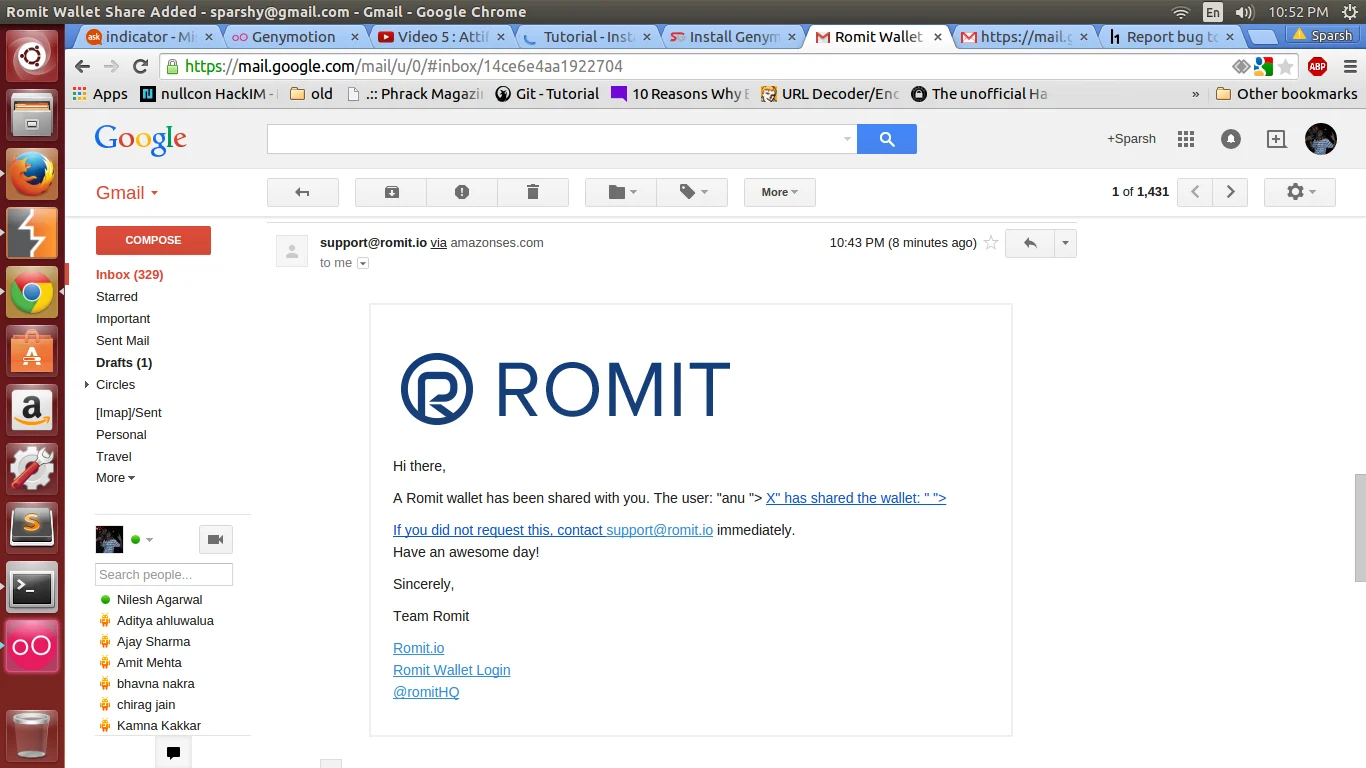
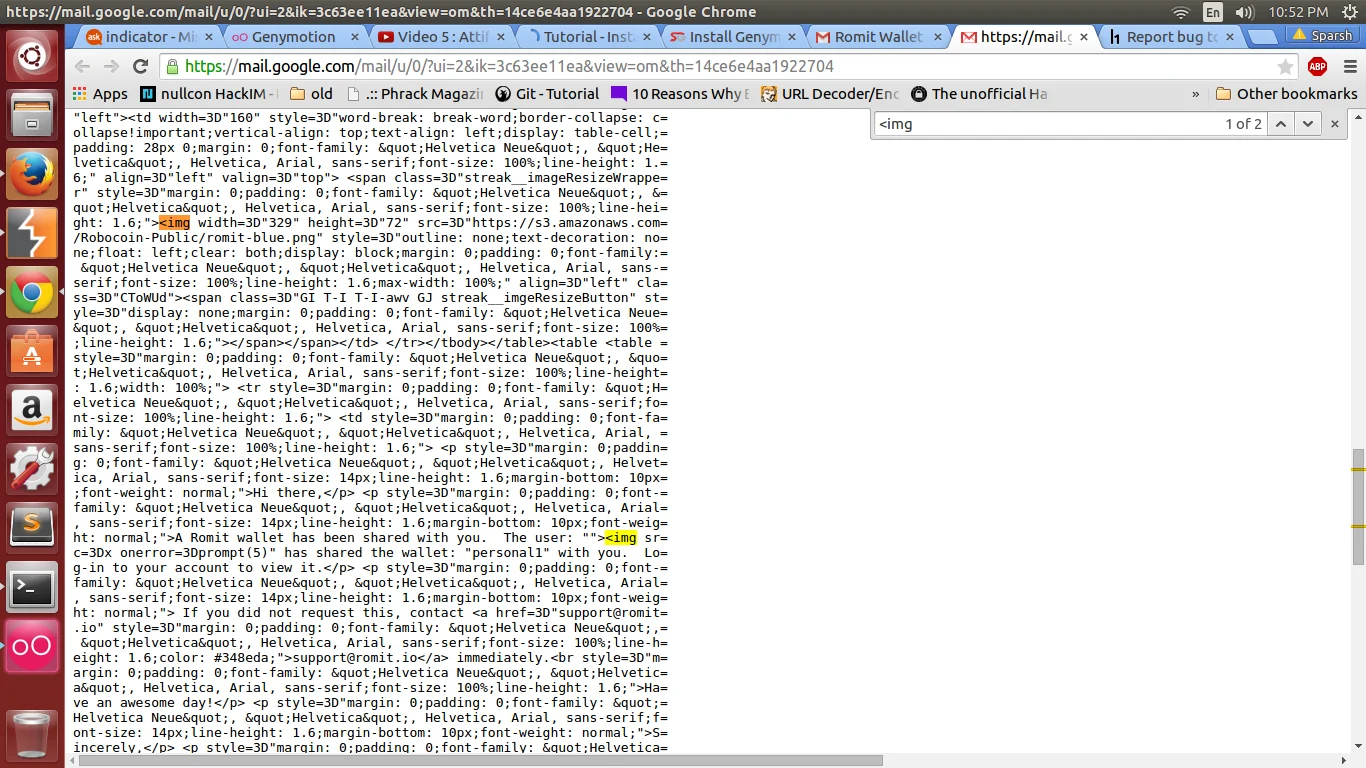
What the report shows
The target is romit.io, a wallet service, and the feature involved is the email that the service sends to a user when a wallet is shared with them. The researcher found that the nickname field on the account settings page is not sanitised before it is placed into that email, so an attacker who controls their own nickname can inject HTML into a message that romit.io sends to somebody else.
The report describes the issue in one sentence: arbitrary HTML can be injected because the < character in a username is not sanitised when mail is sent to the user. The stated consequences are redirecting a recipient to unwanted websites, or using romit.io as a source of spam.
The proof of concept is three steps:
- Go to settings in your account and change the Nickname to some HTML, for example:
"> <a href="google.com">
or:
"><img src="sth bad"
or:
- Save your settings.
- Share your wallet with any user by providing a phone number.
The payloads are deliberately fragmentary. The first two begin with a closing double quote and a closing angle bracket, which suggests the nickname is interpolated into an existing HTML attribute in the email template and the attacker is breaking out of it. The third, an HTML comment opener, is a way to comment out the remainder of the template. The report does not show the template itself, so the exact context the nickname lands in is not documented.
The two attachments show the result in the delivered email. The report includes two attachments.
Root cause
The likely cause is output encoding applied in the wrong context, or not applied at all. The nickname is user-controlled data that is concatenated into an HTML email body. If the value is inserted between tags, HTML-encoding the angle brackets would be enough. If it is inserted inside an attribute value, as the leading "> in the payloads implies, the value also needs attribute-context encoding, and the quote character must be escaped. The report only states that < is not sanitised; the attribute breakout is inferred from the payloads.
Impact
The report limits itself to two outcomes: redirecting the recipient to unwanted websites and sending spam that appears to come from romit.io. The mail is sent by the service itself, so injected links appear to come from romit.io. The report does not demonstrate script execution, credential theft or any interaction with wallet funds, and it does not claim them.
How this kind of bug works
HTML injection happens when untrusted data is written into an HTML document without context-appropriate encoding. The browser (or mail client) parses the result as markup, so characters that should have been literal text become tags, attributes or comments. The classic entry points are profile fields, display names, filenames, support-ticket subjects and any value that is later rendered in a page, a PDF or an email.
Email is a particularly common home for this bug because templates are often built by string concatenation in a mailer, separate from the view layer that has auto-escaping. A templating engine that escapes by default in web views may not be used for the mail body at all, or the developer may mark the value as safe to preserve formatting.
The distinction from cross-site scripting matters. HTML injection is the broader primitive: injecting markup. XSS is the case where injected markup executes script in a security context. In a webmail client, script is normally stripped, so the realistic impact is content spoofing, phishing links and layout manipulation. In a browser-rendered context the same bug can escalate to XSS.
The defences are contextual output encoding (HTML-entity encoding for text nodes, attribute encoding including quotes for attribute values), a strict Content Security Policy for the web context, and, for email, avoiding user data in markup positions where it is not needed. Input validation that rejects angle brackets and quotes is a secondary measure, not a substitute for encoding on output.
How to test for it
- Identify every place where a value you control is reflected: profile fields, nicknames, wallet or account names, ticket subjects, and anything that appears in a notification email.
- Set the value to a harmless marker that is unmistakable in source, such as a unique word wrapped in a tag you can recognise, and save it.
- Trigger the feature that sends the email or renders the page, then inspect the raw source of the message rather than the rendered view.
- If the marker appears unencoded, determine the context: text node, attribute value, URL, or inside a script block. Craft the breakout accordingly, closing any quote or tag that surrounds the injection point.
- Confirm with a benign payload that produces visible but harmless markup, and check whether script is filtered.
A positive result is your markup appearing as markup in the delivered message, with the surrounding template intact. Common false positives are values that are encoded in the web view but not in the email, or the reverse; values that appear only in a plain-text part of a multipart message; and payloads that are reflected but inside a context where the client strips them, which still counts as injection but changes the impact you can claim. Always check the raw MIME source, since a rendered preview can hide what was actually sent.
How it is fixed
Apply context-aware output encoding at the point of interpolation, using the mailer's templating engine with auto-escaping enabled rather than string concatenation. Encode quotes as well as angle brackets when the value sits in an attribute. Where the field has no legitimate need for markup, validate it on input as well. Add a Content Security Policy to any web page that renders the same value, and review other templates that use the same field, since a nickname is typically reused across notifications.
Hunting notes
This class hides wherever a stored value is reused in a second rendering context: the web profile page is escaped, but the email, the PDF receipt, the push notification or the admin panel is not. Recon signals include features that generate outbound email (sharing, invitations, receipts, password resets), templates that support rich text, and any field whose value appears in more than one place. Test the least obvious consumer of the data first, because that is where escaping is most often forgotten.
To make the report land, show the raw message source with the injected markup, state the exact field and the exact action that triggers the send, and describe the realistic abuse: a link to an attacker-controlled page presented under the service's branding. Do not overclaim script execution unless you have demonstrated it in a context where script runs.
What happened, in plain words
romit.io is a wallet service: an online place where people keep an account and can share that wallet with someone else. When you share a wallet, romit.io sends an email to the person you shared it with. That email is built by the service itself, so it carries the service's name and looks trustworthy.
The researcher found that the nickname on your account settings page is not cleaned before it is placed into that email. A nickname is just a short display name you choose for yourself. Because the service copies it into the email without checking it, an attacker can put HTML code into their own nickname, and that code ends up inside the email romit.io sends to somebody else.
HTML is the language web pages and HTML emails are written in. It uses angle brackets to mark up structure, for example <a href="..."> for a link or <img> for a picture. Normally those brackets are just text when a person types them. Here they are treated as real markup, which is what makes the bug possible.
The report sums up the issue in one sentence: arbitrary HTML can be injected because the < character in a username is not sanitised when mail is sent to the user. The stated consequences are redirecting the recipient to unwanted websites, or using romit.io as a source of spam.
The proof of concept is three steps:
- Go to settings in your account and change the Nickname to some HTML, for example:
"> <a href="google.com">
or:
"><img src="sth bad"
or:
- Save your settings.
- Share your wallet with any user by providing a phone number.
Why each step matters. Step 1 is where the attacker plants the code: the nickname is stored on the account and will be reused later. Step 2 saves that stored value to the account. Step 3 is the trigger: sharing the wallet is the action that causes romit.io to send the email, and the email is where the stored nickname is inserted.
Look closely at the payloads. The first two start with a closing double quote and a closing angle bracket, ">. That suggests the nickname is dropped into an existing HTML attribute in the email template, and the attacker is closing the attribute and the tag early to start writing their own markup. The third payload, <!--, opens an HTML comment, which is a way to turn the rest of the template into something the mail client ignores. The report does not show the template itself, so the exact spot the nickname lands in is not documented.
The two attachments show the result in the delivered email. The report includes two attachments.
In general, how this kind of bug works
This is called HTML injection. It happens when data that a user controls is written into an HTML document without being encoded for the place it lands in. Encoding means converting characters that have a special meaning in HTML, such as <, > and ", into harmless stand-ins so the browser or mail client shows them as plain text instead of reading them as markup.
A simple comparison: imagine a form letter where a clerk types your name into a blank. If you write "Bob" it reads fine. If you write instructions for the clerk, and the clerk follows them instead of copying them, the letter says something you never intended. Encoding is the rule that says the clerk always copies, never obeys.
Email is a common home for this bug because email templates are often assembled by gluing strings together in the code that sends mail, separately from the web pages that usually escape data automatically. A web page may be safe while the email built from the same field is not.
HTML injection is broader than cross-site scripting, usually shortened to XSS. XSS is the case where injected markup actually runs a script in a security context. Mail clients normally strip scripts, so the realistic impact in email is content spoofing, phishing links and broken layout. In a browser page the same bug can escalate to XSS.
The defences are contextual output encoding: HTML-entity encoding for text, and attribute encoding including quotes when the value sits inside an attribute. A strict Content Security Policy, a browser rule that limits what a page may load or run, helps in the web context. For email, avoid putting user data in markup positions where it is not needed. Rejecting angle brackets and quotes on input is a secondary measure, not a substitute for encoding on output.
In general, how to test for it
- Identify every place where a value you control is reflected: profile fields, nicknames, wallet or account names, ticket subjects, and anything that appears in a notification email.
- Set the value to a harmless marker that is unmistakable in source, such as a unique word wrapped in a tag you can recognise, and save it.
- Trigger the feature that sends the email or renders the page, then inspect the raw source of the message rather than the rendered view.
- If the marker appears unencoded, determine the context: text node, attribute value, URL, or inside a script block. Craft the breakout accordingly, closing any quote or tag that surrounds the injection point.
- Confirm with a benign payload that produces visible but harmless markup, and check whether script is filtered.
A positive result is your markup appearing as markup in the delivered message, with the surrounding template intact. Common false positives are values that are encoded in the web view but not in the email, or the reverse; values that appear only in a plain-text part of a multipart message; and payloads that are reflected but inside a context where the client strips them, which still counts as injection but changes the impact you can claim. Always check the raw MIME source, the actual bytes of the message, since a rendered preview can hide what was really sent.
In general, how it is fixed
Apply context-aware output encoding at the point where the value is inserted, using the mailer's templating engine with auto-escaping enabled rather than string concatenation. Encode quotes as well as angle brackets when the value sits in an attribute. Where the field has no legitimate need for markup, validate it on input as well. Add a Content Security Policy to any web page that renders the same value, and review other templates that use the same field, since a nickname is typically reused across notifications.
In general, where to look
This class hides wherever a stored value is reused in a second rendering context: the web profile page is escaped, but the email, the PDF receipt, the push notification or the admin panel is not. Signals worth watching include features that generate outbound email (sharing, invitations, receipts, password resets), templates that support rich text, and any field whose value appears in more than one place. Test the least obvious consumer of the data first, because that is where escaping is most often forgotten.
To make a report land, show the raw message source with the injected markup, state the exact field and the exact action that triggers the send, and describe the realistic abuse: a link to an attacker-controlled page presented under the service's branding. Do not overclaim script execution unless you have demonstrated it in a context where script runs.
Glossary
- HTML: the markup language used to build web pages and HTML emails, where angle brackets define tags such as links and images.
- HTML injection: writing user-controlled data into an HTML document so that it is read as markup instead of plain text.
- Sanitise: clean user input so that characters with special meaning cannot change the structure of the page or message.
- Encoding (output encoding): converting special characters into harmless stand-ins at the moment they are written out, so they display as text.
- Attribute: a setting inside an HTML tag, such as the address in a link, written as name="value".
- Payload: the piece of input an attacker sends to trigger a bug.
- HTML comment: text between
<!--and-->that a browser or mail client ignores. - Template: a reusable skeleton for a page or email, with blanks filled in from data.
- String concatenation: joining pieces of text together in code, which is how the email body is likely assembled here.
- XSS (cross-site scripting): a bug where injected markup runs a script in a security context, such as a browser page.
- Content Security Policy: a browser rule that restricts what a page may load or run.
- MIME source: the raw form of an email message, including its markup, before a mail client renders it.
- CVSS: a standard scoring system for the severity of a vulnerability.
- Bounty: a payment a company makes to a researcher who reports a valid security bug.




