Potential for financial loss, negative Values for "Buy fee" and "Sell Fee"
The application allowed negative values for Buy Fee and Sell Fee settings, which could cause unexpected transfers. An attacker could set these negative fees to override settings at the location.

- Triaged in 2 hours
- Fixed in 3 hours
- Paid in 3 hours
- Disclosed after 5 months
Issue It is possible to set negative values for the Buy Fee and Sell Fee, which will cause unexpected transfers etc. as these settings override the settings at the location.
PoC
- Go to the Operator Wallet's Settings.
- Click on the users tab.
- Select any user.
- Go to settings tab of that user.
- Select any kiosk.
- Click on Save .Capture the request and set negative values for Sell Fee and Buy Fee.
To verify, next time when you try to view these settings, the server responds with the set negative values.
Thanks crab
Attachments
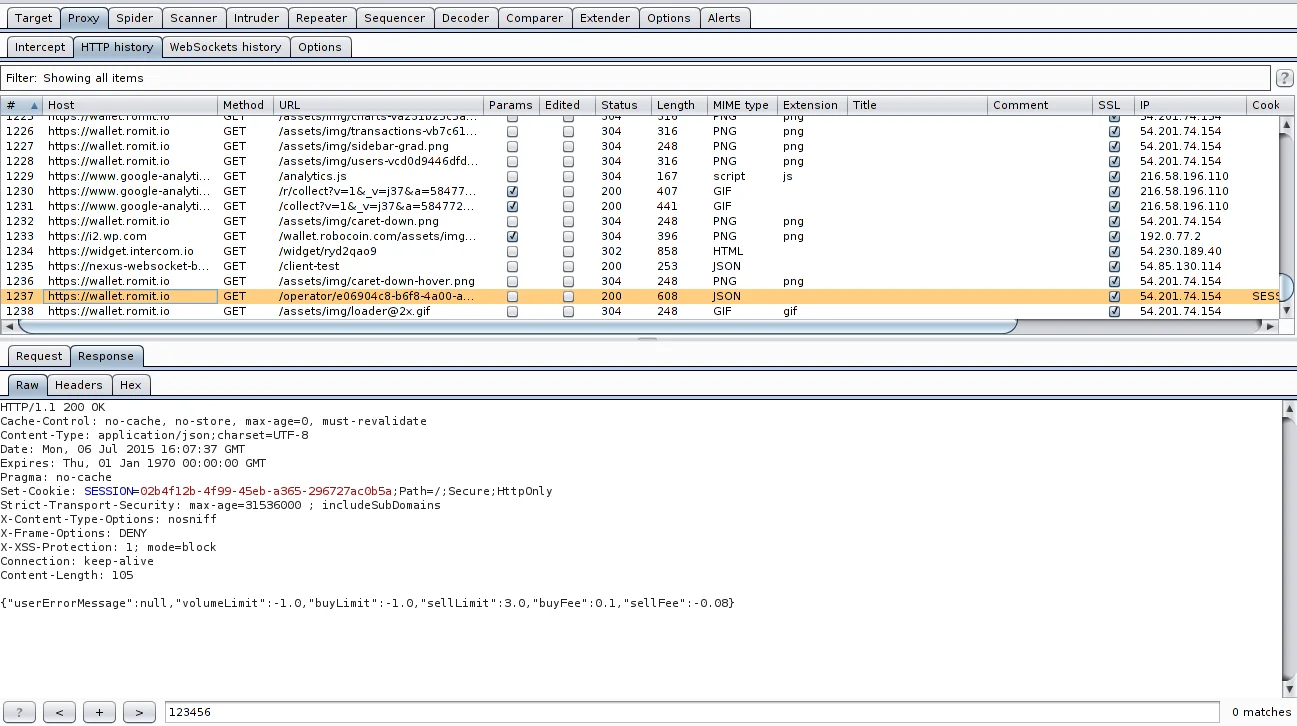
What the report shows
The target is an operator wallet feature with a per-user, per-kiosk settings screen. The researcher found that the Buy Fee and Sell Fee fields accept negative values, and that these values are stored and later returned by the server, overriding the settings configured at the location.
The reproduction steps are short and entirely UI-driven, with a single intercepted request at the end:
- Go to the Operator Wallet's Settings.
- Click on the users tab.
- Select any user.
- Go to settings tab of that user.
- Select any kiosk.
- Click on Save. Capture the request and set negative values for Sell Fee and Buy Fee.
The report does not include the captured request itself, so the endpoint, parameter names and body format are not shown here. The verification is behavioural: when the settings are viewed again, the server responds with the negative values that were set, which confirms the values were persisted rather than rejected or normalised on the way in.
The report describes the consequence as "unexpected transfers etc.", because the per-user settings override the settings at the location. It does not spell out the exact transfer logic or amounts involved.
The report was disclosed on 26 November 2015 and paid a bounty of 250.00 USD. It is classified as a violation of secure design principles. No severity rating or CVSS score is given, and the report does not describe a fix.
Root cause
The likely root cause is missing server-side validation of a numeric field that carries financial meaning. The server accepts whatever value arrives in the save request and persists it. Because the per-user, per-kiosk record takes precedence over the location-level configuration, a negative fee is not just stored, it becomes the effective setting for that scope.
This is a design problem as much as an input-validation one: the fee is treated as an arbitrary number rather than as a value with an invariant (non-negative, and probably bounded above as well).
Impact
With a negative Buy Fee or Sell Fee in place, the report says this causes unexpected transfers etc. The report frames this as "unexpected transfers etc.", which is deliberately vague, and the precise financial effect depends on how the fee is applied downstream, which the report does not document.
The scope is limited by the access needed: the attacker must be able to reach the operator wallet settings and edit a user's kiosk configuration. Whether that is a privileged operator action or something a lower-privileged account can do is not stated. The persistence of the value, confirmed by re-reading the settings, means the effect is not a one-off glitch but a lasting configuration change.
How this kind of bug works
Any field that feeds a monetary calculation is an invariant-bearing value. Fees, rates, prices, quantities and balances normally have a domain: non-negative, within a maximum, a fixed number of decimal places, and consistent with related fields. When the server trusts the submitted number and stores it without checking that domain, the application's later arithmetic operates on values the designers never intended.
Negative amounts are the classic case because they flip the sign of a calculation. A fee subtracted from a balance becomes a credit; a price multiplied by a negative quantity becomes a refund. The bug is common wherever a UI control (a number input with a min attribute, a slider, a formatted text box) creates the impression of a constraint that exists only in the browser. Intercepting and replaying the request bypasses it entirely.
Defences are layered: server-side validation of the domain on every write, a database constraint or model-level validation so no code path can store an out-of-range value, and business-logic checks at the point of use so that even a bad stored value cannot produce an invalid transaction.
How to test for it
Look for features where a number you supply affects money or inventory: fee and commission settings, discount and tax rates, prices, transfer amounts, refund values, quantity fields, and any per-scope override (per user, per terminal, per store) of a global setting.
- Map the write path. Perform the action in the UI, intercept the save request, and note every numeric parameter and its type.
- Establish a baseline. Save a normal value and confirm it is returned unchanged when the settings are read back.
- Probe the domain. Resubmit with a negative value, then with zero, a very large value, a fractional value where integers are expected, and a value with more decimal places than the field should allow. Also try omitting the parameter and sending it as a string.
- Confirm persistence. Re-read the settings through the UI and through any API that returns them. A value that is echoed back is stored; a value that is silently replaced with a default was rejected.
- Follow the value. Trigger the transaction or calculation that consumes the setting and observe the effect on balances, statements or transfer records. This is what turns a validation gap into a demonstrable impact.
A positive result is a value outside the intended domain that survives the round trip and changes downstream behaviour. Common false positives: the server accepts the input but clamps it before storage (the read-back shows the clamped value); the field is validated but the UI merely displays the raw input; the negative value is stored but the consuming code independently rejects it; or the parameter is ignored entirely and the change came from somewhere else. Always verify with a fresh read and, where possible, with the resulting transaction.
How it is fixed
Validate the domain server-side on every write: reject negative fees, enforce an upper bound, and enforce the expected numeric type and precision. Mirror the rule in the data layer with a constraint so that no alternate code path can bypass it. Add a defensive check where the fee is consumed, so an invalid stored value fails closed rather than producing a transfer. Return a clear validation error instead of silently correcting the value, and audit existing records for out-of-range values already stored.
Hunting notes
These bugs cluster in administrative and configuration surfaces: operator, merchant and tenant settings; per-user or per-device overrides of global configuration; fee, commission and pricing tables; and anything with a save-and-reload pattern where the server echoes back what it stored. Recon signals include settings pages with numeric inputs, API endpoints that accept a settings object as JSON, and hierarchies where a child scope overrides a parent.
To make the report land, show the full chain: the intercepted request, the read-back proving persistence, and the downstream effect on a balance or transaction. Programs are far more likely to accept a validation gap when it is tied to a concrete financial outcome rather than a stored odd value. Keep the demonstration minimal and avoid moving real funds beyond what is needed to prove the point.
What happened, in plain words
This report is about a payment-style product that has an "operator wallet" feature. An operator is a business or person who runs the system, and a kiosk is one of the physical or logical terminals that operator manages. Inside the operator wallet there is a settings screen where fees are configured: a Buy Fee and a Sell Fee.
The researcher found that the Buy Fee and Sell Fee fields accept negative numbers. The report describes the result as "unexpected transfers etc.".
Two things make this worse than a cosmetic display problem. First, the server stores the negative value instead of rejecting it. Second, the per-user, per-kiosk setting overrides the setting configured at the location level, so the negative fee becomes the effective setting for that scope. The report was disclosed on 26 November 2015 and paid a bounty of 250.00 USD. It is classified as a violation of secure design principles. No severity rating or CVSS score is given, and the report does not describe a fix.
How the researcher reproduced it
The steps are all done through the normal user interface, with one intercepted request at the end. Intercepting means putting a tool between the browser and the server so you can see and edit the request before it is sent. The steps are:
- Go to the Operator Wallet's Settings.
- Click on the users tab.
- Select any user.
- Go to settings tab of that user.
- Select any kiosk.
- Click on Save. Capture the request and set negative values for Sell Fee and Buy Fee.
Each step matters because it narrows the scope of the setting being changed. Step 1 opens the operator area. Steps 2 to 4 pick a specific user, and step 5 picks a specific kiosk belonging to that user. That combination is the scope that overrides the location configuration. Step 6 is the actual attack: the researcher captures the save request and edits the fee values before it is sent.
The report does not include the captured request, so the endpoint, the parameter names and the body format are not shown here.
To verify, the researcher viewed the settings again. The server responded with the negative values that had been set. That read-back is the important part: it proves the server stored the values rather than rejecting them or quietly replacing them with a default.
In general, what this kind of bug is
Any number that feeds a money calculation has a range of values that make sense. A fee should be zero or more, probably below some maximum, with a fixed number of decimal places. Security people call that range an invariant: a rule that must always hold. When the server trusts whatever number arrives and saves it without checking the rule, later calculations run on values the designers never intended.
Negative amounts are the classic case because they flip the sign of a calculation. A fee subtracted from a balance becomes a credit. A price multiplied by a negative quantity becomes a refund. The trap is that the browser often creates the impression of a limit: a number input with a minimum, a slider, a formatted box. Those limits live only in the browser. Anyone who can edit the request, or send their own, is not bound by them.
This is a design problem as much as an input-validation one. The fee is being treated as an arbitrary number rather than as a value with rules attached.
In general, how to test for it
Look for features where a number you supply affects money or stock: fee and commission settings, discount and tax rates, prices, transfer amounts, refund values, quantity fields, and any per-scope override of a global setting, such as per user, per terminal or per store.
- Map the write path. Do the action in the interface, intercept the save request, and note every numeric parameter and its type.
- Establish a baseline. Save a normal value and confirm it comes back unchanged when you read the settings again.
- Probe the range. Resubmit with a negative value, then zero, a very large value, a fractional value where whole numbers are expected, and more decimal places than the field should allow. Also try leaving the parameter out and sending it as text.
- Confirm persistence. Read the settings back through the interface and through any API that returns them. A value that is echoed back is stored; a value silently replaced with a default was rejected.
- Follow the value. Trigger the transaction or calculation that uses the setting and observe the effect on balances, statements or transfer records. That is what turns a validation gap into a demonstrable impact.
A positive result is a value outside the intended range that survives the round trip and changes behaviour downstream. Common false positives: the server accepts the input but clamps it before storage, so the read-back shows the clamped value; the field is validated but the interface merely displays the raw input; the negative value is stored but the code that consumes it rejects it independently; or the parameter is ignored and the change came from somewhere else. Always verify with a fresh read and, where possible, with the resulting transaction.
In general, how it is fixed
Validate the range on the server on every write: reject negative fees, enforce an upper bound, and enforce the expected numeric type and precision. Mirror the rule in the data layer with a constraint so no alternate code path can bypass it. Add a defensive check where the fee is used, so an invalid stored value fails safely rather than producing a transfer. Return a clear validation error instead of silently correcting the value, and audit existing records for out-of-range values already stored.
Glossary
- Operator wallet: the settings and money area used by an operator, the business that runs kiosks.
- Kiosk: a terminal managed by an operator, used here as the scope for a set of fee settings.
- Buy Fee / Sell Fee: the amounts charged on buying and selling transactions.
- Request: the message a browser sends to a server when you click a button or load a page.
- Response: the message the server sends back.
- Intercept: pause a request between browser and server so you can read and edit it.
- Parameter: a named value inside a request, such as a fee amount.
- Endpoint: the address on the server that a request is sent to.
- Persistence: whether a value is actually stored by the server, rather than rejected or replaced.
- Read-back: viewing a setting again to see what the server really saved.
- Invariant: a rule that must always hold, such as a fee never being negative.
- Input validation: checking that supplied data is acceptable before using or storing it.
- Server-side validation: validation done on the server, which the user cannot bypass by editing the browser.
- Override: a setting at a narrower scope that replaces a broader one, here per user and kiosk over location.
- Business logic: the rules of the product, such as how a fee affects a balance.
- False positive: a finding that looks like a bug but is not, because something else prevents the harm.
- CVSS: a standard scoring system for the severity of a vulnerability.
- Bounty: a payment made by a program for a valid security report.




