[34.96.80.155] Server Logs Disclosure lead to Information Leakage
A server-status page was publicly reachable and exposed request logs containing sensitive data such as private keys and SSO tokens. An attacker could read those logs and use the captured SSO key to log in as another user.

- Triaged in 18 hours
- Fixed in 7 days
- Paid in 6 days
- Disclosed after 28 days
Summary:
In this case server log is available for any in /server-status
Steps To Reproduce:
- Go to https://34.96.80.155/server-status/ and follow attack scenario's
Attack Scenario's:
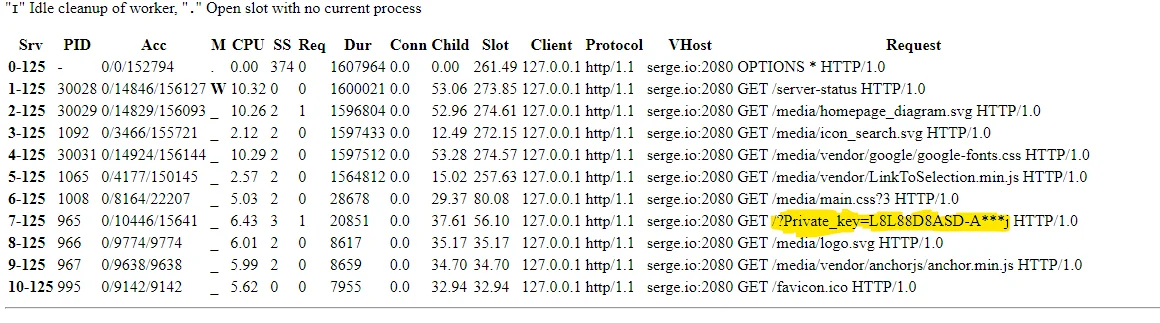
[Serg.io]
- User go to server and enter sensitive info that can be logged (example :
http://host/login?private_key=<KEY>) - Attacker read the logs and founded sensitive information that user entered (example :
private_key=<KEY>)
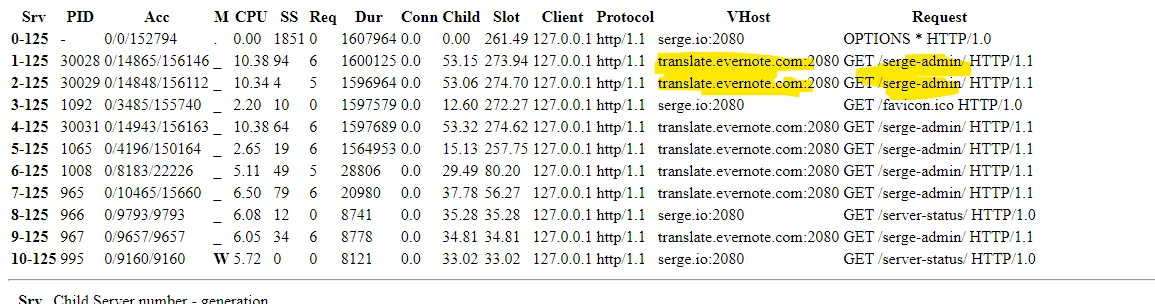
[translate.evernote.com] In this site login and many features available and it's increase the impact
- Users login with sso ( example :
/sso?sso_private_key=<key>&next=/ssoreturn) - Attacker can read full sso key and login (Account Take Over)
Supporting Material/References:
Why [34.96.80.155] blongs to www.evernote.com :
- the ssl certificate : https://www.shodan.io/host/34.96.80.155 (SSL Cert related to Evernote Corporation)
- copywrite section :
© 2014–2021 Evernote Corporation
Impact
attacker can read all log on server
Attachments
Context
The target is www.evernote.com, and the asset in question is a host at [redacted] that the researcher ties to Evernote Corporation. The exposed feature is the /server-status page, which the report says makes server logs available to anyone. It is meant for local administration, not for the public.
The report describes two consequences of that page being reachable. The first is that request data captured in the status output can contain secrets that users put into URLs. The second is that one of the affected sites, translate.evernote.com, performs SSO login in a way that places a private key in the query string, so reading the logs can yield a full SSO key and allow account takeover.
Setup
No accounts, roles, tools or versions are described. The only precondition stated is network access to the host and the ability to request the status page. The researcher's evidence that the host belongs to Evernote is two-fold:
- The SSL certificate, referenced through a Shodan lookup at
https://www.shodan.io/host/[redacted], is related to Evernote Corporation. - The copyright section on the host reads:
© 2014-2021 Evernote Corporation
Finding it
The researcher found that server logs are available to anyone at /server-status, and that page exposes logged request data. Because URLs are routinely logged, any secret carried in a query string ends up in that output.
Exploitation
Step 1: Reach the status page
The report gives the URL as https://[redacted]/server-status/. Requesting it returns the server status output, which is where the logged request data appears.
Step 2: Understand the logging pattern
The researcher frames the issue with a general scenario, attributed in the report to Serg.io:
- A user goes to the server and enters sensitive information that can be logged, for example
http://host/login?private_key=<KEY>. - The attacker reads the logs and finds the sensitive information the user entered, for example
private_key=<KEY>.
Step 3: Apply it to translate.evernote.com
The researcher states that translate.evernote.com offers login and many features, which increases the impact. The SSO flow puts the key in the URL:
- Users log in with SSO, for example
/sso?sso_private_key=<key>&next=/ssoreturn. - The attacker can read the full SSO key and log in, resulting in account takeover.
The report presents the SSO flow and the consequence without showing a captured key from the status output. The report does not show a captured example of the SSO key from the status output; it presents the flow and the consequence.
Root cause
The /server-status endpoint makes server logs available to anyone. Whatever logging or status module produces the page includes request URLs, and URLs carry secrets because the application accepts them in query parameters (private_key in the generic example, sso_private_key in the SSO flow). Two design choices combine: an administrative page exposed to the internet, and credentials placed in URLs where any log or status view will record them. The report does not describe any authentication check, IP restriction or redaction.
Impact
The attacker can read all logs on the server, as the report puts it. In practice that means any sensitive value a user submitted in a URL can be recovered, and for translate.evernote.com the recovered sso_private_key is enough to log in as the user, which the researcher describes as account takeover. The impact depends on secrets actually appearing in logged URLs; the report's SSO example is the concrete case it relies on.
Fix
The measures its findings point to are restricting /server-status to local or authorised administrative access, and stopping credentials from travelling in query strings so that logs and status pages cannot capture them.
Variants to test
- Request
/server-statusand/server-status/on hosts tied to the target and check whether worker and request tables are returned without authentication. A positive result is a page listing recent requests with their full query strings. - Look for the same exposure on sibling status paths used by other server modules, and check whether any of them echo request lines. A positive result is any unauthenticated page that shows URLs containing parameters.
- Walk the login and SSO flows of the target's subdomains and note which ones place keys, tokens or session values in the query string. A positive result is a redirect or link such as
/sso?sso_private_key=<key>&next=/ssoreturnwhere the value is a live credential. - Correlate the two: if a secret-bearing URL exists and a status or log page is reachable, confirm that the secret appears in the page output. A positive result is the exact key from step 3 visible in the status output.
- Check the certificate and copyright footer of an IP-hosted service to establish ownership before reporting, as the researcher did with the Shodan certificate lookup and the
© 2014–2021 Evernote Corporationnotice.
Hunting notes
This kind of bug hides on hosts that are reachable by IP but belong to the target through their certificate or footer, and on administrative endpoints that were never meant to face the internet. During recon, a certificate tied to the organisation on an IP address, or a copyright line naming the company, is the signal that the host is in scope. The second signal is any application flow that puts credentials in the query string, since that is what turns a log disclosure into account takeover. The researcher named translate.evernote.com with a login flow whose key sits in the URL, and tied the IP host to Evernote through the certificate and the copyright notice.
What happened, in plain words
A server belonging to Evernote had a page at /server-status that made its logs available to anyone. That page, at /server-status, shows the server's recent activity, including the addresses (URLs) that visitors asked for. Anyone on the internet could open it, no password needed.
Why does that matter? Because some websites put secret values into the address itself. If a secret is in the address, and the address is written into the server's activity log, and the log is shown on a public page, then the secret is public too. The researcher found that one Evernote site, translate.evernote.com, logs users in through a flow that puts a private key in the address. Anyone who reads the status page can copy that key and log in as the user. That is called account takeover.
This is a beginner-friendly walkthrough of the report, in the same order as the technical version, with the same addresses and examples.
Context
The target named in the report is www.evernote.com. The actual machine involved is at the address [redacted], which the researcher links to Evernote Corporation.
An IP address like [redacted] is the numeric address of a computer on the internet. A domain name like evernote.com is a human-friendly label that points to such an address. Normally you visit a site by name, but you can also visit a machine directly by its number, and that is what happened here.
The exposed feature is a page at /server-status. A web server is the program that sits on a machine and answers browser requests. The status page shows logged request data.
The report describes two consequences of that page being reachable by anyone:
- The request information shown on the status page can contain secrets that users typed into addresses.
- One affected site,
translate.evernote.com, performs single sign-on (SSO) in a way that places a private key in the address, so reading the status page can reveal a full SSO key and allow account takeover.
SSO, or single sign-on, is a login method where one central service confirms who you are and then tells other sites to trust that confirmation. Instead of typing a password on every site, you log in once and the sites pass a proof between them. If that proof is a key carried in the address, and the address is logged, the proof leaks.
Setup
The report does not describe any accounts, roles, tools or software versions. The only precondition it states is that you can reach the host over the network and request the status page.
The researcher gives two pieces of evidence that the machine at [redacted] belongs to Evernote:
- The SSL certificate. An SSL certificate (more precisely a TLS certificate) is the digital document a website presents to prove its identity, and it is issued to a named organisation. A lookup on Shodan, a search engine for internet-connected devices, at
https://www.shodan.io/host/[redacted]shows a certificate related to Evernote Corporation. - The copyright notice on the host reads:
© 2014-2021 Evernote Corporation
The researcher gives the certificate and the copyright line as evidence that the machine belongs to Evernote. This matters because a bug report is only useful if the affected machine really belongs to the organisation being reported to.
Finding it
The researcher found that server logs are available to anyone at /server-status, and that page exposes logged request data.
Why does that leak secrets? Because web servers routinely write down the addresses they receive. If a secret is part of the address, it ends up in that written record. A useful comparison: think of a receptionist who writes down every visitor's name and reason for visiting on a clipboard, and then leaves the clipboard on the front desk. Nothing was hacked; the information was simply left where anyone walking past can read it.
Exploitation
Step 1: Reach the status page
Line by line:
GET /server-status/ HTTP/1.1is a request in the HTTP protocol, the language browsers and servers use to talk.GETmeans "give me this thing"./server-status/is the path being asked for.HTTP/1.1is the version of the protocol.Host: [redacted]tells the server which machine name the request is for. Because one machine can host many sites, the server uses this line to decide which site to answer for.
The report gives the address as https://[redacted]/server-status/. The https:// part means the connection is encrypted. Requesting that address returns the server status output, and that output is where the logged request data appears.
Step 2: Understand the logging pattern
The researcher frames the issue with a general scenario, attributed in the report to Serg.io:
- A user goes to the server and enters sensitive information that can be logged, for example
http://host/login?private_key=<KEY>. - The attacker reads the logs and finds the sensitive information the user entered, for example
private_key=<KEY>.
What is happening in that example address? Everything after the ? is called the query string. It is a list of name and value pairs, here private_key with the value <KEY>. Query strings are convenient for developers, but they are also the part of a request most likely to be recorded in logs, kept in browser history and passed along in links. Putting a secret there is like writing your PIN on the outside of an envelope.
Step 3: Apply it to translate.evernote.com
The researcher states that translate.evernote.com offers login and many features, which increases the impact. A site with real accounts and real features is more valuable to an attacker than an empty page, because a stolen key there unlocks something worth having. The SSO flow on that site puts the key in the address:
- Users log in with SSO, for example
/sso?sso_private_key=<key>&next=/ssoreturn. - The attacker can read the full SSO key and log in, resulting in account takeover.
Reading that example address in plain words: the path is /sso, the query string contains sso_private_key with some key value, and next=/ssoreturn tells the site where to send the user afterwards. The & separates the two name and value pairs. The key is the credential, the thing that proves the user's identity to the login system. If someone else reads it, they can present it themselves and be treated as that user.
The mechanism is the same as in step 2: the key travels in the query string, the query string is logged, and the status page publishes the log. The report does not show a captured example of the SSO key from the status output; it presents the flow and the consequence.
Root cause
The /server-status page is reachable from the public internet instead of being limited to local administration. Whatever logging or status module produces the page includes request addresses, and addresses carry secrets because the application accepts them in query parameters: private_key in the generic example, sso_private_key in the SSO flow.
Two design choices combine here. First, an administrative page is exposed to the internet. Second, credentials are placed in addresses, where any log or status view will record them. Either one alone is a problem; together they turn a housekeeping page into a credential leak.
Impact
The attacker can read all logs on the server, as the report puts it. In practice that means any sensitive value a user submitted in an address can be recovered. For translate.evernote.com, the recovered sso_private_key is enough to log in as the user, which the researcher describes as account takeover.
CVSS is a standard scoring system for the seriousness of a security flaw; 3.7 sits in the low range. The impact depends on secrets actually appearing in logged addresses, and the report's SSO example is the concrete case it relies on.
Fix
The measures its findings point to are restricting /server-status to local or authorised administrative access, and stopping credentials from travelling in query strings so that logs and status pages cannot capture them.
Variants to test
These are the follow-up checks the findings suggest, in the order the technical version lists them:
- Request
/server-statusand/server-status/on hosts tied to the target and check whether worker and request tables are returned without authentication. A positive result is a page listing recent requests with their full query strings. - Look for the same exposure on sibling status paths used by other server modules, and check whether any of them echo request lines. A positive result is any unauthenticated page that shows addresses containing parameters.
- Walk the login and SSO flows of the target's subdomains and note which ones place keys, tokens or session values in the query string. A positive result is a redirect or link such as
/sso?sso_private_key=<key>&next=/ssoreturnwhere the value is a live credential. - Correlate the two: if a secret-bearing address exists and a status or log page is reachable, confirm that the secret appears in the page output. A positive result is the exact key from step 3 visible in the status output.
- Check the certificate and copyright footer of an IP-hosted service to establish ownership before reporting, as the researcher did with the Shodan certificate lookup and the
© 2014–2021 Evernote Corporationnotice.
Hunting notes
This kind of bug hides on machines that are reachable by IP address but belong to the target through their certificate or footer, and on administrative pages that were never meant to face the internet. During reconnaissance, a certificate tied to the organisation on an IP address, or a copyright line naming the company, is the signal that the machine is in scope.
The second signal is any application flow that puts credentials in the query string, since that is what turns a log disclosure into account takeover. The researcher named translate.evernote.com with a login flow whose key sits in the address, and tied the IP host to Evernote through the certificate and the copyright notice.
Attachments
Glossary
- Account takeover: a situation where an attacker gains control of someone else's account, here by stealing a login key.
- Apache: a widely used web server program; it can produce a
/server-statuspage for administrators. - Bounty: a payment made by an organisation to a researcher who reports a valid security flaw.
- Copyright notice: a line such as
© 2014–2021 Evernote Corporationstating who claims ownership of the content; here used as a clue about who runs the machine. - Credential: any value that proves identity, such as a password, key or token.
- CVSS: a standard scoring system that rates the seriousness of a security flaw, from low to critical.
- GET: the HTTP method used to ask a server for a page or resource.
- Host header: the line in an HTTP request that names which site on the server the request is for.
- HTTP: the protocol browsers and servers use to exchange requests and responses.
- HTTPS: HTTP carried over an encrypted connection.
- IP address: the numeric address of a computer on a network, such as
[redacted]. - Log: a record a server keeps of what happened, including the addresses of requests it received.
- Query string: the part of an address after the
?, made of name and value pairs separated by&. - Reconnaissance: the early phase of security testing where you gather information about a target.
- Redaction: removing or masking sensitive values before showing data to someone.
- Shodan: a search engine that indexes internet-connected devices and the certificates they present.
- Single sign-on (SSO): a login method where one central service confirms your identity and other sites trust that confirmation.
- SSL/TLS certificate: a digital document a site presents to prove its identity, issued to a named organisation.
- Status page: an administrative page reporting a server's current activity and recent requests.
- Subdomain: a named section of a domain, such as
translate.evernote.comunderevernote.com. - Web server: the program on a machine that receives and answers browser requests.
- Worker: one of the processes a web server uses to handle requests; the status page reports their states.