Evernote(WindowsApp) XSS to RCE
A malformed Evernote note file containing an XSS payload in a clipped source title attribute executes script when imported, allowing an attacker to call Electron IPC and launch local programs such as the Windows calculator.

- Triaged in 10 days
- Fixed in 6 months
- Paid in 36 hours
- Disclosed after 3.3 years
Summary:
Loading a malformed note file in the Evernote(Windows) application will cause XSS in the application, leading to an RCE
Steps To Reproduce:
STEP[Creation of malormed note file]
- Install Evernote's Web Clip extension(https://evernote.com/intl/jp/features/webclipper) in my browser and execute "Clip Full Page" on any website.
info: I installed this on Google Chrome. 2. Open the installed Evernote application and open the note of the clipped web page. 3. Export note in ENEX format.
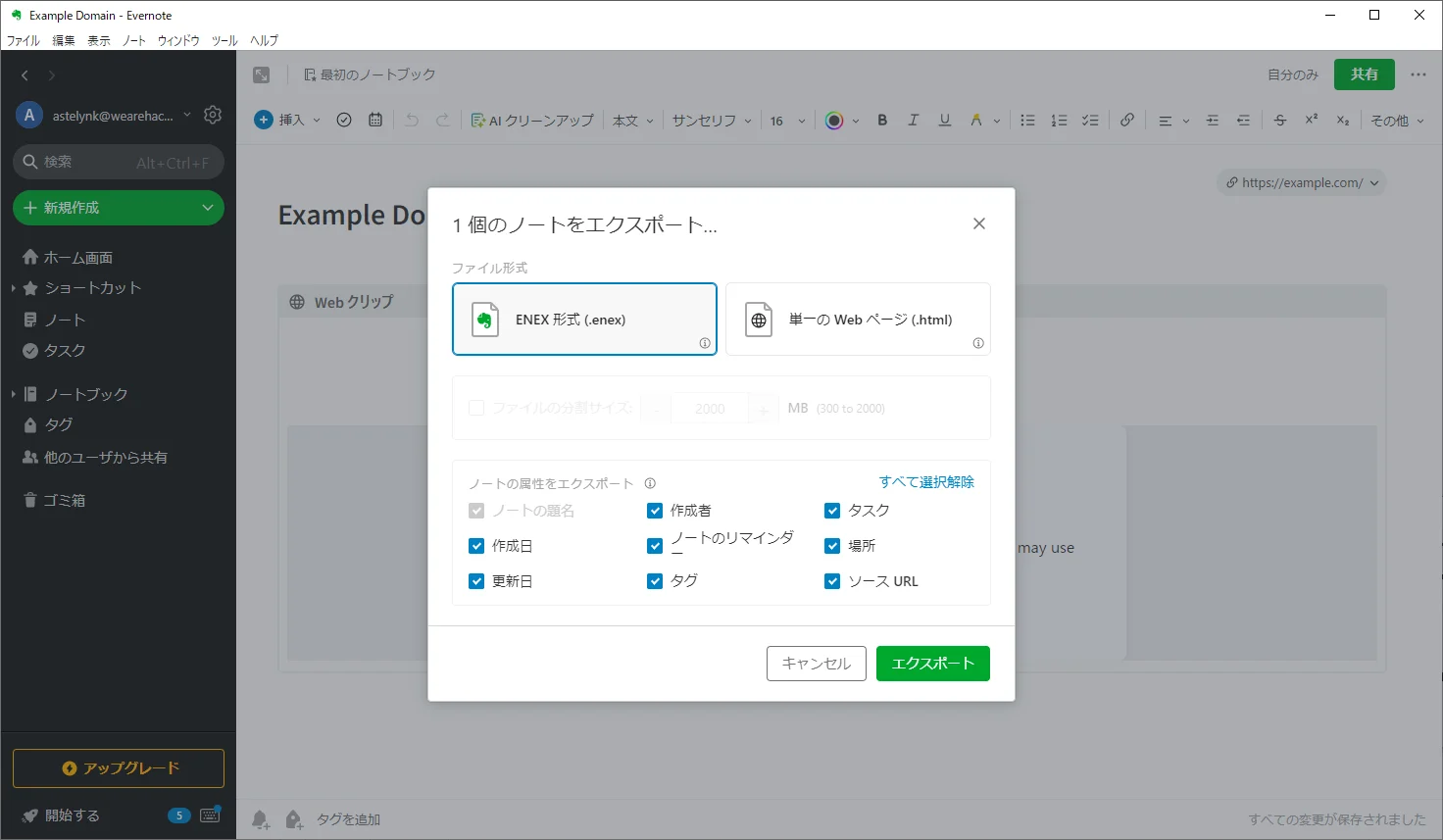
- In the exported ENEX file, insert the HTML-entityized XSS payload in the "--en-clipped-source-title" section. And save the file.
info: In XPath, it is the style attribute "--en-clipped-source-title" of the div element in the CDATA that can be obtained by "/en-export/note/content/text()".
I have inserted this payload.
"><img src onerror=eval(atob('c2V0VGltZW91dCgoKT0+e3dpbmRvdy5lbGVjdHJvbkFwaS5pcGNSZW5kZXJlci5zZW5kKCJCcm9rZXJCcmlkZ2UiLHthY3Rpb246IkJyaWRnZS9QdWJsaXNoIix0b3BpY3M6ImJvcm9uLmFjdGlvbnMub3BlbkJyb3dzZXJXaW5kb3ciLHR5cGU6IiIsZGF0YTp7InJlcXVpcmVzQXV0aGVudGljYXRpb24iOmZhbHNlLCJ1cmwiOiJmaWxlOi8vL0M6L1dpbmRvd3MvU3lzdGVtMzIvY2FsYy5leGUifX0pO30sNTAwMCk7'))>
The malformed note file is here. (Attachment on the original report: Example_Domain(rce).enex)
STEP[Load malformed note file cause XSS and RCE]
- Open the installed Evernote application and import the malformed note file.
- A few seconds after the import is complete, the Windows calculator application will launch.
NOTE: Evernote versions is 10.60.4-win-winstore-public (20230803182206) This is the latest version available for installation from the Microsoft Store as of August 22, 2023 (JST).
How It works:
The following code is executed in the XSS that occurs when the note file import completes.
setTimeout(()=>{window.electronApi.ipcRenderer.send("BrokerBridge",{action:"Bridge/Publish",topics:"boron.actions.openBrowserWindow",type:"",data:{"requiresAuthentication":false,"url":"file:///C:/Windows/System32/calc.exe"}});},5000);
In this code, the following steps are taken:
- Wait 5 seconds
- Using the "window.electronApi.ipcRenderer.send" prepared in Preload, the "BrokerBridge" function is called in the main process via IPC communication.
- "boron.actions.openBrowserWindow" function could be used to run local applications.
Impact
Loading an malformed note file in an application can result in command execution, program execution, or access to an external URL.
Context
Evernote ships a Windows desktop client that is built on Electron. The client can import notes from ENEX files, the XML-based export format Evernote uses to move notes between installations. A note exported from the desktop app contains a content element whose text is HTML wrapped in CDATA, and that HTML carries attributes that record where a clipped page came from.
The report describes what happens when one of those attributes is made to contain markup instead of plain text: the imported note renders attacker-controlled HTML inside the application, and from that JavaScript context the renderer can reach the Electron IPC bridge and ask the main process to open a local executable.
Setup
- Target: Evernote for Windows, installed from the Microsoft Store.
- Version tested:
10.60.4-win-winstore-public (20230803182206), described as the latest version available from the Microsoft Store as of 22 August 2023 (JST). - Browser used for clipping: Google Chrome, with Evernote's Web Clip extension installed.
- No account details, roles or special configuration are described beyond a working installation of the client and the clipper.
The precondition for the whole chain is that the victim imports a crafted ENEX file. The report does not describe any way to deliver that file other than the user importing it.
Finding it
The researcher started from a normal feature: the Web Clipper writes a clipped page into a note, and the note can then be exported to ENEX. Looking at the exported XML, the clipped page's HTML sits inside the CDATA of /en-export/note/content/text(), and inside that HTML the div element carries a --en-clipped-source-title style attribute holding the page title.
That attribute is a place where text taken from a web page ends up in the note's HTML. If the importer writes the attribute value back into the rendered document without escaping it, a title containing HTML entities that decode to markup would break out of the attribute and become live elements. That is the hypothesis the researcher tested.
Exploitation
Step 1: create a note to export
- Install Evernote's Web Clip extension in the browser and run "Clip Full Page" on any website. The researcher used Google Chrome.
- Open the installed Evernote application and open the note created from the clipped page.
- Export the note in ENEX format.
The screenshot shows the export of the note to ENEX, the file that is then edited by hand.
Step 2: inject the payload into the ENEX file
In the exported ENEX file, insert an HTML-entityised XSS payload into the --en-clipped-source-title section, then save the file. In XPath terms this is the style attribute --en-clipped-source-title of the div element inside the CDATA reachable at /en-export/note/content/text().
The payload inserted was:
The payload is written with HTML entities so that it survives the XML/HTML context it is placed in. " and > close the attribute and the surrounding tag, <img ...> opens a new element, and ' supplies the quotes the inline handler needs. The src attribute is empty, so the image fails to load and onerror fires. The handler calls eval(atob(...)), decoding a base64 string into the JavaScript that does the real work.
The malformed note file is attached to the report as Example_Domain(rce).enex.
Step 3: import the file
- Open the installed Evernote application and import the malformed note file.
- A few seconds after the import completes, the Windows calculator application launches.
The video shows the import and the calculator starting afterwards, which is the proof that the injected JavaScript reached the IPC bridge and the main process acted on it.
What the decoded JavaScript does
The code executed by the XSS when the note import completes is:
setTimeout(()=>{window.electronApi.ipcRenderer.send("BrokerBridge",{action:"Bridge/Publish",topics:"boron.actions.openBrowserWindow",type:"",data:{"requiresAuthentication":false,"url":"file:///C:/Windows/System32/calc.exe"}});},5000);
The report breaks it down as follows:
- Wait 5 seconds.
- Use
window.electronApi.ipcRenderer.send, exposed in the preload script, to call theBrokerBridgefunction in the main process over IPC. boron.actions.openBrowserWindowcan be used to run local applications.
The message is published on the boron.actions.openBrowserWindow topic with requiresAuthentication set to false and a url pointing at a local executable, file:///C:/Windows/System32/calc.exe. The report states that boron.actions.openBrowserWindow can be used to run local applications.
Root cause
The note content is HTML stored inside CDATA in the ENEX file. On import, the application renders that HTML, and the value that came from the clipped page's title is placed into the --en-clipped-source-title attribute without being escaped for the HTML context. Entity-encoded markup in the title therefore decodes into real tags and attributes when the note is rendered, giving script execution in the renderer.
That alone would be a client-side XSS, but the renderer is not isolated from privileged functionality: the preload script exposes window.electronApi.ipcRenderer, and the main process accepts a BrokerBridge publish on boron.actions.openBrowserWindow that will open a file:// URL. The renderer can therefore reach a main-process topic that the report says can be used to run local applications. The report does not describe any validation on the url value or any check that the caller is trusted; the message itself carries requiresAuthentication: false. Whether the escaping gap is in the import path, the renderer, or both is not stated in the report.
Impact
Loading a malformed note file in the application can result in command execution, program execution, or access to an external URL. In the demonstrated case the result is execution of a local binary chosen by the attacker. Severity is rated high with a CVSS score of 8.3, and the report is classified as code injection.
Fix
Based on the chain, the escaping of the clipped-source title (and any other note-derived value written into rendered HTML) needs to be corrected so that entity-encoded markup stays text, and the IPC surface exposed to the renderer should not let a note's content cause the main process to open arbitrary file:// URLs or launch local programs.
Variants to test
- Other note-derived attributes and fields: put the same entity-encoded
img/onerrorpayload into other attributes of the clipped HTML and into other parts of the note content, then import. A positive result is the handler firing on import. - Other import formats: try the same idea in any other format the client can import. A positive result is script execution from imported content.
- Other IPC topics: enumerate what the preload bridge exposes and which
BrokerBridgetopics the main process accepts. A positive result is a topic that performs a privileged action without an authentication check. - URL schemes in
openBrowserWindow: try values other thanfile://, such as external URLs or other schemes. A positive result is the main process opening them on request from the renderer. - Other Electron clients with a clipping or import feature: look for places where page-derived text is stored in an attribute and re-rendered. A positive result is the same attribute breakout on import.
What happened, in plain words
Evernote is a note-taking program. You can install it on your computer, and it also comes with a browser add-on called Web Clipper that lets you save a web page as a note with one click. Notes can be exported to a file so you can move them to another computer or keep a backup. That file format is called ENEX.
This report shows that if someone hands you a specially crafted ENEX file and you import it into the Evernote app for Windows, the app will run code that the file's author chose. In the demonstration, the code starts the Windows calculator. Starting a calculator is harmless, but the same trick could start any program on your machine, which is why the report is rated high severity.
The chain has two links. First, a piece of text inside the note file is treated as if it were part of the app's own web page, so it can run JavaScript (this is called cross-site scripting, or XSS). Second, the Evernote app is built with a framework called Electron, which lets that JavaScript ask the app's more powerful inner parts to do things, such as launching a local program. XSS plus that request channel equals remote code execution (RCE): someone else's code runs on your computer.
Background you need
What Evernote and the Web Clipper do
Evernote stores notes. The Web Clipper is a browser extension: a small add-on you install in your browser. When you click its button on a page, it copies the page's content into a new note in your Evernote account. The note keeps some information about where it came from, such as the page title.
What ENEX is
ENEX is Evernote's export format. When you choose to export a note, the app writes a single file that contains the note's text, its formatting and its metadata. The file is XML: a text format where data is wrapped in tags like <note> and </note>, similar to HTML but meant for storing data rather than displaying it. Because it is just text, anyone can open an ENEX file in a text editor and change it.
What HTML, attributes and escaping mean
HTML is the language web pages are written in. It uses tags such as <img> (an image) and <div> (a generic block). Tags can carry attributes, which are extra settings written inside the tag, for example style="color: red". Text inside quotes is supposed to stay text.
The trouble starts when text that came from somewhere untrusted (like a web page title) is placed into HTML without being cleaned. Special characters such as <, > and " have a meaning in HTML. If they are not neutralised, they can end a piece of text early and start a new tag. The usual defence is escaping: replacing < with <, > with >, " with " and ' with '. Those are called HTML entities. A browser shows them as the original character but never treats them as markup. If an app forgets to escape, an attacker can write entities that the app later decodes back into live markup.
What XSS is
Cross-site scripting (XSS) means getting your own JavaScript to run inside a page or app that the victim trusts. JavaScript is the programming language browsers run. If an attacker can run JavaScript in the context of an application, that script can do anything the application's own scripts can do. A simple everyday comparison: it is like someone slipping an extra instruction into a recipe book you trust, so the cook follows it without questioning it.
What Electron, the renderer, the main process and IPC are
Electron is a toolkit for building desktop programs using web technology. An Electron app has two kinds of parts:
- The renderer: a built-in browser window that shows the interface. It runs HTML, CSS and JavaScript, just like a website.
- The main process: the part with real power over the operating system. It can read and write files and start programs.
The renderer is meant to display the interface, and powerful actions are handled by the main process. To do anything powerful it sends a message to the main process. That message channel is called IPC, short for inter-process communication. Think of the renderer as a shop assistant and the main process as the manager in the back office: the assistant cannot open the safe, but can pass a request through the intercom.
A preload script is a small piece of code that runs before the page loads and can deliberately expose a limited set of functions from the renderer to the main process. In this app, that exposed object is called window.electronApi. If the exposed functions are too generous, any JavaScript running in the renderer, including injected JavaScript, can use them.
What base64 and eval are
Base64 is a way of writing arbitrary data using only letters, digits and a couple of symbols. It is often used to hide code from casual reading, but it is not encryption: anyone can decode it. atob() is a JavaScript function that decodes a base64 string back into text. eval() takes a string and runs it as JavaScript. So eval(atob('...')) means: decode this hidden text, then execute it.
The setup
The researcher tested:
- Evernote for Windows, installed from the Microsoft Store.
- Version
10.60.4-win-winstore-public (20230803182206), which the report describes as the latest version available from the Microsoft Store as of 22 August 2023 (JST). - Google Chrome with Evernote's Web Clip extension installed.
No special account, role or configuration is described beyond a normal installation of the app and the clipper. The one condition for the attack is that the victim imports the crafted ENEX file. The report does not describe any way to deliver that file other than the user importing it.
How the researcher found it
The starting point was an ordinary feature. The Web Clipper saves a page into a note, and the note can be exported to ENEX. Looking inside the exported file, the clipped page's HTML sits inside a wrapper called CDATA. CDATA is an XML device that says "treat everything between these markers as raw text, not as XML tags". Inside that HTML, the div element carries a style attribute named --en-clipped-source-title, which holds the page's title.
That attribute is a place where text copied from a web page ends up inside the note's HTML. The researcher's idea was simple: if the importer puts that value back into the displayed page without escaping it, then a title containing HTML entities that decode to markup would break out of the attribute and become real elements. That is the hypothesis that was then tested.
Step by step: building the malicious file
Step 1: create a note to export
- Install Evernote's Web Clip extension in the browser and run "Clip Full Page" on any website. The researcher used Google Chrome.
- Open the installed Evernote application and open the note created from the clipped page.
- Export the note in ENEX format.
The screenshot shows the note being exported to ENEX. This is the file that is then edited by hand.
Step 2: inject the payload into the ENEX file
Open the exported ENEX file in a text editor and insert an HTML-entityised XSS payload into the --en-clipped-source-title section, then save the file. In XPath terms, this is the style attribute --en-clipped-source-title of the div element inside the CDATA reachable at /en-export/note/content/text(). XPath is a way of describing a location inside an XML document, a bit like a file path but for tags and attributes.
The payload inserted was:
Line by line, in plain words:
"is the entity for a double quote. It is there to close the attribute the payload is being placed into.>is the entity for>. It closes the tag that contained the attribute.<imgis the entity for<followed by the start of an image tag. Together they open a brand new element in the page.srcis the image source attribute, left empty on purpose. Because there is no real image, the browser will fail to load it.onerror=is an event handler: code that runs when the image fails to load. This is the trigger.eval(atob('...'))decodes the long base64 string between the quotes and runs the result as JavaScript.'is the entity for a single quote, used to wrap the base64 text.>at the end closes the image tag.
The whole payload is written with entities so that it survives the XML and HTML contexts it passes through. When the app later decodes the entities, the text turns back into real markup: a quote, a closing bracket, an image tag with an error handler. The malformed note file is attached to the report as Example_Domain(rce).enex.
Step 3: import the file
- Open the installed Evernote application and import the malformed note file.
- A few seconds after the import completes, the Windows calculator application launches.
The video shows the import and the calculator starting afterwards. That is the proof: the injected JavaScript ran, reached the IPC bridge, and the main process acted on its request.
What the decoded JavaScript does
The code that the XSS runs when the note import completes is:
setTimeout(()=>{window.electronApi.ipcRenderer.send("BrokerBridge",{action:"Bridge/Publish",topics:"boron.actions.openBrowserWindow",type:"",data:{"requiresAuthentication":false,"url":"file:///C:/Windows/System32/calc.exe"}});},5000);
Line by line:
setTimeout(() => { ... }, 5000)waits 5,000 milliseconds, that is five seconds, and then runs the code inside the braces. The delay is five seconds before the message is sent.window.electronApi.ipcRenderer.send(...)is the function the preload script exposed. It sends a message from the renderer to the main process over IPC.windowis the global object of the page;electronApiis the bridge object;ipcRendereris the part that talks to the main process;senddelivers the message."BrokerBridge"is the name of the channel the message is sent on, and{action:"Bridge/Publish", ...}is the message body.actionsays what kind of operation it is: publish a message on a topic.topics:"boron.actions.openBrowserWindow"names the topic. A topic is like a labelled mailbox: whoever listens on that label receives the message. The report says this topic can be used to run local applications.type:""is an empty field in the message.data:{...}carries the details."requiresAuthentication":falsesays the request does not need to be authenticated, that is, it does not need to prove who is asking."url":"file:///C:/Windows/System32/calc.exe"is the address to open.file://is the URL scheme for files on the local disk, so this points at the Windows calculator program.
The report breaks the behaviour down as follows:
- Wait 5 seconds.
- Use
window.electronApi.ipcRenderer.send, exposed in the preload script, to call theBrokerBridgefunction in the main process over IPC. boron.actions.openBrowserWindowcan be used to run local applications.
The report says the boron.actions.openBrowserWindow topic can be used to run local applications, and the calculator starts. In everyday terms: the shop assistant passes a note through the intercom saying "open this door", the message itself says no authentication is required, and the door opens.
Why it works: the root cause
The note content is HTML stored inside CDATA in the ENEX file. On import, the application renders that HTML, and the value that came from the clipped page's title is placed into the --en-clipped-source-title attribute without being escaped for the HTML context. Entity-encoded markup in the title therefore decodes into real tags and attributes when the note is rendered, giving script execution in the renderer.
On its own, that would be a client-side XSS. The problem is that the renderer is not isolated from privileged functionality. The preload script exposes window.electronApi.ipcRenderer, and the main process accepts a BrokerBridge publish on boron.actions.openBrowserWindow that will open a file:// URL. The renderer can therefore ask the main process to launch a local program. The report does not describe any validation on the url value or any check that the caller is trusted; the message itself carries requiresAuthentication: false. Whether the escaping gap is in the import path, the renderer, or both is not stated in the report.
Impact
Loading a malformed note file in the application can result in command execution, program execution, or access to an external URL. In the demonstrated case the result is execution of a local binary chosen by the attacker. Severity is rated high with a CVSS score of 8.3, and the report is classified as code injection.
Fix
Based on the chain, the escaping of the clipped-source title, and of any other note-derived value written into rendered HTML, needs to be corrected so that entity-encoded markup stays text. The IPC surface exposed to the renderer should also not let a note's content cause the main process to open arbitrary file:// URLs or launch local programs.
Variants to test
- Other note-derived attributes and fields: put the same entity-encoded
img/onerrorpayload into other attributes of the clipped HTML and into other parts of the note content, then import. A positive result is the handler firing on import. - Other import formats: try the same idea in any other format the client can import. A positive result is script execution from imported content.
- Other IPC topics: enumerate what the preload bridge exposes and which
BrokerBridgetopics the main process accepts. A positive result is a topic that performs a privileged action without an authentication check. - URL schemes in
openBrowserWindow: try values other thanfile://, such as external URLs or other schemes. A positive result is the main process opening them on request from the renderer. - Other Electron clients with a clipping or import feature: look for places where page-derived text is stored in an attribute and re-rendered. A positive result is the same attribute breakout on import.
Glossary
- API: a defined set of functions one program offers to another, like a service counter with a fixed list of things you can ask for.
- Attribute: an extra setting written inside an HTML tag, such as
style="...". - Base64: a way of writing data using only letters, digits and a few symbols; easy to decode, not encryption.
- CDATA: an XML wrapper that marks its contents as raw text, so XML tags inside are not interpreted.
- Cross-site scripting (XSS): getting attacker-written JavaScript to run inside a page or app that the victim trusts.
- CVSS: a standard scoring system for the severity of a security issue; higher numbers mean more serious.
- Electron: a toolkit for building desktop apps with web technology, split into a renderer and a main process.
- ENEX: Evernote's XML-based export file format for notes.
- Escaping: replacing characters that have special meaning in HTML with safe entity codes so they stay plain text.
- HTML entity: a code such as
<or"that represents a special character without it being treated as markup. - IPC: inter-process communication; the message channel between the renderer and the main process in an Electron app.
- JavaScript: the programming language that runs in browsers and in Electron renderers.
- Main process: the powerful part of an Electron app that can touch the operating system, including starting programs.
- Preload script: code that runs before a page loads and can expose a limited bridge from the renderer to the main process.
- Renderer: the browser-like part of an Electron app that displays the interface and runs page JavaScript.
- RCE (remote code execution): making a program run code of your choosing on someone else's machine.
- Topic: a named label on a message channel; listeners receive messages published to their label.
- Web Clipper: Evernote's browser extension that saves a web page as a note.
- XML: a text format for storing structured data using tags.
- XPath: a way of describing a location inside an XML document, like a path for tags and attributes.




