Passive mixed content issues on the site https://*.fanduel.com
The site loaded images over HTTP on an HTTPS page, creating passive mixed content. An attacker who can intercept network traffic could replace those images with deceptive content or observe which images the user loads.

- Triaged in 18 hours
- Fixed in 12 days
- Paid in 12 days
- Disclosed after 42 days
Hello.
Summary:
While browsing the sites https://www.fanduel.com and https://subscriptionapi.fanduel.com found a mixed content error on the site with HTTPS. This error is located at https://www.fanduel.com/press and https://subscriptionapi.fanduel.com/press. Image are uploaded to the site via HTTP.
- Code:
<div class="post-image">{{media:0}}</div>
Description:
Passive mixed content is content sent over HTTP that is contained on the HTTPS page, but which can not change other parts of the page. For example, an attacker can replace a picture sent via HTTP with obscene content or a message to the user. The attacker can also view the activity of the user, observing which images are sent to the user. Knowing which pictures the user downloads, an attacker can figure out which pages the user is visiting. Active mixed content has access to the entire DOM tree or part of it. This type can change the behavior of a page protected by HTTPS, and, theoretically, steal passwords from the user. Unlike passive content, the active is much more vulnerable. In the case of active mixed content, the attacker can intercept the request by writing unwanted JavaScript code there, capable of stealing user personal data or installing dangerous software using vulnerabilities in plug-ins. The risk associated with active content does not depend on the type of site and how valuable the user enters on it. The page can contain both publicly available information and data that is available only after authorization. Even if the page is public and does not contain any valuable data, with the help of active content, an attacker can redirect a user to other pages and steal cookies from there.
Steps To Reproduce:
- Open any browser (Chrome, Opera etc).
- Follow this links https://www.fanduel.com/press and https://subscriptionapi.fanduel.com/press.
- View Developer Tools
Ctrl + Shift + I(besides Internet Explorer -F12). - Open the Console tab - there will be a warning that there are mixed content on the page.
Supporting Material/References:
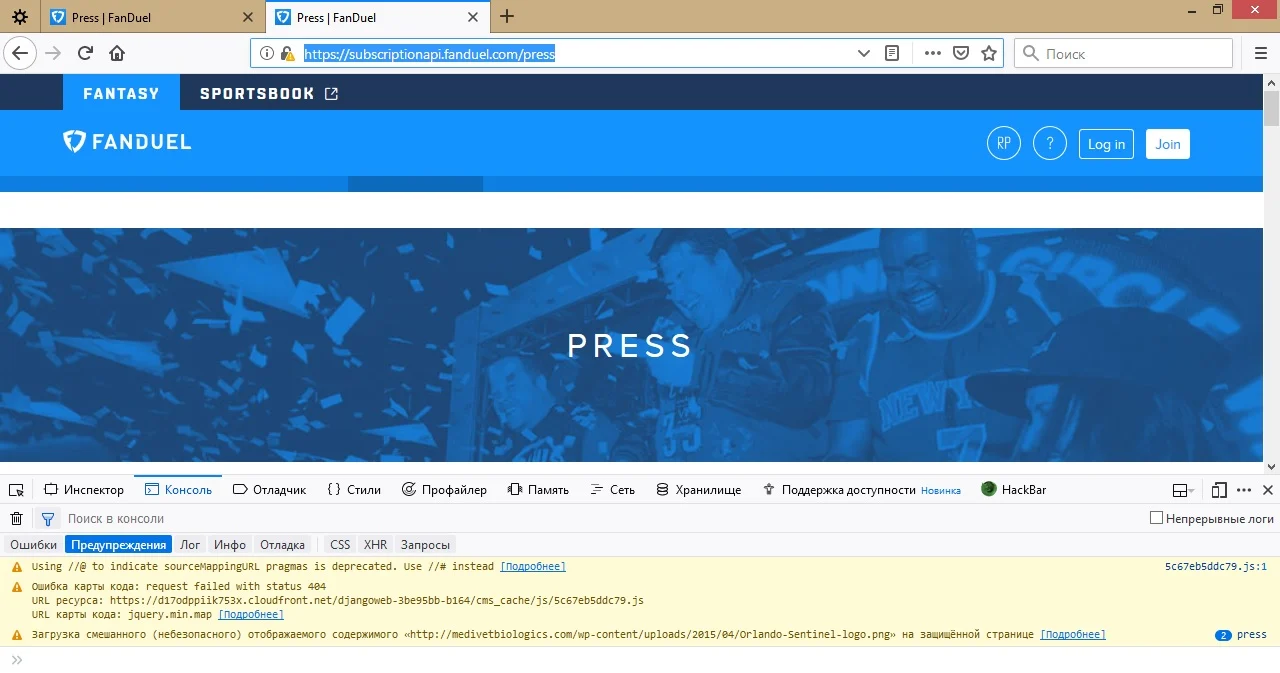
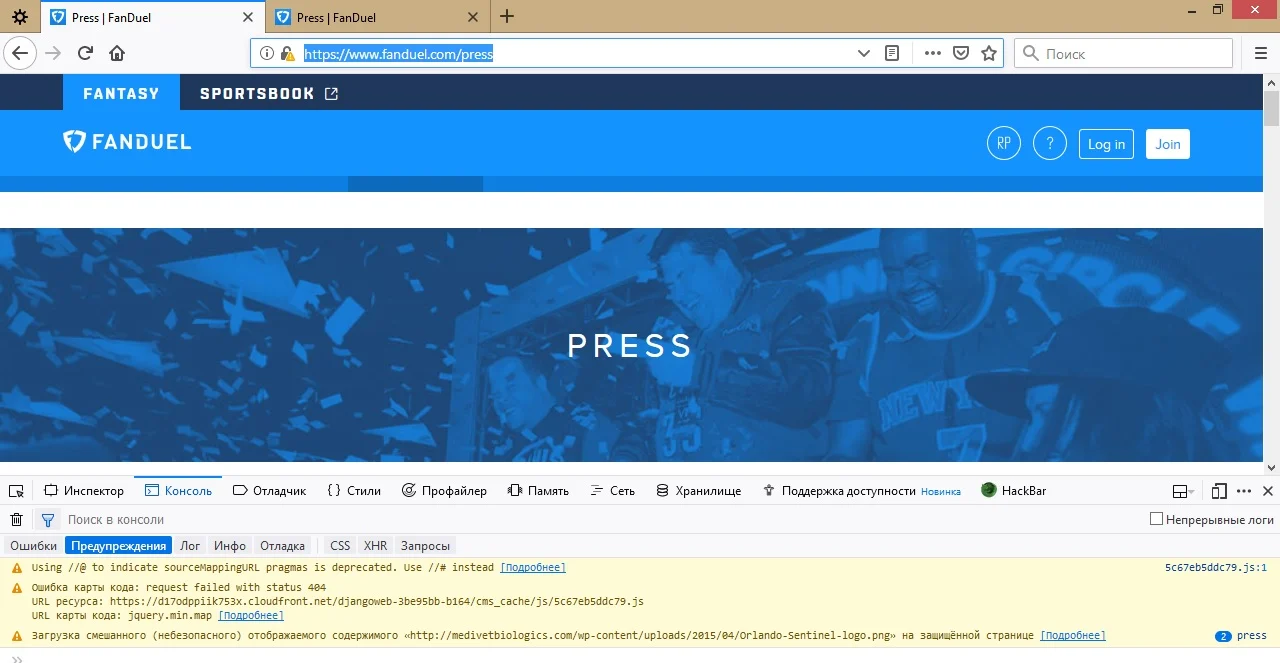
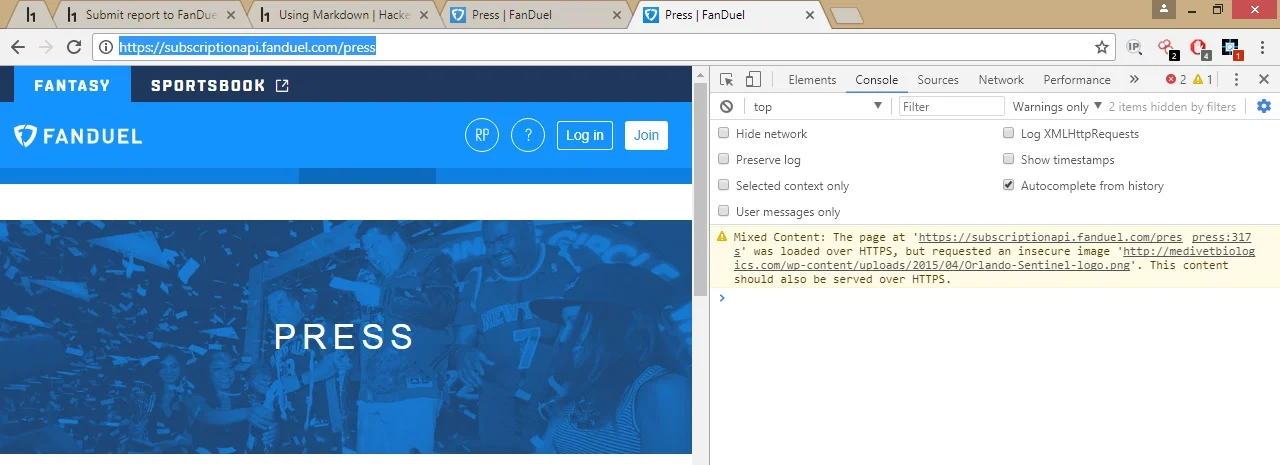
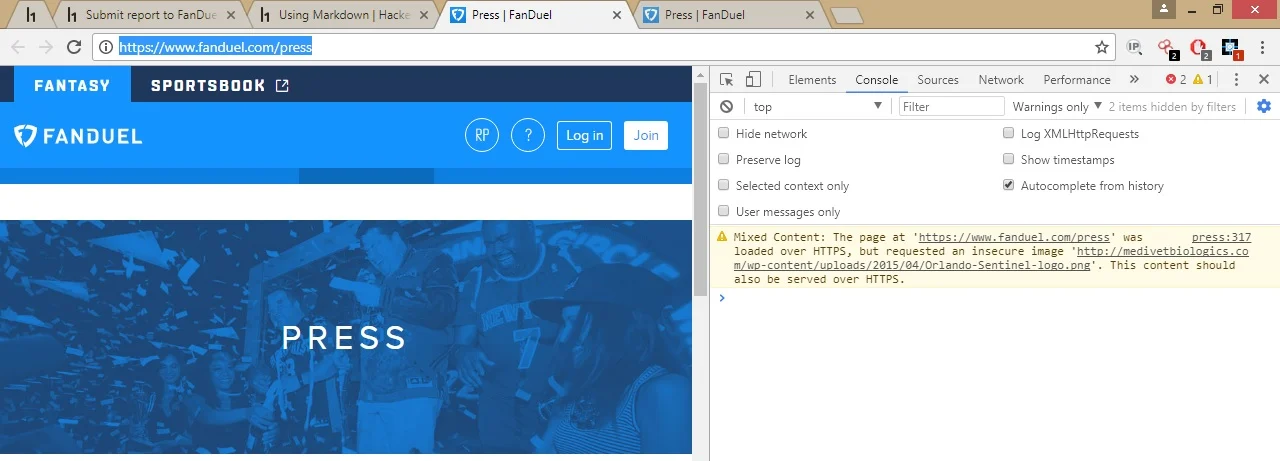
- Screenshots - F372905, F372904, F372907, F372906.
- https://resources.infosecinstitute.com/https-mixed-content-vulnerability/
Sincerely, Vyacheslav.
Impact
If the HTTPS page includes content retrieved through regular, cleartext HTTP, then the connection is only partially encrypted. The unencrypted content is accessible to sniffers.
A man-in-the-middle attacker can intercept the request and also rewrite the response to include malicious or deceptive content. This content can be used to steal the user's credentials, acquire sensitive data about the user, or attempt to install malware on the user's system (by leveraging vulnerabilities in the browser or its plugins, for example), and therefore the connection is not safeguarded anymore.
Attachments
Context
FanDuel runs its public web presence on *.fanduel.com. Two hosts are relevant here: https://www.fanduel.com and https://subscriptionapi.fanduel.com. Both serve a press page at /press, and that page displays images uploaded to the site. The report is about those images being loaded over plain HTTP from an otherwise HTTPS page, which browsers classify as mixed content.
The researcher describes the affected markup as a post image container:
<div class="post-image">{{media:0}}</div>
The report does not show the full <img> tag or the exact HTTP URL of the image, only this container element.
Setup
No accounts, roles or special tooling are needed. The only precondition is a browser with developer tools: Chrome, Opera or any other modern browser, with the console available. The researcher notes that in Internet Explorer the developer tools open with F12 instead of Ctrl + Shift + I. The pages are public, so no authentication is involved.
Finding it
While browsing https://www.fanduel.com and https://subscriptionapi.fanduel.com, the researcher noticed a mixed content error on the HTTPS pages. The error appears on https://www.fanduel.com/press and https://subscriptionapi.fanduel.com/press, and the cause is that images are uploaded to the site via HTTP. Because the page itself is served over HTTPS, the browser flags the HTTP image as insecure content.
The researcher separates the general concept into passive and active mixed content. Passive mixed content is content sent over HTTP that is contained on the HTTPS page but cannot change other parts of the page. An attacker could replace a picture sent over HTTP with obscene content or a message to the user, and could observe which images are sent to the user, which reveals which pages the user is visiting. Active mixed content has access to the entire DOM tree or part of it, can change the behaviour of an HTTPS-protected page and, theoretically, steal passwords. With active content an attacker can intercept the request and inject JavaScript capable of stealing personal data or installing dangerous software through plug-in vulnerabilities. The risk of active content does not depend on the type of site or the value of the data entered: even a public page with nothing valuable lets an attacker redirect the user to other pages and steal cookies from there.
In this report the affected resource is an image, so the finding is passive mixed content.
Exploitation
Step 1: Open any browser
Use Chrome, Opera or another modern browser. No configuration is required.
Step 2: Visit the press pages
Open both of these URLs:
https://www.fanduel.com/press
https://subscriptionapi.fanduel.com/press
Both are served over HTTPS. The page content includes images that are requested over HTTP, which is what triggers the warning in the next step.
Step 3: Open Developer Tools
Press Ctrl + Shift + I (in Internet Explorer, F12).
Step 4: Read the Console
The Console tab shows a warning that the page contains mixed content. That warning is the observable evidence of the issue: the browser has detected an HTTP subresource on an HTTPS document.
The report includes four screenshots of the console warning, one pair per browser and host. The Mozilla screenshots show the warning for subscriptionapi and for www:
The Chrome screenshots show the same warning for the same two hosts:
Root cause
The press page is delivered over HTTPS but references images over HTTP. The report attributes this to images being uploaded to the site via HTTP, so the stored or generated image URLs use the http:// scheme rather than https:// or a scheme-relative URL. The browser then loads those images in cleartext alongside the encrypted page.
Existing defences did not stop it because the page's HTTPS transport only protects the document and the subresources that are also fetched over HTTPS. An HTTP image URL bypasses that protection for that resource, and the browser can only warn about it in the console; it does not rewrite the URL. The report does not describe any Content Security Policy or other server-side control that would have blocked the HTTP request.
Impact
Because the HTTPS page includes content retrieved over cleartext HTTP, the connection is only partially encrypted. The unencrypted content is accessible to sniffers. A man-in-the-middle attacker can intercept the request and rewrite the response to include malicious or deceptive content. That content can be used to steal the user's credentials, acquire sensitive data about the user, or attempt to install malware on the user's system, for example by leveraging vulnerabilities in the browser or its plug-ins, so the connection is no longer safeguarded.
For this specific finding the mixed resource is an image, which is passive content: an attacker on the network path could substitute the image or observe which images the user loads, but could not use the image itself to alter the page's DOM or run script. The broader consequences listed above are the general risk of mixed content as the researcher frames it, not demonstrated against these pages.
Fix
The fix implied by the finding is to serve the press page images over HTTPS: store or emit the image URLs with the https:// scheme, or use scheme-relative URLs so they inherit the page's scheme, so that no subresource on the HTTPS page is fetched over cleartext HTTP.
Variants to test
- Check other pages on the same hosts that render user- or editor-uploaded media, not just
/press. A positive result is a console mixed content warning on an HTTPS page whose<img>,<video>or<audio>source useshttp://. - Inspect the raw HTML rather than only the console, looking for
src="http://orhref="http://on stylesheets, fonts and scripts. A positive result is any HTTP subresource on an HTTPS document; script and stylesheet references are the more serious, active case. - Test both the
wwwhost and API or subdomain hosts that serve rendered pages, as this report found the issue on two separate hosts. A positive result is the same warning reproduced independently on each host. - Look at how upload features construct stored URLs. A positive result is an uploaded asset whose returned URL is
http://even when the upload form was submitted over HTTPS.
Hunting notes
This class of bug tends to hide in pages that display media uploaded through a CMS or an older upload pipeline, where the stored URL scheme was fixed before the site moved to HTTPS. During recon, the signal is a console mixed content warning on any HTTPS page, or http:// strings in the page source for images, media, stylesheets, fonts or scripts. The researcher demonstrated it with nothing more than a browser and the developer tools console, and captured the warning on both affected hosts in two browsers, which is enough evidence for a low-severity, passive mixed content report.
What happened, in plain words
FanDuel is a company that runs websites where people can read about the company and use its services. Two of its websites are https://www.fanduel.com and https://subscriptionapi.fanduel.com. Both of them have a page at /press that shows press information and pictures.
A security researcher was browsing these pages and noticed something odd. The pages themselves are delivered over a secure, encrypted connection (HTTPS), but some of the pictures on them are fetched over an old, unencrypted connection (HTTP). When a secure page pulls in something over an insecure connection, browsers call this mixed content, and they show a warning about it in a hidden panel called the developer console.
This article walks through the same finding from scratch, explaining every term along the way.
Context
FanDuel runs its public web presence on *.fanduel.com. The * is a wildcard meaning "any subdomain", so this covers www.fanduel.com, subscriptionapi.fanduel.com and any other name under fanduel.com. Two hosts matter for this report:
https://www.fanduel.com, the main public website.https://subscriptionapi.fanduel.com, a host whose name suggests it serves an API. An API (Application Programming Interface) is a way for one piece of software to talk to another. In web terms, it is often a server that returns data rather than a full web page, but here it also serves a rendered page at/press.
Both hosts serve a press page at the path /press. A path is the part of a URL after the domain name that points to a specific page or resource, like a folder path on your computer. The press page displays images that were uploaded to the site.
The issue is that those images are loaded over plain HTTP from a page that is otherwise served over HTTPS. Browsers classify this as mixed content.
To understand the terms:
- HTTP (HyperText Transfer Protocol) is the basic language browsers and web servers use to exchange pages and files. It is not encrypted, so anyone positioned on the network between you and the server can read or change what passes.
- HTTPS is HTTP wrapped in encryption (via TLS). It protects the connection so that a network eavesdropper cannot read or alter the traffic. The padlock in your browser's address bar indicates HTTPS.
- Mixed content is when an HTTPS page includes resources (images, scripts, stylesheets) fetched over HTTP. The page is partly protected and partly not.
The researcher describes the affected markup as a post image container:
<div class="post-image">{{media:0}}</div>
Line by line:
<div ...>is an HTML element, a building block of a web page. Adivis a generic container used to group content.class="post-image"is an attribute that labels this container with the namepost-image, so the site's styling (CSS) can target it. Think of a class as a sticky label on a box.- `` is a placeholder in this write-up where the actual image element would sit. In a real page this would be an
<img>tag pointing at the picture file. </div>closes the container.
The report does not show the full <img> tag or the exact HTTP URL of the image, only this container element. So we know the image lives inside this container, but not the precise address it is fetched from.
Setup
No accounts, roles or special tooling are needed. The only precondition is a browser with developer tools: Chrome, Opera or any other modern browser, with the console available. The researcher notes that in Internet Explorer the developer tools open with F12 instead of Ctrl + Shift + I. The pages are public, so no authentication is involved.
A few terms here:
- Developer tools (often called DevTools) are a built-in panel in modern browsers that let you inspect a page's structure, network requests and messages. You do not install anything; it ships with the browser.
- Console is one tab inside DevTools. It shows messages, errors and warnings that the browser or the page's code produce. It is like a noticeboard where the browser posts problems it noticed.
- Authentication means proving who you are, usually by logging in. Because these pages are public, you do not need to log in to see the issue.
Finding it
While browsing https://www.fanduel.com and https://subscriptionapi.fanduel.com, the researcher noticed a mixed content error on the HTTPS pages. The error appears on https://www.fanduel.com/press and https://subscriptionapi.fanduel.com/press, and the cause is that images are uploaded to the site via HTTP. Because the page itself is served over HTTPS, the browser flags the HTTP image as insecure content.
Why does uploading over HTTP matter? When someone uploads a file to a website, the server stores it and gives it a URL so it can be shown later. If that stored URL starts with http:// instead of https://, then every time the page displays the image, the browser fetches it over the unencrypted channel, even though the page around it is encrypted.
The researcher separates the general concept into passive and active mixed content.
Passive mixed content is content sent over HTTP that is contained on the HTTPS page but cannot change other parts of the page. An everyday comparison: imagine a sealed, tamper-proof letter (the HTTPS page) with a postcard tucked inside (the HTTP image). Someone handling the postcard in transit can swap the picture on it or read it, but they cannot rewrite the sealed letter around it. In web terms, an attacker could replace a picture sent over HTTP with obscene content or a message to the user, and could observe which images are sent to the user, which reveals which pages the user is visiting.
Active mixed content is different. It has access to the entire DOM tree or part of it. The DOM (Document Object Model) is the browser's in-memory model of the page: every element, its text and its attributes. If a script can reach the DOM, it can change what the page shows and does. Active content can change the behaviour of an HTTPS-protected page and, theoretically, steal passwords. With active content an attacker can intercept the request and inject JavaScript capable of stealing personal data or installing dangerous software through plug-in vulnerabilities. JavaScript is the programming language that runs in your browser and makes pages interactive. The risk of active content does not depend on the type of site or the value of the data entered: even a public page with nothing valuable lets an attacker redirect the user to other pages and steal cookies from there.
A cookie is a small piece of data a website asks your browser to store and send back on later requests, often used to remember that you are logged in. If an attacker can steal a cookie, they may be able to act as you on that site.
In this report the affected resource is an image, so the finding is passive mixed content. The image cannot run code or rewrite the page; it can only be swapped or observed.
Exploitation
Step 1: Open any browser
Use Chrome, Opera or another modern browser. No configuration is required. The point of this step is simply to have a tool that can display the page and report warnings. Every modern browser does this out of the box.
Step 2: Visit the press pages
Open both of these URLs:
https://www.fanduel.com/press
https://subscriptionapi.fanduel.com/press
Line by line:
https://www.fanduel.com/pressis the press page on the main website. Thehttps://prefix means the page itself is fetched over the encrypted channel.https://subscriptionapi.fanduel.com/pressis the press page on the API host. Again, the page is fetched over HTTPS.
Both are served over HTTPS. The page content includes images that are requested over HTTP, which is what triggers the warning in the next step. The researcher lists both URLs as affected.
Step 3: Open Developer Tools
Press Ctrl + Shift + I (in Internet Explorer, F12).
This keyboard shortcut opens the DevTools panel. The reason for this step is that the browser does not show mixed content warnings on the page itself; it only reports them in the console. Without opening DevTools, you would never see the evidence.
Step 4: Read the Console
The Console tab shows a warning that the page contains mixed content. That warning is the observable evidence of the issue: the browser has detected an HTTP subresource on an HTTPS document. In other words, the browser itself is telling you that part of the page was fetched insecurely.
The report includes four screenshots of the console warning, one pair per browser and host. The Mozilla screenshots show the warning for subscriptionapi and for www:
The Chrome screenshots show the same warning for the same two hosts:
The report includes screenshots of the warning from two browsers on the two hosts.
Root cause
The press page is delivered over HTTPS but references images over HTTP. The report attributes this to images being uploaded to the site via HTTP, so the stored or generated image URLs use the http:// scheme rather than https:// or a scheme-relative URL. The scheme is the first part of a URL, such as http or https. A scheme-relative URL is one that starts with // and no scheme, so the browser uses whatever scheme the page itself used; on an HTTPS page it would become HTTPS automatically. The browser then loads those images in cleartext alongside the encrypted page.
Existing defences did not stop it because the page's HTTPS transport only protects the document and the subresources that are also fetched over HTTPS. An HTTP image URL bypasses that protection for that resource, and the browser can only warn about it in the console; it does not rewrite the URL. The report does not describe any Content Security Policy or other server-side control that would have blocked the HTTP request. A Content Security Policy (CSP) is a set of rules a site can send to the browser saying which sources of content are allowed; a strict policy could refuse to load HTTP images at all.
Impact
Because the HTTPS page includes content retrieved over cleartext HTTP, the connection is only partially encrypted. The unencrypted content is accessible to sniffers. A sniffer is anyone or anything positioned on the network path (for example on public Wi-Fi) that can read traffic passing by.
A man-in-the-middle attacker is someone who can sit between you and the server and intercept the traffic. They can intercept the request and rewrite the response to include malicious or deceptive content. That content can be used to steal the user's credentials, acquire sensitive data about the user, or attempt to install malware on the user's system, for example by leveraging vulnerabilities in the browser or its plug-ins, so the connection is no longer safeguarded.
For this specific finding the mixed resource is an image, which is passive content: an attacker on the network path could substitute the image or observe which images the user loads, but could not use the image itself to alter the page's DOM or run script. The broader consequences listed above are the general risk of mixed content as the researcher frames it, not demonstrated against these pages.
Fix
The fix implied by the finding is to serve the press page images over HTTPS: store or emit the image URLs with the https:// scheme, or use scheme-relative URLs so they inherit the page's scheme, so that no subresource on the HTTPS page is fetched over cleartext HTTP.
Variants to test
- Check other pages on the same hosts that render user- or editor-uploaded media, not just
/press. A positive result is a console mixed content warning on an HTTPS page whose<img>,<video>or<audio>source useshttp://. - Inspect the raw HTML rather than only the console, looking for
src="http://orhref="http://on stylesheets, fonts and scripts. A positive result is any HTTP subresource on an HTTPS document; script and stylesheet references are the more serious, active case. - Test both the
wwwhost and API or subdomain hosts that serve rendered pages, as this report found the issue on two separate hosts. A positive result is the same warning reproduced independently on each host. - Look at how upload features construct stored URLs. A positive result is an uploaded asset whose returned URL is
http://even when the upload form was submitted over HTTPS.
Hunting notes
This class of bug tends to hide in pages that display media uploaded through a CMS or an older upload pipeline, where the stored URL scheme was fixed before the site moved to HTTPS. A CMS (Content Management System) is software that lets people publish and manage website content without writing code by hand. During recon, the signal is a console mixed content warning on any HTTPS page, or http:// strings in the page source for images, media, stylesheets, fonts or scripts. Recon (reconnaissance) is the early phase of looking around a target to see what it exposes. The researcher demonstrated it with nothing more than a browser and the developer tools console, and captured the warning on both affected hosts in two browsers, which is enough evidence for a low-severity, passive mixed content report.
Glossary
- API (Application Programming Interface): a way for one piece of software to talk to another; on the web, often a server that returns data rather than a full page.
- Attribute: extra information attached to an HTML element, such as
class="post-image". - Authentication: proving who you are, usually by logging in.
- Bounty: a payment made by a company to a researcher who reports a valid security issue.
- Browser: the program you use to view web pages, such as Chrome, Opera or Firefox.
- Class (HTML): a label on an element used by styling rules to target it.
- CMS (Content Management System): software for publishing and managing website content without hand-writing code.
- Console: a tab in browser developer tools that shows messages, errors and warnings.
- Content Security Policy (CSP): rules a site sends to the browser saying which sources of content are allowed.
- Cookie: a small piece of data a site asks your browser to store and send back later, often used to keep you logged in.
- Credentials: the details used to prove identity, such as a username and password.
- Developer tools (DevTools): a built-in browser panel for inspecting a page, its network requests and its messages.
- DOM (Document Object Model): the browser's in-memory model of a page, made of elements, text and attributes.
- Element: a building block of an HTML page, such as a
divor animg. - Host: a named server on the internet, such as
www.fanduel.com. - HTML: the language that describes the structure of a web page.
- HTTP: the unencrypted protocol browsers and servers use to exchange pages and files.
- HTTPS: HTTP wrapped in encryption, so the connection cannot be read or altered by a network eavesdropper.
- JavaScript: the programming language that runs in the browser and makes pages interactive.
- Man-in-the-middle attacker: someone who can sit between you and a server and intercept or alter the traffic.
- Mixed content: an HTTPS page that includes resources fetched over HTTP.
- Passive mixed content: HTTP content on an HTTPS page that cannot change other parts of the page, such as an image.
- Active mixed content: HTTP content on an HTTPS page that can run code or change the page, such as a script.
- Path: the part of a URL after the domain that points to a specific page or resource, such as
/press. - Recon (reconnaissance): the early phase of looking around a target to see what it exposes.
- Scheme: the first part of a URL, such as
httporhttps. - Scheme-relative URL: a URL starting with
//and no scheme, so the browser uses the page's own scheme. - Severity: a rating of how serious a security issue is, here low.
- Sniffer: anyone or anything on the network path that can read traffic passing by.
- Subdomain: a name under a main domain, such as
www.fanduel.comunderfanduel.com. - Subresource: a file a page loads in addition to the page itself, such as an image, script or stylesheet.
- TLS: the encryption technology behind HTTPS.
- URL: the address of a resource on the web.
- Wildcard (
*): a symbol meaning "anything", so*.fanduel.commeans any subdomain offanduel.com.



