File access controls incorrectly enforced for files shared via QuickLink - Unshared files can be accessed
The QuickLink file-sharing feature checked only that the requested path started with the shared file's name, so an attacker could download any file whose name began with that prefix, including files in similarly named folders.

- Triaged in 18 hours
- Fixed in 22 hours
- Paid in 20 hours
- Disclosed after 31 days
Enter the support PIN from your test site (if applicable): 305056 Enter the name of your test site (if applicable): pwn.brickftp.com Enter the subdomain from your test site (if applicable): pwn.brickftp.com
Summary
This is a bug in the file sharing feature QuickLink. The file access control is flawed which allows an attacker to download not just the shared file, but any file that has the same name prefix as the shared file.
Steps to reproduce
I have created the following files and folders:
bar
foo
foobar/secret
footer.php
Let's say I want to share foo with some friends, so I use the Copy Public QuickLink action and it will create a bundle (see https://pwn.brickftp.com/f/23a17148e ) with just that file:
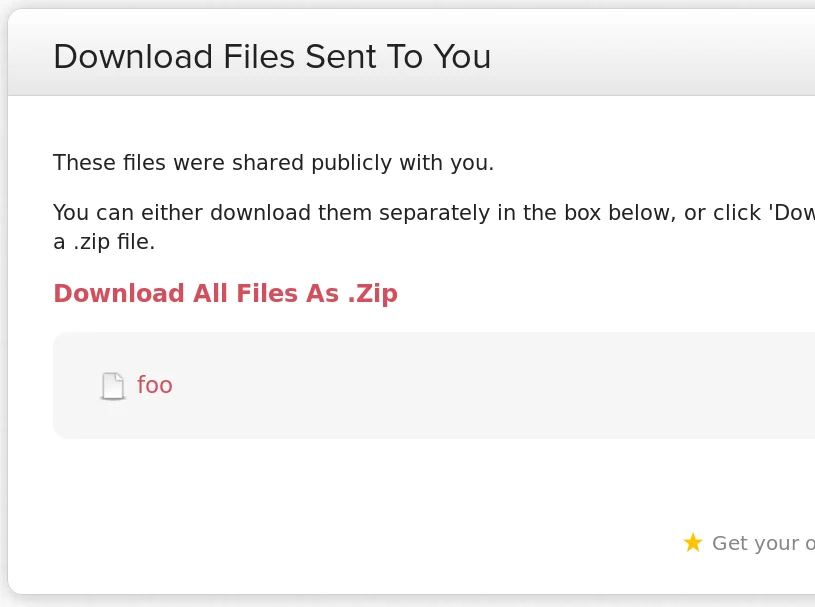
.
Now when I try to download foo a GET request is sent to https://pwn.brickftp.com/bundles/download?code=23a17148e&path=foo&x=767de6540 .
Notice that the path variable contains foo, if we change it to bar, it will tell us: Invalid path for bundle.
However, any other path starting with foo can be downloaded. For example https://pwn.brickftp.com/bundles/download?code=23a17148e&path=footer.php&x=767de6540
This would also allow to download any file in foobar/: https://pwn.brickftp.com/bundles/download?code=23a17148e&path=foo&x=767de6540
Final Remark
Please note that the above links will most likely not work for if you click on them because the x parameter is session specific. But you can still download my files if you go to the QuickLink: https://pwn.brickftp.com/f/23a17148e and then simply replace the path variable yourself like I did above.
If something is unclear or you have any questions please let me know.
Context
Files.com (the report refers to the test site as pwn.brickftp.com) offers a file sharing feature called QuickLink. A QuickLink is a bundle that exposes one or more selected files to people outside the account through a public URL of the form https://pwn.brickftp.com/f/<code>. The bundle is identified by a short code, and the download request carries the bundle code, the file path and an x parameter.
The report describes a flaw in the access control applied to that download endpoint: the check that a requested file belongs to the bundle is done in a way that accepts any path sharing a prefix with the shared file's name.
Setup
The researcher worked against a test site named pwn.brickftp.com, with the support PIN 305056 supplied to the program. No specific account roles, tools or product versions are described in the report.
The test data was a small set of files and folders created in the account:
bar
foo
foobar/secret
footer.php
This layout is deliberate: foo is the file to be shared, bar is an unrelated file, and footer.php and foobar/secret are files whose names begin with the same three characters as foo.
Finding it
The researcher used the Copy Public QuickLink action on foo. That produced a bundle at https://pwn.brickftp.com/f/23a17148e containing only that one file.
The screenshot shows the QuickLink bundle with just the shared file in it.
Downloading foo from the bundle issues a GET request to the bundle download endpoint, with the bundle code, the file path and an x parameter:
The path parameter is what identifies the file inside the bundle, and the x parameter is session specific. Changing path to another value shows how the server validates it against the bundle contents.
Exploitation
Step 1: confirm that an unrelated path is rejected
Changing path from foo to bar produces the error Invalid path for bundle. So the endpoint does perform a check, and a file that is not part of the bundle cannot be fetched by simply naming it.
Step 2: try a path that shares a prefix with the shared file
Because footer.php starts with the same characters as foo, the researcher requested it with the same bundle code and session value:
The report presents this URL as a way to download footer.php, even though it was never added to the bundle.
Step 3: reach files inside a directory with the same prefix
The report states that any file in foobar/ can also be downloaded, because the directory name begins with the shared file's name:
In the report the example URL is written with path=foo, but the accompanying text states that this allows downloading any file in foobar/, so the intended target is the file inside that directory.
Limits
The x parameter is tied to the session, so the exact URLs above will most likely not work when clicked by someone else. The practical route is to open the QuickLink at https://pwn.brickftp.com/f/23a17148e and then replace the path value in the resulting download request, as the researcher did.
Root cause
The behaviour is consistent with a check on path that compares a prefix rather than an exact match, though the report does not show the code. Any path whose string begins with the shared file's name therefore passes: footer.php and foobar/secret both start with foo. The check that correctly rejects bar is the same check that wrongly accepts these paths, so the validation exists but is implemented too loosely. The report does not include the server-side code, so the exact comparison used is not shown.
Impact
A request for a QuickLink can fetch files outside the bundle as long as their paths share a prefix with a file that is in it. That includes sibling files with a common name prefix and files inside directories with that prefix. The report does not describe how the x value is issued or how long it lives, so the window in which a leaked request can be replayed is not stated.
Fix
- Share a file named
reportand requestreport.pdf,report-final.docxorreports/2024/summary.csv. A positive result is a successful download of a file that is not listed in the bundle. - Share a file inside a directory and request a sibling with a longer name, for example share
docs/aand requestdocs/ab. A positive result shows the comparison is done on the full path string rather than on path components. - Try path traversal sequences appended to the shared name, such as
foo/../bar, to see whether normalisation happens before or after the membership check. A positive result is a download ofbar. - Try case variations and trailing characters, such as
foo%00,foo.orFOO, to see whether the comparison is case sensitive and whether terminators are handled. A positive result is any accepted path that does not resolve to the shared file. - Apply the same idea to other bundle or share endpoints that take a path parameter, such as preview, thumbnail or archive download routes. A positive result is the same prefix acceptance on a different endpoint.
This class of bug hides in features that expose a subset of stored objects through a public identifier: share links, bundles, signed download routes and preview endpoints. The signal during recon is a download URL that carries both a container identifier (here code) and an object path (here path), because the server has to reconcile the two on every request. When testing, start by requesting an object that is clearly outside the container to confirm a check exists, then move to names that share a prefix with a legitimate member, including directory names. The report made the impact concrete by showing the bundle page containing only foo and then downloading footer.php and a file under foobar/ through the same bundle code, which is enough for a program to see that unshared files are reachable.
What happened, in plain words
Files.com is a service for storing and sharing files online. One of its features is called QuickLink. A QuickLink is a way to hand a file to someone outside your account: you pick a file, the service gives you a public web address, and anyone with that address can download the file. Think of it like a locker in a cloakroom. You put one coat in locker number 23, and the attendant gives you a ticket with that number. When someone shows the ticket, the attendant should fetch only the coat that belongs to locker 23.
In this report, the researcher found that the attendant was not checking the ticket carefully. The service did check the requested file against the bundle, but the check let through names that begin with the shared file's name. So if you shared a file called foo, the service also handed over footer.php and files inside a folder called foobar/, because all of those names start with the same three letters. Files that were never shared could be downloaded through the same bundle.
The researcher demonstrated this on a test site called pwn.brickftp.com, using a support PIN of 305056 to identify the test account to the program. The report does not describe any particular account role, tool or product version.
The setup: a small set of test files
To show the problem clearly, the researcher created a handful of files and folders in the account:
bar
foo
foobar/secret
footer.php
Line by line:
baris an unrelated file. It shares no letters with the file that will be shared, so it is the control case: it should never be downloadable through a bundle that does not contain it.foois the file that will be shared through the QuickLink. It is the legitimate member of the bundle.foobar/secretis a file calledsecretsitting inside a folder calledfoobar. The folder name starts with the same three letters asfoo.footer.phpis a file whose name also starts withfoo.
The layout is deliberate. One file is the shared one, one is completely unrelated, and two have names that begin with the same characters as the shared file. That way the researcher can test whether the service compares whole names or just the start of them.
Finding the flaw
The researcher used the Copy Public QuickLink action on foo. This created a bundle at the address https://pwn.brickftp.com/f/23a17148e, containing only that one file.
The screenshot shows the QuickLink page with just the shared file listed in it. This matters because it is the evidence that only foo was meant to be public.
When you click download on that page, your browser sends a request to the server. A request is simply a message your browser sends asking the server for something, and the server answers with the file or an error. The request for foo looks like this:
Line by line:
GETis the type of request. It means "please give me this thing". It is the same kind of request your browser makes when you open any web page./bundles/downloadis the part of the server that handles downloads from bundles. Think of it as the specific counter in the cloakroom where you collect your coat.code=23a17148eidentifies which bundle is being used. It is the locker number.path=foosays which file inside the bundle you want. It is the name written on the coat.x=767de6540is an extra value that the server issued to this particular browsing session. A session is the server's memory of your visit: when you open the QuickLink page, the server gives your browser a value, and the browser sends it back with each follow-up request so the server knows the requests belong together. The report says this value is session specific, which is why the exact URLs in the report will not work for anyone else.Host: pwn.brickftp.comtells the server which website the request is for. One server can host many sites, so the request names the one it wants.
The path parameter is the interesting part. It is the only thing that says which file to fetch, so the researcher started changing it to see how strictly the server checked it against the bundle's contents.
Exploitation
Step 1: confirm that an unrelated path is rejected
The first test is to ask for a file that is clearly not in the bundle. The researcher changed path from foo to bar. The server answered with the error Invalid path for bundle.
This is a good sign in one sense: it proves the server does perform a check. A file that is not part of the bundle cannot be fetched just by naming it. The researcher needed to know this before going further, because if bar had been accepted, the bug would have been far more obvious and far more serious.
Step 2: try a path that starts with the same letters
Next, the researcher asked for footer.php. This file was never added to the bundle, but its name begins with the same three characters as foo. The request used the same bundle code and the same session value:
Line by line:
- Everything is the same as the legitimate request except
path=footer.php. - The bundle code
23a17148estill points at the bundle that contains onlyfoo. - The session value
x=767de6540is still the researcher's own, so the server treats the request as coming from the same visitor.
The report presents this URL as a way to download footer.php even though it was never part of the bundle. The check that rejected bar accepted footer.php, which tells us the check is comparing only the beginning of the name, not the whole name.
Step 3: reach files inside a folder with the same prefix
The same weakness applies to folders. If a folder's name begins with the shared file's name, files inside it are accepted too. The report states that any file in foobar/ can be downloaded:
Line by line:
path=foobar/secretasks for the filesecretinside the folderfoobar.- The slash separates the folder name from the file name, the same way folders are written on a computer.
- The bundle code and session value are unchanged.
In the report the example URL is written with path=foo, but the text next to it says this allows downloading any file in foobar/, so the intended target is the file inside that folder. The point is the same: the folder name starts with foo, so the loose check lets it through.
Why the exact links will not work for you
The x value is tied to the session, so the exact URLs above will most likely not work if someone else clicks them. The practical route, as the researcher describes, is to open the QuickLink at https://pwn.brickftp.com/f/23a17148e yourself and then replace the path value in the download request your browser makes. That way you use your own session value, which the server will accept.
Root cause
The behaviour is consistent with a check that compares only the start of the requested name, though the report does not show the code. Any path whose text begins with foo therefore passes: footer.php and foobar/secret both start with those three letters. The very same check that correctly rejects bar wrongly accepts these paths, so the validation exists but is implemented too loosely. The report does not include the server-side code, so the exact comparison used is not shown.
Impact
A request for a QuickLink can fetch files outside the bundle as long as their paths start with the name of a file that is in it. That includes other files with a common name prefix and files inside folders with that prefix.
Fix
- Share a file named
reportand requestreport.pdf,report-final.docxorreports/2024/summary.csv. A positive result is a successful download of a file that is not listed in the bundle. - Share a file inside a folder and request a neighbour with a longer name, for example share
docs/aand requestdocs/ab. A positive result shows the comparison is done on the whole path text rather than on each folder and file name separately. - Try path traversal sequences appended to the shared name, such as
foo/../bar, to see whether the path is cleaned up before or after the membership check. Path traversal means using..to climb out of a folder, the waycd ..moves you up one level on a computer. A positive result is a download ofbar. - Try case variations and trailing characters, such as
foo%00,foo.orFOO, to see whether the comparison cares about upper and lower case and whether special characters are handled. A positive result is any accepted path that does not lead to the shared file. - Apply the same idea to other bundle or share endpoints that take a path parameter, such as preview, thumbnail or archive download routes. An endpoint is a specific address on a server that does one job, like the download counter in the cloakroom. A positive result is the same prefix acceptance on a different endpoint.
This kind of bug hides in features that expose a small part of stored files through a public identifier: share links, bundles, signed download routes and preview endpoints. The signal during recon is a download URL that carries both a container identifier (here code) and an object path (here path), because the server has to reconcile the two on every request. Recon means looking around a target to see what it offers before testing anything.
When testing, start by requesting an object that is clearly outside the container to confirm a check exists, then move to names that start with the same letters as a legitimate member, including folder names. The report made the impact concrete by showing the bundle page containing only foo and then downloading footer.php and a file under foobar/ through the same bundle code, which is enough for a program to see that unshared files are reachable.
Glossary
- API: a way for one piece of software to talk to another, like a service counter where you make a specific request and get a specific answer.
- Bundle: a collection of one or more files that a sharing feature exposes together under a single public address.
- Endpoint: a specific address on a server that performs one job, such as handling downloads.
- GET request: the type of web request that asks the server to give you something, such as a page or a file.
- Host: the part of a request that names which website on the server is being asked.
- Parameter: a named value attached to a request, such as
path=foo, that tells the server what you want. - Path: the text that identifies a file or folder, with slashes separating folders from file names.
- Path traversal: using
..in a path to climb out of a folder and reach files elsewhere. - Prefix: the beginning of a piece of text.
foois a prefix offooter.php. - QuickLink: the Files.com feature that shares selected files with people outside the account through a public web address.
- Recon: looking around a target to understand what it offers before testing it.
- Request: a message a browser sends to a server asking for something.
- Root cause: the underlying reason a bug exists, as opposed to its visible symptoms.
- Session: the server's memory of one visitor's visit, kept together by a value the browser sends back on each request.
- Session value: the value that ties requests to one session, here the
xparameter. - Support PIN: a number the researcher supplied to the program to identify the test account.
- Vulnerability class: a family of bugs that share the same underlying mistake, such as checking only part of a name.





