Firebase: Insecure by Default (feat. that one time our classmates tried to sue us)
The Fizz app's Firebase security rules allowed any authenticated user to read the entire users and posts collections, enabling deanonymization of all posts down to email or phone number, and to modify their own account to become a moderator. An attacker could thus identify anonymous posters and gain moderation privileges to delete arbitrary posts.
 Published on saligrama.io
By shifting the data authorization and access restriction burden from robust programmatic systems running on a server to static security rules, backend-as-a-service platforms like Google Firebase put new app developers and their products at risk of catastrophic data breaches if utmost care is not paid to the efficacy…
The full write-up lives on its author's site
It belongs to its author, so we link to it rather than copy it. The other two tabs are our own rewrites, checked against it.
Context
Firebase is Google's backend-as-a-service platform. Its selling point for early-stage apps is that it removes the need to write and maintain a backend: it handles authentication (including MFA and SSO) and offers two document-structured datastores, Cloud Firestore (CFS) and Realtime Database (RTDB). Because the data model can change frequently, this is attractive to developers in a prototyping phase.
The security model is the part that matters here. Clients such as web and mobile apps connect directly to both the authentication system and the datastore using a set of API keys distributed with every client instance, so every app download carries the same Firebase API keys. There is no programmatic authorisation system deciding which clients can see what data, as there would be in a traditional client-server-database model. Instead, access is configured in the admin view with JSON-based security rules that specify which classes of users may read or write each data path.
Firebase's own documentation explains why this gets hard as data models grow:
Rules are applied as
ORstatements, notANDstatements. Consequently, if multiple rules match a path, and any of the matched conditions grants access, Rules grant access to the data at that path. Therefore, if a broad rule grants access to data, you can't restrict with a more specific rule. Firebase Security Rules flag overlaps in your matched paths as compiler warnings.
The default configuration when an app is first set up is Test Mode, which grants read and write access on all data to all users on the open internet, whether or not they have an app account, using this rule:
match /{document=**} {
  allow read, write: if request.time < timestamp.date(2022, 10, 13);
}
That is fine before launch, when nobody but the developers knows the Firebase project exists. In early-stage startups security often takes a backseat, and collections are frequently left in Test Mode well after launch. A 2020 report by Comparitech found that nearly eight percent of Android apps on the Google Play Store using Firebase had rules that allowed attackers to potentially read personal user information without even authenticating, and more than 75 percent of those apps also allowed write access by arbitrary users. There are likely more apps where authentication is required but any authenticated user can read any other user's data.
These issues belong to a class known as HospitalGown: client-side applications connect to a completely exposed backend that lets malicious users query for data they should not have access to.
The case study is Fizz (formerly Buzz), an iOS-only social messaging platform for sharing posts and comments, popular at Stanford and other college campuses. Each user has an account requiring a community-affiliated email to verify membership, but can post anonymously, and users accrue points based on the popularity of their posts. Because of its purported anonymity, posts can contain highly sensitive information; users talk about their LGBTQ+ identity, for example, even while in family situations that are not supportive of it.
Setup
In November 2021, Miles McCain, Cooper de Nicola and the author inspected Fizz's security posture and found significant data leakage caused by misconfigured Firebase security rules.
The first step was to pull the Firebase API keys off a jailbroken iPhone 6S using the iOS token extraction technique described below. The inspection happened before the team knew Baserunner existed, so they wrote a Node.js script based on the Firebase SDK that could identify itself to Firebase as Fizz using the tokens found in the app files.
Fizz's minimal security rules required an active user session when data is requested from the database, and their authentication model at the time consisted of sending a sign-in link to the user's email. Simulating that in a script would have been extremely difficult; Baserunner is much easier here because it saves such state for you in the session. Crucially, the email associated with a session did not need to be affiliated with a member community to access data, so temporary users with addresses of the form [redacted] could be created for each run of the script.
Finding it
Locating the API tokens
A Firebase client identifies itself with a set of API tokens in this format:
{
  apiKey: "[redacted]", // created by keyboard mashing
  authDomain: "my-project.firebaseapp.com",
  projectId: "my-project",
  storageBucket: "my-project.appspot.com",
  databaseURL: "https://my-project.firebaseio.com", // used only by RTDB
  messagingSenderId: "70263983361", // randomized
  appId: "1:70263983361:web:907b0c94510e7549e1ae94" // randomized
}
Finding them is not particularly difficult:
- On web apps they are typically somewhere in the minified JavaScript source for the page. Search for the phrase
appspotand you should find them, already in JSON format. - For Android apps, download the APK to your computer with a tool such as the one linked in the report. After decompiling with
apktool, the keys are inres/values/strings.xml; search for the keywordfirebase. The values you want are associated with the XML keysgcm_defaultSenderId,google_api_key,firebase_url(for RTDB client apps),google_storage_bucket,google_app_idandproject_id. - iOS apps are trickier and usually require a jailbroken iPhone or iPad.
sshinto the device and navigate to/var/containers/Bundle/Application. Find the app's UUID by runningfind | grep com.appdev.app_name, thencd app_uuid/app_name.app. The tokens are inGoogleService-Info.plist. The file may be binary encoded and may need a tool likeplistutilto reveal it in plaintext, which can be done by usingscpto transfer the file back to your computer. The keys you want areAPI_KEY,DATABASE_URL(for RTDB client apps),GCM_SENDER_ID,GOOGLE_APP_ID,PROJECT_IDandSTORAGE_BUCKET.
Probing the datastore
With the tokens in hand, the easiest way to explore the database is Baserunner, which lets you set a Firebase config in JSON format for a particular app and then authenticate into it if necessary. Authentication is supported via email/password, phone number/OTP and Google account.
Once authenticated, you use a query template to request data from CFS or RTDB, depending on what the app uses. That requires knowing or guessing collection and possibly document names that correspond to valid data. This can be made easier by searching the JavaScript source of web or React Native apps, or by using a gRPC-capable proxy such as mitmproxy to intercept and inspect requests between mobile clients and Firebase. Many Firebase apps and websites use SSL certificate pinning when accessing the database, which makes proxying difficult; one workaround is one of mitmproxy's suggested certificate pinning bypass techniques, although the author had not tried any of them.
When guessing names, keep in mind how Cloud Firestore and Realtime Database structure their data models, especially this restriction for Cloud Firestore:
Notice the alternating pattern of collections and documents. Your collections and documents must always follow this pattern. You cannot reference a collection in a collection or a document in a document.
One important behaviour: if you access an invalid data path, Firebase's client library as used in Baserunner always returns a permission denied error. This is a security feature that prevents the frontend from distinguishing an invalid path from a path that security rules block for the authenticated user. To confirm your tooling works, try a data path you know you should be able to access, which you can probably find by inspecting web requests or minified JavaScript.
Exploitation
Step 1: become a Firebase client
The Node.js script below identifies itself to Firebase as Fizz using the extracted tokens, creates a throwaway account, reads the users collection and then deletes the account.
import { initializeApp } from 'firebase/app';
import { getFirestore, collection, getDocs } from 'firebase/firestore/lite';
import { getAuth, createUserWithEmailAndPassword, deleteUser } from "firebase/auth";

const firebaseConfig = {
    // Fizz tokens go here
};

const app = initializeApp(firebaseConfig);
const db = getFirestore(app);
const auth = getAuth();

createUserWithEmailAndPassword(
    auth,
    "not-real-user-" + Math.random() + "@test.com",
    "foo"
).then((userCredential)) => {
    getDocs(collection(db, "users")).then(x => {
        x.forEach((doc) => {
            console.log(JSON.stringify(doc.data()));
        });
    });

    deleteUser(auth.currentUser);
};
The config object holds the tokens taken from the app files. createUserWithEmailAndPassword registers a temporary account with a random @test.com address and the password foo. getDocs(collection(db, "users")) then requests the whole users collection and prints each document as JSON. deleteUser removes the temporary account afterwards. Because the session email did not need to belong to a member community, temporary users could be created for each run of the script.
Step 2: read the users collection
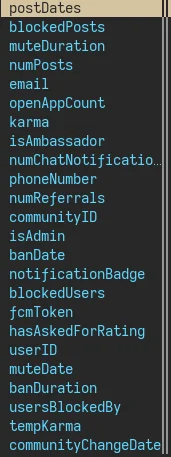
The first request was for the users collection. It contained the expected information: emails, phone numbers, app points accrued and moderator status. The team also noticed a userID field and theorised it was what connected the users and posts collections.
Step 3: read the posts collection
Requesting the posts collection was a bit trickier because the table was namespaced under a specific member of the communities collection: each community has its own posts table.
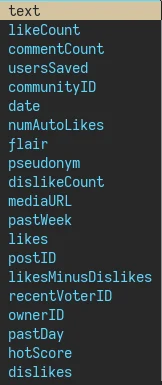
Each post document contained post content, pseudonyms, the user ID of the user who created it, the user IDs of the users who upvoted and downvoted it, and more. Joining users and posts on the user ID fields identified each post's author down to their email address and/or phone number, which broke the app's anonymity.
Step 4: modify the users collection
The users collection could also be written to. The team changed the points value of the author's own account to 99 trillion, and the change was reflected when opening the app.

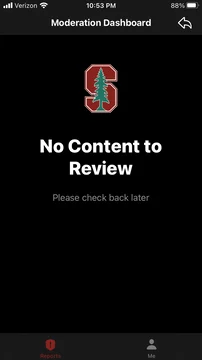
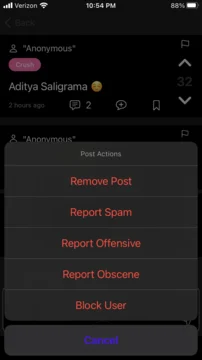
More concerning was privilege escalation: changing the isModerator field on the account from null to true promoted it to moderator. That gave access to a moderation UI and the ability to delete arbitrary posts from the app itself, including posts made by accounts that were not the author's own. The only posts deleted were created by Miles for testing purposes. All modifications were reverted immediately after taking screenshots from the app for documentation, and the only accounts modified were the team's own, with express consent from their owners.

Root cause
The vulnerability was a misconfiguration of Firebase security rules. The rules required an active user session to read from the database, and the email tied to that session did not need any community affiliation. Any session, including one created with an email address that had no community affiliation, could read the users collection, read every community's posts collection, and write to users, including the isModerator field.
Because Firebase rules are evaluated as OR statements rather than AND, a broad rule that grants access cannot be narrowed by a more specific one, which makes this kind of mistake easy to make as a data model grows. The default Test Mode rule grants read and write on all data to everyone on the open internet, and it is common for collections to be left in that state well after launch. In Fizz's case the rules required an active session, but any session could reach the data the team requested.
Google's safeguards did not prevent this. Test Mode expires 30 days after creation by default and Google sends emails warning about expiry and unauthorised data access, but developers tend to keep resetting the timer rather than writing proper rules, especially during rapid growth. Google also has no way of warning developers about rules that are nearly as insecure as Test Mode, such as permitting all requests by authenticated users. Such rules sometimes appear as a suggested implementation in introductory development tutorials.
Impact
With the app's Firebase API keys, which ship with every client instance, the team registered a session with an email address and read the users collection, exposing emails, phone numbers, points and moderator status. They could read every community's posts collection, exposing post content, pseudonyms, author user IDs and the user IDs of upvoters and downvoters. Joining the two collections on user ID deanonymised every post down to email address and/or phone number. The team could also write to users, changing points and setting isModerator to true to gain the moderation UI and delete arbitrary posts.
Given how fundamental the vulnerability was, the team believes it is possible that it was noticed, and perhaps abused, by others before they discovered it.
Fix
Fizz worked to fix the issue after the initial report and told the team on 22 November 2021 that they considered the original vulnerability fixed. The report does not describe the specific rule changes.
For this class of vulnerability, remediation must come from careful application of security rules that restrict data to those authorised to see it. Because of how rules are interpreted, this is tricky, and many apps that made good attempts were still susceptible through edge cases. Developers must test every potential user role and every data access path to confirm the rules work.
The author argues Google should go further: stronger warnings in the Firebase documentation as well as in emails and the console, written so that new developers can understand and implement the rules; and a way to click any collection or document and see exactly which users or roles have access, so developers can self-test without much extra effort.
Variants to test
-
Authenticated read across tenants. Sign in with a throwaway account that has no affiliation with the app's communities and query each collection, including namespaced ones such as per-community posts tables. A positive result is data belonging to other users or communities.
-
Write to profile fields. Attempt to modify your own document's privilege or score fields, such as a moderator flag or a points value. A positive result is the change persisting and being reflected in the app.
-
Join for deanonymisation. Where posts carry an author ID and profiles carry the same ID alongside contact details, join the two. A positive result is mapping an anonymous post to an email address or phone number.
-
Path guessing with a control. When a query returns permission denied, retry a path you know you can access to confirm the tooling works, since Firebase returns the same error for invalid paths and blocked paths.
-
Rules that allow all authenticated users. Look for apps whose rules simply permit any authenticated request, a pattern sometimes suggested by tutorials. A positive result is any authenticated session reading collections it has no business seeing.
What happened, in plain words
Fizz is a social app, formerly called Buzz, that runs only on iPhone. Students at Stanford and other universities use it to share posts and comments. You need an email address tied to your university to join, but when you post, your name is hidden: the app promises anonymity. Users also collect points when their posts are popular.
Because people believed they were anonymous, they wrote very personal things on Fizz. Some talked about their LGBTQ+ identity, even when their family situation was not supportive of it. That makes the promise of anonymity a serious safety matter, not a small feature.
In November 2021, three security researchers looked at how Fizz stored its data. Fizz, like many young apps, used a Google product called Firebase to run its backend. Firebase stores the app's data in the cloud and lets the app talk to it directly. The researchers found that Fizz's settings on Firebase were too loose. The researchers, who had read the app's built-in keys, which ship inside every copy of the app, created an account with an email address and then read the database: users' emails and phone numbers, and posts linked to the person who wrote them. They also edited their own account to give themselves moderator powers and delete posts.
They reported the problem to Fizz privately. Fizz worked to fix it and said it considered the issue fixed, and in that email attached a lawyer's letter threatening action unless the researchers stayed silent. A free-speech legal group, the Electronic Frontier Foundation, represented the researchers. Fizz eventually posted a security notice to users, framed as security improvements, which did not adequately disclose that every post could be deanonymised.
This article walks through how the researchers found the problem, step by step, and explains each technical idea from scratch along the way.
Background: what Firebase is and why its settings matter
A backend in a box
Most apps need a backend: a computer somewhere that stores data and answers the app's questions. In the traditional picture, the app on your phone talks to a server, and only that server talks to the database. The server is the bouncer: it checks who you are and decides what you are allowed to see before it fetches anything.
Firebase is Google's product that removes the need to build that server. It is often called backend-as-a-service: someone else runs the computers, and the app talks to them directly. Firebase handles sign-in (including multi-factor authentication and single sign-on) and offers two ways to store data, Cloud Firestore (CFS) and Realtime Database (RTDB). Both store data as documents, a bit like folders of labelled records. Because the shape of the data can change easily, this is attractive to a small team building a first version of an app.
The keys that every app download carries
To use Firebase, an app needs a set of API keys. An API is simply a way for one piece of software to ask another piece of software to do something, like a service counter where you hand over a request form. The key is the form that identifies which project you are asking about.
Here is the important part: those keys are baked into every copy of the app. Every person who downloads Fizz gets the same keys. They are not secret in the way a password is secret. They identify the project, not the person.
In a traditional setup, the server decides what data each request may see. With Firebase, there is no such server-side gatekeeper. Instead, the app connects straight to the datastore, and the rules about who may read or write what live in a configuration screen in the Firebase admin console. Those rules are written in JSON, a text format for structured data, and they say things like "users of this class may read this path".
Why the rules are easy to get wrong
Firebase's own documentation explains the trap. Rules are combined with OR, not AND. In plain words: if any rule that matches a piece of data says yes, the answer is yes. A broad rule that lets people in cannot be narrowed by a more specific rule that says no. The documentation puts it like this:
Rules are applied as
ORstatements, notANDstatements. Consequently, if multiple rules match a path, and any of the matched conditions grants access, Rules grant access to the data at that path. Therefore, if a broad rule grants access to data, you can't restrict with a more specific rule. Firebase Security Rules flag overlaps in your matched paths as compiler warnings.
Think of a building with several doors. If any one door is unlocked, the room is open, no matter how many other doors have good locks.
Test Mode: open to the whole internet
When you first create a Firebase project, it starts in Test Mode. Test Mode lets anyone on the internet read and write all the data, whether or not they have an account in your app. The rule looks like this:
match /{document=**} {
  allow read, write: if request.time < timestamp.date(2022, 10, 13);
}
Line by line:
match /{document=**}selects every document in the database. The**means "and everything below this point", like saying "all files in all folders".allow read, write:says that both reading and writing are permitted.if request.time < timestamp.date(2022, 10, 13);adds one condition: the request must arrive before 13 October 2022. Until that date, the door is wide open. After it, the rule stops allowing anything.
This is fine before launch, when nobody except the developers knows the project exists. The trouble is that in young startups security often comes after other work, and databases are frequently left in Test Mode long after the app has real users.
A 2020 report by Comparitech found that nearly eight percent of Android apps on the Google Play Store that used Firebase had rules letting attackers potentially read personal user information without even signing in. More than 75 percent of those apps also let arbitrary users write to their databases. There are likely more apps where signing in is required, but any signed-in user can read any other user's data.
The name for this class of bug
Security researchers group these problems under the name HospitalGown: an app on your phone connects to a backend that is completely exposed, so a malicious user can simply ask for data they should never see. The name is a metaphor for a backend that is left undressed in public.
The target: Fizz
Fizz, formerly Buzz, is an iOS-only social messaging platform for sharing posts and comments, popular at Stanford and other college campuses. Each user has an account that requires a community-affiliated email to verify membership, but users post anonymously. Users accrue points based on how popular their posts are.
Because of its claimed anonymity, posts can contain highly sensitive information. Users talk about their LGBTQ+ identity, for example, even while in family situations that are not supportive of it. If the anonymity breaks, the harm is not abstract.
Setting up the test
In November 2021, Miles McCain, Cooper de Nicola and the author inspected Fizz's security posture. They found significant data leakage caused by misconfigured Firebase security rules.
The first step was to pull the Firebase API keys off a jailbroken iPhone 6S. Jailbreaking means removing the restrictions Apple places on an iPhone so that you can run your own tools on it; it is like being given the keys to the inside of the device. The team used the iOS token extraction technique described further down.
They did this inspection before they knew a tool called Baserunner existed. Baserunner is a ready-made program for exploring a Firebase database. Instead, they wrote their own small program in Node.js, a way of running JavaScript on a computer rather than in a browser, using Firebase's software development kit (SDK), a set of pre-written code that makes talking to Firebase easier. The program could identify itself to Firebase as Fizz using the tokens found in the app files.
Fizz's security rules were minimal: they required an active user session when data was requested. A session is the state of being signed in, like a wristband at an event that proves you entered. Fizz's sign-in at the time worked by sending a sign-in link to the user's email. Simulating that inside a script would have been extremely difficult. Baserunner is much easier for this because it keeps that state for you in the session.
Crucially, the email tied to a session did not need to belong to a member community in order to read data. So the team could create temporary users with addresses of the form [redacted] for each run of the script. The wristband was checked, but nobody checked whether the wristband belonged to a real student.
Finding it
Locating the API tokens
A Firebase client identifies itself with a set of API tokens in this format:
{
  apiKey: "[redacted]", // created by keyboard mashing
  authDomain: "my-project.firebaseapp.com",
  projectId: "my-project",
  storageBucket: "my-project.appspot.com",
  databaseURL: "https://my-project.firebaseio.com", // used only by RTDB
  messagingSenderId: "70263983361", // randomized
  appId: "1:70263983361:web:907b0c94510e7549e1ae94" // randomized
}
Line by line:
- The outer braces
{and}wrap one object, a collection of labelled values, like a form with named fields. apiKeyis the main key that identifies the Firebase project. The comment says it was created by keyboard mashing, which is how these long random-looking strings are often produced.authDomainis the web address Firebase uses for sign-in.projectIdis the project's name inside Google's systems.storageBucketis where files such as images are kept.databaseURLis the address of the Realtime Database, used only by apps that use RTDB.messagingSenderIdis an identifier for push notifications, described as randomized.appIdis the app's identifier, also described as randomized.
Finding these values is not particularly difficult:
- On web apps they are typically somewhere in the minified JavaScript source for the page. Minified means the code has been squashed to save space, with short names and no line breaks, which makes it hard for a person to read but does not hide anything from a search. Search for the phrase
appspotand you should find them, already in JSON format. - For Android apps, download the APK to your computer with a tool such as the one linked in the report. An APK is the installable package file for an Android app, like a zip file with the app inside. After decompiling with
apktool, a program that unpacks the APK back into readable files, the keys are inres/values/strings.xml; search for the keywordfirebase. The values you want are associated with the XML keysgcm_defaultSenderId,google_api_key,firebase_url(for RTDB client apps),google_storage_bucket,google_app_idandproject_id. - iOS apps are trickier and usually require a jailbroken iPhone or iPad.
sshinto the device, which means opening a remote command line on it from your computer, and navigate to/var/containers/Bundle/Application. Find the app's UUID, a long unique identifier, by runningfind | grep com.appdev.app_name, thencd app_uuid/app_name.app. The tokens are inGoogleService-Info.plist. The file may be binary encoded, meaning stored in a machine format rather than readable text, and may need a tool likeplistutilto reveal it in plaintext, which can be done by usingscpto transfer the file back to your computer. The keys you want areAPI_KEY,DATABASE_URL(for RTDB client apps),GCM_SENDER_ID,GOOGLE_APP_ID,PROJECT_IDandSTORAGE_BUCKET.
Probing the datastore
With the tokens in hand, the easiest way to explore the database is Baserunner. It lets you set a Firebase config in JSON format for a particular app and then authenticate into it if necessary. Authentication is supported via email/password, phone number/one-time code, and Google account.
Once authenticated, you use a query template to request data from CFS or RTDB, depending on what the app uses. A query is just a question asked of the database, such as "give me everything in the users collection". That requires knowing or guessing collection and possibly document names that correspond to valid data. A collection is a group of records of the same kind, like a drawer of index cards; a document is one record, one card.
This guessing can be made easier by searching the JavaScript source of web or React Native apps, or by using a gRPC-capable proxy such as mitmproxy to intercept and inspect requests between mobile clients and Firebase. A proxy sits between your device and the internet and can record what passes through, like a post office that opens and copies every letter. gRPC is a way programs talk to each other efficiently. Many Firebase apps and websites use SSL certificate pinning when accessing the database, which makes proxying difficult. Certificate pinning means the app only trusts one specific identity certificate for the server, so a proxy cannot pretend to be the server. One workaround is one of mitmproxy's suggested certificate pinning bypass techniques, although the author had not tried any of them.
When guessing names, keep in mind how Cloud Firestore and Realtime Database structure their data models, especially this restriction for Cloud Firestore:
Notice the alternating pattern of collections and documents. Your collections and documents must always follow this pattern. You cannot reference a collection in a collection or a document in a document.
In everyday terms: a drawer holds cards, and a card can point to another drawer, but you cannot put a drawer inside a drawer or a card inside a card. Knowing this pattern narrows down the names worth trying.
One important behaviour: if you access an invalid data path, Firebase's client library as used in Baserunner always returns a permission denied error. This is a security feature that prevents the frontend from distinguishing an invalid path from a path that security rules block for the signed-in user. In other words, the system refuses to tell you whether the door does not exist or is simply locked. To confirm your tooling works, try a data path you know you should be able to access, which you can probably find by inspecting web requests or minified JavaScript. That known-good path is your control, like checking that a torch works on your own hand before pointing it into a dark room.
Exploitation
Step 1: become a Firebase client
The Node.js script below identifies itself to Firebase as Fizz using the extracted tokens, creates a throwaway account, reads the users collection and then deletes the account.
import { initializeApp } from 'firebase/app';
import { getFirestore, collection, getDocs } from 'firebase/firestore/lite';
import { getAuth, createUserWithEmailAndPassword, deleteUser } from "firebase/auth";

const firebaseConfig = {
    // Fizz tokens go here
};

const app = initializeApp(firebaseConfig);
const db = getFirestore(app);
const auth = getAuth();

createUserWithEmailAndPassword(
    auth,
    "not-real-user-" + Math.random() + "@test.com",
    "foo"
).then((userCredential)) => {
    getDocs(collection(db, "users")).then(x => {
        x.forEach((doc) => {
            console.log(JSON.stringify(doc.data()));
        });
    });

    deleteUser(auth.currentUser);
};
Line by line:
- The three
importlines bring in pre-written pieces of Firebase code:initializeAppstarts the connection,getFirestore,collectionandgetDocswork with the database, andgetAuth,createUserWithEmailAndPasswordanddeleteUserhandle accounts. const firebaseConfig = { ... }is the form where the tokens taken from the app files go. The comment marks the spot.const app = initializeApp(firebaseConfig);starts the Firebase connection using those tokens, so the program now looks like the Fizz app to Google's servers.const db = getFirestore(app);gets a handle on the database.const auth = getAuth();gets a handle on the sign-in system.createUserWithEmailAndPassword(auth, "not-real-user-" + Math.random() + "@test.com", "foo")registers a temporary account. The address is the wordsnot-real-user-followed by a random number, so each run gets a fresh address, and the password isfoo. This satisfies the requirement for an active session..then((userCredential)) => { ... }means: once the account exists, do the following.getDocs(collection(db, "users"))asks for the wholeuserscollection, every record in that drawer..then(x => { x.forEach((doc) => { console.log(JSON.stringify(doc.data())); }); });takes the result, goes through each record, and prints its contents as JSON text in the terminal.deleteUser(auth.currentUser);removes the temporary account afterwards, so nothing is left behind.
Because the session email did not need to belong to a member community, temporary users could be created for each run of the script.
Step 2: read the users collection
The first request was for the users collection. It contained the expected information: emails, phone numbers, app points accrued and moderator status. The team also noticed a userID field and theorised it was what connected the users and posts collections. A field is one labelled value inside a record, like one line on an index card.
Step 3: read the posts collection
Requesting the posts collection was a bit trickier because the table was namespaced under a specific member of the communities collection: each community has its own posts table. Namespaced means the name is nested under another name, like a folder inside a folder, so you have to know the community's name before you can find its posts.
Each post document contained post content, pseudonyms, the user ID of the user who created it, the user IDs of the users who upvoted and downvoted it, and more. A pseudonym is the made-up name shown next to a post instead of the real one.
Joining users and posts on the user ID fields identified each post's author down to their email address and/or phone number, which broke the app's anonymity. A join means matching records from two lists using a shared value, like matching two lists of names by student number. The anonymous post carried a number, and the user record carried the same number along with an email address.
Step 4: modify the users collection
The users collection could also be written to. The team changed the points value of the author's own account to 99 trillion, and the change was reflected when opening the app.
More concerning was privilege escalation: changing the isModerator field on the account from null to true promoted it to moderator. Privilege escalation means giving yourself a higher level of power than you were granted, like editing your own ticket to say "staff". null means empty or no value; true means yes.
That gave access to a moderation UI and the ability to delete arbitrary posts from the app itself, including posts made by accounts that were not the author's own. A UI, user interface, is the set of screens and buttons a person uses. The only posts deleted were created by Miles for testing purposes. All modifications were reverted immediately after taking screenshots from the app for documentation, and the only accounts modified were the team's own, with express consent from their owners.
Root cause
The vulnerability was a misconfiguration of Firebase security rules. The rules required an active user session to read from the database, and the email tied to that session did not need any community affiliation. Any session, including one created with an email address that had no community affiliation, could read the users collection, read every community's posts collection, and write to users, including the isModerator field.
Because Firebase rules are evaluated as OR statements rather than AND, a broad rule that grants access cannot be narrowed by a more specific one, which makes this kind of mistake easy to make as a data model grows. The default Test Mode rule grants read and write on all data to everyone on the open internet, and it is common for collections to be left in that state well after launch. In Fizz's case the rules required an active session, but any session could reach the data the team requested.
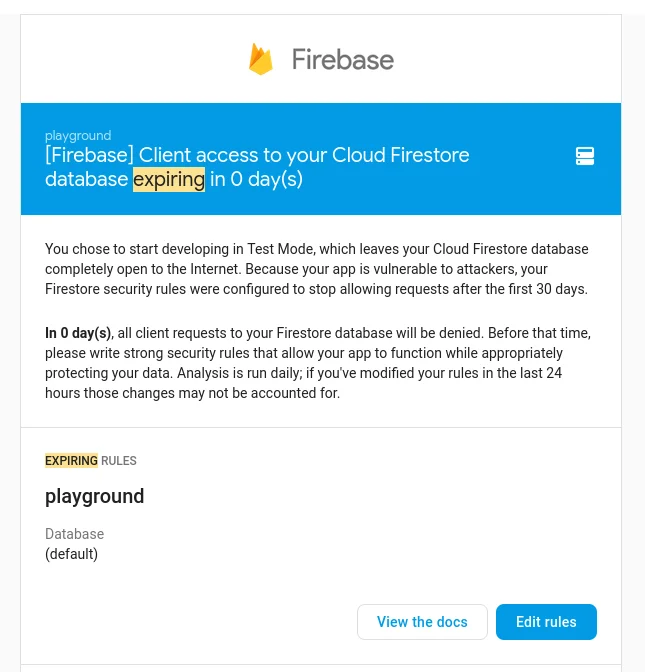
Google's safeguards did not prevent this. Test Mode expires 30 days after creation by default and Google sends emails warning about expiry and unauthorised data access, but developers tend to keep resetting the timer rather than writing proper rules, especially during rapid growth. Google also has no way of warning developers about rules that are nearly as insecure as Test Mode, such as permitting all requests by signed-in users. Such rules sometimes appear as a suggested implementation in introductory development tutorials.
Impact
With the app's Firebase API keys, which ship with every copy of the app, the team registered a session with an email address and read the users collection, exposing emails, phone numbers, points and moderator status. They could read every community's posts collection, exposing post content, pseudonyms, author user IDs and the user IDs of upvoters and downvoters. Joining the two collections on user ID deanonymised every post down to email address and/or phone number. The team could also write to users, changing points and setting isModerator to true to gain the moderation UI and delete arbitrary posts.
Given how fundamental the vulnerability was, the team believes it is possible that it was noticed, and perhaps abused, by others before they discovered it.
Fix
Fizz worked to fix the issue after the initial report and told the team on 22 November 2021 that they considered the original vulnerability fixed. The report does not describe the specific rule changes.
For this class of vulnerability, remediation must come from careful application of security rules that restrict data to those authorised to see it. Because of how rules are interpreted, this is tricky, and many apps that made good attempts were still susceptible through edge cases. Developers must test every potential user role and every data access path to confirm the rules work.
The author argues Google should go further: stronger warnings in the Firebase documentation as well as in emails and the console, written so that new developers can understand and implement the rules; and a way to click any collection or document and see exactly which users or roles have access, so developers can self-test without much extra effort.
Variants to test
-
Authenticated read across tenants. Sign in with a throwaway account that has no affiliation with the app's communities and query each collection, including namespaced ones such as per-community posts tables. A positive result is data belonging to other users or communities.
-
Write to profile fields. Attempt to modify your own document's privilege or score fields, such as a moderator flag or a points value. A positive result is the change persisting and being reflected in the app.
-
Join for deanonymisation. Where posts carry an author ID and profiles carry the same ID alongside contact details, join the two. A positive result is mapping an anonymous post to an email address or phone number.
-
Path guessing with a control. When a query returns permission denied, retry a path you know you can access to confirm the tooling works, since Firebase returns the same error for invalid paths and blocked paths.
-
Rules that allow all authenticated users. Look for apps whose rules simply permit any authenticated request, a pattern sometimes suggested by tutorials. A positive result is any authenticated session reading collections it has no business seeing.
Glossary
- API: a way for one piece of software to ask another to do something, like a service counter where you hand over a request form.
- API key: a string that identifies a software project to a service. It is not a password and is often shipped inside apps.
- APK: the installable package file for an Android app.
- Backend: the part of a system that stores data and answers requests, usually running on a server rather than on your device.
- Backend-as-a-service: a product that runs the backend for you, so you do not build or maintain your own server.
- Baserunner: a tool for connecting to a Firebase project and exploring its database.
- Certificate pinning: an app trusting only one specific identity certificate for a server, which blocks proxies from pretending to be that server.
- Cloud Firestore (CFS): one of Firebase's two datastores, organised as collections of documents.
- Collection: a group of records of the same kind in a document datastore.
- Control: a known-good test used to confirm your tools work before trusting a negative result.
- Deanonymisation: working out who wrote something that was meant to be anonymous.
- Document: one record inside a collection.
- Field: one labelled value inside a record.
- Firebase: Google's backend-as-a-service platform.
- gRPC: an efficient way for programs to talk to each other.
- HospitalGown: a class of vulnerability where a client app connects to a completely exposed backend.
- JSON: a text format for structured data, made of labelled values and lists.
- Join: matching records from two lists using a shared value.
- Jailbreaking: removing Apple's restrictions on an iPhone so you can run your own tools on it.
- Minified: code squashed to save space, with short names and no line breaks.
- mitmproxy: a proxy tool that can intercept and inspect traffic between a device and a server.
- Namespaced: nested under another name, like a folder inside a folder.
- Node.js: a way of running JavaScript on a computer rather than in a browser.
- OR rule: a rule combination where any matching rule that says yes grants access, regardless of other rules that say no.
- Privilege escalation: giving yourself a higher level of power than you were granted.
- Proxy: something that sits between your device and the internet and can record what passes through.
- Pseudonym: a made-up name shown instead of a real one.
- Query: a question asked of a database.
- Realtime Database (RTDB): one of Firebase's two datastores.
- Security rules: the JSON configuration in Firebase that says who may read or write which data.
- Session: the state of being signed in, like a wristband that proves you entered.
- SDK: a set of pre-written code that makes using a service easier.
- SSL: the encryption that protects traffic between an app and a server.
- Test Mode: Firebase's default starting configuration, which allows anyone on the internet to read and write all data until a set date.
- Token: a string that identifies a client or a session to a service.
- UI: user interface, the screens and buttons a person uses.
- UUID: a long unique identifier.
- XML: a text format for structured data, similar in spirit to JSON.

