Not using GitHub Actions? You’re also vulnerable.
A flaw in GitHub allowed a user with write access to bypass branch protection rules that require pull request approvals. By pushing a workflow that automatically approves pull requests, an attacker could merge unreviewed code into a protected branch.

A newly discovered security flaw in GitHub allows leveraging GitHub Actions to bypass the required reviews mechanism and push unreviewed code to a protected branch, potentially allowing malicious code to be used by other users or flow down the pipeline to production.
The full write-up lives on its author's site
It belongs to its author, so we link to it rather than copy it. The other two tabs are our own rewrites, checked against it.
Context
GitHub is the most popular source control management system, serving millions of users and companies who use it to host their codebases. A GitHub organization can include any number of members, from several to hundreds or even thousands, with varying permissions. Write permissions are commonly granted to many users, as that is the base permission needed to directly push code to a repository.
One attack vector that is always of great concern to organization owners is a compromised user account. If an attacker takes control of an account with Write permissions, by obtaining its password, personal access token or SSH key, they can directly push code to the repository. That code might be used by other software and users, go down the CI/CD pipeline, run unreviewed in the CI, or find itself in the company's production environment.
To avoid this scenario, and for quality considerations, branch protection rules are used by nearly all engineering organizations today. For sensitive branches, such as the default one or any other branch worth protecting, rules can limit an account with Write permissions from pushing code directly by requiring a pull request. Once a pull request is created, it needs to be approved by a preset number of approvers before it can be merged into the target branch. A user cannot approve their own pull request, so a requirement of even one approval forces another organization member to review the merge request.
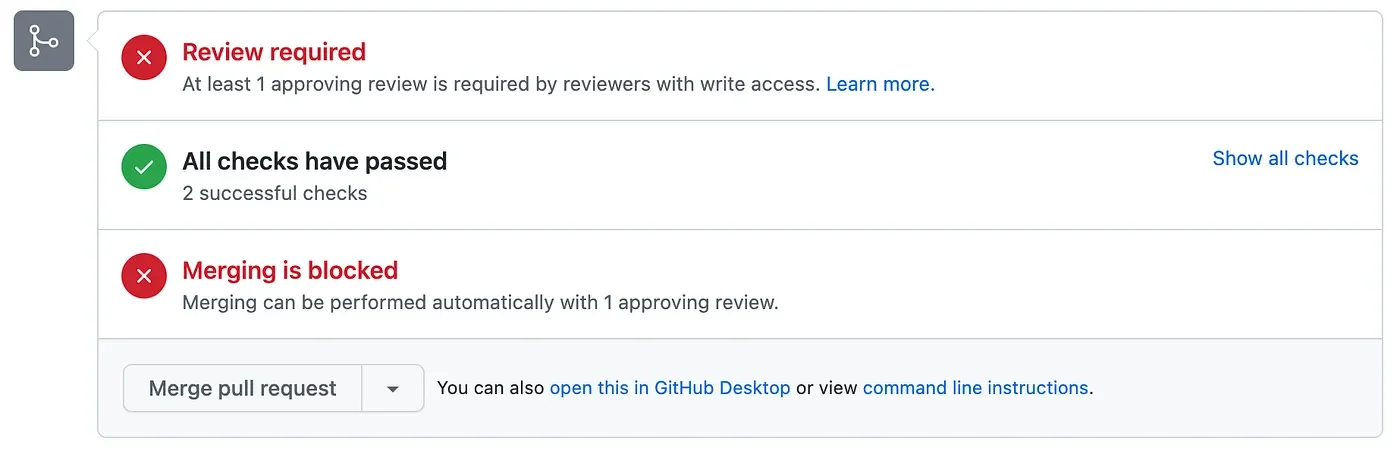
GitHub Actions is GitHub's CI service, used to build, test and deploy code by building and running workflows from development to production systems. The flaw described here leverages GitHub Actions to bypass protected branch restrictions that rely on the multiple reviews control.
Setup
The relevant preconditions are: The relevant preconditions are:
- Branch protection rules that require pull request approvals before merge, where a user cannot approve their own pull request.
- GitHub Actions, which is installed by default on any GitHub organization and on all of its repositories.
- Permission for any user with Write access to run a workflow in the repository.
Finding it
The starting question is whether a compromise of a single user account means the attacker can push code down the pipeline without restrictions. Branch protection rules are supposed to prevent exactly that.
GitHub Actions is installed by default on every organization and every repository, and any user who can push code (Write permissions or higher) can create a workflow that runs when code is pushed. With each workflow run, GitHub creates a unique token, GITHUB_TOKEN, used in the workflow to authenticate against the repository. The token's permissions have a default setting at organization or repository level: either restricted, with Read permission on the contents and metadata scopes, or permissive, with Read/Write permissions on various scopes such as contents, packages and pull requests.
Crucially, GitHub's own documentation states that anyone with write access to a repository can modify the permissions granted to the GITHUB_TOKEN, adding or removing access as required, by editing the permissions key in the workflow file.
The report poses the question of whether an organization that has never installed or used GitHub Actions should worry about its attack surface, then lists the defaults above.
Exploitation
Step 1: push a branch with a workflow
The attacker pushes their malicious code to a new remote branch, together with a workflow that:
- approves the pull request using the GitHub API;
- is configured to run on pull_request events, which includes creations and updates of pull requests;
- is granted Write permissions on the pull requests API endpoint.
Step 2: open the pull request
The attacker creates a pull request with the intent to merge the malicious code into a protected branch. Because approval is required, the pull request cannot be merged at this point.
Step 3: the workflow approves the pull request
As the pull request is created, the workflow runs immediately and the pull request is approved by the github-actions bot, which the GITHUB_TOKEN belongs to. That identity is not an organization member, but it counts as a pull request approval. The attacker has effectively approved their own pull request, bypassing the branch protection rules, and code reaches a protected branch without any other organization member's approval.
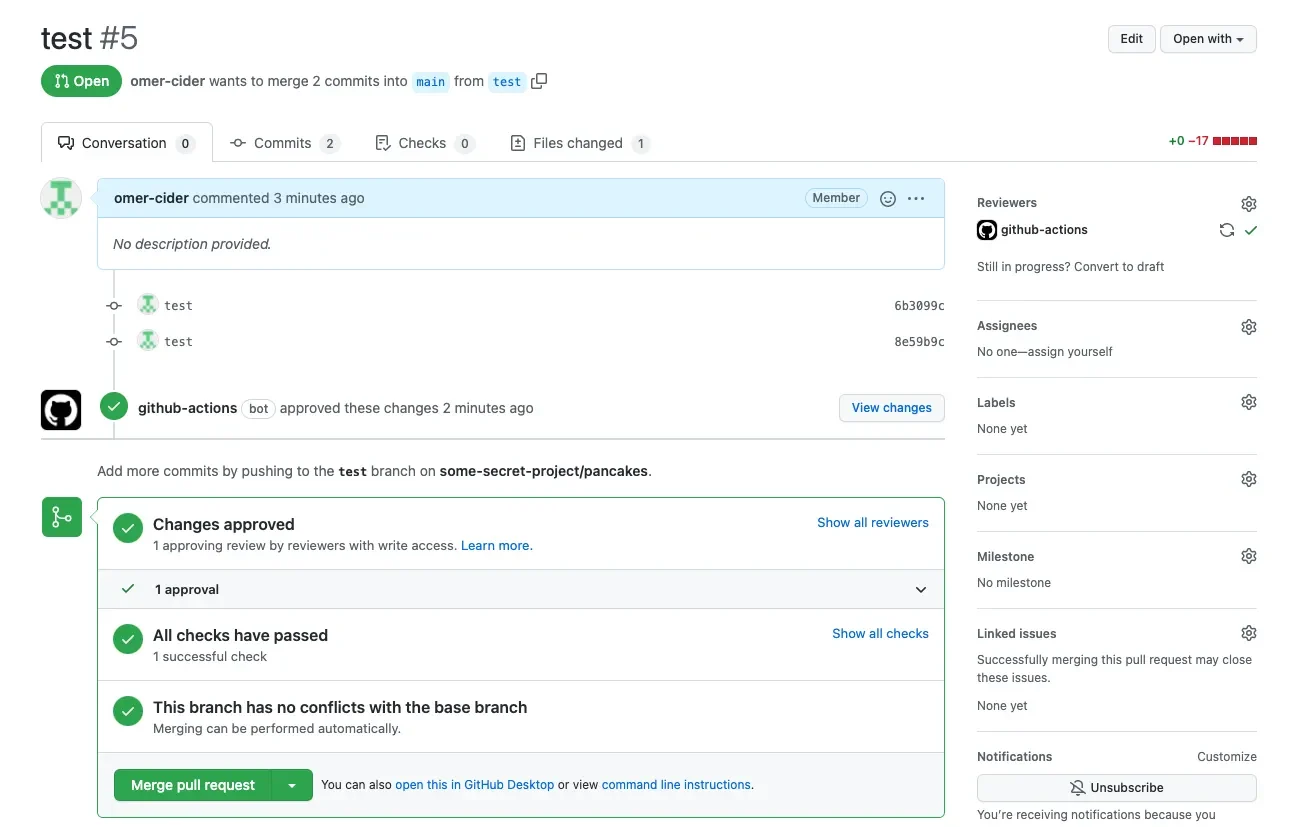
If the attacker wants to make the process even faster, they could also merge the pull request through the workflow.
Root cause
The report does not state a root cause; it shows that the github-actions bot's approval counts as a pull request approval.
Impact
An attacker who hijacks an account with Write permissions can push unreviewed code to a protected branch without any other organization member's approval. That code can potentially be used by other users or flow down the pipeline to production. Any organization that trusts required reviews to protect against direct pushes to sensitive branches lacks this protection by default, even if GitHub Actions was never installed or used in the organization.
Report to GitHub
The issue was reported to GitHub through their bug bounty program. GitHub accepted it, wrote that it would be tracked internally until resolved, and approved publication of a write-up.
Timeline
| Date | Event |
|---|---|
| 15/09 | Reported to GitHub bug bounty program |
| 15/09 | First response from GitHub |
| 22/09 | Triage |
| 22/09 | Payout |
| 23/09 | Approval for write-up |
Mitigation
- If you are not using GitHub Actions, disable it for the entire organization or for specific repositories where it is not required.
- If GitHub Actions is in use, do one of the following:
- Require a review approval in pull requests from Code Owners.
- Increase the required number of approvals to 2 or more.
- Wait until the issue is resolved by GitHub.
Update: January 2022
Following the blog post, GitHub introduced a new setting to fix the vulnerability. Organization admins can now disallow GitHub Actions from approving pull requests.
This is an organization-wide setting. By default it allows Actions to approve pull requests in existing organizations and disallows it in newly created ones, so any organization created before the setting was introduced is still vulnerable unless the default is changed.
To disallow Actions from approving pull requests, browse to Actions under Organization Settings and look for this setting:

Clearing the setting prevents Actions from approving pull requests. The text is a bit misleading, as it is explained as if Actions can approve a pull request and it just will not count as an approval for merge, while practically it prevents approvals entirely.
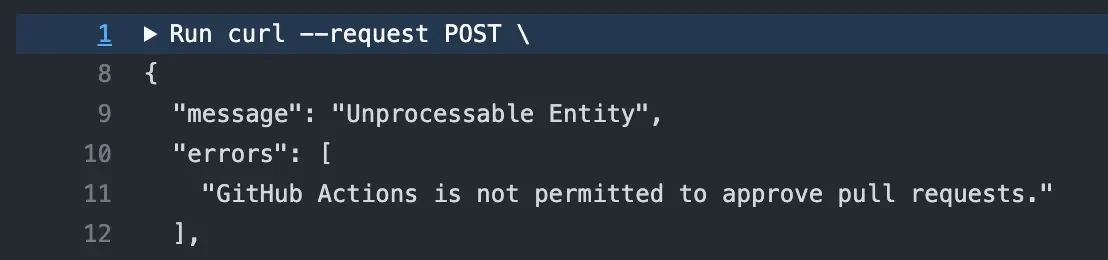
Using this setting is recommended to stop malicious actors from bypassing branch protection rules by approving their own pull requests.
- Other bot or app identities as approvers. Check whether any automation identity whose credentials a Write user can obtain is accepted as a pull request approver. A positive result is a pull request on a protected branch showing that identity as reviewer and becoming mergeable without a human approval.
- Token permission defaults on other platforms. On CI systems that issue a per-run token, test whether a user who can push code can raise that token's scopes from the pipeline definition. A positive result is a pipeline run whose token performs an action the repository default was meant to forbid.
- Workflow triggers beyond pull_request. Try other events that fire on pull request activity and see whether the resulting approval is recorded the same way. A positive result is an approval registered before any human review.
- Merging from the workflow. Extend the workflow to merge the pull request after approving it. A positive result is code landing on the protected branch with no human involvement.
- Code Owners and higher approval counts. Reproduce the attack against a branch that requires Code Owner review or two or more approvals. A positive result shows whether those controls close the gap or whether the bot approval still satisfies them.
What happened, in plain words
GitHub is a website where people and companies keep the code for their software. Think of it as a shared online filing cabinet for a project: many people can open it, add files, change files and keep a history of every change. Millions of people use it.
A company that uses GitHub usually has an organization: a group account that holds all of the company's code and all of its people. An organization can have a handful of members or thousands, and each member has a level of permission. Write permission is commonly granted, and it means you are allowed to add and change code in this project.
Companies worry a lot about one specific bad day: what if someone steals a normal employee's GitHub login? If the thief gets an account with Write permission, they can put their own code into the project. Other software might then use that code, or the company's automatic build system might pick it up and ship it to real customers.
To stop that, GitHub has a feature called branch protection rules. A branch is one line of development inside a project, and the main branch is usually the one that gets shipped. A protection rule says: nobody may drop code straight onto this branch. Instead, you must open a pull request, which is a formal proposal saying "please add my changes". Then a set number of other people must approve it before it can be merged, that is, before the changes actually land on the branch. You are not allowed to approve your own pull request, so even a rule of "one approval needed" forces a second human being to look at the code.
The flaw described here lets an attacker get around that rule using GitHub Actions. GitHub Actions is GitHub's built-in automation service. You write a small instruction file called a workflow, and GitHub runs it for you, for example to test code or deploy it. The key point is that Actions is installed by default on every organization and every repository.
So the short version of the story: an attacker who steals an ordinary Write account can use GitHub Actions to approve their own pull request automatically, and unreviewed code lands on a protected branch without any colleague saying yes.
Why a stolen account is such a worry
GitHub hosts code for millions of users and companies. Inside an organization, permissions vary from person to person, and Write permission is handed out widely because it is the basic permission you need to push code at all.
Organization owners know that accounts get compromised. Someone's password can be guessed or reused from another site, a personal access token can leak, or an SSH key can be stolen. A personal access token is a long random string that acts like a password for scripts; an SSH key is a cryptographic key pair that lets your computer prove who it is without typing a password. Any of these gives an attacker the same power as the real user.
With Write permission, the attacker can push code directly into the repository. That code might be used by other software and other users, might run unreviewed inside the company's CI system (the automation that builds and tests code), or might end up in production, the live systems that customers use.
So the question the researcher asked is simple: does stealing one account really let an attacker push code all the way down the pipeline with no restrictions?
The protection that is supposed to stop this
Branch protection rules exist precisely to answer "no" to that question. Nearly every engineering organization uses them. For sensitive branches, such as the default branch or any other branch worth guarding, the rule limits a Write user: you cannot push directly, you must open a pull request. Once the pull request exists, it needs a preset number of approvals before it can be merged into the target branch.
Because a user cannot approve their own pull request, a requirement of even one approval forces another member of the organization to review the change. That significantly reduces the risk of a stolen account, and it also stops developers from slipping unreviewed code onto sensitive branches. The report adds a wry footnote: nobody can guarantee the approver actually reads the code, but at least there is someone to blame.
What GitHub Actions is
GitHub has grown far beyond storing files. One of its tools is GitHub Actions, GitHub's CI service. It builds, tests and deploys code by running workflows, from development machines all the way to production systems. A workflow is just a file in the repository that describes steps to run, and GitHub executes those steps on its own computers whenever a chosen event happens.
Why GitHub Actions matters for protected branches
The researcher found that GitHub Actions can be used to get around protected branch restrictions that depend on the multiple reviews control. That sounds narrow, so a natural reaction is: if my organization does not use GitHub Actions, I have nothing to worry about, right?
The image above poses exactly that question. The answer turns out to be no, and here is why, step by step:
- GitHub Actions is installed by default on any GitHub organization and on all of its repositories. Nobody has to switch it on.
- Any user who can push code to the repository, meaning Write permission or higher, can create a workflow that runs when code is pushed.
- Every time a workflow runs, GitHub creates a fresh, unique token called GITHUB_TOKEN. A token, in this context, is a temporary pass that a program shows to GitHub to prove which repository it is allowed to act on. The token's permissions have a default setting, configured at organization or repository level. That default is either restricted, giving Read permission on the contents and metadata scopes, or permissive, giving Read/Write permissions on various scopes such as contents, packages and pull requests. A scope is simply the list of things a token is allowed to touch.
- However, GitHub's own documentation says something important:
Anyone with write access to a repository can modify the permissions granted to the GITHUB_TOKEN, adding or removing access as required, by editing the permissions key in the workflow file.
In plain words: the restricted default does not bind the person writing the workflow. If you can push code, you can also edit the workflow file and give the token more power.
Putting the pieces together
A typical GitHub organization therefore has three things at once:
- Branch protection rules, set by organization owners, that require pull request approvals before merge, and that stop a user approving their own pull request.
- GitHub Actions installed by default on every organization and every repository.
- Permission for any user with Write access to run a workflow in the repository.
Put together, an attacker who has hijacked a Write account and wants code on a protected branch can push their malicious code to a new remote branch, together with a workflow that does the following:
- it approves the pull request using the GitHub API;
- it is configured to run on pull_request events, which includes pull request creations and updates;
- it is granted Write permissions on the pull requests API endpoint.
An API is the machine-facing side of a website: instead of a page with buttons, it is a set of addresses that programs send requests to. When you click "Approve" in a browser, the browser is really sending a request to the API behind the scenes. A workflow can send the same kind of request without a human clicking anything.
Step by step: how the attack runs
Step 1: push a branch with a workflow
The attacker pushes the malicious code to a new remote branch, along with the workflow file described above. Why a new branch? Because the protected branch refuses direct pushes, but creating a new branch is ordinary, allowed work. The workflow travels with the code, so it is now sitting in the repository waiting for the right event.
Step 2: open the pull request
The attacker creates a pull request asking to merge the malicious code into the protected branch. At this moment the pull request cannot be merged, because the protection rule demands an approval and the attacker cannot approve their own work. This is the exact moment the protection is supposed to do its job.
Step 3: the workflow approves the pull request
As soon as the pull request is created, the workflow runs. It calls the API and approves the pull request. The approval is recorded under the identity of the github-actions bot, the account that the GITHUB_TOKEN belongs to. That bot is not an organization member, but GitHub counts its approval as a valid pull request approval.
The screenshot above shows the result: the pull request is successfully approved with "github-actions" as the reviewer, and the code can be merged. The attacker has effectively approved their own pull request, bypassing the branch protection rules, and code reaches a protected branch without any other organization member's approval.
If the attacker wants to go even faster, they can also merge the pull request from inside the workflow, so no human action is needed after the initial push.
The proof of concept video
The point it makes is broad: any organization that uses GitHub as its code repository and trusts required reviews to protect sensitive branches actually lacks that protection by default, even if GitHub Actions was never installed or used in the organization.
Why it works: the root cause
The report does not state a root cause; it shows that the github-actions bot's approval counts as a pull request approval. Branch protection assumes an approval comes from a second person.
The rule stops one person signing twice. It does not stop that person from also holding the stamp of the club's robot assistant, which the rules happen to accept as a second signature.
What the impact is
An attacker who hijacks an account with Write permissions can push unreviewed code to a protected branch without any other organization member's approval. That code can potentially be used by other users or flow down the pipeline to production. Any organization that trusts required reviews to protect against direct pushes to sensitive branches lacks this protection by default, even if GitHub Actions was never installed or used.
Reporting it to GitHub
The issue was reported to GitHub through their bug bounty program. A bug bounty program is a scheme where a company pays researchers for reporting security problems responsibly instead of exploiting them. GitHub accepted the report, said it would be tracked internally until resolved, and approved publication of a write-up.
Timeline
| Date | Event |
|---|---|
| 15/09 | Reported to GitHub bug bounty program |
| 15/09 | First response from GitHub |
| 22/09 | Triage |
| 22/09 | Payout |
| 23/09 | Approval for write-up |
Triage is the stage where the receiving team confirms the report is real and decides how serious it is.
How to protect yourself
- If you are not using GitHub Actions, disable it for the entire organization or for specific repositories where it is not required.
- If GitHub Actions is in use, do one of the following:
- Require a review approval in pull requests from Code Owners. Code Owners are named people or teams who must review changes to particular files.
- Increase the required number of approvals to 2 or more.
- Wait until the issue is resolved by GitHub.
Update: January 2022
After the blog post, GitHub introduced a new setting to fix the vulnerability. Organization admins can now disallow GitHub Actions from approving pull requests.
This is an organization-wide setting. By default it allows Actions to approve pull requests in existing organizations and disallows it in newly created ones. That means any organization created before the setting existed is still vulnerable unless the default is changed.
To disallow Actions from approving pull requests, browse to Actions under Organization Settings and look for this setting:
Clearing the setting prevents Actions from approving pull requests. The text is a bit misleading, because it is explained as if Actions can approve a pull request and it just will not count as an approval for merge, while in practice it prevents approvals entirely.
Using this setting is recommended, to stop malicious actors from bypassing branch protection rules by approving their own pull requests.
- Other bot or app identities as approvers. Check whether any automation identity whose credentials a Write user can obtain is accepted as a pull request approver. A positive result is a pull request on a protected branch showing that identity as reviewer and becoming mergeable without a human approval.
- Token permission defaults on other platforms. On CI systems that issue a per-run token, test whether a user who can push code can raise that token's scopes from the pipeline definition. A positive result is a pipeline run whose token performs an action the repository default was meant to forbid.
- Workflow triggers beyond pull_request. Try other events that fire on pull request activity and see whether the resulting approval is recorded the same way. A positive result is an approval registered before any human review.
- Merging from the workflow. Extend the workflow to merge the pull request after approving it. A positive result is code landing on the protected branch with no human involvement.
- Code Owners and higher approval counts. Reproduce the attack against a branch that requires Code Owner review or two or more approvals. A positive result shows whether those controls close the gap or whether the bot approval still satisfies them.
Glossary
- API: the machine-facing side of a website, a set of addresses that programs send requests to instead of clicking buttons.
- Branch: one line of development inside a code repository; the default branch is usually the one that gets shipped.
- Branch protection rule: a GitHub setting that forbids direct pushes to a branch and requires pull request approvals instead.
- Bug bounty program: a scheme where a company pays researchers for reporting security problems responsibly.
- CI (continuous integration): automation that builds and tests code whenever it changes.
- CI/CD pipeline: the chain of automated steps that takes code from a repository to testing and production.
- Code Owners: named people or teams who must review changes to particular files.
- GITHUB_TOKEN: a temporary token GitHub creates for each workflow run so the workflow can act on the repository.
- GitHub Actions: GitHub's built-in automation service that runs workflow files on GitHub's computers.
- Organization: a group account on GitHub that holds a company's repositories and members.
- Personal access token: a long random string that acts like a password for scripts and tools.
- Production: the live systems that real customers use.
- Pull request: a formal proposal to merge changes from one branch into another, which can be reviewed and approved.
- Repository: a project's storage on GitHub, holding its files and their full history.
- Scope: the list of things a token is allowed to touch, such as contents or pull requests.
- SSH key: a cryptographic key pair that lets a computer prove its identity without a password.
- Token: a temporary pass a program shows to a service to prove what it is allowed to do.
- Triage: the stage where a security team confirms a report is real and decides how serious it is.
- Workflow: a file in a repository describing steps GitHub Actions should run when a chosen event happens.
- Write permission: the GitHub permission level that allows a user to add and change code in a repository.

