Server Side Template Injection on Name parameter during Sign Up process
The First Name field during sign-up was rendered as a server-side template, so a payload like {{7*7}} was evaluated and appeared as 49 in the welcome email subject. An attacker could inject further template syntax to read sensitive data or possibly achieve remote code execution.
 Originally disclosed on HackerOne
- Fixed in 3 months
- Disclosed after 17 months
Summary:
Server-side template injection is when an attacker is able to use native template syntax to inject a malicious payload into a template, which is then executed server-side. In this scenario, when an attacker signs up on the platform and uses a payload in the First Name field, the payload is rendered server side and it gets executed in the promotional/welcome emails sent to the user
Steps To Reproduce:
Step 1: Navigate to [Glovoapp] (https://www.glovoapp.com/kg/en/bishkek/) and click on Register
Step 2: Now, in the First Name field, enter the value {{7*7}}
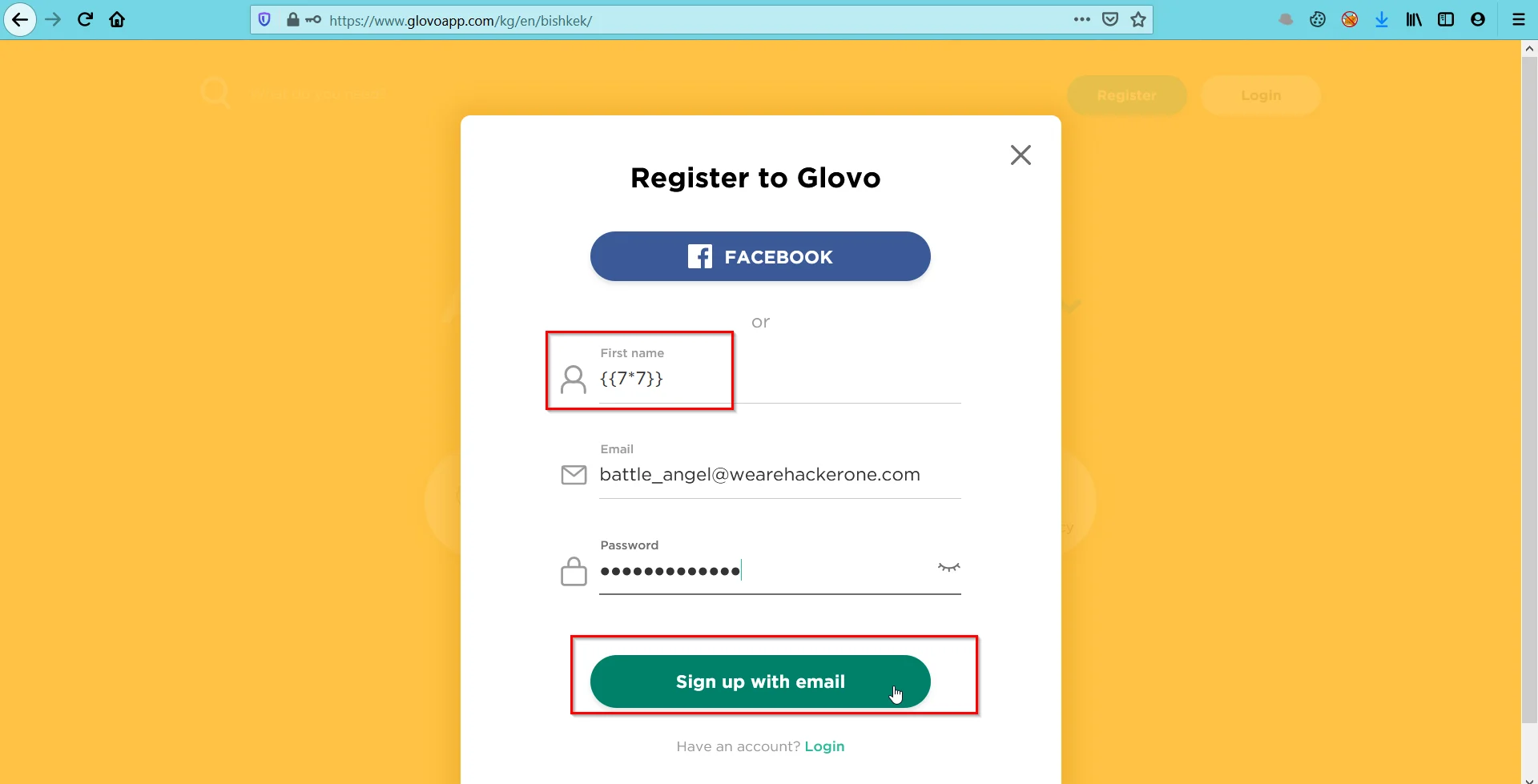
Step 3: Fill in the rest of the values on the Register page and register your account.
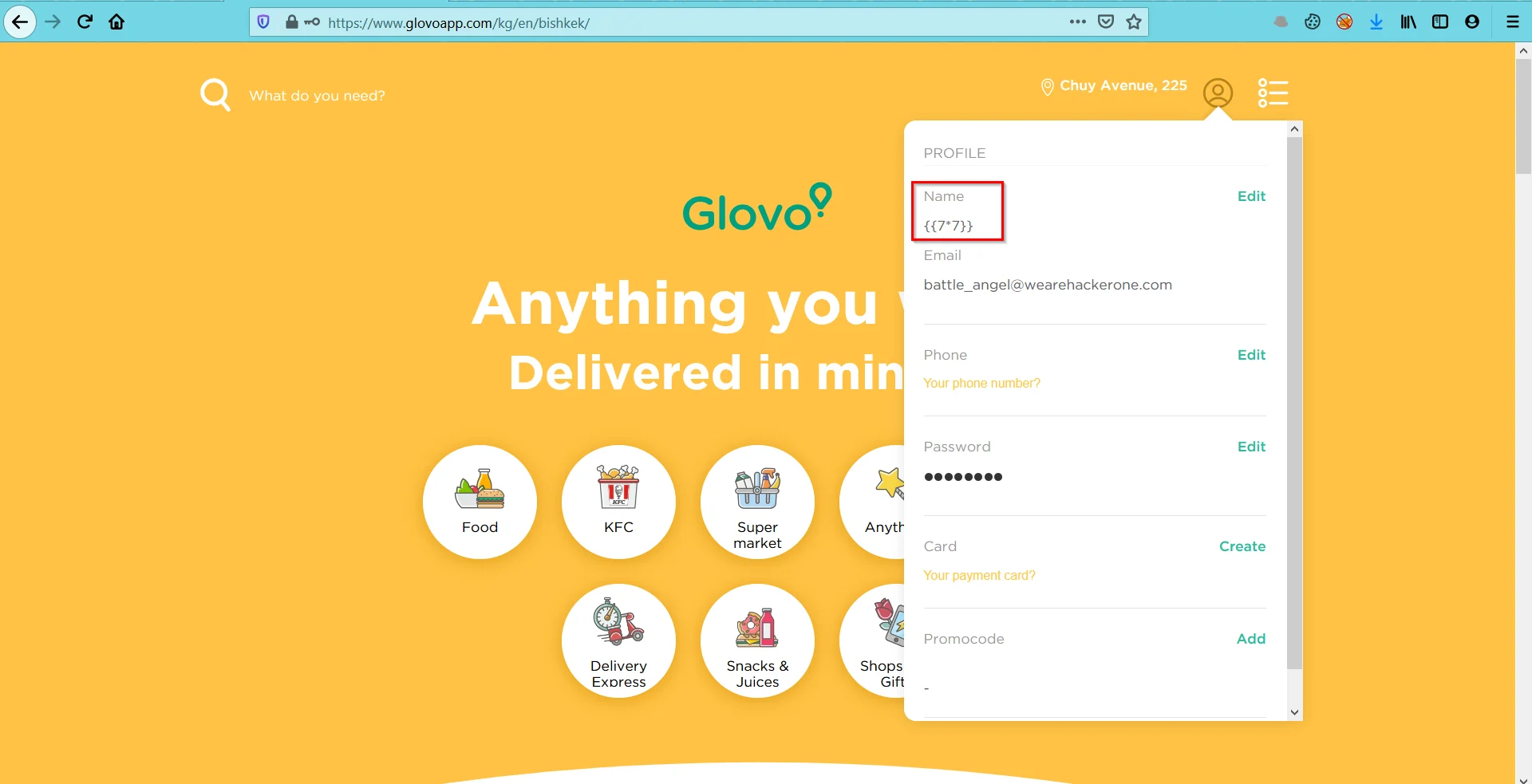
Step 4: We have used the payload {{7*7}} here to verify that it is being evaluated at the backend
Step 5: Now, wait for the welcome/promotional email to arrive in your Inbox
Step 6: Notice that the email arrives with the Subject as 49, welcome to Glovo!
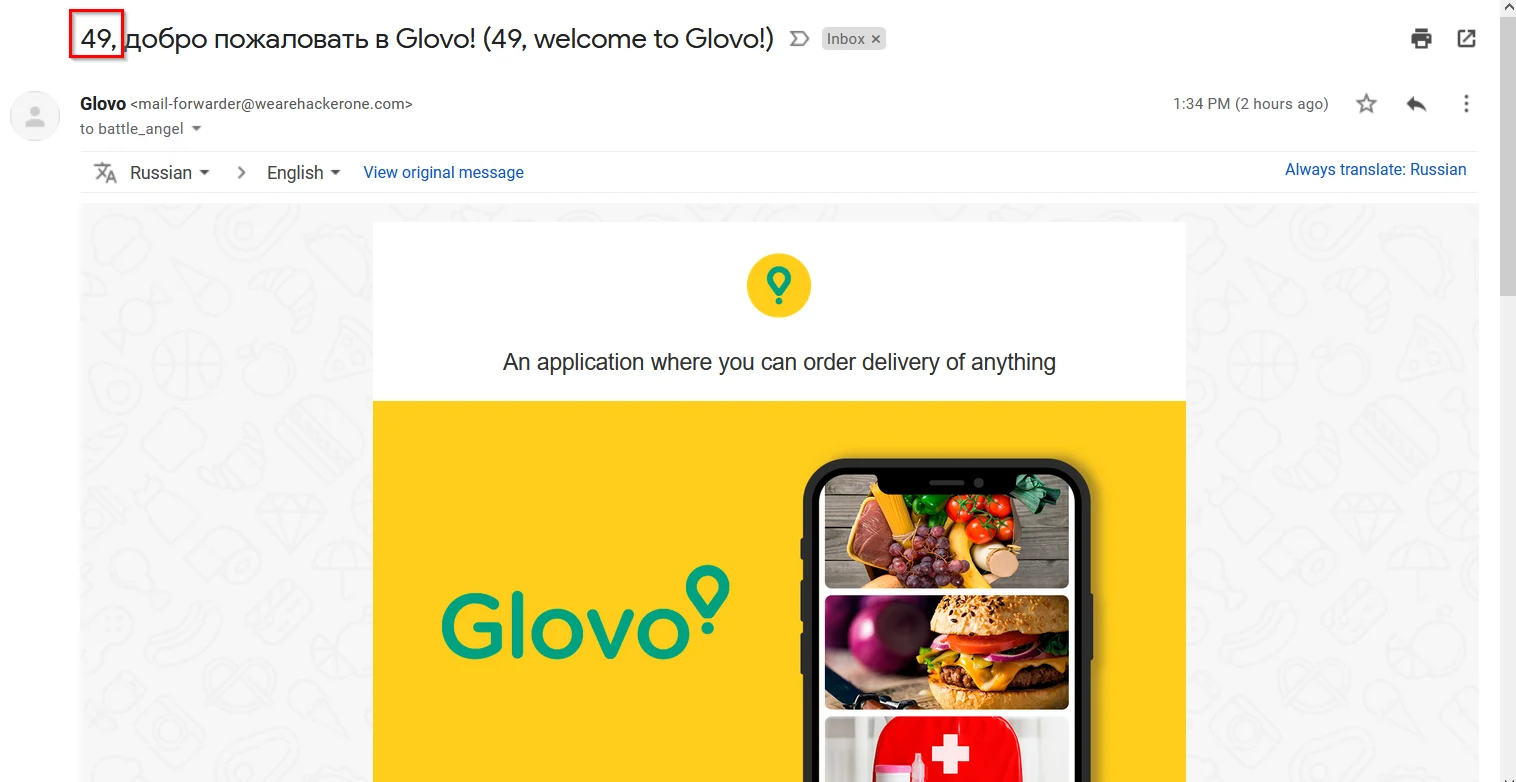
Step 7: The attacker can now further exploit this issue by injecting malicious payloads in the Name field and gathering sensitive information from the application.
Note- After carrying out this attack, I didn't receive any welcome email for my other account maybe because the code broke.
Impact
Template engines are widely used by web applications to present dynamic data via web pages and emails. Unsafely embedding user input in templates enables Server-Side Template Injection, which can be used to directly attack web servers' internals and often obtain Remote Code Execution (RCE), turning every vulnerable application into a potential pivot point.
Context
Glovo runs a web platform with a registration flow, and the report focuses on the sign-up form on the Glovoapp site. The feature involved is the First Name field, which the platform stores at registration and later uses to personalise the welcome and promotional emails sent to the new user.
That personalisation is the interesting part: the name is not only shown back in the web interface, it is embedded into an email template that is rendered on the server. The report describes the bug as server-side template injection (SSTI), where an attacker can use native template syntax to inject a payload into a template that is then executed server-side.
Setup
No special tooling, account privileges or versions are described. The precondition is simply the ability to reach the public registration page and create an account. The researcher used their own sign-up and their own inbox to observe the result.
Finding it
The researcher tested whether the First Name value would be evaluated when the welcome email was rendered. To test whether the backend evaluates template expressions in that field, they submitted a simple arithmetic expression in template syntax and then checked the subject line of the email that arrived.
Exploitation
Step 1: Open the registration page
Navigate to the Glovoapp site and click Register:
https://www.glovoapp.com/kg/en/bishkek/
Step 2: Put a template expression in the First Name field
In the First Name field, enter:
The payload uses double-brace template syntax. If the value is rendered as data, the email will contain the literal string {{7*7}}. If the value is compiled as part of the template, the engine will evaluate the expression and produce 49.
Step 3: Complete the registration
Fill in the rest of the values on the Register page and register the account.
Step 4: The purpose of the payload
The payload {{7*7}} is used here to verify that it is being evaluated at the backend, rather than merely echoed.
Step 5: Wait for the email
Wait for the welcome or promotional email to arrive in the inbox.
Step 6: Read the subject line
The email arrives with the subject:
49, welcome to Glovo!
The 49 in place of {{7*7}} confirms server-side evaluation of the expression.
Step 7: Escalate
With evaluation confirmed, an attacker can inject further malicious payloads in the Name field and use them to gather sensitive information from the application.
One operational note from the researcher: after carrying out this attack, they did not receive a welcome email for another account, possibly because the code broke.
Root cause
The name supplied at registration is evaluated server-side when the welcome email is rendered. The engine treats template syntax in the name as code. The report does not describe the template engine or the code path involved, so the exact mechanism is not stated; the observable behaviour is that {{7*7}} was evaluated to 49 in the email subject.
Impact
Template engines are widely used by web applications to present dynamic data in web pages and emails. Unsafely embedding user input in templates enables server-side template injection, which can be used to attack the web server's internals directly and often to obtain remote code execution, turning the vulnerable application into a potential pivot point. In this case the injection point is the registration name, and the execution context observed is the welcome email. The report does not demonstrate code execution or data exfiltration; it demonstrates evaluation of an arithmetic expression and states that further payloads could be used to gather sensitive information.
Fix
The report does not describe a fix or a change made by the vendor. The general remediation for this class of bug is to pass user input to the template as data rather than letting it be interpreted as template syntax.
Variants to test
- Submit
{{7*7}}in every free-text field of a registration or profile form (first name, last name, company, address) and watch for49in any generated email subject or body. - Try other template syntaxes in the same field, such as
${7*7}or<%= 7*7 %>, to identify which engine is in use; a positive result is the evaluated value appearing where the literal payload was submitted. - Check other server-rendered outputs that reuse profile data, such as invoices, notifications and PDF exports, for the same evaluation behaviour.
- Submit a payload that produces a distinctive string rather than a number, so that evaluation is unambiguous even if the surrounding text changes.
Hunting notes
This bug hides in the gap between stored data and rendered output: a field that looks harmless on the web page can be compiled into a template elsewhere, particularly in transactional email. The signal during testing is a value that comes back transformed rather than echoed, which is why a simple arithmetic expression is a good first probe. The researcher tied the evaluation to a real, user-triggered email and noted that the same field could carry further payloads; the report does not include a full exploitation chain beyond that.
What happened, in plain words
Glovo has a website where you can create an account. When you sign up, you type in your first name. The platform saves that name and later uses it to personalise the welcome and promotional emails it sends you, so the email can greet you by name instead of saying something generic.
That personalisation is where the problem lives. The name you type is not simply dropped into the email as plain text. Instead, it is placed inside an email template, a kind of fill-in-the-blanks document that the server processes before sending. The server reads the template, works out what to put in each blank, and produces the final email. The bug is that the name you typed is evaluated by the server when the email is rendered. That means anything that looks like template instructions inside your name will be treated as instructions and carried out by the server.
This class of bug is called server-side template injection, or SSTI. The report describes it as a situation where an attacker can use the template's own syntax to inject a malicious payload into a template, which is then executed on the server. A useful everyday comparison: imagine a form letter where the clerk is told to "insert the customer's name here". If a customer writes their name as "insert the customer's name here", a careless clerk might follow that as an instruction rather than copying it as text. The template engine is that clerk, and it cannot tell the difference between your data and its own instructions unless the application keeps them separate.
The researcher tested this by putting a tiny arithmetic expression, written in template syntax, into the First Name field. If the server treated the name as plain text, the email would contain the literal characters. If the server treated the name as part of the template, the server would calculate the sum and put the answer in the email. The email arrived with the answer, which confirmed the bug.
Setting up
The report does not describe any special tools, paid accounts or particular software versions. The only precondition is being able to open the public registration page in a browser and create an account. The researcher used their own sign-up and their own email inbox to see what arrived.
Finding it
The researcher tested whether the First Name value would be evaluated when the welcome email was rendered. To test whether the backend evaluates template expressions in that field, they submitted a simple sum written in template syntax, then checked the subject line of the email that arrived.
Exploitation
Step 1: Open the registration page
Go to the Glovoapp site and click Register:
https://www.glovoapp.com/kg/en/bishkek/
This is simply the public page where new users create an account. The researcher started here because the bug is in the sign-up form, so the registration page is the entry point.
Step 2: Put a template expression in the First Name field
In the First Name field, enter:
The payload uses the double-brace syntax that many template engines understand. The double braces are the template's way of saying "work this out and put the result here". Inside them, 7*7 is a multiplication. If the value is rendered as data, the email will contain the literal string {{7*7}}. If the value is compiled as part of the template, the engine will evaluate the expression and produce 49. The researcher chose a sum because the difference between the two outcomes is unmistakable: either you see the braces and the asterisk, or you see a number.
Step 3: Complete the registration
Fill in the rest of the values on the Register page and register the account.
This step matters because the email is only generated after a successful sign-up, and the name has to be stored on the account for the email template to use it.
Step 4: The purpose of the payload
The payload {{7*7}} is used here to verify that it is being evaluated at the backend, rather than merely echoed. "Evaluated" means the server actually performed the calculation. "Echoed" means the server just copied the characters back out. The researcher wanted to tell these two apart, because only evaluation shows that the server is treating the name as code.
Step 5: Wait for the email
Wait for the welcome or promotional email to arrive in the inbox. This is the moment of truth: the email is where the name gets rendered by the server, so it is where the result of the test shows up.
Step 6: Read the subject line
The email arrives with the subject:
49, welcome to Glovo!
The 49 in place of {{7*7}} confirms server-side evaluation of the expression. In plain terms, the server did the multiplication and put the answer where the name should have been. That is the proof of the bug.
Step 7: Escalate
With evaluation confirmed, an attacker can inject further malicious payloads in the Name field and use them to gather sensitive information from the application. The report does not show any such payload or its result; it states that this is the direction the bug could be taken.
One operational note from the researcher: after carrying out this attack, they did not receive a welcome email for another account, possibly because the code broke. The researcher suggested the code may have broken.
Root cause
The name supplied at registration is evaluated server-side when the welcome email is rendered. "Escaped" means the application marks the text as data so the template engine will not interpret it as instructions. The engine treats template syntax in the name as code.
Impact
Template engines are widely used by web applications to present dynamic data in web pages and emails. Unsafely embedding user input in templates enables server-side template injection, which can be used to attack the web server's internals directly and often to obtain remote code execution, turning the vulnerable application into a potential pivot point. "Remote code execution" means an attacker can make the server run commands of their choosing. "Pivot point" means the compromised application can be used as a stepping stone to reach other systems. In this case the injection point is the registration name, and the execution context observed is the welcome email. The report does not demonstrate code execution or data exfiltration; it demonstrates evaluation of an arithmetic expression and states that further payloads could be used to gather sensitive information.
Fix
The general remediation for this class of bug is to pass user input to the template as data rather than letting it be interpreted as template syntax. In everyday terms, hand the clerk a card that says "this is the customer's name, copy it exactly", instead of letting the customer write on the form letter itself.
Variants to test
- Submit
{{7*7}}in every free-text field of a registration or profile form (first name, last name, company, address) and watch for49in any generated email subject or body. - Try other template syntaxes in the same field, such as
${7*7}or<%= 7*7 %>, to identify which engine is in use; a positive result is the evaluated value appearing where the literal payload was submitted. - Check other server-rendered outputs that reuse profile data, such as invoices, notifications and PDF exports, for the same evaluation behaviour.
- Submit a payload that produces a distinctive string rather than a number, so that evaluation is unambiguous even if the surrounding text changes.
Hunting notes
This bug hides in the gap between stored data and rendered output: a field that looks harmless on the web page can be compiled into a template elsewhere, particularly in transactional email. "Transactional email" means an automatic message tied to an action, such as a welcome note after sign-up. The signal during testing is a value that comes back transformed rather than echoed, which is why a simple arithmetic expression is a good first probe. The researcher tied the evaluation to a real, user-triggered email and noted that the same field could carry further payloads; the report does not include a full exploitation chain beyond that.
Glossary
- Server-side template injection (SSTI): a bug where user input is placed into a template and the server treats it as template instructions instead of plain text.
- Template: a document with placeholders that the server fills in to produce the final page or email.
- Template engine: the software that reads a template, works out the placeholders and produces the finished output.
- Payload: the piece of text an attacker submits to test or exploit a bug.
- Backend: the server-side part of an application that the user does not see directly.
- Evaluate: to work out the result of an expression, such as calculating
7*7to get49. - Echo: to copy input back out unchanged, without interpreting it.
- Escape: to mark text as data so that software will not treat it as instructions.
- Remote code execution (RCE): a bug that lets an attacker make a server run commands of their choosing.
- Pivot point: a compromised system used as a stepping stone to reach other systems.
- Data exfiltration: stealing data out of a system.
- Transactional email: an automatic message tied to a user action, such as a welcome email after sign-up.
- Registration flow: the sequence of pages and steps a new user goes through to create an account.
- Inbox: the place in an email account where received messages arrive.



