$36k Google App Engine RCE
 Published on web.archive.org
In early 2018 I got access to a non-production Google App Engine deployment environment, where I could use internal APIs and it was considered as Remote Code Execution due to the way Google works. Thanks to this I got a reward of $36,337 as part of Google Vulnerability Rewards Program.
The full write-up lives on its author's site
It belongs to its author, so we link to it rather than copy it. The other two tabs are our own rewrites, checked against it.
Context
Google App Engine (GAE) applications all reply to HTTP requests with an X-Cloud-Trace-Context header, which makes it easy to tell that a site is running on GAE. Using that signal, the researcher noticed that appengine.google.com itself runs on GAE, yet it can perform actions that ordinary user applications cannot. The question behind this work was how it does those actions, and whether the same internal interfaces could be reached from a normal application.
GAE apps perform internal actions, such as writing logs or getting an OAuth token, by sending Protocol Buffer (PB) messages in binary wire format to an internal HTTP endpoint at http://[redacted]:10001/rpc_http. The request looks like this:
POST /rpc_http HTTP/1.1
Host: [redacted]:10001
X-Google-RPC-Service-Endpoint: app-engine-apis
X-Google-RPC-Service-Method: /VMRemoteAPI.CallRemoteAPI
Content-Type: application/octet-stream
Content-Length: <LENGTH>

<PROTO_MESSAGE>
The PB message is an apphosting.ext.remote_api.Request with these fields:
service_name: name of the API to callmethod: name of the API's method to invokerequest: bytes of the inner PB request, encoded in binary wire formatrequest_id: the security ticket given to the app with every GAE request, required even though it is marked optional
The response is the PB message representing the API reply, or an error message. In the Java 8 runtime the security ticket can be obtained with reflection:
import com.google.apphosting.api.ApiProxy;
import java.lang.reflect.Method;
Method getSecurityTicket = ApiProxy.getCurrentEnvironment().getClass().getDeclaredMethod("getSecurityTicket");
getSecurityTicket.setAccessible(true);
String security_ticket = (String) getSecurityTicket.invoke(ApiProxy.getCurrentEnvironment());
As a worked example, getting a Google OAuth token for the test scope https://www.googleapis.com/auth/xapi.zoo takes four steps:
- Generate an
apphosting.GetAccessTokenRequestwithscopeset to["https://www.googleapis.com/auth/xapi.zoo"]. - Generate an
apphosting.ext.remote_api.Requestwithservice_name="app_identity_service"(the API that provides access to the GAE Service Account),method="GetAccessTokenRequest",request= the bytes of the message from step 1 in binary wire format, andrequest_id= the security ticket. - Send the HTTP request.
- Decode the response, which should be an
apphosting.GetAccessTokenResponse.
Setup
The work was done from inside GAE itself. To run binaries, the researcher uploaded them with the application, then during runtime copied them to /tmp and gave them execution permission, since the rest of the file system is read-only. A statically linked Nmap was uploaded this way and run against [redacted].
Access to the non-production deployment environments came from an earlier bug: the staging environment (staging-appengine.sandbox.googleapis.com) and the test environment (test-appengine.sandbox.googleapis.com). Common Google users should not have access to these. To call an app running in them:
- Upload a version with manual scaling. Without it the request failed with
403 Forbidden. - Send a request to
www.appspot.combut change theHostheader to<PROJECT-NAME>.prom-<qa/nightly>.sandbox.google.com. For an app normally atsave-the-expanse.appspot.com,<PROJECT-NAME>becomessave-the-expanse; for the staging environment<qa/nightly>becomesqa, and for the test environment it becomesnightly. The researcher tested withthe-expanse.prom-nightly.sandbox.google.com.
Finding it
Nmap against [redacted] showed port 4 open. Sending data to it produced a messy reply with legible strings, which an online search identified as a gRPC service. A Java gRPC client on GAE ran into trouble because the built-in gRPC library seemed incomplete and kept being used even after a complete one was uploaded, so the researcher built a C++ client instead and ran it on GAE.
The gRPC service turned out to run the same apphosting.APIHost API as the HTTP endpoint, with one difference: it also accepted JSON encoding of the PB messages, which made testing much easier. A live example of the client is at save-the-expanse.appspot.com/grpc?api=app_identity_service&method=GetDefaultGcsBucketName&req=%7B%7D&setPb=1.
No other server was found besides the Metadata server, which was not useful. The working assumption became that appengine.google.com uses hidden APIs or methods through the RPC services. To find them, the researcher collected every PB definition available, extracting them from .CLASS files inside .JAR files and from binaries in the runtime, and searched for anything pointing to a hidden API. The file apphosting/base/appmaster.proto looked promising, with messages that seemed to modify internal App Engine settings and an AppMaster API with defined methods, but no way to call those methods was found.
Attention moved to the binaries. They were huge and were explored with a combination of strings and grep. The main binary, java_runtime_launcher_ex, had many command line parameters, so the researcher set out to see which parameters it received in the GAE environment. Connecting Java variables to parameters did not work. Instead, a Java library was written in C++ with a method that reads the arguments passed to the launcher, following a Stack Overflow answer:
int argc = -1;
char **argv = NULL;
static void getArgs(int _argc, char **_argv, char **_env) {
  argc = _argc;
  argv = _argv;
}
__attribute__((section(".init_array"))) static void *ctr = (void*) getArgs;
A simple method then converted the arguments to a Java array. A live example is at save-the-expanse.appspot.com/args. Among the many arguments returned was this one, split over multiple lines for readability:
--api_call_deadline_map=
  app_config_service:60.0,
  blobstore:15.0,
  datastore_v3:60.0,
  datastore_v4:60.0,
  file:30.0,
  images:30.0,
  logservice:60.0,
  modules:60.0,
  rdbms:60.0,
  remote_socket:60.0,
  search:10.0,
  stubby:10.0
APIs already used, such as logservice for writing logs, appeared in the list, which suggested these were the APIs available through the internal HTTP endpoint. The list also contained stubby, an RPC infrastructure the researcher had seen in error messages from other Google products and read about in the SRE book. That looked like a candidate for how appengine.google.com performs internal actions.
Guessing method names against the C++ gRPC client all returned errors saying the method did not exist. A 2010 post found online contained the error message:
The API call stubby.Send() took too long to respond and was cancelled.
Trying Send returned that it did not exist. The researcher suspected the error was hiding the fact that the method exists but is not accessible. Comparing a real not-exist error (app_identity_service with method SaveTheExpanse) against a fake one (stubby with method Send) confirmed it: when the apphosting.APIRequest.pb field was left unset, a non-existent method returned a not-exist error, while a real method returned an incomplete request error, even one that supposedly did not exist. So stubby.Send exists.
Exploitation
Step 1: reach the non-production environment
After uploading the application with the gRPC client to the staging or test environment, stubby.Send was accessible. The call pattern was worked out mostly by reading error messages and guessing how to fix them.
Step 2: obtain a stub ID
Call stubby.GetStubId with this JSON PB message:
{
  "host": "<HOST>"
}
<HOST> is where the method to call is hosted, for example google.com:80, [redacted].google.com:80 or blade:monarch-cloud_prod-streamz. The blade:<SERVICE> form appears to be an internal DNS system: blade:cloudresourcemanager-project is cloudresourcemanager.googleapis.com externally, while some, like blade:monarch-cloud_prod-streamz, have no external counterpart. The response is a JSON PB message whose only field is stub_id; its value is needed in the next step.
Step 3: send the Stubby call
Call stubby.Send with this JSON PB message:
{
  "stubby_method": "/<SERVICE>.<METHOD>",
  "stubby_request": "<PB>",
  "stub_id": "<STUB_ID>"
}
<PB> is the PB message bytes in binary wire format. To discover valid values for stubby_method, set it to /ServerStatus.GetServices with an empty stubby_request; the reply is an rpc.ServiceList listing all the services and their methods that the target supports.
Step 4: read the response
On success the call returns a JSON PB message whose only field is stubby_response, containing the response PB message bytes in binary wire format.
Testing with this access did not turn up any Stubby call the researcher considered dangerous, but the report was filed and given P1 priority.
Step 5: the second hidden API
Reviewing the earlier work, the researcher noticed app_config_service in the launcher arguments, another hidden API. Its methods were not in the PB definitions directly and not on Google Search, but they were mentioned in apphosting/base/quotas.proto, for example APP_CONFIG_SERVICE_GET_APP_CONFIG. Testing showed app_config_service.GetAppConfig is a real hidden method.
Among the app_config_service methods, ConfigApp and SetAdminConfig were the most interesting. They allowed setting internal settings such as the allowed email senders, the app's Service Account ID, ignoring quota restrictions, marking the app as a SuperApp and granting it FILE_GOOGLE3_ACCESS. SetAdminConfig takes apphosting.SetAdminConfigRequest as its request message, and ConfigApp takes apphosting.GlobalConfig. The same quotas.proto file also revealed other APIs and methods, such as basement.GaiaLookupByUserEmail.
Step 6: the response from Google
After the new findings were reported, the priority of the internal ticket was raised and Google said:
Please stop exploring this further, as it seems that you could easily break something using these internal APIs.
The issue was then CC'd to several employees.
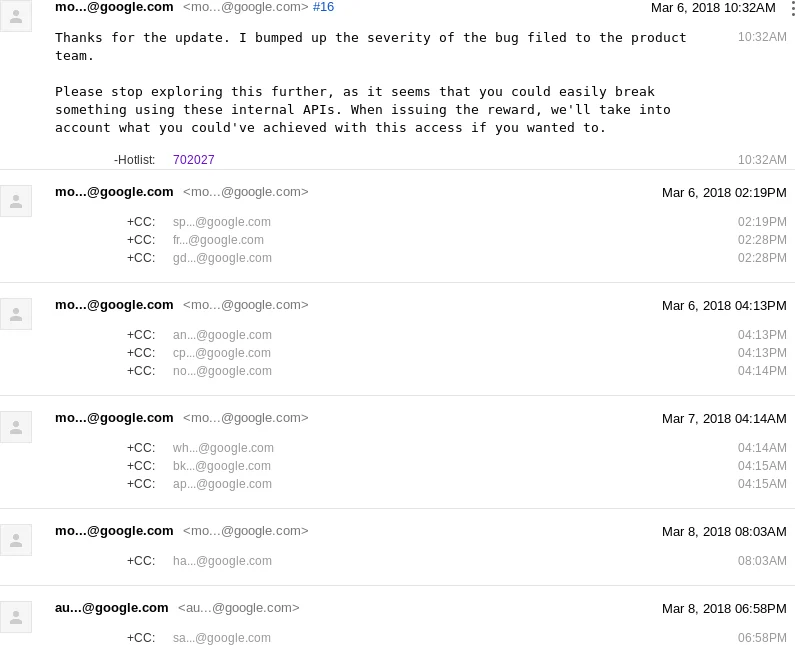
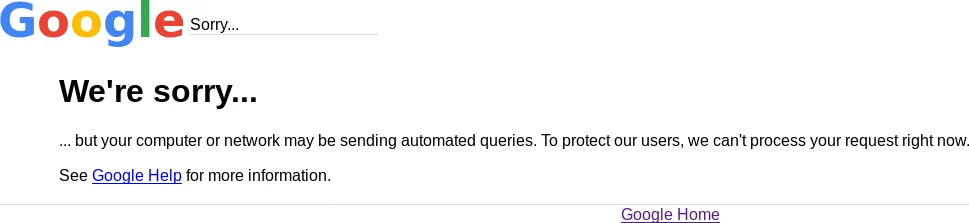
A few days later, access to non-production GAE APIs and environments was blocked with an error page returning status 429 Too Many Requests. The message is still visible at staging-appengine.sandbox.googleapis.com and test-appengine.sandbox.googleapis.com.
Later came the reward message.
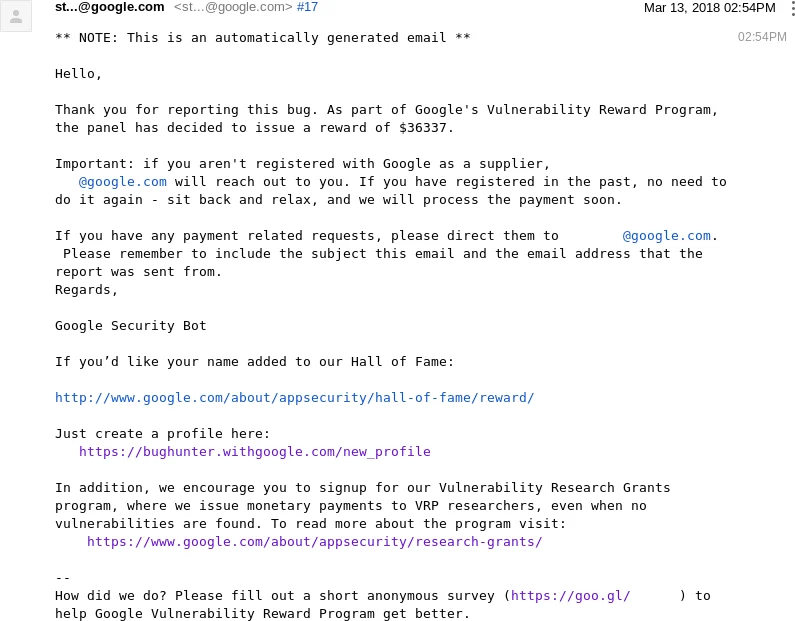
The reward was 36,337 dollars. Until then the researcher had not known the issue was regarded as Remote Code Execution, the highest tier for bugs. A Googler on the reward panel explained that it counts as RCE for the way Google works, suggested reading the SRE book, and said the extra $5k, on top of the $31,337 paid for RCE bugs, was for a lesser bug.
Root cause
The non-production GAE deployment environments exposed internal APIs, including stubby and app_config_service, to applications running in them. The researcher could not find a way to reach the same access in the production environment, so the working access was in staging and test. The researcher's access to those environments came from an earlier bug, since common Google users should not have access to non-production deployment environments. The report does not describe the server-side change beyond blocking access to non-production GAE APIs and environments.
Impact
In the non-production environments, an application could call stubby.Send against internal hosts, including blade: services with no external counterpart, and could use app_config_service methods to change internal settings such as allowed email senders, the app's Service Account ID, quota restrictions, SuperApp status and FILE_GOOGLE3_ACCESS. Google classified the issue as Remote Code Execution for the way Google works. The researcher did not find a Stubby call that was considered dangerous, and the practical reach depended on having access to the staging or test environment, which ordinary users should not have.
Fix
Access to non-production GAE APIs and environments was blocked, returning 429 Too Many Requests on the staging and test environments. The issue was confirmed as fixed on May 16th, 2018.
Variants to test
- Run Nmap from inside a cloud runtime against the internal metadata and RPC addresses to find undocumented open ports. A positive result is a port that answers with legible strings identifying a known RPC framework.
- Read the launcher's command line arguments through an injected native library. A positive result is a list of internal API names, as the
--api_call_deadline_mapargument gave here. - Probe candidate method names through the gRPC client with and without the
apphosting.APIRequest.pbfield set. A real method returns an incomplete request error when the field is unset, while a non-existent method returns a not-exist error. - Call
/ServerStatus.GetServicesthroughstubby.Sendwith an empty request. A positive result is anrpc.ServiceListenumerating the target's services and methods. - Search extracted PB definitions for quota and config files that name internal methods, then test the names directly. A positive result is a method that responds rather than returning not-exist.
Timeline
- February 2018: issue found
- February 25th, 2018: initial report, covering only the
stubbyAPI - March 4th and 5th, 2018:
app_config_servicediscovered and reported - March between 6th and 13th, 2018: access to non-production GAE environments blocked with a 429 error page
- March 13th, 2018: reward of $36,337 issued
- May 16th, 2018: issue confirmed as fixed
What happened, in plain words
A security researcher found a way to make a Google App Engine application talk to internal Google services that ordinary applications are not supposed to reach. App Engine is Google's service for running your own web application on Google's computers: you upload your code, Google runs it, and your app gets a web address such as save-the-expanse.appspot.com. The researcher discovered that, in Google's non-production testing environments, an app could call hidden internal interfaces, including one called stubby and another called app_config_service. Google treated this as Remote Code Execution, the most serious category in its reward programme, and paid 36,337 dollars.
Remote Code Execution (RCE) normally means an attacker can make a server run their own commands. Here the researcher explains that Google counted it as RCE "for the way Google works": the internal interfaces reach deep enough into Google's own systems that being able to call them is treated as equivalent to running code inside Google. The report does not go further into that reasoning.
This article walks through the same steps the researcher took, in the same order, and explains each idea from scratch.
Background: how the researcher spotted App Engine
Every Google App Engine application replied to every HTTP request with an X-Cloud-Trace-Context header. A header is a small line of extra information that a web server sends along with a page or a response; your browser shows you the page and ignores the headers, but anyone can look at them with the browser's developer tools or with a command line tool. Because that particular header appeared on every GAE response, the researcher assumed any website returning it is probably running on GAE.
Using that signal, the researcher noticed that appengine.google.com itself runs on GAE. That is interesting because appengine.google.com can perform actions that cannot be done anywhere else and that common user applications cannot perform. The question behind the whole investigation was: how does it do those actions, and could a normal application reach the same internal interfaces?
An API (Application Programming Interface) is a defined set of requests one program can send to another. Think of a restaurant menu: the menu lists the dishes you may order and the name you use to order them; the kitchen does the work. An API is that menu for software, and each dish on it is called a method. The researcher's goal was to find the menu that appengine.google.com orders from.
The internal HTTP endpoint
GAE apps perform internal actions, such as writing logs or getting an OAuth token, by sending Protocol Buffer (PB) messages to an internal HTTP endpoint at http://[redacted]:10001/rpc_http.
Two terms need unpacking. A Protocol Buffer is a way of packing structured data (a set of named fields and their values) into a compact binary format, so that two programs can exchange it efficiently. "Binary wire format" just means the bytes as they travel over the network, as opposed to a human-readable text form such as JSON. An endpoint is a specific address and path where a service listens for requests; [redacted] is an address on a private network that only the running application can reach, not something on the public internet.
The request looks like this:
POST /rpc_http HTTP/1.1
Host: [redacted]:10001
X-Google-RPC-Service-Endpoint: app-engine-apis
X-Google-RPC-Service-Method: /VMRemoteAPI.CallRemoteAPI
Content-Type: application/octet-stream
Content-Length: <LENGTH>

<PROTO_MESSAGE>
Line by line:
POST /rpc_http HTTP/1.1says "I am sending data to the path/rpc_httpusing version 1.1 of the HTTP protocol". POST is the HTTP method used when you send something to the server rather than just asking for a page.Host: [redacted]:10001names the server and port being contacted. A port is like an apartment number inside a building: one machine can run many services, each on its own numbered port.X-Google-RPC-Service-Endpoint: app-engine-apisis a custom header telling the service which internal endpoint is wanted. RPC stands for Remote Procedure Call: calling a function that runs on another machine as if it were local.X-Google-RPC-Service-Method: /VMRemoteAPI.CallRemoteAPInames the method to invoke on that endpoint.Content-Type: application/octet-streamsays the body is raw binary data, not text or a form.Content-Length: <LENGTH>gives the size of the body in bytes;<LENGTH>is a placeholder for the real number.- The blank line separates headers from the body, and
<PROTO_MESSAGE>is the placeholder for the binary Protocol Buffer message itself.
The PB message is an apphosting.ext.remote_api.Request with these fields:
service_name: name of the API to callmethod: name of the API's method to invokerequest: bytes of the inner PB request, encoded in binary wire formatrequest_id: the security ticket given to the app with every GAE request, required even though it is marked optional
Think of this outer message as an envelope: service_name and method are the address on the front, request is the letter inside, and request_id is the stamp that proves the sender is allowed to post it. A security ticket is a short-lived string that the platform hands to the app with each incoming request, so the internal services can tell that a call really comes from an app that is handling a request right now.
The response is the PB message representing the API reply, or an error message.
In the Java 8 runtime the security ticket can be obtained with reflection:
import com.google.apphosting.api.ApiProxy;
import java.lang.reflect.Method;
Method getSecurityTicket = ApiProxy.getCurrentEnvironment().getClass().getDeclaredMethod("getSecurityTicket");
getSecurityTicket.setAccessible(true);
String security_ticket = (String) getSecurityTicket.invoke(ApiProxy.getCurrentEnvironment());
Line by line:
import com.google.apphosting.api.ApiProxy;brings in the class that represents the app's current environment, the object that knows about the running app.import java.lang.reflect.Method;brings in Java's reflection tool. Reflection lets a program inspect and call methods that are not normally exposed to it.ApiProxy.getCurrentEnvironment().getClass().getDeclaredMethod("getSecurityTicket")asks the environment object for its class, then for a method namedgetSecurityTicketdeclared on it. That method is not meant to be called by applications, which is why reflection is needed.getSecurityTicket.setAccessible(true);switches off the access check so the method can be called anyway.String security_ticket = (String) getSecurityTicket.invoke(ApiProxy.getCurrentEnvironment());actually calls the method on the current environment and stores the returned text in a variable.
As a worked example, getting a Google OAuth token for the test scope https://www.googleapis.com/auth/xapi.zoo takes four steps. An OAuth token is a temporary pass that lets a program act on behalf of an account without knowing its password; a scope says which permissions the pass carries. xapi.zoo is described in the report as a test scope without real use.
- Generate an
apphosting.GetAccessTokenRequestwithscopeset to["https://www.googleapis.com/auth/xapi.zoo"]. - Generate an
apphosting.ext.remote_api.Requestwithservice_name="app_identity_service"(the API that provides access to the GAE Service Account),method="GetAccessTokenRequest",request= the bytes of the message from step 1 in binary wire format, andrequest_id= the security ticket. - Send the HTTP request.
- Decode the response, which should be an
apphosting.GetAccessTokenResponse.
A Service Account is a non-human account that belongs to an application rather than a person, so the app can prove its identity to other Google services.
Setting up: running tools from inside App Engine
The work was done from inside GAE itself. To run binaries, the researcher uploaded them with the application, then during runtime copied them to /tmp and gave them execution permission, since the rest of the file system is read-only. A binary is a ready-to-run program file. /tmp is a temporary folder that the running app is allowed to write to; the rest of the disk is locked so the app cannot change the platform. Nmap is a well-known tool that scans a machine's ports to see which ones are open and what answers on them.
Access to the non-production deployment environments came from an earlier bug: the staging environment (staging-appengine.sandbox.googleapis.com) and the test environment (test-appengine.sandbox.googleapis.com). A deployment environment is the set of machines and services where an app actually runs; production is the one real users hit, while staging and test are copies used for checking changes before release. Common Google users should not have access to these.
To call an app running in them:
- Upload a version with manual scaling. Without it the request failed with
403 Forbidden. Scaling is how the platform decides how many copies of your app to run; manual scaling means you fix the number yourself instead of letting it grow and shrink automatically.403 Forbiddenis the HTTP status meaning "you are not allowed to do this". - Send a request to
www.appspot.combut change theHostheader to<PROJECT-NAME>.prom-<qa/nightly>.sandbox.google.com. For an app normally atsave-the-expanse.appspot.com,<PROJECT-NAME>becomessave-the-expanse; for the staging environment<qa/nightly>becomesqa, and for the test environment it becomesnightly. The researcher tested withthe-expanse.prom-nightly.sandbox.google.com.
The Host header is how your browser tells a server which site it wants, because many sites can share one address. By sending the request to www.appspot.com but claiming a different Host, the researcher reached the non-production environment through a front door that accepted the request.
Finding the hidden service
Nmap against [redacted] showed port 4 open. Sending data to it produced a messy reply with legible strings, which an online search identified as a gRPC service. gRPC is a framework for making remote procedure calls; it is the modern cousin of the older RPC style, and it can carry Protocol Buffer messages. Legible strings are readable fragments of text inside otherwise binary data, which often reveal the name of the software answering.
A Java gRPC client on GAE ran into trouble because the built-in gRPC library seemed incomplete and kept being used even after a complete one was uploaded, so the researcher built a C++ client instead and ran it on GAE. A client, here, is a small program written to talk to the service.
The gRPC service turned out to run the same apphosting.APIHost API as the HTTP endpoint, with one difference: it also accepted JSON encoding of the PB messages, which made testing much easier. JSON is the text format with curly braces and quoted field names that you may have seen in web pages; being able to send JSON instead of raw binary meant the researcher could read and edit requests by hand. A live example of the client is at save-the-expanse.appspot.com/grpc?api=app_identity_service&method=GetDefaultGcsBucketName&req=%7B%7D&setPb=1.
No other server was found besides the Metadata server, which was not useful. The metadata server is a special address inside a cloud machine that tells the machine about itself, such as its identity; it did not lead anywhere here. The working assumption became that appengine.google.com uses hidden APIs or methods through the RPC services. To find them, the researcher collected every PB definition available, extracting them from .CLASS files inside .JAR files and from binaries in the runtime, and searched for anything pointing to a hidden API. A .JAR file is a Java archive, a zip-like bundle of compiled Java classes; a .CLASS file is one compiled Java class. A PB definition is the file that describes which fields and methods exist, like a menu rather than the kitchen.
The file apphosting/base/appmaster.proto looked promising, with messages that seemed to modify internal App Engine settings and an AppMaster API with defined methods, but no way to call those methods was found.
Attention moved to the binaries. They were huge and were explored with a combination of strings and grep. strings is a command that pulls readable text out of a binary file; grep searches text for a pattern. Together they are a quick way to look for interesting names inside something you cannot read directly. The main binary, java_runtime_launcher_ex, had many command line parameters, so the researcher set out to see which parameters it received in the GAE environment. Command line parameters are the extra words you give a program when you start it, such as options and settings.
Connecting Java variables to parameters did not work. Instead, a Java library was written in C++ with a method that reads the arguments passed to the launcher, following a Stack Overflow answer:
int argc = -1;
char **argv = NULL;
static void getArgs(int _argc, char **_argv, char **_env) {
  argc = _argc;
  argv = _argv;
}
__attribute__((section(".init_array"))) static void *ctr = (void*) getArgs;
Line by line:
int argc = -1;andchar **argv = NULL;declare two variables to hold the argument count and the argument list, starting empty.static void getArgs(int _argc, char **_argv, char **_env) {defines a function that receives the count, the argument list and the environment list.argc = _argc;andargv = _argv;copy those values into the variables above, so they can be read later.__attribute__((section(".init_array"))) static void *ctr = (void*) getArgs;is the trick: it places a pointer togetArgsin a special section that the system runs automatically when the library is loaded, so the function captures the arguments without anyone calling it explicitly.
A simple method then converted the arguments to a Java array. A live example is at save-the-expanse.appspot.com/args. Among the many arguments returned was this one, split over multiple lines for readability:
--api_call_deadline_map=
  app_config_service:60.0,
  blobstore:15.0,
  datastore_v3:60.0,
  datastore_v4:60.0,
  file:30.0,
  images:30.0,
  logservice:60.0,
  modules:60.0,
  rdbms:60.0,
  remote_socket:60.0,
  search:10.0,
  stubby:10.0
This is one long setting named --api_call_deadline_map. Each entry pairs an API name with a number, which is a time limit in seconds: how long a call to that API may take before it is given up. The names are the APIs the launcher knows about.
APIs already used, such as logservice for writing logs, appeared in the list, which suggested these were the APIs available through the internal HTTP endpoint. The list also contained stubby, an RPC infrastructure the researcher had seen in error messages from other Google products and read about in the SRE book. SRE stands for Site Reliability Engineering, Google's book about how it runs its systems. That looked like a candidate for how appengine.google.com performs internal actions.
Guessing method names against the C++ gRPC client all returned errors saying the method did not exist. A 2010 post found online contained the error message:
The API call stubby.Send() took too long to respond and was cancelled.
This is a real error message someone posted publicly, and it names a method, stubby.Send, which means "send through stubby". Trying Send returned that it did not exist. The researcher suspected the error was hiding the fact that the method exists but is not accessible. Comparing a real not-exist error (app_identity_service with method SaveTheExpanse) against a fake one (stubby with method Send) confirmed it: when the apphosting.APIRequest.pb field was left unset, a non-existent method returned a not-exist error, while a real method returned an incomplete request error, even one that supposedly did not exist. So stubby.Send exists.
This is a useful trick in general: when a system gives the same answer for "does not exist" and "you may not use it", you can sometimes tell them apart by sending a deliberately incomplete request. A real method complains that the request is incomplete; a fake one complains that it does not exist.
Exploitation
Step 1: reach the non-production environment
After uploading the application with the gRPC client to the staging or test environment, stubby.Send was accessible. The call pattern was worked out mostly by reading error messages and guessing how to fix them.
Step 2: obtain a stub ID
Call stubby.GetStubId with this JSON PB message:
{
  "host": "<HOST>"
}
This is a JSON object with one field, host, whose value is a placeholder for the host you want to talk to. The response gives a stub_id, which is used in the next call.
<HOST> is where the method to call is hosted, for example google.com:80, [redacted].google.com:80 or blade:monarch-cloud_prod-streamz. The blade:<SERVICE> form appears to be an internal DNS system: blade:cloudresourcemanager-project is cloudresourcemanager.googleapis.com externally, while some, like blade:monarch-cloud_prod-streamz, have no external counterpart. DNS is the internet's phone book: it turns a name into an address. An internal DNS system does the same job but only inside Google's network, so some names have no public equivalent. The response is a JSON PB message whose only field is stub_id; its value is needed in the next step.
Step 3: send the Stubby call
Call stubby.Send with this JSON PB message:
{
  "stubby_method": "/<SERVICE>.<METHOD>",
  "stubby_request": "<PB>",
  "stub_id": "<STUB_ID>"
}
Line by line:
stubby_methodis the remote method to call, written as a slash, the service name, a dot and the method name. The placeholders<SERVICE>and<METHOD>are replaced with real names.stubby_requestis the request payload, the bytes of a Protocol Buffer message in binary wire format, shown as the placeholder<PB>.stub_idis the handle obtained in step 2, shown as the placeholder<STUB_ID>.
<PB> is the PB message bytes in binary wire format. To discover valid values for stubby_method, set it to /ServerStatus.GetServices with an empty stubby_request; the reply is an rpc.ServiceList listing all the services and their methods that the target supports. This is like asking a building's reception for a directory of every office inside.
Step 4: read the response
On success the call returns a JSON PB message whose only field is stubby_response, containing the response PB message bytes in binary wire format.
Testing with this access did not turn up any Stubby call the researcher considered dangerous, but the report was filed and given P1 priority. Priority levels are how a bug bounty programme ranks reports; P1 is the highest, meaning it should be handled urgently.
Step 5: the second hidden API
Reviewing the earlier work, the researcher noticed app_config_service in the launcher arguments, another hidden API. Its methods were not in the PB definitions directly and not on Google Search, but they were mentioned in apphosting/base/quotas.proto, for example APP_CONFIG_SERVICE_GET_APP_CONFIG. Testing showed app_config_service.GetAppConfig is a real hidden method. The definition file names it in capitals with underscores, and a little testing revealed the method actually called.
Among the app_config_service methods, ConfigApp and SetAdminConfig were the most interesting. They allowed setting internal settings such as the allowed email senders, the app's Service Account ID, ignoring quota restrictions, marking the app as a SuperApp and granting it FILE_GOOGLE3_ACCESS. A quota is a limit on how much of a resource you may use. The report says the researcher did not know what SuperApp means, only that it sounded important, and describes FILE_GOOGLE3_ACCESS as access to Google3, which the researcher believes is part of Piper, Google's single repository holding files related to Google's APIs and services. SetAdminConfig takes apphosting.SetAdminConfigRequest as its request message, and ConfigApp takes apphosting.GlobalConfig. The same quotas.proto file also revealed other APIs and methods, such as basement.GaiaLookupByUserEmail.
Step 6: the response from Google
After the new findings were reported, the priority of the internal ticket was raised and Google said:
Please stop exploring this further, as it seems that you could easily break something using these internal APIs.
This is a direct quote from Google's reply. The issue was then CC'd to several employees. CC means copying additional people on a message so they can see it.
The image accompanies the note that the issue was CC'd to several employees.
A few days later, access to non-production GAE APIs and environments was blocked with an error page returning status 429 Too Many Requests. The message is still visible at staging-appengine.sandbox.googleapis.com and test-appengine.sandbox.googleapis.com.
The image accompanies the note about the error page. 429 Too Many Requests is the HTTP status meaning "you are sending too many requests"; here it was used as a polite way of refusing access altogether.
Later came the reward message.
The image accompanies the reward message.
The reward was 36,337 dollars. Until then the researcher had not known the issue was regarded as Remote Code Execution, the highest tier for bugs. A Googler on the reward panel explained that it counts as RCE for the way Google works, suggested reading the SRE book, and said the extra $5k, on top of the $31,337 paid for RCE bugs, was for a lesser bug.
Root cause
The non-production GAE deployment environments exposed internal APIs, including stubby and app_config_service, to applications running in them. The researcher could not find a way to reach the same access in the production environment, so the working access was in staging and test. The researcher's access to those environments came from an earlier bug, since common Google users should not have access to non-production deployment environments. The report does not describe the server-side change beyond blocking access to non-production GAE APIs and environments.
Impact
In the non-production environments, an application could call stubby.Send against internal hosts, including blade: services with no external counterpart, and could use app_config_service methods to change internal settings such as allowed email senders, the app's Service Account ID, quota restrictions, SuperApp status and FILE_GOOGLE3_ACCESS. Google classified the issue as Remote Code Execution for the way Google works. The researcher did not find a Stubby call that was considered dangerous, and the practical reach depended on having access to the staging or test environment, which ordinary users should not have.
Fix
Access to non-production GAE APIs and environments was blocked, returning 429 Too Many Requests on the staging and test environments. The issue was confirmed as fixed on May 16th, 2018.
Variants to test
These are the general techniques the researcher used, written so that someone repeating the work knows what a good result looks like.
- Run Nmap from inside a cloud runtime against the internal metadata and RPC addresses to find undocumented open ports. A positive result is a port that answers with legible strings identifying a known RPC framework.
- Read the launcher's command line arguments through an injected native library. A positive result is a list of internal API names, as the
--api_call_deadline_mapargument gave here. - Probe candidate method names through the gRPC client with and without the
apphosting.APIRequest.pbfield set. A real method returns an incomplete request error when the field is unset, while a non-existent method returns a not-exist error. - Call
/ServerStatus.GetServicesthroughstubby.Sendwith an empty request. A positive result is anrpc.ServiceListenumerating the target's services and methods. - Search extracted PB definitions for quota and config files that name internal methods, then test the names directly. A positive result is a method that responds rather than returning not-exist.
Timeline
- February 2018: issue found
- February 25th, 2018: initial report, covering only the
stubbyAPI - March 4th and 5th, 2018:
app_config_servicediscovered and reported - March between 6th and 13th, 2018: access to non-production GAE environments blocked with a 429 error page
- March 13th, 2018: reward of $36,337 issued
- May 16th, 2018: issue confirmed as fixed
Glossary
- API: a defined set of requests one program can send to another, like a menu of allowed operations.
- App Engine (GAE): Google's service for running your own web application on Google's computers.
- Binary wire format: the raw bytes of a message as they travel over the network, as opposed to a readable text form such as JSON.
- Binary: a ready-to-run program file, as opposed to source code.
- Blade: an internal naming scheme used by Google, written
blade:<SERVICE>, that appears to work like an internal DNS. - CC: copying additional people on a message so they can see it.
- Client: a program written to talk to a service.
- Command line parameters: the extra words given to a program when it starts, such as options and settings.
- Deployment environment: the set of machines and services where an app actually runs; production is the live one, staging and test are copies for checking changes.
- DNS: the internet's phone book, turning a name into an address.
- Endpoint: a specific address and path where a service listens for requests.
- gRPC: a framework for making remote procedure calls, able to carry Protocol Buffer messages.
- Header: a small line of extra information sent along with an HTTP request or response.
- HTTP: the protocol browsers and servers use to exchange pages and data.
- JSON: a text format for structured data, using curly braces and quoted field names.
- Manual scaling: fixing the number of copies of your app yourself instead of letting the platform grow and shrink it automatically.
- Metadata server: a special address inside a cloud machine that tells the machine about itself, such as its identity.
- Method: one named operation offered by an API, like one dish on a menu.
- Nmap: a tool that scans a machine's ports to see which are open and what answers on them.
- OAuth token: a temporary pass that lets a program act on behalf of an account without knowing its password.
- P1: the highest priority level in a bug bounty programme, meaning the report should be handled urgently.
- Port: a numbered channel on a machine, so one machine can run many services.
- Protocol Buffer (PB): a way of packing structured data into a compact binary format for exchange between programs.
- Quota: a limit on how much of a resource you may use.
- RCE (Remote Code Execution): the ability to make a remote server run your own commands; the most serious bug category.
- Reflection: a programming feature that lets a program inspect and call methods that are not normally exposed to it.
- RPC (Remote Procedure Call): calling a function that runs on another machine as if it were local.
- Scope: the set of permissions an OAuth token carries.
- Security ticket: a short-lived string handed to an app with each request, proving to internal services that a call comes from a real request.
- Service Account: a non-human account belonging to an application rather than a person.
- SRE: Site Reliability Engineering, Google's book about how it runs its systems.
- Stub: a small local object that stands in for a remote service; its ID is the handle used in later calls.
- Stubby: an internal Google RPC infrastructure, named in the launcher arguments.
stringsandgrep: commands that pull readable text out of a binary file and search text for a pattern..CLASSfile: one compiled Java class..JARfile: a Java archive, a zip-like bundle of compiled Java classes.403 Forbidden: the HTTP status meaning "you are not allowed to do this".429 Too Many Requests: the HTTP status meaning "you are sending too many requests"; here used to refuse access altogether.


