$10k host header
An internal Google App Engine application was accessible from the internet by sending a request to the App Engine server with a Host header pointing to the internal hostname. An attacker could view a confidential internal site without authentication.
 Published on web.archive.org
I tried a lot of things in many Google services, one of those things was changing the Host header in requests to the App Engine server (.appspot.com) in order to get access to some internal App Engine apps (.googleplex.com) that usually require going through the MOMA login page (Which acts as a proxy called…
The full write-up lives on its author's site
It belongs to its author, so we link to it rather than copy it. The other two tabs are our own rewrites, checked against it.
Context
On 11 July 2017 the researcher spent a bored afternoon looking for bugs in Google services. One of the ideas was to change the Host header on requests sent to the App Engine server (*.appspot.com) in order to reach internal App Engine applications (*.googleplex.com). Those internal apps normally require going through the MOMA login page, which acts as a proxy called "ÜberProxy".
The target that turned out to be vulnerable was yaqs.googleplex.com. Its homepage redirected to /eng, and that page contained many links to different sections about Google services and infrastructure. The footer carried the text "Google Confidential". The researcher later learned from Googlers that YAQS is like an internal Stack Overflow.
Setup
The researcher used Burp Suite because it made it easy to change the Host header quickly and to see the result. No special account, role or version is described in the report.
Finding it
Most attempts failed in one of two ways: the server returned a 404 Not Found, or it applied a security measure such as checking that the caller used a Googler account ([redacted]) instead of a normal Google account.
One of the websites tried, yaqs.googleplex.com, did neither. It did not check the username and had no other security measure. The homepage redirected to /eng, and that page was reachable from the outside. Before visiting any of its sections, the researcher read the footer: "Google Confidential". At that point the poking stopped and the issue was reported right away.
Exploitation
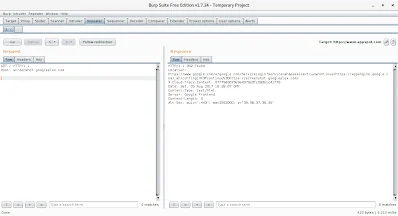
Step 1: send the request through Burp Repeater
The report describes the reproduction as follows (using Burp Suite):
- Go to the Repeater tab.
- Set the target host to
www.appspot.com, the target port to443and check the "Use HTTPS" option. - Write this raw HTTP request (including the last two empty lines):
GET /eng HTTP/1.1
Host: yaqs.googleplex.com
- Click "Go".
The request line asks the App Engine front end for /eng. The Host header names the internal application yaqs.googleplex.com, so the front end routes the request to that application rather than to the host configured in Burp's target.
Step 2: the simpler proof of concept
The researcher notes that an easier proof of concept would have been a single terminal command:
curl -k "https://yaqs.googleplex.com" --resolve "yaqs.googleplex.com:443:[redacted]"
This makes curl connect to the given IP address while still sending yaqs.googleplex.com as the host name, which is the same trick expressed at the client level.
Step 3: the report
The report sent to Google read:
Summary: Google confidential page accessible from the outside by requesting it to App Engine directly

Steps to reproduce (Using Burp Suite):
1. Go to the Repeater tab
2. Set the target host to "www.appspot.com", the target port to "443" and check the "Use HTTPS" option
3. Write this raw HTTP request (Including the last two empty lines):
GET /eng HTTP/1.1
Host: yaqs.googleplex.com

4. Click "Go"

Attack scenario:
Anyone can access an internal Google website called YAQS that says "Google Confidential" in the footer.
I'm not sure what it is, I only accessed the homepage (Despite really wanting to take a look around), you can check the request logs (Should be the only one accessing from Uruguay, with IP address <REDACTED>).

Warnings shown:
likely_out_of_scope |
The report deliberately stopped at the homepage. The researcher offered the request logs as corroboration, noting that the access should be the only one coming from Uruguay. The platform flagged the submission with a likely_out_of_scope warning.
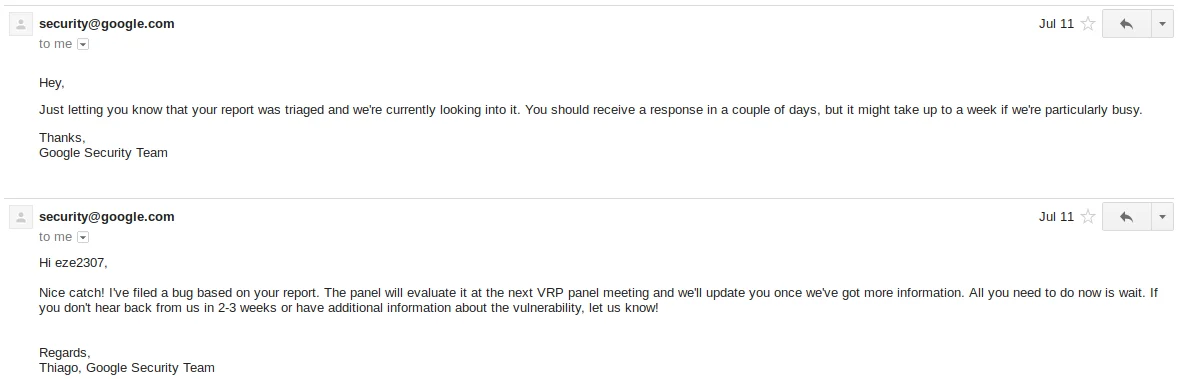
A few hours after the report, the security team reviewed it and confirmed it was valid.
Root cause
The report does not describe the code or configuration involved, so the following is inferred. The App Engine front end routes incoming requests by the Host header. The internal application yaqs.googleplex.com relied on the MOMA login page and the ÜberProxy in front of it to enforce who could reach it, and did not itself verify the identity of the caller. When the request arrived directly at the App Engine server with the internal host name in Host, the front end delivered it to the application, and the application served the page without any check. The defences that stopped the other attempts, a 404 or a check for a [redacted] account, were simply absent on this application.
Impact
Anyone on the internet could access an internal Google website that is marked "Google Confidential", by requesting it from App Engine directly. The researcher only accessed the homepage and did not explore further. Google later said the large reward was because they found a few variants that would have allowed an attacker access to sensitive data. The report does not describe those variants.
Fix
The bug has been fixed.
Variants to test
- Send a request to a shared front end (such as
*.appspot.com) with theHostheader of an internal host name, as in the request above. A positive result is a page that is normally behind an internal login or proxy, served without any authentication check. - Repeat the same request against other internal host names one at a time. A positive result is anything other than a
404or an account check, for example a redirect to an application path such as/eng. - Use the
curl --resolveform to pin the connection to the front end's address while keeping the internal host name in the request. A positive result is the same content returned as through the proxy-based method. - Watch for responses that carry confidentiality markings or internal-only navigation. A positive result is a page whose footer or content states that it is confidential or internal.
Timeline (UTC-3)
| Time | Event |
|---|---|
| 11 July 2017, 10:13 AM | Initial report |
| 11 July 2017, 02:44 PM | Report triaged |
| 11 July 2017, 04:46 PM | "Nice catch!" |
| 4 August 2017, 12:55 PM | Reward issued |
| 5 August 2017, 05:07 PM | Researcher asked why the reward was so large, and whether it was fixed and could be discussed publicly |
| 9 August 2017, 05:37 AM | Google replied |
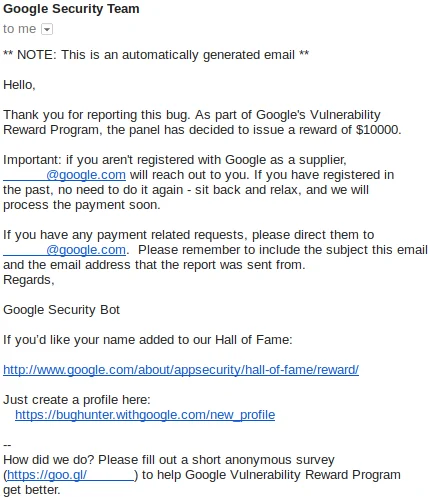
The reward was $10,000 US dollars, for changing the Host header.
What happened, in plain words
On 11 July 2017, a researcher was bored and decided to spend the afternoon looking for bugs in Google services. One of the ideas was simple: take a request that a browser would normally send to a public Google server, and change one line in it, the line that says which website you want. If the server believed that line without checking anything else, it might hand back a page that was only meant for Google employees.
That is exactly what happened. By pointing a request at Google's public App Engine front end but naming an internal Google website in the Host header, the researcher got the internal site's homepage, complete with a footer reading "Google Confidential". He stopped there, reported it, and was later paid $10,000 US dollars.
This article walks through the whole story from zero: what each piece of the setup is, why each step was taken, and what the request actually means.
The background concepts
Before the story makes sense, a few everyday ideas need names.
What a server and a request are
When you type an address into your browser, the browser sends a small text message to a computer somewhere else, called a server, and the server sends back a page. That text message is an HTTP request. It is not magic: it is a few lines of plain text with a fixed shape.
What a header is
A request is made of a first line (what you want) and then a list of headers. A header is a labelled line of extra information, like the label on a parcel that says what is inside and where it should go. One of those labels is the Host header, and it says which website name the request is for.
What the Host header does
One physical server can host many websites. When a request arrives, the server reads the Host header to decide which of those websites should answer. Think of a large office building with one reception desk: the receptionist reads the name on the envelope and sends you to the right floor. The Host header is that name on the envelope.
This is convenient, but it also means that if a server trusts the name on the envelope without checking who sent it, you can write any name you like on it.
What App Engine and *.appspot.com are
App Engine is a Google service that runs other people's web applications for them. Applications hosted there get an address ending in *.appspot.com. The * is a wildcard meaning "any name". So www.appspot.com is one of the shared front doors of App Engine: a single entry point that receives requests and forwards each one to the right application behind it.
What *.googleplex.com is
googleplex.com is a domain used for internal Google applications, the kind of thing employees use at work. The * again means any name, so yaqs.googleplex.com is one internal application inside that domain.
What MOMA and ÜberProxy are
Internal applications are not supposed to be reachable from the open internet. Normally an employee has to log in through an internal login page called MOMA, and MOMA sits in front of the internal apps acting as a proxy. A proxy is a middleman: you talk to the proxy, the proxy checks you, and only then does it pass your request on to the real application. The report says this proxy is called "ÜberProxy".
Think of a receptionist who checks your badge before letting you into the office. The application behind the receptionist assumes that anyone who reaches it has already been checked.
What Burp Suite is
Burp Suite is a tool that sits between your browser and a server. Instead of the browser talking directly to the server, the traffic goes through Burp, where you can read it, pause it, and edit it before it continues. The researcher used Burp because it made it easy to change the Host header quickly and to see the result.
What the vulnerability class means
This bug is filed under broken authorization. Authorization is the question "are you allowed to do this?". Broken authorization means the system either does not ask that question, or asks it in the wrong place. Here, the check lived in the proxy in front of the application, and the application itself never asked. Anyone who could reach the application directly, skipping the proxy, was let in.
The idea
The plan was to send requests to the App Engine server (*.appspot.com) but change the Host header to an internal App Engine application (*.googleplex.com). If the App Engine front end simply forwarded the request based on the name in Host, the request would land on the internal application, and the internal application would answer without ever seeing the MOMA login page.
Trying it out
Most attempts failed, in one of two ways:
- The server returned a
404 Not Found. That is the standard "there is nothing here" answer, meaning the front end did not know what to do with that name. - The server applied a security measure, such as checking that the caller used a Googler account (
[redacted]) instead of a normal Google account. In other words, the application itself asked for proof that you were an employee.
Then one of the websites tried, yaqs.googleplex.com, did neither. It did not check the username and had no other security measure. Its homepage redirected to /eng, and that page was reachable from the outside. Before visiting any of its sections, the researcher read the footer: "Google Confidential".
At that point he stopped poking at the website and reported the issue right away, without even thinking of a better way to show the vulnerability than with Burp.
Reproducing it step by step
The report describes the reproduction as follows, using Burp Suite:
- Go to the Repeater tab. Repeater is the part of Burp where you can send the same request over and over, editing it each time, and read each response.
- Set the target host to
www.appspot.com, the target port to443and check the "Use HTTPS" option. Port443is the standard port for HTTPS, the encrypted version of web traffic, so this tells Burp to talk securely to the App Engine front door. - Write this raw HTTP request (including the last two empty lines):
GET /eng HTTP/1.1
Host: yaqs.googleplex.com
- Click "Go".
Line by line, the request says:
GET /eng HTTP/1.1: "Please give me the page at the path/eng, using version 1.1 of the HTTP protocol."GETis the ordinary verb for "fetch me a page".Host: yaqs.googleplex.com: "I am asking for the website calledyaqs.googleplex.com." This is the line that does all the work. Burp is connected towww.appspot.com, but the request claims to be for the internal name.- The two empty lines at the end mark the end of the request, the way a full stop ends a sentence. Without them the server keeps waiting for more.
The request line asks the App Engine front end for /eng. The Host header names the internal application yaqs.googleplex.com, so the front end routes the request to that application rather than to the host configured in Burp's target.
The simpler proof of concept
The researcher notes that an easier proof of concept would have been a single terminal command:
curl -k "https://yaqs.googleplex.com" --resolve "yaqs.googleplex.com:443:[redacted]"
What each part does:
curlis a command-line tool for fetching web pages, the terminal equivalent of a browser.-ktells curl to accept the server's certificate even if it cannot verify it. Certificates are the proof of identity a server presents;-ksays "do not stop because of that"."https://yaqs.googleplex.com"is the address being requested, so the nameyaqs.googleplex.comgoes into theHostheader automatically.--resolve "yaqs.googleplex.com:443:[redacted]"is the trick. It tells curl: when you wantyaqs.googleplex.comon port443, actually connect to the machine at[redacted]. So the connection goes to the App Engine front end, but the request still carries the internal name.
This is the same trick expressed at the client level: the name in the request and the machine actually contacted are deliberately different.
The report sent to Google
The report read:
Summary: Google confidential page accessible from the outside by requesting it to App Engine directly

Steps to reproduce (Using Burp Suite):
1. Go to the Repeater tab
2. Set the target host to "www.appspot.com", the target port to "443" and check the "Use HTTPS" option
3. Write this raw HTTP request (Including the last two empty lines):
GET /eng HTTP/1.1
Host: yaqs.googleplex.com

4. Click "Go"

Attack scenario:
Anyone can access an internal Google website called YAQS that says "Google Confidential" in the footer.
I'm not sure what it is, I only accessed the homepage (Despite really wanting to take a look around), you can check the request logs (Should be the only one accessing from Uruguay, with IP address <REDACTED>).

Warnings shown:
likely_out_of_scope |
A few things are worth noticing in that text:
- The summary states the problem in one sentence: a confidential page can be reached from outside by asking App Engine directly.
- The steps are written so that someone else can repeat them exactly, which is what makes a bug report useful.
- The attack scenario explains the consequence in plain language rather than in technical terms.
- The researcher deliberately stopped at the homepage. He says he only accessed the homepage, despite really wanting to take a look around, and offers the request logs as corroboration, noting that the access should be the only one coming from Uruguay. That is a responsible way to handle an accidental discovery: prove the door is open, do not walk through the building.
- The platform flagged the submission with a
likely_out_of_scopewarning, meaning the automated system suspected the target might not be covered by the bug bounty programme. The report was confirmed valid a few hours later.
Just a few hours after the report, the security team reviewed it and confirmed it was valid.
Why it worked
The report does not describe the code or configuration involved, so the following is inferred. The App Engine front end routes incoming requests by the Host header. The internal application yaqs.googleplex.com relied on the MOMA login page and the ÜberProxy in front of it to enforce who could reach it, and did not itself verify the identity of the caller. When the request arrived directly at the App Engine server with the internal host name in Host, the front end delivered it to the application, and the application served the page without any check. The defences that stopped the other attempts, a 404 or a check for a [redacted] account, were simply absent on this application.
In everyday terms: the badge check happened at reception, but there was a second entrance round the back that led straight into the office, and nobody had put a lock on it.
What the impact was
Anyone on the internet could access an internal Google website that is marked "Google Confidential", by requesting it from App Engine directly. The researcher only accessed the homepage and did not explore further. Google later said the large reward was because they found a few variants that would have allowed an attacker access to sensitive data. The report does not describe those variants.
The fix
The bug has been fixed.
Variants to test
If you want to look for the same kind of mistake elsewhere, these are angles to consider:
- Send a request to a shared front end (such as
*.appspot.com) with theHostheader of an internal host name, as in the request above. A positive result is a page that is normally behind an internal login or proxy, served without any authentication check. - Repeat the same request against other internal host names one at a time. A positive result is anything other than a
404or an account check, for example a redirect to an application path such as/eng. - Use the
curl --resolveform to pin the connection to the front end's address while keeping the internal host name in the request. A positive result is the same content returned as through the proxy-based method. - Watch for responses that carry confidentiality markings or internal-only navigation. A positive result is a page whose footer or content states that it is confidential or internal.
Timeline (UTC-3)
| Time | Event |
|---|---|
| 11 July 2017, 10:13 AM | Initial report |
| 11 July 2017, 02:44 PM | Report triaged |
| 11 July 2017, 04:46 PM | "Nice catch!" |
| 4 August 2017, 12:55 PM | Reward issued |
| 5 August 2017, 05:07 PM | Researcher asked why the reward was so large, and whether it was fixed and could be discussed publicly |
| 9 August 2017, 05:37 AM | Google replied |
The reward was $10,000 US dollars, for changing the Host header. The researcher had thought it was probably a small thing that was not worth a dime, and did not know what the website contained. He later learned from Googlers that YAQS is like an internal Stack Overflow.
Glossary
- App Engine: a Google service that hosts and runs web applications for their owners, giving them addresses under
*.appspot.com. - appspot.com: the domain used for applications hosted on App Engine;
www.appspot.comis one of its shared front doors. - Authorization: the question of whether a caller is allowed to do what they are asking to do.
- Broken authorization: a flaw where that question is not asked, or is asked in the wrong place, so someone who should be refused is let through.
- Burp Suite: a tool that sits between your browser and a server so you can read, pause and edit requests before they are sent.
- Certificate: the proof of identity a server presents so a client can check it is talking to the right machine.
- curl: a command-line tool for fetching web pages and other resources.
curl --resolve: an option that makes curl connect to a chosen machine while still sending a chosen host name in the request.- GET: the HTTP verb used to ask a server for a page.
- googleplex.com: a domain used for internal Google applications.
- Header: a labelled line of extra information in a request or response, such as
Host. - Host header: the header that names which website the request is for; servers often use it to decide which application should answer.
- HTTP: the text-based protocol browsers and servers use to exchange requests and pages.
- HTTPS: HTTP carried over an encrypted connection, normally on port
443. - MOMA: the internal Google login page that employees go through before reaching internal applications.
- Port: a numbered channel on a machine;
443is the standard one for HTTPS. - Proxy: a middleman that receives your request, checks or forwards it, and passes it on to the real destination.
- Repeater: the part of Burp Suite where you can resend and edit the same request repeatedly.
- 404 Not Found: the standard HTTP answer meaning there is nothing at the requested address.
- ÜberProxy: the name the report gives to the proxy in front of the internal applications.
- YAQS: the internal Google application at
yaqs.googleplex.com; Googlers described it as like an internal Stack Overflow. /eng: the path the YAQS homepage redirected to, and the path requested in the proof of concept.

